Gold Auto Pilot
- Experts
- Versão: 3.1
- Ativações: 15

https://www.mql5.com/en/market/product/174770
Gold Auto Pilot v3.1
Open the Trade from Your Phone — Let the Robot Manage the Rest
Gold Auto Pilot v3.1 combines manual trading freedom with automated basket management.
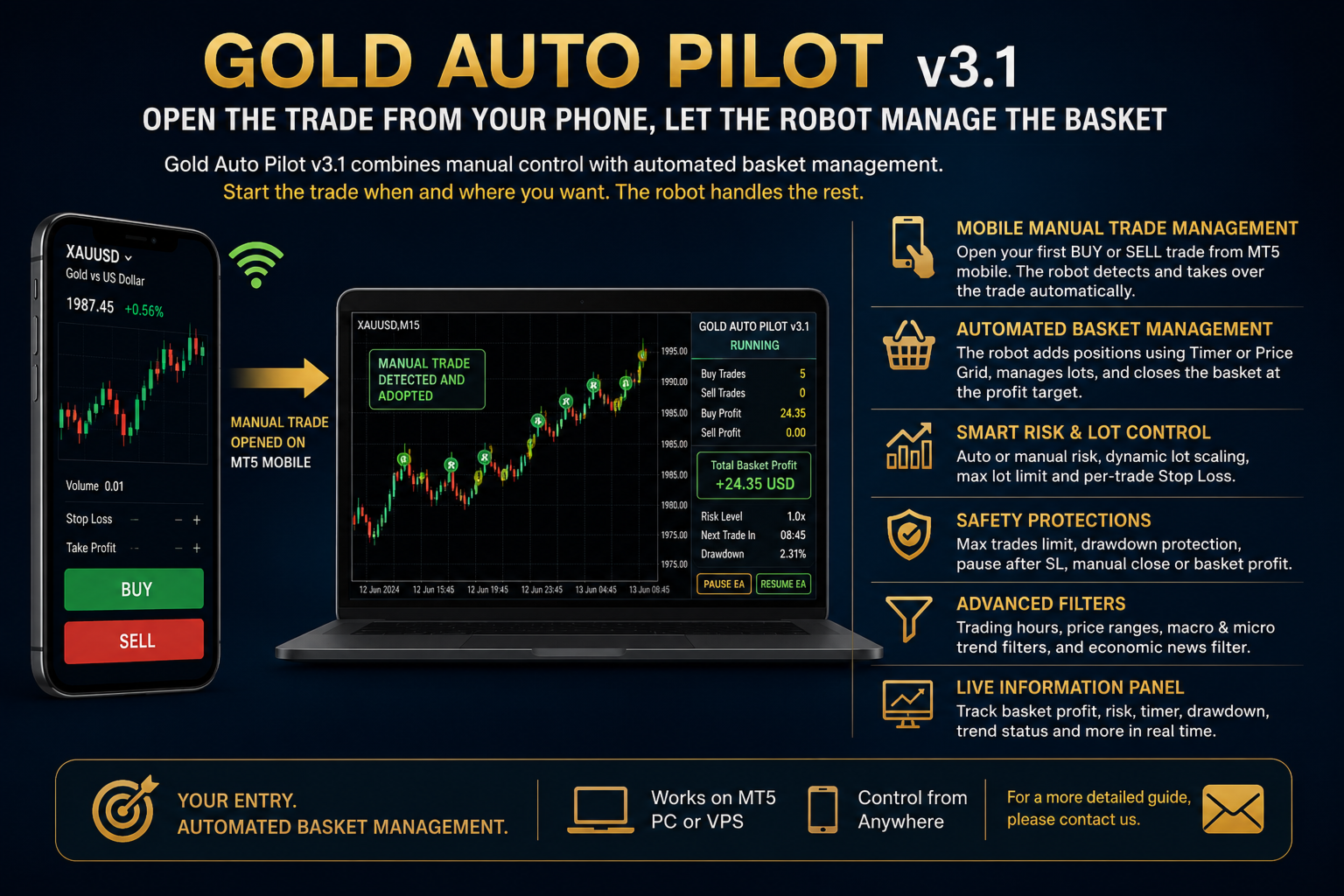
You can identify an opportunity and open your first BUY or SELL trade manually through the MetaTrader 5 mobile application. Gold Auto Pilot, running on your computer or VPS, automatically detects and adopts that manual trade on the same symbol.
From that moment, the robot can manage the trade according to your selected settings.
Mobile Manual Trade Management
You do not need to stay in front of your computer to start a trading basket.
Simply open a manual trade from your phone. The robot can then:
-
Detect and adopt the manual position automatically
-
Use the first manual trade as the starting point of the basket
-
Continue opening additional trades using Timer or Price Grid mode
-
Scale robot lot sizes according to the first manual lot
-
Scale the basket profit target according to the first manual lot
-
Keep additional trades in the same direction as the first manual trade
-
Close all managed BUY and SELL positions at the combined basket profit target
-
Stop the EA when a managed trade is closed manually
This creates a practical semi-automatic trading workflow:
You decide when and where to enter. Gold Auto Pilot manages the basket.
Important: Expert Advisors do not run directly inside the MT5 mobile application. Gold Auto Pilot must remain active on MetaTrader 5 desktop or a VPS. The mobile application is used to open, monitor or manually close the trade.
Two Manual Basket Direction Modes
Locked Direction
The robot follows the direction of the first manual trade until the entire basket is closed.
-
Manual BUY starts a BUY basket
-
Manual SELL starts a SELL basket
-
Opposite-direction robot trades are blocked during that basket
This mode provides clearer and more controlled basket management.
Free Direction
The robot may open BUY or SELL trades according to the enabled macro and micro trend filters.
This mode provides greater flexibility when market direction changes.
Timer or Price Grid Entry
Gold Auto Pilot offers two different entry systems.
Timer Strategy
The robot waits for the selected number of minutes before opening the next eligible trade.
This provides time-controlled basket expansion and prevents trades from being opened too frequently.
Price Grid Strategy
When Timer Strategy is disabled, new positions are opened according to the selected grid distance.
-
Additional BUY trades are opened after the price moves downward by the defined distance
-
Additional SELL trades are opened after the price moves upward by the defined distance
Unified Basket Profit Management
Gold Auto Pilot evaluates all managed BUY and SELL positions as one combined basket.
When the total net basket profit reaches the selected USD target, the robot can close all managed positions together.
When a basket starts with a manual trade, the profit target can automatically scale according to the lot size of the first manual position.
For example, a larger manual starting lot can proportionally increase:
-
The robot’s following lot sizes
-
The total basket profit target
Automatic Lot and Risk Management
The robot can calculate the risk multiplier automatically according to account balance.
Users can configure:
-
Balance required for each risk level
-
Manual risk multiplier
-
Base starting lot
-
Lot increase amount
-
Number of trades before the next lot increase
-
Maximum permitted lot size
Automatic Risk can also be disabled for fully manual risk selection.
Maximum Trade Limit
Users can limit the maximum number of positions allowed inside a basket.
This feature helps control:
-
Basket size
-
Margin usage
-
Total market exposure
-
Grid expansion
Macro and Micro Trend Filters
Gold Auto Pilot includes two independent moving-average trend filters.
Macro Trend Filter
Analyzes the broader market direction using a selectable timeframe, period, averaging method and price source.
Micro Trend Filter
Analyzes the shorter-term market direction before allowing new entries.
When both filters are enabled, a new robot trade must receive confirmation from both trend systems.
Trading Time Filter
The robot can be restricted to selected trading hours.
Users can define:
-
Trading start hour and minute
-
Trading end hour and minute
-
Whether an existing basket may continue receiving new trades outside the selected hours
Separate BUY and SELL Price Ranges
Gold Auto Pilot can restrict entries to specific price areas.
Independent ranges can be configured for:
-
BUY entries
-
SELL entries
This allows the user to prevent the robot from opening positions outside predetermined market zones.
Economic News Protection
The integrated news filter can block new entries around selected economic events.
Available controls include:
-
Online news data for live and demo trading
-
Local news files for backtesting
-
Selected currencies
-
High-impact events only
-
Medium- and high-impact events
-
All impacts and holidays
-
Blocking time before the event
-
Blocking time after the event
-
News refresh interval
-
Optional trade blocking when news data cannot be retrieved
Stop Loss and Drawdown Protection
An individual Stop Loss can be applied to every robot trade.
The Safe Risk Mode also provides account drawdown protection. When the selected maximum drawdown level is reached, the robot can:
-
Close all managed positions
-
Stop opening new positions
-
Wait for the configured cooldown period
Aggressive Mode keeps the drawdown limit disabled.
Automatic Pause Controls
Gold Auto Pilot can automatically stop after:
-
A basket reaches its profit target
-
A Stop Loss is triggered
-
A managed trade is closed manually
-
The maximum drawdown limit is reached
The EA can then be restarted using the RESUME EA button on the information panel.
Changing an input setting does not automatically cancel the protected pause state. This helps prevent an unwanted new basket from starting after an input change or EA restart.
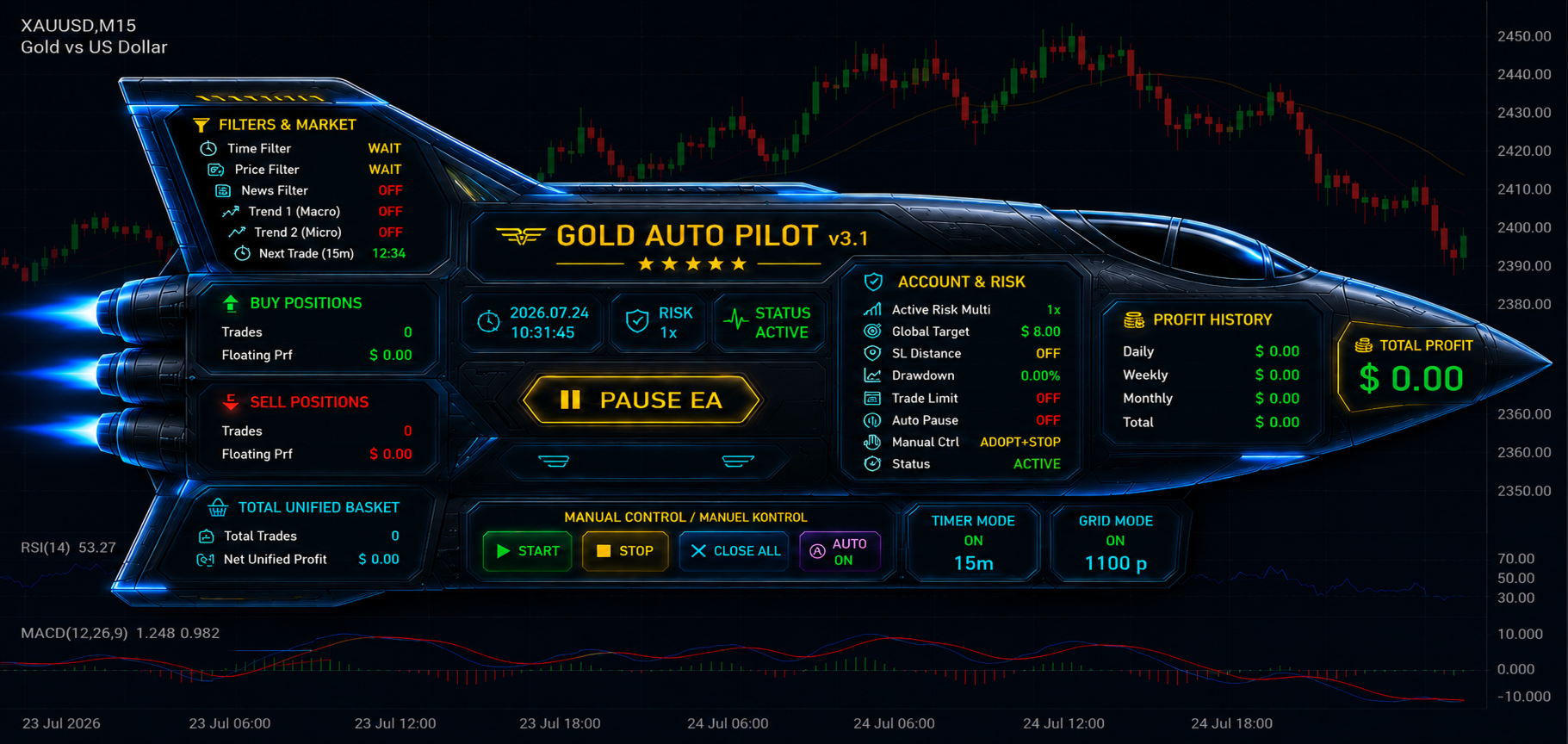
Real-Time Information Panel
The on-chart dashboard displays important information such as:
-
Robot status
-
BUY and SELL trade counts
-
BUY and SELL profit
-
Combined basket profit
-
Active risk level
-
Timer countdown
-
Drawdown level
-
Trading-time status
-
Trend status
-
ADX, +DI and -DI values
-
Manual control status
-
Pause and resume controls
Why Gold Auto Pilot?
Gold Auto Pilot is designed for traders who want to keep control of the first entry while automating the repetitive work that follows.
Open the first trade from your phone.
Let the robot continue the basket on your VPS.
Monitor the entire process from anywhere.
Gold Auto Pilot v3.1 brings together:
-
Mobile-assisted manual entry
-
Automatic manual-trade adoption
-
Timer and grid management
-
Dynamic lot and target scaling
-
Unified basket closure
-
Trend and news protection
-
Drawdown security
-
Flexible manual control
Your entry. Your direction. Automated basket management.
(For a more detailed guide, please contact us.)