Mercaria Unicorn Gold EA
- Experts
- Versão: 3.580
- Atualizado: 16 junho 2026
- Ativações: 5

Mercaria Unicorn is an adaptive grid trading system for Gold (XAUUSD) on MetaTrader 5, developed by practicing traders for all experience levels.
Overview
Mercaria Unicorn is an adaptive trading system for Gold (XAUUSD) and other CFD instruments. Unlike standard grid robots with fixed parameters, it automatically adjusts the number of levels, the lot size, and the risk thresholds according to the selected volatility profile and your deposit.
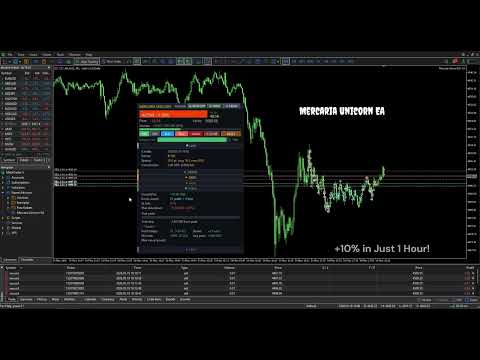
All key decisions are available on a visual control panel on the chart, so you can change settings on the fly without reopening the inputs window. The system suits traders who prefer a hands-off setup, experienced traders who manage risk around the news calendar, and professionals who want a position manager on top of their own entry strategy.
Key facts
- Symbol: XAUUSD (Gold) and other CFD instruments
- Strategy: adaptive grid with dynamic risk management
- Chart timeframe: any
- Account type: Hedging (recommended) or Netting
- Minimum deposit: 300 USD, from 1,000 USD recommended
- Leverage: 1:100 or higher
- Activations: 5 (MQL5 Market standard)
Key features
Adaptive engine. Four volatility profiles (Normal, Spike M, Spike L, Black Swan) cover calm days, news days, sharp surprises, and crisis conditions, and can be switched from the panel with one click without restart. The autosizing module calculates a safe number of levels and a lot size for your balance using a mathematical model with a built-in safety buffer. Lot scaling keeps every USD threshold (take profit, stop loss, trailing stop, profit protection) in proportion to the active lot, so the same configuration works on a small or a large deposit without manual recalculation.
Risk and profit protection. A two-layer mechanism protects open profit: a percentage rule reacts to a drop from the peak, followed by a USD trailing stop. An optional Profit-to-SL bonus moves part of the closed profit into the stop-loss cushion of the pool. Deposit protection adds a hard pool stop in USD, a session limit on stop-loss hits, an automatic stop when the session target is reached, and a visual margin-call distance indicator.
Interface and statistics. The visual control panel has six sections (Live, Sizing, Grid, Risk, Stats, Log) with protection against accidental clicks, a view-only mode, and an emergency close. Real-time statistics include win rate, average pool result, the closed result reconciled with the account balance, the current streak, the maximum drawdown, and the number of pools for the day.
Volatility profiles
Switch with one click from the panel, no restart:
Spike M news days (CPI, rate decisions)
Spike L major employment-report surprises
Black Swan crisis and extreme volatility
Who it is for
Beginners can use ready-made presets: autosizing in Cap mode with the Spike M base profile and an automatic stop on the daily target. The system limits risk to your deposit, so you set the daily target and follow it on the panel.
Traders with one to two years of experience can work in a semi-automatic way, following the economic calendar and switching the volatility profile before important news, for example Normal in the morning, Spike M before a central-bank decision, Spike L on a major employment report. The system recalculates safe sizing for the selected model.
Professional traders can use Mercaria Unicorn as a position manager. You open trades by your own method, and the system manages each position: it adds levels on adverse moves, protects profit with the trailing stop, and closes positions by fixed rules, without emotional decisions in fast markets.
Parameter groups
All settings are organized into eleven logical groups. Most users only adjust the first two.
- Main: magic number, lot size, grid step, maximum levels, take profit in USD, maximum drawdown in USD, minimum pause between orders. Basic grid mechanics and risk limits.
- AutoSizing: mode (Off, Advisory, Cap, Full), scenario, safety buffer, minimum and maximum levels, maximum lot, rescale-down. Dynamic lot and level calculation for the deposit and scenario.
- Risk Scenarios: overrun in points for each of the four profiles, calibration coefficient, per-scenario lot caps. Fine-tuning for a specific broker.
- Pyramid and Recovery: USD trailing stop on the floating-profit peak.
- Profit Protection: percentage profit protection on a drop from the peak.
- Profit-to-SL Bonus: optional stop-loss cushion built from closed profit.
- Lot Scaling: adapts take profit, stop loss, and trailing stop to the current lot.
- Candle Filter: filter by candle direction.
- Entries per Candle: limit on entries within a single candle.
- Session: daily target in USD and a session limit on losing exits; the system stops when either is reached.
- Visual: panel font size and font.
Full parameter descriptions with examples and recommended values are in the online user guide on the author's page.
Control panel
The control window is a visual panel on the chart with six collapsible sections and a fixed header.
The header shows status, floating result and equity, session result with a progress bar toward the target, and control buttons (On, Off, Buy, Sell, Panic, Close, Reset, Lock, Move, Read-only), plus a margin-call indicator. The background changes color as drawdown grows.
The Live section shows the current H1 candle, the entries-per-candle counter, the spread, and commission on open positions. Sizing shows balance and leverage, mode and scenario buttons for on-the-fly switching, the active sizing, the selected scenario overrun, the full grid margin required, a worst-case projection, and recommendations per scenario. Grid shows direction, open levels, average entry price, pool result, total volume, and the next level. Risk shows setup margin in USD and in percent, free margin, margin level, distance to margin call, and the current stop-loss buffer. Stats shows the closed result reconciled with the balance, closed pools split by profit and loss, stop-loss hits, maximum drawdown, the trailing peak, pools today, streak, win rate, and average pool. Log keeps a rolling journal of the last eight events.
Usage scenarios
- Full automation: mode Cap, scenario Spike M, target 2 to 3 percent of the deposit.
- News-calendar driven: mode Full, Normal in the morning, Spike M or Spike L before news.
- Manual with auto-management: mode Off, manual buy and sell by your own signal.
- Demo or recording: Read-only mode for view-only display.
Minimum requirements
Instrument XAUUSD (Gold), optimal
Account type Hedging (recommended) or Netting
Chart timeframe any
Minimum deposit 300 USD (0.01 lot); from 1,000 USD recommended
Leverage 1:100 or higher
Connection VPS recommended, not mandatory
Recommended setup
For stable operation, a deposit from 1,000 USD gives room for all four profiles and the Full autosizing mode. An ECN or raw-spread account keeps the spread low, which matters for frequent take-profit exits, the gold commission should be moderate, and the broker should provide fast execution. Test on a demo account for at least one or two trading sessions before going live.
Evaluation plan
- Buy the product on MQL5 Market; it appears automatically in your terminal.
- Create a demo account with a 10,000 USD balance, preferably Hedging.
- Test on different leverages in turn: 1:100, 1:500, 1:1000, 1:2000, 1:3000, to see how the available levels and autosizing change with the broker margin requirements.
- Run at least one or two full trading sessions in real market conditions rather than in the Strategy Tester (see the note below).
- Track your metrics, win rate, average pool, maximum drawdown, and pools today, in the Stats section.
- Open the online user guide to interpret the behavior and choose parameters for your style.
- Move to a live account only after a successful demo, starting with the minimum lot and scaling gradually.
About the Strategy Tester
Testing in the standard MetaTrader 5 Strategy Tester gives an incomplete picture. At speeds above 75 percent the tester skips ticks, which matters for grid logic; it does not reproduce real slippage or instant spread changes during news; and virtual execution can differ from a broker live environment. If you do test in the Strategy Tester, use visual mode, keep the speed at or below 75 percent, and set modeling to every tick based on real ticks. Testing on a demo account with the real quote feed gives a more realistic result.
What is included
- The compiled Mercaria Unicorn Gold EA, installed with one click from Navigator, Market.
- A full online user guide on the author's page covering all parameters, panel sections, scenarios, and common questions.
- Video tutorials on the author's page on MQL5.
- Free updates through MQL5 Market.
- Author support through MQL5 messages, usually answered within 24 hours.
- Five activations per the MQL5 Market standard.
Documentation
Full documentation, a parameter breakdown, and scenario checklists are available on the author's page on MQL5: https://www.mql5.com/en/users/empty.seeing/news
Quick start
- Buy the product on MQL5 Market; it appears under Navigator, Market.
- Open a XAUUSD chart on any timeframe.
- Drag the advisor onto the chart and, in the inputs window, keep the defaults or set the maximum drawdown in USD to suit your deposit (often 5 to 7 percent of the balance).
- Enable AutoTrading in the terminal.
- Control the system from the visual panel on the chart.
Technical details
Type Expert Advisor for MetaTrader 5
Strategy adaptive grid with dynamic risk management
Instrument XAUUSD (also applicable to other CFDs)
Magic number configurable (default 885533)
Interface English
Updates automatic via MQL5 Market
Risk disclosure
Mercaria Unicorn is a trading automation tool. Past results do not guarantee future returns. Grid strategies carry a risk of significant floating drawdown during prolonged one-directional moves. The trader is fully responsible for choosing the risk profile, deposit size, leverage, and protection modes (Lock, Maximum Drawdown, Maximum Loss Count, Profit Protection). Demo testing for at least one or two trading sessions is required before live trading. Do not trade with funds whose loss would be critical for you.