Entry Cluster MT4

Entry Cluster Indicator Summary

What It Does: Entry Cluster is a MetaTrader 4 indicator that combines momentum analysis with structural price levels, using Bollinger Bands to filter signals and reduce false entries.

Unique Features:

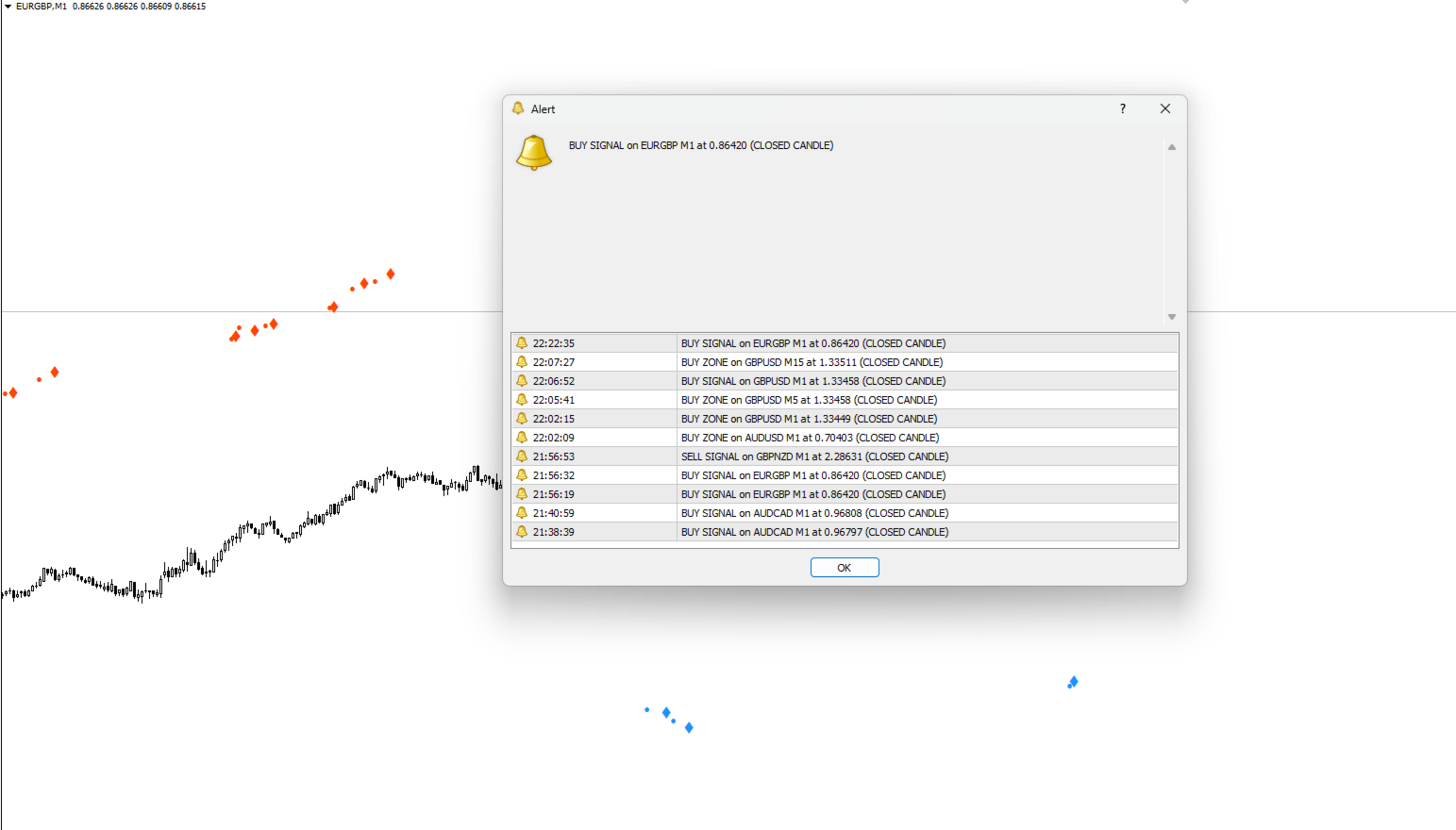
  • Non-repainting signals that only appear on closed candles
  • Auto-detects optimal price levels for different assets
  • Multi-channel alerts (sound, popup, mobile push notifications)
  • Fully customizable visuals and parameters

Signal System (4-Tier):

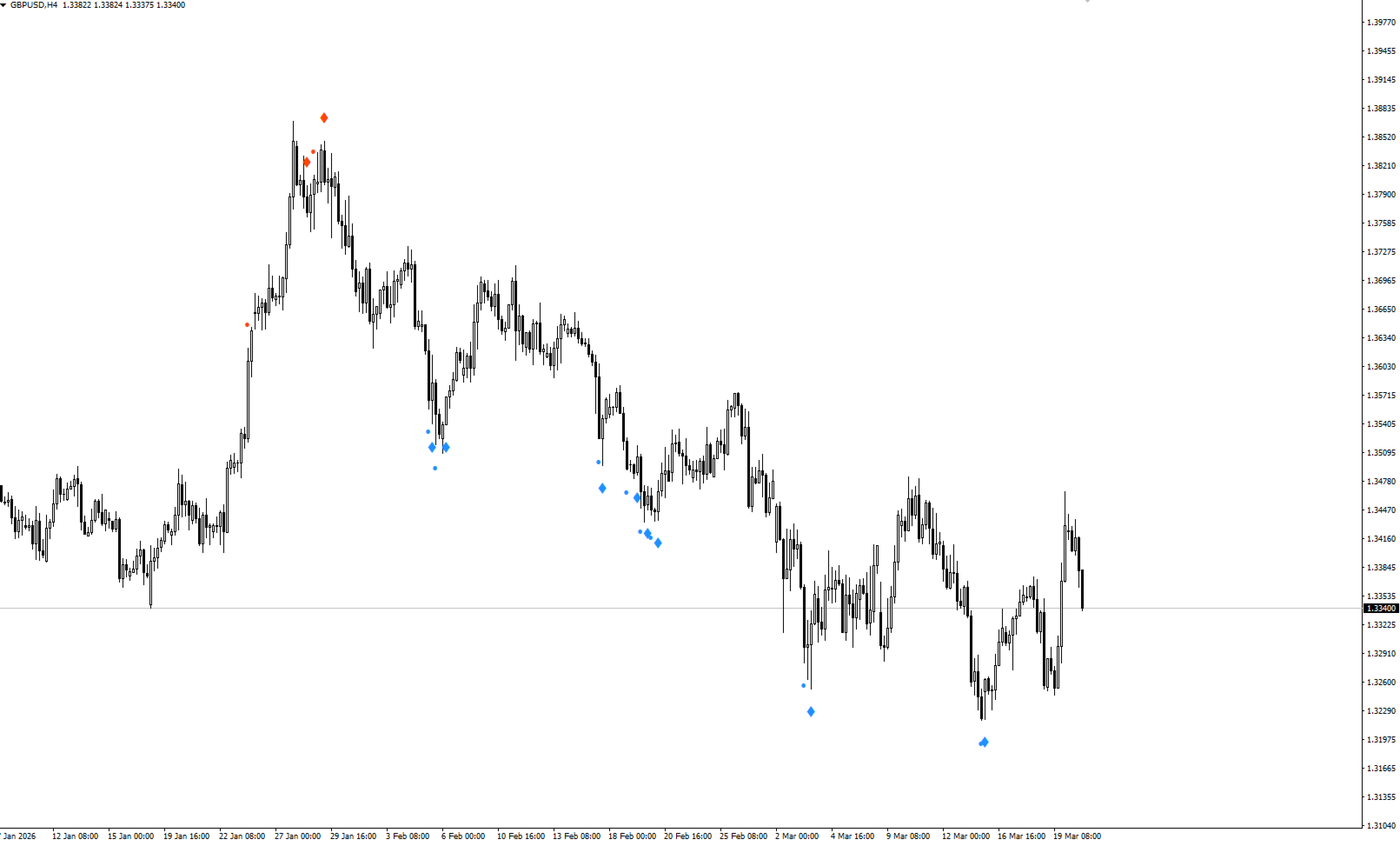
  • Small Dots = "Get Ready" (accumulation zones, preparation signal)
  • Large Gems = "Entry Trade" (confirmed momentum shift, primary trading signal)
  • Comes in Buy (blue) and Sell (red) versions

Best Trading Setup:

  • Large gem + price near Entry Cluster level = highest probability
  • Double confirmation: momentum + support/resistance
  • Allows tighter stop losses and better risk-reward ratios

Performance Expectations:

  • M15 timeframe optimal
  • Lower timeframes = more signals, lower reliability
  • Should filter signals by trend, confluence, and risk management rules

Key Advantages:

  • No repainting (reliability)
  • Complete system (no additional indicators needed, though traders can add more)
  • Works for automated trading (EAs)
  • Customizable for different trading styles

Bottom Line: A non-repaint momentum-based entry signal system designed to provide higher-probability trade setups when price confirms at structural levels.


Frequently Asked Questions (FAQ)

Q1: Does Entry Cluster repaint?

A: No. Entry Cluster signals only appear on closed candles and never disappear or change. 

Q2: What timeframe works best?

A: M15 provides the optimal balance of signal frequency and reliability. H4 works well for swing trading. Lower timeframes generate more signals but with lower reliability.

Q3: How many signals per day should I expect?

A: On XAUUSD M15, expect 1-3 signals (large gems) per day on average. Some days may have none, volatile days may have 5+. Quality over quantity.

Q4: Should I trade every signal?

A: No. Filter signals based on:

  • Entry Cluster level confluence
  • Overall market trend
  • Your trading plan
  • Risk management rules Trade only high-probability setups that align with your strategy.

Q5: What's the difference between small dots and large gems?

A:

  • Small dots = zone entry - preparing signal
  • Large gems = entry signal - primary trading signal Trade the large gems, use small dots as preparation.

Q6: Can I use this for automated trading (EA)?

A: Yes. Entry Cluster provides clear, non-repainting signals that can be coded into an Expert Advisor. Entry Cluster EA coming soon...

Q7: How do I know if my alerts are working?

A: Test by:

  1. Enabling all alert types
  2. Waiting for next signal
  3. Verifying you receive notifications
  4. Checking MT5 app for push notifications If alerts don't fire, check MT5 notification settings.

    Q8: What's the minimum account size?

    A:

    • Absolute minimum: $250
    • Recommended: $500+
    • Optimal: $1,000+ Smaller accounts should trade micro lots and risk 0.5% per trade maximum.

    Q9: Do I need other indicators?

    A:  Entry Cluster is a complete system combining:

    • Momentum analysis
    • Zone detection
    • Key structural levels However, many traders add price action, trend indicators, or support/resistance for additional confluence.

    Q10: Can I customize the colors and display?

    A: Yes. All visual elements are customizable:

    • Entry Cluster level colors and styles
    • Signal dot/gem colors and sizes


    Success requires discipline, risk management, and patience.

    Mais do autor
    Wicks Trade Panel Premium  It's a Trade Panel include Order Management & Risk Management for serious trader. Especially for those traders who pay attention to important events like the CPI, NFP, and ADP. A one-of-a-kind faster technique to fix the Entry Price by simply pointing the mouse pointer at it. This is what I enjoy about it. Automatically closing 50% order size lots when setting TRUE on Breakeven Status. It's especially useful when trading on significant economic events like the CPI, NF
    Wicks Trade Panel
    Lee Teik Hong
    4 (1)
    Wicks Trade Panel  It's a Trade Panel include Order Management & Risk Management for serious trader. Especially for those traders who pay attention to important events like the CPI, NFP, and ADP. A one-of-a-kind faster technique to fix the Entry Price by simply pointing the mouse pointer at it. This is what I enjoy about it. Automatically closing 50% order size lots when setting TRUE on Breakeven Status. It's especially useful when trading on significant economic events like the CPI, NFP, and A
    FREE
    Heiken Ashi Button
    Lee Teik Hong
    4.75 (4)
    Heiken Ashi Button Heiken-Ashi , often spelled Heikin-Ashi, is a Japanese word that means "Average Bar." The Heiken-Ashi approach can be used in conjunction with candlestick charts to spot market trends and forecast future prices. It's useful for making candlestick charts easier to read and analysing patterns. Traders can use Heiken-Ashi charts to determine when to stay in trades while the trend continues and close trades when the trend reverses. The majority of earnings are made when markets a
    FREE
    Entry Cluster Indicator for MT5 Entry Cluster is a professional-grade trading system engineered to deliver precise, high-probability entries without repainting or hindsight bias. Designed for serious traders, it integrates momentum analysis with institutional price levels to identify only the most reliable setups. Signal Clarity : Dots mark potential buy/sell zones, allowing traders to prepare. Gems confirm execution points, triggered only when momentum aligns with key levels. Robust Framework
    FREE
    Features The Expert Advisor (EA) is a semi-automated trading system that blends user-initiated entries with algorithmic trend management. Trade entries are triggered manually, while scaling, trailing stops, and risk control are handled automatically by the EA. Functional Specifications 1. Trading Modes Manual Execution Mode Trades initiated via on-chart control panel User selects Buy or Sell direction EA applies predefined Stop Loss and Take Profit values Trend management logic activates after
    FREE
    Super Trend Button
    Lee Teik Hong
    5 (1)
    Super Trend Button Super Trend is a trading strategy according to which one should trade Forex or Stocks when its price trend goes up, and trend goes down, expecting price movements to continue. “The trend is your friend” agree? Features -   Special Button   : Quick hide/show   Super Trend   chart. ( Make your Chart more clean and clear easily) -   Color   : You have the option of customising your favourite colour of   Up Trend or Down Trend . -  Super Trend Periods   : You have the option to c
    Expert Advisor The Onrex IV Premium uses intraday breakout with RSI levels to execute trade. Positions are opened in accordance with the chosen risk and capital management regime: lot size corresponding to account balance and fixed lot. It's a trading tool that be used to enhance your manual trading skill and Auto-Trading Expert Advisor also. Don't worry if your trades goes in the wrong direction, ONREX IV will take over and try to manage and control your risk management. ONREX IV offers a tra
    Smart ADR
    Lee Teik Hong
    Smart ADR as an indicator displays the average daily range of 3 timeframes such as Daily, Weekly, and Monthly.  Using the combination of 3 timeframes of ADR as a reference to shows fixed range and dynamic range targets as lines on your charts.  Inputs Smart ADR Parameters Indicator Name - Display the indicator name Daily Periods - Display the Daily Periods of ADR Weekly Periods -  Display the Weekly Periods of ADR Monthly Periods -  Display the Monthly Periods of ADR Daily Line Show ON - Set T
    Auto Fibonacci Button The Fibonacci retracement is a popular and reliable technical analysis tool for traders to determine support and resistance areas.  It employs the "Golden Ratio," a mathematical pattern seen throughout nature and even the universe, to forecast particular levels of support level and resistance level.  This tool is generated in technical analysis by dividing the vertical distance between two extreme points on the chart (typically a peak and a low) by the important Fibonacci
    Breakout Preparation Choppy movement up and down on the opening range everyday.  Trading breakouts on London session and New York session is recommended. Setting a bounce for a certain time zone and trade when the bounce reveals a break through.   Input Parameter Indicator Name Days to Show Start Time to Analysis End Time to Analysis Bounce Show till Time Chart Setting Color Scheme Selection Happy Trading and thanks for support.
    Wicks UpDown Target Choppy movement up and down on the opening range every day.  Trading breakouts on London session and New York session is recommended. Wicks UpDown Target is specialized in all forex pairs. Guideline Entry Strategy Idea: Step 1 - Breakout Forming (Warning! Trade on London Session and New York Session) Step 2 - Breakout Starting (Take Action on your trading plan) Step 3 - Partial Close your order & set breakeven (no-risk) Step 4 - Target complete Step 5 - Don't trade in Sto
    Idea Pro Trend Premium This EA is a Semi-auto Trading Panel with a variety of strategic settings, such as those listed below. It is excellent for scalping or long-term trading by traders. This EA is simple and convenient to trade and attach to the chart with the default settings on AUDUSD, EURUSD, GBPUSD and NZDUSD. How to use You can trade based on the trend that is displayed on the left-hand side of Info Panel. If the trend are" 2 Up Trend" and "2 Down Trend", please do not trade. Simply pro
    Key Level  Key Level is a MetaTrader 4 Indicator that uses a proprietary algorithm based on Price Retracement/Breakout Method to show the Entry-Line on your trading. Instead, it analyzes data of market and identify entry points and opportunities. (Price Retracement / Price Breakout) It's also a trading tool that be used to practice and enhance your manual trading skills. Key Level is an amazing tool for Scalping Trader. It also a trading tool that be used to practice and enhance your manual trad
    Key Features 1. Trading Modes Manual Mode (Recommended): Use the on-chart panel to execute Buy/Sell orders with full control Auto Mode: RSI-based strategy backtesting use 2. Martingale Risk Management Automatic lot size multiplication after stop loss hits Reverse trade execution (Buy→Sell, Sell→Buy) Configurable multiplier and maximum lot size Automatic reset to initial lot size after take profit 3. Professional UI Dashboard Real-time lot size display Live position status and profit/loss tracki
    Recommended Setup Parameter Recommendation Symbol All Symbols Timeframe M15, M30 Minimum Balance $250 Recommended $500+ Broker Type ECN / RAW Spread Risk per Trade 0.5-2% Prop Firm Compatible Yes (strictly drawdown control) What makes Entry Cluster indicator unique: Combines momentum analysis with structural levels (entry cluster levels) Non-repainting signals that only appear on closed candles Intelligent auto-detection of optimal price levels for different assets Comprehensive alert system f
    What is FX Analysis? FX Analysis is a powerful MetaTrader 5 indicator that helps forex traders find the best trading opportunities. It combines four analysis tools in one easy-to-use interface: Volatility Analyzer -   Check single symbol’s volatility by hourly, daily Currency Strength Meter - Shows which currencies are strong or weak Oscillator Panel - Shows if markets are overbought or oversold Top Picks – Shows if the symbol reached 60% - 80% range of volatility Pivot Point - Show 5 Pivot line
    BEAST TRADEMATE   1. Overview Beast TradeMate is a comprehensive multi-feature MetaTrader 5 (MT5) chart indicator that combines TDI-based trade signal detection, multi moving average trend filtering, sweetspot level mapping, TP/SL auto-projection, and a full alert system into a single, unified tool. It is designed to provide traders with high-probability entry signals while keeping the chart clean and informative. 2. Signal Types Beast TradeMate produces four distinct types of trade signals, ea
    FX Line Assistant - Professional EA Description Overview The FX Line Assistant is an advanced MetaTrader 5 Expert Advisor featuring an intuitive visual trading panel that transforms horizontal chart lines into executable trade setups. This tool bridges manual technical analysis with automated trade execution, offering institutional-grade risk management and position monitoring capabilities. Core Functionality Intelligent Line Detection System Multi-Color Recognition : Automatically scans and ide
    Filtro:
    Sem comentários
    Responder ao comentário