Konstantin Kulikov
Konstantin Kulikov
4.1 (270)
  • 정보
11+ 년도
경험
32
제품
1074
데몬 버전
0
작업
19
거래 신호
1
구독자
💎 HELPFUL INFORMATION 💎

🔹 Autostart of terminals when rebooting VPS: https://www.mql5.com/en/blogs/post/736914
🔹 Disable Windows updates to avoid losing mql products activations: https://www.mql5.com/en/blogs/post/742676
🔹 Saving VPS resources: https://www.mql5.com/en/blogs/post/746138
🔹 Profile loading instructions: https://www.mql5.com/en/blogs/post/740359
🔹 Checking automatic GMT in EAs: https://www.mql5.com/en/blogs/post/748027
🔹 Manual setting of GMT_OFFSET parameter in experts: https://www.mql5.com/en/blogs/post/682539
🔹 EAs access to sites: https://www.mql5.com/en/blogs/post/750708
🔹 Trading lot size and money management: https://www.mql5.com/en/blogs/post/748029
🔹 The danger of using StopLoss in scalping systems: https://www.mql5.com/en/blogs/post/700262
================================================================================================
⭐️ EAs are only sold here, the rest is fake ⭐️
⭐️⭐️⭐️ The Best Offer: https://www.mql5.com/en/blogs/post/768696
================================================================================================
🏆 Top experts for automated trading: https://www.mql5.com/en/users/test-standart/seller
🔥 Comprehensive setup of all experts at once: https://www.mql5.com/en/blogs/post/750723
🔧 All latest presets: https://www.mql5.com/en/blogs/post/747929
================================================================================================
💬 My trading chat in MQL5, join: https://www.mql5.com/en/messages/011e4f235b10dc01
📣 Telegram channel with announcements from real traders: https://t.me/EAFXPRO
🛑 To get into the telegram private group, write me a personal message on this site after buying any EA
▬▬▬▬▬▬▬▬▬▬▬▬▬▬▬▬▬▬▬▬▬▬▬▬▬▬▬▬▬▬▬▬▬▬▬▬▬▬▬▬▬▬▬▬▬▬▬▬▬▬▬▬▬▬▬▬▬▬▬▬▬
🤝 Receive cashback on a portion of the commission and spread from every trade with any broker directly to your USDT wallet: https://fxcash.net/en/?id=-FOREX-
Konstantin Kulikov 출시돈 제품
리뷰: 16
347.00 USD

제가 몇 년 동안 사용하고 있는 유용한 로봇을 소개드립니다. 반자동뿐만 아니라 자동 모드로도 사용할 수 있습니다. >>> Chat <<< 본 프로그램에는 경제 캘린더의 뉴스별로 유연한 거래 설정이 포함되어 있습니다. 전략 테스터에서 확인할 수 없습니다. 진짜 작업뿐입니다. 터미널 설정에서 허용된 URL 목록에 뉴스 사이트를 추가해야 합니다. 서비스>설정 > 조언자>를 클릭합니다. "다음 URL에 대해 WebRequest 허용:" 확인란을 선택합니다. 다음을 추가합니다 (공백 삭제): https://  nfs.faireconomy.media 최신 설정 아카이브 다운로드:   https://www.mql5.com/en/blogs/post/747929 신호 모니터링:   https://www.mql5.com/en/signals/author/test-standart 이 전문가를 위해 고유 설정 세트를 만들 때

Konstantin Kulikov
Konstantin Kulikov
Hi guys!
I noticed that the MT4 terminals stopped working if they were not updated. Therefore, restart the terminals if you lose connection (see screenshot).
Konstantin Kulikov
Konstantin Kulikov
If you use GMT_Offset_AUTO=false and broker notify about the day light saving change, then increase the value of "GMT_offset_Manual" by 1.
Konstantin Kulikov
게재된 포스트 Download settings
Latest sets and joint profiles of sets for several experts . Under this blog, the settings archives are always updated with new changes. Profile loading instructions: https://www.mql5.com/en/blogs/post/740359 Download 👇...
Konstantin Kulikov
Konstantin Kulikov
Beginning of the week
Konstantin Kulikov
Konstantin Kulikov
💎 ПОЛЕЗНАЯ ИНФОРМАЦИЯ 💎 🔹АВТОЗАПУСК ТЕРМИНАЛОВ ПРИ ПЕРЕЗАГРУЗКЕ VPS: https://www.mql5.com/ru/blogs/post/736913
🔹Отключение обновлений Windows, чтобы избежать потерь активаций продуктов mql: https://www.mql5.com/ru/blogs/post/742677
🔹Экономия ресурсов ВПС: https://www.mql5.com/ru/blogs/post/746136
🔹Загрузка профиля: https://www.mql5.com/ru/blogs/post/740358
🔹Ручная настройка параметра GMT_OFFSET в экспертах: https://www.mql5.com/ru/blogs/post/681157
Konstantin Kulikov
Konstantin Kulikov
💎 HELPFUL INFORMATION 💎 🔹AUTOSTART OF TERMINALS WHEN REBOOTING VPS: https://www.mql5.com/en/blogs/post/736914
🔹Disable Windows updates to avoid losing mql products activations: https://www.mql5.com/en/blogs/post/742676
🔹Saving VPS resources: https://www.mql5.com/en/blogs/post/746138
🔹Profile loading: https://www.mql5.com/en/blogs/post/740359
🔹Manual setting of GMT_OFFSET parameter in experts: https://www.mql5.com/en/blogs/post/682539
Konstantin Kulikov
게재된 포스트 Saving VPS resources
Some recommendations to facilitate the work of the terminal . 1) Reduce the number of bars in history and on charts to 10 000 (you can find out the minimum number of bars for a specific EA to work from its author...
Konstantin Kulikov
게재된 포스트 Экономия ресурсов ВПС
Некоторые рекомендации для облегчения работы терминала . 1) У меньшите количество баров в истории и на графиках до 10 000 (у точнить минимальное количество баров для работы конкретного EA можно у его автора...
Konstantin Kulikov
Konstantin Kulikov
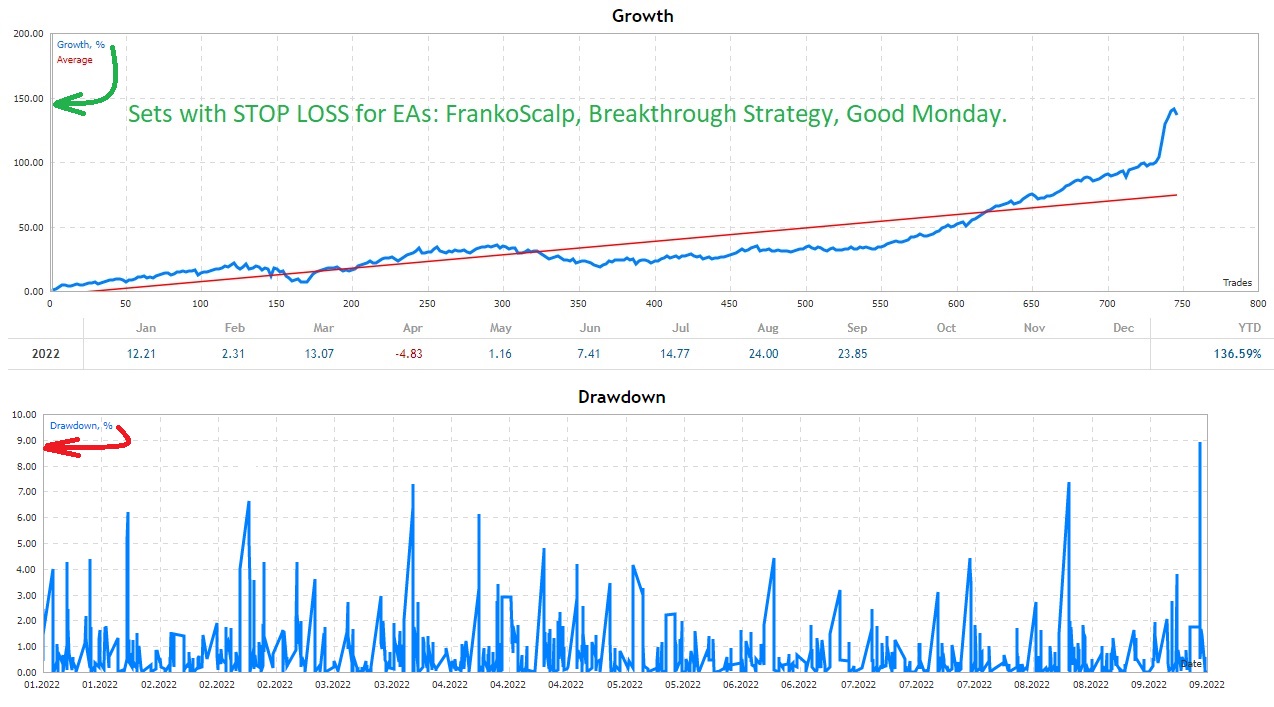
Two months ago we developed additional sets for the "Good Monday" expert. Some of them showed good results in real forward testing (on a real account).
You can include them in your portfolio.
These sets open trades already in liquid time (a few hours after the market opens), so the results on different brokers do not differ so much.
You can download a new archive with settings under this article: https://www.mql5.com/en/blogs/post/737064
Anton Kochyn
Anton Kochyn 2021.04.07
Сетка или стоп лосс?
Konstantin Kulikov
Konstantin Kulikov 2021.04.08
Это с SL. Путь к этим сетам в архиве настроек: \Without GridMartin\Sets\Additional Sets
Konstantin Kulikov 출시돈 제품
리뷰: 6
247.00 USD

An automated trading system with smart entry/exit algorithms that uses grid and martingale techniques to maximize profits. You can search for current signals on this page, or write me a personal message: https://www.mql5.com/en/signals/author/test-standart The default settings ( M1 timeframe ) are suitable for currency pairs, especially for pairs with GBP. All new sets appear here:  https://www.mql5.com/en/blogs/post/747929 A description of the Expert's parameters can be found in the

Konstantin Kulikov
Konstantin Kulikov
Statistics from the ICMarkets MT5 account.

EA for MT4 by link:
https://www.mql5.com/en/market/product/17470
EA for MT5 by link:
https://www.mql5.com/en/market/product/38826
Konstantin Kulikov
Konstantin Kulikov
Calm start for EA Breakthrough in 2021💠

EA for MT4 by link:
https://www.mql5.com/en/market/product/23001
EA for MT5 by link:
https://www.mql5.com/en/market/product/52858
#Breakthrough
Konstantin Kulikov
Konstantin Kulikov
Hello! This is an important post! Check it out⚠️

All my EAs (like most EAs) have time settings. To make sure that it is correct, expand any one chart in the terminal (if it is correct on one chart, then it is also correct on the others) and compare the GMT time in the advisor's information field with the GMT time on the Internet (for example, from the site https://time.is/GMT ). This must be done on a weekday when the currency market is open. This check must be performed when you first launch an Expert Advisor on a new VPS, as well as during the time change period (winter/summer).

So, if the GMT values coincide on the chart of the expert and the website on the Internet, then everything is correct, no action is required. And if the values do not match, then you need to change the EA parameters:

"GMT_Offset_AUTO"=false and set the "GMT_Offset_Manual" value yourself, according to the instructions https://www.mql5.com/en/blogs/post/682539
Konstantin Kulikov
Konstantin Kulikov
The last trading day for "Breakthrough Strategy" this year was successful. The system is fine.
The next two Fridays are public holidays (not working days), so trading stops. Trading will resume on January 5th.

"Breakthrough Strategy" MT4 version: https://www.mql5.com/en/market/product/23001
"Breakthrough Strategy" MT5 version: https://www.mql5.com/en/market/product/52858
Konstantin Kulikov
Konstantin Kulikov
✴️ Review on "Breakthrough Strategy" from trader Alan Lee: https://youtu.be/DCLF3fo1lHI
❇️Link to all experts: https://www.mql5.com/en/users/test-standart/seller
Konstantin Kulikov
Konstantin Kulikov
✴️"Breakthrough Strategy" video presentation: https://www.youtube.com/watch?v=6mntyLHyqkA
❇️Link to all experts: https://www.mql5.com/en/users/test-standart/seller