Save Sniper

스나이퍼 전문가 어드바이저는 반자동 전문가로,소위"안전"규칙과 실패한"안전"규칙과 함께 사용되는 오버 클러킹 위치를 사용하여 트레이더의 전략에 따라 거래를 여는 것이 주요 임무입니다.

전문가가 저격 전략에 따라 시장을 분석하지 않는다는 점은 주목할 가치가 있지만 자금 관리에 대한 대중적인 접근 방식을 구현하기위한 일반적인 조수입니다.

그것은 또한 전문가 고문 절대적으로 모든 가능 하 고 어떤 시간 프레임에 작동,그래서 그것은 당신의 전략에 품질 추가 될 수 있습니다 주목할 가치가 있다.


고문의 알고리즘. 실용적인 응용 프로그램 및 설정

내가 이미 언급했듯이,스나이퍼 고문은 반자동,즉 그는 직접 주문을 직접 열지 않습니다.

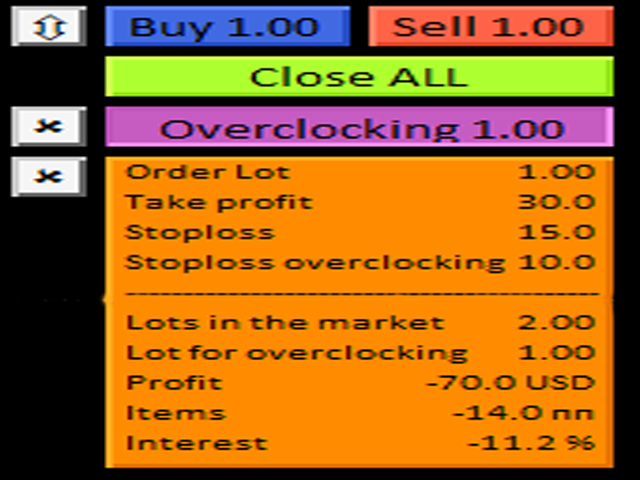
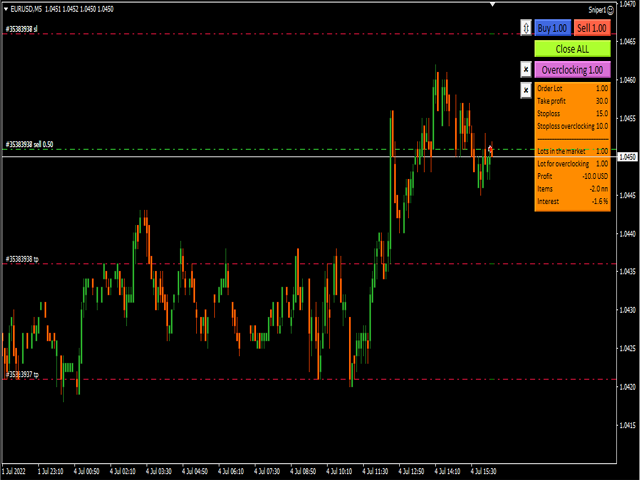
차트에서 주문을 열려면 버튼이있는 특수 패널이 있으며 클릭하면 전문가가 두 개의 누적 위치 주문을 동시에 엽니 다. (그림 1)

고문은"안전한"규칙에 따라 작동하며,그 본질은 두 가지 주문으로 총 계획된 볼륨을 여는 것이지만 다른 목표를 갖는 것입니다. 가격이 가장 가까운 목표에 도달 할 확률은 더 먼 목표보다 높은 수준입니다.

그래서,고문은 첫 번째 순서가 당신의 방향으로 가고,두 번째 순서가 정지 순서에 따라 닫히면,당신은 0 으로 갈 것입니다.

또한 패널에 오버 클러킹 버튼이 있습니다.이 버튼은 주문 중 하나를 닫은 후 반대 방향으로 신호가 나타나면 엄청난 수의 위치를 뒤집습니다. (그림 2)

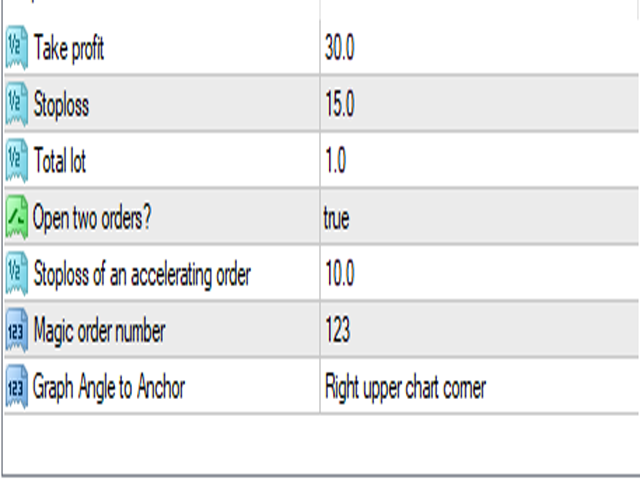
따라서"이익 가져 오기"줄에서 위치의 목표를 포인트로 변경할 수 있으며"정지 손실"줄에서는 두 주문에 대해 정지 순서의 값을 포인트로 변경할 수 있습니다. (그림 3)

"총 로트"줄에 자신의 위치 볼륨을 입력 할 수 있습니다.이 볼륨은 동일한 로트를 가진 두 위치로 분할됩니다. 전문가가 두 개의 주문으로 시장에 진입하지 않으려면"두 개의 주문 열기"라인에서 거짓을 선택하십시오.

그러나이 경우 전문가는 첫 번째 목표에 도달 할 때 위치를 부분적으로 마감합니다.

"오버클러킹 주문의 손실 중지"줄에서 위치 반전에 참여하는 주문의 포인트 손실을 제한할 수 있습니다. 라인"매직 주문 번호"는 전문가 고문이 도움을 받아 열린 주문 만 식별 할 수있게합니다.

결론적으로"안전한"규칙은 모든 추세 거래 전략에 적합하며 스나이퍼 전문가 고문 덕분에 일상적인 작업을 제거하고 주문 열기 및 관리 프로세스를 자동화 할 수 있다는 점은 주목할 가치가 있습니다.
추천 제품
Wise Men Indicator demo
Bohdan Kasyanenko
3 (2)
The indicator displays signals according to the strategy of Bill Williams on the chart. Demo version of the indicator has the same features as the paid, except that it can work only on a demo account . Signal "First Wise Man" is formed when there is a divergent bar with angulation.  Bullish divergent bar - with lower minimum and closing price in the upper half. Bearish divergent bar - higher maximum and the closing price at the bottom half. Angulation is formed when all three lines of Alligator
FREE
Free automatic fibonacci
Tonny Obare
4.68 (50)
Free automatic Fibonacci is an indicator that automatically plots a Fibonacci retracement based on the number of bars you select on the BarsToScan setting in the indicator. The Fibonacci is automatically updated in real time as new highest and lowest values appears amongst the selected bars. You can select which level values to be displayed in the indicator settings. You can also select the color of the levels thus enabling the trader to be able to attach the indicator several times with differe
FREE
Your chart. One glance. Total clarity. Built by @Ash_TheTrader for traders who are tired of guessing, Extreme Trading Dashboard is a professional-grade heads-up display that sits quietly in the corner of your chart — dark charcoal, rounded, semi-transparent, and genuinely easy on the eyes — until the moment it matters. Dual Session Highlighter Shade up to two independent time windows directly on your chart — London, New York, or your own custom kill-zone. Each gets its own color, so overlappi
FREE
Alert Relay Helper (EA) – MT5  & MT4 Encrypted bridge that forwards indicator alerts to external messengers *   in real-time. Plug-and-play   utility – simply attach it to   one   chart. Zero trading functions   – does   not   open, modify or close orders. End-to-end AES-256 encryption   – only custom indicators that support the same key can broadcast messages (e.g.  VWAP Ultimate Pro   v1.20+). Multi-platform   – MT5 build 4150+, MT4 build 1380+. Before you turn it on : Open Tools > Options >
FREE
SilvMAT
MARC ALBRECHT SCHMID
4.5 (10)
SilvMAT EA – XAGUSD를 위한 정밀 거래, 완전 무료 주의:   이는 새로 개발된 EA입니다—현재 인상적인 결과에도 불구하고 장기 성능이 아직 평가 중이므로 주의하세요! 최적화 대상:   XAGUSD M15 권장 설정:   0.0001 로트 센트 계정 €200+ 또는 표준 계정 €20,000+ (레버리지 1:2000) 를 사용해 안전한 거래. https://www.mql5.com/en/signals/2389532 왜 SilvMAT를 선택하나요? SilvMAT 로 엘리트 거래에 들어가세요, Marc Albrecht Trading 의 혁명적인 Expert Advisor입니다. 10년 이상의 MT4 프로그래밍 경험으로 구축된 SilvMAT는 M1 타임프레임에서 XAGUSD (은) 거래를 위해 특별히 제작되었습니다. 가장 좋은 점?   100% 무료 —숨겨진 비용 없음, 제한 없음. 내 목표는 판매로 이익을 내는 것이 아니라 당신 같은 트레이더를 작동하는 도구로 강화하는 것입
FREE
This Expert Advisor monitors all open trades and saves them to a CSV file whenever a change is detected. It’s a lightweight tool for exporting trade data from MetaTrader 4 in real time. What it does: Monitors all open positions on the terminal Detects changes (order type, volume, price, SL, TP, etc.) Writes updated trade data to a .csv file ( TradeCopy.csv ) Includes order ID, symbol, type, lot size, price, SL, and TP Saves files in the Common Files folder for easy access by other applications H
FREE
AutoTrailingandSLTP
Kimitaka Yoshikawa
5 (1)
1. Overview This EA is a discretionary trading support tool for MT4 that enables batch SL/TP operations for open positions and pending orders, as well as trailing stops based on unrealized profit amounts. To use it, attach the EA to a chart while MT4's "Auto Trading" is enabled. 2. Trailing Stop Function 2.1. Basic Specifications The standard MT4 trailing stop is set in points, but this EA allows you to set the trailing stop based on unrealized profit amounts (in USD or JPY), making it more int
FREE
IceFX AccountInfo
Norbert Mereg
4.71 (17)
This very new indicator is able to unlock all advanced features of MetaTrader 4 (above build 600). This indicator can graphically represent the main data of the current account (balance, equity, free margin, current Profit/Loss, total Profit/Loss, amount of open position(s) & size, etc.) in an elegant way. On the chart AccountInfo graphically shows the account balance of recent days. Also all data can be filtered with MagicNumber, Order Comment, and symbol for the professional evaluation of a sp
FREE
# AutoECPointer **AutoECPointer** stands for **Auto Entry Close Pointer** . AutoECPointer is a custom indicator for MetaTrader 4 (MT4) designed to visualize your trade history directly on the chart. It automatically draws arrows for trade entries and exits, distinguishing between profitable and losing trades, helping traders review their past performance visually. ## Features - **Automatic History Visualization** : Scans account history and plots trades on the chart. - **Entry & Exit Marker
FREE
Position Selective Close MT4
Francisco Manuel Vicente Berardo
The Position Selective Close is a multi-symbol multi-timeframe script used to close simultaneously various positions.  General Description   The Position Selective Close   possesses   three operation modes (Intersection,   Union   and All) that control the way   as   four position features (symbol, magic number,   type   and profit) are used. The modes, available through the Selection Mode input parameter, relate to the features, available through the “Select by Feature” and “Feature” input pa
FREE
Ppr PA
Yury Emeliyanov
4.75 (4)
"Ppr PA" is a unique technical indicator created to identify "PPR" patterns on the currency charts of the MT4 trading platform. These patterns can indicate possible reversals or continuation of the trend, providing traders with valuable signals to enter the market. Features: Automatic PPR Detection:   The indicator automatically identifies and marks PPR patterns with arrows on the chart. Visual Signals:   Green and red arrows indicate the optimal points for buying and selling, respectively. Ar
FREE
Automatic fibonacci with alerts is an indicator that automatically plots a fibonacci retracement based on the number of bars you select on the BarsToScan setting in the indicator. The fibonacci is automatically updated in real time as new highest and lowest values appear amongst the selected bars. You can select which level values to be displayed in the indicator settings. You can also select the color of the levels thus enabling the trader to be able to attach the indicator several times with d
FREE
Indicator Test Report MT4
Narayanan Mohanan Mohanan Krishnan
MetaTrader 4용 Indicator Test Report — 지표가 실제로 어떻게 작동하는지 보여주는 MT4 다시 그리기 검사기 및 지표 테스터 컴파일된 표시기 내부는 볼 수 없습니다. Indicator Test Report는 구매, 작성 또는 MetaTrader에 내장된 모든 지표를 로드하고 설명이 할 수 없는 질문에 답합니다. 다시 그리는지, 얼마나 많은 기록이 필요한지, 실제로 무엇을 게시합니까? 행동을 보고합니다. 등급을 매기지 않습니다. Strategy Tester에 지표를 로드하고 해당 동작의 12가지 측면(공개하는 버퍼 수, 값이 의미를 갖기 전에 필요한 기록 양, 닫힌 막대의 값이 나중에 변경되는지 여부, 읽는 데 드는 비용)에 대한 일반 언어 보고서를 받으세요. 지표가 좋은지 여부에 대한 점수, 합격 표시, 평결은 없습니다. 단지 관찰된 것과 증명된 것과 증명되지 않은 것만 있을 뿐입니다. 답변 내용 1. 버퍼. 지표가 실제로 게시하는 번호가 매겨진 데이터 시
FREE
FFx MACD
Eric Venturi-Bloxs
4.2 (5)
The purpose of this new version of the MT4 standard indicator provided in your platform is to display in a sub-window multiple timeframes of the same indicator. See the example shown in the picture below. But the display isn’t like a simple MTF indicator. This is the real display of the indicator on its timeframe. Here's the options available in the FFx indicator: Select the timeframes to be displayed (M1 to Monthly) Define the width (number of bars) for each timeframe box Alert pop up/sound/ema
FREE
FFx Fractals
Eric Venturi-Bloxs
4.5 (2)
The purpose of this new version of the MT4 standard indicator provided in your platform is to display in a sub-window multiple timeframes of the same indicator. See the example shown in the picture below. But the display isn’t like a simple MTF indicator. This is the real display of the indicator on its timeframe. Here's the options available in the FFx indicator: Select the timeframes to be displayed (M1 to Monthly) Define the width (number of bars) for each timeframe box Alert pop up/sound/ema
FREE
Fair Value Gap FGV MT4
Jean Charles Vilhena Maia
Smart FVG Visualizer 는 시장의 불균형(Fair Value Gaps)을 자동적이고 정확하게 식별하도록 설계된 고성능 지표입니다. Smart Money Concepts (SMC) 및 ICT 방법론을 기반으로 하는 이 지표는 가격 불균형 구간을 시각화하여, 향후 가격이 끌어당겨지거나 반전될 수 있는 강력한 지점들을 표시해 줍니다. 주요 특징: 즉각적인 식별: 모든 타임프레임에서 상승 및 하락 FVG를 자동으로 감지합니다. 전문적인 시각화: 기관 거래 표준에 맞춰 "FVG" 텍스트 라벨이 포함된 색상 박스를 표시합니다. 성능 최적화: 가볍고 깨끗한 코드로 설계되어 여러 차트를 열어두어도 터미널이 느려지지 않습니다. 완벽한 커스터마이징: 트레이딩 템플릿에 맞춰 색상, 글꼴, 채우기 설정을 쉽게 조정할 수 있습니다.

FREE
Heiken Ashi Button
Lee Teik Hong
4.75 (4)
Heiken Ashi Button Heiken-Ashi , often spelled Heikin-Ashi, is a Japanese word that means "Average Bar." The Heiken-Ashi approach can be used in conjunction with candlestick charts to spot market trends and forecast future prices. It's useful for making candlestick charts easier to read and analysing patterns. Traders can use Heiken-Ashi charts to determine when to stay in trades while the trend continues and close trades when the trend reverses. The majority of earnings are made when markets a
FREE
FFx Momentum
Eric Venturi-Bloxs
4 (1)
The purpose of this new version of the MT4 standard indicator provided in your platform is to display in a sub-window multiple timeframes of the same indicator. See the example shown in the picture below. But the display isn’t like a simple MTF indicator. This is the real display of the indicator on its timeframe. Here's the options available in the FFx indicator: Select the timeframes to be displayed (M1 to Monthly) Define the width (number of bars) for each timeframe box Alert pop up/sound/ema
FREE
Constructor
Aleksey Semenov
Constructor is a convenient tool for creating, (building strategies) testing and applying trading strategies and ideas, as well as testing and using separate indicators and their groups. Constructor includes opening, closing, deal tracking, averaging and recovery modules, as well as various trading options with and without averaging and martingale. You are able to connect up to 10 different external indicators. Find the detailed instructions in the attached pdf file. Trading settings averaging
FREE
Sm Ichimoku Scanner
Steeve Christian Martol
5 (5)
Multi Time Frame Indicator acts as a Scanner based on the Ichimoku Trading System. The outcome is displayed on a board. This helps you to make "at a glance" a mental picture of the System without having to open the chart. Up to 10 Currencies can be watched. Scanned elements And Legend "KUMO Futur" - Green : The Kumo Futur is Bullish. "KUMO Futur" - Red : The Kumo Futur is Bearish. "PRICE Cross KJ" - Green : The Price is Above the Kijun Sen.  "PRICE Cross KJ" - Red : The Price is Below the Kijun
FREE
Shadow Flare MT4
Kestutis Balciunas
Shadow Flare 인디케이터는 MetaTrader 4용 비리페인트형 추세 & 유동성 도구 입니다. 설정 가능한 이동평균 베이스라인(HMA, EMA, SMA 또는 RMA)을 계산하고, 그 주변에 평균진폭범위(ATR) 기반 밴드를 씌워 가격이 상단 또는 하단 밴드를 종가 기준으로 돌파할 때에만 방향이 전환되는 “점착형(Sticky)” 추세 상태를 생성합니다. 동일한 추세 엔진은 피벗 고점·저점을 감지하여 그 주위에 색상 박스를 그린 뒤, 가격이 종가 기준으로 해당 박스를 돌파하는 순간 자동으로 존을 소거(미티게이션)하는 공급/수요 존 모듈도 구동합니다. 매수·매도 신호는 추세 상태가 전환되는 시점에 발생하며, 선택적인 거래량 및 RSI 필터를 통해 약한 신호나 모멘텀에 역행하는 진입을 차단할 수 있습니다. 내장 대시보드는 실시간으로 Trend Bias(추세 바이어스), Momentum(RSI 기반), Volume(거래량)을 보여 줍니다. 팝업, 사운드, 모바일 푸시, 이메일로 구성
FREE
Market Sessions Time MT4
Juan Facundo Valdes
3.5 (4)
현재 주요 시장 세션과 다음 시작까지 남은 시간을 표시합니다. 시장 뉴욕 런던 프랑크푸르트 도쿄 시드니 맞춤 이름, 시작 및 종료 시간이 포함된 추가 세션 1개 시계 시간 GMT/UTC 로컬(컴퓨터에서) 브로커(서버 시간) 설정의 기본 시간은 GMT입니다. 로컬 또는 브로커 시간으로 변경한 후 선택한 시간 유형에 따라 각 세션 시작 및 종료 시간을 수동으로 조정해야 합니다. 개장 및 폐장 시간을 조정할 수 있습니다 그래픽 설정 각 세션을 개별적으로 표시하거나 숨길 수 있습니다. 여기에는 다음이 포함됩니다. 오픈 바의 세션 이름 세션이 종료될 때까지 그리는 시가 라인 배경색 세션 배경색에는 2가지 모드가 있습니다 분리자로 유용한 첫 번째 막대 열린 시간부터 닫은 시간까지 전체 세션 기간 * 겹침이 있는 경우 세션 색상이 혼합됩니다. 이렇게 하면 차트에 새로운 특정 색상이 생성되며, 소원은 과거 데이터에서 쉽게 겹치는 부분을 찾는 데 유용합니다. * 차트에 함께 그려진 세션이


FREE
Smart Trade Monitor — Real-Time Position Tracking, P&L Analysis & Alert System   Real-Time Monitoring : Auto-tracks open/closed positions, displays yesterday’s & previous day’s P&L—no manual calculations!   Smart Alerts (Premium Only) : Instant push notifications + sound alerts for position changes—never miss a trading opportunity!   User-Friendly : One-click setup, key data displayed directly on charts for faster decisions.   Cross-Platform : Supports both MT4 & MT5, compatible with
FREE
Trading Information
Cuong Le Van
4.5 (10)
This an utility indicator which displays the most important information of the current account and position (*). Displayed information: Information about the current account (Balance, Equity, Free Margin). Current spread, current drawdown (DD), planned profit, expected losses, etc. Number of open position(s), volume (LOT), profit. Today’s and yesterday’s range. Remaining time to the next candle. Last day profit information (with integrated IceFX ProfitInfo indicator). Risk-based LOT of informat
FREE
FFx Volumes
Eric Venturi-Bloxs
3.5 (2)
The purpose of this new version of the MT4 standard indicator provided in your platform is to display in a sub-window multiple timeframes of the same indicator. See the example shown in the picture below. But the display isn’t like a simple MTF indicator. This is the real display of the indicator on its timeframe. Here's the options available in the FFx indicator: Select the timeframes to be displayed (M1 to Monthly) Define the width (number of bars) for each timeframe box Alert pop up/sound/ema
FREE
Safety
Sergey Ermolov
5 (2)
나는 모두가"안전"과 같은 돈 관리 규칙을 알고 있다고 생각합니다. 인식하지 못하는 사람들을 위해,금고는 거래에 대한 이익이 정지의 크기를 같게 한 후 위치의 절반을 마감한다고 가정합니다. 따라서,가격이 반전하고 정지를 잡는다 할지라도,이전에 위치의 일부를 닫을 때 정확히 같은 양의 이익을 받았기 때문에 돈을 잃지 않을 것입니다. 안전 전문가 고문은 단 하나의 설정,즉 폐쇄 로트 만 있습니다. 위치 0 에 남겨두면 고문은 거래의 정확히 절반을 닫을 것입니다. 전문가 어드바이저를 설치 한 후,이익의 일부가 전문가 어드바이저에 의해 고정 될 위치에 빨간색 점선이 차트에 나타납니다. 당신이 고문이 다른 수준에서 트랜잭션의 일부를 닫으려면 안전하게 다른 장소로이 라인을 이동할 수 있습니다. 동일한 통화 쌍에 여러 개의 거래가 열려 있는 경우 마우스 커서로 시장을 차트로 끌어다 놓고 안전한 거래로 마감하려는 주문 시작 수준 근처에 시장을 놓아야 합니다. 전문가 고문은 주문 티켓을 고려
FREE
The Candle Countdown Timer for MetaTrader 4 (also available for MT5) is a vital indicator designed to help you manage your trading time effectively. It keeps you updated about market open and close times by displaying the remaining time before the current candle closes and a new one forms. This powerful tool enables you to make well-informed trading decisions. Key Features: Asia Range: Comes with an option to extend the range. Broker Time, New York, London Time: Displays the current broker time
FREE
Follow The Line
Oliver Gideon Amofa Appiah
3.94 (16)
FOLLOW THE LINE GET THE FULL VERSION HERE: https://www.mql5.com/en/market/product/36024 This indicator obeys the popular maxim that: "THE TREND IS YOUR FRIEND" It paints a GREEN line for BUY and also paints a RED line for SELL.  It gives alarms and alerts of all kinds. IT DOES NOT REPAINT and can be used for all currency pairs and timeframes. Yes, as easy and simple as that. Even a newbie can use it to make great and reliable trades. NB: For best results, get my other premium indicators for more
FREE
First 20 Downloads FREE ## 1. Overview $2014 MA Perfect Order All-Currency Scanner Detects "Perfect Order" moving average alignment across all currency pairs simultaneously. A Perfect Order occurs when 3-5 moving averages of increasing periods are stacked in a single, uninterrupted order $2014 proof that price is trending cleanly with no conflicting timeframes.   BUY  signal : Shorter-period MAs are all above longer-period MAs (fast-to-slow stack) -> strong uptrend   SELL signal : Shorte
FREE
이 제품의 구매자들이 또한 구매함
Trade Manager EA에 오신 것을 환영합니다. 이 도구는 거래를 보다 직관적이고 정확하며 효율적으로 만들기 위해 설계된 궁극적인 리스크 관리 도구 입니다. 단순한 주문 실행 도구가 아닌, 원활한 거래 계획, 포지션 관리 및 리스크 제어를 위한 종합 솔루션입니다. 초보자부터 고급 트레이더, 빠른 실행이 필요한 스캘퍼에 이르기까지 Trade Manager EA는 외환, 지수, 상품, 암호화폐 등 다양한 시장에서 유연성을 제공합니다. Trade Manager EA를 사용하면 복잡한 계산은 이제 과거의 일이 됩니다. 시장을 분석하고 진입, 손절 및 익절 수준을 차트의 수평선으로 표시한 후 리스크를 설정하면, Trade Manager가 이상적인 포지션 크기를 즉시 계산하고 SL 및 TP 값을 실시간으로 표시합니다. 모든 거래가 간편하게 관리됩니다. 주요 기능: 포지션 크기 계산기 : 정의된 리스크에 따라 거래 크기를 즉시 결정합니다. 간단한 거래 계획 : 진입, 손절, 익절을 위한
Local Trade Copier EA MT4
Juvenille Emperor Limited
4.96 (111)
Local Trade Copier EA MT4 를 사용하여 매우 빠른 거래 복사 경험을 해보세요. 1분 안에 간편하게 설정할 수 있으며, 이 거래 복사기를 사용하면 Windows 컴퓨터 또는 Windows VPS에서 여러 개의 MetaTrader 터미널 간에 거래를 0.5초 미만의 초고속 복사 속도로 복사할 수 있습니다. 초보자든 전문가든 Local Trade Copier EA MT4 는 다양한 옵션을 제공하여 사용자의 특정 요구에 맞게 맞춤 설정할 수 있습니다. 이는 수익 잠재력을 높이려는 모든 사람을 위한 최고의 솔루션입니다. 지금 사용해보시고 이것이 왜 시장에서 가장 빠르고 쉬운 무역용 복사기인지 알아보세요! 팁: 여기 에서 데모 계정에서 Local Trade Copier EA MT4 데모 버전을 다운로드하여 사용해 볼 수 있습니다. 다운로드한 무료 데모 파일을 MT4 >> File >> Open Data Folder >> MQL4 >> Experts 폴더에 붙여넣고 터미널
Exp COPYLOT CLIENT for MT4
Vladislav Andruschenko
4.69 (65)
MetaTrader 4용 전문 트레이드 복사기 MetaTrader 4 용 빠르고 안정적이며 전문적인 트레이드 복사기입니다. COPYLOT 은 MetaTrader 4 와 MetaTrader 5 터미널 간에 Forex 거래를 복사할 수 있으며, 다양한 계좌 유형과 운용 방식에 맞춰 유연한 동기화 환경을 제공합니다. COPYLOT MT4 버전 지원 방식: MetaTrader 4 → MetaTrader 4 MetaTrader 5 Hedge → MetaTrader 4 MetaTrader 5 Netting → MetaTrader 4   MT5 버전 상세 설명 + DEMO + PDF 구매 방법 설치 방법 로그 파일 확인 방법 테스트 및 최적화 방법 Expforex의 모든 제품 MetaTrader 5 버전 을 사용하면 MetaTrader 5 → MetaTrader 5 및 MetaTrader 4 → MetaTrader 5 복사도 지원됩니다: COPYLOT CLIENT for MT5 COPYLOT 은
Trade Assistant MT4
Evgeniy Kravchenko
4.43 (197)
거래당 위험 계산, 라인을 사용한 손쉬운 신규 주문, 부분 청산 기능을 통한 주문 관리, 7가지 유형의 트레일링 스탑 및 기타 유용한 기능을 제공합니다. 추가 자료 및 지침 설치 지침 - 애플리케이션 지침 - 데모 계정용 애플리케이션 평가판 라인 기능       - 차트에 개시선, 손절매, 차익실현을 표시합니다. 이 기능을 사용하면 새로운 주문을 쉽게 하고 개봉 전에 추가 특성을 볼 수 있습니다. 위기 관리       -       위험 계산 기능은 설정된 위험과 손절매 주문의 크기를 고려하여 새 주문의 볼륨을 계산합니다. 이를 통해 손절매 크기를 설정하고 동시에 설정된 위험을 존중할 수 있습니다. 로트 계산 버튼 - 위험 계산을 활성화/비활성화합니다. 필요한 위험 값은 위험 필드에 0에서 100 사이의 백분율 또는 예금 통화로 설정됩니다. 설정 탭에서 위험 계산 옵션을 선택합니다. $ 통화, % 잔액, % 지분, % 자유 마진, % 사용자 정의, % AB 이전 일, % AB
복사기->편리하고 빠른 인터페이스 상호작용으로 사용자가 바로 사용 가능       ->>>> Windows 컴퓨터 또는 VPS Windows에서 사용하는 것이 좋습니다. 특징: 다양하고 개인화된 복사 거래 설정: 1. 다양한 신호 소스에 대해 다양한 로트 모드를 설정할 수 있습니다. 2. 다양한 신호 소스를 포워드 및 리버스 복사 거래에 대해 설정할 수 있습니다. 3. 신호는 주석으로 설정할 수 있습니다. 4. 계약 로트에 따라 로트를 교정할지 여부 다양하고 개인화된 복사 주문 설정 2: 1. 다양한 품종에 대해 다양한 로트 모드를 설정할 수 있습니다. 2. 정방향 및 역방향 복사 주문에 대해 다양한 품종을 설정할 수 있습니다. 3. 주석으로 신호를 설정할 수 있습니다. 4. 계약 로트에 따라 로트를 교정할지 여부 댓글 필터링, MAGIC 필터링, 시그널 로트 필터링, 로컬 제품 필터링 근무시간 설정 역동기화 SLAVE 닫힘 주문 바인딩 기능: 모든 주문은 설정된 신호 소스 주문
Telegram to MT4 Coppy
Sergey Batudayev
4.09 (11)
Telegram에서 MT4로:   최고의 신호 복사 솔루션 최첨단 유틸리티인   Telegram to MT4를   사용하여 거래를 간소화하세요. DLL 없이도 Telegram 채널과 채팅에서 MetaTrader 4 플랫폼으로 거래 신호를 직접 복사할 수 있습니다. 이 강력한 솔루션은 탁월한 정밀도와 맞춤 설정 옵션을 통해 원활한 신호 실행을 보장하여 시간을 절약하고 효율성을 높여줍니다. [ Instructions and DEMO ] 주요 특징 직접 Telegram API 통합 전화번호와 보안 코드를 통해 인증하세요. 사용자 친화적인 EXE 브리지를 사용하여 채팅 ID를 손쉽게 가져오고 관리하세요. 여러 채널/채팅을 추가, 삭제, 새로 고침하여 동시에 신호를 복사합니다. 고급 필터를 사용한 신호 파싱 사용자 정의 예외 단어(예: "보고서", "요약")가 포함된 원치 않는 신호를 건너뜁니다. 유연한 SL 및 TP 형식을 지원합니다: 가격, 핍 또는 포인트. 신호가 가격 대신 지점을 지정
작동 체험판 다운로드 Copy Cat More (카피캣) MT4 트레이드 카피어 (Trade Copier) 는 단순한 로컬 트레이드 카피어가 아닙니다. 오늘날의 트레이딩 과제를 위해 설계된 완전한 리스크 관리 및 실행 프레임워크 (risk management and execution framework) 입니다. 프롭 펌 (prop firm) 챌린지부터 개인 포트폴리오 관리까지, 견고한 실행, 자본 보호, 유연한 설정, 고급 트레이드 처리의 조합으로 모든 상황에 적응합니다. 이 카피어는   마스터 (Master, 송신측) 와 슬레이브 (Slave, 수신측)   두 모드 모두에서 작동하며, 시장가 주문과 대기 주문, 트레이드 수정, 부분 청산, 상호 청산 (Close By) 작업을 실시간으로 동기화합니다. 데모 및 실거래 계좌, 트레이딩 또는 인베스터 로그인 모두와 호환되며, EA·터미널·VPS가 재시작되더라도 영구 트레이드 메모리 (Persistent Trade Memory) 시
Multi Copy
Kaijun Wang
5 (1)
복사기->편리하고 빠른 인터페이스 상호작용으로 사용자가 바로 사용 가능       ->>>> Windows 컴퓨터 또는 VPS Windows에서 사용하는 것이 좋습니다. 기본 기능: 복사 거래의 일반적인 상호작용 속도는 0.5초 미만입니다. 신호 소스를 자동으로 감지하고 신호 소스 계정 목록을 표시합니다. 심볼 자동 매칭, 다양한 플랫폼에서 일반적으로 사용되는 거래 심볼의 95%(다른 접미사와 같은 특수한 경우)가 자동으로 매칭되며, 기본적으로 수동 설정이 필요하지 않으며 심볼 매핑 테이블을 두 번 클릭하여 해당 심볼을 변경할 수 있습니다. (매핑 테이블에는 빠른 심볼 검색 기능이 있습니다) 4가지 lot 계산 모드(1. 승수 2. 고정 lot 3. 적응형 위험 4. 신호   적응형 위험   ) 특수 로트 모드: 로트 크기는 손절매 자본 위험에 따라 계산될 수 있습니다.(손절매가 너무 작을 수 있고 계산된 로트 크기가 너무 클 수 있으므로 주의해서 사용하세요) 다중 플랫폼, 다중 신
Trend Line Optimizer
Evgenii Aksenov
4.11 (19)
이 추세선 프로 표시기에 대한 자동 매개 변수 최적화 프로그램입니다 쉽고 빠르게 당신은 당신의 마음에 드는 추세선 프로 표시기에 대한 최적의 매개 변수를 선택합니다. 최적화에는 몇 초 밖에 걸리지 않습니다. 최적화할 수 있는 최고의 매개변수에 대한 각 쌍고기간:진폭,TP1-TP3,stoploss 에뿐만 아니라,값은 시간을 필터 및 카테고에 필터가 역사를 선택 섹션(일) 다른 시간대를 최적화하려면 다른 범위의 히스토리가 필요합니다: M5-M15 계산 범위 매개 변수 설정(일)=60(3 개월) M30-H1 계산 범위 매개 변수 설정(일)=120(6 개월) H4 매개 변수 계산 범위 설정(일)=240(1 년) D1-W1 매개 변수 계산 범위 설정(일)=720(3 년) Mn1 매개 변수 계산 범위 설정(일)=1200(5 년) 최적화 후 매개 변수는 폴더의 기성품 세트 파일에 자동으로 저장됩니다.MQL4>Files>trendlineoptimizedsettings 최적화 유틸리티 사용
Risk manager Risk manager - it will simplify the tracking of drawdown and will notify you (alert) when the specified risk is reached, and close/lock orders when the critical DD risk level is reached. If the specified drawdown is exceeded, you can choose two options for actions: All orders will be closed that mean loss will be fixed on depo. The terminal also closes. Instead of fixing the loss on depo, the opposite order will be opened - orders locking will occure. Not a single order will be c
The product will copy all telegram signal to MT4   ( which you are member  ) , also it can work as remote copier.  Easy to set up, copy order instant, can work with almost signal formats, image signal, s upport to translate other language to English Work with all type of channel or group, even channel have "Restrict Saving Content", work with  multi channel, multi MT5 Work as remote copier: with signal have ticket number, it will copy exactly via ticket number. Support to backtest signal. How to
MetaTrader 4 통화 강도 지표 이 통화 강도 지표 는 최대 28개 주요 통화쌍을 읽어 USD, EUR, GBP, JPY, CHF, CAD, AUD, NZD 등 8개 주요 통화에 각각 하나의 값을 산출합니다. 어느 통화가 주도하는지 알아보려고 차트를 하나씩 열 필요 없이, MetaTrader 4 차트의 패널 하나만 보면 어떤 통화가 매수되고 어떤 통화가 매도되는지 알 수 있습니다. 패널에 표시되는 내용 8개 통화 각각의 강도 막대와 백분율, 강한 순으로 정렬 멀티 타임프레임 매트릭스: 통화별로 세 개의 시간대를 나란히 표시하여 진입 전에 M15, H1, H4가 일치하는지 확인 각 행의 강도 히스토리. 20에서 60으로 올라온 통화와 90에서 60으로 내려온 통화는 다릅니다 최적 통화쌍 : 강도 차이가 가장 큰 조합을 정렬해 표시. 클릭하면 해당 차트가 열립니다 피할 통화쌍 : 두 통화가 함께 움직이면 거래할 여지가 없으며, 숨기지 않고 표시합니다 클릭 한 번으로 열리는 28
Partial Closure EA MT4
Juvenille Emperor Limited
5 (3)
Partial Closure EA MT4 는 계정의 모든 거래를 부분 청산할 수 있게 해줍니다. 로트 크기의 선택된 비율 및/또는 티켓 번호로 수동 청산하거나, TP/SL 수준의 지정된 비율에 따라 자동으로 초기 로트 크기의 일부를 최대 10개의 이익 실현 및 10개의 손절매 수준에 걸쳐 청산할 수 있습니다. 특정 매직 번호, 코멘트 또는 심볼을 지정하거나 제외하여 계정 내 모든 거래 또는 선택한 거래를 관리할 수 있습니다. 팁: 부분 폐쇄 EA MT4의 무료 데모 버전을 다운로드하고 데모 계정에서 사용해 보십시오: 여기 다운로드한 무료 데모 파일을 MT4 >> File >> Open Data Folder >> MQL4 >> Experts 폴더에 붙여넣고 터미널을 다시 시작합니다.   무료 데모 버전은 데모 계정에서만 한 번에 4시간 동안 모든 기능을 사용할 수 있습니다. 평가판 기간을 재설정하려면 MT4 >> 도구 >> 전역 변수 >> Control + A >> 삭제로 이동하세
TPSpro Risk Manager
Roman Podpora
3.67 (3)
TPSpro 위험 관리자       모든 교육과 자본을 보유한 트레이더를 위한 전문적인 위험 관리를 위한 고유한 시스템입니다. 거래 손실과 거래 시 심각한 실수를 방지할 수 있습니다. TPSpro Risk Manager는 주로 스캘퍼와 데이 트레이더를 위한 리스크 관리에 필요하지만 모든 거래 스타일의 트레이더가 성공적으로 사용합니다. 패널에는 3개의 열이 있으며 각 열에는 유용한 정보가 포함되어 있습니다. 첫 번째 열에는 당월 초의 계좌 정보가 표시됩니다. 즉, 전체 결과를 백분율과 예금 통화로 표시합니다. 두 번째 열에는 설정에 지정된 날짜의 위험이 표시됩니다. 세 번째 열에는 현재 계정 상황이 표시됩니다. 하루 동안 지정된 위험이 초과되거나 주문 수가 초과되면 Advisor는 모든 주문을 종료하고 새로운 주문을 열지 못하게 하여 트레이더를 "감정적 거래"로부터 보호합니다. "Risk Manager"를 사용하면 다음 매개변수에 따라 거래를 제어할 수 있습니다. 일일 손실 한도
EA Local Trade Copier Pro MT4: The Ultimate DLL-Free Trade Duplicator Are you tired of complicated trade copiers that require unsafe external DLLs, crash your terminal, or confuse you with separate "Master" and "Client" files? Experience the next generation of trade copying with EA Local Trade Copier Pro MT4. Engineered for maximum stability, lightning-fast execution, and ultimate simplicity, this utility allows you to seamlessly copy trades between multiple MetaTrader terminals on the same Wind
King Trade Copier MT4
Mohammed Maher Al-sayed Mohammed Ahmed Saleh
5 (1)
King Trade Copier MT4 – Lightning-Fast Local Trade Copier (Master + Slave in ONE file) King Trade Copier is a professional local trade copier that mirrors every trading action from one Master account to unlimited Slave accounts on the same PC or VPS — with an internal copy latency of just a few milliseconds. It was built by a real trader for daily real-money use, with one goal: whatever happens on the Master must happen on the Slave, instantly and without exceptions. Watch the demo video to s
Fast Trade MT4
Alexey Valeev
4.8 (5)
This trading panel has been developed for fast and comfortable operation of the financial markets. It is equipped with the necessary functions for manual and semi-automated trading. Due to the presence of the order trailing feature, trailing stop and automatic closure by equity, profit, time. You can use it to automate your trading system. All you have to do is open a position and set the parameters for maintenance, everything else will be handled by the EA. If you want to limit your losses, set
Trade copier MT4
Alfiya Fazylova
4.6 (35)
Trade Copier는 거래 계정 간의 거래를 복사하고 동기화하도록 설계된 전문 유틸리티입니다. 복사는 공급자의 계정/단말기에서 동일한 컴퓨터 또는 vps에 설치된 수신자의 계정/단말기로 발생합니다. 프로모션 - 이미 "Trade copier MT4"를 구매하셨다면, "Trade copier MT5"를 무료로 받으실 수 있습니다 (MT4 → MT5 및 MT4 ← MT5 복사용). 조건에 대한 자세한 정보를 원하시면, 개인 메시지를 통해 저희에게 문의해 주시기 바랍니다! 구매하기 전에 데모 계정에서 데모 버전을 테스트할 수 있습니다. 데모 버전 여기 . 전체 지침 여기 . 주요 기능 및 이점: 복사기는 "МТ4> МТ4", "МТ4> МТ5", "МТ5> МТ4" 복사를 지원합니다. 복사기는 데모 계정 > 실 계정, 실 계정 > 데모 계정, 데모 계정 > 데모 계정 및 실제 계정 > 실 계정 복사를 지원합니다. 복사기는 읽기 전용 암호가 적용된 투자자 계정에서 복사를 지원합니다. 하
TradePanel MT4
Alfiya Fazylova
4.84 (95)
Trade Panel은 다기능 거래 도우미입니다. 이 애플리케이션에는 50개 이상의 수동 거래 기능이 포함되어 있으며 대부분의 거래 작업을 자동화할 수 있습니다. 앱 사용 설명서 + 동영상 설명: https://www.mql5.com/en/blogs/post/772292 데모 계정용 앱 체험판: https://www.mql5.com/en/blogs/post/750865 앱 설치 방법: https://www.mql5.com/en/blogs/post/756239 시각 모드에서 앱 테스트 방법: https://www.mql5.com/en/blogs/post/770277 VPS MetaTrader에 앱 설치 방법: https://www.mql5.com/en/blogs/post/770190 거래. 한 번의 클릭으로 거래를 수행할 수 있습니다: 리스크 자동 계산과 함께 예약 주문 및 포지션 열기. 한 번의 클릭으로 여러 주문 및 포지션 열기. 주문 그리드 열기. 예약 주문 및 포지션을 그룹별로
KT Equity Protector MT4
KEENBASE SOFTWARE SOLUTIONS
3.75 (4)
모든 MetaTrader 트레이더가 실행해 두어야 하지만, 아직 많은 사람이 사용하지 않는 단 하나의 EA. 대부분의 계좌는 전략이 틀려서 무너지는 것이 아닙니다. 좋지 않은 순간에 손실을 계속 방치하거나, 포지션을 더 키우거나, 주말까지 거래를 들고 가거나, 한 주 동안의 수익을 다시 시장에 돌려주거나, 단 한 번의 잘못된 클릭으로 prop firm의 일일 손실 한도를 잊어버리기 때문에 무너집니다. KT Equity Protector는 이런 일이 일어나지 않도록 막아주는 자동 계좌 보호 EA입니다. 차트 하나에만 설치하세요. 이해하기 쉬운 단계별 설정 마법사에서 일일 손실, 최대 드로다운, 수익 목표, equity 트레일링 스톱, 주말 전 청산 같은 규칙을 한 번만 설정하면 됩니다. 그 순간부터 EA는 전체 MetaTrader 계좌를 실시간으로 감시합니다. 모든 포지션. 모든 심볼. 모든 틱. 설정한 선이 넘어가는 즉시, EA는 사용자가 선택한 동작을 실행합니다. 알림, 손실 거래
Smart Copy Local MT4
Kyra Nickaline Watson-gordon
5 (7)
Smart Copy is an Easy-to-Use EA that supports Multi Copying Metatrader4 and Metatrader5 and Local/Remote Copying. (Remote Version is coming soon) Free version is available on Smart Copy Local Free MT4 Specifications :     Real Time, Multi Terminal - Multi Account - MT4/MT5 trade copying     Copy from netting to hedge and hedge to netting is supported.     Fast and instant copy     All settings are input visually.     Easy modifying symbol names, prefix, suffix     Enable/Disable copying s
News Filter EA: Advanced Algo Trading Assistant News Filter EA is an advanced algo trading assistant designed to enhance your trading experience. By using the   News Filter EA , you can integrate a Forex economic news filter into your existing expert advisor, even if you do not have access to its source code. In addition to the news filter, you can also specify   trading days   and   hours   for your expert. The News Filter EA also includes   risk management   and   equity protection   features
Riskless Pyramid
Snapdragon Systems Ltd
5 (1)
Introduction This powerful MT4 trade mangement EA offers a way potentially to aggressively multiply trade profits in a riskfree manner. Once a trade has been entered with a defined stoploss and take profit target then the EA will add three pyramid add-on trades in order to increase the overall level of profit. The user sets the total combined profit target to be gained if everything works out. This can be specified either as a multiple of the original trade profit or as a total dollar amount. Fo
Prop Guardian Risk Manager MT4 – Drawdown, Risk & Hedge Protection for Prop Firm and Managed Accounts Prop Guardian Risk Manager is a professional risk-control utility for MetaTrader 4, designed for prop firm traders, money managers and anyone who wants strict account-level risk protection. It does not generate trading signals, strategy entries or trading decisions. Instead, it runs in the background, monitors your account risk and can automatically block new exposure, close managed trades or ac
Grid Manual MT4
Alfiya Fazylova
4.71 (17)
"Grid Manual"은 주문 그리드 작업을 위한 거래 패널입니다. 이 유틸리티는 보편적이며 유연한 설정과 직관적인 인터페이스를 제공합니다. 그것은 손실을 평균화하는 방향뿐만 아니라 이익을 증가시키는 방향으로 주문 그리드와 함께 작동합니다. 거래자는 주문 그리드를 만들고 유지할 필요가 없으며 유틸리티에서 수행합니다. 거래자가 주문을 시작하는 것으로 충분하며 "Grid Manual"는 자동으로 그를 위한 주문 그리드를 생성하고 거래가 마감될 때까지 그와 동행할 것입니다. 전체 설명 및 데모 버전 여기 . 유틸리티의 주요 기능: 모바일 터미널을 포함하여 어떤 방식으로든 열린 주문과 함께 작동합니다. "제한" 및 "중지"의 두 가지 유형의 그리드와 함께 작동합니다. 고정 및 동적(ATR 표시기 기반)의 두 가지 유형의 그리드 간격 계산과 함께 작동합니다. 오픈 오더 그리드의 설정을 변경할 수 있습니다. 차트에서 각 주문 그리드의 손익분기점 수준을 표시합니다. 각 주문 그리드에 대한 이익
X2 Copy MT4
Liubov' Shkandrii
빠르게. 정확하게. 혁신적으로. 기술 기반. 혁신적인 X2 Copy MT4로 즉각적인 거래 복사를 경험해 보세요. 단 10초의 간단한 설정만으로 단일 컴퓨터 또는 Windows VPS에서 MetaTrader 터미널 간의 거래를 전례 없는 속도로 동기화하는 강력한 도구를 얻을 수 있습니다. 여러 계정을 관리하든, 신호를 따라 거래하든, 전략을 확장하든, X2 Copy MT4는 비교할 수 없는 정밀도와 제어력으로 작업 흐름에 적응합니다. 가장 기술 중심적인 거래 복사 솔루션으로 더 빠르고 안정적으로 작업하세요. 무료 평가판을 사용해 보고 시스템에서 속도를 확인해 보십시오. *중요: MT5 터미널 작업에는 별도의 X2 Copy MT5 버전이 필요합니다 X2 Copy MT4/5 설정 및 기능 설명 | X2 Copy 체험판 설치 방법 주요 기능 고속 복사 — 0.1초 이내 거래 전송 모든 복사 유형에 대한 범용 지원: MT4>MT4, MT4>MT5, MT5>MT4, MT5>MT5 직관적인 인
# Vyl Trade Manager — Full Documentation ## Short Description (for the Market product card) Vyl Trade Manager is a professional trading panel for MetaTrader 4 that automates risk-based position-size calculation and gives you instant access to all the trade-management tools you need. Forget manual calculations and complex formulas — one click to open a trade with the correct lot size, instant move-to-breakeven, partial profit-taking, and Stop Loss/Take Profit management right from the chart
Trade Manager 4 Lite is trading panel developed with a goal to make manual trading in some (routine) task easier. Trade Manager 4 Lite also works in Strategy Tester. Version for Meta Trader 5 is here: Trade Manager 5 Lite Main features of Trade Manager 4 Lite Trading for Forex and CFDs Support for 4 and 5 digit brokers 65 combinations to set order Set Take Profit, Stop Loss and entry level for Pending Order with lines positioned on the chart Break Even Trailing Stop Loss Multiple Orders at one
The utility copies trades from the signal provider accounts (master accounts, one or multiple providers) to unlimited number of receiver accounts (slave accounts). The provider is defined by the 'provider' parameter (any combination of numbers and letters). For example, there are two providers. Run the utility in master mode on them, and set different values to the provider parameter. On the account designated for copying these signals, run two utilities in slave mode in different windows, setti
Trading History MT4
Siarhei Vashchylka
5 (9)
Trading History - A program for trading and money management on the history of quotes in stratagy tester. It can work with pending and immediate orders, and is equipped with trailing stop, breakeven and take profit functions. Very good for training and testing different strategies. Manual (Be sure to read before purchasing) Advantages 1. Allows you to test any trading strategy in the shortest possible time 2. An excellent simulator for trading training. You can gain months of trading experience
제작자의 제품 더 보기
고릴라 채널은 장기 관측에 기초하여 수정 된 채널 표시이다. 신호 거래 표시기는 추세 채널을 표시하는 표시기와 입력 신호 소스 중 하나로 사용할 수 있으며 추가 필터링이 적용됩니다. 올바른 접근 방식으로,성공적인 거래의 적어도 80%. 고릴라 채널의 주요 특징: 분석 기능 모든 통화 쌍 및 시간 프레임에서 사용할 수 있습니다; 표시기가 다시 그려지지 않습니다; 그것은 다른 지표에 큰 도움이됩니다;  그래픽 기능 차트의 최소 위치 수를 차지합니다; 유연한 팅크; 쉽게 배울 수;  주요 특징 온/오프 경고를 설정하는 기능; 메시지 및 모바일 알림의 형태로 이메일 알림; 고릴라 채널 시작: 표시기를 시작하고 최적의 팅크를 조정하십시오. 고릴라 채널 설정:    전시 체크 바-채널 표시기 크기(최적 값:150-200); 유연성-신호 튜닝(최적의 값:5-20); 편차-채널 폭(최적 값:1.618-3); 중앙선-중앙 점선 참|거짓 표시; -신호 수(권장 홀로 터치);    알림
FREE
고양이 추세는 정확하고 수익성있는 진입 신호를 가진 지속적으로 개선되는 지표입니다. 캣트렌드 브이지레터 라인은 트렌드 방향에 따라 색이 바뀌고,인디케이터는 가격 반전 포인트에서 화살표를 그립니다. 또한 고양이 트렌드 표시기는 화살표 모양에 대한 소리 및 텍스트 경고를 구현합니다. 중요:표시등이 다시 그려지지 않습니다. 고양이 트렌드의 주요 특징: 분석 기능 모든 통화 쌍 및 시간 프레임에서 사용할 수 있습니다; 표시기가 다시 그려지지 않습니다; 그것은 다른 지표에 큰 도움이됩니다; 입력 할 필터가 필요하지 않습니다;  그래픽 기능 차트의 최소 위치 수를 차지합니다; 유연한 팅크; 쉽게 배울 수; 고양이 트렌드의 주요 특징: 설정 길이 스무딩 깊이; 단계는 -100 내에서 변화하는 매개 변수입니다... +100,전환 프로세스의 품질에 영향을 미칩니다; 시프트-시간 축을 따라 표시기의 시프트; 입력 가격 세관-지표가 계산되는 가격 선택(0-"닫기",1-"열기",2
FREE
TroMark
VITALI ZYRKO
A small decoration for MT4. Lettering in the background. Shows the currency pair and time interval. There can be a number of settings for changing the color, size, location, and time interval. Promark Settings:  TURN_OFF - enable / disable decoration;   Show Period-enable / disable the time interval;  MyChartX-x-axis location;  MyChartY-location on the Y axis;   My Corner-location at the corners of the chart;   My Font Size is the size of the jewelry; Enjoy your use. Leave feedback on
FREE
팬더 오실레이터는 스캘핑을 위해 설계된 새로운 저자의 지표입니다. 표준 및 독점 도구의 전체 범위의 판독 값을 기반으로 신호를 제공하는 표시기. 팬더 발진기의 주요 특징: 분석 기능 모든 통화 쌍 및 시간 프레임에서 사용할 수 있습니다; 표시기가 다시 그려지지 않습니다; 그것은 다른 지표에 큰 도움이됩니다; 그래픽 기능 차트의 최소 위치 수를 차지합니다; 유연한 팅크; 쉽게 배울 수;   팬더 발진기 구성... 이 표시기는 파란색 선입니다.; 주황색 선은 통합 된 표시기입니다.; 점선은 볼린저 밴드의 경계입니다. 6) 파란색 선은 볼린저 밴드의 중간 선입니다;  팬더 발진기의 주요 특징 필터링을 위한 표시기 집합이 있습니다; 이 시장에 진입 할 필요가있을 때 표시 자체가 표시됩니다; 팬더 발진기의 기본 설정: 이 기간 동안 파란색 선을 설정해야합니다.;  밴드 기간-점선의 조정;  엄마 기간-이동 평균 설정;  밴드 편차-밴드 편차;  밴드 시프트-밴드의 시
FREE
필터:
[삭제] 2022.07.12 13:21 
 

사용자가 평가에 대한 코멘트를 남기지 않았습니다

리뷰 답변