Close All PRO MT4

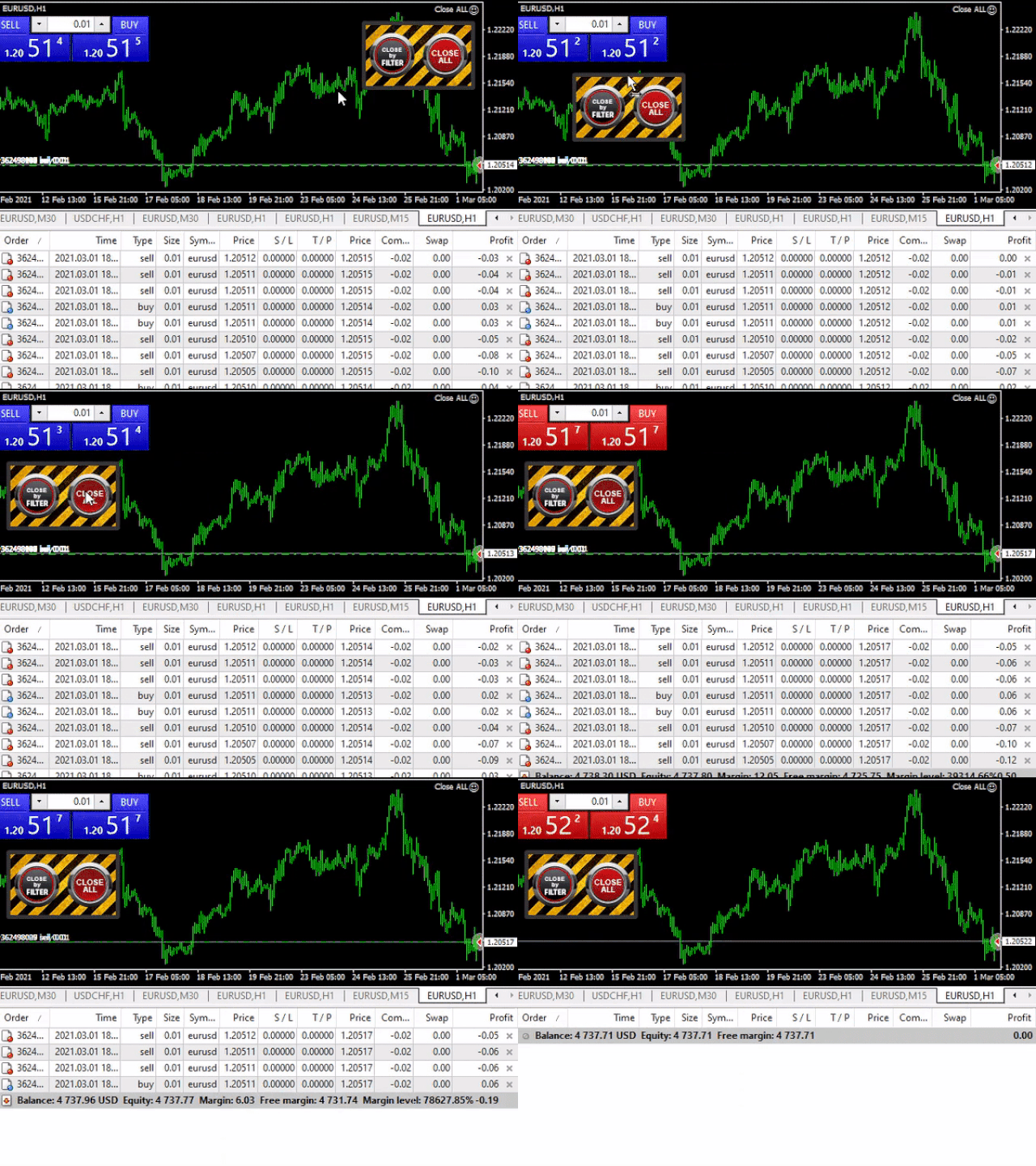
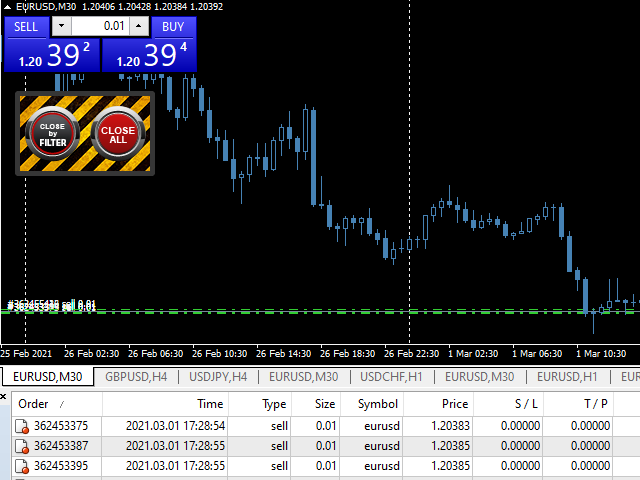
This is a simple and very effective utility for closing orders with one click. You will need it if you have a number of open orders on your balance and it takes too long to close them manually, which might lead to an extra loss of money on the account.

The utility consists of an external panel with two buttons "Close by Filter" and "Close ALL", which is convenient to move around the graph.

You can set the Close ALL utility so that orders are closed as soon as the specified profit or loss value is reached in the deposit currency.

You can also set up a scheduled closing by setting the desired profit size or limiting your loss. To do this, just activate the Close by FILTER button.

This utility will save your deposit in case of a sharp market change. Just add it to any free chart and use it for your daily trading.

Thanks to the minimal set of parameters, you can easily set up the utility for any symbol in MT4 or MT5.

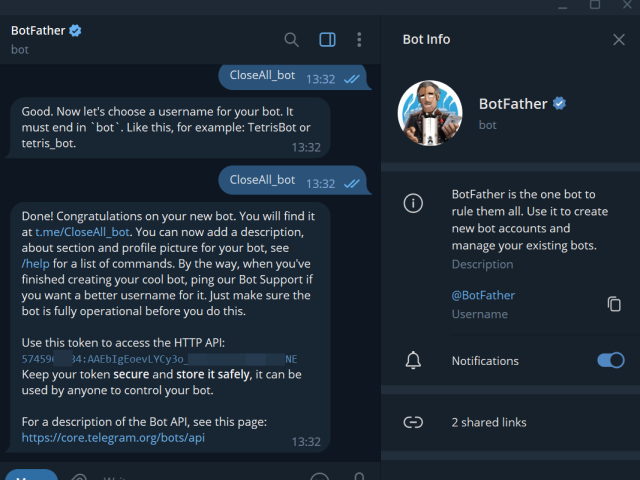
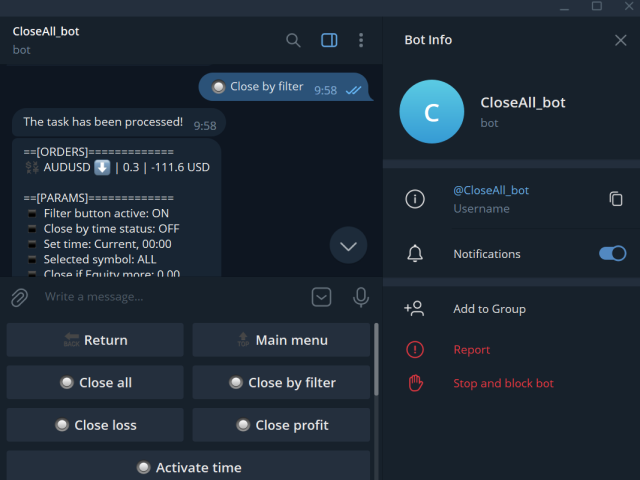
The latest version of the Close All PRO utility supports interactive control via Telegram messenger.

Manual Guide: here     

You can also set up a scheduled closing by setting the desired profit size or limiting your loss. To do this, just activate the Close by FILTER button.

This utility will save your deposit in case of a sharp market change. Just add it to any free chart and use it for your daily trading.

Thanks to the minimal set of parameters, you can easily set up the utility for any symbol in MT4 or MT5.

The latest version of the CloseAll utility supports interactive control via Telegram messenger.

Close ALL MT4: here    ALL my programs: here

Settings of "Close ALL" button:

  • Close (All pairs/Current) -select the settings for orders of all symbols or only for a pair of the current chart
  • Close ( ALL/LOSS) - select whether to close all orders or only unprofitable ones

Settings of "Close by FILTER" button:

  • Close (All pairs/Current) -select the settings for orders of all symbols or only for a pair of the current chart
  • Close by Time - use it to activate (true) the order closing schedule
  • Day to close - the current day is set by default, but you can set any day of the week
  • Hour to close (You can set 0-23 hours) - sets the closing hour according to the broker's time
  • Minute to close (You can set 0-59 minutes) - sets the closing minutes according to the broker's time
  • Equity Model (Currency/Percent) - the choice of closing orders when account Equity reaches a certain size in the currency or as a percentage of the Deposit

Telegram Options:

  • Telegram Bot Token - is an individual token of the side. You need to create your personal bot with any name.
  • Channel for results - the IP of the channel to control the bot.
  • Setting up sending results: EVERY DEAL or DAILY BALANCE - receive notification of a change (closing) of a transaction or once a day (Balance per day).

추천 제품
When executing an order, whether through the Metatrader ticket on a computer or the Metatrader app on a mobile device, either manual or pending, Easy Trade will automatically set the take profit and stop loss levels, as well as a limit order with its respective take profit and stop loss levels. It follows the trading strategy for market open (US30, US100, US500), but it can be applied to any market asset.
FREE
Trading Panel - Smart Stop Management A free professional trading panel for MT4, built to make manual execution faster, cleaner, and smarter. Trading Panel - Smart Stop Management helps you place Market, Limit, and Stop orders directly from the chart, manage position size, calculate TP/SL from volatility, and protect your execution from temporary spread widening during news, rollovers, or thin market conditions. The panel uses local smart stop logic based on the middle price, helping reduce
FREE
Auto Close Manager EA – Equity & Account Protection Utility Overview Auto Close Manager EA is a risk management utility for MetaTrader 4 designed to automatically close all open positions when a predefined floating profit or floating loss level is reached. This Expert Advisor does NOT open trades. It only monitors account equity and manages existing positions. The EA works with manual trades and can optionally include trades opened by other Expert Advisors. How It Works The EA continuously moni
Exp Swing
Vladislav Andruschenko
4.45 (65)
그것은 Swinger(Pendulum, Cheburashka)라고 하는 유명한 전략의 모델을 사용합니다. 전략은 두 개의 반대되는 보류 중인 주문을 배치하는 것입니다. 가격이 특정 방향으로 이동하면 하나의 보류 주문이 트리거되고 다른 주문의 로트 크기가 증가합니다. EA는 세 가지 유형의 개설 보류 주문(TypeofTrade)을 제공합니다. 배치 후 자동 개설(즉시 개설 AutoTrade) 수동 개봉 후 개봉 및 관리 (수동 개봉 ManualTrade) 높음/낮음 수준으로 열기(과거 막대 TFTrade의 경우 높음 낮음) OCO(One-Cancels-the-Other) 주문은 두 개의 주문으로 구성된 조건부 주문의 일종입니다. 두 번째 주문이 체결되면 첫 번째 주문은 자동으로 취소됩니다. 스윙 - 전체 설명 MT5 version 구입 방법 설치하는 방법     로그 파일을 얻는 방법     테스트 및 최적화 방법     Expforex의 모든 제품 작동 원리 시작 시 Expe
FREE
NAS100 Auto Sl And TP
Moustapha Boulouz
5 (2)
MT4용 NAS100 Auto SL 및 TP 메이커를 소개합니다: 메타트레이더 4에서 나스닥 100 시장을 탐색하는 트레이더에게 필수적인 보조 도구인 NAS100 Auto SL 및 TP 메이커로 손절 및 테이크프로핏 설정을 다시는 놓치지 마세요. 이 도구는 손절 및 테이크프로핏 레벨을 자동으로 관리할 수 있는 원활한 솔루션을 찾는 분들을 위해 설계되었습니다. 주요 특징: 손쉬운 자동화: 스톱로스 및/또는 테이크프로핏 없이 나스닥 100 거래를 자동으로 모니터링합니다. 사용자가 구성한 설정에 따라 레벨을 동적으로 조정합니다. 다양한 주문 유형: 나스닥 100의 시장가 주문과 지정가 주문 모두 호환됩니다. 메타트레이더 4에서 사용할 수 있는 다양한 주문 유형을 지원합니다. 맞춤형 구성: 사용자 친화적인 매개변수 설정으로 추적 기본 설정 및 손절/익절 수준을 사용자 지정할 수 있습니다. 유연한 범위: 실행되는 특정 NAS100 상품 또는 거래되는 모든 상품에 대해 손절 및 이익실현을 설
FREE
Lot by Risk
Sergey Vasilev
4.83 (23)
위험 거래 패널에 의해 많은 수동 거래를 위해 설계되었습니다. 이 명령을 보낼 수있는 다른 수단이다. 패널의 첫 번째 특징은 제어 라인을 사용하여 편리하게 주문할 수 있다는 것입니다. 두번째 특징은 정지 손실 선의 면전에서 주어진 위험을 위한 거래 양의 계산입니다. 제어 라인은 단축키를 사용하여 설정됩니다: 이익을-기본적으로 티 키; 가격-기본적으로 피 키; 정지 손실-기본적으로 키; 당신은 거래 패널의 설정에서 키를 직접 구성 할 수 있습니다. 작동 알고리즘: 1)-우리는(이 모든 레벨을 배치 할 필요가 없습니다)원하는 장소에 레벨을 배치; 2)–위험 지정(선택 사항); 3)-녹색 주문 보내기 버튼을 클릭하십시오.; 4)–우리는 배치 될 순서를 기다리고 있습니다,또는 오류 메시지와 경고가 나타납니다; 5)-우리는 전문가 고문에 마법에 의해 연결된 현재 기호에 대한 모든 주문을 닫으려면,다음 닫기 주문 버튼을 클릭합니다. 주문 보내기 버튼을 여러 번 눌러서는 안
FREE
OTRX Fimathe Backtest is a tool for the Trader or Enthusiast who uses the Fimathe technique created by Trader Marcelo Ferreira to carry out his training and validate if he can obtain profitability. In this tool you will be able to: 1. Define whether you are looking for a buy or sell entry. (Trend). 2. Define by clicking twice on the horizontal lines where your Reference Zone and your Neutral Zone will be. 3. Monitor the entry, subcycle and exit of the trade. 4. Trading Summary, Daily, Week

FREE
This simple but useful script calculates the lot in % of the deposit. It is indispensable for risk management. There is only one customizable parameter: MaxRisk - risk in % for lot calculation. The product works as a standard script. Launch it once on an appropriate chart and start trading using the calculated lot value. Genious is simplicity! Happy trading!
FREE
EasyTradePad
Sergey Batudayev
5 (5)
EasyTradePad – MetaTrader 4용 트레이딩 패널 EasyTradePad   는 수동 및 반자동 거래를 위한 도구입니다. 이 패널을 통해 주문 및 포지션을 빠르게 관리하고, 한 번의 클릭으로 위험 관리 계산을 수행할 수 있습니다. 패널 특징: 사전 정의된 위험(% 또는 예치 통화)으로 거래를 시작하고 마감합니다. SL 및 TP를 포인트, 백분율 또는 금전적 가치로 설정하세요 위험 대비 보상 비율을 자동으로 계산합니다 손절매를 손익분기점으로 이동 부분 포지션 마감 트레일링 스톱(포인트 또는 캔들 섀도우 기준) 위치 평균화 및 피라미딩 활성 거래의 매개변수 수정 [   데모   ] [   지침   ] 추가 기능: 피라미딩 가격이 이익실현을 향해 움직일 때마다 거래를 단계적으로 추가합니다. 각 새 거래의 위험을 줄일 수 있습니다. 추가되는 거래 수는 쉽게 설정할 수 있습니다. 평균화 차트에서 사용자 지정 수준으로 추가 주문을 할 수 있습니다. 포지션은 평균 진입 가
This tool will perform Trailing stop loss and Break even management for orders. Helps you limit or reduce the time spend watching orders on the screen, especially when you need to go to sleep. Just add this EA to 1 chart, you can manage all pairs. You can filter orders by comment, magic number, symbol, and order ticket number. When Breakeven it can add shift/offset pips (to cover the commission...). You can try in strategy tester before purchase. The EA will add Buy and Sell alternately, so yo
Close_All_Trades_with_TP_SL is a reliable and efficient MQL4 Expert Advisor designed to simplify and automate trade management for all open positions on your MT4 account. This EA is especially useful for traders who open multiple trades quickly or use high-frequency strategies where manual TP/SL placement becomes difficult and time-consuming. The primary purpose of the EA is to ensure that every open trade—whether Buy or Sell—always has a predefined Take Profit (TP) and Stop Loss (SL) applied. M
FREE
Trade Manager G2 MT4
Ida Bagus Putu Mahardika
TRADE MANAGER G2 – PRODUCT DESCRIPTION By Ida Bagus Putu Mahardika Trade Manager G2 – All-in-One Trading Panel for Professional Execution & Risk Management Trade Manager G2 is a next-generation trading panel designed to give you full control over order execution, position management, and profit optimization in real time on MetaTrader 5. With a modern card-based user interface and individual TP actions per level, this panel elevates your trading experience to the next level. KEY ADVANTAGES OF
이것은 구매 및 판매 주문 네트워크를 배치하는 일반 패널입니다. 이 전문가 고문은 설정에 정의 된 이익 순서를 닫습니다. 그런 다음 사다리라는 매개 변수가 있습니다.이 매개 변수에는 사다리 매개 변수에 의해 표시된 점(여기서 주요 설정에서는 10 점)으로 주문 사이의 거리가 증가하기 시작하므로 두 번째 순서는 10 점,세 번째 순서는 20 점,네 번째 순서는 40 점 등이 포함됩니다. 그런 다음 설정에 있지 않기 때문에 이 고문에 무엇이 있는지 알아야 하지만 이 고문이 제안한 전략의 논리에 영향을 미칩니다.. 의이 고문이 다섯 개 주문을 엽니 다 여기 설정에서 가정 해 봅시다... 또는 구매... 또는 판매... 좋아.. 그러나,주문을 열 때,그것은 이전에 열린 주문의 절반으로 다음 오픈 주문의 로트를 증가시킬 것입니다. 즉,설정에서 0.1 로트를 설정하면 계획에 따라 5 개의 주문이 열리고 현재 가격에 가까운 첫 번째 주문은 0.1 로트의 가격으로 열립니다. 두 번째는 주어진
UltraFast Trade Manager V2.60 - The Ultimate "True Break-Even" Utility The UltraFast Trade Manager is not an auto-trading robot that opens trades. It is a professional Trade Manager . Whether you use a Grid/Martingale EA, or trade manually, this tool manages your open trades, calculates your real profits, hides your targets from the broker, and closes your trades with one click. Version 2.60 is completely dummy-proof. It calculates everything for you, so you never have to guess your profit again
FREE
PZ Trade Pad EA
PZ TRADING SLU
4.29 (31)
This simple visual expert advisor allows you to trade easily from the chart. It handles risk management for you and can perform several useful tasks with your existing trades, saving time and making risk-management for each individual trade easier.  [ Installation Guide | Update Guide | Troubleshooting | FAQ | All Products   |  Get Help ] Trade easily from the chart Trade with precise risk management, hassle free Trade pending order with drag and drop price selection Set SL and TP levels with
FREE
This is a DEMO version of the Smarter Trade Manager Smarter Trade Manager  is an advanced trade management tool that can monitor and manage your manual and EA trades according to the settings you choose. It works as an Expert Advisor (EA), it does not open any trades but it closes trades as per the auto closing settings or when manually pressing any of the close buttons. FEATURES: Three-dimensional  interactive  view of your trades Trade Summary, P/L, Alerts, Closure by  Currency Trade Summary,
FREE
# Zikiman Risk Panel Standard MT4 **Zikiman Risk Panel Standard MT4는 수동 매매 트레이더를 위한 MT4 트레이딩 패널이자 포지션 사이즈·로트 계산기입니다.** 고정 금액 리스크, 계좌 잔고 대비 리스크 비율 또는 고정 로트를 선택하고, 차트에서 Stop Loss와 Take Profit을 배치한 뒤 Market, Limit, Stop 주문을 준비할 수 있습니다. 진입 방향과 시점은 사용자가 직접 결정합니다. 이 도구는 매매 신호를 만들거나 자동으로 진입하지 않습니다. ## 리스크 기반 포지션 사이징 세 가지 방식을 지원합니다. - **고정 금액 리스크** — 한 거래에서 감수할 계좌 통화 금액을 입력합니다. - **리스크 비율** — 현재 계좌 잔고의 일정 비율로 리스크를 설정합니다. - **고정 로트** — 원하는 거래량을 직접 입력합니다. 금액 또는 비율 모드에서는 예정 진입가와 Stop Loss 사이의 거리를 기준
FREE
FDT Guardian — the stop loss MetaTrader doesn't give you MetaTrader lets you set a stop loss per order. What it doesn't let you set is a loss limit for the account as a whole . And that's precisely the number that matters when you aren't the one opening the trades: when you copy another trader, when several robots are running at once, or simply when you're away from the screen. FDT Guardian tracks the total floating P/L of your account — every open order across every symbol, swaps and commission
Profitstat is a free indicator that scans your history and displays it on the chart. The free version shows the number of trades and profit made on the current and previous day. The data is updated instantly as soon as a trade closes. Simply attach it to any chart and it gives the account data irrespective of the chart currency nor timeframe.
FREE
IceFX TradeInfo
Norbert Mereg
4.77 (44)
IceFX’s TradeInfo is an utility indicator which displays the most important information of the current account and position. Displayed information: Information about the current account (Balance, Equity, Free Margin). Current spread, current drawdown (DD), planned profit, expected losses, etc. Number of open position(s), volume (LOT), profit. Today’s and yesterday’s range. Remaining time to the next candle. Last day profit information (with integrated IceFX ProfitInfo indicator). Risk-based LOT
FREE
TSim
Sergey Kruglov
Утилита  TSim   позволяет симулировать ручную торговлю в Тестере Стратегий MetaTrader 4. В панеле можно устанавливать размеры лота, тейпрофита и стоплосса. Панель имеет кнопки Sell   и Buy для выставления рыночных ордеров, а также кнопки CloseSell, CloseBuy и CloseAll для быстрого закрытия ордеров. Под панелью отображается список открытых ордеров. Внимание. Панель работает только в Визуальном режиме Тестера Стратегий MetaTrader 4.
FREE
SL and TP Setter
Giacomo Barone
4 (1)
You can manually open a trade (one click), and this EA will take care of setting the SL and TP. SL and TP are set based on the number of pips you specify in the input screen. You can also choose monetary SL and TP. SL and TP are determined based on the weighted average price (WAP), so if you open a new trade, SL and TP will be updated according to the new WAP. The WAP is not unique but differentiated between buy and sell trades (this is useful only if you open opposite trades on the same chart)
FREE
Neonplox Trade Manager
Mr Roberto Carlos Ferreira Silva
n3oNpLoX Trade Manager Market Order. Stop Order. Limit Order. To help you Place trades based on the amount of Money in Dollars you want to risk. As it will show in the screenshots you can calculate the right Lot size for the money you want to risk. Calculates Lot Size based on the distance between Stop Loss and Entry Point. 5 Options for TP - (1RR,2RR,3RR,4RR,5RR) It will help you manage your risk and Place trades with the correct Lot Size. So you will not over expose yourself and your money
FREE
Breakeven Manager MT4
Ibrahim Olalekan Ganiu
Hello, trading champs! I trust you are doing well. Have you experienced entering a position where the market initially moves in your favour or approach your takeprofit then suddenly the market reversed opposite your position? Well, it has happened to me numerous times and today I decide to fight back. I present to you a trade manager that help you protect your position(s). This project helps you set your position(s) to breakeven either when a certain amount of pips you specify is reached or a
FREE
Fully functional manual trade panel with risk/reward, auto SL, lot size calculation, one-click trading, hidden (virtual) stop loss/take profit and pending orders, scale in and out of trades (partial close), news events and more. Works with all symbols not just currency pairs. Brings an incredible amount of functionality to MetaTrader for free and for both demo and live accounts. Features Lot size calculation - based on % of account to risk, fixed amount or dynamic lots Automatic take profit base
FREE
一键平仓小工具,可以针对买单、卖单和挂单进行批量操作,可以操作当前图表订单和所有订单,简单高效。 第一行第一个按钮是关闭当前图表 品种 所有买单,第二个按钮是关闭当前图表品种的所有卖单,第三个按钮是关闭当前图表 品种 的所有订单; 第二行 第一个按钮是删除当前图表 品种 所有买单挂单,第二个按钮是 删除 当前图表品种的所有卖单 挂单 ,第三个按钮是 删除 当前图表 品种 的所有 挂单 ; 第三行第一个按钮是关闭所有 品种的全部买单,第二个按钮是关闭所有 品种的全 卖单,第三个按钮是关闭所有 品种的全部订单; 第四行第一个按钮是删除所有 品种全部买单挂单 ,第二个按钮是 删除 全部品种 的全部卖单挂单 ,第三个按钮是删除 全部品种 的全部挂单 。 希望此程序能对您有用
FREE
VR Color Levels MT4
Vladimir Pastushak
5 (2)
VR 컬러 레벨은 추세선, 직사각형, 텍스트 등의 요소를 사용하여 기술적 분석을 적용하는 사람들에게 편리한 도구입니다. 차트에 직접 텍스트를 추가하고 스크린샷을 찍는 것이 가능합니다. 설정, 세트 파일, 데모 버전, 지침, 문제 해결 등은 다음에서 얻을 수 있습니다. [블로그] 다음에서 리뷰를 읽거나 작성할 수 있습니다. [링크] 버전 [MetaTrader 5] 표시기 작업은 한 번의 클릭 으로 수행됩니다. 이렇게 하려면 선이 있는 버튼을 클릭하세요. 그러면 커서 아래에 추세선이 나타납니다. 그런 다음 커서를 움직여 선 위치 를 선택하고 다시 클릭하여 수정하면 됩니다. 표시기 의 특징은 스타일과 색상의 모든 변경 사항이 자동으로 저장되고 나중에 새로 생성된 모든 그래픽 개체에 적용된다는 것입니다. 이 지표에는 서로 다른 스타일의 추세선을 설정하기 위한 두 개의 독립 버튼, 서로 다른 스타일의 두 개의 독립 직사각형, 자체 스타일이 있는 하나의 텍스트 필드 및 스크린샷 생성용 버튼
FREE
Robi Auto
Yvan Musatov
Robi Auto Expert Advisor works using sharp tick movements. It goes through the entire history and all currency pairs with one single setting. The more latency your broker has in the amount of the Internet channel, the higher you need to set stop loss, take profit and trailing stop so that the server can process them at the desired price and the lower the trading frequency will be. The uniqueness of the Expert Advisor is that it can be run on any hourly period, on any currency pair and on the se
Expert Advisor for MT4 Useful utility MUST have for all traders.  With 1 click button, you're able to close all your open positions. Its come with a warning pop up notification when you click to close all your trades, to avoid an accident press the button. Just press 'Yes' to confirm or 'No' to cancel it. The expert will close all your open positions no matter what pairs you currently open or directions. Just attach the expert on 1 of your chart, and you're good to go.
Calc for MT4
Radim Kucera
5 (2)
This indicator is designed to provide all useful information about symbol, account, positions and profit. It is developed for improving trader's money management. Parameters Calc can be divided to separate blocks. Each block is possible to hide, set its own color and other properties. Block symbol: This block displays information about actual SPREAD, POINT VALUE (in deposit currency for 1 lot), SWAP LONG and SHORT. Show symbol info - display/hide this block Color of symbol info - color of this
FREE
이 제품의 구매자들이 또한 구매함
Local Trade Copier EA MT4
Juvenille Emperor Limited
4.96 (111)
Local Trade Copier EA MT4는 동일한 Windows 컴퓨터 또는 Windows VPS에서 여러 MetaTrader 4 계정 간에 거래를 복사하고 관리할 수 있는 빠르고 유연한 거래 복사기입니다. 로컬 거래 동기화 기능과 함께 Receiver 측에서 로트 크기, 리스크 관리, 거래 필터링, 심볼 매핑, 거래 관리 및 계정 보호를 독립적으로 설정할 수 있습니다. Transmitter와 Receiver 터미널을 약 1분 안에 설정하고, 동일한 브로커 또는 서로 다른 브로커의 계정 간에 수동 거래 또는 EA 거래를 복사할 수 있습니다. 적절한 조건에서는 로컬 MetaTrader 터미널 간의 거래 정보가 0.5초 이내 에 동기화될 수 있습니다. 실제 체결 속도는 브로커 지연 시간, 네트워크 상태, 컴퓨터/VPS 성능 및 터미널 부하에 따라 달라집니다. 구매 전에 무료 데모를 사용해 보세요 MT4 데모 계정에서 Local Trade Copier EA MT4의 모든 기능을
Trade Manager EA에 오신 것을 환영합니다. 이 도구는 거래를 보다 직관적이고 정확하며 효율적으로 만들기 위해 설계된 궁극적인 리스크 관리 도구 입니다. 단순한 주문 실행 도구가 아닌, 원활한 거래 계획, 포지션 관리 및 리스크 제어를 위한 종합 솔루션입니다. 초보자부터 고급 트레이더, 빠른 실행이 필요한 스캘퍼에 이르기까지 Trade Manager EA는 외환, 지수, 상품, 암호화폐 등 다양한 시장에서 유연성을 제공합니다. Trade Manager EA를 사용하면 복잡한 계산은 이제 과거의 일이 됩니다. 시장을 분석하고 진입, 손절 및 익절 수준을 차트의 수평선으로 표시한 후 리스크를 설정하면, Trade Manager가 이상적인 포지션 크기를 즉시 계산하고 SL 및 TP 값을 실시간으로 표시합니다. 모든 거래가 간편하게 관리됩니다. 주요 기능: 포지션 크기 계산기 : 정의된 리스크에 따라 거래 크기를 즉시 결정합니다. 간단한 거래 계획 : 진입, 손절, 익절을 위한
Trade Assistant MT4
Evgeniy Kravchenko
4.43 (197)
거래당 위험 계산, 라인을 사용한 손쉬운 신규 주문, 부분 청산 기능을 통한 주문 관리, 7가지 유형의 트레일링 스탑 및 기타 유용한 기능을 제공합니다. 추가 자료 및 지침 설치 지침 - 애플리케이션 지침 - 데모 계정용 애플리케이션 평가판 라인 기능       - 차트에 개시선, 손절매, 차익실현을 표시합니다. 이 기능을 사용하면 새로운 주문을 쉽게 하고 개봉 전에 추가 특성을 볼 수 있습니다. 위기 관리       -       위험 계산 기능은 설정된 위험과 손절매 주문의 크기를 고려하여 새 주문의 볼륨을 계산합니다. 이를 통해 손절매 크기를 설정하고 동시에 설정된 위험을 존중할 수 있습니다. 로트 계산 버튼 - 위험 계산을 활성화/비활성화합니다. 필요한 위험 값은 위험 필드에 0에서 100 사이의 백분율 또는 예금 통화로 설정됩니다. 설정 탭에서 위험 계산 옵션을 선택합니다. $ 통화, % 잔액, % 지분, % 자유 마진, % 사용자 정의, % AB 이전 일, % AB
Trade Indicator Assistant is a powerful MT4 utility designed to turn indicators into automated trading systems. Its main feature is the ability to automatically detect an indicator’s   BUY and SELL signal buffers , without requiring you to know the buffer numbers, search through indicator settings, or modify the indicator source code. Bonus Indicator: After purchasing Trade Indicator Assistant, contact me to receive Trade Signal Pro completely free as a bonus indicator. [Download Demo Version]
Exp COPYLOT CLIENT for MT4
Vladislav Andruschenko
4.69 (65)
MetaTrader 4용 전문 트레이드 복사기 MetaTrader 4 용 빠르고 안정적이며 전문적인 트레이드 복사기입니다. COPYLOT 은 MetaTrader 4 와 MetaTrader 5 터미널 간에 Forex 거래를 복사할 수 있으며, 다양한 계좌 유형과 운용 방식에 맞춰 유연한 동기화 환경을 제공합니다. COPYLOT MT4 버전 지원 방식: MetaTrader 4 → MetaTrader 4 MetaTrader 5 Hedge → MetaTrader 4 MetaTrader 5 Netting → MetaTrader 4   MT5 버전 상세 설명 + DEMO + PDF 구매 방법 설치 방법 로그 파일 확인 방법 테스트 및 최적화 방법 Expforex의 모든 제품 MetaTrader 5 버전 을 사용하면 MetaTrader 5 → MetaTrader 5 및 MetaTrader 4 → MetaTrader 5 복사도 지원됩니다: COPYLOT CLIENT for MT5 COPYLOT 은
TradePanel MT4
Alfiya Fazylova
4.84 (95)
Trade Panel은 다기능 거래 도우미입니다. 이 애플리케이션에는 50개 이상의 수동 거래 기능이 포함되어 있으며 대부분의 거래 작업을 자동화할 수 있습니다. 앱 사용 설명서 : https://www.mql5.com/en/blogs/post/756482 데모 계정용 앱 체험판: https://www.mql5.com/en/blogs/post/750865 앱 설치 방법: https://www.mql5.com/en/blogs/post/756239 시각 모드에서 앱 테스트 방법: https://www.mql5.com/en/blogs/post/770277 VPS MetaTrader에 앱 설치 방법: https://www.mql5.com/en/blogs/post/770190 거래. 한 번의 클릭으로 거래를 수행할 수 있습니다: 리스크 자동 계산과 함께 예약 주문 및 포지션 열기. 한 번의 클릭으로 여러 주문 및 포지션 열기. 주문 그리드 열기. 예약 주문 및 포지션을 그룹별로 닫기. 포지션
Take a Break
Eric Emmrich
5 (31)
Take a Break pauses your Expert Advisors when trading is a bad idea: before news, after a daily loss, outside your trading hours, or when a rule you wrote yourself says so. When the pause is over, your EAs simply continue. Account protection for all your EAs in one tool: news filter, drawdown and equity protection, time filter and custom rules. One EA on one chart protects the whole account, the free indicator gives every chart its own rules on top. Free demo | What is new in 26.09 | Support Ass
Trade Manager MT4 DaneTrades
Levi Dane Benjamin
4.09 (11)
거래 관리자는 위험을 자동으로 계산하는 동시에 거래를 빠르게 시작하고 종료하는 데 도움을 줍니다. 과잉 거래, 복수 거래 및 감정 거래를 방지하는 데 도움이 되는 기능이 포함되어 있습니다. 거래를 자동으로 관리할 수 있으며 계정 성과 지표를 그래프로 시각화할 수 있습니다. 이러한 기능은 이 패널을 모든 수동 거래자에게 이상적으로 만들고 MetaTrader 4 플랫폼을 향상시키는 데 도움이 됩니다. 다중 언어 지원. MT5 버전  |  사용자 가이드 + 데모 트레이드 매니저는 전략 테스터에서 작동하지 않습니다. 데모를 보려면 사용자 가이드로 이동하세요. 위기 관리 % 또는 $를 기준으로 위험 자동 조정 고정 로트 크기 또는 거래량과 핍을 기반으로 한 자동 로트 크기 계산을 사용하는 옵션 RR, Pips 또는 Price를 사용한 손익분기점 손실 설정 추적 중지 손실 설정 목표 달성 시 모든 거래를 자동으로 마감하는 최대 일일 손실률(%)입니다. 과도한 손실로부터 계정을 보호하고 과도한
Telegram to MT4 Multi-Channel Copier   는 Telegram 및 Discord 채널의 트레이딩 시그널을 MetaTrader 4로 자동 복사합니다. 봇도, 브라우저 확장도, 수동 복사도 필요 없습니다. Telegram이나 Discord에 시그널이 도착하면 EA가 몇 초 안에 터미널에서 주문을 실행합니다. 그리고 채널을 복사하기 전에, 내장 백테스터가 그 채널이 내 계좌에서 어떤 결과를 냈을지 보여줍니다. 제품은 두 가지 구성 요소로 이루어집니다: Telegram 채널을 수신하는 Windows 애플리케이션과, MT4 터미널에서 시그널을 실행하는 본 EA입니다. MT5 버전도 제공됩니다   여기 . 설정 가이드와 앱 다운로드:   https://www.mql5.com/en/blogs/post/768988 텔레그램 시그널 채널을 백테스트하는 방법 을 확인하세요. 현재 가격은 향후 인상될 예정입니다. 작동 방식 앱은 여러분 자신의 Telegram 계정으로 연결되므
FCK CurrencyStrength Pro
Patel Hitendrakumar Mahendrabhai
Hi Friends, " FCK Currency Strength Pro " is a auto & semi auto trading expert with direction of pair. Buy-Sell separate or multi currency in one click. The strategy of  FCK Currency Strength Pro  is a combination of custom indicator, Trendlines, Support & Resistance levels ( Price Action ) and most important secretive trading algorithm mentioned above. Download News Ex4 and csv file You need the following SDSnews.ex4 in MQL4/Libraries and the daylightsavings.csv in MQL4/Files. Only 4 of 5 copi
The product will copy all telegram signal to MT4   ( which you are member  ) , also it can work as remote copier.  Easy to set up, copy order instant, can work with almost signal formats, image signal, s upport to translate other language to English Work with all type of channel or group, even channel have "Restrict Saving Content", work with  multi channel, multi MT5 Work as remote copier: with signal have ticket number, it will copy exactly via ticket number. Support to backtest signal. How to
RS Trade Copier - 진짜 그래픽 인터페이스를 갖춘 초고속 로컬 트레이드 카피어입니다. 계좌번호를 일일이 입력하지 마세요. 200개가 넘는 복잡한 입력 파라미터 목록은 이제 끝입니다. 여러 MT4와 MT5 터미널 간 거래 작업을 복사하기 위한 안정적이고 유연한 도구입니다. 이 도구는 경험 많은 트레이더, 신호 서비스, 개인 투자자 모두에게 적합합니다. 하나 또는 여러 시그널 소스(Provider)에서 하나 또는 여러 리시버(Client)로 트레이딩을 동기화 하여 높은 정밀도와 최소 지연 시간을 제공합니다. 간단한 자동 설정부터 고급 수동 구성까지 지원합니다. 수동 또는 다른 EA로 열린 주문에 간섭하지 않습니다. 모든 작업이 MT4 내부에서 로컬로 처리 되며 외부 서버 의존성 없이 실행됩니다. RS Trade Copier와 다른 솔루션 비교 RS Trade Copier 다른 솔루션 설정 시각적 단계별 마법사. 설정에 약 1분 소요. 200개 이상의 불분명한 입력 매개변수.
MT4 to Telegram Signal Provider 는 사용하기 쉽고 완전히 사용자 정의가 가능한 도구로, 텔레그램으로 신호를 보내어 계정을 신호 제공자로 변환할 수 있습니다. 메시지 형식은 완전히 사용자 정의가 가능합니다! 그러나 간단한 사용을 위해 미리 정의된 템플릿을 선택하고 메시지의 특정 부분을 활성화하거나 비활성화할 수도 있습니다. [ 데모 ]  [ 매뉴얼 ] [ MT5 버전 ] [ 디스코드 버전 ] [ 텔레그램 채널 ]  New: [ Telegram To MT5 ] 설정 단계별 사용자 가이드 가 제공됩니다. 텔레그램 API에 대한 지식이 필요 없으며, 개발자가 필요한 모든 것을 제공합니다. 주요 기능 구독자에게 보낸 주문 세부 정보를 사용자 정의할 수 있는 기능 예를 들어 브론즈, 실버, 골드와 같은 계층 구독 모델을 만들 수 있습니다. 골드 구독은 모든 신호 등을 받게 됩니다. ID, 심볼 또는 코멘트별 주문 필터링 주문이 실행된 차트의 스크린샷을 포함 보낸
Telegram to MT4 Coppy
Sergey Batudayev
4.09 (11)
Telegram에서 MT4로:   최고의 신호 복사 솔루션 최첨단 유틸리티인   Telegram to MT4를   사용하여 거래를 간소화하세요. DLL 없이도 Telegram 채널과 채팅에서 MetaTrader 4 플랫폼으로 거래 신호를 직접 복사할 수 있습니다. 이 강력한 솔루션은 탁월한 정밀도와 맞춤 설정 옵션을 통해 원활한 신호 실행을 보장하여 시간을 절약하고 효율성을 높여줍니다. [ Instructions and DEMO ] 주요 특징 직접 Telegram API 통합 전화번호와 보안 코드를 통해 인증하세요. 사용자 친화적인 EXE 브리지를 사용하여 채팅 ID를 손쉽게 가져오고 관리하세요. 여러 채널/채팅을 추가, 삭제, 새로 고침하여 동시에 신호를 복사합니다. 고급 필터를 사용한 신호 파싱 사용자 정의 예외 단어(예: "보고서", "요약")가 포함된 원치 않는 신호를 건너뜁니다. 유연한 SL 및 TP 형식을 지원합니다: 가격, 핍 또는 포인트. 신호가 가격 대신 지점을 지정
Trade Copier Global
Laszlo Tormasi
5 (15)
Trade Copier Global: The name speaks for itself. This copier allows you to copy orders between MT4 terminals even if they are not installed on the same computer. Features Copying trades between MT4 terminals around the world with a short delay. Automatically recognizes symbol prefixes. Can connect many Slaves to the same Master. Supports pending and market orders. Supports partial order close (with limitations, see below) Can send messages and notifications to the Slaves from the Master Several
Partial Closure EA MT4
Juvenille Emperor Limited
5 (3)
Partial Closure EA MT4 는 계정의 모든 거래를 부분 청산할 수 있게 해줍니다. 로트 크기의 선택된 비율 및/또는 티켓 번호로 수동 청산하거나, TP/SL 수준의 지정된 비율에 따라 자동으로 초기 로트 크기의 일부를 최대 10개의 이익 실현 및 10개의 손절매 수준에 걸쳐 청산할 수 있습니다. 특정 매직 번호, 코멘트 또는 심볼을 지정하거나 제외하여 계정 내 모든 거래 또는 선택한 거래를 관리할 수 있습니다. 팁: 부분 폐쇄 EA MT4의 무료 데모 버전을 다운로드하고 데모 계정에서 사용해 보십시오: 여기 다운로드한 무료 데모 파일을 MT4 >> File >> Open Data Folder >> MQL4 >> Experts 폴더에 붙여넣고 터미널을 다시 시작합니다.   무료 데모 버전은 데모 계정에서만 한 번에 4시간 동안 모든 기능을 사용할 수 있습니다. 평가판 기간을 재설정하려면 MT4 >> 도구 >> 전역 변수 >> Control + A >> 삭제로 이동하세
VirtualTradePad mt4 Extra
Vladislav Andruschenko
4.85 (61)
한 번의 클릭으로 거래할 수 있는 거래 패널.   위치 및 주문 작업!   차트 또는 키보드에서 거래. 거래 패널을 사용하면 차트에서 클릭 한 번으로 거래하고 표준 MetaTrader 컨트롤보다 30배 빠르게 거래 작업을 수행할 수 있습니다. 거래자의 삶을 더 쉽게 만들고 거래자가 훨씬 빠르고 편리하게 거래 활동을 수행할 수 있도록 도와주는 매개변수 및 기능의 자동 계산. 차트의 무역 거래에 대한 그래픽 팁 및 전체 정보. 새로운 프리미엄 버전 출시:   VirtualTradePad PRO SE 로 트레이딩 워크플로를 업그레이드하세요.   MetaTrader 5   및   MetaTrader 4 를 위한 차세대 전문 트레이딩 패널입니다. MT5 버전 전체 설명   +DEMO +PDF 구입 방법 설치하는 방법     로그 파일을 얻는 방법     테스트 및 최적화 방법     Expforex의 모든 제품 열기 및 닫기, 반전 및 잠금, 부분 닫기/오토로트. 가상/실제 손절매/이익
작동 체험판 다운로드 Copy Cat More (카피캣) MT4 트레이드 카피어 (Trade Copier) 는 단순한 로컬 트레이드 카피어가 아닙니다. 오늘날의 트레이딩 과제를 위해 설계된 완전한 리스크 관리 및 실행 프레임워크 (risk management and execution framework) 입니다. 프롭 펌 (prop firm) 챌린지부터 개인 포트폴리오 관리까지, 견고한 실행, 자본 보호, 유연한 설정, 고급 트레이드 처리의 조합으로 모든 상황에 적응합니다. 이 카피어는   마스터 (Master, 송신측) 와 슬레이브 (Slave, 수신측)   두 모드 모두에서 작동하며, 시장가 주문과 대기 주문, 트레이드 수정, 부분 청산, 상호 청산 (Close By) 작업을 실시간으로 동기화합니다. 데모 및 실거래 계좌, 트레이딩 또는 인베스터 로그인 모두와 호환되며, EA·터미널·VPS가 재시작되더라도 영구 트레이드 메모리 (Persistent Trade Memory) 시
King Trade Copier MT4
Mohammed Maher Al-sayed Mohammed Ahmed Saleh
5 (1)
King Trade Copier는 같은 컴퓨터나 VPS에서 실행되는 MetaTrader 터미널들을 연결합니다. 한 계좌에서 열린 거래는 다른 계좌에도 나타납니다. 이 파일에는 두 가지 역할이 모두 들어 있어서, 같은 다운로드 파일이 Mode에 무엇을 설정하느냐에 따라 송신 측이 되기도 하고 수신 측이 되기도 합니다. 모든 차트에서 패널은 이 터미널이 송신 중인지 수신 중인지 표시하고, 반대편 계좌의 이름을 알려 주며, 응답한 수신 측의 수를 세고, 마지막 신호가 얼마나 지났는지 보여 줍니다. 복사되지 않은 주문은 사라지지 않고 그 이유를 패널에 남깁니다. 복사되는 항목 시장가 주문, 진입과 청산 대기 주문: 생성, 수정, 삭제 Stop Loss와 Take Profit, 최초 값과 그 이후의 모든 변경 부분 청산과 추가된 거래량 각 변경이 개별적으로 추적되므로, 본전으로 옮겨진 뒤 트레일링되는 스톱도 주문이 열려 있는 동안 수신 계좌에 똑같은 방식으로 전달됩니다. 속도와 무인 운영
MetaTrader 4 통화 강도 지표 이 통화 강도 지표 는 최대 28개 주요 통화쌍을 읽어 USD, EUR, GBP, JPY, CHF, CAD, AUD, NZD 등 8개 주요 통화에 각각 하나의 값을 산출합니다. 어느 통화가 주도하는지 알아보려고 차트를 하나씩 열 필요 없이, MetaTrader 4 차트의 패널 하나만 보면 어떤 통화가 매수되고 어떤 통화가 매도되는지 알 수 있습니다. 패널에 표시되는 내용 8개 통화 각각의 강도 막대와 백분율, 강한 순으로 정렬 멀티 타임프레임 매트릭스: 통화별로 세 개의 시간대를 나란히 표시하여 진입 전에 M15, H1, H4가 일치하는지 확인 각 행의 강도 히스토리. 20에서 60으로 올라온 통화와 90에서 60으로 내려온 통화는 다릅니다 최적 통화쌍 : 강도 차이가 가장 큰 조합을 정렬해 표시. 클릭하면 해당 차트가 열립니다 피할 통화쌍 : 두 통화가 함께 움직이면 거래할 여지가 없으며, 숨기지 않고 표시합니다 클릭 한 번으로 열리는 28
CloseIfProfitorLoss with Trailing
Vladislav Andruschenko
4.88 (32)
이익 추적 기능으로 총 이익/손실에 도달하면 MetaTrader 4에서 포지션을 청산합니다. 가상 정지 (별도 주문) 을 활성화할 수 있습니다. BUY 및 SELL 포지션을 별도로 계산하고 마감합니다 (BUY SELL 별도). 모든 심볼 또는 현재 심볼 만 닫고 계산합니다 (모든 심볼). 이익을 위해 후행 추적 을 활성화합니다 (후행 이익). 예금 통화, 포인트, 잔액의 %에 대한 총 손익을 마감합니다. 이 애플리케이션은 다른 EA와 함께 또는 수동 거래와 함께 모든 계정에서 사용하도록 설계되었습니다. MT5 버전 전체 설명 + DEMO + PDF 구입 방법 설치하는 방법 로그 파일을 얻는 방법 테스트 및 최적화 방법 Expforex의 모든 제품 일부 쌍 또는 모든 쌍의 총 거래 잔액이 설정에서 지정된 값보다 크거나 같으면 모든 포지션이 닫히고 주문이 삭제됩니다. 이 버전은 지정된 이익 수준에서 포지션을 마감할 수 있을 뿐만 아니라 더 나은 결과를 위해 이익을 추적할 수도 있습니다
Trade Dashboard MT4
Fatemeh Ameri
4.96 (55)
Trade Dashboard simplifies how you open, manage, and control your trades, with built-in lot size calculation. It allows you to execute trades, manage risk, and control positions directly on the chart, with tools such as partial close, breakeven, and trailing stop. Designed to reduce manual work and help you stay focused on your trading decisions. A demo version is available for testing. Detailed explanations of features are provided within the MQL5 platform. Installation instructions are include
Smart Copy Local MT4
Kyra Nickaline Watson-gordon
5 (7)
Smart Copy is an Easy-to-Use EA that supports Multi Copying Metatrader4 and Metatrader5 and Local/Remote Copying. (Remote Version is coming soon) Free version is available on Smart Copy Local Free MT4 Specifications :     Real Time, Multi Terminal - Multi Account - MT4/MT5 trade copying     Copy from netting to hedge and hedge to netting is supported.     Fast and instant copy     All settings are input visually.     Easy modifying symbol names, prefix, suffix     Enable/Disable copying s
Want automatically to put the pending order, take profit and stop loss? This EA will do it on your behalf! The Fibo Heart EA strategy will place limit order after the ‘check point’ breakout. The position will be triggered when the price make a successful retest. If not, the pending order will automatically deleted after price hit certain level. You also have option to enable market order (instant execution) and custom take profit in the inputs setting. This EA must be attached with Fibo Heart In
News Filter EA: Advanced Algo Trading Assistant News Filter EA is an advanced algo trading assistant designed to enhance your trading experience. By using the   News Filter EA , you can integrate a Forex economic news filter into your existing expert advisor, even if you do not have access to its source code. In addition to the news filter, you can also specify   trading days   and   hours   for your expert. The News Filter EA also includes   risk management   and   equity protection   features
Unlimited Trade Copier Pro is a tool to copy trade remotely to multiple MT4, MT5 and cTrader accounts at different computers/locations over internet. This is an ideal solution for you if you are a signal provider and want to copy your trades to other receivers globally on your own rules. One provider can copy trades to multiple receivers and one receiver can get trade from multiple providers as well. The provider can even set the subscription expiry for each receiver, so that receiver will not b
Bar Replay MT4
Hoang The Manh
3.43 (7)
Don't purchase before testing the Demo version first. DEMO version:   https://www.mql5.com/en/market/product/76917 __________________________________________________ This EA  - Tool allow you replay bar in Meta Trader 4 for back test. This Tool can back test in multi timeframe in only one chart. This Tool is very useful for Price action trader. It can work with Indicators, some indicators cannot works. So please download Demo to test before purchase.  Demo Version We do not accept refund in any
This is a program in the form of an EA that attaches to a chart in MetaTrader 4. Then, by using API from Bittrex, Binance websites, it downloads the history of altcoins. By selecting a pair name, the EA automatically downloads all time frames history (Daily,H12,H4,H2,H1,M30,M15,M5,M3,M1) so there is no need to attach multiple EAs to different charts. You can select one pair from Bittrex and 4 pairs from Binance exchange with one running EA and create up to 15 timeframes for 5 different pairs. Th
Strategy Builder offers an incredible amount of functionality. It combines a trade panel with configurable automation (covert indicators into an EA), real-time statistics (profit & draw down) plus automatic optimization of SL, TP/exit, trading hours, indicator inputs. Multiple indicators can be combined into an single alert/trade signal and can include custom indicators, even if just have ex4 file or purchased from Market. The system is easily configured via a CONFIG button and associated pop-up
복사기->편리하고 빠른 인터페이스 상호작용으로 사용자가 바로 사용 가능       ->>>> Windows 컴퓨터 또는 VPS Windows에서 사용하는 것이 좋습니다. 특징: 다양하고 개인화된 복사 거래 설정: 1. 다양한 신호 소스에 대해 다양한 로트 모드를 설정할 수 있습니다. 2. 다양한 신호 소스를 포워드 및 리버스 복사 거래에 대해 설정할 수 있습니다. 3. 신호는 주석으로 설정할 수 있습니다. 4. 계약 로트에 따라 로트를 교정할지 여부 다양하고 개인화된 복사 주문 설정 2: 1. 다양한 품종에 대해 다양한 로트 모드를 설정할 수 있습니다. 2. 정방향 및 역방향 복사 주문에 대해 다양한 품종을 설정할 수 있습니다. 3. 주석으로 신호를 설정할 수 있습니다. 4. 계약 로트에 따라 로트를 교정할지 여부 댓글 필터링, MAGIC 필터링, 시그널 로트 필터링, 로컬 제품 필터링 근무시간 설정 역동기화 SLAVE 닫힘 주문 바인딩 기능: 모든 주문은 설정된 신호 소스 주문
제작자의 제품 더 보기
Wall Street Scalper MT5
Evgenii Aksenov
4.85 (13)
A scalping robot of a new generation should be developed using Artificial Intelligence. Suitable for scalping trading on one of the most popular US Wall Street 30  index (US30). The strategy has passed months of tests on real and demo accounts and is currently being used on several investment accounts with different Profit/Risk ratios. Big sale! Price $399. Regular price $799 Real Signal performance: click here All our signals are now available on myfxbook :   click here   Unique set files and
Trend Line PRO EA mt5
Evgenii Aksenov
4.7 (27)
The Trend Line EA adviser trades based on the Trend Line PRO indicator signals in automatic mode. An additional set of functions allows the Trend Line PRO strategy to become break-even with any instrument in MT5: Gold, Forex, Indices, Stocks, Crypto. Big sale 30% OFF! Price $199. Regular price $299 All our signals are now available on myfxbook:   click here   Unique set files and all recommendations are provided free of charge. All future updates of the adviser are included in the price. After t
TrendLine PRO MT5
Evgenii Aksenov
4.68 (34)
The Trend Line PRO indicator is an independent trading strategy. It shows the trend change, the entry point to the transaction, as well as automatically calculates three levels of Take Profit and Stop Loss protection. Trend Line PRO is perfect for all Meta Trader symbols: currencies, metals, cryptocurrencies, stocks and indices. The indicator is used in trading on real accounts, which confirms the reliability of the strategy. Robots using   Trend Line PRO   and real Signals can be found here: 
TrendLine PRO MT4
Evgenii Aksenov
4.83 (168)
The Trend Line PRO indicator is an independent trading strategy. It shows the trend change, the entry point to the transaction, as well as automatically calculates three levels of Take Profit and Stop Loss protection. Trend Line PRO is perfect for all Meta Trader symbols: currencies, metals, cryptocurrencies, stocks and indices. The indicator is used in trading on real accounts, which confirms the reliability of the strategy. Robots using   Trend Line PRO   and real Signals can be found here:   
Trend Line Optimizer MT5
Evgenii Aksenov
4.09 (11)
This is an automatic parameter optimizer for the Trend Line PRO indicator Easily and quickly you will select the optimal parameters for your favorite Trend Line PRO indicator.  Optimization takes only a few seconds. The optimizer allows you to find the best parameters for each pair and period: Amplitude, TP1-TP3, StopLoss, as well as values for Time Filter and HTF Filter on the selected history section (Days)  To optimize different timeframes, you need a different range of history: M5-M15 set
GOLD EAgle mt5
Evgenii Aksenov
4.26 (35)
Promo Price $299. Regular price $399 Unique set files and all recommendations are provided free of charge. All future updates of the adviser are included in the price. After the purchase, contact me and I will help you install and configure the robot correctly. I will also share with you information on how to get a free VPS from a reliable broker. GOLD EAGLE is a swing strategy that is for the market in flat, which is 80-90% of the time. The GOLD EAGLE Expert Advisor is optimized for the XAUUSD
Trend Line Optimizer
Evgenii Aksenov
4.11 (19)
이 추세선 프로 표시기에 대한 자동 매개 변수 최적화 프로그램입니다 쉽고 빠르게 당신은 당신의 마음에 드는 추세선 프로 표시기에 대한 최적의 매개 변수를 선택합니다. 최적화에는 몇 초 밖에 걸리지 않습니다. 최적화할 수 있는 최고의 매개변수에 대한 각 쌍고기간:진폭,TP1-TP3,stoploss 에뿐만 아니라,값은 시간을 필터 및 카테고에 필터가 역사를 선택 섹션(일) 다른 시간대를 최적화하려면 다른 범위의 히스토리가 필요합니다: M5-M15 계산 범위 매개 변수 설정(일)=60(3 개월) M30-H1 계산 범위 매개 변수 설정(일)=120(6 개월) H4 매개 변수 계산 범위 설정(일)=240(1 년) D1-W1 매개 변수 계산 범위 설정(일)=720(3 년) Mn1 매개 변수 계산 범위 설정(일)=1200(5 년) 최적화 후 매개 변수는 폴더의 기성품 세트 파일에 자동으로 저장됩니다.MQL4>Files>trendlineoptimizedsettings 최적화 유틸리티 사용
Infinity ProfitZone
Evgenii Aksenov
4.85 (13)
The indicator shows Profit Zones on the chart, displaying the beginning and end of the local trend Profit Zone PRO is perfect for all Meta Trader symbols: currencies, metals, cryptocurrencies, stocks and indices Advantages of the Profit Zone PRO indicator: Indicator signals without redrawing The algorithms of the indicator allow you to find the ideal moments to enter a transaction (purchase or sale of an asset), which increase the success of transactions for 100% of traders. The indicator ha
Trend Line GRID mt4
Evgenii Aksenov
4.62 (42)
Trend Line REVOLUTION (GRID) EA trade the first order based on the indicator signal and builds a grid if the price deviates. After a certain number of orders, the DrawDown Reduction function is enabled, which reduces the most unprofitable orders by closing them with a counter profit. EA also accompanies trades opened in manual mode and resolves them into a profit.  The recommended Deposit amount is from $100 to a micro-account.  You need to have a VPS to automatically trading .  Trend Line REVOL
FIBO Trend PRO mt4
Evgenii Aksenov
5 (6)
The indicator allows you to instantly determine the current trend by color and FIBO levels. Higher Timeframe the panel shows the current trend of higher periods, helping to determine the strength of the trend Trade according to the trend when changing the color of candles or trade against the trend when the price hit the extreme levels of the   FIBO Trend PRO  indicator     Advantages of the FIBO Trend PRO Indicator never repaint and does not change their values Very easy to use and intuitive
GOLD EAgle mt4
Evgenii Aksenov
4.64 (119)
Promo Price $199. Regular price $499 Unique set files and all recommendations are provided free of charge. All future updates of the adviser are included in the price. After the purchase, contact me and I will help you install and configure the robot correctly. I will also share with you information on how to get a free VPS from a reliable broker. GOLD EAGLE is a swing strategy that is for the market in flat, which is 80-90% of the time. The GOLD EAGLE Expert Advisor is optimized for the XAUUSD
Level Trend mt4
Evgenii Aksenov
4.2 (5)
The Level Trend PRO indicator is designed to search for reversal entry points into a local trend. It works best on intraday candlesticks M15-H1 Expert Advisor for automatic trading on indicator signals:   here Advantages of Level Trend PRO Never redraws its signals; The possibility of using it as an independent strategy; Has a support-resistance level; It works on the stock market, indices, oil, gold and on all timeframes; It has a notification function on the phone; The indicator has proven i
FREE
FIBO Trend EA mt4
Evgenii Aksenov
5 (2)
50% discount until the end of the month ($199). Regular price $399 Real Signal on myfxbook:   click here   Unique set files and all recommendations are provided free of charge. All future updates of the adviser are included in the price. After the purchase, contact me and I will help you install and configure the robot correctly. I will also share with you information on how to get a free VPS from a reliable broker. This is a trend strategy that uses the  FIBO Trend PRO  indicator. The FIBO Tre
Level Trend EA MT4
Evgenii Aksenov
4.36 (11)
전문가 고문은 레벨 트렌드 프로 지표의 신호와 검증 된 그리드 전략을 사용합니다. 가격이 공개 주문에 대해 계속 움직이더라도 EA 는 손실을 수정하지 않지만 추가 주문을 엽니 다. 가격이 수익성 영역으로 돌아 오면 레벨 트렌드 그리드는 총 이익으로 일련의 주문을 마감합니다.  의 균형을 수학적 시스템,자본을 줄 알고리즘,필터 수석의 기간 동안 수준을 트렌드 표시기와 촛불 필터 컨트롤 만들이 독특한 전문가 자문  다중 거래 패널을 사용하면 자동 모드와 수동 모드에서 모두 거래 할 수 있습니다. 동시에,수동 모드에서 열린 모든 거래는 가격이 당신에게 불리하더라도 플러스로 닫힙니다. 이것은 일중 거래를 스캘핑하기위한 진정으로 독특한 거래 시스템입니다 함수 및 매개 변수에 대한 자세한 설명: 여기 최소 투자 금액은 10,000 센트의 센트 계좌를 개설하는 데 100 달러입니다 당신은 아직도 질문이 있는 경우에,저에게 연락하십시오:profitcamp@mail.ru (텍스트의
무한대에서 통화의 강도를 측정하는이 혁신적인 지표는 오랫동안 거래하는 암표 및 거래자에게 없어서는 안될 조수입니다. 통화의 강도/약점을 분석하는 시스템은 오랫동안 알려져 있으며 세계 최고의 거래자들에 의해 시장에서 사용되었습니다. 이 분석 없이는 차익 거래가 완료되지 않습니다. 우리의 지표는 서로 관련하여 기본 통화의 강도를 쉽게 결정합니다. 표시 라인에 차트에 대한 모든 또는 현재 통화 쌍의 수 있도록 즉각적인 분석 및 검색에 대한 강한 진입 점. 표시등,직관적 인 사용하면 신속하게 찾아와 스위치는 모든 쌍,모바일 패널 배치할 수 있는 모두에서 지하실에는 기본 차트. 통화의 강도의 변화의 통지의 타이머 모드는 상인에게 전화로 알림을받을 수있는 기회를 제공합니다.  통화 전력계 무한대 표시기를 사용하기위한 몇 가지 전략: 1. 신흥 추세에 대한 신호로 교차점을 검색 할 통화의 강도의 선형 표시의 차트를 사용하여 2. 추세 반전 신호가 나타난 후 강한 통화 방향으로 두피 3.
FREE
Copy Master mt4
Evgenii Aksenov
5 (5)
이 유틸리티를 사용하면 마스터 설정이있는 한 터미널에서 슬레이브 설정이있는 다른 터미널로 모든 트랜잭션을 복사 할 수 있습니다 동시에 복사 할 쌍을 선택하고 여러 매개 변수에 따라 복사 된 순서의 크기를 설정할 수 있습니다. 드로우 다운 손실 한도를 설정하거나 수익성있는 거래 만 복사하십시오 Mt4 또는 mt5 에서 다른 브로커의 mt4 또는 MT5 로 거래를 복사 할 수 있습니다 이제 mt4 에서 일하는 전문가의 신호를 MT5 터미널 또는 뒤로 복사하는 것이 어렵지 않을 것입니다 복사 마스터를 사용하여 다른 신호,전문가 고문,수동 거래에서 거래를 복사하십시오.  를 사용하여 설정을 변경할 수 있습니다 많은 크기,무역 방향으로만 복사 수익을 거래하고 설정 값을 저장하는 금고  복사 마스터는 하나의 계정에 서로 다른 가입 신호의 여러 전략을 결합 할 수 있습니다 익을 MT4,당신은 필요합 복사본을 마스터 MT5 버전:  https://www.mql5.com/ko/mar
Trend Line PRO EA mt4
Evgenii Aksenov
4.65 (46)
The Trend Line EA adviser trades based on the Trend Line PRO indicator signals in automatic mode. An additional set of functions allows the Trend Line PRO strategy to become break-even with any instrument in MT4: Gold, Forex, Indices, Stocks, Crypto. Big sale 30% OFF! Price $199. Regular price $299 All our signals are now available on myfxbook: click here   Unique set files and all recommendations are provided free of charge. All future updates of the adviser are included in the price. After the
Scanner Trend Line PRO mt4
Evgenii Aksenov
4.67 (6)
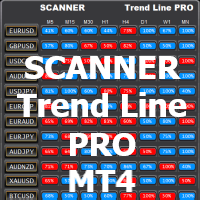
Works with   Trend Line PRO   indicator and set files made by   Optimizer Utility You can download additional programs:   here The scanner is developed to get new signals of the Trend Line PRO indicator on all pairs and timeframes from M5 to MN1 For the scanner to work, you should have an indicator. The main advantage of SCANNER Trend Line PRO is the possibility to use an individual set file for each pair and timeframe. You can automatically set up, change and save settings for each pair in the
FREE
Price Channel PRO mt4
Evgenii Aksenov
4 (2)
이 지표를 사용하면 일중 범위의 지역 추세의 강도에 상대적인 가격 변화의 역 동성을 추적 할 수 있습니다 추천 기간:M5-H1 가격 채널 프로 표시기는 다시 그리지 않고 레벨을 변경하지 않습니다 표시기를 사용하여 거래하는 것은 매우 간단합니다 판매 거래를 여는 방법: 1. 새로운 현지 가격 최대를 기다립니다 2. 가격은 채널의 중간(녹색 선)으로 롤백해야합니다 3. 새 촛불에 판매 표시를여십시오 4. 정지 손실을 채널의 상한(파란색 선)이상으로 설정하십시오 5. 가격이 역전되고 로컬 최소값이 업데이트되면 수익성 영역에서 주문을 닫습니다 구매 거래를 여는 방법: 1. 새로운 지역 최소 가격을 기다리십시오 2. 가격은 채널의 중간(녹색 선)으로 롤백해야합니다 3. 새로운 촛불에 구매 트랙을 엽니 다 4. 채널의 하단 테두리(빨간색 선)아래 정지 손실을 설정합니다 5. 가격이 역전되고 로컬 최대 값이 업데이트되면 수익성 영역에서 주문을 닫습니다 가격 채널 프로 표시기를
FREE
Champion MT4
Evgenii Aksenov
4.58 (12)
Big sale 50% OFF! Price $199. Regular price $399 All our signals are now available on myfxbook:   click here   Unique set files and all recommendations are provided free of charge. All future updates of the adviser are included in the price. After the purchase, contact me and I will help you install and configure the robot correctly. I will also share with you information on how to get a free VPS from a reliable broker. This is a multi-currency Expert Advisor with an intelligent order opening f
Spread Meter mt4
Evgenii Aksenov
4.33 (3)
그것의 비밀이 없는 서로 다른 브로커 및 다른 유형의 계정할 수 있는 다른 확산 가치(간의 차이를 입찰 가격). 이러한 조건에서 동일한 전문가 고문은 완전히 다른 결과로 거래 할 것입니다. 기호의 확산이 클수록 얻는 이익이 적고 브로커가 귀하에게서 얻는 이익이 더 많습니다.  따라서 측정,확산이 매우 중요한 선택을 위한 브로커 계정식,특히 스캘핑,자정 및 장중 전략이 있습니다.  무한대에서 간단하지만 신뢰할 수있는 지표는 어떤 브로커에서 어떤 기호의 확산을 추적하는 데 도움이됩니다! 모든 차트에 스 캐터 미터 표시기를 설치하기 만하면됩니다(M1-H1 권장). 스프레드 미터는 최대 최소 및 평균 스프레드 변경 사항을 추적하고 기억합니다. 차트 하단의 산포계 표시기의 히스토그램은 실시간으로 기록을 축적합니다. 따라서 표시기를 지속적으로 사용하는 것이 중요합니다. Vps 또는 영구적 인 인터넷 연결이있는 컴퓨터를 사용하는 것이 좋습니다.  산란계 표시기의 매개 변수: Low
FREE
PZ Grid MT4
Evgenii Aksenov
5 (3)
You can use Stop Loss and Take Profit or activate the GRID function to open a series of orders in the direction of the Expert Advisor signal. We use advanced technologies DrawDown Reduce (reduce the deposit load) and Dynamic Zones (dynamic Buy and Sell zones) as well as News Filter and Time Filter to control price spikes during important news. Big sale 50% OFF! Price $199. Regular price $399 All our signals are now available on myfxbook:   click here   Unique set files and all recommendations ar
Index Scalper PRO MT4
Evgenii Aksenov
4.62 (13)
The scalping trading system is designed in accordance with the principle of moving to the average value of the market price of  most liquid among traders  Dow Jones   (US30) index. It took me more than 2 years to optimize this strategy. The first versions of the expert were not very good, because they showed a good result in the tester only on ordinary ticks. But I managed to make a scalper trading in tests and in real time the same way. Unlike most other Expert Advisors, Index Scalper PRO has a
ONI EA mt4
Evgenii Aksenov
Big sale 50% OFF! Price $299. Regular price $599 All our signals are now available on myfxbook:   click here   Unique set files and all recommendations are provided free of charge. All future updates of the adviser are included in the price. After the purchase, contact me and I will help you install and configure the robot correctly. I will also share with you information on how to get a free VPS from a reliable broker. The strategy of the Expert Advisor is based on the return of the price to t
Predictor PRO MT4
Evgenii Aksenov
5 (2)
A new generation PROgressive indicator from INFINITY. Predictor PRO uses its own entry and exit calculation strategy. Indicator without redrawing signals! This is very important for real trading. The indicator can be used for any currency pairs, metals, cryptocurrencies or indices. The best time of the H1 chart. Unlike other indicators, Predictor PRO shows shows the Buy/Sell entry point and the Close exit point. Calculating the profit of all signals in points on the panel helps to choose the
The One EA MT4
Evgenii Aksenov
5 (3)
Big sale 50% OFF! Price $199. Regular price $399 All our signals are now available on myfxbook :   click here   Unique set files and all recommendations are provided free of charge. All future updates of the adviser are included in the price. After the purchase, contact me and I will help you install and configure the robot correctly. I will also share with you information on how to get a free VPS from a reliable broker. The One is a strategy based on the assessment of the weakening of the mark
A unique robot that has been successfully trading on a real account since 2021. The Gold Dragon trading system is so stable that it has allowed it to survive all market fluctuations, while other systems have failed! Big sale 50% OFF! Price $299. Regular price $599 Real signal:   click here   Unique set files and all recommendations are provided free of charge. All future updates of the adviser are included in the price. After the purchase, contact me and I will help you install and configure
ProfitZone PRO MT5
Evgenii Aksenov
4.5 (6)
The indicator shows Profit Zones on the chart, displaying the beginning and end of the local trend Profit Zone PRO is perfect for all Meta Trader symbols: currencies, metals, cryptocurrencies, stocks and indices Advantages of the Profit Zone PRO indicator: Input signals without redrawing The algorithms of the indicator allow you to find the ideal moments to enter a transaction (purchase or sale of an asset), which increase the success of transactions for 100% of traders. The indicator has two
TrendLine GRID
Evgenii Aksenov
4.83 (18)
Big sale 50% OFF! Price $199. Regular price $399 Unique set files and all recommendations are provided free of charge. All future updates of the adviser are included in the price. After the purchase, contact me and I will help you install and configure the robot correctly. I will also share with you information on how to get a free VPS from a reliable broker. Trend Line REVOLUTION  EA trade the first order based on the indicator signal and builds a grid if the price deviates. After a certain nu
FIBO Trend PRO mt5
Evgenii Aksenov
4.5 (2)
The indicator allows you to instantly determine the current trend by color and FIBO levels. Higher Timeframe the panel shows the current trend of higher periods, helping to determine the strength of the trend. Trade according to the trend when changing the color of candles or trade against the trend when the price hit the extreme levels of the FIBO Trend PRO  indicator   Advantages of the FIBO Trend PRO Indicator never repaint and does not change their values Very easy to use and intuitive Appl
필터:
Nice Trader
3742
Aller Uja 2024.12.01 17:42 
 

사용자가 평가에 대한 코멘트를 남기지 않았습니다

Prathamesh Prakash Gawde
385
Prathamesh Prakash Gawde 2023.03.17 11:20 
 

사용자가 평가에 대한 코멘트를 남기지 않았습니다

Libi Pappachen
286
Libi Pappachen 2023.03.13 08:35 
 

사용자가 평가에 대한 코멘트를 남기지 않았습니다

Evgenii Aksenov
232906
개발자의 답변 Evgenii Aksenov 2023.03.13 08:36
Thank you!
Sergio Allende
378
Sergio Allende 2023.01.03 18:55 
 

사용자가 평가에 대한 코멘트를 남기지 않았습니다

Evgenii Aksenov
232906
개발자의 답변 Evgenii Aksenov 2023.01.03 19:10
Thank you!
JordyGabriel
17
JordyGabriel 2022.12.13 15:02 
 

사용자가 평가에 대한 코멘트를 남기지 않았습니다

SHINTA ELISYA DEWI
213
SHINTA ELISYA DEWI 2022.08.01 18:58 
 

사용자가 평가에 대한 코멘트를 남기지 않았습니다

6117587
762
6117587 2022.07.10 11:24 
 

사용자가 평가에 대한 코멘트를 남기지 않았습니다

John Winsome Munar
3471
John Winsome Munar 2022.06.14 05:24 
 

사용자가 평가에 대한 코멘트를 남기지 않았습니다

RenkoFX
104
RenkoFX 2022.05.24 15:53 
 

사용자가 평가에 대한 코멘트를 남기지 않았습니다

Krzysztof A.
52
Krzysztof A. 2022.05.02 20:40 
 

사용자가 평가에 대한 코멘트를 남기지 않았습니다

NM Studio
18
NM Studio 2022.03.29 15:54 
 

사용자가 평가에 대한 코멘트를 남기지 않았습니다

S R
62
S R 2022.02.14 23:14 
 

사용자가 평가에 대한 코멘트를 남기지 않았습니다

Dedu M.
36
Dedu M. 2022.02.06 06:11 
 

사용자가 평가에 대한 코멘트를 남기지 않았습니다

Mostafa Nasar
1615
Mostafa Nasar 2021.12.28 05:20 
 

사용자가 평가에 대한 코멘트를 남기지 않았습니다

Lupacchiotta
330
Lupacchiotta 2021.12.10 18:33 
 

사용자가 평가에 대한 코멘트를 남기지 않았습니다

BurtonFX
56
BurtonFX 2021.12.09 03:09 
 

사용자가 평가에 대한 코멘트를 남기지 않았습니다

andrei150
461
andrei150 2021.11.24 12:57 
 

사용자가 평가에 대한 코멘트를 남기지 않았습니다

Ryan L Johnson
6531
Ryan L Johnson 2021.11.23 19:49 
 

사용자가 평가에 대한 코멘트를 남기지 않았습니다

Tammachat Phumkate
187
Tammachat Phumkate 2021.10.19 05:27 
 

사용자가 평가에 대한 코멘트를 남기지 않았습니다

Moebius-FX
223
Moebius-FX 2021.09.29 10:44 
 

사용자가 평가에 대한 코멘트를 남기지 않았습니다

Evgenii Aksenov
232906
개발자의 답변 Evgenii Aksenov 2021.10.03 09:03
Thanks you! 💗🙏💗 I will send you personal invitation in the support chat
12
리뷰 답변