SpikeSense MT5
- 지표
- 버전: 1.0

About the indicator
SPIKESENSE is developed around my personal trading approach, which focuses on identifying strong price spikes and then watching for a structured pullback entry. It marks a potential setup in two stages: a spike alert first, followed by a possible entry signal if price resumes in the spike direction.
This indicator is not suitable for beginners. It is intended mainly for experienced scalpers who understand market behavior, momentum, volatility, spread, execution conditions, and the risks of short-term trading. The user is expected to judge the broader market context rather than follow markers mechanically.
The indicator does not place or manage trades. Its signals are not trading recommendations and should only be considered together with your own strategy, confirmation, and risk management.
Suggested market conditions
The indicator is designed with short-term charts in mind. I recommend starting with the M1 or M5 timeframe on volatile instruments such as gold. Behavior varies by symbol, broker feed, spread, and market session, so review and adapt settings to your own conditions.
Do not trade its signals in sideways or ranging markets. SPIKESENSE 1.00 has no built-in range detector or range filter. Use it only when price is moving with clear, strong directional momentum. Avoid choppy conditions and stand aside when you cannot confidently assess the market environment.
How signals are formed
1. Spike setup
The indicator looks for three consecutive candles in the same direction. A bullish candidate requires three bullish candles and a gap from the high of the first candle to the low of the third. A bearish candidate requires three bearish candles and a gap from the low of the first candle to the high of the third.
The gap must meet a dynamic threshold calculated from the average qualifying gap over the selected lookback. The Spike Factor scales that average by Spike Factor / 10 . With the default factor of 10, the threshold equals the average; a larger factor requires a larger gap, while a smaller factor accepts smaller gaps. The average and threshold are recalculated at the configured interval.
A small blue or orange/red dot marks a qualifying spike. This is a stage-one setup marker, not an entry signal.
2. Structure confirmation
When enabled, the Structure Filter requires the spike candle to break the latest confirmed swing high for a bullish setup or swing low for a bearish setup. Swings are identified using the configured number of candles on each side of a pivot. The optional Draw Structure setting displays the broken level and a BOS label; it controls the drawing only, while Use Structure Filter controls whether a break is required.
3. Pullback and continuation trigger
After a spike, the indicator waits for a pullback and a continuation trigger. A bullish entry signal occurs when a candle's low moves below the previous candle's low; its displayed reference price is the previous candle's low. A bearish entry signal occurs when a candle's high moves above the previous candle's high; its displayed reference price is the previous candle's high.
The setup is cancelled if price closes beyond its stop level before the trigger, or if the maximum correction period expires. The marker is an analytical reference and does not guarantee that an order can be filled at that price.
4. Stop and target references
Stop-Loss Mode provides two methods:
- Swing Origin: searches backward from the first candle of the spike for the lowest low in a bullish setup or highest high in a bearish setup. Swing Lookback controls the search depth.
- Three Candles: uses the three spike candles to calculate a tighter stop reference.
While a setup is waiting for an entry trigger, the optional dashed stop line shows the stop level used by the setup. After an entry signal, optional chart lines show the SL and a 1:1 risk-to-reward TP. The target ratio is fixed by the indicator and is not a separate input.
Settings guide
Spike Detection
- Lookback Candles (default 2000): recent chart candles used to calculate the average qualifying gap.
- Recalc Minutes (default 10): interval for recalculating the average gap and spike threshold.
- Spike Factor (default 10): scales the average gap to set the minimum spike size. Higher values are more selective.
- Min Bars Between (default 5): minimum spacing between detected spike setups.
Entry
- Max Correction Bars (default 30): maximum bars allowed for the pullback and continuation trigger after a spike.
- SL Mode: selects Swing Origin or Three Candles stop placement.
- Swing Lookback (default 10): candles searched when Swing Origin mode is selected.
Structure Filter (BOS)
- Use Structure Filter (default enabled): requires a break of the latest confirmed swing in the spike direction.
- Fractal Bars (default 7): candles on each side used to confirm a swing point. Larger values identify broader swings and can reduce or delay setups.
- Draw Structure (default disabled): draws the broken swing level and BOS label. This is a visual option; it does not enable or disable the filter itself.
3-Candle Same-Leg Filter
- Use Same-Leg Filter (default disabled): requires progressive price movement across the three candles and limits overlap between adjacent candle ranges.
- Max Leg Overlap Percent (default 50): maximum allowed adjacent-candle overlap when the filter is enabled. Lower values apply a stricter continuity test.
Visuals
- Draw Levels (default enabled): draws SL and TP lines after an entry signal. Signal arrows and spike dots are plotted separately.
- Draw Spike Stop (default enabled): displays the projected stop while a setup waits for its entry trigger.
- Buy Color / Sell Color: colors the corresponding long and short statistics in the dashboard. Chart markers use their built-in blue and orange/red colors.
Alerts
- Alert on Spike (default enabled): enables alerts for stage-one spike events.
- Send Alert (default enabled): shows an alert in MetaTrader.
- Send Notification (default disabled): sends a push notification when terminal notifications are configured.
- Send Email (default disabled): sends an email when terminal email settings are configured.
- Alert Recency Bars (default 3): limits alerts to recent events and helps avoid alerts for older historical signals during calculation.
Dashboard
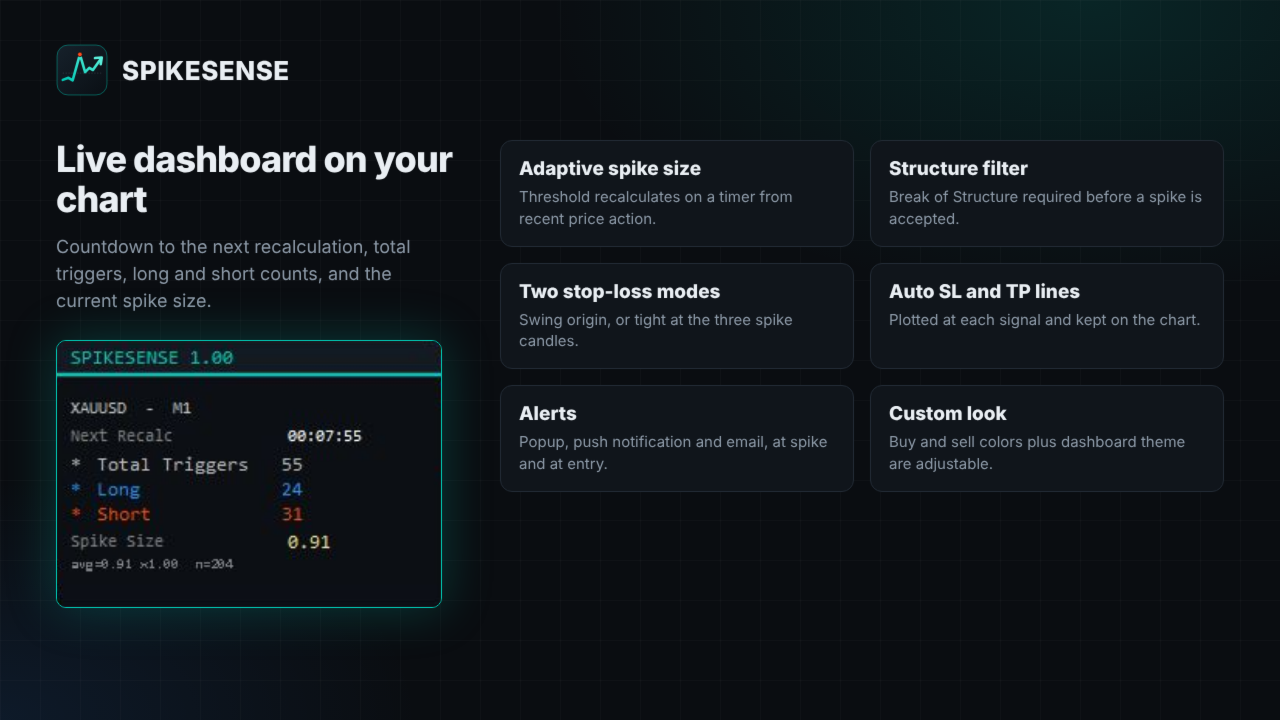
- Show Panel (default enabled): shows or hides the dashboard. It stays fixed in the upper-left corner.
- Panel Header, Background, Border, and Accent Colors: customize the panel appearance. The panel displays the symbol and timeframe, time until the next threshold recalculation, total/long/short trigger counts, current spike threshold, and average-gap statistics.
Performance
- Max Bars To Process (default 3000): maximum recent chart bars processed for signal calculations. Increasing it extends the historical scan and may require more processing.
- Max Persistent Levels (default 200): maximum SL/TP signal pairs retained on the chart. Older pairs are removed when the limit is exceeded.
Important
Use the default settings as a starting point, not as a universal preset. Assess momentum and market structure before acting on a signal, and avoid ranging conditions. Short-term trading involves substantial risk; past chart behavior does not guarantee future results. SPIKESENSE is an indicator only and does not provide financial advice.