Order Watchdog Pro
- 유틸리티
-
Manit Chin
 MQL5 Developer | Overfit-proof testing and account protection for EAs
I help traders answer two questions before real money is at risk:
1) Is this strategy real, or just fitted to the past?
2) Will the account survive when something goes wrong?
Protection against overfitting - 버전: 1.3
- 활성화: 5
Protects your MT5 account from trades that are not yours: positions and pending orders with an unknown magic number, and manual trades from places you do not trade from. In Act mode it closes them. Your own EAs are never touched. It never opens a trade.
What it protects you from
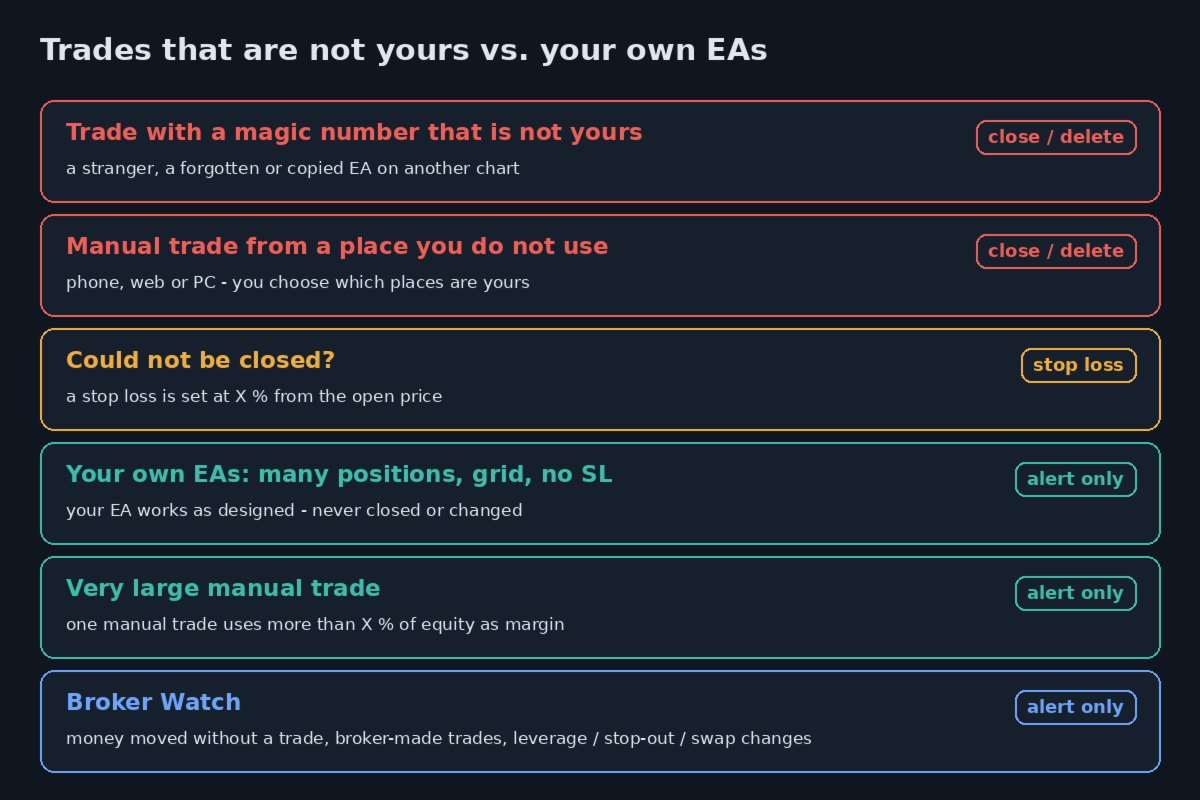
- Someone else trading on your account: a person who has your password and trades from the phone app or the web terminal, when you tell it that you do not trade from there (InpManualTrades).
- An EA you did not mean to run: a forgotten EA on another chart, a copied or test EA with a different magic number.
- Someone closing your trades: an alert when one of your positions is closed by a place or an EA that is not yours.
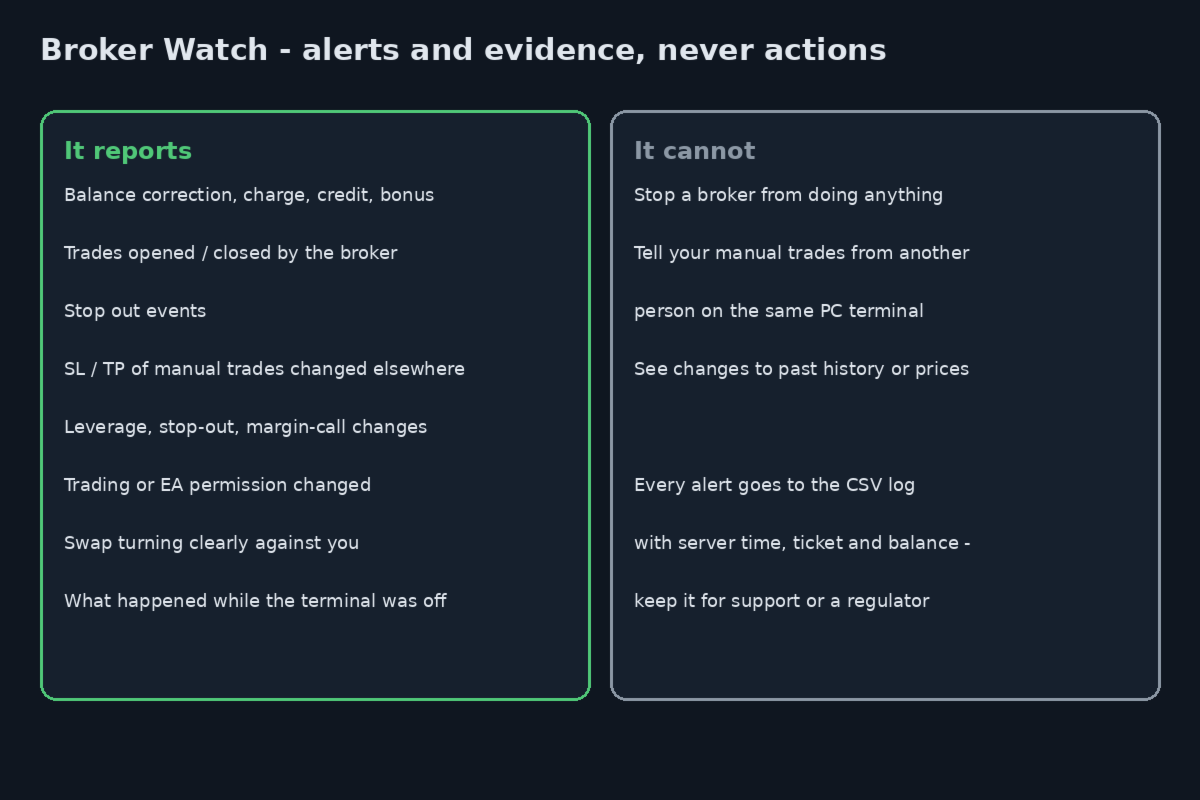
- Changes made by the broker: money moved without a trade, trades opened or closed by the broker, leverage, stop-out, swap or permission changes (alerts only).
What it does NOT do
- It does not manage your own EAs. Positions with a magic number you entered are never closed or changed, also when an EA opens many positions, uses grid or martingale, or trades without a stop loss. These can be reported as alerts.
- It is not a daily-loss or prop-firm risk manager.
- It cannot stop a broker from doing anything. It reports and keeps a record.
- It does not trade and does not open positions.
What you fill in
- 1. InpMagics: the magic numbers of your EAs, for example "12345, 500000-500063". Also the magic numbers of trades copied by an MQL5 Signal or a trade copier, if you use one (Dry run shows them).
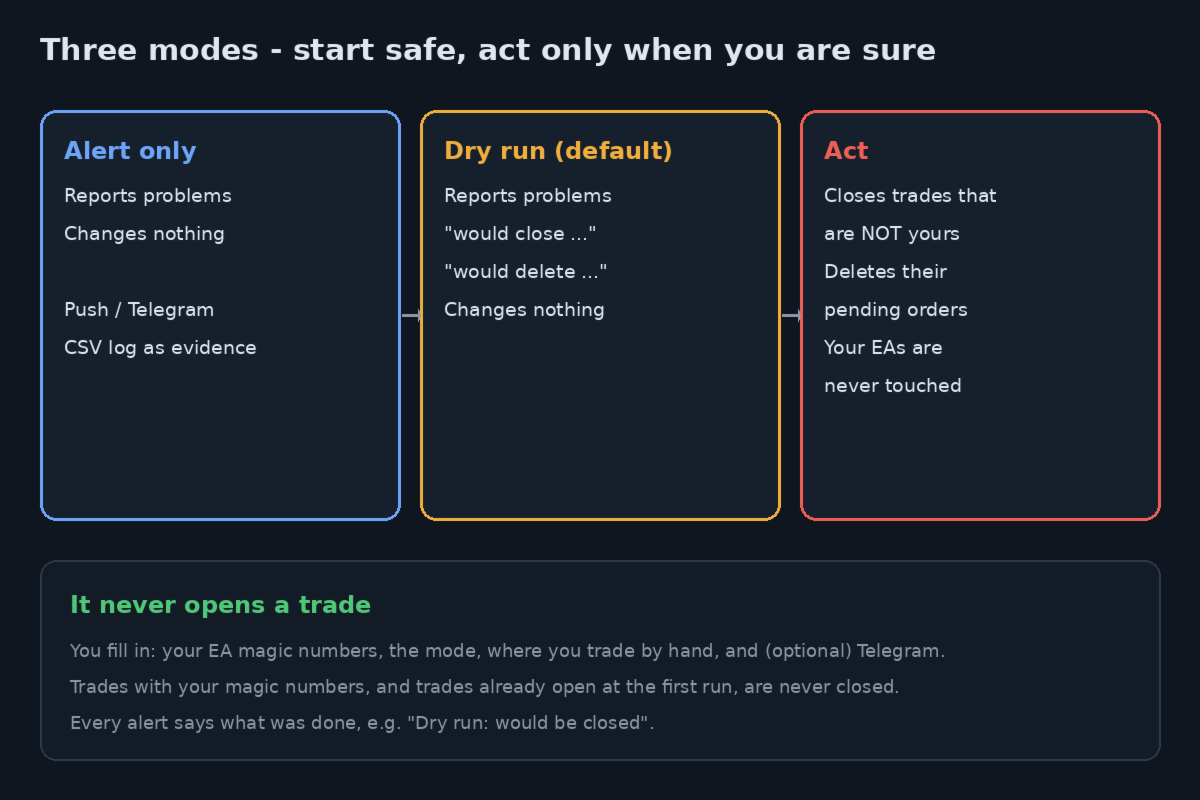
- 2. InpMode: Alert only / Dry run (default) / Act.
- 3. InpTgToken and InpTgChatId: your Telegram bot token and chat id (optional). Telegram is on when both are filled in.
- 4. InpManualTrades: where you trade by hand - anywhere (default), only PC, only phone, PC or phone, or never. Manual trades from other places are not yours.
All other inputs are in the ADVANCED group and can stay as they are.
Modes
- Alert only: alerts only. Sends no trade request.
- Dry run (default): alerts, plus a "would close / would delete" line for each trade that is not yours. Sends no trade request.
- Act: closes positions and deletes pending orders that are not yours.
What happens to a trade that is not yours (Act mode)
- A position or pending order is "not yours" when its magic number is not in InpMagics, or when it is a manual trade (magic 0) opened from a place InpManualTrades does not allow (default: manual trades from anywhere are yours). An EA that uses magic 0 is treated as yours.
- Positions and orders that were already open when the watchdog first ran on the account are only reported, never closed. A mistake in InpMagics or a change of account cannot close older trades.
- The position is closed; the pending order is deleted.
- If the position cannot be closed after InpMaxTries requests (default 3) and has no stop loss, a stop loss is set InpUnknownSLPct % (default 1) of the open price away, and you get an alert. An existing stop loss is never changed. The close is tried again every 5 minutes.
- On netting accounts these positions are reported, not closed, because one position can also hold your own EA's volume. Pending orders are still deleted.
- Magic numbers in InpNeverTouch are only reported.
Alerts only (nothing is closed or changed)
- Large manual trade (InpManualMarginPct, default 20): one manual position opened from the PC terminal, phone app or web terminal needs more margin than this % of equity. EA trades are not checked.
- Many positions per EA (InpMaxPerMagic, default 0 = off): one of your EAs holds more positions per symbol and direction than this number.
- No stop loss (InpRequireSL, default off): a position of your EAs has no stop loss InpNoSLGraceSec seconds after opening.
- Broker Watch (InpBrokerWatch, default on):
- - balance changes without a trade: deposit or withdrawal, credit, charge, correction, bonus, canceled deals;
- - deals opened or closed by the broker or server, not by a client terminal, an EA, SL, TP or stop out;
- - stop out;
- - changes of leverage, stop-out level, margin-call level, account trading permission, account EA permission and symbol trade mode;
- - swap: a swap that was paid to you or zero becomes a charge, or a charge grows by more than 1.5 times (other swap changes go to the log only);
- - positions closed and reopened at rollover or for variation margin: one alert a day, every deal in the log.
- InpBrokerSLTP (default on): stop loss or take profit of a manual position changed by a request that did not come from this terminal, confirmed on two scans. Off on an MQL5 VPS.
- InpSlipAlertPts (default 0 = off): stop loss filled this many points worse than the stop loss level.
- Closed by others: a position closed or reduced by a manual close from a place you do not allow, or by an EA with a magic number that is not yours.
- On start: trades that were not yours, stop outs and balance changes while it was off, up to InpOfflineMaxDays days back (default 7).
How it runs
- One copy on one chart watches all symbols of the account (or only InpSymbols). Symbol and timeframe of the chart do not matter.
- The account is scanned every InpScanSec seconds (default 10); new deals are checked when they arrive.
- Works on an MQL5 VPS or on your own PC.
- In Act mode each request is checked against the account right before it is sent. After no answer or an unclear answer it waits 15 seconds; when the market is closed, 5 minutes; after a requote, 10 seconds to 5 minutes.
- At most InpMaxActionsPerMin requests per minute (default 20), then requests pause for 5 minutes with an alert.
- Act mode with an empty InpMagics is refused, because it would close every EA trade. InpMagics may not contain 0 (write 7000, not 7,000).
- Invalid inputs stop it from starting, with a message naming the input.
Alerts
- Push to the MetaTrader mobile app (InpPush). Your MetaQuotes ID must be set in Tools, Options, Notifications.
- Telegram: api.telegram.org must be added (with https) in Tools, Options, Expert Advisors, Allow WebRequest. A message that fails is sent again later.
- One alert per finding, also after a restart.
- Each alert states what was done, for example "Dry run: would be closed" or "Never-touch magic: not closed".
- Every alert and action is written to MQL5\Files\WatchdogPro_log.csv with server time, balance and equity.
- Chart panel: mode, your magic numbers, counts of findings and actions, last scan and last alert. The frame colour shows the mode: blue Alert only, yellow Dry run, red Act.
Limits
- It cannot switch off the AutoTrading button of the terminal.
- It cannot tell your own manual trades from manual trades made by another person on the same PC terminal. Both are reported as "PC".
- It cannot tell an outside trade that reuses your EA's magic number from your EA's own trade.
- Use one copy per account. After moving it to an MQL5 VPS, remove it from the chart on your PC.
- In the Strategy Tester only, it opens small example trades so that its alerts and actions can be seen.
- A position can move further before a close request is filled.