Goldrix Pivot MT5
- Experts
- 버전: 1.0
- 활성화: 9

Goldrix Pivot: Structured Breakout Trading for Gold
Goldrix Pivot is a fully automated Expert Advisor for XAUUSD (Gold). It trades in the direction of the market and enters with pending orders at key price levels, so a trade is placed only when price action supports the move. Every decision is rule-based and applied the same way every time. There is no guesswork and no emotion.
The Strategy: Simple, Disciplined, Protected
- Single-Order Execution: The EA trades one position at a time. There is no stacking of trades.
- Built-in Protection: Every order is placed with a predefined Stop Loss (SL) and Take Profit (TP).
- Profit Optimization: A Trailing Stop locks in gains as the market moves in your favor.
- Sustainable Ethics: There is no Grid, no Martingale, no Cost-Averaging and no Recovery system.
- Pure Logic: The EA relies on rule-based price action, not on Machine Learning.
- Smart Trading Filters: Built-in filters help avoid poor trading conditions, including trading session control, Friday protection, major market holidays, year-end pause, a spread filter and an optional daily order limit. See the Trading Filters Guide below.
- Clean On-Chart Panel: A compact panel shows the symbol, spread, market direction, equity, risk, lot size and the current EA status at a glance.
Trading Filters Guide
Filters decide when the EA is allowed to place new orders. They never close a trade that is already open, and an open trade keeps its Stop Loss and Take Profit. While a filter is blocking new orders, any waiting pending order is removed and the panel status shows "Blocked" with the reason. Trading resumes automatically when the condition ends. Dates and times follow your broker's server time.
The default settings are recommended. Change a filter only if you understand its effect.
- Trade Direction (TradeDirection, default: Both)
Choose Both, Buy Only or Sell Only. Use Buy Only or Sell Only if you want the EA to trade just one side of the market. - Session Filter (TradeOnlyWhenSessionOpen, default: On)
New orders are placed only while the broker's trading session for the symbol is open. The EA skips the first 2 hours after the session opens and the last hour before it closes. Turn it Off only if you want the EA to place orders at any time. - Friday Stop (UseFridayStop, default: On, and FridayStopHours, default: 6)
Stops new orders a number of hours before the market closes on Friday, to reduce the risk of weekend gaps. Increase FridayStopHours to stop earlier. - Holiday Filter (UseHolidayFilter, default: On, and HolidayStopHours, default: 6)
Pauses new orders on major market holidays, such as Good Friday, Easter Monday, New Year's Day, Christmas Day and the main U.S. public holidays. The pause starts HolidayStopHours before the holiday begins. On early-close holidays the pause lasts the whole day. - New Year Pause (NewYearPause, default: 15 Days)
Pauses new orders for the selected number of days before and after January 1. Choose Off, 7 Days or 15 Days. - Spread Filter (UseSpreadFilter, default: Off, and MaxSpreadPoints, default: 35)
When On, new orders are blocked while the spread is higher than MaxSpreadPoints. The spread is checked at the start of each new bar. The unit is points, the same unit as the Spread value shown on the panel. Because brokers quote gold with different numbers of digits, check the normal gold spread on your account and set the limit slightly above it. - Daily Order Limit (UseDailyOrderLimit, default: Off, and MaxOrdersPerDay, default: 2)
When On, the EA stops placing new orders after the selected number of orders have been executed on the current server day.
System Requirements
- Account Type: Low Spread (ECN/Raw) is highly recommended.
- Infrastructure: A VPS (Virtual Private Server) for 24/7 uninterrupted operation.
- Minimum Capital: $350 USD (Note: This represents a high-risk setting of roughly 10%).
Installation Guide
- Pair: XAUUSD (Gold).
- Timeframe: 15-Minute (M15).
- Setup: Attach the EA to the chart. You can use the default settings or adjust the lot and risk parameters.
Risk Management Settings
Choose your exposure with the LotMode parameter:
- Fix Lot: Trades a fixed lot size defined in FixLot (default 0.01).
- Risk Percent: Calculates the lot size from a percentage of your balance, defined in RiskPercent.
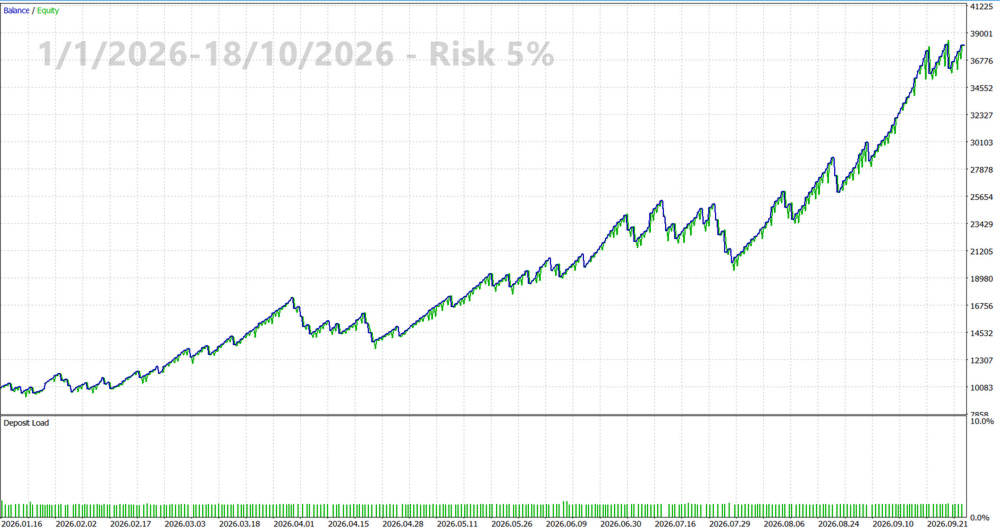
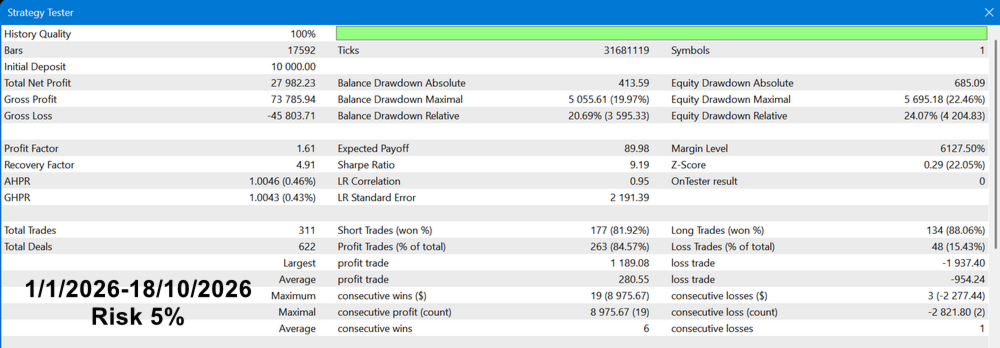
Recommended Risk: We strongly advise keeping your risk between 1% - 5% per trade. Exceeding this range significantly increases the likelihood of uncomfortable drawdowns.
Consistency is Key. Please allow the EA to operate for a sufficient period before evaluating its performance (we suggest at least 3 months).
Trading involves risk. Past performance does not guarantee future results. Trade only with money you can afford to lose.