MT5 Chart Object Sync
- 지표
- 버전: 7.12
- 업데이트됨: 6 10월 2026
- 활성화: 5

MT5 Chart Object Sync is a powerful utility indicator for MetaTrader 5 that automatically synchronizes drawing objects between multiple charts of the same trading symbol.
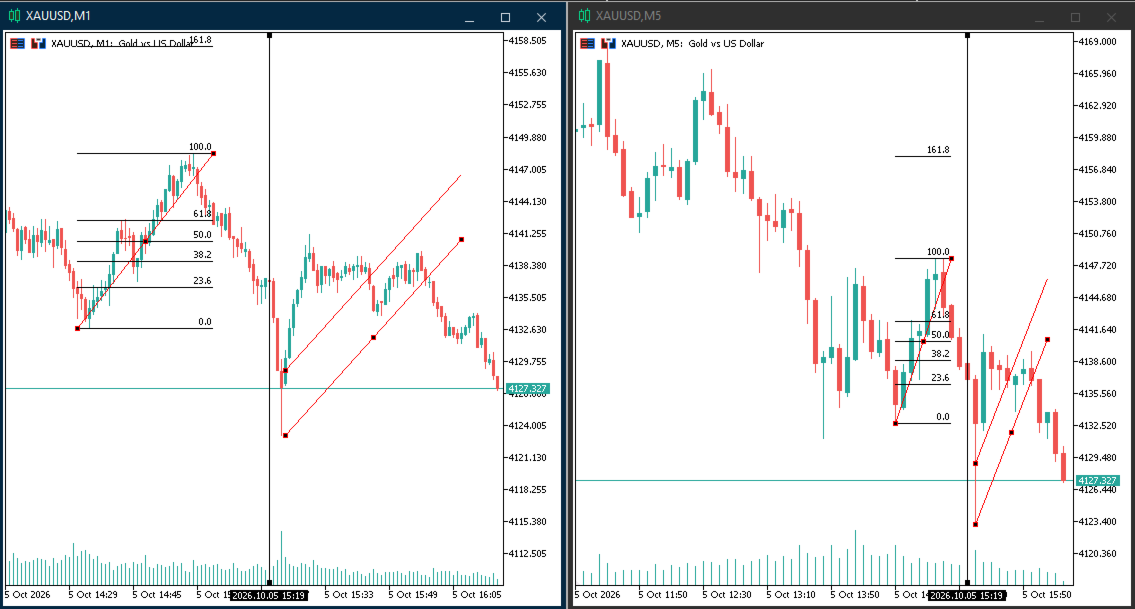
Create or modify a drawing object on one MT5 chart and the changes can be synchronized automatically to other charts using the same symbol, including different timeframes.
No master chart or slave chart is required. Install the indicator on the charts you want to synchronize, and the charts communicate automatically.
KEY FEATURES
• Bidirectional chart object synchronization
• Same-symbol chart synchronization
• Multi-timeframe support
• Create, modify, move and delete synchronization
• No master/slave configuration
• Automatic chart detection
• Works across multiple MT5 charts
• Lightweight background synchronization
• Optional synchronization of existing objects when the indicator starts
• Configurable synchronization timer
• Optional diagnostic logging for troubleshooting
SUPPORTED DRAWING OBJECTS
MT5 Chart Object Sync supports a wide range of MetaTrader 5 graphical objects, including:
• Trend Lines
• Horizontal Lines
• Vertical Lines
• Trend By Angle
• Cycles
• Arrowed Lines
• Channels
• Standard Deviation Channels
• Regression Channels
• Fibonacci Retracement
• Fibonacci Time Zones
• Fibonacci Fan
• Fibonacci Arcs
• Fibonacci Channels
• Fibonacci Expansion
• Gann Line
• Gann Fan
• Gann Grid
• Andrews Pitchfork
• Elliott Wave 3
• Elliott Wave 5
• Rectangles
• Triangles
• Ellipses
• Arrows
• Text
• Labels and other supported chart interface objects
HOW IT WORKS
-
Attach MT5 Chart Object Sync to the charts you want to synchronize.
-
Use the charts normally.
-
Create or modify a supported drawing object on any synchronized chart.
-
The object is automatically synchronized with the other charts using the same symbol.
For example, you can work with EURUSD on M5, M15, H1 and H4 charts.
Draw a trend line on M5 and it can appear on the other synchronized EURUSD charts.
Move the trend line on H1 and the change can be synchronized back to the other charts.
Delete an object on one chart and the deletion can be synchronized as well.
MULTI-TIMEFRAME WORKFLOW
MT5 Chart Object Sync is especially useful for traders who analyze the same symbol across multiple timeframes.
Example:
EURUSD M5
EURUSD M15
EURUSD M30
EURUSD H1
EURUSD H4
Instead of manually recreating the same drawing objects on every chart, the indicator keeps supported objects synchronized automatically.
BIDIRECTIONAL SYNCHRONIZATION
There is no master chart.
Every chart running the indicator can participate in synchronization.
This means you can create or modify an object from any synchronized chart and the change can be propagated to the other charts.
PERFORMANCE
The indicator uses lightweight event-based synchronization together with periodic object monitoring to detect changes that may not always be captured by a single chart event.
The synchronization interval can be configured in the indicator settings.
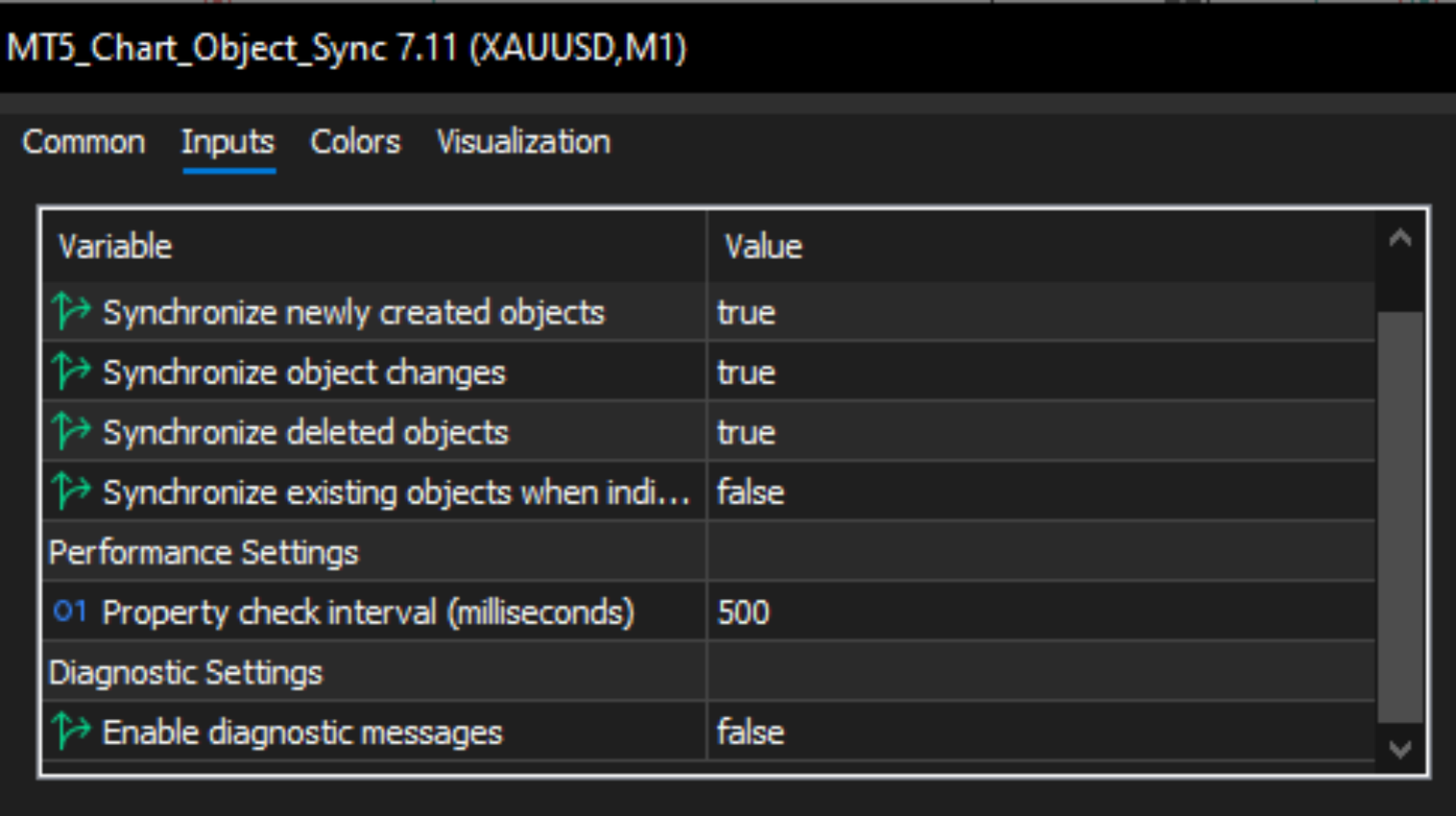
DEFAULT SETTINGS
SyncCreate = true
SyncChange = true
SyncDelete = true
SyncExistingOnStart = false
SyncTimerMs = 500
DebugLog = false
These settings allow the indicator to start with a clean and practical configuration while giving advanced users control over synchronization behavior.
DIAGNOSTIC MODE
The optional DebugLog setting can be enabled when troubleshooting.
When enabled, diagnostic information can help identify synchronization activity and make it easier to investigate unexpected behavior.
For normal daily use, DebugLog can remain disabled.
IMPORTANT
MT5 Chart Object Sync synchronizes supported graphical objects between charts of the same trading symbol.
The indicator does not provide trading signals, market predictions, automated trading decisions, or profit guarantees.
It is designed as a chart management and synchronization utility for MetaTrader 5 users.
RECOMMENDED FOR
• Multi-timeframe traders
• Technical analysts
• Price action traders
• Traders using Fibonacci analysis
• Traders using Elliott Wave analysis
• Traders using Gann tools
• Traders using Andrews Pitchfork
• Traders who frequently work with multiple MT5 charts
• Traders who want to avoid manually duplicating chart drawings
EXAMPLE USE CASE
You are analyzing XAUUSD on M5, M15, H1 and H4.
You draw a Fibonacci tool on the M15 chart.
With MT5 Chart Object Sync installed on the participating charts, the supported object can be synchronized automatically.
You then adjust the Fibonacci levels from another synchronized chart.
The updated properties can be synchronized back to the other charts.
This makes multi-timeframe technical analysis more convenient and reduces repetitive manual chart work.
WHY USE MT5 CHART OBJECT SYNC?
Managing the same technical analysis across multiple timeframes can become repetitive.
Manually recreating trend lines, Fibonacci tools, pitchforks, Elliott Wave objects and other drawings takes time and can result in inconsistent chart analysis.
MT5 Chart Object Sync provides an automatic way to keep supported chart objects synchronized while allowing you to continue working normally on each chart.
INSTALLATION
Attach the indicator to every chart that you want to participate in synchronization.
For example:
EURUSD M5
EURUSD M15
EURUSD H1
The indicator automatically detects participating charts.
No master/slave setup is required.
No external DLL is required.
No external web service is required.
The indicator is designed to work directly inside MetaTrader 5.
SUMMARY
MT5 Chart Object Sync is a MetaTrader 5 chart synchronization utility designed to keep supported drawing objects synchronized across multiple charts of the same symbol and across different timeframes.
Create once. Synchronize automatically.
Manage your technical analysis across multiple MT5 charts without repeatedly recreating the same drawing objects.