Randli RR Manager System

➡️ 1. Visual Level Adjustment (Click-and-Drag Risk Management)


The utility provides an interactive framework to configure order parameters using chart-based lines rather than manual price typing:
  • Exclusive Toggle Logic: Activating one level adjustment mode (e.g., clicking the Stop Loss button) automatically disarms the other two modes. This prevents graphic input conflicts on the chart.
  • Target Parameters: It manages three distinct interactive pricing lines:
    • Entry Price ( btn_p_ent_click / p_entryVonalKattVaras )
    • Stop Loss ( btn_p_sl_v_click / p_slVonalKattVaras )
    • Take Profit ( btn_p_tp_v_click / p_tpVonalKattVaras )
  • Misclick Protection: It records high-resolution system uptime via GetTickCount() right at the moment of interaction ( skipClickTick ). This acts as an anti-bounce or double-click safeguard, preventing erratic line displacement while dragging.

➡️ 2. Multi-Module Operational Matrix


The dashboard utilizes a 6-button navigation interface to switch the environment between different trading logic modules ( aktualisKereskedesiMod 0 to 5 ), dynamically rebuilding the user interface upon activation:
  • Module 0 (Market Orders): Dedicated to live execution. It triggers JRR_RefreshTradingLines() to map, monitor, and manage currently open, running market positions.
  • Module 1 (Pending Orders): Dedicated to structural entry orders (Limits/Stops). It triggers JRR_RefreshPendingLines() to project and track unfulfilled trade setups.
  • Modules 2 to 5 (Auxiliary Tools): Reserved for back-end trading utilities. Based on standard algorithmic panels of this caliber, these routinely handle functionalities such as lot-size calculators (risk-to-equity formulas), advanced partial closing targets, account metrics/analytics, or global EA configurations.


➡️ 3. Multi-Timeframe SMA system
추천 제품
Night Scalper EA Lite
Robots4Forex Ltd
2.25 (4)
The Night Scalper EA Lite is a fully automated Expert Advisor that trades at night and relies on price reversion. The EA trades using market orders and has the option to use time averaging to improve performance. This EA works best on EURUSD using the M5 timeframe, but will also work on AUDUSD, GBPUSD, NZDUSD, USDCAD, USDCHF and likely many more. A VPS is advisable when trading this system and a low spread and commission based broker is best. Check the comments for back test results and optimiz
FREE
Free automatic fibonacci
Tonny Obare
4.69 (51)
Free automatic Fibonacci is an indicator that automatically plots a Fibonacci retracement based on the number of bars you select on the BarsToScan setting in the indicator. The Fibonacci is automatically updated in real time as new highest and lowest values appears amongst the selected bars. You can select which level values to be displayed in the indicator settings. You can also select the color of the levels thus enabling the trader to be able to attach the indicator several times with differe
FREE
Position Selective Close MT4
Francisco Manuel Vicente Berardo
The Position Selective Close is a multi-symbol multi-timeframe script used to close simultaneously various positions.  General Description   The Position Selective Close   possesses   three operation modes (Intersection,   Union   and All) that control the way   as   four position features (symbol, magic number,   type   and profit) are used. The modes, available through the Selection Mode input parameter, relate to the features, available through the “Select by Feature” and “Feature” input pa
FREE
The Saz_Timer indicator belongs to the Saz_Forex suite of professional indicators designed by Traders, for Traders. This indicator will show minutes and seconds of real time on the chart window. The indicator uses the OnTimer() event so it can update even while no ticks received on the chart. The text is shown toward the bottom right of the chart, encircled red in the screenshot. Inputs: Text Colour, allows selection of the colour for the text.
FREE
SC MTF Rsi MT4
Krisztian Kenedi
5 (1)
다중 타임프레임 지원, 사용자 정의 시각 신호 및 구성 가능한 알림 시스템을 갖춘 상대강도지수(RSI) 지표. 프리랜서 프로그래밍 서비스, 업데이트 및 기타 TrueTL 제품은 제 MQL5 프로필 에서 확인하실 수 있습니다. 피드백과 리뷰를 진심으로 환영합니다! RSI란 무엇인가요? 상대강도지수(RSI)는 가격 변화의 속도와 크기를 측정하는 모멘텀 오실레이터입니다. 이 지표는 0에서 100 사이에서 진동하며, 지정된 기간 동안 최근 상승폭과 최근 하락폭의 크기를 비교합니다. RSI는 주로 과매수 및 과매도 상태를 식별하는 데 사용됩니다. 높은 수치는 과매수 상태를 나타내고, 낮은 수치는 과매도 상태를 나타냅니다. 트레이더들은 또한 RSI와 가격 움직임 사이의 다이버전스를 주시하며, 이는 잠재적인 추세 전환을 신호할 수 있습니다. 기능: 화살표와 수직선을 사용한 시각적 신호 마커 구성 가능한 트리거(방향 변경, 레벨 교차, 고점/저점, 극단 구역)가 있는 세 개의 독립적인 신호
FREE
CandleCloseTimer — 캔들 마감까지 남은 시간을 완벽하게 관리 CandleCloseTimer는 현재 캔들이 마감될 때까지 남은 시간을 차트에 직접 표시하는 MetaTrader 4용 компакт한 유틸리티입니다. 타이머는 현재 가격 근처에 표시되므로 트레이더가 가장 자주 확인하는 가격 스케일 주변에서 필요한 정보를 항상 확인할 수 있습니다. 이 유틸리티는 거래를 실행하지 않고, 매매 신호를 제공하지 않으며, 플랫폼의 작동에 개입하지 않습니다. 선택한 타임프레임에서 현재 캔들이 마감될 때까지 정확히 얼마나 남았는지를 보여주는 것이 주요 목적입니다. CandleCloseTimer의 주요 기능 1. 현재 캔들 마감까지의 타이머 현재 캔들이 마감될 때까지 남은 시간을 00:00:00 형식으로 표시합니다. 2. 현재 가격 근처에 표시 타이머를 가격 스케일 근처 또는 현재 가격 아래에 배치할 수 있어 차트 분석을 방해하지 않습니다. 3. 타임프레임 자동 전환 M1, M5, M15,
FREE
Aurum Trend Scout
David Sanchez Clavero
Aurum Trend Scout — Aurum Trend Engine 무료 LITE 버전 Aurum Trend Scout는 Aurum Trend Engine 전문가 자문의 무료 버전 입니다. H1 타임프레임에서 XAUUSD(금)을 Parabolic SAR + 볼린저 밴드 폭 비율 기반 추세추종 전략으로 거래합니다. 이 LITE 버전에는 ATR 기반 손절을 포함한 전체 전략 로직이 포함되어 있습니다. 고정 랏을 사용하며, FULL 버전의 동적 자금 관리는 포함되지 않습니다. 검증된 성과 (실제 데이터, XAUUSD H1, 2014-2025) 스프레드 20포인트: 수익률 1.32 | 승률 63.65% | 최대 하락 2.22% | 순이익 $11,363 | 1,004건 스프레드 30포인트: 수익률 1.25 | 승률 62.60% | 최대 하락 2.40% | 순이익 $9,378 | 1,016건 LITE 버전 기능 전체 전략 로직 (FULL과 동일) ATR 기반 손절 매수만 — 마틴게일 없음,
FREE
Swing Low MT4
Teerathad Booranawisedkul
Key Features: Automatic swing detection on any timeframe (M1 to MN1) Visual arrow indicators (red for swing highs, blue for swing lows) Adjustable sensitivity with customizable swing strength parameter Dynamic arrow positioning that never overlaps with candles Instant display when changing timeframes - no delays Compatible with MT4 and MT5 platforms Clean, professional interface with minimal screen clutter Lightweight code for fast performance Customizable colors and arrow sizes Customizable S
FREE
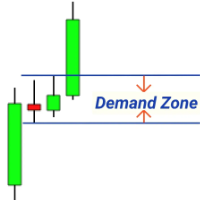
MQL5 블로그: https://www.mql5.com/en/blogs/post/770814 MT4 버전: https://www.mql5.com/en/market/product/107986 랠리 베이스 랠리(RBR), 드롭 베이스 랠리(DBR), 드롭 베이스 드롭(DBD), 랠리 베이스 드롭(RBD), 적정가치 갭(FVG) / 불균형, 히든 베이스 "수요 및 공급 어시스턴트"(EA) 전문가 어드바이저를 소개합니다. 이 최첨단 전문가 어드바이저는 트레이더에게 수요 및 공급 역학에 대한 실시간 인사이트를 제공하여 정보에 입각한 의사 결정을 내리고 거래 잠재력을 극대화할 수 있도록 세심하게 설계되었습니다. 주요 기능: 자동 영역 식별: 전문가 어드바이저는 고급 알고리즘을 사용하여 가격 차트에 주요 공급 및 수요 영역을 자동으로 감지하고 표시합니다. 이러한 영역에는 #rallybaserally, #rallybasedrop, #dropbaserally, #dropbasedrop 등이 포
FREE
Индикатор "Стрелки" (Arrow Drawing Tool) Краткое описание: Удобный инструмент для рисования стрелок на графике с помощью кнопки и мыши. Позволяет визуально отмечать направления движения цены, уровни поддержки/сопротивления и важные ценовые зоны. Основные возможности: Простое управление   - кнопка "Стрелка" для активации режима рисования Автоматическая окраска   - зеленые стрелки для движения вверх, красные для движения вниз Настраиваемый дизайн   - регулируемая длина и угол наконечника стрелки Г
FREE
Real-time spread tracking and monitoring software Displays spread values in form of histograms on current timeframe of chart Convenient for analyzing spread changes, as well as for comparing trading conditions of different brokers By placing on desired chart, the spread changes at different trading times are displayed Additionally Fully customizable Works on any instrument Works with any broker
FREE
Constructor
Aleksey Semenov
Constructor is a convenient tool for creating, (building strategies) testing and applying trading strategies and ideas, as well as testing and using separate indicators and their groups. Constructor includes opening, closing, deal tracking, averaging and recovery modules, as well as various trading options with and without averaging and martingale. You are able to connect up to 10 different external indicators. Find the detailed instructions in the attached pdf file. Trading settings averaging
FREE
Update:ver1.53 (2023/08/16) ・概要と必要環境 手動発注もしくは他ツール等からの発注に対し、指値発注予約の複製を生成します。こちらは「発注操作の簡易化」に特化したものになります。発注判断となる分析は、資料を漁る、経験則を導く、他の分析ツールやEAを併用する等、利用者ご自身で頑張ってください。なお、ver1.28より、「決済後、自動で再発注する」機能が実装されました。(有償版でのみ有効化できます) ・導入と導入後の操作 導入そのものは簡単です。「自動売買可能なEA」として、適当なチャートにて動作させるだけです。(チャートの対象相場は問いません。このEAは、チャートを見ていません)。あとは、「このEAでのローカルコピー以外の発注」があれば、それに応じて「損失が出た場合に備えての追加取引の予約」という形で、指値発注が自動生成されます。 導入操作上の注意として、「本EAを、複数のチャートで動作」はできません。EAがチャート自体を見ておらず、注文状況だけを見ているため、複数のチャートで動かす意味もありません。また、ターミナルとEAの設定として「自動売買」を許可しない
FREE
Zig Zag 123
Stephen Reynolds
Zig Zag 123 tells us when a reversal or continuation is more likely by looking at the shift in supply and demand. When this happens a signature pattern appears known as 123 (also known ABC) will often break out in direction of higher low or lower high. Stop loss and take profit levels have been added. There is a panel that shows the overall performance of your trades for if you was to use these stop loss and take profit levels.  We get alerted if a pattern 123 appears and also if the price re
FREE
Period Change Button
Rainer Albrecht
3 (1)
Fastest way to change the period. Suitable for traders who use many charts and timeframes. Size, shape and color can be customized. Inputs Parameters Corner — Choose corner placement Standart is "Right lower chart corner" Color — Background color of the button ColorText — Text color of the button ColorOn — Background color of the button for the current period ColorOnText — Text color of the button for the current period Font — Arial, Verdana... FontSize — Size of the font in pixels DistanceX —
FREE
History Trading Path
Kaijun Wang
5 (1)
Necessary for traders: tools and indicators Waves automatically calculate indicators, channel trend trading Perfect trend-wave automatic calculation channel calculation , MT4 Perfect trend-wave automatic calculation channel calculation , MT5 Local Trading copying Easy And Fast Copy , MT4 Easy And Fast Copy , MT5 Local Trading copying For DEMO Easy And Fast Copy , MT4 DEMO Easy And Fast Copy , MT5 DEMO Strongly recommend trend indicators,   automatic calculation of wave standard   and   MT5 ver
FREE
FX Gambit
Boyan Atanassov
Zenner Trading Presents FX Gambit Streaming Live on YouTube:  https://youtu.be/rD9bCSxypio FX Gambit is an Adaptive, Market Neutral, Dual MT4 based Parallel Launch Automated Trading System, designed to respond to all directional combinations and permutations of the market, and still produce a Net Positive Outcome. There are 2 instances of MT4 with 2 charts in each. The LONG LEG of the HEDGE is in the left chart and the SHORT LEG on the right. The two MT4 instances exchange current market BID
FREE
Safety
Sergey Ermolov
5 (2)
나는 모두가"안전"과 같은 돈 관리 규칙을 알고 있다고 생각합니다. 인식하지 못하는 사람들을 위해,금고는 거래에 대한 이익이 정지의 크기를 같게 한 후 위치의 절반을 마감한다고 가정합니다. 따라서,가격이 반전하고 정지를 잡는다 할지라도,이전에 위치의 일부를 닫을 때 정확히 같은 양의 이익을 받았기 때문에 돈을 잃지 않을 것입니다. 안전 전문가 고문은 단 하나의 설정,즉 폐쇄 로트 만 있습니다. 위치 0 에 남겨두면 고문은 거래의 정확히 절반을 닫을 것입니다. 전문가 어드바이저를 설치 한 후,이익의 일부가 전문가 어드바이저에 의해 고정 될 위치에 빨간색 점선이 차트에 나타납니다. 당신이 고문이 다른 수준에서 트랜잭션의 일부를 닫으려면 안전하게 다른 장소로이 라인을 이동할 수 있습니다. 동일한 통화 쌍에 여러 개의 거래가 열려 있는 경우 마우스 커서로 시장을 차트로 끌어다 놓고 안전한 거래로 마감하려는 주문 시작 수준 근처에 시장을 놓아야 합니다. 전문가 고문은 주문 티켓을 고려
FREE
HIZOA Candle Statistics Objective Candle Structure, Market Activity and Pattern Recognition HIZOA Candle Statistics is a compact informational and educational indicator that provides a clear numerical view of the current candle and the most recently closed candle. Instead of producing buy or sell signals, the indicator helps traders understand the structure and relative activity of the candles currently shaping the market. By displaying the proportions of the candle body, upper wick and lower w
FREE
The Candle Countdown Timer for MetaTrader 4 (also available for MT5) is a vital indicator designed to help you manage your trading time effectively. It keeps you updated about market open and close times by displaying the remaining time before the current candle closes and a new one forms. This powerful tool enables you to make well-informed trading decisions. Key Features: Asia Range: Comes with an option to extend the range. Broker Time, New York, London Time: Displays the current broker time
FREE
작업 논리 Stop Out 유틸리티는 Stop Out 레벨까지 남은 포인트를 표시하는 간단하지만 매우 편리한 표시기입니다. 이점은 많은 트레이더가 이익을 추구하는 거래의 위험을 의도적으로 과대 평가하고 사용 가능한 마진을 최대로 사용한다는 사실에 있으며, 이 경우 브로커가 강제로 포지션을 닫을 수 있는 위치를 아는 것이 매우 중요합니다. 차트에 표시기를 놓고 매수 또는 매도의 열린 위치에 따라 차트에서 바로 이 거래 가격의 경계 표시를 볼 수 있습니다. 포지션을 열 때까지는 차트에 선이 표시되지 않습니다. 추천 로봇 스캘퍼 -       https://www.mql5.com/en/market/product/77108 변수 글꼴 크기 - 레이블의 글꼴 크기 가장자리 들여쓰기 - 가장자리에서 들여쓰기 선 색상 - 선 색상 텍스트 색상 - 텍스트 색상
FREE
Auto Supply and Demand Oscillator is an indicator for MetaTrader 4 and MetaTrader 5 that detects supply and demand zones automatically and displays them as a single oscillator value at the bottom of the chart, instead of drawing rectangles directly on price. Concept Supply zones are price areas where strong selling created a sharp downward move away from a balance area. Demand zones are price areas where strong buying created a sharp upward move. Traditional implementations draw boxes on the
FREE
Stop controller – утилита, которая следит за тем, чтобы у ордеров были установлены стоп-приказы и за уровнем просадки или прибыли. Стоп-приказы можно установить, как пользовательские, так и расчётные. Также она способна сопровождать рыночные ордера. Сопровождение выглядит следующим образом: утилита отслеживает промежуточные между ценой открытия и тейкпрофитом цели и частично закрывает сделки, при этом переводя стоплосс на уровень предыдущей цели. Частичное закрытие ордеров можно отключить. Чтобы
FREE
======================================================== GOLD WAVE LEVELS (ELLIOTT-ALIGNED) - MQL5/MT4 MARKET DESCRIPTION (formatting: **bold** = Bold button; lines with • = bullet list; UPPERCASE = heading) ======================================================== OVERVIEW ------------------------------------------------------- **Gold Wave Levels** draws a tested wave backbone for gold and validates signals against **Elliott theory hard-rules**, with higher-timeframe context and per-timeframe
FREE
Your chart. One glance. Total clarity. Built by @Ash_TheTrader for traders who are tired of guessing, Extreme Trading Dashboard is a professional-grade heads-up display that sits quietly in the corner of your chart — dark charcoal, rounded, semi-transparent, and genuinely easy on the eyes — until the moment it matters. Dual Session Highlighter Shade up to two independent time windows directly on your chart — London, New York, or your own custom kill-zone. Each gets its own color, so overlappi
FREE
NAS100 Auto Sl And TP
Moustapha Boulouz
5 (2)
MT4용 NAS100 Auto SL 및 TP 메이커를 소개합니다: 메타트레이더 4에서 나스닥 100 시장을 탐색하는 트레이더에게 필수적인 보조 도구인 NAS100 Auto SL 및 TP 메이커로 손절 및 테이크프로핏 설정을 다시는 놓치지 마세요. 이 도구는 손절 및 테이크프로핏 레벨을 자동으로 관리할 수 있는 원활한 솔루션을 찾는 분들을 위해 설계되었습니다. 주요 특징: 손쉬운 자동화: 스톱로스 및/또는 테이크프로핏 없이 나스닥 100 거래를 자동으로 모니터링합니다. 사용자가 구성한 설정에 따라 레벨을 동적으로 조정합니다. 다양한 주문 유형: 나스닥 100의 시장가 주문과 지정가 주문 모두 호환됩니다. 메타트레이더 4에서 사용할 수 있는 다양한 주문 유형을 지원합니다. 맞춤형 구성: 사용자 친화적인 매개변수 설정으로 추적 기본 설정 및 손절/익절 수준을 사용자 지정할 수 있습니다. 유연한 범위: 실행되는 특정 NAS100 상품 또는 거래되는 모든 상품에 대해 손절 및 이익실현을 설
FREE
After purchasing the Tpx Dash Supply Demand indicator, you must download this indicator which will link and feed market data to the Tpx Dash Supply Demand indicator and will provide all Supply Demand price signals, ATR Stop, VAH and VAL, trend values ​​with the ADX, and POC prices and locations in the market. Just download it and Dash will locate the indicator to retrieve the information!
FREE
IceFX AccountInfo
Norbert Mereg
4.71 (17)
This very new indicator is able to unlock all advanced features of MetaTrader 4 (above build 600). This indicator can graphically represent the main data of the current account (balance, equity, free margin, current Profit/Loss, total Profit/Loss, amount of open position(s) & size, etc.) in an elegant way. On the chart AccountInfo graphically shows the account balance of recent days. Also all data can be filtered with MagicNumber, Order Comment, and symbol for the professional evaluation of a sp
FREE
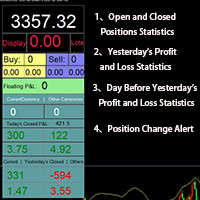
Smart Trade Monitor — Real-Time Position Tracking, P&L Analysis & Alert System   Real-Time Monitoring : Auto-tracks open/closed positions, displays yesterday’s & previous day’s P&L—no manual calculations!   Smart Alerts (Premium Only) : Instant push notifications + sound alerts for position changes—never miss a trading opportunity!   User-Friendly : One-click setup, key data displayed directly on charts for faster decisions.   Cross-Platform : Supports both MT4 & MT5, compatible with
FREE
MASi Three Screens
Aleksey Terentev
5 (2)
MASi Three Screens is based on the trading strategy by Dr. Alexander Elder. This indicator is a collection of algorithms. Algorithms are based on the analysis of charts of several timeframes. You can apply any of the provided algorithms. List of versions of algorithms:     ThreeScreens v1.0 - A simple implementation, with analysis of the MACD line;     ThreeScreens v1.1 - A simple implementation, with analysis of the MACD histogram;     ThreeScreens v1.2 - Combines the first two algorithms in
FREE
이 제품의 구매자들이 또한 구매함
Trade Manager EA에 오신 것을 환영합니다. 이 도구는 거래를 보다 직관적이고 정확하며 효율적으로 만들기 위해 설계된 궁극적인 리스크 관리 도구 입니다. 단순한 주문 실행 도구가 아닌, 원활한 거래 계획, 포지션 관리 및 리스크 제어를 위한 종합 솔루션입니다. 초보자부터 고급 트레이더, 빠른 실행이 필요한 스캘퍼에 이르기까지 Trade Manager EA는 외환, 지수, 상품, 암호화폐 등 다양한 시장에서 유연성을 제공합니다. Trade Manager EA를 사용하면 복잡한 계산은 이제 과거의 일이 됩니다. 시장을 분석하고 진입, 손절 및 익절 수준을 차트의 수평선으로 표시한 후 리스크를 설정하면, Trade Manager가 이상적인 포지션 크기를 즉시 계산하고 SL 및 TP 값을 실시간으로 표시합니다. 모든 거래가 간편하게 관리됩니다. 주요 기능: 포지션 크기 계산기 : 정의된 리스크에 따라 거래 크기를 즉시 결정합니다. 간단한 거래 계획 : 진입, 손절, 익절을 위한
Exp COPYLOT CLIENT for MT4
Vladislav Andruschenko
4.69 (65)
MetaTrader 4용 전문 트레이드 복사기 MetaTrader 4 용 빠르고 안정적이며 전문적인 트레이드 복사기입니다. COPYLOT 은 MetaTrader 4 와 MetaTrader 5 터미널 간에 Forex 거래를 복사할 수 있으며, 다양한 계좌 유형과 운용 방식에 맞춰 유연한 동기화 환경을 제공합니다. COPYLOT MT4 버전 지원 방식: MetaTrader 4 → MetaTrader 4 MetaTrader 5 Hedge → MetaTrader 4 MetaTrader 5 Netting → MetaTrader 4   MT5 버전 상세 설명 + DEMO + PDF 구매 방법 설치 방법 로그 파일 확인 방법 테스트 및 최적화 방법 Expforex의 모든 제품 MetaTrader 5 버전 을 사용하면 MetaTrader 5 → MetaTrader 5 및 MetaTrader 4 → MetaTrader 5 복사도 지원됩니다: COPYLOT CLIENT for MT5 COPYLOT 은
Trade Assistant MT4
Evgeniy Kravchenko
4.43 (197)
거래당 위험 계산, 라인을 사용한 손쉬운 신규 주문, 부분 청산 기능을 통한 주문 관리, 7가지 유형의 트레일링 스탑 및 기타 유용한 기능을 제공합니다. 추가 자료 및 지침 설치 지침 - 애플리케이션 지침   라인 기능       - 차트에 개시선, 손절매, 차익실현을 표시합니다. 이 기능을 사용하면 새로운 주문을 쉽게 하고 개봉 전에 추가 특성을 볼 수 있습니다. 위기 관리       -       위험 계산 기능은 설정된 위험과 손절매 주문의 크기를 고려하여 새 주문의 볼륨을 계산합니다. 이를 통해 손절매 크기를 설정하고 동시에 설정된 위험을 존중할 수 있습니다. 로트 계산 버튼 - 위험 계산을 활성화/비활성화합니다. 필요한 위험 값은 위험 필드에 0에서 100 사이의 백분율 또는 예금 통화로 설정됩니다. 설정 탭에서 위험 계산 옵션을 선택합니다. $ 통화, % 잔액, % 지분, % 자유 마진, % 사용자 정의, % AB 이전 일, % AB 이전 주, % AB 이전 월.
Local Trade Copier EA MT4
Juvenille Emperor Limited
4.96 (111)
Local Trade Copier EA MT4는 동일한 Windows 컴퓨터 또는 Windows VPS에서 여러 MetaTrader 4 계정 간에 거래를 복사하고 관리할 수 있는 빠르고 유연한 거래 복사기입니다. 로컬 거래 동기화 기능과 함께 Receiver 측에서 로트 크기, 리스크 관리, 거래 필터링, 심볼 매핑, 거래 관리 및 계정 보호를 독립적으로 설정할 수 있습니다. Transmitter와 Receiver 터미널을 약 1분 안에 설정하고, 동일한 브로커 또는 서로 다른 브로커의 계정 간에 수동 거래 또는 EA 거래를 복사할 수 있습니다. 적절한 조건에서는 로컬 MetaTrader 터미널 간의 거래 정보가 0.5초 이내 에 동기화될 수 있습니다. 실제 체결 속도는 브로커 지연 시간, 네트워크 상태, 컴퓨터/VPS 성능 및 터미널 부하에 따라 달라집니다. 구매 전에 무료 데모를 사용해 보세요 MT4 데모 계정에서 Local Trade Copier EA MT4의 모든 기능을
The product will copy all telegram signal to MT4   ( which you are member  ) , also it can work as remote copier.  Easy to set up, copy order instant, can work with almost signal formats, image signal, s upport to translate other language to English Work with all type of channel or group, even channel have "Restrict Saving Content", work with  multi channel, multi MT5 Work as remote copier: with signal have ticket number, it will copy exactly via ticket number. Support to backtest signal. How to
News Filter EA MT4
Rashed Samir
4.64 (11)
News Filter EA: Advanced Algo Trading Assistant News Filter EA is an advanced algo trading assistant designed to enhance your trading experience. By using the   News Filter EA , you can integrate a Forex economic news filter into your existing expert advisor, even if you do not have access to its source code. In addition to the news filter, you can also specify   trading days   and   hours   for your expert. The News Filter EA also includes   risk management   and   equity protection   features
CloseIfProfitorLoss with Trailing
Vladislav Andruschenko
4.88 (32)
이익 추적 기능으로 총 이익/손실에 도달하면 MetaTrader 4에서 포지션을 청산합니다. 가상 정지 (별도 주문) 을 활성화할 수 있습니다. BUY 및 SELL 포지션을 별도로 계산하고 마감합니다 (BUY SELL 별도). 모든 심볼 또는 현재 심볼 만 닫고 계산합니다 (모든 심볼). 이익을 위해 후행 추적 을 활성화합니다 (후행 이익). 예금 통화, 포인트, 잔액의 %에 대한 총 손익을 마감합니다. 이 애플리케이션은 다른 EA와 함께 또는 수동 거래와 함께 모든 계정에서 사용하도록 설계되었습니다. MT5 버전 전체 설명 + DEMO + PDF 구입 방법 설치하는 방법 로그 파일을 얻는 방법 테스트 및 최적화 방법 Expforex의 모든 제품 일부 쌍 또는 모든 쌍의 총 거래 잔액이 설정에서 지정된 값보다 크거나 같으면 모든 포지션이 닫히고 주문이 삭제됩니다. 이 버전은 지정된 이익 수준에서 포지션을 마감할 수 있을 뿐만 아니라 더 나은 결과를 위해 이익을 추적할 수도 있습니다
RS Trade Copier - 진짜 그래픽 인터페이스를 갖춘 초고속 로컬 트레이드 카피어입니다. 계좌번호를 일일이 입력하지 마세요. 200개가 넘는 복잡한 입력 파라미터 목록은 이제 끝입니다. 여러 MT4와 MT5 터미널 간 거래 작업을 복사하기 위한 안정적이고 유연한 도구입니다. 이 도구는 경험 많은 트레이더, 신호 서비스, 개인 투자자 모두에게 적합합니다. 하나 또는 여러 시그널 소스(Provider)에서 하나 또는 여러 리시버(Client)로 트레이딩을 동기화 하여 높은 정밀도와 최소 지연 시간을 제공합니다. 간단한 자동 설정부터 고급 수동 구성까지 지원합니다. 수동 또는 다른 EA로 열린 주문에 간섭하지 않습니다. 모든 작업이 MT4 내부에서 로컬로 처리 되며 외부 서버 의존성 없이 실행됩니다. RS Trade Copier와 다른 솔루션 비교 RS Trade Copier 다른 솔루션 설정 시각적 단계별 마법사. 설정에 약 1분 소요. 200개 이상의 불분명한 입력 매개변수.
Telegram to MT4 Coppy
Sergey Batudayev
4.09 (11)
Telegram에서 MT4로:   최고의 신호 복사 솔루션 최첨단 유틸리티인   Telegram to MT4를   사용하여 거래를 간소화하세요. DLL 없이도 Telegram 채널과 채팅에서 MetaTrader 4 플랫폼으로 거래 신호를 직접 복사할 수 있습니다. 이 강력한 솔루션은 탁월한 정밀도와 맞춤 설정 옵션을 통해 원활한 신호 실행을 보장하여 시간을 절약하고 효율성을 높여줍니다. [ Instructions and DEMO ] 주요 특징 직접 Telegram API 통합 전화번호와 보안 코드를 통해 인증하세요. 사용자 친화적인 EXE 브리지를 사용하여 채팅 ID를 손쉽게 가져오고 관리하세요. 여러 채널/채팅을 추가, 삭제, 새로 고침하여 동시에 신호를 복사합니다. 고급 필터를 사용한 신호 파싱 사용자 정의 예외 단어(예: "보고서", "요약")가 포함된 원치 않는 신호를 건너뜁니다. 유연한 SL 및 TP 형식을 지원합니다: 가격, 핍 또는 포인트. 신호가 가격 대신 지점을 지정
Trade copier MT4
Alfiya Fazylova
4.62 (37)
Trade Copier는 거래 계정 간의 거래를 복사하고 동기화하도록 설계된 전문 유틸리티입니다. 복사는 공급자의 계정/단말기에서 동일한 컴퓨터 또는 vps에 설치된 수신자의 계정/단말기로 발생합니다. 구매하기 전에 데모 계정에서 데모 버전을 테스트할 수 있습니다. 데모 버전 여기 . 전체 지침 여기 . 주요 기능 및 이점: 복사기는 "МТ4> МТ4", "МТ4> МТ5", "МТ5> МТ4" 복사를 지원합니다. 복사기는 데모 계정 > 실 계정, 실 계정 > 데모 계정, 데모 계정 > 데모 계정 및 실제 계정 > 실 계정 복사를 지원합니다. 복사기는 읽기 전용 암호가 적용된 투자자 계정에서 복사를 지원합니다. 하나의 공급자 터미널은 여러 수신 터미널로 트랜잭션을 보낼 수 있고 하나의 수신 터미널은 여러 공급자 터미널에서 트랜잭션을 수신할 수 있습니다. 복사기는 귀하 또는 귀하의 고문이 거래하는 동일한 터미널에서 작동할 수 있습니다. 높은 복사 속도(0.5초 미만). 복사기에는 간편
Telegram to MT4 Multi-Channel Copier   는 Telegram 및 Discord 채널의 트레이딩 시그널을 MetaTrader 4로 자동 복사합니다. 봇도, 브라우저 확장도, 수동 복사도 필요 없습니다. Telegram이나 Discord에 시그널이 도착하면 EA가 몇 초 안에 터미널에서 주문을 실행합니다. 그리고 채널을 복사하기 전에, 내장 백테스터가 그 채널이 내 계좌에서 어떤 결과를 냈을지 보여줍니다. 제품은 두 가지 구성 요소로 이루어집니다: Telegram 채널을 수신하는 Windows 애플리케이션과, MT4 터미널에서 시그널을 실행하는 본 EA입니다. MT5 버전도 제공됩니다   여기 . 구매 전에 사용해 보세요:   애플리케이션은 무료로 다운로드할 수 있습니다. 본인의 채널을 연결하고 각 시그널이 어떻게 읽히는지 확인하세요. Backtest 탭과 실제 거래에는 구매하거나 임대한 EA가 필요합니다. 이 페이지의 무료 데모는 전략 테스터에서만 실행되며
Local Copier MT4
Rodrigo Arana Garcia
Local Copier – MetaTrader 4 및 MetaTrader 5용 거래 복사기 MetaTrader 4 및 MetaTrader 5용 로컬 거래 복사기입니다. 같은 Windows 컴퓨터 또는 VPS에서 실행되는 터미널 간에 어느 방향으로든 거래를 복사합니다. MetaTrader 4에서 MetaTrader 4로, MetaTrader 5에서 MetaTrader 5로, 그리고 두 플랫폼 사이에서 복사할 수 있습니다. 이 제품은 MetaTrader 4 버전입니다. MetaTrader 5 버전 은 별도의 제품입니다. 두 플랫폼 간에 복사하려면 각 터미널에 해당 플랫폼용 버전을 설치하세요. 추가 자료 및 안내 설치 가이드 - 사용자 매뉴얼 (1부) - 사용자 매뉴얼 (2부) 무료 데모 버전 구매 전에 무료 데모 버전 으로 본인의 데모 계좌에서 복사기를 사용해 볼 수 있습니다. 정식 버전의 모든 기능을 갖추고 있으며, 데모 계좌에서만 작동하고 2시간 단위 세션으로 복사합니다. 설치:
PZ Trade Pad Pro MT4
PZ TRADING SLU
3.67 (3)
Effortlessly calculate lot sizes and manage trades to save time and avoid costly errors The Trade Pad Pro EA is a tool for the Metatrader Platform that aims to help traders manage their trades more efficiently and effectively. It has a user-friendly visual interface that allows users to easily place and manage an unlimited number of trades, helping to avoid human errors and enhance their trading activity. [ Installation Guide | Update Guide | Troubleshooting | FAQ | All Products ] One of the k
지원이 필요하신가요? 설정 방법이 궁금하신가요? 질문이 있으신가요? 여기에 고객님의 언어로 문의하세요, 빠른 답변: https://www.mql5.com/en/market/product/139089/comments 작동 체험판 다운로드 Copy Cat More (카피캣) MT4 트레이드 카피어 (Trade Copier) 는 단순한 로컬 트레이드 카피어가 아닙니다. 오늘날의 트레이딩 과제를 위해 설계된 완전한 리스크 관리 및 실행 프레임워크 (risk management and execution framework) 입니다. 프롭 펌 (prop firm) 챌린지부터 개인 포트폴리오 관리까지, 견고한 실행, 자본 보호, 유연한 설정, 고급 트레이드 처리의 조합으로 모든 상황에 적응합니다. 이 카피어는   마스터 (Master, 송신측) 와 슬레이브 (Slave, 수신측)   두 모드 모두에서 작동하며, 시장가 주문과 대기 주문, 트레이드 수정, 부분 청산, 상호 청산 (Close B
TradePanel MT4
Alfiya Fazylova
4.84 (95)
Trade Panel은 다기능 거래 도우미입니다. 이 애플리케이션에는 50개 이상의 수동 거래 기능이 포함되어 있으며 대부분의 거래 작업을 자동화할 수 있습니다. 앱 사용 설명서 : https://www.mql5.com/en/blogs/post/756482 데모 계정용 앱 체험판: https://www.mql5.com/en/blogs/post/750865 앱 설치 방법: https://www.mql5.com/en/blogs/post/756239 시각 모드에서 앱 테스트 방법: https://www.mql5.com/en/blogs/post/770277 VPS MetaTrader에 앱 설치 방법: https://www.mql5.com/en/blogs/post/770190 거래. 한 번의 클릭으로 거래를 수행할 수 있습니다: 리스크 자동 계산과 함께 예약 주문 및 포지션 열기. 한 번의 클릭으로 여러 주문 및 포지션 열기. 주문 그리드 열기. 예약 주문 및 포지션을 그룹별로 닫기. 포지션
Trade Indicator Assistant is a powerful MT4 utility designed to turn indicators into automated trading systems. Its main feature is the ability to automatically detect an indicator’s   BUY and SELL signal buffers , without requiring you to know the buffer numbers, search through indicator settings, or modify the indicator source code. Bonus Indicator: After purchasing Trade Indicator Assistant, contact me to receive Trade Signal Pro completely free as a bonus indicator. [Download Demo Version]
DMI Drawdown Watcher: Track your Drawdowns in Real Time 100% free, functional and without limitations! The DMI Drawdown Watcher is an essential tool for traders, designed to monitor your drawdowns in real time. Ideal for optimizing your risk management, this indicator tracks your current and maximum losses, helping you meet the strict criteria of prop firms and protect your capital. Key Features: Max DrawDown Value Alert: Triggers an alert when the maximum drawdown threshold is reached. (Def
TimeFilter 4
Andrej Nikitin
1 (1)
TimeFilter indicator allows you to visually select bit masks (GoodHourOfDay, BadHoursOfDay, GoodDayOfWeek, BadDaysOfWeek) for the  Intraday Time Filter  module of trading signals of the Standard Library. The use of time filters allows you to take into account the particulars of each trading session in performing trading operations.

The Envelopes Trailing Stop is a tool that implements trailing of the stop loss order after the price based on the Envelopes trend indicator. The utility provides all the necessary parameters for customization, which allows to select the optimal configuration for any user. The EA allows to choose the trailing line depending on the type of the trade. For example, buy trades can be trailed based on the lower line of the indicator, and sell trades can be trailed based on the upper line. The Magic p
Trading History MT4
Siarhei Vashchylka
5 (9)
Trading History - A program for trading and money management on the history of quotes in stratagy tester. It can work with pending and immediate orders, and is equipped with trailing stop, breakeven and take profit functions. Very good for training and testing different strategies. Manual (Be sure to read before purchasing) Advantages 1. Allows you to test any trading strategy in the shortest possible time 2. An excellent simulator for trading training. You can gain months of trading experience

Trade Manager Pro MT4
Bryan Djoufack Nguessong
This is an Utility to make your trading easier by putting at   one click or a few clicks   time-consuming tasks as order management and risk management. Contact for a free trial. Features Risk Management   Calculates automatically lots based on risk specified in either   % or $  in the risk field and let you enter just   by placing lines for SL TP   etc and display   real-time Risk Reward . TrueRisk   so   it includes commissions when calculating lot size on FX pairs only so you risk 1% with
Shepherd Safety EA
AW Trading Software Limited
4.92 (13)
AW Shepherd Safety EA는 열린 포지션을 관리하는 EA입니다. 첫 주문은 트레이더가 패널에서 열고, 이후에는 EA가 바스켓을 직접 관리합니다: 추세 필터를 거쳐 복구 주문을 추가하고, TakeProfit, 트레일링 또는 손절로 해당 측을 청산하며, 청산 수준을 차트에 표시합니다. 매수와 매도는 따로 관리되며 양 측을 동시에 열어 둘 수 있습니다. 복구 주문은 가격 간격만으로 열리지 않고, Parabolic SAR, 두 개의 MA 또는 캔들 색상 기준으로 포지션 방향으로의 반전이 확인된 뒤에 열립니다. Orders Magic number가 일치하면 수동으로 또는 다른 EA가 연 포지션도 EA가 넘겨받아 관리합니다. EA가 포지션을 관리하는 방식: 1 트레이더가 Open Buy 또는 Open Sell 버튼으로 Order Size 필드의 거래량만큼 첫 주문을 엽니다. 2 가격이 포지션에 불리한 방향으로 Minimal step between recovery orders만큼 움
Trade Assistant Pro 36 in 1
Makarii Gubaydullin
4.76 (21)
다기능 거래 도구: 로트 계산기, 그리드 주문, 위험/보상 비율, 거래 관리자, 수급 구역, 가격 행동 분석 등 데모 버전   |   사용자 설명서 트레이딩 어시스턴트 는 전략 테스터에서 작동하지 않습니다: 이 유틸리티 를 테스트하려면 데모 버전을 여기서 다운로드하세요. 질문 /개선 아이디어/버그 발견 시 저에게 연락 하세요 MT5 버전이 필요하시면, 여기서 사용 가능합니다 거래 프로세스 를 단순화, 가속화, 자동화하세요. 이 대시보드 로 표준 터미널 기능을 확장합니다. 트레이딩 패널 은 모든 거래 상품에서 작동합니다: 외환, 주식, 지수, 암호화폐 등. 1. 새로운 거래 열기 : 로트/위험/위험보상비 계산: 수동 거래의 위험 관리 로트 계산기 (위험 크기 기반 거래량 계산) 위험 계산기 (로트 크기 기반 위험 금액) 위험 보상 비율 그리드 주문: + 동적 거리 옵션 및 분할 로트 옵션 주문 활성화 트리거, + Buy StopLimit/Sell StopLimit: Mt4에서도 가능
Az OrderGun
Jose Antonio Valle Magana
AZ_OrderGun MT4 - Professional 1-Click Trading Panel AZ_OrderGun is the all-in-one panel to execute and manage your trades without wasting time setting up SL/TP. KEY FEATURES: 1. 4 INSTANT ENTRIES: Buy SLL - Buy with SL on Low of previous candle Sell SLH - Sell with SL on High of previous candle Buy SLO / Sell SLO - SL on Open of previous candle > Fully configurable % Risk 2. ADVANCED VISUAL MANAGEMENT: Draggable lines for Pending and Market orders Auto calculation of Lot Size, $ Ri
Rhino Chart Drawing Tools 는 MetaTrader 4에서 TradingView 스타일 의 차트 드로잉 환경을 제공합니다. 54개의 드로잉 도구 , 사용자 지정 가능한 툴바, 즐겨찾기, 빠른 스타일 설정, 객체 설정, 템플릿 및 객체 관리자를 제공합니다. 사용자 매뉴얼: 제품 사용 방법 무료 데모 버전: 데모 다운로드 MetaTrader 5 버전: Rhino Drawing Tools for MT5 드로잉 도구 그룹 객체 목록 라인 추세선, 레이, 연장선, 수평선, 수직선, 수평 레이, 교차선, 추세 각도, 화살표, 경로, 폴리라인 및 정보선. 채널 평행 채널, 회귀 채널, 플랫 채널, 분리 채널 및 피치포크. 피보나치 되돌림, 확장, 채널, 속도 팬 및 시간대. 간 간 박스 및 간 팬. 도형 사각형, 회전 사각형, 타원, 원, 삼각형 및 폴리라인. 주석 텍스트, 메모, 콜아웃, 가격 라벨, 표지판, 플래그 및 화살표 마크. 패턴 XABCD, ABCD, Cyphe
Equity Protect Pro: 안심 거래를 위한 종합 계좌 보호 전문가 계좌 보호, 자산 보호, 포트폴리오 보호, 다중 전략 보호, 수익 보호, 수익 확보, 거래 보안, 위험 관리 프로그램, 자동 위험 관리, 자동 청산, 조건부 청산, 예약 청산, 동적 청산, 추적 손절매, 원클릭 종료, 원클릭 청산, 원클릭 복원 등의 기능을 찾고 있다면 Equity Protect Pro가 바로 필요한 프로그램입니다. 설정이 간편하고 사전 설정된 조건이 충족되면 모든 차트를 닫을 수 있으며 신호 구독 취소도 지원합니다(이는 모든 거래 프로그램도 중지됨을 의미합니다). 이 시점에서 새로운 주문이 생성되지 않으며 최종적으로 모든 주문이 종료되어 예상치 못한 손실을 효과적으로 방지하고 안심하고 거래할 수 있습니다. Equity Protect Pro (Technical Manual) Equity Protect Pro Demo Version for yo u to test   Equity Protect
Trade Dashboard MT4
Fatemeh Ameri
4.96 (55)
Trade Dashboard simplifies how you open, manage, and control your trades, with built-in lot size calculation. It allows you to execute trades, manage risk, and control positions directly on the chart, with tools such as partial close, breakeven, and trailing stop. Designed to reduce manual work and help you stay focused on your trading decisions. A demo version is available for testing. Detailed explanations of features are provided within the MQL5 platform. Installation instructions are include
MT4 to Telegram Signal Provider 는 사용하기 쉽고 완전히 사용자 정의가 가능한 도구로, 텔레그램으로 신호를 보내어 계정을 신호 제공자로 변환할 수 있습니다. 메시지 형식은 완전히 사용자 정의가 가능합니다! 그러나 간단한 사용을 위해 미리 정의된 템플릿을 선택하고 메시지의 특정 부분을 활성화하거나 비활성화할 수도 있습니다. [ 데모 ]  [ 매뉴얼 ] [ MT5 버전 ] [ 디스코드 버전 ] [ 텔레그램 채널 ]  New: [ Telegram To MT5 ] 설정 단계별 사용자 가이드 가 제공됩니다. 텔레그램 API에 대한 지식이 필요 없으며, 개발자가 필요한 모든 것을 제공합니다. 주요 기능 구독자에게 보낸 주문 세부 정보를 사용자 정의할 수 있는 기능 예를 들어 브론즈, 실버, 골드와 같은 계층 구독 모델을 만들 수 있습니다. 골드 구독은 모든 신호 등을 받게 됩니다. ID, 심볼 또는 코멘트별 주문 필터링 주문이 실행된 차트의 스크린샷을 포함 보낸
Multi Account Local Trade Copier 는 MetaTrader용 빠른 로컬 트레이드 카피어입니다: 동일한 Windows PC 또는 VPS의 MT4/MT5 터미널 간에, 하나의 마스터 계좌에서 여러 리시버 계좌로 거래를 복사하세요 — 본인의 실계좌, 데모 계좌, 프랍펌 계좌로. 같은 브로커든 다른 브로커든 상관없습니다. 이벤트 기반 으로 작동합니다: 마스터는 각 거래를 발생하는 순간 즉시 게시하고, 리시버는 모든 복사의 실제 지연 시간을 측정하고 기록 합니다 — 일반적으로 50-150ms 입니다. DLL 없음, 인터넷 브리지 없음, 설정 파일 없음. 단계별 설정 가이드: Multi Account Local Trade Copier — 설정 가이드 하나의 EA, 두 가지 모드 원본 터미널에는 MASTER 로, 각 대상 터미널에는 RECEIVER 로 부착하세요. Master ID = AUTO 이면 리시버가 활성 마스터를 스스로 찾습니다: 드래그, 드롭, 끝. 하나의 마스
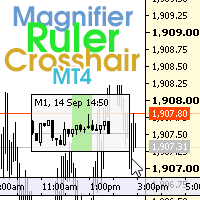
The indicator has three main tools: Magnifier (Zoom chart), Ruler  ( Time and Price scales ),   and Crosshair. You can move it all around with your mouse and customize different formats for  displaying , customize   size and color of each element. The Magnifier (zoom chart) allows you to display candles from any time frame and at different scales. Hotkeys: 'Q' - higher timeframe, 'A' - lower timeframe, 'W' - decrease candle size, 'S' - increase candle size, 'Z' - show/hide zoom chart You can

필터:
리뷰 없음
리뷰 답변