Eos AI
- 지표
-
Lasse Mathias Baagoe S Christensen
 I code what I trade.
I also teach how I trade.
______________________________________
Trading Experience: 5 years.
CEO: Powered Traders & Deep Traders.
Tools & chart inspiration. 👇🏽 - 버전: 1.0
How to Read EOS AI
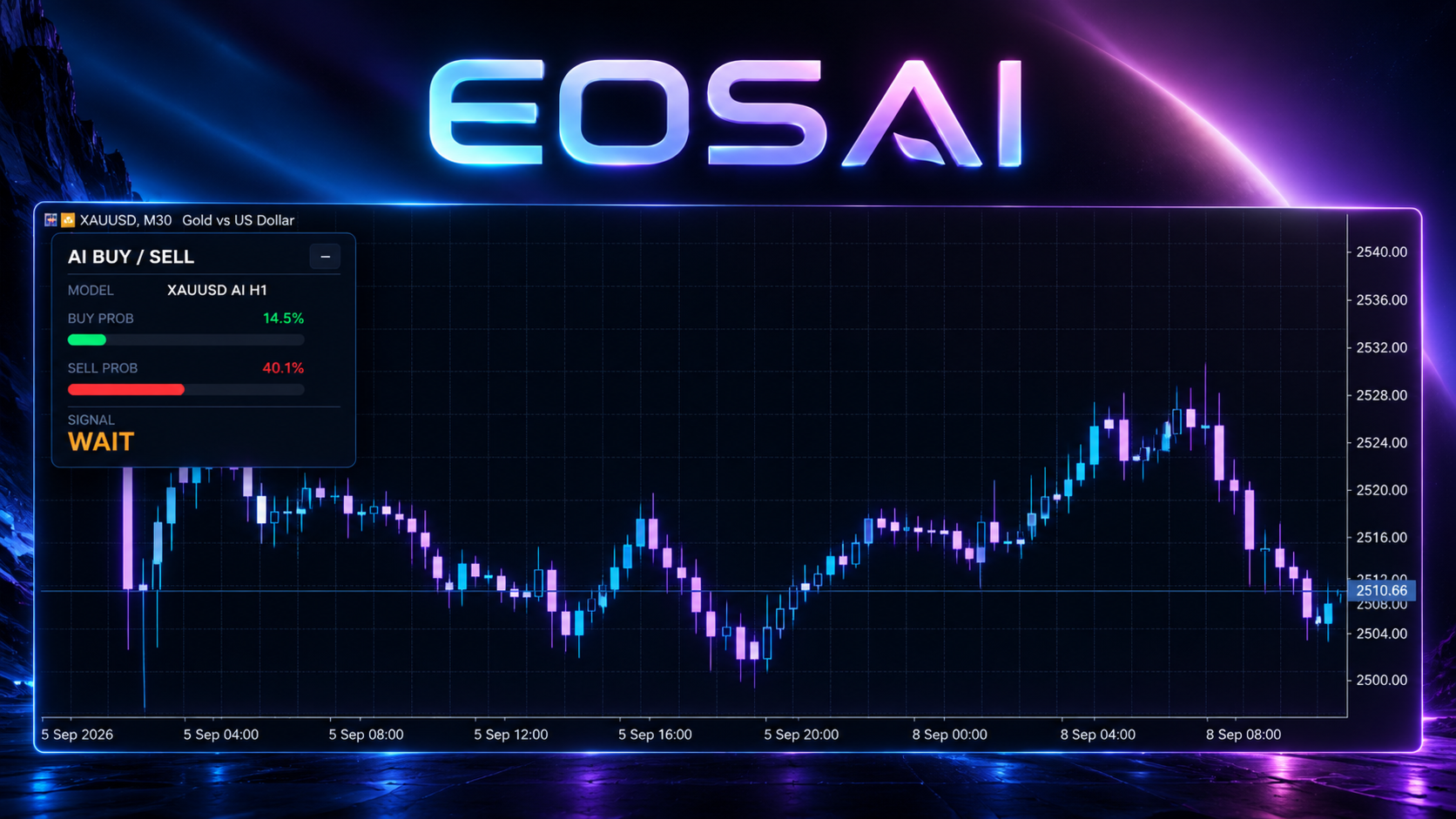
EOS AI is designed to make its current market assessment easy to understand from one compact dashboard.
The panel gives you three main pieces of information:
-
BUY Probability – the neural model's current bullish assessment
-
SELL Probability – the neural model's current bearish assessment
-
Signal – BUY, SELL or WAIT after the required confirmation rules are applied
The probabilities provide context, while the final signal applies the additional confirmation logic.
This means the highest probability does not automatically become the final trading signal.
The model analyses. The filters confirm. You make the decision.
17-Feature Neural Analysis
At the core of EOS AI is a trained neural-network model that processes 17 market features simultaneously.
Rather than evaluating one technical condition in isolation, the model receives multiple numerical inputs describing the current market environment.
Those inputs are processed together by the neural network to produce the current directional probabilities.
The result is expressed through:
-
BUY probability
-
SELL probability
The exact relationship between the 17 inputs is handled by the trained model rather than by a simple single-indicator rule.
This does not mean the model can predict the future.
It means EOS AI uses the relationships learned during its training process to evaluate the current market information presented to it.
More Than the Highest Probability
EOS AI is not designed to display BUY simply because BUY is slightly stronger than SELL.
A directional probability must first satisfy the configured confidence requirement.
The higher-timeframe confirmation must also support the direction before the final signal can be presented.
For example, the model may currently favour BUY, but EOS AI can still display WAIT when the required confirmation is incomplete.
This creates an additional layer between the raw neural-model output and the final dashboard signal.
AI Analysis + Higher-Timeframe Confirmation
EOS AI combines two different layers of market analysis.
Layer 1 – Neural Model
The trained model processes the 17 market features and generates the current BUY and SELL probabilities.
Layer 2 – H4 Trend Confirmation
The higher-timeframe filter evaluates the broader direction using the H4 EMA 20 and EMA 50.
The final BUY or SELL confirmation requires the neural assessment and the higher-timeframe direction to be compatible.
If the required agreement is not present, EOS AI can remain on WAIT.
AI probability provides the directional assessment. H4 provides broader market context.
Why H1 and H4?
EOS AI separates its primary analysis from its higher-timeframe confirmation.
The neural model uses H1 as its primary AI timeframe.
The trend confirmation uses H4.
This allows EOS AI to evaluate the current H1 market environment while also checking whether the broader H4 direction supports the result.
The calculations operate independently of the chart timeframe currently displayed in MetaTrader 5.
You can therefore keep your preferred chart timeframe open while EOS AI continues using its intended H1 and H4 analysis internally.
Understanding WAIT
WAIT is an important part of EOS AI.
It does not represent an error or missing calculation.
WAIT means the complete confirmation required for BUY or SELL is not currently present.
This can include situations where:
-
Model confidence is below the required threshold
-
BUY and SELL probabilities are too close
-
The higher-timeframe trend does not provide sufficient confirmation
-
The neural direction conflicts with the H4 filter
Market conditions do not always provide a clear directional answer.
EOS AI is designed to say WAIT instead of forcing a signal.
Using EOS AI as Confirmation
EOS AI is intended to fit beside an existing manual trading process.
A simple workflow can be:
Your Setup → EOS AI → Directional Confirmation → Your Decision
For example:
If your own analysis suggests a BUY and EOS AI also provides a strong BUY confirmation, you have an additional directional reference supporting the setup.
If your own analysis suggests BUY while EOS AI displays SELL or WAIT, the conflicting information can give you a reason to review the setup again before making a decision.
The indicator does not determine your entry price, Stop Loss, Take Profit or position size.
It is designed to answer one narrower question:
Does the current AI and higher-timeframe analysis support BUY, SELL or WAIT?
Supported Markets
EOS AI supports the following markets:
-
XAUUSD
-
BTCUSD
-
EURUSD
-
GBPUSD
-
USDJPY
-
USTEC / NAS100 / US100
Different brokers can use different names for the same instrument.
Always confirm that the symbol you are using corresponds with one of the supported markets.
Market behaviour, spread and broker conditions can also differ between symbols and providers.
Designed to Stay Beside Your Trading Setup
EOS AI intentionally avoids covering the chart with historical arrows and multiple technical panels.
The dashboard keeps the main output together:
-
Model status
-
BUY Probability
-
SELL Probability
-
BUY / SELL / WAIT Signal
The panel can be moved around the chart and minimized when you want a smaller workspace.
This makes EOS AI suitable as an additional confirmation panel beside your existing technical or price-action setup.
What EOS AI Does Not Do
-
Does not open trades automatically
-
Does not close trades automatically
-
Does not manage live positions
-
Does not calculate position size
-
Does not place Stop Loss
-
Does not place Take Profit
-
Does not guarantee that the highest probability will be correct
-
Does not guarantee that BUY or SELL will produce a profitable trade
-
Does not predict future prices with certainty
EOS AI is a market-analysis and confirmation indicator for manual traders.
EOS AI MT5 in Short
-
Trained Neural-Network Model
-
17 Market Features
-
BUY Probability
-
SELL Probability
-
BUY • SELL • WAIT
-
H1 Primary AI Analysis
-
H4 Trend Confirmation
-
EMA 20 / EMA 50 Higher-Timeframe Filter
-
Selective WAIT State
-
Movable Dashboard
-
Minimized Dashboard Mode
-
Clean Chart Design
-
Multi-Market Support
-
Manual Trading Only
AI ANALYSES. THE MARKET CONFIRMS. YOU DECIDE.
Testing EOS AI
Before making EOS AI part of your regular trading process, test it on the supported markets you intend to analyse.
Pay attention to:
-
How BUY and SELL probabilities change over time
-
How often EOS AI remains on WAIT
-
How the H4 trend filter affects the final signal
-
How signals behave during trending conditions
-
How signals behave during uncertain or changing markets
-
How EOS AI fits alongside your own trading setup
Do not evaluate the model from only a small number of observations.
Different markets and market environments can produce different probability behaviour.
Important Information
EOS AI MT5 is a technical market-analysis and confirmation indicator.
The neural model analyses market information and produces probability-based directional assessments.
A displayed probability is not the mathematical probability that a future trade will win and should not be interpreted as a guaranteed future outcome.
BUY, SELL and WAIT represent the indicator's current assessment according to its model and confirmation logic.
Machine-learning models can produce incorrect assessments, and market behaviour can differ from patterns represented during training.
Always combine EOS AI with your own trading strategy, market analysis, position sizing and risk management.
Trading leveraged financial products involves substantial risk and can result in loss of capital.
AI analysis, model probabilities and historical market behaviour do not guarantee future performance.
For product questions or support, use the MQL5 product comments or MQL5 messaging system.