Apex Adaptive Risk Engine
- 라이브러리
- 버전: 1.0
- 활성화: 5

Apex Adaptive Risk Engine
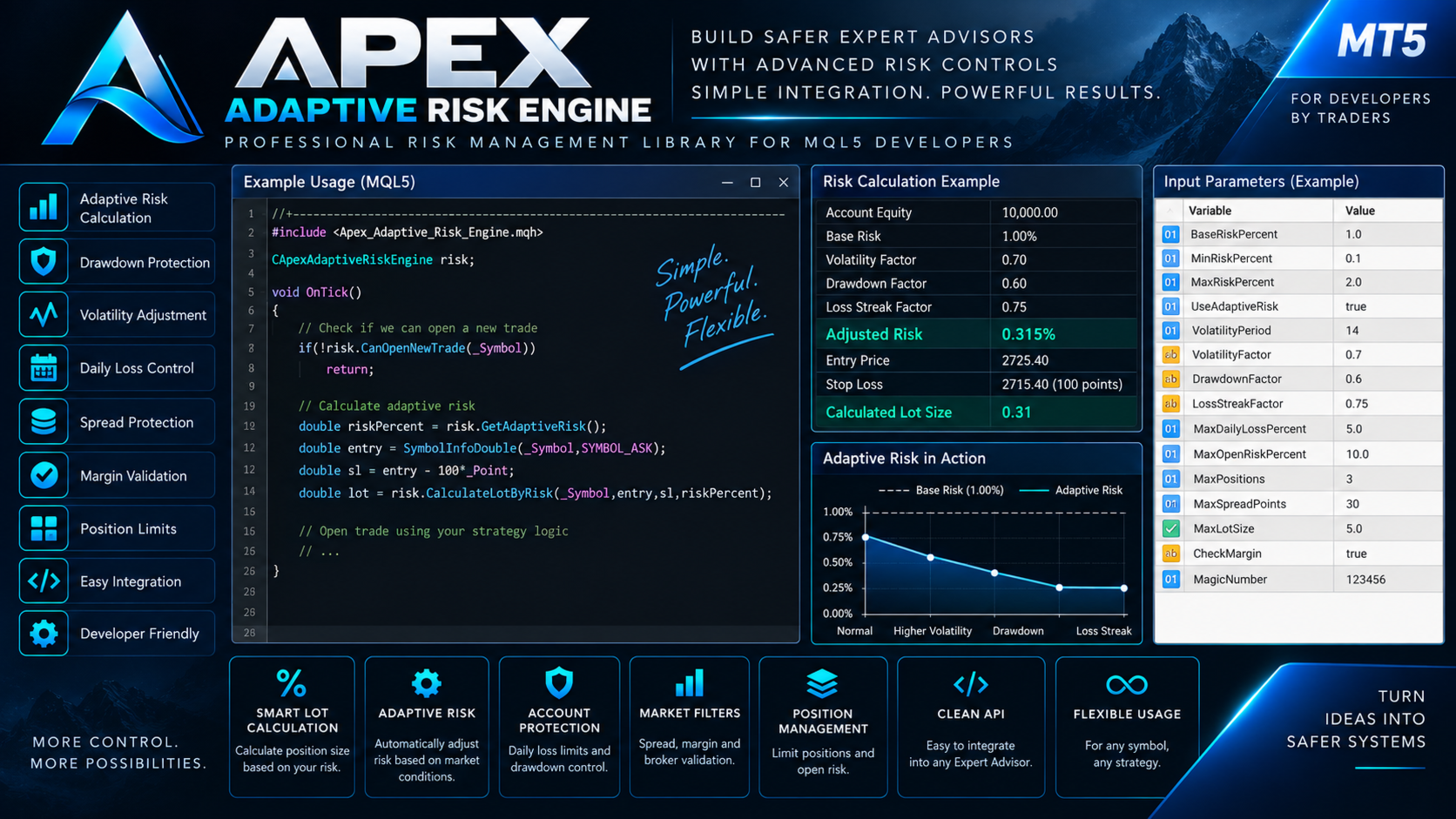
Apex Adaptive Risk Engine is an advanced risk management library for MetaTrader 5 developers.
It is designed to help MQL5 developers integrate professional risk controls into Expert Advisors without rebuilding the same risk-management infrastructure for every project.
Unlike a basic lot-size calculator, Apex Adaptive Risk Engine can dynamically adjust risk according to volatility, account drawdown and consecutive losing trades while also providing essential trade protection functions.
The library is intended for developers and does not generate trading signals or execute a trading strategy by itself.
MAIN FEATURES
- Percentage-based position sizing
- Adaptive risk calculation
- Volatility-based risk adjustment
- Drawdown-based risk reduction
- Consecutive-loss risk adjustment
- Minimum and maximum risk limits
- Maximum lot protection
- Daily loss protection
- Maximum open-risk control
- Maximum position limit
- Spread protection
- Margin validation
- Broker stop-level validation
- Volume normalization
- Equity drawdown calculation
- Consecutive losing-trade detection
- Magic Number filtering
- Symbol-specific risk controls
- All-in-one trade permission check
- Developer-friendly MQL5 class structure
ADAPTIVE RISK MANAGEMENT
The core feature of Apex Adaptive Risk Engine is its adaptive risk model.
Traditional risk systems normally use a fixed percentage such as:
Base Risk: 1.00%
Apex can dynamically reduce this risk according to current conditions.
The adaptive model evaluates:
- Current volatility
- Current account drawdown
- Consecutive losing trades
For example, if volatility is elevated, the account is experiencing drawdown and a losing streak is present, the engine can reduce the effective risk below the configured base risk.
The developer can also disable adaptive behavior and use the library as a traditional fixed-percentage risk engine.
RISK-BASED LOT CALCULATION
Apex calculates position volume using:
- Account equity
- Selected risk percentage
- Entry price
- Stop Loss price
- Symbol tick size
- Symbol tick value
- Broker minimum volume
- Broker maximum volume
- Volume step
- Configured maximum lot
This allows the same risk-management logic to adapt to different symbols and broker specifications.
DAILY LOSS PROTECTION
The engine can calculate realized trading losses for the current trading day.
Developers can configure a maximum daily loss percentage.
When the configured limit is reached, the library can prevent the strategy from authorizing additional entries through its permission checks.
OPEN RISK CONTROL
Apex can calculate the estimated risk represented by currently open positions that have a Stop Loss.
This can be used to prevent an Expert Advisor from accumulating excessive simultaneous exposure.
For example, a developer can configure:
Maximum Open Risk: 5%
and prevent additional positions when the configured exposure limit has been reached.
DRAWDOWN MONITORING
The library calculates current equity drawdown relative to account balance.
This value can also be supplied to the adaptive risk model.
As drawdown increases, the model can automatically reduce the effective risk percentage according to the configured parameters.
LOSS STREAK DETECTION
Apex can inspect closed trading history and determine the current consecutive losing-trade streak.
The adaptive model can reduce risk after multiple consecutive losses.
This functionality can be filtered by:
- Symbol
- Magic Number
SPREAD PROTECTION
The engine checks the current Bid/Ask spread before allowing a new trade.
Developers can configure the maximum acceptable spread in points.
This can help prevent a strategy from entering when transaction conditions exceed the configured limit.
MARGIN VALIDATION
Before an order is submitted, Apex can use the MetaTrader 5 margin calculation functions to estimate the required margin.
The library can then verify whether sufficient free margin is available.
BROKER STOP-LEVEL VALIDATION
Different brokers and symbols may have different minimum Stop Loss and Take Profit distance requirements.
Apex can validate and normalize SL/TP levels according to the symbol's trading specifications, including stop-level and freeze-level information.
POSITION LIMIT CONTROL
Developers can configure the maximum number of simultaneous positions.
Position counting can be filtered using:
- Symbol
- Magic Number
This makes the engine suitable for both single-strategy and multi-strategy Expert Advisors.
ALL-IN-ONE TRADE PERMISSION CHECK
Apex includes a convenient CanOpenNewTrade() function.
This function combines several protection checks before a new entry is authorized.
It can verify:
- Terminal trading permission
- MQL trading permission
- Symbol trading availability
- Current spread
- Position count
- Daily loss limit
- Current open risk
This allows developers to integrate several risk controls through a single function call.
FLEXIBLE CONFIGURATION
Developers can configure parameters such as:
- Base Risk Percentage
- Minimum Risk Percentage
- Maximum Risk Percentage
- Maximum Lot
- Maximum Daily Loss
- Maximum Open Risk
- Maximum Positions
- Maximum Spread
- Adaptive Risk On/Off
- Volatility Penalty
- Drawdown Penalty
- Loss Streak Penalty
EXAMPLE INTEGRATION
Typical integration is simple:
CApexAdaptiveRiskEngine riskEngine;
riskEngine.SetBaseRiskPercent(1.0);
riskEngine.SetMaxDailyLossPercent(5.0);
riskEngine.SetMaxOpenRiskPercent(10.0);
riskEngine.SetAdaptiveRisk(true);
The developer can then calculate adaptive risk, calculate position volume and verify whether a new trade is permitted.
WHO IS IT FOR?
Apex Adaptive Risk Engine is designed for:
- MQL5 developers
- Expert Advisor developers
- Algorithmic traders
- Freelance trading-system developers
- Developers building multi-symbol systems
- Developers who need reusable risk-management infrastructure
IMPORTANT
Apex Adaptive Risk Engine is a programming library.
It is not an Expert Advisor.
It does not generate BUY or SELL signals.
It does not predict market direction.
It does not contain a profitable trading strategy.
It does not guarantee protection against trading losses.
Risk-management controls can reduce or limit certain types of exposure, but they cannot eliminate financial risk.
Developers are responsible for correctly integrating, configuring and testing the library within their own trading systems.
Always test the completed Expert Advisor under the intended broker, symbol and account conditions before using it in live trading.