BreakEven Trade Manager MT4
- 유틸리티
-
Mykhailo Krygin
 Hello and welcome!
My name is Mykhailo Krygin. I'm a Trading Software Developer, founder of TradeHub, and an experienced Forex trader with 20+ years of hands-on experience in financial markets. - 버전: 1.2
- 활성화: 10
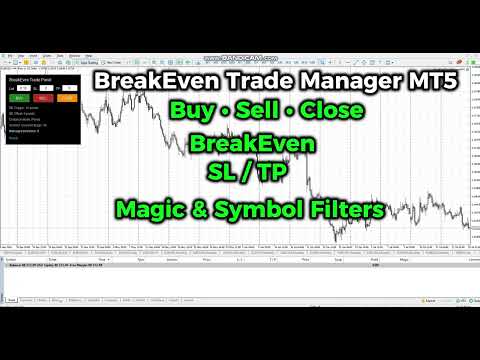
BreakEven Trade Manager MT4 is a lightweight and easy-to-use trading utility for MetaTrader 4 that helps you open, manage, and automatically protect trades directly from the chart.
The utility combines fast manual order execution with automatic BreakEven management, helping reduce routine actions and improve position control.
TradeHub Trading Utilities
BreakEven Trade Manager MT4 is the first product in the TradeHub Trading Utilities collection — a growing ecosystem of professional MetaTrader tools designed for fast, efficient, and reliable trade management.
Each utility is focused on a single task and can be used independently or combined with other TradeHub products.
Planned utilities include:
- Trailing Stop Manager
- Partial Close Manager
- Position Protector
- Auto Close Manager
- and more...
Key Features
- One-click Buy & Sell
- One-click Close managed positions
- Automatic BreakEven
- Adjustable Stop Loss & Take Profit
- Adjustable Trade Volume
- Symbol & Magic Number Filters
- Multiple Distance Modes
- Custom Trade Comment
- Clean and Lightweight Trading Panel
- Hedging & Netting Support
Automatic BreakEven
The utility automatically moves Stop Loss to the BreakEven level after the position reaches the specified profit distance.
Available settings:
- Configurable BreakEven Trigger
- Positive, Zero or Negative BreakEven Offset
- Support for Buy and Sell positions
- Symbol filtering
- Magic Number filtering
- Management of multiple open positions
A negative offset can be used when you want Stop Loss to remain slightly below the entry price for Buy positions or slightly above the entry price for Sell positions.
Trading Panel
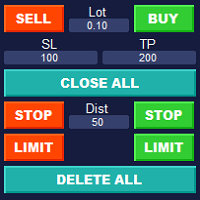
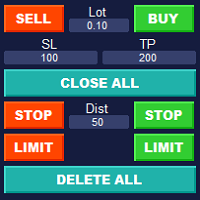
The compact chart panel provides quick access to the main trading operations.
Available actions:
- Buy
- Sell
- Close
Before opening a position, you can specify:
- Lot Size
- Stop Loss
- Take Profit
The entered values can be changed directly on the panel without reopening the Expert Advisor settings.
Position Filters
BreakEven Trade Manager MT4 can manage only the positions that match the selected filters.
Symbol Filter
- Current Symbol
- All Symbols
Magic Number Filter
- All Magic Numbers
- Selected Magic Number
The selected Magic Number is also assigned to positions opened from the trading panel.
This makes it possible to separate positions opened by this utility from positions opened manually or by other Expert Advisors.
Distance Modes
The utility supports several distance calculation modes:
- Points
- Pips by Digits
- Pips as Point × 10
This allows the utility to work correctly with brokers and symbols that use different quote formats.
Input Parameters
Trading Panel
- Lot Size
- Stop Loss
- Take Profit
- Magic Number
- Trade Comment
Position Management
- Symbol Scope
- Magic Number Scope
- BreakEven Trigger
- BreakEven Offset
- Distance Mode
Interface
- Font Scale
Suitable For
BreakEven Trade Manager MT4 can be useful for:
- Manual Forex traders
- CFD traders
- Scalpers
- Day traders
- Swing traders
- Multi-symbol trading
- Traders using several Expert Advisors with different Magic Numbers
Important Information
- The utility must remain attached to a chart for automatic BreakEven management to work.
- Automated trading must be enabled in MetaTrader 4.
- Stop Loss and Take Profit levels are subject to the broker's minimum stop and freeze-level requirements.
- The Close button affects only positions matching the selected Symbol and Magic Number filters.
- The utility does not guarantee profit and does not replace proper risk management.
Why Choose BreakEven Trade Manager MT4?
- Fast one-click trading
- Automatic BreakEven protection
- Flexible Symbol & Magic Number filtering
- Lightweight and responsive
- Clean and intuitive interface
- Designed for everyday trading