Aurora Command All in One Gold Trading Terminal
- Experts
-
Thorsten Fuehrmann
 Founder of the Aurora Trading Suite.
My mission is to bridge the gap between institutional logic and automated trading. I don't believe in "Black Box" algorithms. I believe in documented transparency, multi-layer confluence, and capital protection as a priority. - 버전: 1.46
- 업데이트됨: 19 8월 2026
- 활성화: 5
AURORA COMMAND — THE ALL-IN-ONE GOLD TRADING TERMINAL
Not a bot you switch on and hope. A complete command center for beginners and professionals — on a single chart.
✔ Automated gold trend engine (XAUUSD, H1) with rule-based pyramiding
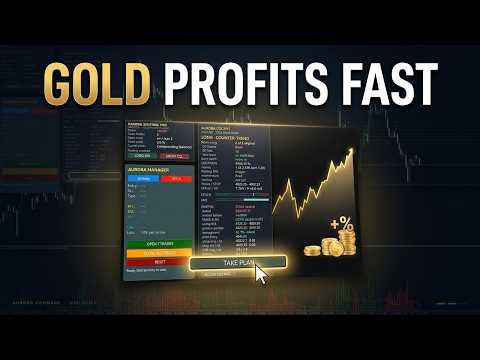
✔ Live market cockpit: trend alignment, zones, timing and a ready-to-read trade plan
✔ One-click "Take Plan" — send the cockpit's plan straight to the manual desk
✔ Manual trading desk: set entry and stop by mouse click, the terminal manages the rest
✔ Hand-placed trades are adopted and protected automatically✔ Built-in Stochastic cue and Aurora Momentum Explosion (AME) — as readout and as visual gauges
✔ Direction control at the press of a button (LONG / SHORT on-off)
✔ No martingale • No grid • Fixed stop on every trade
✔ One file, drag & drop — no set files, ready after loading
━━━━━━━━━━━━━━━━━━━━━━━━━━━━
WHAT AURORA COMMAND ACTUALLY IS
Most products give you one thing: an engine, or an indicator, or a panel. Aurora Command gives you the whole desk. It is the control center a discretionary trader would build for themselves if they had the time — the automated engine, a live market read, a decision-ready trade plan, visual momentum tools and a disciplined manual execution desk, all merged into one Expert Advisor on one chart.
You are always in charge. Let the engine run when the market allows it. Read the market at a glance in the cockpit. Take the cockpit's plan with a single click. Or open your own trade whenever you want — and let the terminal manage it for you. Nothing here follows a black box, and nothing is hidden from you.
━━━━━━━━━━━━━━━━━━━━━━━━━━━━
WHY THERE ARE NO SIGNALS TO FOLLOW — AND WHY THAT IS THE POINT
This is important, so we say it plainly. Aurora Command is not a signal service, and it cannot be one. It is a trend follower: it trades when the market genuinely trends, and it stays out when it does not. A trend does not appear on a fixed schedule, so there is no daily "signal" to sell you — and we will never pretend otherwise.
Here is what makes this a strength rather than a limitation: during the quiet phases, when a pure bot would simply sit idle, Aurora Command hands you a fully equipped manual desk with everything you need to act on your own read — the cockpit's trade plan, the Stochastic cue, the momentum-explosion read, the golden-pocket levels, risk-based lot sizing. You open the trade; the terminal takes it over and manages it. Automation when the market trends, full manual control the rest of the time. One tool, no gap.
━━━━━━━━━━━━━━━━━━━━━━━━━━━━
THE AUTOMATED ENGINE
A pure trend follower on gold. It decides in clear, consecutive stages and acts only when every stage agrees:
• Direction (daily chart): a higher-timeframe trend filter decides whether — and in which direction — trading happens at all. Without a clear daily trend the engine stays passive.
• Entry (H1): inside the confirmed trend the engine waits for a pullback and a confirmation candle. Every trade receives a fixed stop-loss immediately.
• Position building (pyramiding): while a trade runs in profit and the trend continues, the engine adds in clearly limited steps — strictly in the direction of profit, never into a loss. With each addition the stops move toward break-even.
No martingale. No grid. No averaging into a loss.
━━━━━━━━━━━━━━━━━━━━━━━━━━━━
THE COCKPIT — THE MARKET AT A GLANCE
The cockpit reads the current market live, on your own terminal, from live prices — the same read the developer sees, because it is deterministic mathematics on the same data, not a delayed copy of someone else's opinion:
• Horizons: D1 macro, D1 momentum and H4 trend, with a clear verdict (full setup, counter-trend, wait, no trade).
• Location: distance and room to the next serious zone.
• Timing (M15): momentum and swing triggers.
• Trade plan: golden pocket, planned entry, structural and engine stop, risk-based lot for each, reward-to-risk and the invalidation level.
• Stochastic cue: overbought/oversold, K/D cross, and whether it aligns with the higher-timeframe trend.
• Visual gauges: a Stochastic scale with a live marker and a momentum-explosion bar (green up / red down) with an explosion threshold — so you read the state at a glance, without interpreting a single number.
━━━━━━━━━━━━━━━━━━━━━━━━━━━━
ONE CLICK: TAKE PLAN
When the cockpit shows a valid plan, a single button loads it into the manual desk — entry and stop are set, and the desk instantly calculates direction, three take-profit levels and the correct lot size from your risk percentage. You review it and open the trade. From there the terminal manages it. The bridge from "what the market offers" to "position on the chart" is one click — with you in control at every step.
━━━━━━━━━━━━━━━━━━━━━━━━━━━━
THE MANUAL TRADING DESK
A clear panel on the chart for disciplined, hand-placed trades:
• Set entry and stop-loss by mouse click directly on the chart.
• The desk automatically calculates direction, the correct lot from your risk percentage, and three take-profit levels.
• One click opens the positions, another closes them.
• Drag the entry and stop lines with the mouse — the values recalculate in real time.
And for trades you open outside the panel — quickly, from your phone — Aurora Command adopts them on request: it sets a missing stop from the current range (ATR), moves the stop to break-even once your profit threshold is reached, and optionally trails it. It never opens or closes such a trade for you — it only adds the protection you would otherwise have to watch by hand.
━━━━━━━━━━━━━━━━━━━━━━━━━━━━
BASIC AND PRO — THE SAME DESK, YOUR CHOICE OF READ
• BASIC: everything is computed locally on your terminal from live prices. The cockpit generates its own daily bias from the D1 structure. No feed, no subscription, no dependency — a real market read that stands entirely on its own.
• PRO: in addition, you can drop a daily briefing file into MetaTrader's Files folder. The cockpit reads it automatically and shows the bias, the invalidation level and a note — your own discretionary daily read on top of the live mathematics. A reload button picks up an updated file within a bar.
Basic is complete on its own. Pro simply adds a human layer for those who want it.
━━━━━━━━━━━━━━━━━━━━━━━━━━━━
THREE OPERATING MODES
• Automated only: let the engine trade the trend on its own.
• Manual only: trade entirely through the desk and the cockpit.
• Both at once: the engine works the trend automatically while you place your own trades in parallel.
The automated engine and the manual desk use separate order identifiers and never interfere with each other.
━━━━━━━━━━━━━━━━━━━━━━━━━━━━
ONE PURCHASE — YOUR COMPLETE TRADING DESK
Aurora Command is priced as a flagship for one honest reason: it replaces a shelf of separate tools with a single, integrated terminal. An automated trend engine, a live decision cockpit, a golden-pocket trade planner with risk-based sizing, a Stochastic read, an Aurora Momentum Explosion tool, visual gauges, and a disciplined manual desk that adopts and protects your own trades — bought once, working together on one chart, from the first minute.
You are not paying for a single script. You are getting the complete workstation a serious gold trader needs — and you keep it. That is where the value sits.
━━━━━━━━━━━━━━━━━━━━━━━━━━━━
WHAT TO EXPECT — PLEASE READ
Aurora Command is not an all-weather system, and it is not sold as one. The engine knows two states:
STATE 1 — THE MARKET TRENDS STRONGLY AND PERSISTENTLYThis is what the engine was built for. It sets the direction, enters on pullbacks and builds the position through pyramiding. Practically the entire automated return is created here — concentrated in a few but large moves.
STATE 2 — THE MARKET MOVES SIDEWAYSSustained moves are missing, many trades end at or near zero, and the automated side treads water for a while. There is no built-in miracle cure — and we do not claim one.
There is no middle ground. What makes Aurora Command different is what you do in State 2: instead of waiting on an idle bot, you keep working through the cockpit and the manual desk. That is exactly what this terminal was built for. If you understand and accept this profile, you get a transparent, rule-based command center without grid or martingale risk. If you are looking for something that earns evenly every week, this is not it — and we would rather say so up front.
━━━━━━━━━━━━━━━━━━━━━━━━━━━━
RISK MANAGEMENT
• Fixed stop-loss on every trade — no position without protection.• No martingale, no grid, no averaging into a loss.• Automated pyramiding runs strictly in the direction of profit and is clearly limited.• The manual desk and the Take-Plan bridge size every position from your defined risk percentage.
━━━━━━━━━━━━━━━━━━━━━━━━━━━━
SETUP & REQUIREMENTS
1. Attach Aurora Command to the XAUUSD H1 chart.
2. Enable auto-trading.3. Choose your mode in the settings (automated / manual / both). The cockpit, gauges and desk appear automatically.
No set files required. One file, drag & drop, ready to run with sensible defaults. The optional Aurora Momentum Explosion (AME) sub-window indicator is included for the classic histogram view.
REQUIREMENTS:
• Instrument: Gold (XAUUSD)
• Timeframe: H1
• Platform: MetaTrader 4
• Account type: ECN account with low spreads recommended
• Leverage: at least 1:500 or higher (essential for correct operation)
• Minimum capital: 3,000 USD
━━━━━━━━━━━━━━━━━━━━━━━━━━━━
RISK DISCLAIMER
Trading financial instruments involves substantial risk and may lead to the loss of your invested capital. Aurora Command is a professional tool and does not constitute investment advice. Past results are no guarantee of future performance. Use at your own risk.
━━━━━━━━━━━━━━━━━━━━━━━━━━━━
THE AURORA FAMILY
Aurora Command is the flagship of a range designed to work together — Aurora Sentinel Pro, Aurora Zones and Aurora Auto Fibonacci. All products are available through my seller profile.
Not a bot you switch on and hope. A complete command center for beginners and professionals — on a single chart.
✔ Automated gold trend engine (XAUUSD, H1) with rule-based pyramiding
✔ Live market cockpit: trend alignment, zones, timing and a ready-to-read trade plan
✔ One-click "Take Plan" — send the cockpit's plan straight to the manual desk
✔ Manual trading desk: set entry and stop by mouse click, the terminal manages the rest
✔ Hand-placed trades are adopted and protected automatically✔ Built-in Stochastic cue and Aurora Momentum Explosion (AME) — as readout and as visual gauges
✔ Direction control at the press of a button (LONG / SHORT on-off)
✔ No martingale • No grid • Fixed stop on every trade
✔ One file, drag & drop — no set files, ready after loading
━━━━━━━━━━━━━━━━━━━━━━━━━━━━
WHAT AURORA COMMAND ACTUALLY IS
Most products give you one thing: an engine, or an indicator, or a panel. Aurora Command gives you the whole desk. It is the control center a discretionary trader would build for themselves if they had the time — the automated engine, a live market read, a decision-ready trade plan, visual momentum tools and a disciplined manual execution desk, all merged into one Expert Advisor on one chart.
You are always in charge. Let the engine run when the market allows it. Read the market at a glance in the cockpit. Take the cockpit's plan with a single click. Or open your own trade whenever you want — and let the terminal manage it for you. Nothing here follows a black box, and nothing is hidden from you.
━━━━━━━━━━━━━━━━━━━━━━━━━━━━
WHY THERE ARE NO SIGNALS TO FOLLOW — AND WHY THAT IS THE POINT
This is important, so we say it plainly. Aurora Command is not a signal service, and it cannot be one. It is a trend follower: it trades when the market genuinely trends, and it stays out when it does not. A trend does not appear on a fixed schedule, so there is no daily "signal" to sell you — and we will never pretend otherwise.
Here is what makes this a strength rather than a limitation: during the quiet phases, when a pure bot would simply sit idle, Aurora Command hands you a fully equipped manual desk with everything you need to act on your own read — the cockpit's trade plan, the Stochastic cue, the momentum-explosion read, the golden-pocket levels, risk-based lot sizing. You open the trade; the terminal takes it over and manages it. Automation when the market trends, full manual control the rest of the time. One tool, no gap.
━━━━━━━━━━━━━━━━━━━━━━━━━━━━
THE AUTOMATED ENGINE
A pure trend follower on gold. It decides in clear, consecutive stages and acts only when every stage agrees:
• Direction (daily chart): a higher-timeframe trend filter decides whether — and in which direction — trading happens at all. Without a clear daily trend the engine stays passive.
• Entry (H1): inside the confirmed trend the engine waits for a pullback and a confirmation candle. Every trade receives a fixed stop-loss immediately.
• Position building (pyramiding): while a trade runs in profit and the trend continues, the engine adds in clearly limited steps — strictly in the direction of profit, never into a loss. With each addition the stops move toward break-even.
No martingale. No grid. No averaging into a loss.
━━━━━━━━━━━━━━━━━━━━━━━━━━━━
THE COCKPIT — THE MARKET AT A GLANCE
The cockpit reads the current market live, on your own terminal, from live prices — the same read the developer sees, because it is deterministic mathematics on the same data, not a delayed copy of someone else's opinion:
• Horizons: D1 macro, D1 momentum and H4 trend, with a clear verdict (full setup, counter-trend, wait, no trade).
• Location: distance and room to the next serious zone.
• Timing (M15): momentum and swing triggers.
• Trade plan: golden pocket, planned entry, structural and engine stop, risk-based lot for each, reward-to-risk and the invalidation level.
• Stochastic cue: overbought/oversold, K/D cross, and whether it aligns with the higher-timeframe trend.
• Visual gauges: a Stochastic scale with a live marker and a momentum-explosion bar (green up / red down) with an explosion threshold — so you read the state at a glance, without interpreting a single number.
━━━━━━━━━━━━━━━━━━━━━━━━━━━━
ONE CLICK: TAKE PLAN
When the cockpit shows a valid plan, a single button loads it into the manual desk — entry and stop are set, and the desk instantly calculates direction, three take-profit levels and the correct lot size from your risk percentage. You review it and open the trade. From there the terminal manages it. The bridge from "what the market offers" to "position on the chart" is one click — with you in control at every step.
━━━━━━━━━━━━━━━━━━━━━━━━━━━━
THE MANUAL TRADING DESK
A clear panel on the chart for disciplined, hand-placed trades:
• Set entry and stop-loss by mouse click directly on the chart.
• The desk automatically calculates direction, the correct lot from your risk percentage, and three take-profit levels.
• One click opens the positions, another closes them.
• Drag the entry and stop lines with the mouse — the values recalculate in real time.
And for trades you open outside the panel — quickly, from your phone — Aurora Command adopts them on request: it sets a missing stop from the current range (ATR), moves the stop to break-even once your profit threshold is reached, and optionally trails it. It never opens or closes such a trade for you — it only adds the protection you would otherwise have to watch by hand.
━━━━━━━━━━━━━━━━━━━━━━━━━━━━
BASIC AND PRO — THE SAME DESK, YOUR CHOICE OF READ
• BASIC: everything is computed locally on your terminal from live prices. The cockpit generates its own daily bias from the D1 structure. No feed, no subscription, no dependency — a real market read that stands entirely on its own.
• PRO: in addition, you can drop a daily briefing file into MetaTrader's Files folder. The cockpit reads it automatically and shows the bias, the invalidation level and a note — your own discretionary daily read on top of the live mathematics. A reload button picks up an updated file within a bar.
Basic is complete on its own. Pro simply adds a human layer for those who want it.
━━━━━━━━━━━━━━━━━━━━━━━━━━━━
THREE OPERATING MODES
• Automated only: let the engine trade the trend on its own.
• Manual only: trade entirely through the desk and the cockpit.
• Both at once: the engine works the trend automatically while you place your own trades in parallel.
The automated engine and the manual desk use separate order identifiers and never interfere with each other.
━━━━━━━━━━━━━━━━━━━━━━━━━━━━
ONE PURCHASE — YOUR COMPLETE TRADING DESK
Aurora Command is priced as a flagship for one honest reason: it replaces a shelf of separate tools with a single, integrated terminal. An automated trend engine, a live decision cockpit, a golden-pocket trade planner with risk-based sizing, a Stochastic read, an Aurora Momentum Explosion tool, visual gauges, and a disciplined manual desk that adopts and protects your own trades — bought once, working together on one chart, from the first minute.
You are not paying for a single script. You are getting the complete workstation a serious gold trader needs — and you keep it. That is where the value sits.
━━━━━━━━━━━━━━━━━━━━━━━━━━━━
WHAT TO EXPECT — PLEASE READ
Aurora Command is not an all-weather system, and it is not sold as one. The engine knows two states:
STATE 1 — THE MARKET TRENDS STRONGLY AND PERSISTENTLYThis is what the engine was built for. It sets the direction, enters on pullbacks and builds the position through pyramiding. Practically the entire automated return is created here — concentrated in a few but large moves.
STATE 2 — THE MARKET MOVES SIDEWAYSSustained moves are missing, many trades end at or near zero, and the automated side treads water for a while. There is no built-in miracle cure — and we do not claim one.
There is no middle ground. What makes Aurora Command different is what you do in State 2: instead of waiting on an idle bot, you keep working through the cockpit and the manual desk. That is exactly what this terminal was built for. If you understand and accept this profile, you get a transparent, rule-based command center without grid or martingale risk. If you are looking for something that earns evenly every week, this is not it — and we would rather say so up front.
━━━━━━━━━━━━━━━━━━━━━━━━━━━━
RISK MANAGEMENT
• Fixed stop-loss on every trade — no position without protection.• No martingale, no grid, no averaging into a loss.• Automated pyramiding runs strictly in the direction of profit and is clearly limited.• The manual desk and the Take-Plan bridge size every position from your defined risk percentage.
━━━━━━━━━━━━━━━━━━━━━━━━━━━━
SETUP & REQUIREMENTS
1. Attach Aurora Command to the XAUUSD H1 chart.
2. Enable auto-trading.3. Choose your mode in the settings (automated / manual / both). The cockpit, gauges and desk appear automatically.
No set files required. One file, drag & drop, ready to run with sensible defaults. The optional Aurora Momentum Explosion (AME) sub-window indicator is included for the classic histogram view.
REQUIREMENTS:
• Instrument: Gold (XAUUSD)
• Timeframe: H1
• Platform: MetaTrader 4
• Account type: ECN account with low spreads recommended
• Leverage: at least 1:500 or higher (essential for correct operation)
• Minimum capital: 3,000 USD
━━━━━━━━━━━━━━━━━━━━━━━━━━━━
RISK DISCLAIMER
Trading financial instruments involves substantial risk and may lead to the loss of your invested capital. Aurora Command is a professional tool and does not constitute investment advice. Past results are no guarantee of future performance. Use at your own risk.
━━━━━━━━━━━━━━━━━━━━━━━━━━━━
THE AURORA FAMILY
Aurora Command is the flagship of a range designed to work together — Aurora Sentinel Pro, Aurora Zones and Aurora Auto Fibonacci. All products are available through my seller profile.