Kito Session Range Projection
- 지표
- 버전: 2.100

Kito Session Range Projection is a MetaTrader 5 indicator for traders who organize intraday analysis around the Asia, London and New York trading sessions.
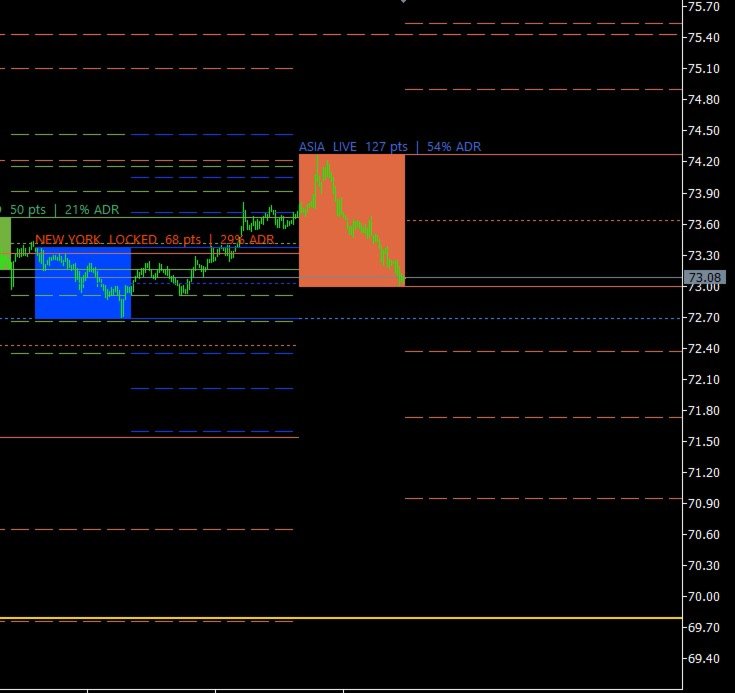
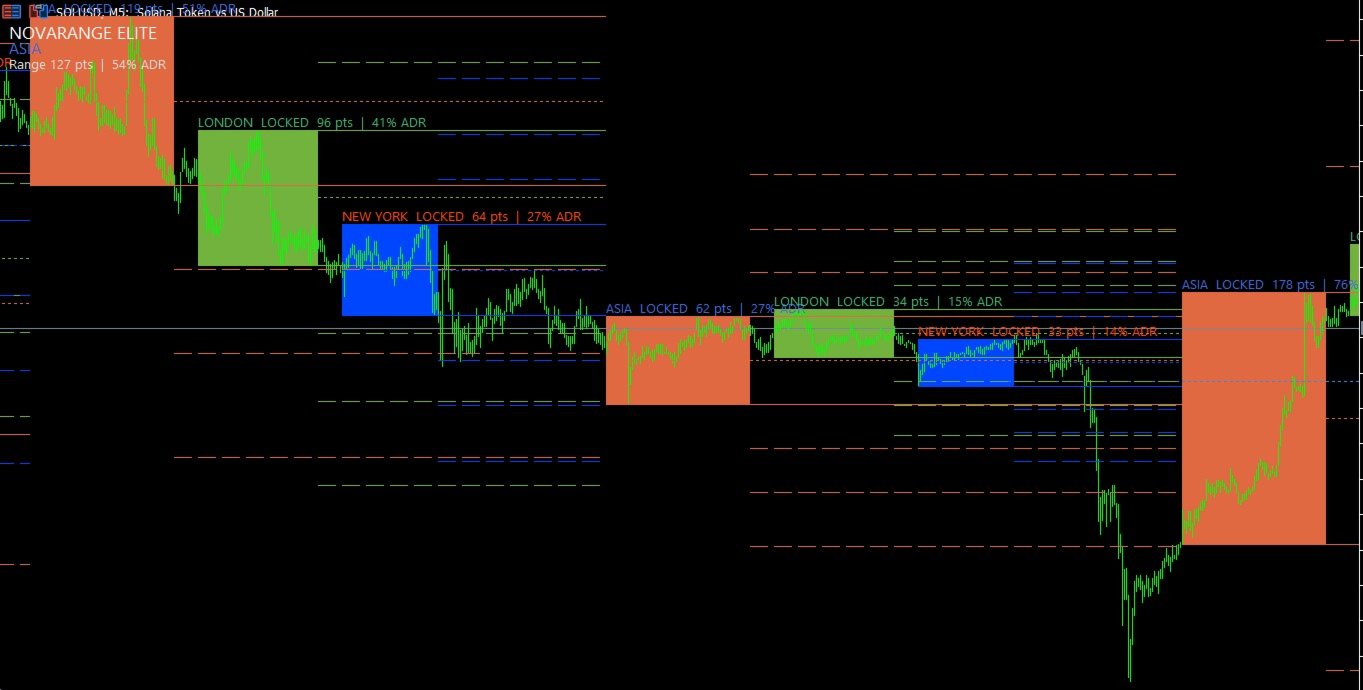
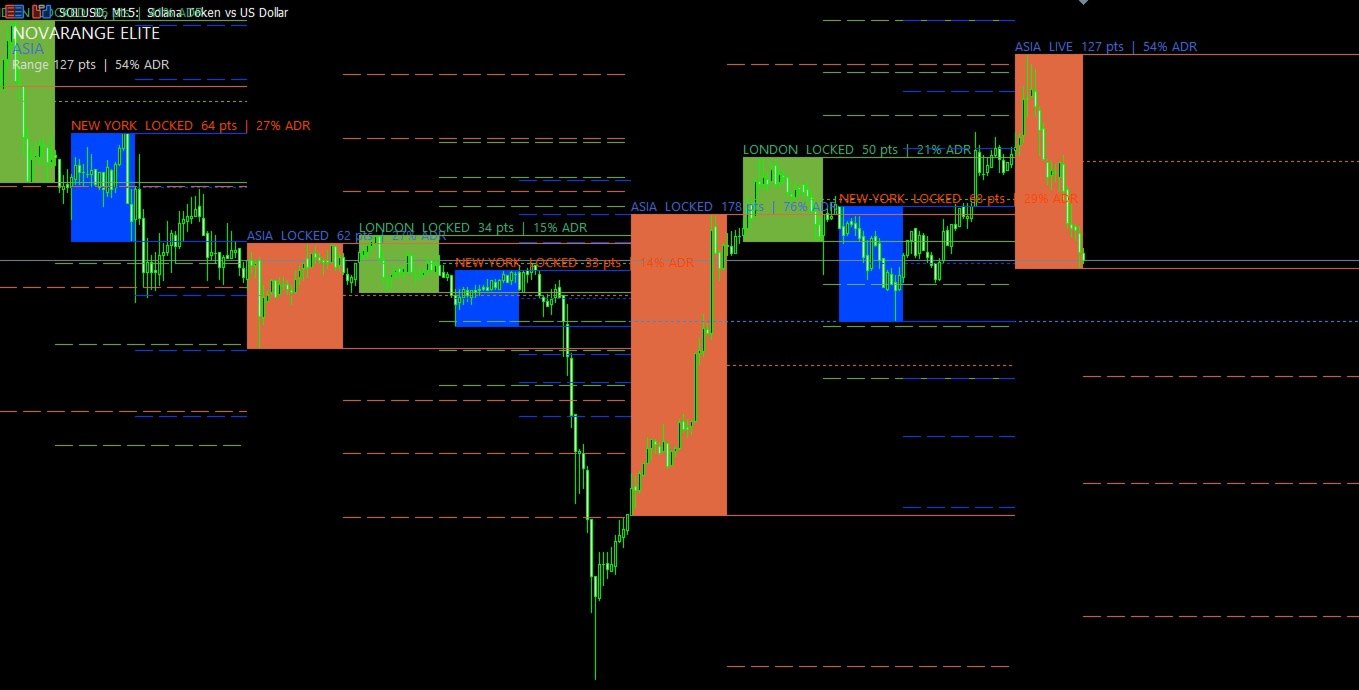
The indicator draws each configured session as a broker-time range, tracks the high, low and midpoint, and extends symmetric projection levels above and below the range. It also compares the session range with the average daily range calculated from 20 completed daily candles.
The indicator is designed for chart analysis. It does not open, manage or close trades.
Main functions
- Asia, London and New York session ranges
- Session hours based on broker server time
- Manual time offset in minutes
- Developing session ranges while the session is active
- Frozen historical ranges after the session closes
- Session high, low and optional midpoint
- Symmetric expansion projections above and below the range
- Configurable projection multipliers
- Session range as a percentage of 20-day ADR
- Optional labels showing session state, range size and ADR percentage
- Optional compact status panel
- Optional alerts near the active session high or low
- Optional MetaQuotes push notifications
- Current-session buffers for Expert Advisors and utilities
- No DLL, WebRequest or external indicator dependency
How it works
While a session is active, its high and low continue to update. When the session closes, the completed range remains on the chart as a historical reference.
The midpoint is calculated at 50 percent of the session range.
Projection levels are calculated symmetrically from the session high and low. For example, a multiplier of 1.00 places an upper level one full session range above the high and a lower level one full session range below the low.
The default projection multipliers are:
0.50, 1.00 and 1.618
Up to six positive multipliers can be entered as comma-separated values.
ADR context
The indicator calculates average daily range from the previous 20 completed daily candles.
Each session label can show the session range as a percentage of that ADR value. This provides context for whether the current session has covered a relatively small or large portion of the recent daily movement.
Session time setup
All session hours use the broker server time displayed in MetaTrader 5.
Default sessions:
Asia: 00:00-06:00
London: 07:00-12:00
New York: 13:00-17:00
Broker schedules differ. Use Broker Offset Minutes when the supplied session times need to be shifted without editing every session individually.
The indicator also supports sessions that cross midnight. For example, 22:00-02:00 is treated as one continuous session.
How to use
1. Attach the indicator to an intraday chart.
2. Confirm the broker server time shown in MetaTrader 5.
3. Adjust the three session schedules when necessary.
4. Select the number of historical days to display.
5. Keep the default projection multipliers or enter your own positive values.
6. Enable the status panel only when a compact current-session summary is required.
7. Enable boundary alerts when you want a notification near the active session high or low.
8. Combine the displayed levels with your own market structure, execution and risk-management rules.
The indicator is most useful on intraday charts where individual sessions can be viewed clearly. It can remain attached to other chart timeframes, but several sessions may appear compressed on higher timeframes.
Inputs
Sessions - broker server time
Show Asia Session
Enables or disables the Asia session.
Asia Session Hours
Asia session start and end in HH:MM-HH:MM format.
Show London Session
Enables or disables the London session.
London Session Hours
London session start and end in HH:MM-HH:MM format.
Show New York Session
Enables or disables the New York session.
New York Session Hours
New York session start and end in HH:MM-HH:MM format.
Broker Offset Minutes
Shifts all configured sessions by the selected number of minutes.
Session History Days
Number of calendar days displayed. Valid range: 1 to 30.
Range and projections
Projection Multipliers
Positive comma-separated values used for symmetric range projections. A maximum of six unique values is processed.
Show Range Midpoint
Displays the 50 percent level of each session range.
Show Session Labels
Displays the session name, live or locked state, range in points and ADR percentage.
Show Live Projections
Updates projection levels while the current session is still developing.
Panel and alerts
Show Status Panel
Displays the current active session, range size, ADR percentage and first projection multiplier. It is disabled by default.
Enable Boundary Alerts
Enables alerts when price enters the selected distance from the active session high or low.
Send Push Notifications
Sends the same boundary message through MetaQuotes notifications when push notifications are configured in the terminal.
Boundary Distance Points
Distance from the active session high or low used by the alert logic.
EA buffer map
Buffer 0: Active session code
1 = Asia, 2 = London, 3 = New York, 0 = no active configured session
Buffer 1: Active session high
Buffer 2: Active session low
Buffer 3: Active session midpoint
Buffer 4: First upper projection
Buffer 5: First lower projection
Buffer 6: Active session range as a percentage of 20-day ADR
The current state is written at buffer index 0.
Important information
Session schedules vary between brokers and can change when server time or daylight-saving arrangements change. Check the displayed broker time and update the settings when necessary.
Projection levels are mathematical extensions of the measured session range. They are not guaranteed targets or reversal levels.
The indicator requires one-minute and daily price history for the selected symbol. MetaTrader may need time to download missing history when the indicator is attached for the first time.
Kito Session Range Projection is an analytical tool. It does not guarantee trading results and should be used with appropriate risk management.