SessionEdge Navigator MT5
- 지표
-
Christopher Calmerin
 저는 10년 이상 소프트웨어를 개발하며 기술을 통해 실제 문제를 해결해 왔습니다. 기업 시스템과 의료 솔루션 개발부터 금융 시장을 위한 지능형 도구 개발까지 다양한 경험을 쌓았습니다.
현재는 트레이더가 시장을 더욱 명확하고 자신 있게 분석할 수 있도록 MetaTrader 5 지표 개발에 집중하고 있습니다. 전통적인 소프트웨어 엔지니어링과 최신 AI 기반 개발 방식을 결합하여 신뢰할 수 있고 효율적이며 사용하기 쉬운 도구를 만들고 있습니다. - 버전: 1.10
Trading Session Activity Dashboard
TAGLINE
Trade the session, not just the candle.
PRODUCT OVERVIEW
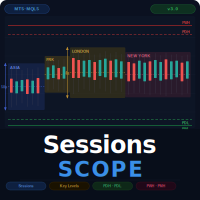
SessionEdge Navigator MT5 is a session-analysis indicator for MetaTrader 5. It tracks the major trading sessions and provides a practical dashboard showing whether a session is active, how much range it has produced, how that range compares with its recent average, and whether current session behavior is bullish, bearish, or range-like.
Covered sessions:
- Sydney
- Tokyo / Asian
- London
- New York
The indicator is designed for traders who want to align their trading decisions with session behavior instead of analyzing price without time-of-day context.
WHAT THE INDICATOR HELPS YOU SEE
- Which session is currently active
- How many minutes remain until a session opens or closes
- Current session range
- Average historical range for that session
- Session directional bias
- Whether the market is forming range behavior or expansion behavior
DASHBOARD CONTENT
For each session, the dashboard shows:
- Session name
- Status (active, opens soon, closed)
- Time until the next session change
- Current range in points
- Average session range in points
- Current session direction
The dashboard also produces a simple final interpretation such as:
- Asian range forming
- Bullish London expansion
- Bearish London expansion
- Bullish New York expansion
- Bearish New York expansion
- Wait for next session
HOW IT WORKS
SessionEdge Navigator MT5 uses server time and user-defined session hours. It scans intraday bars from the selected range timeframe and computes the current day’s session high and session low for each trading session.
From that data, it calculates:
- Current session range
- Session midpoint
- A basic directional classification based on where current price is positioned relative to the session range
- Average session range over a user-defined number of past days
This makes it easier to compare whether a session is quiet, normal, or expanding.
WHY SESSION ANALYSIS MATTERS
Forex and gold markets often behave differently depending on the time of day.
Examples:
- Asian session may behave more quietly and build a range.
- London may create stronger expansion or false breaks from the Asian range.
- New York may continue the London move or reverse it.
SessionEdge Navigator MT5 is intended to support that kind of contextual analysis.
PRACTICAL TRADING USES
1. RANGE ANALYSIS
If Tokyo or the broader Asian session is active and the dashboard shows low directional expansion, a trader may treat that as range-forming behavior.
2. BREAKOUT MONITORING
When London opens after a tighter Asian range, traders often look for range break opportunities.
3. SESSION EXPANSION FILTER
If a session is already near or above its average range, the trader may become more cautious about chasing a late move.
4. TIME FILTERING
Some traders only want to trade specific sessions. The dashboard can help them monitor timing directly on the chart.
5. DAILY ROUTINE SUPPORT
The indicator helps the user see where the market sits in the daily cycle.
ALERTS
Optional alerts can be enabled for session-state changes.
Available alert options:
- Popup alert
- Mobile push notification
- Alert on session open / status shift
INPUTS
- Session open and close hours
- Average-days lookback
- Range timeframe
- Show overlap option
- Dashboard position and dimensions
- Popup and push alerts
WHO IS THIS INDICATOR FOR?
- Forex traders
- Gold traders
- Index traders
- Scalpers
- Intraday traders
- Session-based traders
- Beginners who want to understand how time-of-day affects price behavior
MAIN BENEFITS
- Session timing and activity in one panel
- Current range versus average range comparison
- Easy bullish / bearish / range interpretation
- Helpful for Asian-range and London / New York analysis
- Works as a session context tool
- Does not open trades
INSTALLATION
1. Copy SessionEdge_Navigator_MT5.mq5 or its compiled EX5 file into:
MQL5/Indicators
2. Restart MetaTrader 5 or refresh the Navigator.
3. Attach the indicator to a chart.
4. Adjust session hours to match your broker server time.
5. Use the session dashboard to support timing, range analysis, and expansion planning.
IMPORTANT INFORMATION
This product is a technical-analysis indicator. It does not open, modify, or close trades. It does not guarantee profits and should not be used as the sole basis for a trading decision. Market conditions can change rapidly, and every signal should be combined with appropriate risk management, market structure analysis, and, where relevant, fundamental awareness.
Past price behavior does not guarantee future results. Test the indicator on a demo account and select settings appropriate for the instrument, timeframe, spread, and trading style being used.