FvgFirstStrike Indicator
- 지표
- 버전: 1.0
- 활성화: 5

FVG First Strike identifies the first qualifying bullish or bearish Fair Value Gap formed within the active day or session context. The strategy uses a precise three-bar imbalance definition, configurable gap-size limits, and session-scoped detection, then accepts only the first qualifying FVG of each direction before evaluating entry on the following bar.
Find Your Edge in the Past. Trade the Present.
FVG First Strike Indicator
Every trading methodology should be evaluated objectively before capital is committed.
Does the first qualifying Fair Value Gap within a trading context demonstrate a measurable historical edge?
FVG First Strike Indicator is designed to answer that question through a transparent, rule-based Fair Value Gap methodology combined with integrated historical analysis.
Rather than highlighting every Fair Value Gap that forms throughout the day, the strategy applies precise qualification rules to identify the earliest valid imbalance within the active trading context and evaluates its historical behaviour under your selected configuration. Gap-size limits, detection windows, retest methodology, sessions, targets, trade management and risk parameters can all be analysed using exactly the same programmed rules applied during live operation.
The objective is simple:
Find Your Edge in the Past. Trade the Present.
Built on the EdgityCore Framework, FVG First Strike Indicator provides a structured analytical role within the EdgityCore product family, using the same transparent methodology, terminology and engineering principles shared across every EdgityCore product.
At a Glance
- First qualifying bullish or bearish Fair Value Gap within the active day or session context.
- Precise three-bar Fair Value Gap — oldest bar vs newest bar, with configurable minimum and maximum gap size in points.
- Configurable start and end hours. All three bars of the pattern must fall inside the window.
- Only the first qualifying FVG of each direction per day (and per active session) is accepted.
- Aggressive Entry at the next bar open (default), or Retest of the FVG 50% equilibrium with configurable validity policy.
- Integrated Performance Analysis with CSV exports: Stats, Yearly, CW|CL, DD, and Trade History.
- Trading Mode and Quant Analysis Mode for live operation and historical research.
- Non-repainting — every signal is evaluated on completed bars only.
- Multi-session, multi-target, and circuit-breaker risk management across any instrument or timeframe.
The EdgityCore Philosophy
Markets cannot be predicted with certainty.
Past performance does not guarantee future results, but it remains one of the most valuable sources of evidence available when evaluating a trading methodology.
No indicator can eliminate uncertainty.
What traders can do is improve the quality of their decisions by analysing transparent historical evidence before committing capital.
Every EdgityCore product is therefore designed around three fundamental principles:
- Transparent Methodology
- Quantitative Analysis
- Professional Engineering
Our objective is not to predict the future.
Our objective is to help traders understand the past, evaluate their edge, and make better-informed decisions in the present.
Every statistic, every report and every historical result generated by an EdgityCore product is intended to help traders evaluate a methodology transparently before applying it to live markets.
Risk Warning: Trading foreign exchange, commodities, and indices involves high risk and is not suitable for all market participants. Past performance does not indicate future results. Historical and backtest results are hypothetical data representations and do not represent real trading. You assume full responsibility for your trading decisions.
Why FVG First Strike?
FVG First Strike was designed as an analytical trading tool rather than a conventional signal indicator.
Its purpose is not to highlight every Fair Value Gap that forms during a session, but to give traders a precise, repeatable definition of the first qualifying bullish or bearish imbalance within a trading context — removing the ambiguity of manually choosing among several FVGs formed during the same day or session — and to help them understand how that methodology has behaved historically under the current configuration.
Fair Value Gap traders benefit from a precise and repeatable definition of the first qualifying imbalance instead of manually choosing among multiple FVGs formed during the day or session. Analytical traders benefit from being able to study how first-strike FVG behaviour changes under different gap-size limits, retest policies, sessions, and risk configurations, using the integrated EdgityCore statistics and export tools.
In both cases, FVG First Strike Indicator is an analytical research tool, not an automated signal service. Live results will vary based on execution, trade management, broker conditions, and slippage. Past performance does not guarantee future results.
How It Works
The FVG First Strike strategy is mechanical and rule-based. It evaluates three consecutive bars and looks for a price imbalance between the oldest and newest bars. A bullish FVG exists when the newest bar's low is above the oldest bar's high. A bearish FVG exists when the newest bar's high is below the oldest bar's low. The gap must satisfy the configured minimum and maximum size, and the setup must pass the active EdgityCore date, session, direction, and signal-limit rules. The strategy then keeps only the first qualifying FVG of each direction within the relevant day/session context.
| Step 1 — Detect the Imbalance The strategy evaluates a three-bar pattern. A bullish FVG is formed when the newest bar's low is above the oldest bar's high. A bearish FVG is formed when the newest bar's high is below the oldest bar's low. | Step 2 — Qualify the First Strike The gap must fall between the configured minimum and maximum sizes. The strategy checks the relevant earlier bars and rejects the candidate when an earlier qualifying FVG of the same direction already exists within the applicable day/session context. | Step 3 — Entry When the first qualifying FVG is accepted, the gap is recorded and entry is evaluated at the open of the bar following the newest bar of the three-bar pattern. SL, RML, TP, trailing-stop, and outcome evaluation are then handled through the EdgityCore framework. |
The strategy is designed to isolate the first qualifying directional imbalance rather than treating every Fair Value Gap formed during the same context as a new setup.
Performance Analysis Engine
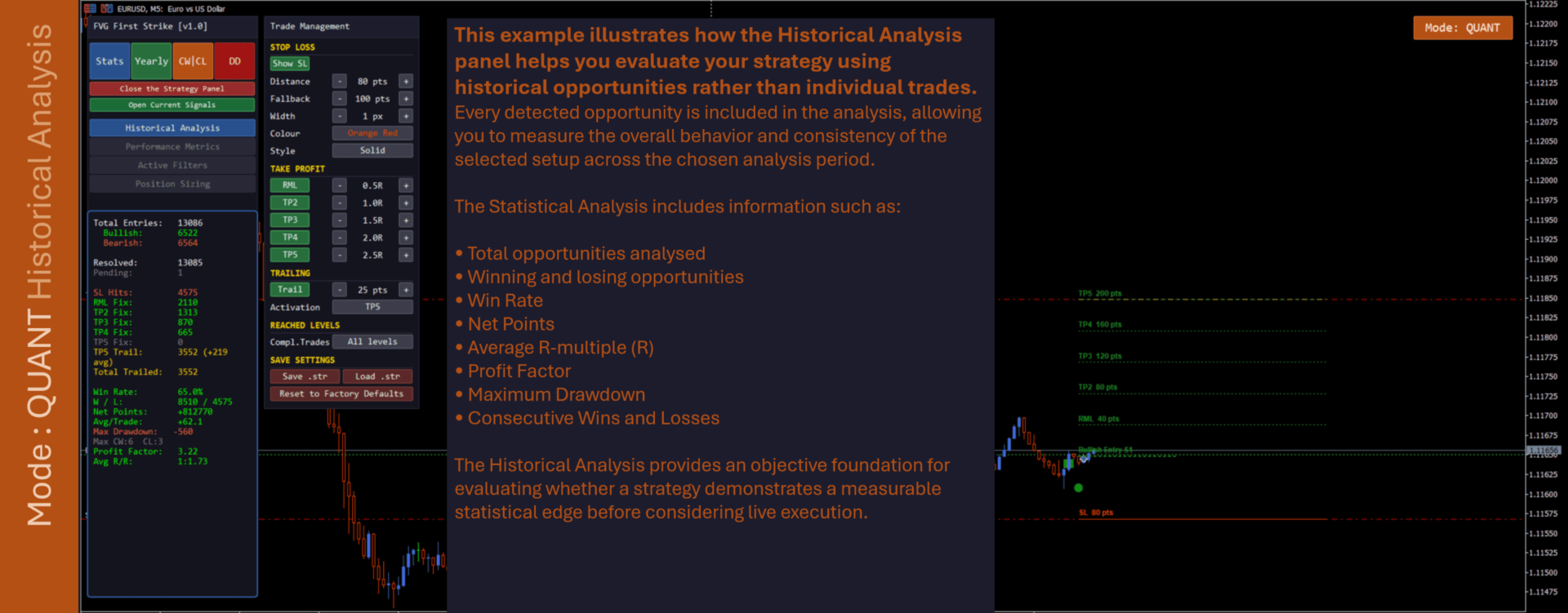
FVG First Strike Indicator includes an integrated statistics panel that scans available history and compiles a performance record under the current configuration. This allows FVG size limits, retest policies, sessions, targets, trailing-stop rules, and risk parameters to be evaluated using the same programmed methodology.
| Metric | Description |
|---|---|
| Risk Mitigation Level (RML) | Provides the first risk-management milestone within the shared EdgityCore trade model, allowing historical outcomes to be evaluated consistently with the configured stop-loss and target structure. |
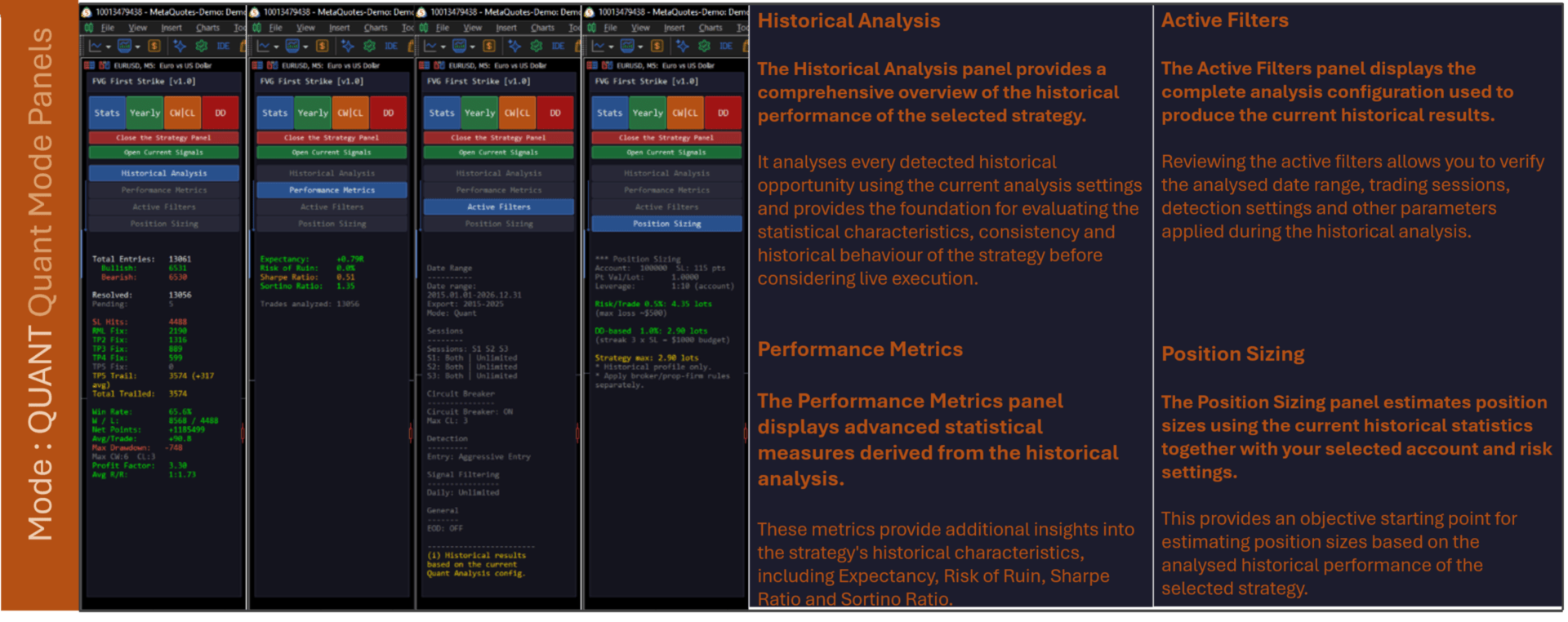
| Statistics Panel | Tracks the historical strategy results produced by the current FVG First Strike and EdgityCore configuration, including the shared performance, drawdown, streak, risk/reward, and position-sizing analytics. |
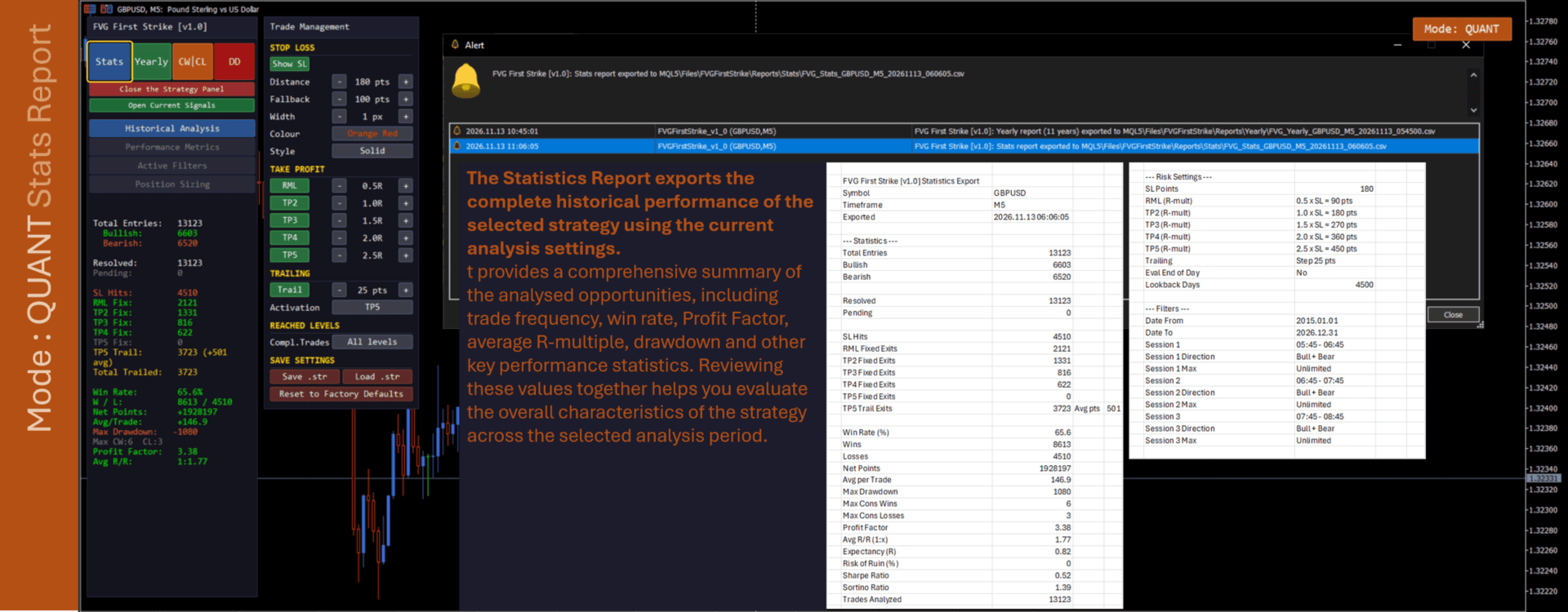
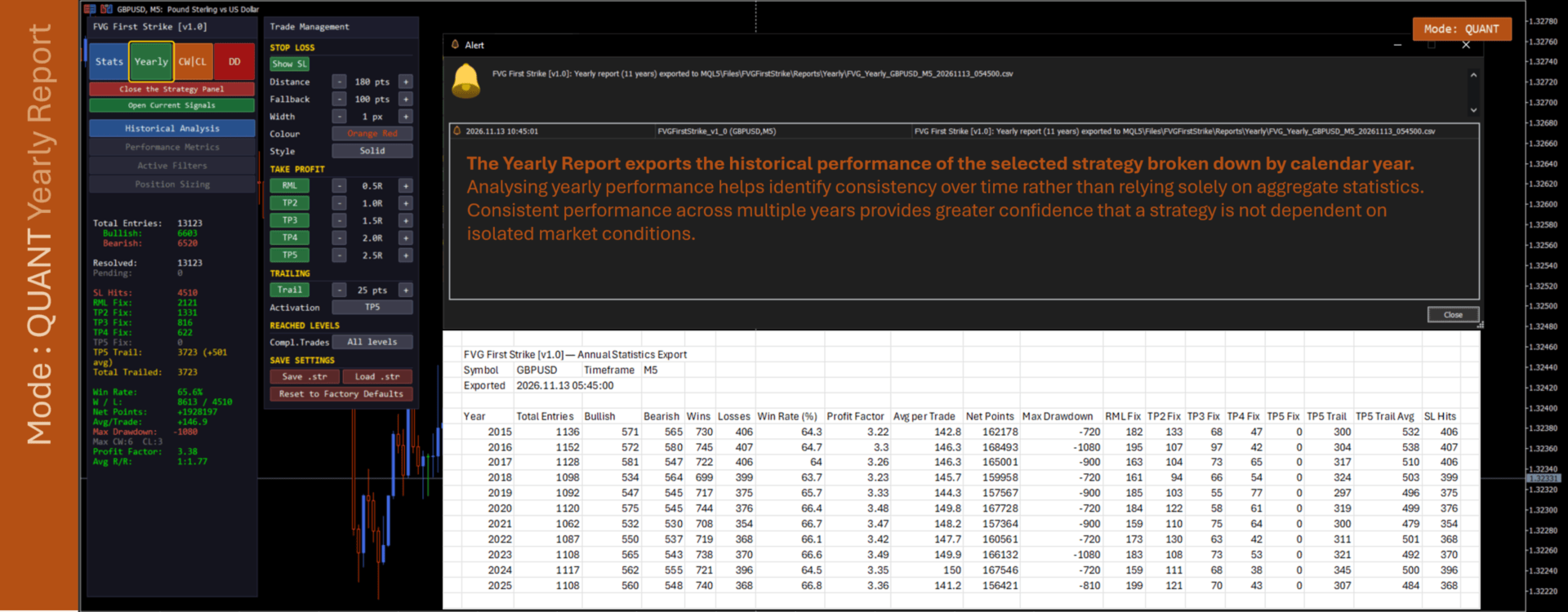
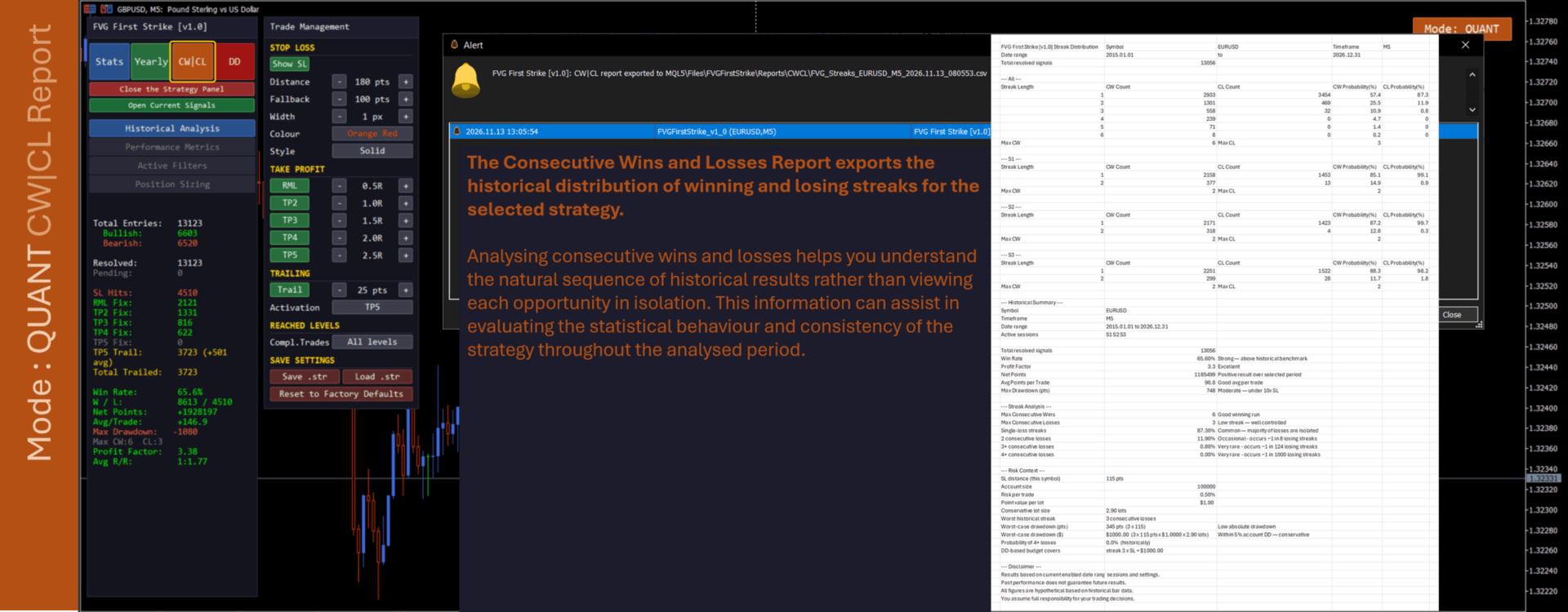
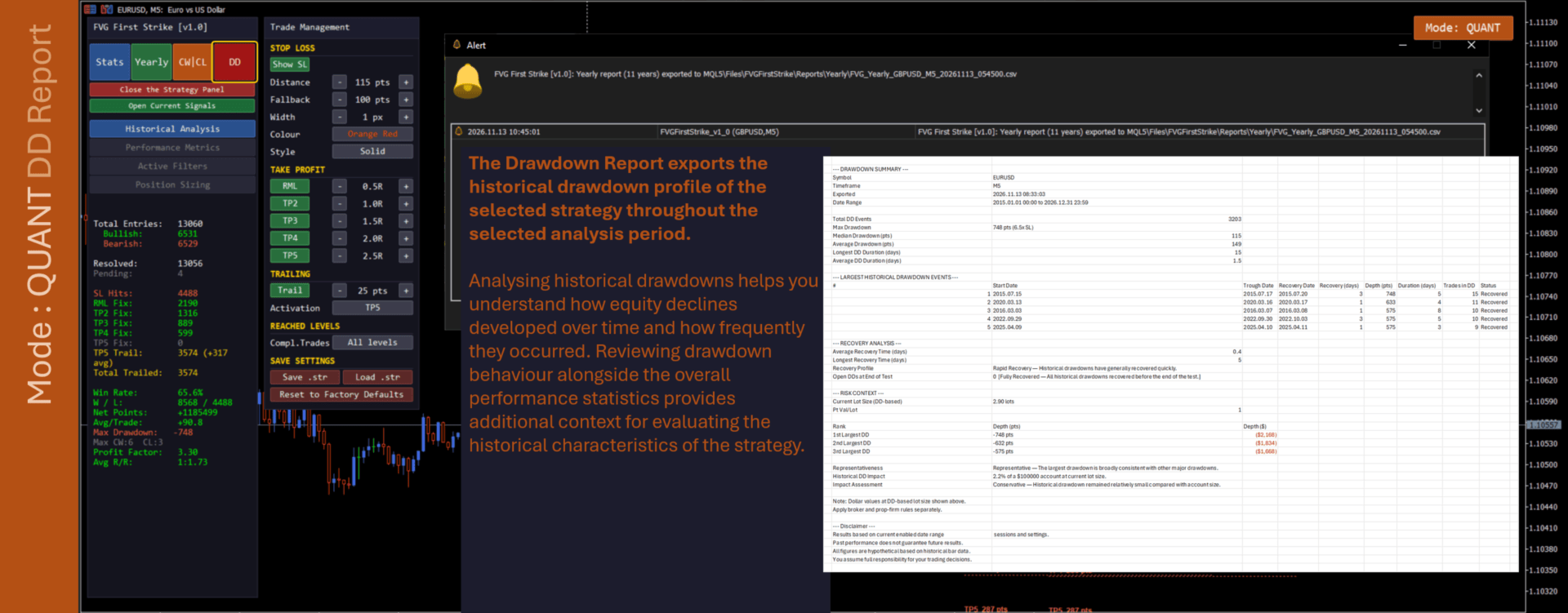
| CSV Export | Four integrated exports provide signal statistics (Stats), year-by-year analysis (Yearly), consecutive win/loss analysis (CW|CL), and drawdown analysis (DD), using the configured historical range and trade-management rules. In Trading Mode the Yearly button is greyed out, and CW|CL is available only while the Circuit Breaker is disabled; use Quant Analysis Mode for those two reports. |
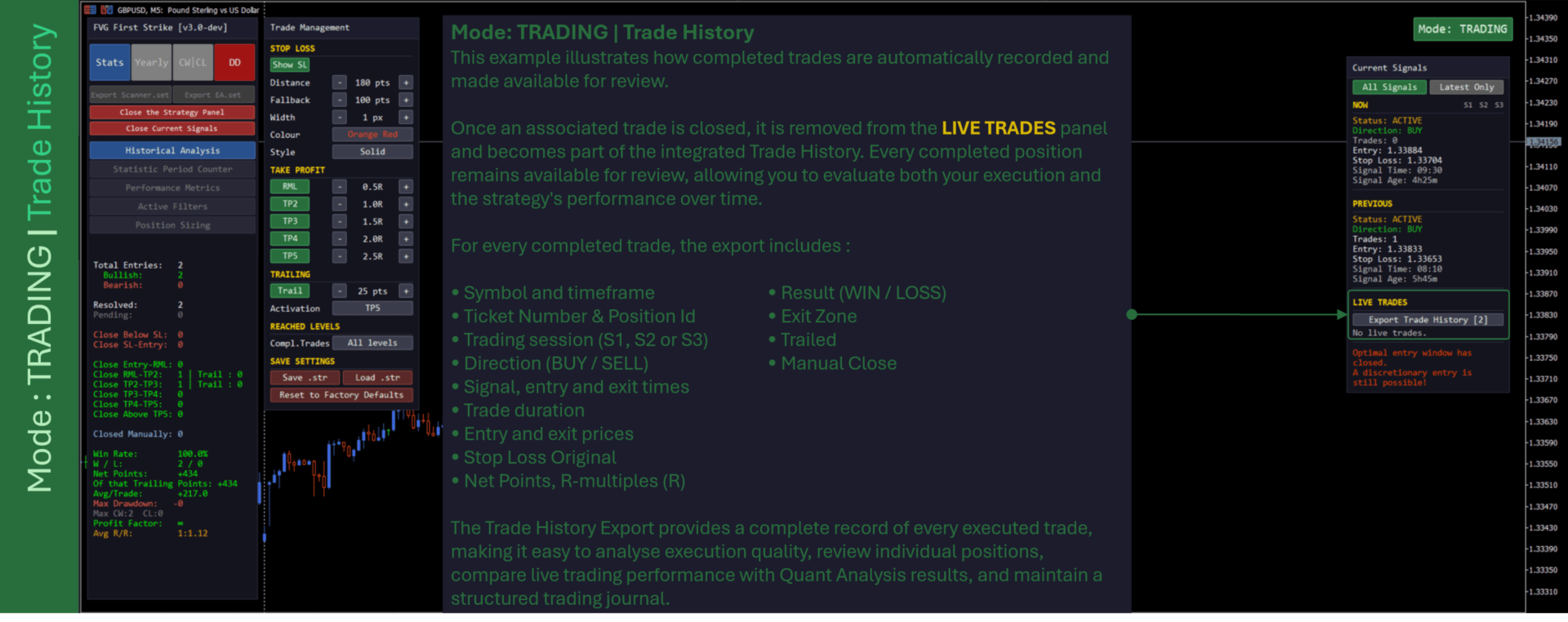
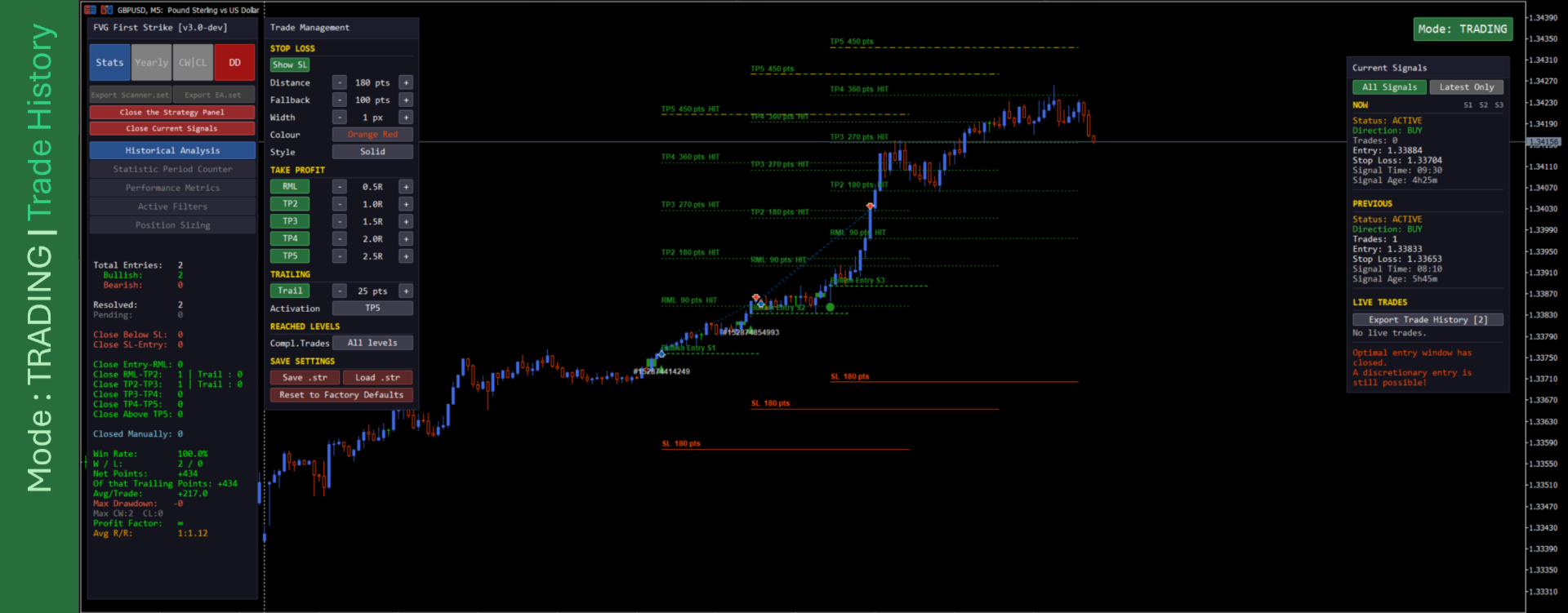
| Trade History Export | In Trading Mode the Current Signal Panel shows only your open trades (LIVE TRADES). The Export Trade History [N] button saves every closed trade to a CSV — ticket, entry and exit price, points, R multiple, result, exit zone, open and close time and duration. N is the number of trades the file will contain. Saved to MQL5\Files\FVGFirstStrike\Reports\TradeHistory\ . A confirmation dialog shows the saved location (folder and file name) on its first line and the number of trades exported on the second. See the Trade History Report Guide. |
| Trading Mode Statistics | In Trading Mode the statistics panel describes your real closed trades: each trade is placed in one outcome interval (Close Below SL … Close Above TP5), with a Closed Manually count, and Win Rate, Net Points, Max Drawdown and Profit Factor are measured from your actual fills. Rows stay greyed until one of your trades is matched to a signal today. |
| Performance View | The Performance section of the statistics panel shows Expectancy (in R), Risk of Ruin, Sharpe Ratio, Sortino Ratio and the number of trades analysed. In Trading Mode they are calculated from your real trades, and Risk of Ruin appears only after a minimum number of trades — set by Performance View: min trades for advanced stats (default 30, range 10–500). |
| Statistic Period Counter | Trading Mode only. Choose Daily counting (statistics reset each broker day, the default) or Multi-Day Statistics (statistics accumulate across days until you press Reset Statistics). The Trade History export follows the same setting. |
| Position Sizing | Uses the configured account size, risk per trade, maximum account drawdown, and leverage parameters within the EdgityCore analytical framework. Historical results remain analytical data and must be considered together with broker, execution, and account rules. |
| First-Strike Selection | Historical evaluation applies the same first-FVG rule used by the strategy, preventing later same-direction qualifying gaps in the relevant context from being treated as equivalent first-strike setups. |
| Non-Repainting | All signals evaluated on completed bars only. No repainting — the chart reflects only what was knowable at bar close. |
| Input Validation | The Indicator validates its shared EdgityCore configuration at load. Invalid validated settings produce an alert and prevent initialization until the configuration is corrected. |
Built on the EdgityCore Framework
FVG First Strike Indicator is part of the EdgityCore Framework, a unified analytical environment shared across every EdgityCore Indicator.
Rather than providing only trading signals, every EdgityCore indicator follows the same standardized analytical architecture, allowing traders to evaluate each methodology consistently regardless of the underlying strategy.
- Standardized Signal Lifecycle — Every detected signal follows the same transparent lifecycle from creation through final outcome evaluation.
- Integrated Statistics Engine — Historical performance is calculated using the same analytical engine across every EdgityCore product.
- Comprehensive CSV Reports — Export detailed Statistics, Yearly Performance, Consecutive Wins & Consecutive Losses (CW|CL), and Drawdown reports for further analysis, plus a Trade History report of your closed trades in Trading Mode.
- Risk Mitigation Level (RML) — A standardized intermediate risk-management milestone providing consistent historical evaluation across all supported methodologies.
- Extensive Documentation — Every major framework component is supported by detailed reference guides explaining methodology, statistics, calculations, reports, and configuration.
- Unified Professional User Interface — Consistent input organization, terminology, reporting, and chart presentation across the complete EdgityCore product family.
- Shared Framework Architecture — Every EdgityCore Indicator operates on the same engineering principles, allowing traders to move between products without learning a different workflow.
Strategy-Specific Capabilities
- Three-Bar Fair Value Gap Detection: The strategy identifies an imbalance directly between the oldest and newest bars of a three-bar sequence.
- Bullish FVG: A bullish Fair Value Gap is detected when the low of the newest bar is strictly above the high of the oldest bar. The gap is the price interval between those two levels.
- Bearish FVG: A bearish Fair Value Gap is detected when the high of the newest bar is strictly below the low of the oldest bar. The gap is the price interval between those two levels.
- Minimum Gap Size: A configurable minimum FVG size in points can exclude gaps that are smaller than the desired threshold. Negative minimum values are treated as zero.
- Maximum Gap Size: A configurable maximum FVG size in points can exclude gaps larger than the desired threshold.
- First-Strike Logic: Before accepting a bullish or bearish FVG, the strategy checks for an earlier qualifying FVG of the same direction within the applicable day and, when sessions are active, the same session. If one already exists, the later candidate is rejected.
- Session-Scoped Time Filtering: FVG First Strike has no hour-of-day detection window of its own. With no session enabled, detection runs across the whole trading day; with a session enabled, detection and the first-strike search are scoped to that session.
- Session-Aware Detection: When EdgityCore sessions are enabled, the middle bar of the three-bar pattern must belong to an active session, and the first-strike search remains within that session.
- FVG Rectangle Visualization: Bullish and bearish gaps are displayed as configurable coloured rectangles representing the detected imbalance zone.
- Configurable Rectangle Extension: FVG rectangles can remain limited to the pattern, extend a configurable number of bars to the right, or extend until the gap is mitigated.
- Entry Mode — Aggressive Entry (default): The signal is created the instant the first qualifying FVG is accepted. Entry is evaluated at the open of the bar immediately following the newest bar of the three-bar pattern.
- Entry Mode — Retest of the Equilibrium: The strategy waits for price to return to the Fair Value Gap's 50% equilibrium level within a configurable window of bars and be rejected there — the bar's wick must reach the equilibrium while its body stays entirely outside the gap. Entry is then evaluated at the gap's own equilibrium price rather than at a bar's open. If price closes fully through the gap before a qualifying rejection occurs, the setup is cancelled.
- Retest Validity Policy: When Retest Entry Mode is selected, traders can define how long a detected Fair Value Gap remains eligible for a valid retest: Strategy Default (original strategy behaviour), Originating Session Only, or Session Overlapping (Broker Day).
- Signal Association Buffer: An optional configurable candle buffer allows manually opened trades shortly after the strategy's normal recognition window to remain associated with the originating signal for analytical purposes. The buffer affects only trade association and Current Signal Panel visibility; it never changes signal detection, lifecycle, or historical outcomes.
Trading Mode & Quant Analysis Mode
| Mode | Purpose | How It Works |
|---|---|---|
| Trading Mode | Live trading and current-day operation. | The default mode. Analysis starts from the current broker day and remains open-ended. The Daily Circuit Breaker is independently enabled or disabled for this mode. |
| Quant Analysis Mode | Historical research and configuration analysis. | Uses a selected historical date range and allows either Raw Strategy with the Circuit Breaker disabled, or Strategy with Circuit Breaker using the configured daily loss-streak threshold. |
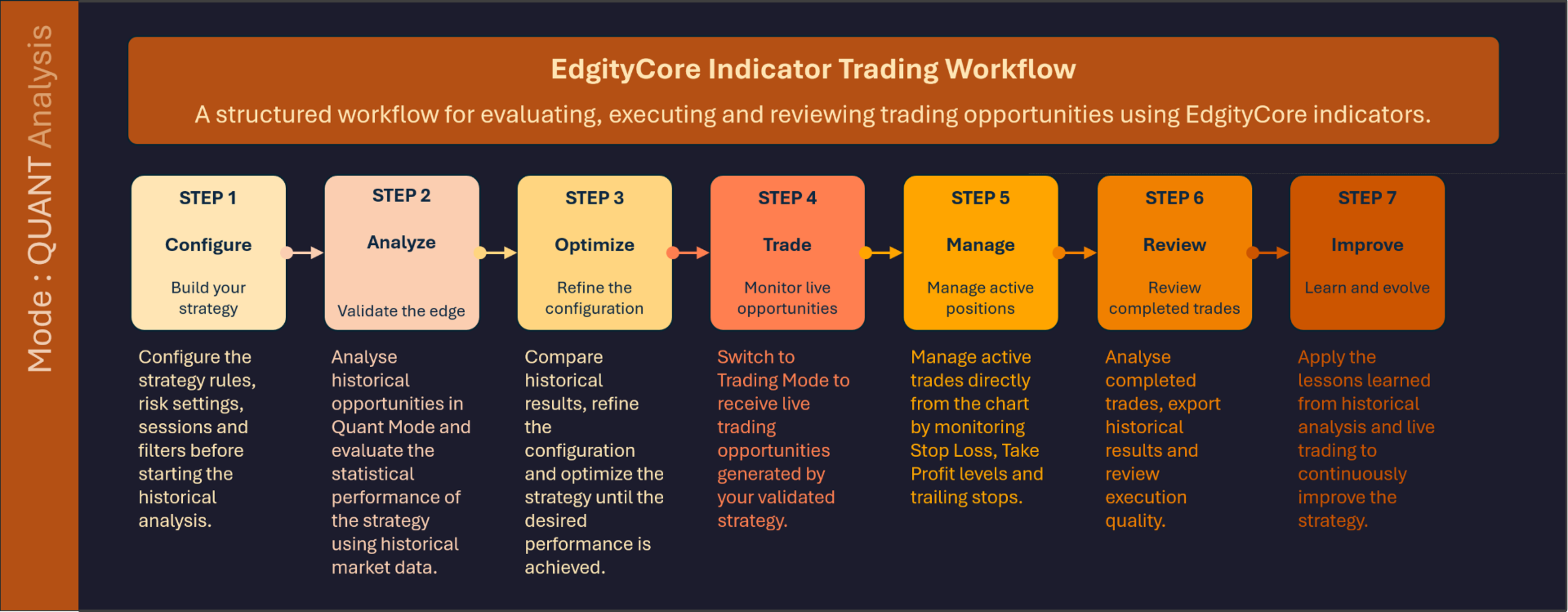
Quant Analysis Mode also allows traders to compare the historical performance of different Entry Modes and Retest Validity policies over identical market conditions.
Use Quant Analysis Mode to study historical behaviour. Use Trading Mode when applying the validated configuration to the current market.
Current Signal Panel
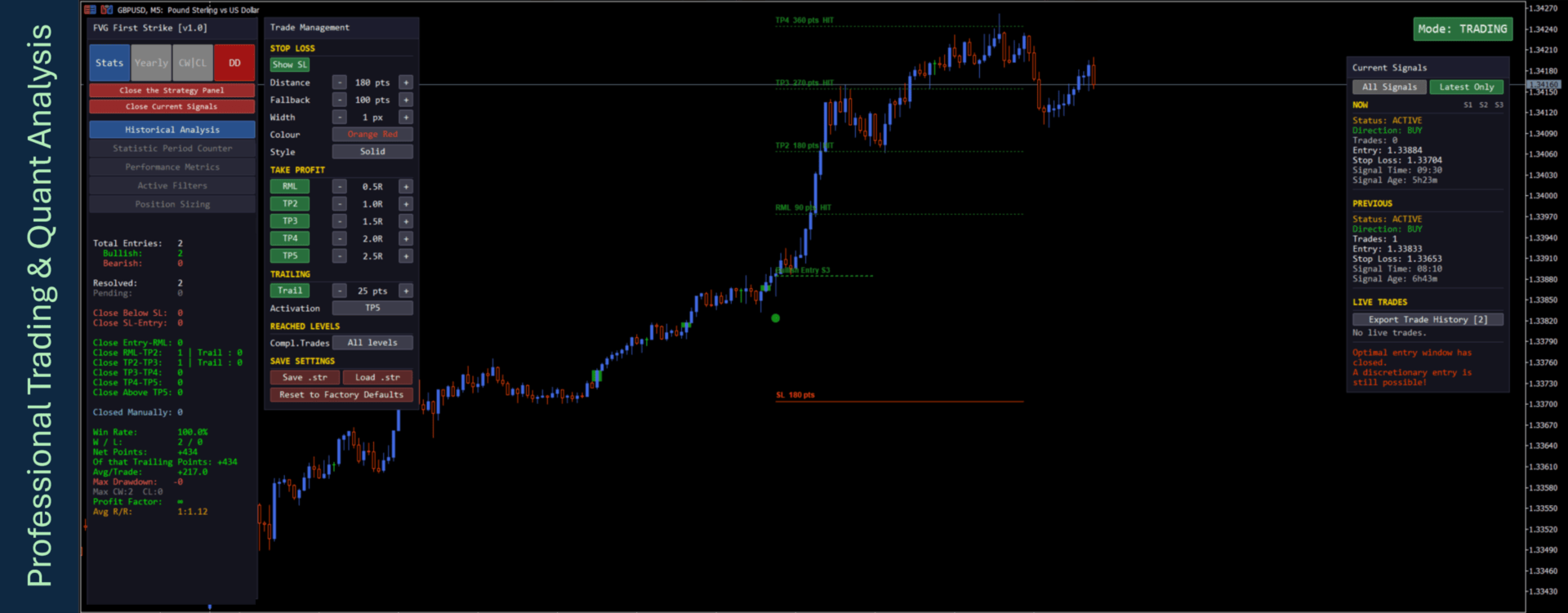
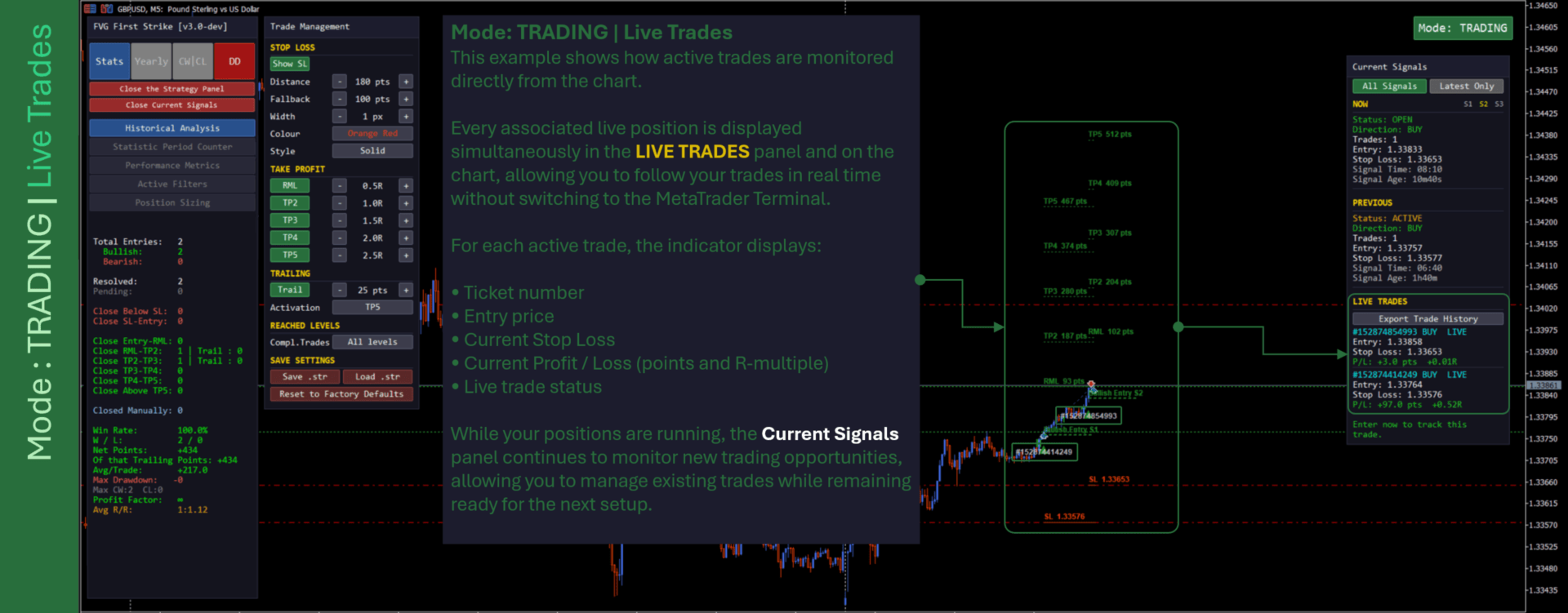
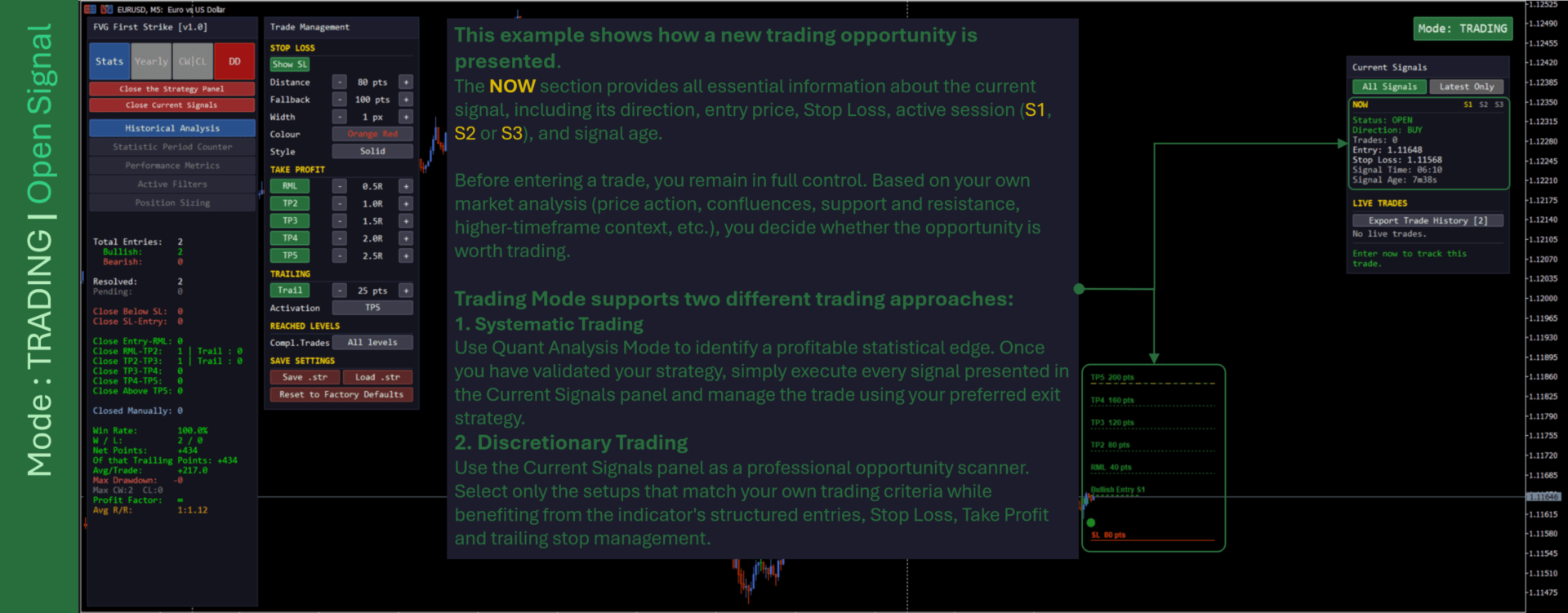
The Current Signal Panel is a compact on-chart panel (opened with its own toggle button) that shows the most recent live signal at a glance: its Status (OPEN, ACTIVE or CLOSED), direction, entry, stop loss, signal time and age. It follows the same signals as the chart and never changes detection or statistics.
In Trading Mode the panel adds a LIVE TRADES section listing only your open trades, with their entry, stop loss and running profit or loss in points and R. Closed trades are exported on demand with the Export Trade History button. In Quant Analysis Mode the LIVE TRADES section is not shown.
EdgityCore Framework Capabilities
- Multi-Session Tracking: Three independent session windows can be enabled with configurable start and end times, direction filters, and per-session signal caps.
- Directional Signal Limits: Shared EdgityCore controls can limit bullish and bearish signals and apply session-specific maximum-signal rules before an FVG First Strike setup is accepted.
- Risk & Target Management: Configurable stop loss, Risk Mitigation Level (RML), and up to five take-profit levels.
- Trailing Stop: Trailing-stop behaviour can be enabled through the shared EdgityCore settings, with a configurable trailing step and a single global activation point.
- Daily Circuit Breaker: Once enabled, the Circuit Breaker is part of the strategy definition itself. Signals occurring after the configured maximum daily consecutive-loss streak is reached are never created — excluded from drawing, caching, statistics and export alike. The Circuit Breaker resets every broker day.
- Entry & Trade Visualization: Bullish and bearish entries, stop-loss levels, take-profit levels, trailing-stop information, and trade outcomes use the shared EdgityCore chart presentation controls.
- Per-Symbol Stop Loss Configuration: Eight configurable symbol/SL pairs can be resolved through the shared risk manager, together with the default stop-loss value and point multiplier.
- Date-Range Analysis: Historical analysis can use a configurable date range and lookback period.
- Statistics Panel: The integrated EdgityCore panel presents strategy performance and provides direct access to the Stats, Yearly, CW|CL, and DD exports (in Trading Mode Yearly is greyed out and CW|CL is available only while the Circuit Breaker is disabled).
- Dynamic Viewport Rendering: Visible trade objects and FVG rectangles are redrawn according to the current chart viewport.
- Live Bar Updates: Strategy processing updates as new bars become available, allowing newly confirmed FVG setups to be incorporated without requiring a chart reload.
- Advanced Alerts: Confirmed live signals can use the shared popup, sound, push-notification, and email alert channels.
- Strategy Tester Support: The Indicator supports historical and visual analysis through the MetaTrader 5 Strategy Tester.
- Input Validation: Shared risk, target, trailing-stop, session, account-risk, and date-range parameters are validated before the Indicator starts.
User Documentation
div> Getting StartedEdgityCore — Demo Version Guide
EdgityCore - Input Parameters Reference
Mode Quant
EdgityCore — Understanding Mode Quant (Historical Analysis)
EdgityCore - Indicator Statistics Panel
EdgityCore - Indicator Statistics Report Guide
EdgityCore - Indicator Yearly Report Guide
EdgityCore - Indicator Consecutive Wins / Consecutive Losses (CW|CL) Report Guide
EdgityCore - Indicator Drawdown Report Guide
Mode Trading
EdgityCore — Understanding Mode Trading
EdgityCore - Indicator Trade History Report Guide
Trading Concepts
EdgityCore — Core Concepts — Understanding Risk (R)
EdgityCore — The Risk Mitigation Level (RML) — Why One Level Changes Everything
EdgityCore – Trade Scoring Methodology
EdgityCore – Net Points Calculation
Frequently Asked Questions
EdgityCore - Frequently Asked Questions Part 1
EdgityCore - Frequently Asked Questions Part 2
EdgityCore - Frequently Asked Questions Part 3
What's Included
- FVG First Strike Indicator (.ex5) for MetaTrader 5.
- Input Parameters Reference and Core Concepts documentation.
- Statistics, Yearly, CW|CL, Drawdown, and Trade History Report Guides.
- Frequently Asked Questions (Parts 1–3).
- Free updates for the lifetime of the product.
A demo version is available for download from the MQL5 Market product page — test the indicator on your own instruments and timeframes before purchasing.
© 2026 Marc Quentier. All Rights Reserved. EdgityCore Suite, FVG First Strike Indicator and all related documentation materials may not be reproduced or redistributed without permission.