Phantom Airbag

Every EA makes mistakes. PHANTOM Airbag catches them before they cost you money.

PHANTOM Airbag is the world's first AI safety net for MT5 trading robots. It runs silently alongside your existing Expert Advisor and reviews every single trade signal through 41 intelligent checks plus PHANTOM AI validation. Bad trades get filtered out before they hit the market. Your capital stays protected.

### Who is this for?

- Traders using EAs (Quantum, Gold, AI trading robots, any EA)
- Prop firm traders (FTMO, MyForexFunds, E8, FundedNext)
- Serious traders tired of watching EAs blow up on avoidable mistakes
- Gold (XAUUSD), indices, and forex traders on MT5

### How it works

```
Your EA → generates a signal → AIRBAG intercepts
↓
41 AI checks + PHANTOM AI review
↓
ALLOW ✓ · SKIP ✗ · MODIFY ⚙
```

When your EA opens a new trade, AIRBAG immediately runs it through:
1. Smart Money Concepts (SMC direction, order blocks, fair value gaps)
2. Session Analysis (best/worst hours based on historical data)
3. News Proximity (avoid trading during high-impact events)
4. Volume Confirmation (is there real buying/selling pressure?)
5. Spread Check (broker spread within acceptable range?)
6. Anti-Tilt (too many recent losses? Take a break)
7. Correlation (conflicting position already open?)
8. Drawdown Protection (daily loss limit enforcement)
9. PHANTOM AI (contextual AI reasoning on the full setup)
10. Plus 32 additional quality checks

### Key Features

- ✅ Works with ANY MT5 Expert Advisor
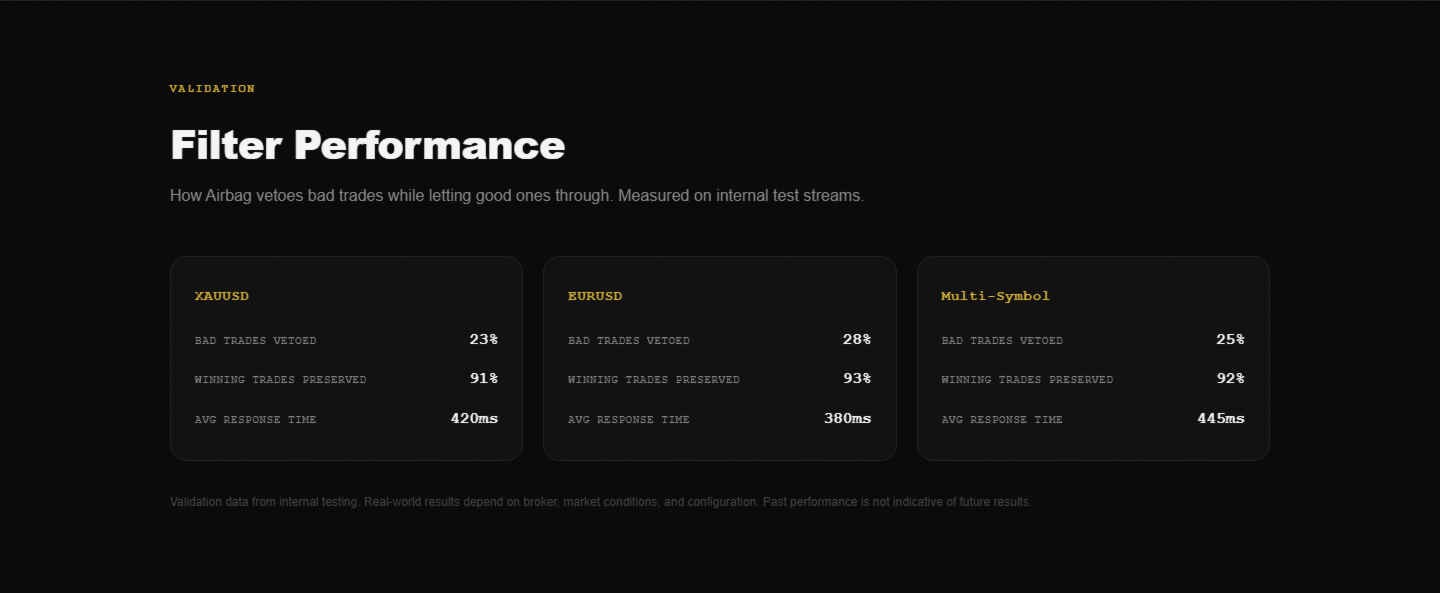
- ✅ 41 AI checks per trade signal in under 500ms
- ✅ PHANTOM AI provides explainable decisions
- ✅ Daily loss limit & overtrading protection
- ✅ Max positions enforcement
- ✅ FTMO & prop firm ready mode
- ✅ Natural language configuration
- ✅ Telegram alerts for filtered trades
- ✅ Paper mode for testing without risk
- ✅ Magic number filter (protect specific EAs)
- ✅ Detailed log files for review
- ✅ Continuous learning from community trades

### Why AIRBAG is different

Most EAs are static rule sets from 2022. They don't adapt to changing market conditions. They make the same mistakes over and over. They don't know about news events. They can't tell when the session is bad. They don't learn.

PHANTOM AIRBAG is different. It's a dynamic AI layer that sits between your EA and the market. Every trade filtered teaches the system more. Every user contributes to the collective intelligence. The AI literally gets smarter every day.

### Setup

1. Install the EA on any chart
2. Whitelist the API URL in MT5 settings (Tools → Options → Expert Advisors)
3. Enter your license key
4. Configure your preferences (or use Natural Language via Telegram)
5. Let it run alongside your existing EA

### System Requirements

- Platform: MetaTrader 5 (Build 4000+)
- Account Type: Hedging or netting (both supported)
- Broker: Any ECN/STP broker
- Symbols: Any (XAUUSD, major pairs, indices, crypto)
- Internet: Required for AI checks (5-second timeout, offline fallback)
- Minimum Deposit: $100 (recommended $500+)
- VPS: Recommended but not required

### Live Signal

📊 Verified Live Trading: See PHANTOM's real-time performance on our public MQL5 Signal (link in comments)

### What makes AIRBAG worth it?

If your EA makes ONE bad trade per week that costs $100 and AIRBAG prevents it, you save $400+ per month. AIRBAG costs less than that. The math is simple.

### Support

- Email: support@goldfoundry.de
- Telegram: @phantomtraders
- Discord: discord.gg/phantomtraders
- Documentation: https://goldfoundry.de/sentinel/docs

### Guarantee

- 14-day free trial available at https://goldfoundry.de/sentinel
- MQL5 Market ensures secure payment
- Full source code review by MetaQuotes
- Hardware-locked license (5 activations)
- Regular updates included

### Part of the PHANTOM Suite

PHANTOM Airbag is one of 5 tools in the PHANTOM trading suite. Each tool works standalone, all work better together.

- PHANTOM News Shield — News protection ($39)
- PHANTOM Trail Pro — Smart trailing stop ($49)
- PHANTOM Guardian — Prop firm risk management ($49)
- PHANTOM Airbag — AI trade filter ($99)
- PHANTOM Trader DSS — Autonomous AI trader ($199)

Try the full suite free for 14 days: https://goldfoundry.de/sentinel

### Risk Disclaimer

PHANTOM Airbag is a technology tool and does not constitute investment advice. Trading financial instruments involves substantial risk of loss. Past performance is not a reliable indicator of future results. Only trade with capital you can afford to lose.

---

Part of the PHANTOM Trading Suite:
- Phantom News Shield — Automatic news protection
- Phantom Trail Pro — Smart trailing stop manager
- Phantom Guardian — Prop firm risk management
- Phantom Copier — Smart trade copier
- Phantom Airbag — AI trade filter for any EA
- Phantom Trader DSS — Autonomous AI trader

Try the full PHANTOM Suite free for 14 days at goldfoundry.de/sentinel

추천 제품
Trading Assistent is a multifunctional trading panel that combines all necessary tools for professional trading. The panel provides complete control over positions, in-depth risk analysis, and fast order execution. MAIN FUNCTIONAL BLOCKS Position Management: - Real-time viewing of all open positions - Sorting by symbol, profit, volume, and type - Visual indication of profitable and losing positions - Bulk closing operations - Breakeven function for profit protection Trading Operations: - I
SmartLot MT5
Nikita Chernyshov
데모 계정 무료 버전 | MT4 버전 SmartLot   MT5  는 차트에서 직접 로트를 빠르게 계산하고, 보류 중 주문 및 시장가 주문을 설정할 수 있는 대화형 및 간단한 패널입니다. 전략 테스터에서는 작동하지 않습니다 . 유틸리티를 테스트하려면 데모 계정용 무료 버전을 다운로드하십시오. 지침과 파일은 설명 상단에 있습니다. 기능: 그래픽 인터페이스:   수익 및 손실 구역을 색상으로 표시한 대화형 진입, SL, TP 라인. 실시간 계산:   SL/TP 수준을 변경할 때 패널이 위험/이익 값(통화 / 핍 / %)을 자동으로 재계산합니다. 실행:   그래픽 라인의 버튼을 클릭하여 주문을 엽니다. 주요 주문 유형 지원. 위험 관리:   동적 로트(예금 비율) 또는 고정 볼륨 작업을 위한 내장 모듈. 개별 매직:   각 주문에 대해 개별적으로 매직 넘버를 지정할 수 있는 기능.
표시기는 현재 시세를 작성하여 과거 시세와 비교할 수 있으며 이를 바탕으로 가격 변동을 예측합니다. 표시기에는 원하는 날짜로 빠르게 이동할 수 있는 텍스트 필드가 있습니다. 옵션: 기호 - 표시기가 표시할 기호 선택. SymbolPeriod - 지표가 데이터를 가져올 기간 선택. IndicatorColor - 표시기 색상. HorisontalShift - 지시자가 그린 따옴표를 지정된 막대 수만큼 이동합니다. Inverse - true는 인용 부호를 반대로, false - 원래 보기를 반전합니다. ChartVerticalShiftStep - 차트를 수직으로 이동합니다(키보드의 위/아래 화살표). 다음은 날짜를 입력할 수 있는 텍스트 필드의 설정으로, '엔터'를 누르면 즉시 이동할 수 있습니다.
Headline ShikaaTraders Gold Grid Pro is a high-performance trade management utility designed specifically for XAUUSD (Gold) and high-volatility pairs. It allows traders to execute complex grid-layering strategies with a single click, ensuring you never miss an entry during fast market moves. Why Choose Gold Grid Pro? Manual trading on Gold requires speed. Manually calculating distances and opening multiple positions takes too much time. This utility automates the "Scaling-In" process, allowing y
Trade Analyzer Panel is a real-time dashboard utility for MetaTrader 5. It brings position monitoring, risk analysis, profit/loss simulation, target planning, break-even visualization and quick-close controls into a single scrollable on-chart panel. Features Position scanner: lists every open position with symbol, direction, lot size, open price and live profit/loss. Account summary: balance, equity, used and free margin, and margin level updated in real time. Break-even visualization: draws a l
Garner Trade Pad EA
Garner Edward Bennie
Garner Trade Pad EA is an MT5 Expert Advisor that brings trade planning and position sizing directly onto your chart. Position your Stop Loss and Take Profit, choose the amount you want to risk, and view the calculated lot size before placing an order.TP1 buy The dark navy panel with blue accents provides a clear view of your proposed trade. It is a manually operated calculator and order-entry tool: you choose the direction, levels and timing of every trade. ## Movable chart panel - Drag t
NRP Risk Manager Pro Institutional-Grade Trade Management & Prop Firm Protection Get the MetaTrader 4 Version Here: https://www.mql5.com/en/market/product/179888 Get the MetaTrader 5 Version Here: https://www.mql5.com/en/market/product/179885 Trading isn't just about finding the right entry; it is about flawlessly executing your edge while fiercely protecting your capital. NRP Risk Manager Pro is not an automated trading robot—it is a comprehensive, institutional-grade trade terminal d
Advanced 1-Click Risk Panel is a precise and lightning-fast risk management utility for MetaTrader 5. It automatically calculates your exact position size based on chart drag-and-drop Stop Loss line and account risk percentage. Key Features Dynamic SL Line & Dynamic Lot: Simply drag the horizontal SL line on your chart—the panel dynamically calculates your exact lot size instantly. 1-Click Execution: Place instant BUY/SELL orders with automated Stop Loss and Take Profit based on your predefin
TradeManager Control Suite Manual trading with structured planning and controlled risk TradeManager Control Suite is a comprehensive trading panel for MetaTrader 5. It helps you prepare trades directly on the chart, calculate position size, place orders and manage open positions according to a plan defined in advance. You remain responsible for every entry. The application does not trade independently and does not use an automated trading strategy. It performs the calculations, sends the orde
Local Copy Trader Utility - Professional Copy Trading System Overview Local Copy Trader Utility is the complete solution for mirroring trades between MetaTrader 5 accounts. With both Master and Slave functionality in one powerful Expert Advisor, it delivers reliable, lightning-fast trade copying with zero external dependencies. Perfect for managing multiple accounts, following trading signals, or transferring trades between brokers, this system ensures your positions stay perfectly synchronized
Capital Management EA – Smart Risk Management & Profit Optimization for MT5 Take control of your trading capital with smart, automated strategies — fully optimized for MetaTrader 5 (MT5). Looking to protect your capital and maximize profits through automated money management strategies ? Capital Management EA is the all-in-one Expert Advisor for MetaTrader 5 (MT5) that helps you trade smarter, not harder. Core Features: 5-in-1 Capital Management Strategies – Built-in versatility Gr
Imagine flying a real aircraft without ever stepping into a flight simulator. That's what trading is like. You have to simulate your strategy before you can take it to a live market. It is good if you can simulate things speedily before even stepping into any live market, or before coming up with an automated system.  People don't have all day to stare at a higher timeframe chart until the entry signal finally arrives. That's why I built this so that you can simulate your strategy with speed. Th
FREE
MultiTimeframe Support and Resistance Zones
Mohamed Gamal Abdelnasser Yous Hashesh
A powerful indicator that highlights key market zones and helps traders identify potential opportunities across multiple timeframes. Designed for clarity and efficiency, it provides real-time alerts to keep you informed of important price levels. Key Features: Works on multiple timeframes: M1, M5, M15, M30, H1, H4, D1, W1, MN1. Customizable zone colors for each timeframe. Real-time alerts and notifications when price reaches significant zones. Automatically manages chart objects to keep your wor
Copy trades locally between MetaTrader terminals with a simple interface and professional risk controls. Use it to mirror trades across accounts, brokers, and platforms in any MT4/MT5 combination. Designed for reliability : supports trade updates such as breakeven, trailing stop, partial closes, and more. User Guide + Demo | MT4 Version Important notes Local Trade Copier MT5 does not work in the Strategy Tester. For a demo, please use the User Guide + Demo link above. To copy to MT4, you will n
TradeAQ
Guo Sheng Zhao
LuoMo Volume & Price Structure 8.98 A multi-function chart indicator for   MetaTrader 4 and MetaTrader 5 , designed to display key volume, volatility, sentiment, and price-structure information directly on the main chart. Main Features Volume and price-based Support & Resistance Volume spike and exhaustion signals ATR volatility expansion alerts Volume Profile with HVN and LVN Bullish and bearish sentiment distribution Developing or fixed POC VAH and VAL levels Supply and Demand zones Volume-wei
Blahtech Market Profile MT5
Blahtech Limited
5 (10)
Was: $249  Now: $99   Market Profile defines a number of day types that can help the trader to determine market behaviour. A key feature is the Value Area, representing the range of price action where 70% of trading took place. Understanding the Value Area can give traders valuable insight into market direction and establish the higher odds trade. It is an excellent addition to any system you may be using. Inspired by Jim Dalton’s book “Mind Over Markets”, this indicator is designed to suit the
TradingManagement
Christian Ishmael Calienta Magallon
TradingManager is a comprehensive trading panel designed to streamline your trading workflow in MetaTrader 5. It combines order management, risk controls, and market analysis into one intuitive interface. Key Features 1. Trading Panel Market Order Entry   - One-click BUY/SELL with automatic SL and TP line placement on chart Fib Limit Orders   - Draw Fibonacci-based limit orders with visual SL and TP levels Risk Management   - Choose between Lots, % Risk, or $ Risk modes Take Profit Split   - Dis
EA 자동 이익 실현, 자동 매수/매도, 볼륨 관리자, 사이드웨이 거래, 트레일링 오픈 포인트 1 – 자동 매수/매도 오픈 EA는 이익, 손절매, 볼륨 설정에 따라 매수 또는 매도를 자동으로 오픈합니다. 볼륨 관리: 총 주문 수와 고정 크기 2 – 자동 이익 실현: 설정에 따라 최소 이익으로 이익 실현, 최소 및 최대 이익에 따라 이익 실현 버튼 3 – 주문 처리: EA에 설정된 핍 수에 따라 포지션의 손절매 수준이 3단계입니다. 4 – 사이드웨이 거래: 사이드웨이 피크 영역에서 매도 주문 오픈 – 사이드웨이 바닥 영역에서 매수 오픈, EA에 설정된 사이드웨이 피크 및 바닥 값 5 – 트레일링 오픈 포지션: 1개 가격 포인트를 추적하고 가격이 해당 지점까지 오르면 매도를 오픈하고 EA의 설정에 따라 핍 수를 줄이며, 가격이 매수 주시 지점까지 오르면 매수를 오픈하고 가격이 설정에 설정된 핍 수로 회복되면 오픈
ADVANCE TRADE MANAGER A complete, tabbed trade-management dashboard for MetaTrader 5 that puts every routine trade operation on one compact panel. No more hunting through menus — open, protect, scale and manage positions from a single interface. The panel is a pure GUI overlay . It never touches your existing chart objects, indicators, arrows or manual lines. All chart objects it creates use the dedicated EGF_Z_ (zones) prefix, and trigger lines use the panel's own object names — so nothing else
Lot calculator tool MT5
Ernestas Kvedaras
3.67 (3)
More stable MetaTrader 4 version is available here:  Lot Calculator Tool . This tool helps you to automatically calculate and manage risk, conveniently place orders visually, schedule orders, trail stops, move them to break-even and more. Features Place market or pending orders using draggable lines Schedule orders Calculate and limit risk using various methods See current spread See time till next candle Set custom order comments Trail stops Move stops to break-even See order profit/loss in p
Trade Manager Panel lets you open trades with one click and the correct lot size. You choose the risk in percent and the stop loss distance; the panel calculates the lot, sets stop loss and take profit with the order and manages the position for you. Order Risk in % of equity with + / – buttons, shown in money. Stop loss distance in points, take profit as a multiple of the risk (R). Lot size calculated from risk and stop loss, rounded to the broker's lot step. BUY and SELL buttons with live pric
TradeControl Pro – MetaTrader용 고급 트레이드 매니저 TradeControl Pro 는 MetaTrader 환경에서 차트 상에서 직접 거래 포지션을 구조적이고 효율적으로 관리할 수 있도록 설계된 트레이드 관리 도구입니다. 이 프로그램은 명확한 사용자 인터페이스와 자동 계산 기능, 그리고 다양한 트레이딩 방식에 대응하는 유연한 제어 옵션을 결합합니다. 내장된 온차트 패널은 표 형식으로 구성되어 있으며, Execution , Close , Info 의 세 가지 주요 탭으로 나뉩니다. 인터페이스는 가독성과 직관적인 조작에 중점을 두고 설계되었습니다. 논리적으로 구성된 명확한 구조 모든 주요 거래 지표의 실시간 업데이트 추가 창 없이 차트에서 직접 제어 가능 탭: Execution (거래 실행 및 계획) Execution 영역은 새로운 거래의 계획과 실행을 담당합니다. Open Calc (대기 주문 설정) Open Calc 를 사용하면 차트에 다음과 같은 세 개의 라
Smart Ai Trading Panel
Muhammad Faisal Sagala
SMART AI TRADING PANEL User Manual — MetaTrader 5 (MT5) Developed by RobotTradingCerdas Website: https://robottradingcerdas.com Copyright 2026 Faisal Sagala 1. Introduction Smart AI Trading Panel is a manual trading assistant for MetaTrader 5. It provides a convenient on-chart interface for opening trades, placing pending orders, managing Stop Loss and Take Profit levels, monitoring account information, and closing selected positions. The panel includes the following features: One-click Buy
Tarnix Evenlock
AL MOOSAWI ABDULLAH JAFFER BAQER
A BREAKEVEN STOP THAT STILL LOSES THE COMMISSION IS NOT BREAKEVEN. TARNIX EVENLOCK LOCKS THE REAL ONE. Tarnix Evenlock is a breakeven lock for MetaTrader 5 that counts what the trade really costs. When a position in scope, opened by hand or by another Expert Advisor, has moved in its favour by the trigger you choose (N x ATR, stored the moment the trade is first seen, or a fixed number of points), its stop loss is moved to the entry plus a buffer that pays the spread cushion, the round-turn comm
The Multilevel PnL Calculator EA is an advanced trading tool designed for Forex and CFD traders who need precise position sizing and risk management calculations. This intuitive panel-based calculator allows you to simulate multiple entry positions with automatic profit and loss calculations in real-time USD values. Key Features Multi-Position Management Calculate Profit and Loss for up to 10 or more simultaneous positions (configurable) Support for both LONG and SHORT trading modes Real-time
Wedge Pattern MT5
Sathit Sukhirun
Korean 이 보조지표는 차트 패턴 거래를 즐기는 트레이더를 위한 고급 차트 분석 비서 역할을 합니다. 시각적 분석의 부담을 줄이고 수익 창출의 정확성을 높이도록 설계되었습니다. 실제 사용 관점에서 본 이 보조지표의 주요 장점과 특징입니다: 1. 자동 패턴 감지 (Automated Pattern Detection) 시간 절약 및 편향(Bias) 감소: 수동으로 추세선을 그릴 필요가 없습니다. 인디케이터가 가격 스윙(Pivot High/Low)을 검색하고 가격 구조가 조건에 부합할 때 라이징 웨지(Rising Wedge, 상승 쐐기형) 및 폴링 웨지(Falling Wedge, 하락 쐐기형) 구조를 자동으로 그립니다. 모든 상황 포괄: 패턴이 형성되는 중, 브레이크아웃(돌파), 심지어 실패한 패턴까지 감지할 수 있어 시장의 전반적인 흐름을 명확하게 파악할 수 있습니다. 2. 내장된 목표가 및 피보나치 익절 (Built-in Targets & Fibonacci TP) 자동 목표가 계산:
TLID Volume Profile
Robby Suhendrawan
Volume Profile은 전문 및 기관 트레이더가 사용하는 가장 강력한 분석 도구 중 하나입니다. 거래가 발생한 시간만 화면 하단에 표시하는 기존 거래량 지표와 달리 Volume Profile은 해당 거래가 발생한 정확한 가격 수준을 보여줍니다. 이를 통해 시장 구조에 대한 명확한 X-ray 뷰를 제공하여 스마트 머니(smart money)와 기관이 포지션을 축적하거나 분배하는 위치를 정확히 확인할 수 있습니다. Volume Profile이 기관 주문 및 Support/Resistance를 감지하는 방법 이 지표는 가격 척도에 대해 가로로 거래량을 플로팅하여 실제 과거 거래를 기반으로 진정한 수요 및 공급 영역을 자연스럽게 드러냅니다. 표준 Volume Profile 규칙을 기반으로 시장을 읽는 방법은 다음과 같습니다. Point of Control (POC): 선택한 기간 내에 거래량이 가장 많은 특정 가격 수준입니다. POC는 구매자와 판매자 모두가 수용하는 가장 공정한 가격
Tick Volume Chart - MetaTrader 5 에서 틱 거래량 기반 차트를 생성하는 독보적인 도구입니다. Tick Volume Chart 를 사용하면 시간이 아닌 지정된 틱 수에 따라 각 캔들이 형성되는 차트를 구축할 수 있습니다. 이를 통해 표준 시간 차트에서는 얻을 수 없는 완벽한 시장 활동 분석 정밀도를 확보할 수 있습니다. 사용자 지정 심볼을 지원하는 모든 지표와 Expert Advisor를 사용할 수 있습니다. 생성된 차트는 표준 차트와 마찬가지로 편리하게 작업할 수 있습니다. 기존 도구와 달리 Tick Volume Chart 는 시간 간격이 아닌 실제 거래 강도에 기반하여 시장을 분석할 수 있게 해줍니다. Tick Volume Chart의 장점 각 바에 고정된 틱 거래량 을 가진 차트를 지원합니다. 내장된 틱 데이터베이스 덕분에 과거 데이터를 즉시 로드 합니다. 데이터가 실시간으로 업데이트되며, 일반 차트와 지연 없이 동기화 됩니다. 한 번에 여러 개의 틱 거
SmartRAL
Jemy Yeferson Dimu Ludji
SmartRAL (Smart Risk Auto-Lot EA) SmartRAL: The Ultimate Risk & Lot Management Expert Advisor (EA) SmartRAL is an essential tool for traders who demand precise risk management and automated position sizing in MetaTrader 5. Stop guessing your lot size and let the algorithm handle the calculations. This EA allows you to trade with confidence by guaranteeing your risk exposure on every single trade, while offering absolute flexibility in setting your Stop Loss (SL). Key Features & Benefits Guarante
Trade Manager Pro A complete discretionary trade-management cockpit for MetaTrader 5 — direction-aware position planning, prop-firm rule enforcement, a live correlation heat map, a pre-trade checklist gate, and one-click execution, all in a single on-chart panel. Overview Trade Manager Pro is not a signal-generating "black box" EA. It does not predict market direction and makes no profitability promises. Instead, it is a risk and execution management tool built for discretionary traders — partic
이 제품의 구매자들이 또한 구매함
Trade Assistant MT5
Evgeniy Kravchenko
4.43 (216)
거래당 위험 계산, 라인을 사용한 손쉬운 신규 주문, 부분 청산 기능을 통한 주문 관리, 7가지 유형의 트레일링 스탑 및 기타 유용한 기능을 제공합니다. 추가 자료 및 지침 설치 지침   -   애플리케이션 지침   라인 기능       - 차트에 개시선, 손절매, 차익실현을 표시합니다. 이 기능을 사용하면 새로운 주문을 쉽게 하고 개봉 전에 추가 특성을 볼 수 있습니다. 위기 관리       -       위험 계산 기능은 설정된 위험과 손절매 주문의 크기를 고려하여 새 주문의 볼륨을 계산합니다. 이를 통해 손절매 크기를 설정하고 동시에 설정된 위험을 존중할 수 있습니다. 로트 계산 버튼 - 위험 계산을 활성화/비활성화합니다. 필요한 위험 값은 위험 필드에 0에서 100 사이의 백분율 또는 예금 통화로 설정됩니다. 설정 탭에서 위험 계산 옵션을 선택합니다. $ 통화, % 잔액, % 지분, % 자유 마진, % 사용자 정의, % AB 이전 일, % AB 이전 주, % AB 이전
Farmed Hedge Yield Farming | All Markets (Manual - Hybrid - Semi/Automated EA) VERIFIED TRADING RESULTS - Farmed Hedge Yield Axi Copy:  https://www.mql5.com/en/signals/2356376 - Farmed Hedge Yield Exn Copy:   https://www.mql5.com/en/signals/2356404 - Farmed Hedge Yield V Copy:  https://www.mql5.com/en/signals/2357156 IMPORTANT NOTICE: FarmedHedge is a MANUAL-FOCUSED TRADING UTILITY ,not a fully automated EA. Results shown on this Signal include manual trades and overall strategic management.
Telegram to MT5 Multi-Channel Copier   는 Telegram 및 Discord 채널의 트레이딩 시그널을 MetaTrader 5로 자동 복사합니다. 봇도, 브라우저 확장도, 수동 복사도 필요 없습니다. Telegram이나 Discord에 시그널이 도착하면 EA가 몇 초 안에 터미널에서 주문을 실행합니다. 그리고 채널을 복사하기 전에, 내장 백테스터가 그 채널이 내 계좌에서 어떤 결과를 냈을지 보여줍니다. 제품은 두 가지 구성 요소로 이루어집니다: Telegram 채널을 수신하는 Windows 애플리케이션과, MT5 터미널에서 시그널을 실행하는 본 EA입니다. MT4 버전도 제공됩니다   여기 . 구매 전에 사용해 보세요:   애플리케이션은 무료로 다운로드할 수 있습니다. 본인의 채널을 연결하고 각 시그널이 어떻게 읽히는지 확인하세요. Backtest 탭과 실제 거래에는 구매하거나 임대한 EA가 필요합니다. 이 페이지의 무료 데모는 전략 테스터에서만 실행되며
EA Overfitter
Stephen J Martret
5 (4)
That backtest looks great. But will it still be making money tomorrow, next week, next month? EA Overfitter re-runs your EA on 100 price histories it has never seen. One score tells you if the edge is real. A backtest tells you what an EA did on one price history — the one that happened to occur. What you cannot tell from it is how much of that result was the strategy and how much was the particular path. EA Overfitter answers that. It builds up to 100 synthetic price histories your EA has n
TradePanel MT5
Alfiya Fazylova
4.89 (174)
Trade Panel은 다기능 거래 도우미입니다. 이 애플리케이션에는 50개 이상의 수동 거래 기능이 포함되어 있으며 대부분의 거래 작업을 자동화할 수 있습니다. 앱 사용 설명서: https://www.mql5.com/en/blogs/post/756482 데모 계정용 앱 체험판: https://www.mql5.com/en/blogs/post/750865 앱 설치 방법: https://www.mql5.com/en/blogs/post/756239 시각 모드에서 앱 테스트 방법: https://www.mql5.com/en/blogs/post/770277 VPS MetaTrader에 앱 설치 방법: https://www.mql5.com/en/blogs/post/770190 거래. 한 번의 클릭으로 거래를 수행할 수 있습니다: 리스크 자동 계산과 함께 예약 주문 및 포지션 열기. 한 번의 클릭으로 여러 주문 및 포지션 열기. 주문 그리드 열기. 예약 주문 및 포지션을 그룹별로 닫기. 포지션
News Trade EA MT5
Konstantin Kulikov
4.55 (11)
제가 몇 년 동안 사용하고 있는 유용한 로봇을 소개드립니다. 반자동뿐만 아니라 자동 모드로도 사용할 수 있습니다. >>> Chat <<< 본 프로그램에는 경제 캘린더의 뉴스별로 유연한 거래 설정이 포함되어 있습니다. 전략 테스터에서 확인할 수 없습니다. 진짜 작업뿐입니다. 최신 설정 아카이브 다운로드: https://www.mql5.com/en/blogs/post/747929 신호 모니터링: https://www.mql5.com/en/signals/author/test-standart 이 전문가를 위해 고유 설정 세트를 만들 때 블로그의 모든 매개변수에 대한 설명을 참조하십시오: https://www.mql5.com/en/blogs/post/748545 . 기본 설정 설명 작업은 한 차트에서 GBP(GBPUSD, EURGBP, GBPJPY, GBPCAD, GBPAUD, GBPCHF)와 쌍으로 이루어집니다. GBP는 가장 변동성이 큰 통화로서 거래 수행 시 거래를 성공적으로
Power Candles Strategy Scanner: 스스로 최적화하는 멀티 심볼 셋업 파인더 작은 움직임마다 울리는 스캐너는 결국 무시하게 됩니다. 분주한 캔들 마감 한 번에 알림이 연달아 쏟아지고, 정작 실제로 거래하는 단 하나의 셋업은 소음에 묻혀 버립니다. Power Candles Strategy Scanner 는 스스로 최적화하는 Power Candles 엔진을 Market Watch의 모든 심볼에서 실행하고, 당신이 직접 정한 필터를 통과한 것만 알려줍니다. 기준은 마지막 확정 캔들의 강도, 셋업의 손익비, 실시간 스프레드, 그리고 당신이 거래하는 자산군입니다. 심볼이 리스트에 들어오면 스캐너가 당신을 부릅니다. 필터로 걸러낸 것은 모두 조용히 남아 있고, 같은 캔들 마감에서 나온 모든 신호는 하나의 메시지로 도착합니다. 구매 전에 패널과 모든 필터를 확인하세요. 스크린샷, 전체 기능 투어, Power Candles와 함께 쓰는 워크플로: stein.investment
================================================================================ POC BREAKOUT - V20.72. Full Professional Grade Toolkit ================================================================================ POC Breakout is a full MetaTrader 5 trading dashboard for discretionary traders who want breakout signals, Point of Control (POC) context, volume profiles, order flow, market structure, news, alerts, and advanced trade planning in one professional workspace. Attached directly to you
다음 업데이트 — 버전 2.52 곧 출시! [신규] 시장 분석 및 트레이딩 워크플로를 향상시키기 위해 설계된 4가지 주요 신규 기능을 기대해 주세요. 트레이딩 요구 사항을 충족하도록 설계된 4가지 새로운 기능으로 시장 분석을 한 단계 더 발전시킵니다. 다음 기능을 소개합니다: 1. TRADE OVERVIEW DASHBOARD 2. CONFLUENCE AT ZONE 3. STRONG & WEAK HIGH/LOW 4. OTE 1. TRADE OVERVIEW DASHBOARD 시장 전체 상황을 더 쉽게 파악할 수 있도록 도와주는 대시보드입니다. 트레이딩 의사결정을 지원하는 가이드를 제공하며, 하나의 화면에서 시장을 분석하고 체계적으로 트레이딩을 계획할 수 있도록 도와줍니다. 멀티 타임프레임 시장 개요 (Multi-Timeframe Market Overview) 시장 방향과 가격 구조를 더욱 명확하게 파악 시장 상황을 빠르게 확인 체계적인 시장 분석 및 진입 계획을 위한 가이드 2. CO
Strategy Builder offers an incredible amount of functionality. It combines a trade panel with configurable automation (covert indicators into an EA), real-time statistics (profit & draw down) plus automatic optimization of SL, TP/exit, trading hours, indicator inputs. Multiple indicators can be combined into an single alert/trade signal and can include custom indicators, even if just have ex4 file or purchased from Market. The system is easily configured via a CONFIG button and associated pop-u
EA Auditor
Stephen J Martret
5 (7)
EA Auditor is an independent analysis tool for traders evaluating Expert Advisors and trading signals on MetaTrader 5. It audits backtest reports, reviews posted developer signals, and cross-verifies the two against each other to help traders assess strategies before committing capital. The MQL5 market offers a wide range of Expert Advisors from many developers, with varying approaches, quality, and transparency. EA Auditor provides a consistent, data-driven framework for reviewing them, answer
The product will copy all telegram signal to MT5 ( which you are member) , also it can work as remote copier.  Easy to set up, copy order instant, can work with almost signal formats, image signal,  s upport to translate other language to English Work with all type of channel or group, even channel have "Restrict Saving Content", work with  multi channel, multi MT5 Work as remote copier: with signal have ticket number, it will copy exactly via ticket number. Support to backtest signal. How to s
Dealer's Panel No signal decides anything here — a hand does. One click, and the panel calculates what's underneath: lot size from risk, target from a 30-step balance ladder that remembers exactly how far an account has climbed. Toggle between market and pending without touching an input field. Set a stop, and the take-profit can write itself — a fixed share of the balance, translated into price with no arithmetic left for the trader to get wrong. One trade live at a time; it won't let a seco
RETAILBERG FOOTPRINT CHART PRO — Order-Flow Workspace for MetaTrader 5 Version 7.00  |  Professional System  |  31 tools  |  One chart A full 150-page illustrated User Manual is included. Please read the full manual to understand this feature packed footprint chart elements and ui. https://www.mql5.com/en/blogs/post/777982 DEMO / STRATEGY TESTER — PLEASE READ FIRST
Elliott Wave Helper
Siarhei Vashchylka
4.92 (13)
Elliott Wave Helper is a panel for constructing wave analysis. Manual (Be sure to read before purchasing) | Version for MT4 Advantages 1. Constructing wave analysis and wave structure in a few clicks 2. Availability of all wave analysis patterns, including triangles and combinations 3. All nine wave display styles, including a special circle font 4. Change colors and display styles of wave groups directly from the chart 5. Binding all elements to a set timeframe or timeframes 6. A template syste
REVDEN AI Desk: REVDEN의 시장 컨텍스트 위에서, 당신만의 AI와 나누는 하나의 대화로 트레이딩을 운영하세요 하나의 대화로 트레이딩을 운영한다고 상상해 보세요. REVDEN AI Desk 는 이를 MetaTrader 5로 가져옵니다. 당신만의 AI에게 시장을 어떻게 읽는지 물으면, AI는 당신이 거래하는 종목에 대한 REVDEN의 전체 컨텍스트, 즉 각 종목의 상태와 리스크 현황, 예정된 발표를 바탕으로 답합니다. AI의 제안은 진입, 스톱, 타겟, 리스크를 갖추고 도착하며, 맞는 제안을 당신이 승인합니다. 규칙도 같은 방식으로 바뀝니다. 무엇을 바꿀지 적으면 AI가 새 룰북의 초안을 작성하고, 받아들일지 버릴지는 당신이 정합니다. 대화를 둘러싸고 시장 전체가 하나의 화면에 펼쳐집니다. 데스크와 설정 가이드를 확인하세요. 모든 화면, 모든 설정, 그리고 당신만의 AI와 함께하는 첫 단계: stein.investments/products/revden-ai-desk 당신
The product will copy all  Discord  signal   to MT5   ( which you are member  ) , also it can work as remote copier.  Easy to set up. Work with almost signal formats, support to translate other language to English Work with multi channel, multi MT5. Work with Image signal. Copy order instant, auto detect symbol. Work as remote copier: with signal have ticket number, it will copy exactly via ticket number. How to setup and guide: Let read all details about setup and download Discord To MetaTrader
YuClusters
Yury Kulikov
4.93 (43)
Attention: You can view the program operation in the free version  YuClusters DEMO .  YuClusters is a professional market analysis system. The trader has unique opportunities to analyze the flow of orders, trade volumes, price movements using various charts, profiles, indicators, and graphical objects. YuClusters operates on data based on Time&Sales or ticks information, depending on what is available in the quotes of a financial instrument. YuClusters allows you to build graphs by combining da
Premium Trade Manager - 코치가 내장된 트레이딩 패널 Premium Trade Manager 는 차트 안에 트레이딩 코치를 심어놓은 도구입니다. 주문을 확정하기 전에, AI 트레이딩 코치 Max가 설정된 거래를 직접 읽고 명확한 판단을 내려줍니다. 스톱이 규율 있는 접근 방식에 맞는지, 리스크 크기가 합리적인지, 고영향 뉴스 이벤트가 몇 분 후에 있는지, 프롭 펌 한도에 근접했는지. 그 아래에는 완전한 실행 엔진이 있습니다. 원클릭 리스크 기반 진입, 차트에서 드래그로 세우고 거래가 진행되는 동안에도 계속 움직일 수 있는 플랜, 최대 4단계 분할 익절, 7가지 트레일링 방식, 실시간 프롭 펌 컴플라이언스, 뉴스 가드, 그리고 자체 비용을 평가하는 스프레드까지. 결정은 당신이 내립니다. Max가 두 번째 시선으로 확인합니다. 패널이 그 이후의 모든 것을 처리합니다. 구매 전에 직접 체험해 보세요. 브라우저에서 라이브 패널을 직접 클릭해볼 수 있습니다. 구매 전에 실제
Trade Indicator Assistant   is a powerful MT5 utility designed to turn indicators into automated trading systems. Its main feature is the ability to automatically detect an indicator’s   BUY and SELL signal buffers , without requiring you to know the buffer numbers, search through indicator settings, or modify the indicator source code. Bonus Indicator:   After purchasing Trade Indicator Assistant, contact me to receive   Trade Signal Pro   completely free as a bonus indicator. [Download Demo V
The Patch
Mian Rameez Ali
The Patch It never opens a trade. It walks behind the ones that did. Every open position, every pending order — checked twice a second for the one thing that's easy to forget: a stop, a target. Found bare, it doesn't ask. It writes the missing number in, measured in points from wherever the position began, and moves on to the next. No strategy, no opinion on direction. Just the quiet assumption that nothing should ever sit on the market unprotected — not because someone decided it shouldn't,
Auto DCA EA
Truong Giang Hoang
5 (1)
All new interface and function Add telegram notify (you have to get Telegram bot API and chat ID). With this ea, you can earn 10-40% even more profit/month! 1. This EA is used to automatically take profit or DCA your orders on MT5 according to the parameters you set. You can enter first order on your phone or MT5 terminal on your computer and it automatically take profit or DCA your orders. 2. Enter buy/sell limit-stop price * Buy limit price/ Sell limit price/ Buy stop price/ Sell stop price:
Floor Watch
Syed Tauqeer Hussain Shah
Floor Watch One number, watched every thirty seconds: how far equity has fallen since the day began — or since its highest point, if it's told to trail the peak instead of the open. Cross the line and it doesn't argue. Every open position closes, every pending order vanishes, and anything that slips through afterward gets shut the moment it appears. Not asked. Removed. The floor holds until the clock turns 5 AM Pakistan time — then, and only then, does the day start over. One rule. No except
MT5 Trading Deck
Manuel Michiels
5 (2)
One button. One trade. MT5 Trading Deck is a hotkey trading panel for MetaTrader 5 that turns the platform into a keyboard-driven execution cockpit. Stop loss, take profit and lot size are pre-calculated for every key; the moment you press, a market order is live on the broker. A complete technical user manual is attached in the product Comments section. It documents every input parameter, the full hotkey map, the recommended Stream Deck XL layout, and the advanced workflows for Pre-Limit orders
FUTURES ORDERFLOW FOOTPRINT CHART Professional OrderFlow EA for MetaTrader 5 Version 1.01| Professional tool for real traders | Institutional-Grade Visualization STRATEGY TESTER USERS - PLEASE SELECT EVERY REAL TICK WHEN TESTING AND YOU HAVE DOWNLOADED HISTORICAL DATA. IF YOU SEE A WAITING SCREEN AND IT IS NOT DOWNLOADING, IT MEANS YOU HAVE LOW HISTORICAL DATA. TRY 1 MIN AND 5 MIN FIRST ON 1 DAY DATA. ONE DAY DATA SHOULD BE THE NEWEST AND MOST CURRENT DATE. PLEASE WAIT UNTIL THE MARKET HAS ROL
EasyInsight AIO MT5
Alain Verleyen
4.92 (12)
EASY Insight AIO – 스마트하고 손쉬운 트레이딩을 위한 올인원 솔루션 개요 외환, 금, 암호화폐, 지수, 심지어 주식까지 — 전 시장을 몇 초 만에, 수동 차트 확인이나 복잡한 설치, 인디케이터 설정 없이 스캔할 수 있다고 상상해 보세요. EASY Insight AIO 는 AI 기반 트레이딩을 위한 궁극의 플러그 앤 플레이(Plug & Play) 데이터 내보내기 도구입니다. 단 하나의 깔끔한 CSV 파일로 전체 시장 스냅샷을 제공하며, ChatGPT, Claude, Gemini, Perplexity 등 다양한 AI 플랫폼에서 즉시 분석할 수 있습니다. 창 전환, 복잡함, 차트 오버레이는 더 이상 필요 없습니다. 자동으로 내보내지는 순수하고 구조화된 데이터 인사이트만으로, 반복적인 차트 감시 대신 데이터 기반의 스마트한 의사결정에 집중할 수 있습니다. 왜 EASY Insight AIO인가요? 진정한 올인원 • 별도의 설정, 인디케이터 설치, 차트 오버레이가 필요 없습
한 번 구매하면 현재 제공 중이거나 앞으로 출시할 제 모든 MT4 및 MT5 지표를 추가 비용 없이 받을 수 있습니다. 구매 후 수령 방법을 안내받으려면 저에게 연락해 주세요. 10회 구매마다 가격을 50$씩 인상하여 최대 999$ 까지 올릴 예정입니다. 결제 시점의 Market 가격이 적용됩니다. 신뢰하는 지표는 그대로 사용하고, 관련 작업을 자동화하세요. 당신의 신호. 당신의 규칙. 당신의 거래 실행. 신뢰하는 MT5 지표가 있지만 여전히 차트를 지켜보고, 신호를 기다리고, 랏을 계산하고, 주문을 넣고, 각 포지션을 직접 관리하고 계신가요? Stratiora Signal Engine MT5는 이러한 단계를 연결합니다. 호환되는 매수·매도 버퍼 신호를 진입, 거래량 계산, Stop Loss, Take Profit, 필터, 포지션 관리 및 계좌 보호까지 이어지는 자동화 과정으로 전환할 수 있습니다. 지표나 거래 아이디어를 바꿀 때마다 별도의 EA를 의뢰하는 대신, 하나의 유연한 엔
Ultimate Extractor
Clifton Creath
5 (7)
Ultimate Extractor - Professional Trading Analytics for MT5 *****this is the local HTML version of Ultimate Extractor. !!!!!it is not compatible with Cloud!!!! For the online version please reach out to me directly****** Ultimate EA manager also now available when you use cloud pro and above for free!! Ultimate Extractor transforms your MetaTrader 5 trading history into actionable insights with comprehensive analytics, interactive charts, and real-time performance tracking. What It Does Automa
Master Your Trading Discipline   Stop losing your hard-earned gains to overtrading and emotional decisions. The Discipline Tool is your ultimate trading assistant, ensuring strict risk management in real-time. Key Protection Features: Advanced Drawdown Defense : Automatically halts trading if your daily drawdown exceeds a preset threshold (percentage or dollar amount). Real-Time Equity Lock : Safeguard profits by referencing peak equity, ensuring drawdown stays within control. Hard Profit Target
Titan Machinist - Your Professional Management System for MetaTrader                                                                                                                                 Transform Your Trading with Automated Position Management Tired of having to manually manage every single trade? Titan Machinist is the ultimate solution to automate your trade management, allowing you to trade like a true professional. Suitable for any trading technique: one s
필터:
리뷰 없음
리뷰 답변