BinanceData
- 라이브러리
- 버전: 2.0
- 활성화: 5

After downloading this service program, it will be used as a service support program for Dom BookHeatMAP Lightning Trading Panel.
Dom BookHeatMAP Lightning Trading Panel download link:https://www.mql5.com/zh/market/product/159414?source=Site+Market+MT5+Search+Rating006%3aDom+BookHeatMAP+Lightning+Trading+Panel
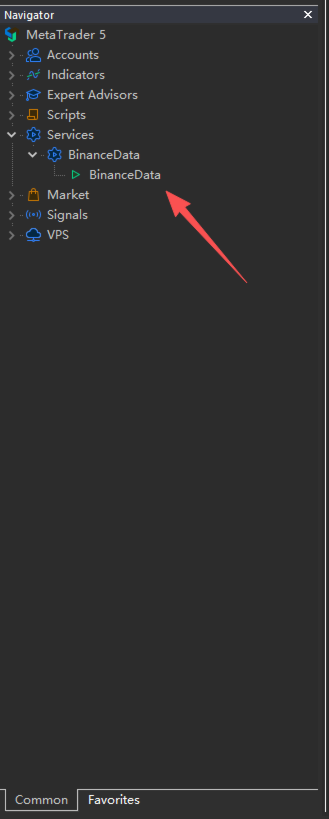
Please first drag and drop the downloaded file to the corresponding service folder (` MQL5 \ Services `) in the MT5 data directory, and confirm that the file has been successfully placed. Subsequently, double-click to run the startup service, and the system will automatically load the relevant components and initialize the service environment.
The specific operation location is shown in the screenshot: After completing the startup process as shown in the screenshot, the main interface of Dom BookHeatMAP Lightning Trading Panel will display normally. At this time, you can enable all its functions and experience efficient and smooth DOM lightning trading services, including core features such as real-time depth map heat map monitoring and fast order execution.
Please note that to ensure the stable operation of the trading system, it is necessary to ensure that the trading pairs set in the service program, the trading pairs selected on the MT5 platform, and the trading pairs selected in the Dom BookHeatMAP Lightning Trading Panel parameter configuration are completely consistent. If there is inconsistency, it may lead to errors in market data push, abnormal order execution, or asset calculation deviation. Please make sure to verify before each launch.