MyTradingHistory

사용하기 쉬운 라이브러리로, 개발자들이 MQL5 EA를 위한 주요 거래 통계에 간단하게 접근할 수 있습니다.

라이브러리에서 사용할 수 있는 메서드:

계좌 데이터 & 이익:

  • GetAccountBalance() : 현재 계좌 잔액을 반환합니다.
  • GetProfit() : 모든 거래의 순이익을 반환합니다.
  • GetDeposit() : 총 입금액을 반환합니다.
  • GetWithdrawal() : 총 출금액을 반환합니다.

거래 분석:

  • GetProfitTrades() : 수익성 있는 거래의 개수를 반환합니다.
  • GetLossTrades() : 손실 거래의 개수를 반환합니다.
  • GetTotalTrades() : 실행된 총 거래 수를 반환합니다.
  • GetShortTrades() : 숏 거래의 개수를 반환합니다.
  • GetLongTrades() : 롱 거래의 개수를 반환합니다.
  • GetWinLossRatio() : 승리 거래와 패배 거래의 비율을 반환합니다.
  • GetAverageProfitTrade() : 수익성 있는 거래의 평균 이익을 반환합니다.
  • GetAverageLossTrade() : 손실 거래의 평균 손실을 반환합니다.
  • GetROI() : 투자 수익률을 계산합니다.
  • GetLargestProfitTrade() : 단일 거래에서 얻은 최대 이익을 반환합니다.
  • GetLargestLossTrade() : 단일 거래에서 발생한 최대 손실을 반환합니다.
  • GetShortTradesWon() : 성공적인 숏 거래의 비율을 반환합니다.
  • GetLongTradesWon() : 성공적인 롱 거래의 비율을 반환합니다.

거래 이익 배열:

  • GetTradeProfitArray(double &outputArray[]) : 각 개별 거래의 이익 배열을 반환하여 세부적인 거래 결과 분석을 가능하게 합니다.


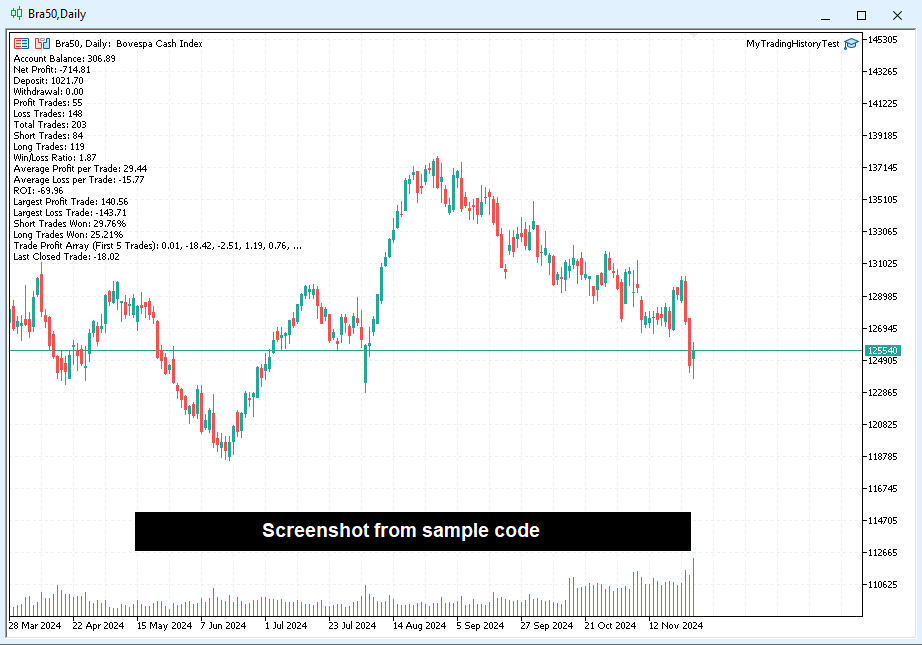
샘플 코드는 아래에 있습니다:

// Import the external MyTradingHistory.ex5 module
#import "MyTradingHistory.ex5"
   void UpdateValues(void);                         // Updates the trading data from the MyTradingHistory library. EXECUTE THIS EVERY TIME YOU WANT TO UPDATE THE VALUES, e.g. after closing a trade or before retreiving the value for the first time.
   void GetTradeProfitArray(double &outputArray[]); // Retrieves an array of profits from closed trades
   double GetAccountBalance(void);                 // Returns the current account balance
   double GetProfit(void);                         // Returns the net profit
   double GetDeposit(void);                        // Returns the total deposit amount
   double GetWithdrawal(void);                     // Returns the total withdrawal amount
   int GetProfitTrades(void);                      // Returns the number of profitable trades
   int GetLossTrades(void);                        // Returns the number of loss trades
   int GetTotalTrades(void);                       // Returns the total number of trades
   int GetShortTrades(void);                       // Returns the number of short trades
   int GetLongTrades(void);                        // Returns the number of long trades
   double GetWinLossRatio(void);                   // Returns the win-to-loss ratio
   double GetAverageProfitTrade(void);             // Returns the average profit per trade
   double GetAverageLossTrade(void);               // Returns the average loss per trade
   double GetROI(void);                            // Returns the return on investment (ROI)
   double GetLargestProfitTrade(void);             // Returns the largest profit from a single trade
   double GetLargestLossTrade(void);               // Returns the largest loss from a single trade
   double GetShortTradesWon(void);                 // Returns the percentage of short trades won
   double GetLongTradesWon(void);                  // Returns the percentage of long trades won
#import

// OnInit is executed when the script starts
int OnInit()
{
   // Update internal data from the imported module
   UpdateValues();

   // Prepare a string to display account and trade summary
   string output = "Account Balance: " + DoubleToString(GetAccountBalance(), 2) + "\n" +
                   "Net Profit: " + DoubleToString(GetProfit(), 2) + "\n" +
                   "Deposit: " + DoubleToString(GetDeposit(), 2) + "\n" +
                   "Withdrawal: " + DoubleToString(GetWithdrawal(), 2) + "\n" +
                   "Profit Trades: " + IntegerToString(GetProfitTrades()) + "\n" +
                   "Loss Trades: " + IntegerToString(GetLossTrades()) + "\n" +
                   "Total Trades: " + IntegerToString(GetTotalTrades()) + "\n" +
                   "Short Trades: " + IntegerToString(GetShortTrades()) + "\n" +
                   "Long Trades: " + IntegerToString(GetLongTrades()) + "\n" +
                   "Win/Loss Ratio: " + DoubleToString(GetWinLossRatio(), 2) + "\n" +
                   "Average Profit per Trade: " + DoubleToString(GetAverageProfitTrade(), 2) + "\n" +
                   "Average Loss per Trade: " + DoubleToString(GetAverageLossTrade(), 2) + "\n" +
                   "ROI: " + DoubleToString(GetROI(), 2) + "\n" +
                   "Largest Profit Trade: " + DoubleToString(GetLargestProfitTrade(), 2) + "\n" +
                   "Largest Loss Trade: " + DoubleToString(GetLargestLossTrade(), 2) + "\n" +
                   "Short Trades Won: " + DoubleToString(GetShortTradesWon(), 2) + "%\n" +
                   "Long Trades Won: " + DoubleToString(GetLongTradesWon(), 2) + "%\n";

   // Add trade profit array data to the output
   output += "Trade Profit Array (First 5 Trades): ";
   double tradeProfitArray[]; // Declare an array to store trade profit data
   GetTradeProfitArray(tradeProfitArray); // Fetch trade profit data

   // Loop through the first 5 trades and append their profit values to the output
   for (int i = 0; i < MathMin(5, ArraySize(tradeProfitArray)); i++)
   {
      output += DoubleToString(tradeProfitArray[i], 2) + ", ";
   }

   // Append the last trade's profit value
   output += "...\nLast Closed Trade: ";
   int size = ArraySize(tradeProfitArray); // Get the size of the trade profit array
   if (size > 0)
      output += DoubleToString(tradeProfitArray[size - 1], 2); // Append the last trade's profit
   else
      output += "No trades available."; // Handle the case where no trades exist

   // Display the summary as a comment on the chart
   Comment(output);

   // Signal successful initialization
   return(INIT_SUCCEEDED);
}


피드백은 언제든지 환영합니다. 구매 전후로 생각이나 질문을 공유해 주세요.

https://www.mql5.com/en/users/maxsonm

추천 제품
Here   is   the   English translation   of   your   description   for   the EA   (Expert   Advisor): --- This   is a   time -based   automatic trading   EA . It allows   you   to   set the   exact   time   for trading , down   to   the   second , and   specify the   maximum number   of   orders . You   can choose   to   place   either   buy   or   sell   orders . It   is possible to   set take   profit and   stop   loss   points . Additionally , you can   specify   how   long after   placing  

Molo kumalo
James Ngunyi Githemo
Trading Forex with our platform offers several key advantages and features: Real-time Data : Stay updated with live market data to make informed decisions. User-Friendly Interface : Easy-to-navigate design for both beginners and experienced traders. Advanced Charting Tools : Visualize trends with interactive charts and technical indicators. Risk Management : Set stop-loss and take-profit levels to manage your risk. Multiple Currency Pairs : Access a wide range of forex pairs to diversify your tr
Ajuste BRA50
Claudio Rodrigues Alexandre
4.4 (5)
Este script marca no gráfico do ativo BRA50 da active trades o ponto de ajuste do contrato futuro do Mini Índice Brasileiro (WIN), ***ATENÇÃO***  para este script funcionar é necessário autorizar a URL da BMF Bovespa no Meta Trader. passo a passo: MetaTrader 5 -> Ferramentas -> Opções -> Expert Adivisors * Marque a opção "Relacione no quadro abaixo as URL que deseja permitir a função WebRequest" e no quadro abaixo adicione a URL: https://www2.bmf.com.br/ este indicador usa a seguinte página par
FREE
Introducing "TG Risk Service Manager" — your comprehensive toolkit for swift and precise risk management and lot size calculations in the dynamic world of trading. Designed to streamline development processes and enhance trading strategies, this indispensable library equips developers with essential tools for optimizing risk assessment and trade profitability. Metatrader4 Version |  All Products  |  Contact   Key Features: Efficient Lot Size Calculation : Harness the power of precise lot size c
Important: This product is a Library for developers . It is suitable only for users who can write/modify MQL5 code and integrate a compiled library into their own EA/Script. It is not a “drag & run” notifier. Telegram SDK helps you send Telegram messages and photos from MetaTrader 5 in a simple and reliable way. Use it when you want Telegram notifications inside your own automation tools. If you need the MetaTrader 4 version, it is available separately in the Market:   Telegram SDK M T4 . Main f
Binance Library
Hadil Mutaqin SE
5 (1)
The library is used to develop automatic trading on Binance Spot Market from MT5 platform. Support all order types: Limit, Market, StopLimit and StopMarket Support Testnet mode Automatically display the chart on the screen Usage: 1. Open MQL5 demo account 2. Download Header   file and EA sample   https://drive.google.com/uc?export=download&id=1kjUX7Hyy02EiwTLgVi8qdaCNvNzazjln Copy Binance.mqh to folder \MQL5\Include Copy  BinanceEA-Sample.mq5 to folder \MQL5\Experts 3. Allow WebRequest from MT5
This lightweight utility library provides essential functions for MQL5 developers to streamline and simplify expert advisor (EA) and indicator development. Whether you’re building trading algorithms or managing chart resources dynamically, this library offers clean and reusable building blocks to enhance your code quality and reduce repetition. Key Features Price Access Functions ASK(string symbol) – Get the current Ask price. BID(string symbol) – Get the current Bid price. Account Information
FREE
TeleSignal
Vincent Jean Robert Trolard
TeleSignal EA is an intelligent Expert Advisor designed to automatically send Telegram notifications whenever a position is opened, closed, or modified in MetaTrader 5 . It allows you to monitor your trades in real time , wherever you are — no need to keep your trading platform open. Through its direct integration with the Telegram API, you’ll receive clear and instant messages showing: Trade opened (symbol, lot size, order type, entry price) Trade closed (exit price, profit/loss, trade du
LSTM Library
Thalles Nascimento De Carvalho
LSTM Library - MetaTrader 5용 고급 신경망 알고리즘 트레이딩을 위한 전문 신경망 라이브러리 LSTM Library는 MQL5 트레이딩 전략에 순환 신경망의 힘을 가져다줍니다. 이 전문적인 구현에는 일반적으로 특수 기계 학습 프레임워크에서만 볼 수 있는 고급 기능을 갖춘 LSTM, BiLSTM 및 GRU 네트워크가 포함되어 있습니다. "트레이딩을 위한 기계 학습의 성공 비결은 적절한 데이터 처리에 있습니다. 쓰레기를 넣으면 쓰레기가 나옵니다 – 예측의 품질은 절대 훈련 데이터의 품질을 넘을 수 없습니다." — 마르코스 로페즈 데 프라도 박사, Advances in Financial Machine Learning 주요 기능 LSTM, BiLSTM 및 GRU의 완전한 구현 더 나은 일반화를 위한 재귀 드롭아웃 다양한 최적화 알고리즘(Adam, AdamW, RAdam) 고급 정규화 기술 포괄적인 지표 평가 시스템 훈련 진행 시각화 클래스 가중치를 통한 불균형 데이터 지
Friends, join us! Ask questions and connect with like-minded traders: MetaCOT Public Group MetaCOT Information Channel: news, CFTC reports, and signals: MetaCOT Channel Here’s to successful trading and new profitable signals for us all! Attention! Recently, certain countries have been blocking access to the cftc.gov website. As a result, users in these countries are giving the product low ratings. MetaCOT has always adhered to the highest quality standards and is in no way associated with th
Cryptocurrency analysis has never been easier with Crypto Charts for MetaTrader 5. Now, trading on BitMEX has never been easier with BitMEX Trading API for MetaTrader 5. BitMEX Trading API library was built to be as easy to use as possible. Just include the library into your Expert Advisor or Script, call the corresponding methods and start trading! Features Trade on BitMEX and BitMEX Testnet. Build and automate your strategies. Concern more with the trading strategy logic and less with the co
TradeGate
Alex Amuyunzu Raymond
TradeGate – Product Description / Brand Story “The gatekeeper for your trading success.” Overview: TradeGate is a professional MT5 validation and environment guard library designed for serious traders and EA developers who demand safety, reliability, and market-ready performance . In today’s fast-moving markets, even a small misconfiguration can cause EAs to fail initialization, skip trades, or be rejected by MQL5 Market. TradeGate acts as a smart gatekeeper , ensuring your EA only operates un
The Quantitative Qualitative Estimation (QQE) indicator is derived from Wilder’s famous Relative Strength Index (RSI). In essence, the QQE is a heavily smoothed RSI. Modification of this version: ( converted from tradingview script by Mihkell00, original from Glaz, 100% identical output) So there are Two QQEs. One that is shown on the chart as columns, and the other "hidden" in the background which also has a 50 MA   bollinger band   acting as a zero line. When both of them agree - you get a b
First contact Telegram - @BerlinOG for more files and installation The   Telegram Signal EA   is a powerful tool designed to bridge your Telegram communications with your MetaTrader 5 (MT5) charts. It enables you to display messages from your Telegram channels, groups, and private chats directly on your MT5 charts as comments. This integration simplifies the process of monitoring trading signals and important messages while you're actively trading. Features Real-time Message Display : View mes
The library is dedicated to help manage your trades, calculate lot, trailing, partial close and other functions. Lot Calculation Mode 0: Fixed Lot. Mode 1: Martingale Lot (1,3,5,8,13) you can use it in different way calculate when loss=1 ,when profit=0. Mode 2: Multiplier Lot (1,2,4,8,16) you can use it in different way calculate when loss=1 ,when profit=0. Mode 3: Plus Lot (1,2,3,4,5) you can use it in different way calculate when loss=1 ,when profit=0. Mode 4: SL/Risk Lot calculate based on s
Automatic Replenishment Trading Within a Defined Range The EA operates   only within the predefined price range . When an order is   closed, filled, or cancelled   (reducing the total number of orders), the EA will   automatically place new orders   to maintain the continuous operation of the trading strategy. This EA is   designed for ranging / sideways market conditions . You can control the total number of orders using   Max Orders . Example: Max Orders:   8 Active trades:   2 Pending Sell L
Market book tester
Aliaksandr Hryshyn
1 (1)
Using data from the order book in the strategy tester Key features: Simultaneous use of several symbols, up to 7 pieces DOM visualization With the visualization of order books, real-time simulation is available, as well as acceleration or deceleration Working with the library: This product also requires a utility to save data:  https://www.mql5.com/en/market/product/71642 Speed control utility:  https://www.mql5.com/en/market/product/81409 Include file:   https://c.mql5.com/31/735/Market_book_s
FREE
EA(Expert Advisor)은 뉴욕 세션 동안 시장이 움직이기 시작할 때(거래량 증가) 포지션을 엽니다. 이를 통해 모멘텀은 거래량에 의해 유지되며, 높은 확률로 즉시 테이크 프로핏(Take Profit)에 도달할 수 있습니다. 신호  https://www.mql5.com/en/blogs/post/764450 뉴욕 세션 모멘텀 기반 진입 EA는 낮은 타임프레임에서 FVG(Fair Value Gap)를 통해 숨겨진 충격을 감지합니다. 뉴욕 세션 직전 또는 세션 도중에 충격이 감지되면 EA는 포지션을 엽니다. 시장 동향에 따른 포지션 관리 모멘텀이 즉시 사라질 경우, EA는 다음 세 가지 전략 중 하나를 적용합니다: 특정 가격 수준에서 스톱로스를 실행하고 거래를 중단합니다. 스톱로스를 실행한 후 반대 방향으로 새로운 포지션을 엽니다. 초기 포지션을 추가하거나 제거하며 수익이 발생할 때까지 관리합니다. 사용 방법 구매 후, 자세한 설정 지침을 받으려면 저에게 연락하세요. EA 작동
Teclado trader, é uma BIBLIOTECA que você pode chamar no OnChartEvent para abrir posição de compra/venda/zerar, os botões padrões são: V = venda C = compra Z = zerar posições a mercado S = zerar posições opostas e depois a mercado X = zerar posições opostas Além da função de teclado, é possível mostrar os estados do ExpertAdvisor usando o MagicId, com informação de: lucro mensal, semanal, diario, e posição aberta, para isto use o OnTick, ou qualquer outro evento (OnTimer / OnTrade / OnBookEven
Automatic Replenishment Trading Within a Defined Range The EA operates only within the predefined price range . When an order is closed, filled, or cancelled (reducing the total number of orders), the EA will automatically place new orders to maintain the continuous operation of the trading strategy. This EA is designed for ranging / sideways market conditions . You can control the total number of orders using Max Orders . Example: Max Orders: 8 Active trades: 2 Pending Buy Limit orders: 6 In t
Goliath Mt5
Nicolokondwani Biscaldi
Goliath MT5 - scalper fully automated Expert Advisor for medium-volatile forex markets P roperties: The Library trades 10 currency pairs (USDCHF, EURCHF, EURGBP, AUDUSD, USDCAD, GBPUSD, EURUSD, NZDUSD, CADCHF, EURAUD, EURCAD, AUDJPY) The Library does not use martingale The Library sets a fixed stop loss and take profit for all orders The Library only trades a user input volume The Library can be installed on any currency pair and any timeframe Recommendations: Before using on a real account, t
License Panel Integration Guide This EA uses a license panel system to verify usage before running trading logic. File Placement Place LICENSE_SINGLE.mqh in the same folder as your EA .mq5 file. If using a subfolder, update the #include path in the EA file. Integration Steps Include the License File #include "LICENSE_SINGLE.mqh" Initialization (OnInit) Call the license check when the EA starts: VerifyLicense(); Deinitialization (OnDeinit) Clean up license resources when EA is removed: HandleLi
Shawrie
Kevin Kipkoech
This Pine Script implements a Gaussian Channel + Stochastic RSI Strategy for TradingView . It calculates a Gaussian Weighted Moving Average (GWMA) and its standard deviation to form an upper and lower channel. A Stochastic RSI is also computed to determine momentum. A long position is entered when the price closes above the upper Gaussian band and the Stoch RSI K-line crosses above D-line . The position is exited when the price falls back below the upper band. The script includes commission, cap
Trading Session Dashboard
Marwan Bin Mohammed Al Eid Bin Mohammed Carpenter
The Trading Sessions Dashboard is a powerful and user-friendly MT5 indicator designed to provide traders with real-time insights into the major forex trading sessions. It displays the status of each session (Active or Closed) along with the remaining time until closure or the next opening, helping you align your trading strategy with market hours. Built for clarity and professionalism, this indicator is perfect for beginners and experienced traders alike, ensuring you never miss key session tran
CloseOrdersEa
Yusuf Watinani Umar
Overview: This utility serves as a tool to provide easy navigation for closing open positions. • Close all open buy positions at market price.  • Close all open sell positions at market price.  • Close all orders at market price based on predefined conditions for efficient trading management.  • Close orders for the current chart at market price, allowing focused control over specific trading instruments.
Terminator Genisys
Itumeleng Mohlouwa Kgotso Tladi
TERMINATOR GENISYS HFT (High Frequency Trading - Ai Algorithm Robot) Extreme-design for EURUSD on the 5Min charts for max profit. (other pairs incluse GBPUSD, EURJPY and other pairs with similar time-frames ) Introducing the ' Terminator Genisys ' Expert Advisor   The   Terminator Genisys  expert advisor stands at the pinnacle of automated trading systems, designed to deliver great performance in today's dynamic financial markets. Developed by a team of experienced traders and algorithmic expe
Dhokiyas Market Screener
Dhokiyas Money Map Investment Consultants - FZCO
Dhokiya's Market Screener 사용자 가이드 원클릭 트레이딩과 종합 기술 분석을 제공하는 MetaTrader 5 다중 심볼 분석 패널 공식 업데이트 채널 채널 참여 : Dhokiyas 지원 직접 메시지 : Contact 1. 제품 기능 Dhokiya's Market Screener 는 MetaTrader 5용 다중 심볼 기술 분석 도구입니다. 여러 심볼을 동시에 스캔하여 다양한 기술적 확인 신호를 기반으로 매수 또는 매도 방향과 점수를 표시합니다. 이 제품은 하나의 패널에서 빠르게 시장을 확인하고 시간을 절약할 수 있도록 설계되었습니다. 2. 중요 안내 본 제품은 수익을 보장하지 않으며 특정 결과를 약속하지 않습니다. 거래에는 위험이 따릅니다. 적절한 자금 관리 전략을 사용하십시오. 신호는 플랫폼에서 제공되는 시장 데이터와 기술적 지표를 기반으로 계산됩니다. 성과는 브로커 조건, 스프레드, 체결 방식 및 심볼 사양에 따라 달라질 수 있습니다. 3. 설치 방
Turn your manual trades into fully automated profit machines! This powerful MT5 EA takes over the moment you open a position — no delays, no stress. It instantly places Stop Loss and Take Profit, activates customizable trailing, and locks in profits while protecting your capital Perfect for scalpers: Every trade is immediately secured, giving you the freedom to focus on sniping the best entries while the EA handles all the management work in the background. Auto SL/TP Full trailin
Tim Trend
Oleksii Ferbei
Due to the fact that at each separate period of time, trading and exchange platforms from different parts of the planet are connected to the trading process, the Forex market operates around the clock. Depending on which continent trading activity takes place during a certain period, the entire daily routine is divided into several trading sessions. There are 4 main trading sessions: Pacific. European. American Asian This indicator allows you to see the session on the price chart. You can also
이 제품의 구매자들이 또한 구매함
WalkForwardOptimizer MT5
Stanislav Korotky
3.78 (9)
WalkForwardOptimizer library allows you to perform rolling and cluster walk-forward optimization of expert advisers (EA) in MetaTrader 5. To use the library include its header file WalkForwardOptimizer.mqh into your EA source code, add call provided functions as appropriate. Once the library is embedded into EA, you may start optimization according to the procedure described in the User guide . When it's finished, intermediate results are saved into a CSV file and some special global variables.
이 라이브러리를 사용하면 EA를 사용하여 거래를 관리할 수 있으며 설명에 언급된 스크립트 코드와 전체 프로세스를 보여주는 비디오의 데모 예제를 사용하여 모든 EA에 통합하기가 매우 쉽습니다. - Place Limit, SL Limit, Take Profit Limit 주문 - 플레이스 마켓, SL-마켓, TP-마켓 주문 - 지정가 주문 수정 - 주문 취소 - 쿼리 주문 - 레버리지, 마진 변경 - 위치 정보 얻기 그리고 더... MT5에 바이낸스 차트가 없는 경우를 제외하고 암호화폐 차트 대여는 선택 사항입니다. 스크립트 데모를 보려면 여기를 클릭하세요. 트레이딩 패널과 거래하고 싶다면 이 제품에 관심이 있으실 것입니다. 이 제품은 Crypto Charting의 애드온입니다. 이 라이브러리를 사용하면 EA를 사용하여 거래를 관리할 수 있으며 설명에 언급된 스크립트 코드와 전체 프로세스를 보여주는 비디오의 데모 예제를 사용하여 모든 EA에 통합하기가 매우 쉽습니
突破交易策略:智能风控系统升级版‌ 当价格突破关键阻力位时,往往意味着趋势的质变时刻。我们的突破交易策略通过三重智能系统——‌动态阈值识别‌、‌量能验证机制‌和‌自适应止损算法‌,帮助交易者精准捕捉这些跃迁机会。 ‌核心优势‌: ‌智能预警‌:实时监测200+技术指标,自动标记潜在突破位 ‌风险对冲‌:突破失败时自动触发0.5秒内止损,保护本金安全 ‌多周期验证‌:结合日线/4小时/1小时数据过滤假信号 ‌实战案例‌: 2025年第二季度,该策略在现货黄金市场实现连续23次有效突破,平均持仓周期缩短至4.7小时,收益率达传统趋势策略的3.2倍。 ‌智能风控系统‌: ‌动态止盈‌:根据ATR指标自动调整止盈位,锁定利润的同时保留上行空间 ‌分级止损‌:首次突破失败后自动切换至1:1盈亏比保护模式,二次突破确认后恢复原策略 本EA依下图设置做黄金1小时图线,经长时期实盘验证年利润达到30多倍,修改参数可以用作比特币和纳斯达克指数都有很好的收益。
This is a simplified and effective version of the library for walk forward analysis of trading experts. It collects data about the expert's trade during the optimization process in the MetaTrader tester and stores them in intermediate files in the "MQL5\Files" directory. Then it uses these files to automatically build a cluster walk forward report and rolling walk forward reports that refine it (all of them in one HTML file). Using the WalkForwardBuilder MT5 auxiliary script allows building othe
Order Book, known also as Market Book, market depth, Level 2, - is a dynamically updated table with current volumes of orders to buy and to sell specific financial instument at price levels near Bid and Ask. MetaTrader 5 provides the means for receiving market book from your broker, but in real time only, without access to its history. The library OrderBook History Library reads market book state in the past from archive files, created by OrderBook Recorder . The library can be embedded into you
Gold plucking machine   Gold plucking machine is an Expert Advisor designed specifically for trading gold. The operation is based on opening orders using the Fast and Slow lines indicator, thus the EA works according to the "Trend Follow" strategy, which means following the trend. Use grid strategy to place orders without stop loss operation, so please make sure the account has sufficient funds. magic number      -  is a special number that the EA assigns to its orders. Lot Multiplier        - 
The library is used to develop automatic trading on Binance Futures Market from MT5 platform. Support Binance Futures USD-M and COIN-M Support Testnet mode Support all order types: Limit, Market, StopLimit, StopMarket, StopLoss and TakeProfit Automatically display the chart on the screen Usage: 1. Open MQL5 demo account 2. Download Header file and EA sample https://drive.google.com/uc?export=download&id=17fWrZFeMZoSvH9-2iv4WDJhcyxG2eW17 Copy BinanceFutures.mqh to folder \MQL5\Include Copy  Bina
MT4/5通用交易库(  一份代码通用4和5 ) #ifdef __MQL5__      #define KOD_TICKET ulong      #define KOD_MAGIC   long #else        #define KOD_TICKET long      #define KOD_MAGIC   int #endif class ODLIST; #import "K Trade Lib Pro 5.ex5"       //祝有个美好开始,运行首行加入    void StartGood() ;    //简单开单    long OrderOpen( int type, double volume, int magic, string symbol= "" , string comment= "" , double opprice= 0 , double sl= 0 , double tp= 0 , int expiration= 0 , bool slsetmode= false , bool tpsetmode= false );    //复杂开单
If you're a trader looking to use Binance.com and Binance.us exchanges directly from your MetaTrader 5 terminal, you'll want to check out Binance Library MetaTrader 5. This powerful tool allows you to trade all asset classes on both exchanges, including Spot, USD-M   and COIN-M futures, and includes all the necessary functions for trading activity. Important: you need to have source code to properly implement the library. With Binance Library MetaTrader 5, you can easily add instruments from Bi
1. What is this The MT5 system comes with very few optimization results. Sometimes we need to study more results. This library allows you to output more results during backtest optimization. It also supports printing more strategy results in a single backtest. 2. Product Features The results of the optimized output are quite numerous. CustomMax can be customized. The output is in the Common folder. It is automatically named according to the name of the EA, and the name of the same EA will be au
AO Core
Andrey Dik
3.67 (3)
AO Core is the core of the optimization algorithm, it is a library built on the author's HMA (hybrid metaheuristic algorithm) algorithm. Pay attention to the MT5 Optimization Booster product , which makes it very easy to manage the regular MT5 optimizer . An example of using AO Core is described in the article: https://www.mql5.com/ru/articles/14183 https://www.mql5.com/en/blogs/post/756510 This hybrid algorithm is based on a genetic algorithm and contains the best qualities and properties of p
EA Toolkit
Esteban Thevenon
EA Toolkit   is a library that allows any developer to quickly and easily program Advisor experts. It includes many functions and enumerations such as trailing stop, lot, stop loss management, market trading authorisations, price table updates, trading conditions and many more. Installation + Documentation : You will find all the information to install this library and the documentation of its functions on this GitHub : https://github.com/Venon282/Expert-Advisor-Toolkit WARNING : The installat
Hello everyone! I am a professional MQL programmer , Making EAs, Indicators and Trading Tools for my clients all over the world. I build 3-7 programs every week but I seldomly sell any ready-made Robots. Because I am fastidious and good strategy is so few...  this EA is the only one so far I think its good enough to be published here.  As we all know, the Ichimoku indicator has become world popular for decades, but still, only few people knows the right way of using it, and if we check the clo
Applying these methods, I managed to arrive at a nuanced conclusion that is crucial to understanding the importance of unique strategies in contemporary trading. Although the neural network advisor showed impressive efficiency in the initial stages, it proved to be highly unstable in the long run. Various factors such as market fluctuations, trend changes, external events, etc. cause its operation to be chaotic and eventually lead to instability. With these experiences, I accepted the challenge
Introducing "TG Trade Service Manager" — your all-in-one solution for seamless trade management in both MQL4 and MQL5 environments. With a focus on speed, reliability, and convenience, this powerful library simplifies the complexities of trade execution and management, empowering developers with a single interface for enhanced efficiency. Metatrader4 Version   |   All Products   |   Contact   Key Features: Unified Interface : TG Trade Service Manager" provides a unified interface for   MQL4   an
The following library is proposed as a means of being able to use the OpenAI API directly on the metatrader, in the simplest way possible. For more on the library's capabilities, read the following article: https://www.mql5.com/en/blogs/post/756098 The files needed to use the library can be found here: Manual IMPORTANT: To use the EA you must add the following URL to allow you to access the OpenAI API as shown in the attached images In order to use the library, you must include the following Hea
Kaseki
Ben Mati Mulatya
The Hybrid Metaheuristic Algorithm (HMA) is a cutting-edge optimization approach that combines the strengths of genetic algorithms with the best features of population-based algorithms. Its high-speed computation ensures unparalleled accuracy and efficient search capabilities, significantly reducing the total time required for optimization while identifying optimal solutions in fewer iterations. HMA outperforms all known population optimization algorithms in both speed and accuracy. Use Cases AO
* * * * * * * 주로 XAUUSD를 거래하고 테스트할 때 XAUUSD로 조정하는 것을 권장하며 다른 거래 대상은 수익 효과를 보장할 수 없습니다 * * * * * * * * * * * * 테스트가 필요한 경우 메모 (본 후 가장 먼저 회신) 를 남겨 주십시오. 작업 성과를 보호하기 위해 특정한 매개 변수를 입력해야 합니다. 시스템의 기본 매개 변수는 캡처하여 철회하는 효과를 실현할 수 없습니다! 테스트가 필요한 경우 메모 (본 후 가장 먼저 회신) 를 남겨 주십시오. 작업 성과를 보호하기 위해 특정한 매개 변수를 입력해야 합니다. 시스템의 기본 매개 변수는 캡처하여 철회하는 효과를 실현할 수 없습니다! 테스트가 필요한 경우 메모 (본 후 가장 먼저 회신) 를 남겨 주십시오. 작업 성과를 보호하기 위해 특정한 매개 변수를 입력해야 합니다. 시스템의 기본 매개 변수는 캡처하여 철회하는 효과를 실현할 수 없습니다! *******************************
이 제품은 지난 3년 동안 개발되었습니다. 이는 MQL5 프로그래밍 언어에서 모든 유형의 인공지능 및 머신러닝 코드를 다룰 수 있는 가장 진보된 코드베이스입니다. MetaTrader 5에서 많은 AI 기반의 트레이딩 로봇과 인디케이터를 만드는 데 사용되었습니다. 이 제품은 MQL5용 머신러닝에 대한 무료 오픈 소스 프로젝트의 프리미엄 버전입니다. 프로젝트 링크:  https://github.com/MegaJoctan/MALE5 . 무료 버전은 기능이 제한적이며, 문서화가 부족하고 유지보수가 원활하지 않습니다. 소규모 AI 모델을 위한 제품입니다. 이 프리미엄 제품은 AI 기반 트레이딩 로봇을 효과적으로 개발하는 데 필요한 모든 기능을 제공합니다. 이 라이브러리를 구매해야 하는 이유? 사용이 매우 간편하며, 코드 문법이 Python의 인기 있는 AI 라이브러리인 Scikit-learn, TensorFlow, Keras와 유사합니다. 잘 문서화됨 – 시작을 돕기 위한 다양한 동영상, 예
Pionex API EA 커넥터 for MT5 – 완벽한 MT5 연동 개요 Pionex API EA 커넥터 for MT5 는 MetaTrader 5 (MT5) 와 Pionex API 를 원활하게 통합하는 도구입니다. 이를 통해 트레이더는 MT5 에서 직접 거래를 실행하고, 계좌 잔액을 확인하며, 주문 내역을 조회할 수 있습니다. 주요 기능 계정 및 잔액 관리 Get_Balance(); – Pionex 의 현재 계정 잔액을 조회합니다. 주문 실행 및 관리 orderLimit(string symbol, string side, double size, double price); – 특정 가격으로 지정가 주문 실행. orderMarket(string symbol, string side, double size, double amount); – 특정 금액으로 시장가 주문 실행. Cancel_Order(string symbol, string orderId); – 특정 주문을 ID 로 취
Bookeepr
Marvellous Peace Kiragu
Bookeepr is an advanced MQL5 trading bookkeeping software that automates trade logging, tracks real-time P&L, and integrates a ledger-style financial system for deposits, withdrawals, and expenses. It supports multi-currency assets , generates detailed performance reports , and provides risk management tools to help traders optimize their strategies. With secure cloud storage, exportable reports, and seamless MetaTrader 5 integration , Bookeepr ensures accurate, transparent, and hassle-free fina
A free indicator for those who purchase the full version This indicator is created by this Ai, with your desired settings Artificial Intelligence at your service Have a complete artificial intelligence and use it in your codes This artificial intelligence is trained to tell you on each candle whether the market is moving up or down. In general, artificial intelligence can be used in all markets, all timeframes and all symbols However, due to the increasing complexity and decreasing accuracy of
快速关仓,无需任何操作。 当前版本的一键关仓主要针对的是来不及手动关仓的情况,目前是不分交易标的类别,是对所有的持仓进行关仓。 未来可能升级的方向: 1、分类别、分标的关仓。 适用场景:开了多个标的的仓位,并且波动不一,快速频繁的波动影响了整体的判断。 2、增加只关闭盈利仓位、只关闭亏损仓位。 适用场景:持仓较多,趋势发生变化。 个人建议:一般建议选择一键全部关仓,因为如果行情与持仓方向一致,只关闭盈利仓位无形就是扩大了亏损。如果行情方向与持仓方向相反,只关闭亏损仓位,当前已盈利的后面又会变为亏损,盈利无法变现。 3、按照仓位顺序由大到小关仓、按照仓位顺序由小到大关仓。 适用 场景:行情发生波动,对于未来行情判断把握不确定的,可根据自己需求选择仓位关仓顺序,由大到小关仓的话,可以避免亏损的进一步扩大。 4、减小仓位量,保持绝对的安全距离。 适用 场景:对未来趋势相对确定,不想错过当前行情,但是认为当前持仓体量又有点大,想降低仓位。
BlitzGeist Telegram Notifier – Stay Connected to Your Trades Anywhere! BlitzGeist Telegram Notifier is a powerful tool that instantly connects your MetaTrader 5 account with Telegram . No matter where you are – you will always receive real-time notifications about your trading activity directly on your phone, PC, or any device with Telegram installed. Perfect for traders who want professional trade reporting, transparency, and risk management monitoring . ️ Key Features Easy Configuratio
Close All Trades - MT5 UI Tool Features - Trading Executions Simplified! One-Click Buy/Sell Buttons : Instantly place buy or sell orders for trades with a single click, streamlining order execution from the desktop. Customizable Lot Size & Parameters : Enter desired lot size, stop-loss (in decimal places e.g. 7 SL Units for 0.7 below or above for buy or sell), take-profit ( in decimal places ), and the number of trades before submitting (1,2,3,4,5 etc.), allowing precise control over each trade
[Gold Intelligent Trading EA | Risk Control is Steady, Profit Breakthrough] The intelligent trading EA, which is customized for the fluctuation characteristics of gold, takes the hard-core trading system as the core, and each order is derived from the accurate judgment of market trends and supporting pressures by quantitative models, so as to eliminate subjective interference and make trading decisions more objective and efficient. Equipped with multi-dimensional risk control system, dynamic s
Questo Expert Advisor (EA) è stato progettato per offrire un'esperienza di trading automatizzata di alto livello, adatta sia ai trader principianti che a quelli esperti. Utilizzando algoritmi avanzati e tecniche di analisi del mercato, l'EA è in grado di identificare opportunità di trading redditizie con precisione e velocità. L'EA è configurabile per operare su vari strumenti finanziari, tra cui forex, indici e materie prime, garantendo una flessibilità senza pari. Le caratteristiche princip
Sniper Utility Rimani sempre aggiornato sui tuoi trade, ovunque tu sia. Sniper Utility invia notifiche immediate ogni volta che uno dei tuoi ordini raggiunge il Take Profit o lo Stop Loss . Perfetta per trader attivi che desiderano monitorare le proprie operazioni senza dover controllare costantemente il terminale. ️ Funzionalità principali Notifica istantanea alla chiusura dell’ordine (TP o SL) Compatibile con notifiche push su dispositivi mobili Supporto per ordini manuali, EA e p
이 라이브러리는 사용 중인 모든 EA를 통해 거래를 관리할 수 있도록 해주며, 어떤 EA에도 매우 쉽게 통합할 수 있습니다. 설명에 언급된 스크립트 코드를 사용하여 직접 통합할 수 있으며, 전체 과정을 보여주는 데모 영상도 제공됩니다. 이 제품은 API를 통해 Bybit 거래소에서 거래 작업을 수행할 수 있도록 합니다. 차트 관련: OHLC 데이터용 암호화폐 차트 또는 주문서 깊이가 포함된 암호화폐 틱 데이터 대여는 선택 사항입니다. 지정가 및 시장가 주문 실행 지정가 주문 수정 주문 ID 기반 단일 주문 취소 또는 전체 주문 취소 주문 조회 레버리지 변경 포지션 정보 조회 Bybit 심볼 생성 사용자 지정 날짜부터 캔들스틱 히스토리 로드 그 외 다양한 기능 제공… 스크립트 문서 이 라이브러리는 사용 중인 모든 EA를 통해 거래를 관리할 수 있도록 해주며, 어떤 EA에도 매우 쉽게 통합할 수 있습니다. 설명에 언급된 스크립트 코드를 사용하여 직접 통합할 수 있으며, 전체 과정을 보
More speed, precision, and control in your operations Introducing the StreamDeck for Trading, pre-programmed with Hotkeys, a solution developed to make your order execution much faster and more efficient. With dedicated Buy and Sell buttons, you execute trades with just one touch, with programmable Stop Loss and Take Profit, ensuring greater control over risk management. The system also features automatic Trailing Stop, which follows market movement and intelligently protects your profits wi
제작자의 제품 더 보기
My Trading Journal
Max Timur Soenmez
5 (2)
MetaTrader에서 복잡하고 혼란스러운 보고서에 지치셨나요? 이제 거래를 추적할 수 있는 더 깔끔하고 간결한 방법을 만나보세요. 저의 새로운 유틸리티/전문가 어드바이저는 거래 성과를 간단하게 읽을 수 있는 미니멀한 뷰를 제공합니다. 이 EA는 현재 피드백을 수집하고 기능을 개선하는 동안 무료로 제공됩니다. 제안은 열려 있지만, 개발이 다른 의무와 병행해서 진행되고 있음을 양해해 주시기 바랍니다. 주요 기능: 계좌 잔액 라인 차트 간단한 라인 차트를 통해 시간 경과에 따른 계좌 잔액의 변화를 추적할 수 있습니다. 계좌의 성과를 즉시 확인하고, 거래 기록에서 트렌드를 한눈에 파악할 수 있습니다. 승패 비율 막대 그래프 매일 거래 세션 별로 수익과 손실을 시각화합니다. 녹색 막대는 수익 거래를, 빨간색 막대는 손실 거래를 나타내어 좋은 거래일과 나쁜 거래일을 빠르게 식별할 수 있습니다. 거래를 마감하면 차트가 즉시 업데이트됩니다. 상세 통계 테이블 이 EA는 거래 성과를 분
FREE
필터:
리뷰 없음
리뷰 답변