CosyTrader

주요 기능

  • 자동 포지션 사이즈 계산: 손절매 거리와 티켓 기반 위험 금액을 기준으로 자동으로 로트 사이즈를 결정합니다.
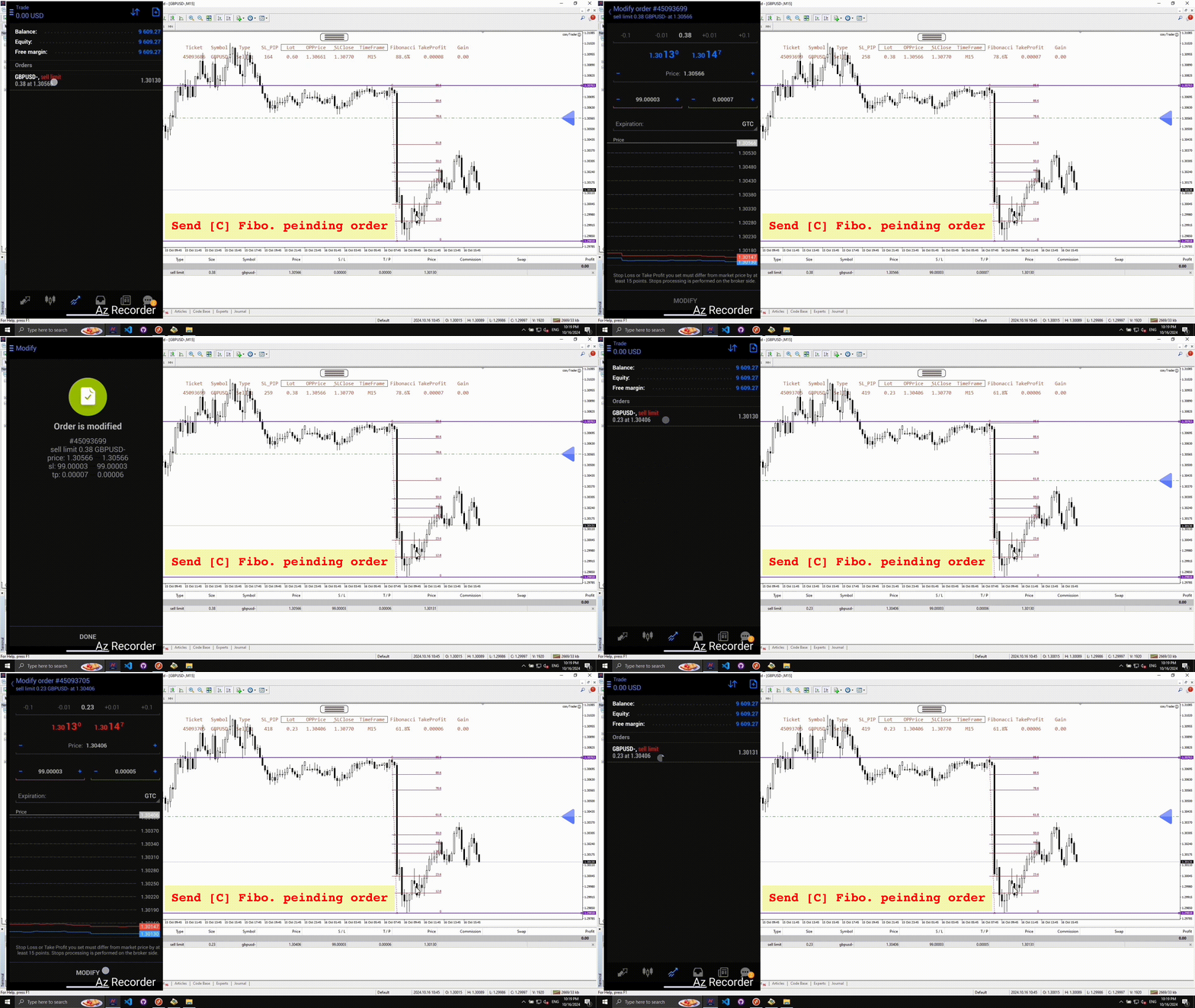
  • 자동 피보나치 되돌림 진입: 시장 움직임을 추적하고 지정된 되돌림 수준에서 풀백 시 거래에 진입합니다.
  • 다중 시간대 종가 손절매 실행: 선택한 시간대의 바 종가를 기준으로 손절매를 실행합니다.
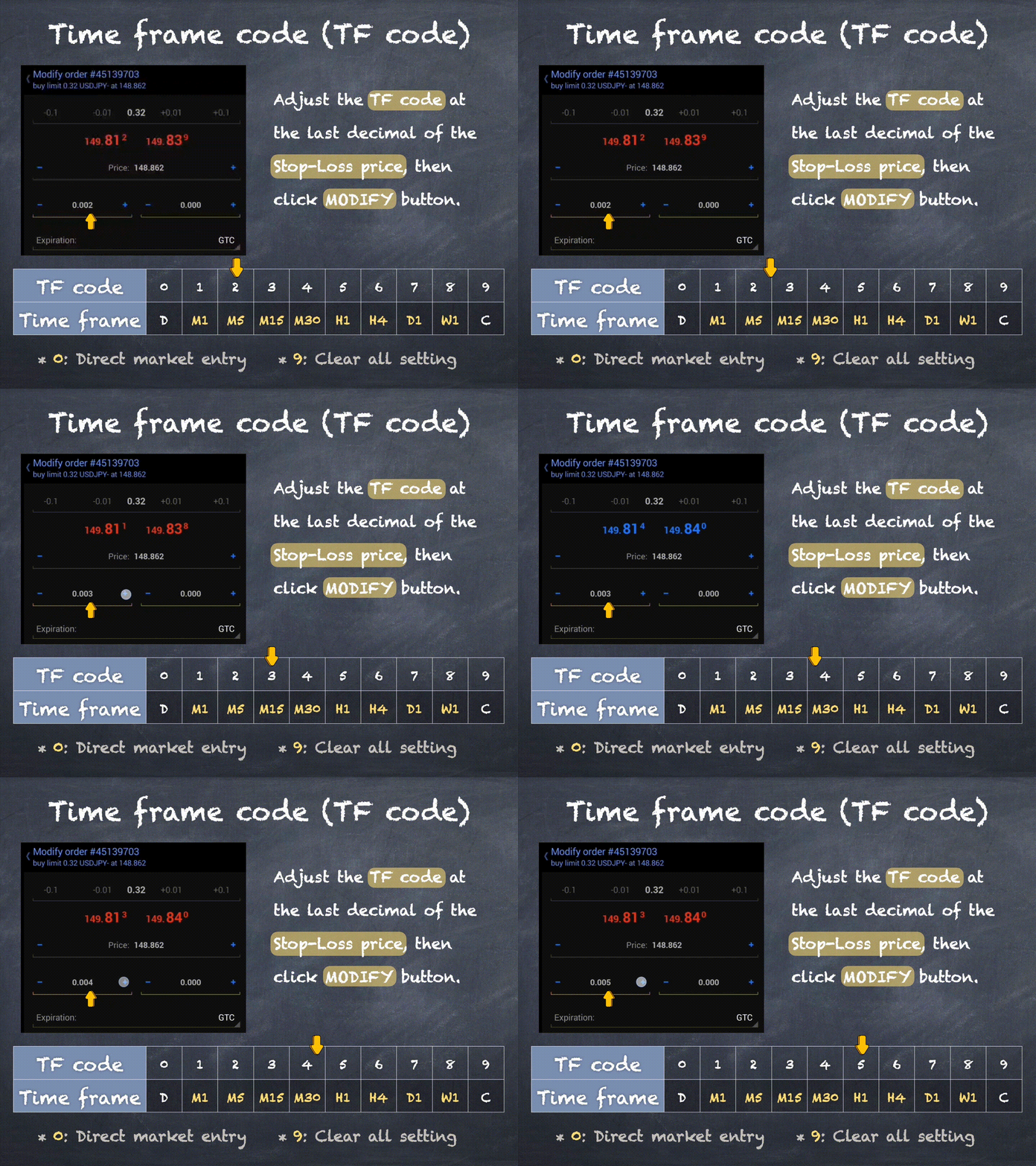
  • 시간대 코드 및 피보나치 되돌림 코드: TF 및 FB 코드를 사용하여 거래를 정밀하게 제어합니다. 이 코드는 종가 실행 및 피보나치 되돌림 수준 진입에 대해 각각 손절매 및 이익 실현 가격의 소수점 이하 마지막 자리에 해당합니다.

소개

CosyTrader EA는 모바일 트레이더를 위해 특별히 설계된 강력한 도구입니다. 로트 사이즈 계산, 피보나치 되돌림 진입 및 종가 손절매 실행을 다중 시간대에서 자동화합니다. 이러한 중요한 거래 작업을 간소화함으로써 EA는 트레이더가 화면 시간을 최소화하면서 정보에 입각한 결정을 내릴 수 있도록 지원합니다.

배경 정보

이 거래 유틸리티는 화면에서 멀리 떨어져 생활을 즐기면서 시장에서 활동적으로 참여하고자 하는 모바일 트레이더에게 이상적입니다. 업무 중 틈틈이 거래하든 전 세계를 여행하든 CosyTrader EA가 지원합니다. 모바일 전화만으로도 여유 시간에 진입 목표 전략을 설정하고 손절매 및 이익 실현 수준을 구성할 수 있습니다.

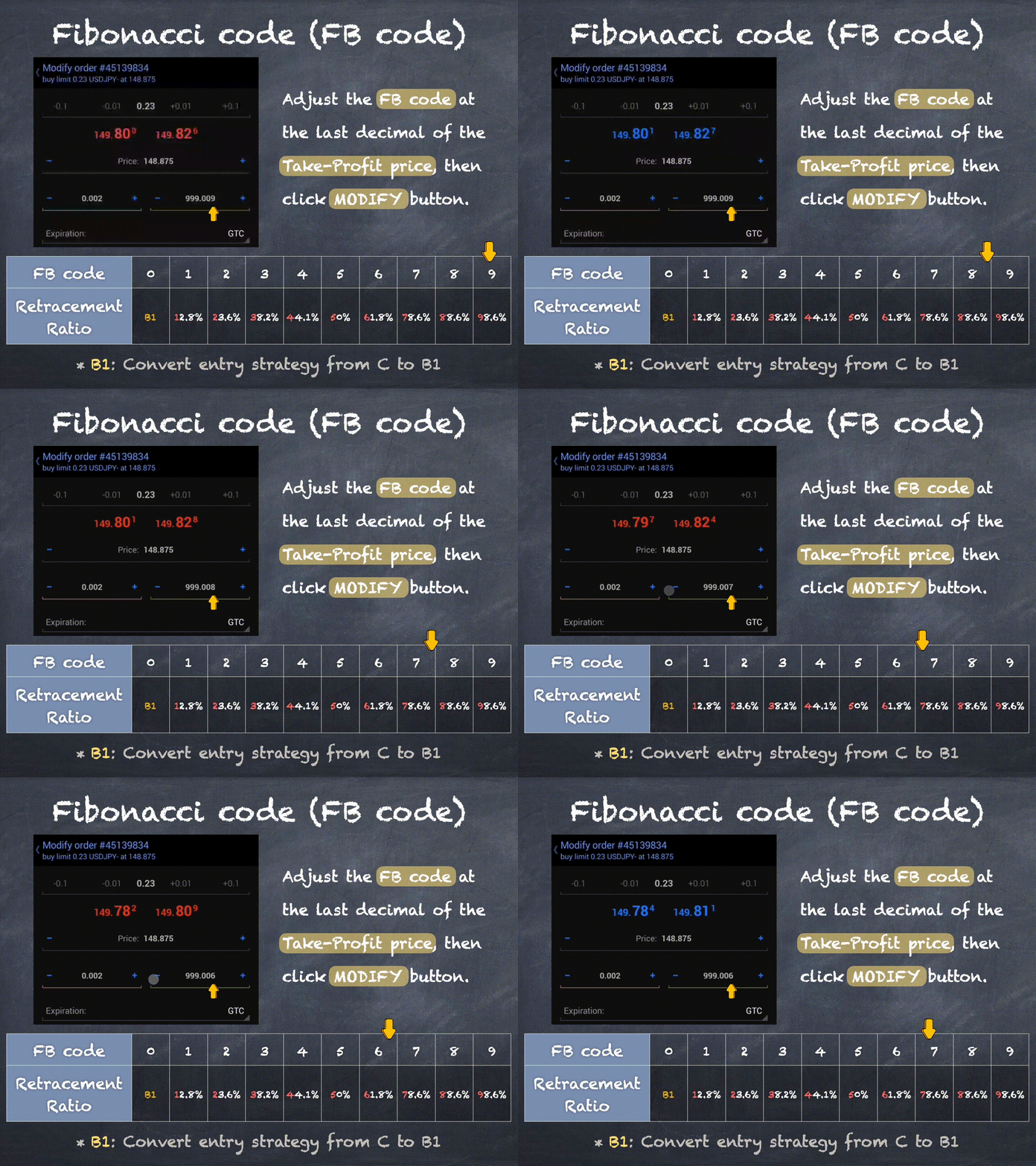
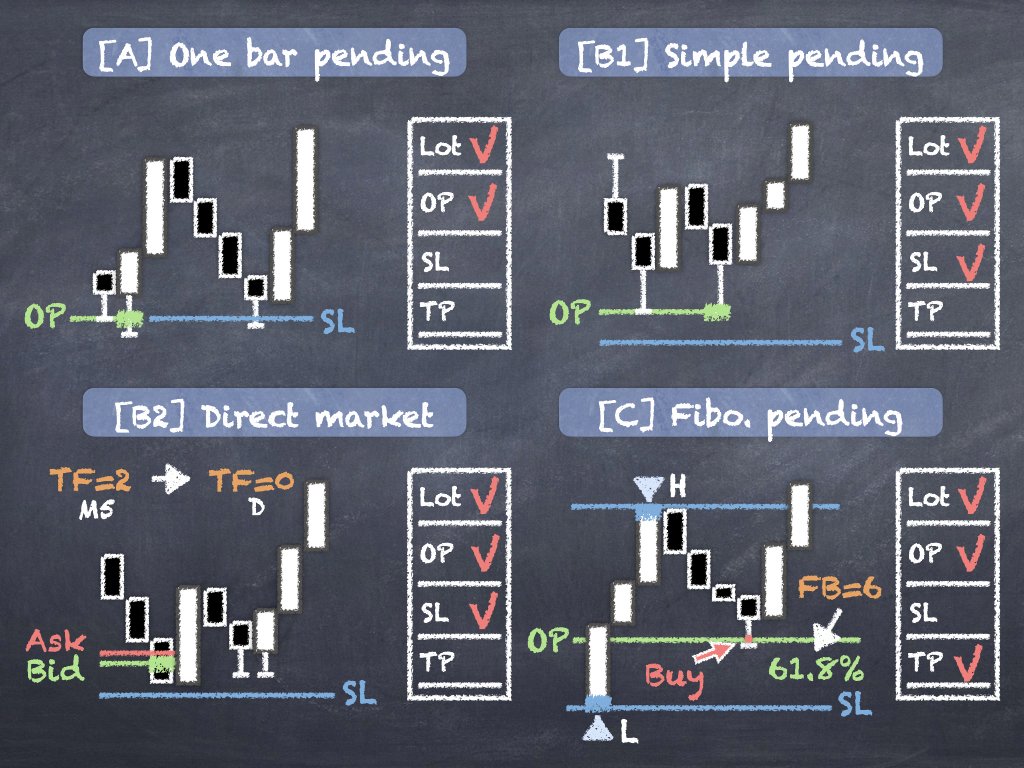
EA는 티켓 기반 위험 계산 및 손절매 실행과 같은 반복적이고 시간이 많이 소요되는 작업을 자동화하는 "대리인" 역할을 합니다. 모바일 MT4 앱은 효과적으로 원격 제어가 되어 진입 및 청산 전략을 빠르고 쉽게 설정할 수 있습니다. 편의성을 높이기 위해 피보나치 코드(FB 코드)와 시간대 코드(TF 코드)를 사용하여 거래를 최적화할 수 있습니다. 예를 들어, '6'의 FB 코드는 61.8% 피보나치 되돌림 진입 수준에 해당하고, '1'의 TF 코드는 1분 차트의 종가를 기준으로 손절매를 실행함을 나타냅니다.

EA를 실행하려면 MetaTrader가 설치된 VPS(가상 사설 서버)가 필요합니다. VPS는 개인 장치가 오프라인 상태여도 지속적인 작동을 보장하여 안정적이고 신뢰할 수 있는 거래 실행을 제공합니다. 이러한 설정을 통해 CosyTrader는 거래 여정에서 신뢰할 수 있는 파트너가 되어 귀중한 시간을 절약하고 거래와 삶 모두를 즐길 수 있도록 합니다.

CosyTrader는 귀하의 신뢰할 수 있는 거래 동반자로서, 귀하의 거래 전략에서 일관성과 효율성을 달성하는 동시에 가장 중요한 일에 시간을 할애할 수 있도록 지원합니다.

진입 도구

기능

  • 위험 금액 기반 자동 로트 사이즈 계산
  • FB 코드로 제어되는 자동 피보나치 되돌림 진입.

위험 금액 기반 자동 로트 사이즈 계산

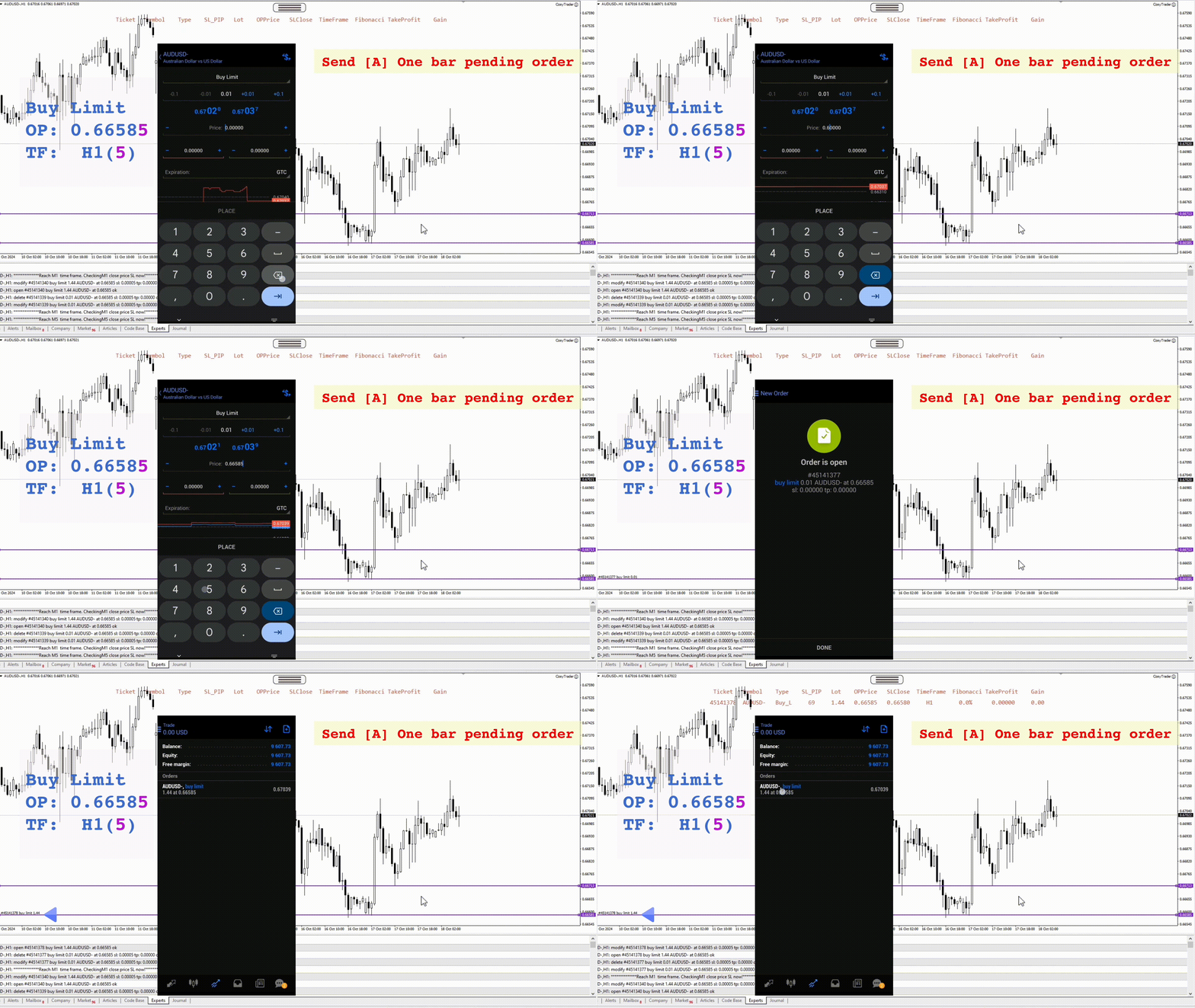
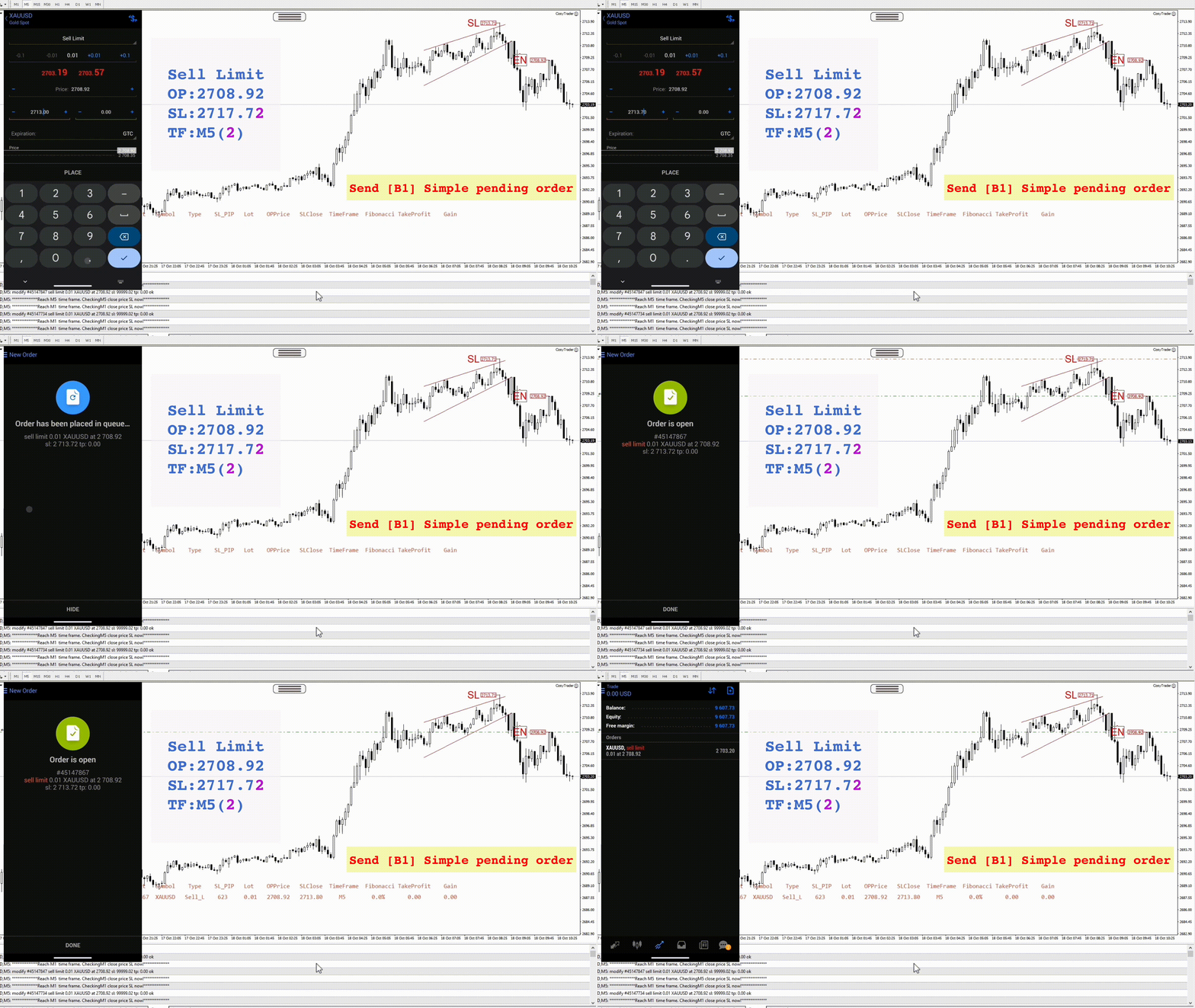
임의의 로트 사이즈와 함께 목표 진입 가격 및 손절매 수준을 지정하여 대기 주문을 보냅니다. 이 EA는 손절매 거리와 거래당 위험하려는 금액을 기반으로 로트 사이즈를 자동으로 조정합니다. 플랫폼 제약으로 인해 MT4에서 기존 주문의 로트 사이즈 변경이 허용되지 않으므로, 이 EA는 사용자가 보낸 원래 주문을 삭제합니다. 그런 다음 조정된 로트 사이즈를 사용하여 새 주문을 생성하여 새로운 티켓 번호를 생성합니다.

자동 피보나치 되돌림 진입

가격이 특정 되돌림 비율로 풀백될 때까지 기다리는 것은 시간이 많이 걸릴 수 있습니다. 이 EA를 사용하면 원하는 피보나치 되돌림 비율을 정의하고 해당 풀백 수준에서 자동으로 거래에 진입할 수 있습니다. 풀백 비율은 이익 실현 가격의 소수점 이하 마지막 자리로 표시되는 피보나치 코드(FB 코드)를 보내서 설정할 수 있습니다.

청산 도구

기능

  • TF 코드로 제어되는 종가 손절매 실행
  • 부동 소수점 과손실 방지

종가 손절매 실행

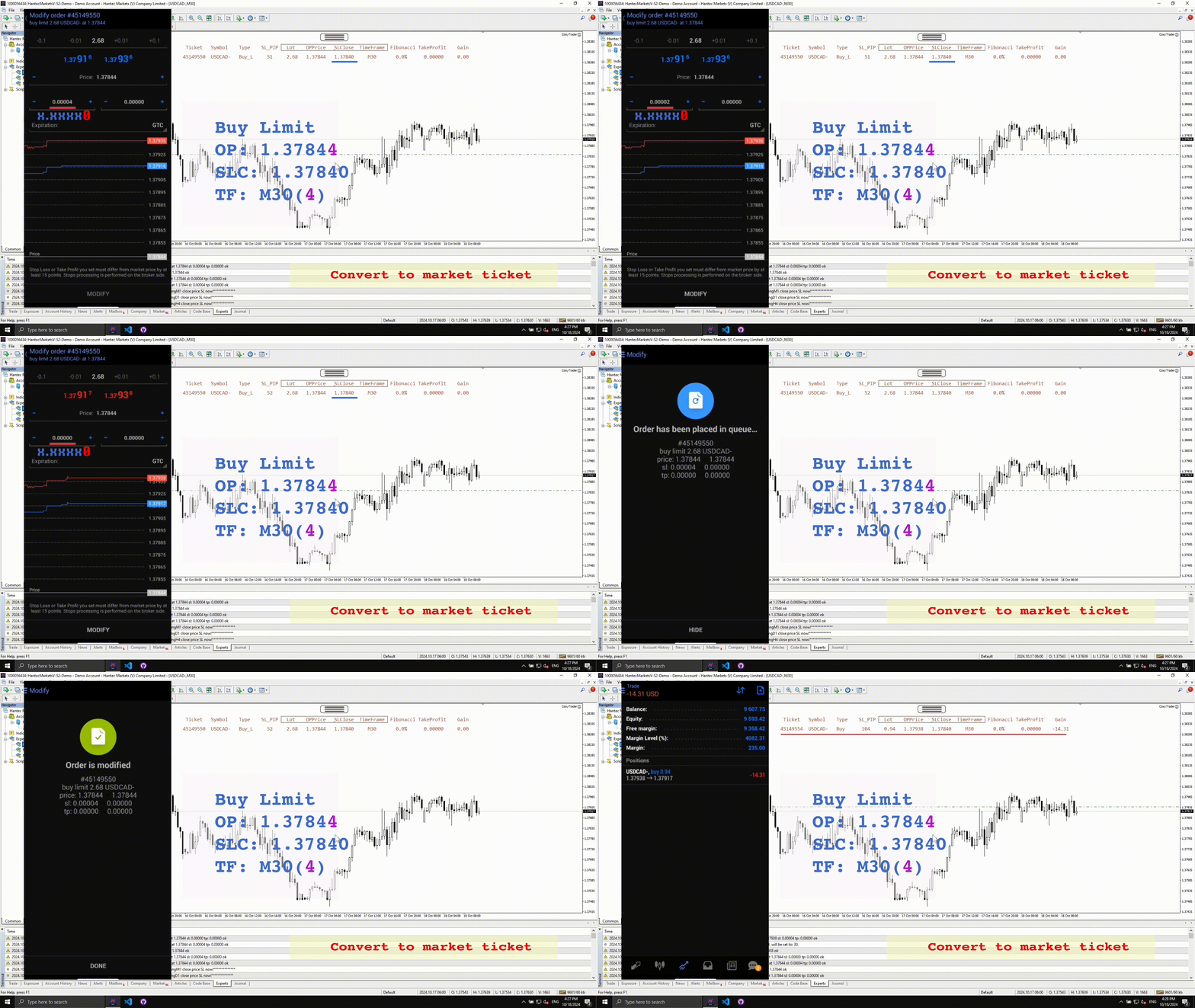
바의 종가에 손절매를 실행하면 중요한 수준에서 가격 변동의 영향을 최소화하는 데 도움이 될 수 있습니다. 시간대 코드(손절매의 소수점 이하 마지막 자리)를 설정하면 이 EA는 새로운 바가 열리고 이전 바가 설정한 시간대의 손절매 가격 이하로 종가가 마감될 때 손절매를 실행합니다.

부동 소수점 과손실 방지

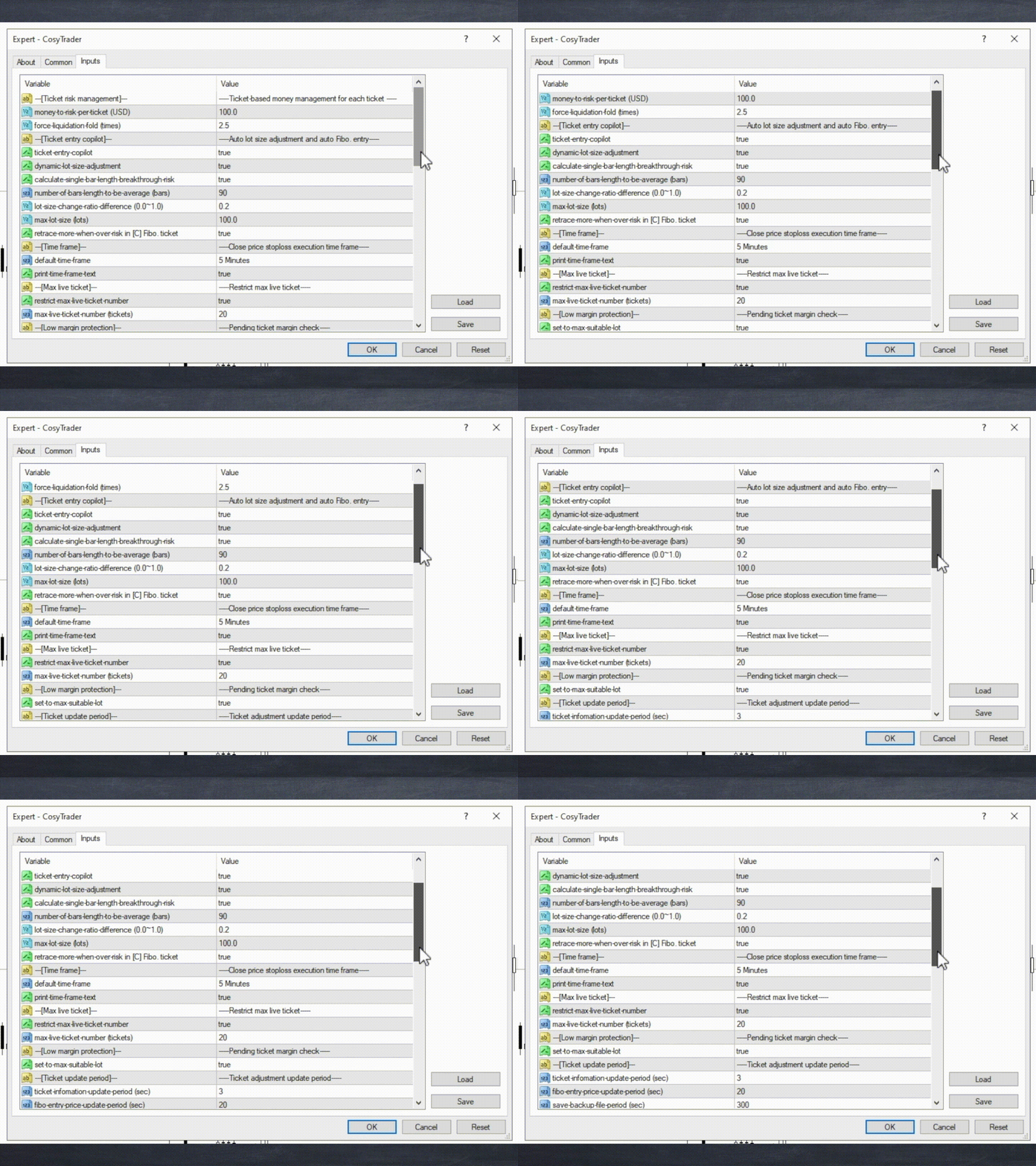
종가 손절매 실행의 단점은 반응 시간이 느리다는 것입니다. 이러한 지연은 변동성이 높은 기간 동안 거래에 더 높은 위험을 초래할 수 있습니다. 시장은 특정 시간(예: 뉴스 이벤트 중)에 빠르게 움직여 손절매가 종가에만 실행될 경우 변동성이 매우 높은 기간 동안 상당한 손실을 초래할 수 있습니다. 이 문제를 해결하기 위해 변동성이 높은 기간 동안 바가 종가가 마감되기 전에 거래가 즉시 종료되도록 하는 기능을 추가했습니다. 이 기능은 부동 손실이 특정 임계값(조정 가능한 매개변수, 기본값 = 위험 금액의 2.5배)에 도달하면 거래를 종료합니다.

추천 제품
Trade Dashboard MT4
Fatemeh Ameri
4.96 (52)
Tired of complex order placement and manual calculations? Trade Dashboard is your solution. With its user-friendly interface, placing orders becomes effortless, by a single click, you can open trades, set stop loss and take profit levels, manage trade lot size, and calculate risk to reward ratios, allowing you to only focus on your strategy. Say goodbye to manual calculations and streamline your trading experience with Trade Dashboard. Download  Demo Version  right now. You can find  Details of
High Tools MT4
Tais Miranda Hoffmann
A versatile tool for: " viewing trading records ", " trading management ", " risk management" and "calculator " For $ 30, get 3 versatile tools.   Each tool is only $ 10.  With just one purchase, use several commonly used tools for a trader. In the first section, view your trading history in detail for each trade, In the second part, perform and manage all types of transactions with accurate and convenient profit and loss limits, And in the last part, use a professional and complete calculator.
My FX Journal
Nguyen Duy Thanh
This is a script in the entire application that records your trading logs that I created myself to practice trading skills. The whole set includes: script, and web app: https://myfxjournal.cloud It is very simple with only two options: Type (select dropdown) and Ticket (input). If you choose to record open positions, please choose Type = Opening_Trade, otherwise choose Type = Closed_Trading (this is under the Account History tab) ***********This is the part used on the website**************
Pending Orders Grid Complete System opens any combination of Buy Stop, Sell Stop, Buy Limit and Sell Limit pending orders and closes all existing pending orders. You will be able to Drag-and-Drop the Script on the chart and it will pick up the start price for the first position in the grid from the "Drop" point. Usually it should be in the area of Support/Resistance lines. Input Parameters Before placing all pending orders, the input window is opened allowing you to modify all input parameters:
Top Flexible Trade Manager
Mr Edmund Harold J Forder
What Can this indicator do for YOU!:  Keeping it simple this year with a straightforward and highly flexible Trade Manager that can reduce your losses and preserve your capital and increase it overtime. Money Management is one of the key aspects of a successful traders career which is why this EA will serve you well.  So, how does this EA function? Below is a PDF attachment with a very in depth explanation into the various functions accompanied with a Demo Video to show you; All functions work
One more Copier MT4
Oleksii Chepurnyi
5 (1)
Yet another signal copier. Nothing special. Demo version can be downloaded here . Key Features The utility copies trades between terminals: by market, pending orders (optional), as well as their stop loss and take profit levels (optional as well). You can copy from one Master account to several Slave accounts, as well as from several Master accounts to one Slave account. Volume calculation At the moment, there are two options for calculating the volume: The trade volume is taken 1 to 1 from th
Easy mt4 to telegram
Medilane Bernard Philippe Couratier
Jarfac Mt4ToTelegram Introduction Jarfac Mt4ToTelegram   is an MT4 system designed to facilitate real-time communication between the MetaTrader 4 platform and Telegram.   This script allows traders to receive customizable instant notifications based on different trade types, ensuring optimal responsiveness without having to constantly monitor the trading platform. main Features Real-time notifications   : Receive notifications directly on Telegram as soon as an action occurs on MT4. Emoji suppor
PARTIAL CLOSE & VIRTUAL TRAILING Virtual trailing with partial position closing.  ( Version MT5 ) ea-PartTrailing&Close is a fully automated Expert Advisor for tracking trades. Version =Simple= provides tracking of one BUY or SELL orders (or 1 Buy+1 Sell simultaneously). The EA is almost perfect at averaging profit and loss. StopLoss without TakeProfit is recommended since the latter may limit your profit in case of sharp price spikes. The trailing is virtual since every movement of the levels r
패널은 모든 초보자가 다룰 수 있는 가장 직관적인 인터페이스를 가지고 있습니다. SLp 열에서 - SL 크기를 핍 단위로 지정해야 합니다. 값이 회색으로 바뀌고 동시에 베이/매도 버튼도 비활성화되면 브로커가 설정하기 전에 허용된 것보다 작은 SL 값을 지정한 것입니다. TP % 열에서 - 계정 잔액의 %에서 TP를 나타냅니다. 설정에서 이 지표가 계산될 항목을 기준으로 자기자본, 잔액 또는 자유 마진을 선택할 수 있습니다. R% 열에서 거래에 대한 위험 값을 설정할 수 있습니다. 단추 Ins . - 설정 값으로 즉시 주문을 열 수 있습니다. 비활성화된 경우 차트에서 직접 거래 매개변수를 사전 설정할 수 있습니다. 상단에서 왼쪽 상단의 빼기 기호를 클릭하여 차트의 패널을 최소화할 수 있습니다. 또한 패널 이름 아래에 있는 + 및 - 버튼을 조정하여 패널 자체의 크기를 늘리거나 줄일 수도 있습니다. 또한 보류 중인 주문을 열고 BU, 후행 중지, 주문 시작을 위한 다양한
ChartChanger는 터미널에 열려 있는 차트 수를 줄이는 훌륭한 유틸리티 도구입니다. 여기에는 기호, 시간 프레임 및 템플릿의 세 가지 섹션이 있습니다. 차트를 하나만 열면 여러 차트로 스크롤할 수 있습니다. 기호: 버튼을 누르면 한 기호에서 다른 기호로 변경할 수 있으며 적용된 지표는 다음 차트에 유지됩니다. 기호에는 자동 감지 모드가 있거나 원하는 기호를 수동으로 입력할 수 있습니다. 28개를 모두 사용하거나 그 이하의 숫자를 사용할 수 있습니다. 통화 쌍, 에너지, 지수, 상품 등 MetaTrader에 있는 모든 기호를 사용할 수 있습니다. 시간 프레임: 패널 중앙에 시간 프레임 변경 기능이 추가되었습니다. 버튼을 누르면 1분부터 월간 차트까지 원하는 기간으로 변경할 수 있습니다. 템플릿: 이 패널의 세 번째 기능은 템플릿 변경자입니다. 9개의 내장 템플릿이 있으며 모두 사용하거나 사용하지 않습니다. 모든 버튼은 자유 부동 패널 내부에 있습니다. 패널 상단에 커서를 놓고
Chart Button
Chantal Sala
3 (1)
Chart Button is a very useful indicator that allows you to navigate all charts with a simple click. This tool has been designed to work both vertically and horizontally. The particularity of this navigator is that you can change more charts simultaneously setting the input value. This tool will give you the ability to optimize your navigation and speed up all your analyzes. Input Values Direction (the direction of symbols buttons) Horizontal Vertical 32 SYMBOLS Forex_Suffix_Symbols (add Forex S
Elliott Wave Helper MT4
Siarhei Vashchylka
5 (5)
Elliott Wave Helper - a panel for making elliott wave and technical analysis. Includes all known wave patterns, support and resistance levels, trend lines and cluster zones. Manual (Be sure to read before purchasing) | Version for MT5 Advantages 1. Making wave analysis and technical analysis in a few clicks 2. All Elliott wave patterns available, including triangle and combinations 3. All nine wave display styles, including a special circle font 4. E lements of technical analysis : trend lines,
Chart Linking
Radu Draghiceanu
5 (1)
Are you a multipair / multitimeframe chartist ? If so, this tool is specially designed for you! Squeeze the most out of your charts! This tool allows you to quickly link your charts into groups, so that you can quickly change the symbol / timeframe of all the selected charts at once. No need for visual panels or anything to clutter your chart space anymore!  Sit back and take advantage of your keyboard when trading ! Use the Up / Down arrows to change the Symbol, and the Left / Right arrows to
================================ ENGLISH MANUAL ================================ Product Name: One-Click Close Utility v9.4 Developer: Gemini Partner Version: 9.40 Platform: MetaTrader 4 Type: Expert Advisor I. PRODUCT OVERVIEW --------------- One-Click Close is a professional order management utility designed for  MetaTrader 4 platform. It provides rapid batch closing operations through  intuitive button interface, integrated with intelligent risk management  system. Suitable for both manual
Pending Grid STOP Manual
Nantakan Leungonnam
5 (1)
Hola Traders. Lot - lot size for pending orders. Martingale - double lot size of pending orders. *(No Martingale = 1.00) TotalGridEachSide - unit each side of pending orders. SpaceOfFirstOrder - distance for the first order in points. Take Profit - profit in points. Stop Loss - loss in points. The entire positioning uses POINTS only. (10 point = 1 pip) and you can open order BUYSTOP, SELLSTOP, ALLBUYANDSELL you can Close Pending, Close orders Profit and Loss and Close All ***  ideas for using
The Definitive Performance Testing Solution for MetaTrader Environments What This Tool Does This specialized benchmark utility measures the performance of your MetaTrader environment, providing insights that impact your trading execution. Unlike generic system benchmarks, this tool evaluates performance specifically within the MetaTrader runtime environment. For Professional Traders & Developers: Performance Metrics : Measurements of calculation throughput and memory efficiency Trading-Specific
Shield ME
Mohamed Zein Mohamed Zein Soliman
The shield allows the trader to easily close all profit / loss positions instantly while being able to protect winning positions. Every trader needs it in their day trading with one click. Features : one click close all positions in profit. one click close all positions in loss one click protect all positions in profit. are you suggest more features ? please contact me!. NOTE:  demo will not work in backtest because it not support button action.  
블로그: https://www.mql5.com/en/blogs/post/761835 MT4 버전: https://www.mql5.com/en/market/product/122732 MT5 버전: https://www.mql5.com/en/market/product/122733 상관관계 마스터: 통화쌍은 두 배로, 위험은 절반으로 음의 상관관계 및 자동 헤징을 위한 스마트 EA 상관관계 마스터는 통화쌍 간의 음의 상관관계 전략을 활용하는 자동 전문가 자문(EA)입니다. 이 EA는 반대 통화쌍(예: EURUSD 매수, USDCHF 매도)에 대해 반대 포지션을 취함으로써 위험을 최소화하면서 수익을 극대화하는 것을 목표로 합니다. 유연한 위험 관리와 다중 통화쌍 설정을 갖춘 이 EA는 스마트한 자동 헤지 전략을 원하는 트레이더에게 적합합니다. 주요 기능 자동 음의 상관관계 전략 반대 방향으로 움직이는 통화쌍에 대해 매수 및 매도 포지션을 오픈합니다. 예: EURUSD(매수)
The informer provides information on the current state of open market positions. The visual presentation consists of two parts.  The left side contains the latest transactions executed on the account. Transactions are sorted by time. The right part shows the current state of the aggregate positions of the instruments. Sorting of positions is carried out in descending order of the margin load on the account. Updating and recalculating the status of positions is performed automatically and/or by
SFG Telegram Trade Notifier for MT4 is a professional notification system that sends instant messages to your Telegram group or channel every time a trade is opened or closed on your MT4 account. MAIN FEATURES Sends notifications for every trade open and close Compatible with Telegram Groups, Channels, and Topics (threads) ️ Customizable scan frequency and filters Persistent memory (no duplicate messages after restart) Ignores trade history — sends only new events ️ 100% safe: no
Send mail demo
Oleksii Pidlubnyi
This Expert Advisor sends an email notification, generates an alert or outputs a message to the journal (depending on the settings) every time a new order is opened (buy, sell, limit, stop). It also sends a similar message about closure of orders. The EA can be useful for those who want to always be informed of which orders had been opened/closed on the account. Limitations: In this demo version, notifications are available only for the GBPCHF currency pair. To use notifications on all currency
FREE
Pending Grid LIMIT Manual
Nantakan Leungonnam
5 (3)
Hola Traders. Lot - lot size for pending orders. Martingale - double lot size of pending orders. *(No Martingale = 1.00) TotalGridEachSide - unit each side of pending orders. SpaceOfFirstOrder - distance for the first order in points. Take Profit - profit in points. Stop Loss - loss in points. The entire positioning uses POINTS only. (10 point = 1 pip) and you can open order BUYLIMIT, SELLLIMIT, ALLBUYANDSELL you can Close Pending, Close orders Profit and Loss and Close All ***  ideas for usin
Watermark Symbol
Makarii Gubaydullin
차트에 워터 마크:기호+기간/또는 자신의 텍스트 내#1 유틸리티 :66+기능을 포함| 당신은 질문이있는 경우 저에게 연락 표시기의 설정에서 구성 할 수 있습니다: 글자크기; 텍스트 색상; 글꼴 이름; 위치: 1=왼쪽 상단; 2=오른쪽 상단; 3=왼쪽 하단; 4=오른쪽 하단; 5=센터; 현재 시간 프레임 표시:켜기/끄기; 제거 할 기호의 접두사는 다음과 같습니다.; 제거 할 기호의 접미사(미화 치사한 사람 프로-->미화 치사한 사람); 사용자 정의 텍스트 표시:활성화하면 아래에 지정된 자신의 텍스트가 표시됩니다: 나만의 워터마크; 내#1 유틸리티 :66+기능을 포함| 당신은 질문이있는 경우 저에게 연락 ..................................
MT4 To Notion
Levi Dane Benjamin
5 (2)
이 프로그램을 사용하면 매우 친숙한 사용자 인터페이스를 사용하여 MetaTrader 계정에서 모든 거래를 직접 Notion으로 내보낼 수 있습니다.  MT5 버전  |  사용자 가이드 + 데모 시작하려면 사용자 가이드를 사용하고 Notion 템플릿을 다운로드하십시오. 데모를 원하는 경우 사용자 가이드로 이동하십시오. 전략 테스터에서 작동하지 않습니다! 주요 기능 거래 계정의 모든 거래를 Notion으로 내보내기 최근 일부터 거래 내보내기 최근 주부터 거래 내보내기 최근 달부터 거래 내보내기 사용자 정의 시간 범위에서 거래 내보내기 모든 새로운 종료된 거래를 자동으로 Notion으로 보내기 주문 유형, 거래량, 개시 시간, 종료 시간 등을 포함하여 내보내기에 포함할 필드 선택 시작하는 방법 위의 사용자 가이드로 이동하거나 EA를 시작하고 '연결 도움말 받기'를 클릭하십시오. 연결된 후에는 '시작: 모두 내보내기'를 클릭하여 현재 트레이드를 모두 내역에서 Notion으로 보내십시오.
Description Keltner's colored multicurrency/multisymbol channel indicator, also called STARC band, drawn in a separate window below the chart of the main financial symbol. The indicator uses the calculation technique of the three drawing options:  basic, improved and modified . The first two were proposed by Keltner, the third one - by a successful trader L. Rakshe. You can also search for your own best parameters of the indicator. The upper, middle and lower bands can be colored. The indicator
GIA Calculate Order
Ruddy De Jesus Saavedra
각 작업의 위험을 쉽고 빠르게 제어하는 ​​데 도움이 됩니다. 혁신적인 인터페이스를 통해 랏 수와 위험/보상 비율을 즉시 계산할 수 있습니다. 원하는 위험 범위 내에서 작업을 유지하고 거래에서 나쁜 시간을 피하십시오. 선 기능 - 차트에 시작 선, 손절매, 이익실현을 표시합니다. 이 기능을 사용하면 다음 주문의 주요 특성과 가장 관련성이 높은 특성을 쉽게 알 수 있습니다.   위험 관리 - 위험 계산 기능은 설정된 위험과 손절매의 크기를 고려하여 다음 주문의 양을 계산합니다. - 손절매의 크기를 설정할 수 있습니다. - 이익실현을 계산하기 위해 위험/이익 관계를 설정할 수 있습니다. - 기본 금액을 기준으로 배치 크기를 계산할지 또는 배치 크기를 수동으로 입력할지 여부를 설정할 수 있습니다. - 백분율 위험을 설정할 수 있습니다. [위험 설정] 기준 금액: 계산에 대한 기준 금액 값을 설정합니다. 0이 설정되면 도구는 계정 잔액을 기본 금액으로 사용합니다. 최
다중 통화 이전 캔들 또는 이전 막대 스캐너를 사용하면 지표 설정에서 선택한 사용자 정의 기간으로 다중 기호 차트를 스캔할 수 있습니다. 제품 기준 : https://www.mql5.com/en/market/product/110229 전날 고가, 전주 고가, 전월 고저 또는 사용자 정의 기간에 대한 다중 기호를 스캔하는 데 사용할 수 있습니다. 이전 4시간 차트 고저 노이즈를 필터링하고 가격이 고점 또는 저점에 도달할 때 방향 알림을 제공합니다. 전략은 간단합니다. 전날, 주 또는 월 최고가에 도달하면 5분과 같은 더 짧은 시간 내에 가격이 거부되는 것으로 보입니다. 다양한 경고 유형을 선택하는 옵션이 있습니다. 밀리초 단위로 스캔할 빈도를 선택하고 설정할 수 있습니다. 1000은 시장 시계의 모든 기호를 매초마다 검색한다는 의미입니다. 제품 특징 1. 터미널 알림 2. 이메일 알림 3. 푸시 알림
Shortcuts MT4 Hotkeys Scalping
Pablo Filipe Soares De Almeida
다음은 요청하신 MT4 Hotkeys – 주문 및 포지션 관리 도구 의 한국어 번역 전체 버전 입니다. 원문에 있는 모든 항목(설명, 키 명령, 리스크 관리 옵션, 기능)을 빠짐없이 한국어로 옮겼습니다. MT4 Hotkeys – 주문 및 포지션 관리 도구 이 도구는 사용자가 MetaTrader 4 플랫폼에서 키보드 단축키를 사용하여 주문과 포지션을 관리할 수 있도록 설계되었습니다. 주문 실행, 포지션 종료, 트레일링 스탑 조정 및 사용자 정의 가능한 설정을 통한 리스크 관리 기능을 지원합니다. 핵심 명령어 "B" : 매수 주문을 실행합니다. "S" : 매도 주문을 실행합니다. "C" : 모든 오픈 포지션을 일괄 종료합니다. "X" : 특정 포지션을 종료합니다(설정에 따라 가장 오래된 포지션 또는 가장 최근 포지션). "T" : 트레일링 스탑을 활성화합니다(매수의 경우 이전 봉의 저점, 매도의 경우 이전 봉의 고점에 맞춰 조정). "P" : 오픈 포지션의 설정 가능한 비율을 청산합니다

Trend Trading
Igor Semyonov
4 (1)
Description Trend Trading is an innovative analyzer designed for trend following trading. The analyzer consists of a trend line, colored bars, arrow pointers and reference information. After completion of the current bar, the trend line, the color of the bar and the arrow pointers are not redrawn. Change of market sentiment can be calculated based on one of the fourteen basic indicators included in the standard package of MT4, it affects the color of the trend line. Optionally colored bars, arro
Don’t you think you can get Candlestick Patterns alerts wherever you are? This utility will send you a detailed notification on your mobile and alert on MT4 Terminal as soon as a Candlestick Pattern you want to see appears on chart. The notification contains the symbol, the Candlestick Pattern and the timeframe on which the pattern formed. You will need to link Metatrader 4 Mobile with your Windows Terminal. Here's how   here . List of Candlestick Patterns that can be detected: Three White Sold
이 제품의 구매자들이 또한 구매함
Trade Manager EA에 오신 것을 환영합니다. 이 도구는 거래를 보다 직관적이고 정확하며 효율적으로 만들기 위해 설계된 궁극적인 리스크 관리 도구 입니다. 단순한 주문 실행 도구가 아닌, 원활한 거래 계획, 포지션 관리 및 리스크 제어를 위한 종합 솔루션입니다. 초보자부터 고급 트레이더, 빠른 실행이 필요한 스캘퍼에 이르기까지 Trade Manager EA는 외환, 지수, 상품, 암호화폐 등 다양한 시장에서 유연성을 제공합니다. Trade Manager EA를 사용하면 복잡한 계산은 이제 과거의 일이 됩니다. 시장을 분석하고 진입, 손절 및 익절 수준을 차트의 수평선으로 표시한 후 리스크를 설정하면, Trade Manager가 이상적인 포지션 크기를 즉시 계산하고 SL 및 TP 값을 실시간으로 표시합니다. 모든 거래가 간편하게 관리됩니다. 주요 기능: 포지션 크기 계산기 : 정의된 리스크에 따라 거래 크기를 즉시 결정합니다. 간단한 거래 계획 : 진입, 손절, 익절을 위한



Exp COPYLOT CLIENT for MT4
Vladislav Andruschenko
4.65 (66)
MetaTrader 4용 트레이드 복사기.       모든 계정의 외환 거래, 포지션, 주문을 복사합니다. 그것은 최고의 무역 복사기 중 하나입니다       MT4 - MT4, MT5 - MT4       위해       카피롯 MT4       버전(또는       MT4 -  MT5   MT5 - MT5       위해       카피롯 MT5       버전). MT5 버전 전체 설명   +DEMO +PDF 구입 방법 설치하는 방법     로그 파일을 얻는 방법     테스트 및 최적화 방법     Expforex의 모든 제품 복사기   버전         MetaTrader 5   터미널 (   МТ5 - МТ5, МТ4 - МТ5   ) -   Copylot Client MT5 고유한 복사 알고리즘은 마스터 계정에서 고객 계정으로 모든 거래를 정확하게 복사합니다. 이 제품은 또한 높은 작동 속도에서 높은 오류 처리로 유명합니다. 강력한 기능 세트. 프로그램은 여러 터
Copy Cat More Trade Copier MT4 (복사 고양이 MT4) 는 단순한 로컬 트레이드 카피어가 아니라, 오늘날의 거래 환경을 위해 설계된 완전한 리스크 관리 및 실행 프레임워크입니다. Prop Firm 챌린지부터 개인 계좌 관리까지, 강력한 실행력, 자본 보호, 유연한 설정, 고급 거래 처리 기능을 통해 모든 상황에 적응합니다. 이 카피어는 Master(송신자) 와 Slave(수신자) 모드 모두에서 작동하며, 실시간으로 시장가/지정가 주문, 거래 수정, 부분 청산, Close By 작업을 동기화합니다. 데모 및 실계좌 모두 호환되며, 거래용 비밀번호 또는 투자자 비밀번호로도 사용할 수 있습니다. Persistent Trade Memory 기술을 통해 EA, 터미널, VPS가 재시작되더라도 거래가 복원됩니다. 여러 Master와 Slave를 동시에 관리할 수 있으며, 브로커 간 차이는 접두사/접미사 자동 감지 또는 심볼 매핑으로 처리됩니다. 매뉴얼/설정: Copy C
VirtualTradePad mt4 Extra
Vladislav Andruschenko
4.87 (60)
한 번의 클릭으로 거래할 수 있는 거래 패널.   위치 및 주문 작업!   차트 또는 키보드에서 거래. 거래 패널을 사용하면 차트에서 클릭 한 번으로 거래하고 표준 MetaTrader 컨트롤보다 30배 빠르게 거래 작업을 수행할 수 있습니다. 거래자의 삶을 더 쉽게 만들고 거래자가 훨씬 빠르고 편리하게 거래 활동을 수행할 수 있도록 도와주는 매개변수 및 기능의 자동 계산. 차트의 무역 거래에 대한 그래픽 팁 및 전체 정보. MT5 버전 전체 설명   +DEMO +PDF 구입 방법 설치하는 방법     로그 파일을 얻는 방법     테스트 및 최적화 방법     Expforex의 모든 제품 열기 및 닫기, 반전 및 잠금, 부분 닫기/오토로트. 가상/실제 손절매/이익 실현/후행 정지/손익분기점, 주문 그리드 .... MetaТrader 4   의 주요 요청 거래 제어판   : 구매, 판매, 구매 중지, 구매 제한, 판매 중지, 판매 제한, 닫기, 삭제, 수정, 후행 중지, 손절매,
EchoTrade Telegram to MT4 Copier
Perpetual Chinemerem Vincent
5 (2)
EchoTrade Telegram to MT5 Copier Seamless, Instant, and Reliable Signal Copying - Direct from Telegram to MetaTrader 4! The product does not run in the strategy tester but you can get free trial version   here  for testing before purchase. Tired of manually executing trades from Telegram signals? EchoTrade automates the process, instantly copying trades from any Telegram channel or group directly into your MT5 account—accurately, efficiently, and without delay. Key Features: Universal Compatib
The product will copy all telegram signal to MT4   ( which you are member  ) , also it can work as remote copier.  Easy to set up, copy order instant, can work with almost signal formats, image signal, s upport to translate other language to English Work with all type of channel or group, even channel have "Restrict Saving Content", work with  multi channel, multi MT5 Work as remote copier: with signal have ticket number, it will copy exactly via ticket number. Support to backtest signal. How to
TradePanel MT4
Alfiya Fazylova
4.85 (93)
Trade Panel은 다기능 거래 도우미입니다. 이 애플리케이션에는 50개 이상의 수동 거래 기능이 포함되어 있으며 대부분의 거래 작업을 자동화할 수 있습니다. 구매하기 전에 데모 계정에서 데모 버전을 테스트할 수 있습니다. 데모 계정용 애플리케이션 체험판 다운로드: https://www.mql5.com/en/blogs/post/750865 . 전체 지침 여기 . 거래. 한 번의 클릭으로 거래를 수행할 수 있습니다: 리스크 자동 계산과 함께 예약 주문 및 포지션 열기. 한 번의 클릭으로 여러 주문 및 포지션 열기. 주문 그리드 열기. 예약 주문 및 포지션을 그룹별로 닫기. 포지션 방향 전환 (Buy 닫기 > Sell 열기, Sell 닫기 > Buy 열기). 포지션 잠금 (부족한 포지션을 열어 Buy와 Sell 포지션의 수량을 동일하게 만들기). 모든 포지션 한 번의 클릭으로 부분적으로 닫기. 모든 포지션의 테이크 프로핏과 스톱로스를 같은 가격 수준에 설정. 모든 포지션의 스톱로스를
MT4 to Discord Signal Provider 는 Discord로 직접 거래 신호를 보내는 데에 설계된 사용자 친화적이고 완전히 맞춤화할 수 있는 유틸리티입니다. 이 도구는 귀하의 거래 계좌를 효율적인 신호 제공자로 변환합니다. 귀하의 스타일에 맞게 메시지 형식을 사용자 정의하세요! 사용 편의성을 위해 사전에 디자인된 템플릿을 선택하고 포함하거나 제외할 메시지 요소를 선택할 수 있습니다. [ 데모 ] [ 매뉴얼 ] [ MT5 버전 ] [ Telegram 버전 ]  New: [ Telegram To MT5 ] 설정 간편한 설정을 위해 저희의 상세한 사용자 가이드 를 따르세요. Discord API에 대한 사전 지식이 필요 없습니다; 필요한 모든 도구를 제공합니다. 주요 기능 구독자 업데이트를 위한 주문 세부 정보를 사용자 정의합니다. 각 계층이 다른 수준의 신호 접근을 제공하는 브론즈, 실버, 골드와 같은 계층적 구독 모델을 구현합니다. 주문이 실행된 차트의 스크린샷을 첨
Telegram to MT4 Coppy
Sergey Batudayev
3.75 (8)
Telegram에서 MT4로:   최고의 신호 복사 솔루션 최첨단 유틸리티인   Telegram to MT4를   사용하여 거래를 간소화하세요. DLL 없이도 Telegram 채널과 채팅에서 MetaTrader 4 플랫폼으로 거래 신호를 직접 복사할 수 있습니다. 이 강력한 솔루션은 탁월한 정밀도와 맞춤 설정 옵션을 통해 원활한 신호 실행을 보장하여 시간을 절약하고 효율성을 높여줍니다. [ Instructions and DEMO ] 주요 특징 직접 Telegram API 통합 전화번호와 보안 코드를 통해 인증하세요. 사용자 친화적인 EXE 브리지를 사용하여 채팅 ID를 손쉽게 가져오고 관리하세요. 여러 채널/채팅을 추가, 삭제, 새로 고침하여 동시에 신호를 복사합니다. 고급 필터를 사용한 신호 파싱 사용자 정의 예외 단어(예: "보고서", "요약")가 포함된 원치 않는 신호를 건너뜁니다. 유연한 SL 및 TP 형식을 지원합니다: 가격, 핍 또는 포인트. 신호가 가격 대신 지점을 지정
Length Movement
Pavel Verveyko
5 (1)
Measures the length of the selected movement in points, shows the duration of the movement, as well as the speed of movement.   Outputs the average value of each dimension. It is designed to calculate the expected target based on typical market movements. The intended goal will provide information about the ratio of the stop size to the possible profit and will allow you not to open positions with a small expected profit. It will also help you determine the point at which it is more logical to c
Risk Manager for MT4
Sergey Batudayev
4.6 (10)
MT4의 Expert Advisor Risk Manager는 매우 중요하며 제 생각에는 모든 거래자에게 필요한 프로그램입니다. 이 Expert Advisor를 사용하면 거래 계정의 위험을 제어할 수 있습니다. 위험 및 이익 통제는 금전적 측면과 백분율 측면에서 모두 수행될 수 있습니다. Expert Advisor가 작동하려면 통화 쌍 차트에 첨부하고 예금 통화 또는 현재 잔액의 %로 허용되는 위험 값을 설정하기만 하면 됩니다. 어드바이저 기능 이 위험 관리자는 위험을 제어하는 ​​데 도움이 됩니다. - 거래를 위해 - 하루 - 일주일 동안 - 한 달 동안 당신은 또한 제어할 수 있습니다 1) 거래 시 최대 허용 랏 2) 1일 최대 주문 수 3) 하루 최대 수익 4) 지분 인수 이익 설정 그게 다가 아닙니다. 설정에서 자동 설정을 지정하면 고문이 기본 SL 및 TP를 설정할 수도 있습니다. 상담원은 각 이벤트에 경고와 함께 동행하며 주문을 삭제하는 이유를 설명합니다.
Ultimate Trade Copier
BLAKE STEVEN RODGER
5 (2)
This trade copy utility allows you to instantly and seamlessly replicate and synchronize unlimited orders from multiple master accounts to multiple slave accounts on your local machine. You can create custom channels (or portfolios) with advanced filtering capabilities to copy from multiple master accounts to multiple slave accounts. Moreover, you can tailor these channels with a range of lot sizing and trade condition options to ensure that copied trades outperform the original source. You can
Becktester Telegram Signals — Turn Telegram Signals into Real Backtests Automatically read signals from real Telegram channels , parse them (Buy/Sell/Entry/SL/TP), and backtest in MetaTrader 4 Strategy Tester . Verify parsing first with Live Parsing Test Mode . Important Information After purchasing the product, please leave a comment on the product page, and I will send you the Telegram Signal History Parser file. This file is not publicly available at the moment and is provided only to verifi
Crystal Trade Manager PRO – MT4 고급 리스크 및 트레이드 관리 시스템 무료 버전: https://www.mql5.com/en/market/product/150632 개요 Crystal Trade Manager PRO(CTM)는 MetaTrader 4를 위한 전문급 거래 실행 및 리스크 관리 유틸리티입니다. 엄격한 실행, 견고한 자본 보호, 그리고 똑똑한 자동화를 필요로 하는 트레이더를 위해 설계되었습니다. 본 시스템은 계좌 리스크를 관리하고, 자본(EQ)을 보호하며, 일일 제한을 적용하고, SL/TP를 자동으로 설정하며, 전문급 기능을 갖춘 초고속 원클릭 트레이딩 패널을 제공합니다. Prop Firm 챌린지, 데이트레이딩, 스캘핑, 포트폴리오 매니저에게 최적화되어 있습니다. MT5 버전도 제공됩니다. 주요 기능 1. 고급 리스크 및 드로우다운 보호 기능 하루 드로우다운을 1%~70% 범위에서 설정 가능 설정한 한도를 초과할 경우 모든 포지션 즉시 종료 조건
Auto Trade Copier
Vu Trung Kien
4.76 (84)
Auto Trade Copier is designed to copy trades to multiple MT4, MT5 and cTrader accounts/terminals with 100% accuracy. The provider and receiver accounts must be on the same PC/VPS. With this tool, you can copy trades to receiver accounts on the same PC/VPS. All trading actions will be copied from provider to receiver perfectly. This version can be used on MT4 accounts only. For MT5 accounts, you must use Auto Trade Copier for MT5 . Reference: - For MT4 receiver, please download Trade Receiver Fre
AW Workpad
AW Trading Software Limited
3.67 (3)
AW Workpad는 수동 및 반자동 거래를 위해 설계된 다기능 거래 컨트롤 패널입니다. 예약 주문, 시장 포지션을 관리하고 광범위한 통계 데이터를 제공하며 고전적인 지표 그룹의 다중 기간 분석을 제공합니다. 이 유틸리티는 5개의 탭으로 표시됩니다.   POSITIONS, PENDING, CLOSE, INDICATORS, INFO.  각 탭에는 현재 시장 상황에 대한 주문 또는 정보를 처리하기 위한 자체 기능 그룹이 있습니다. MT5 버전 ->       여기   / 문제 해결 ->   여기     기능 또는 이점: 이 유틸리티는 모든 시간대와 기호(통화, 지수, 석유, 금속, 주식)에서 작동합니다. 각 패널의 모든 요소에는 추가로 레이블이 지정되어 있어 요소 위로 마우스를 가져가기만 하면 됩니다. AW Workpad 거래 패널에는 유연한 설정과 직관적인 패널 인터페이스가 있습니다. 가장 필요한 모든 기능을 하나의 제품에 담았습니다. 트레이딩 패널 탭: . 위치 - 이 탭에서는 시장
The product will copy all  Discord  signal   to MT4   ( which you are member  ) , also it can work as remote copier.  Easy to set up. Work with almost signal formats, support to translate other language to English Work with multi channel, multi MT4. Work with Image signal. Copy order instant, auto detect symbol. Work as remote copier: with signal have ticket number, it will copy exactly via ticket number. How to setup and guide: Let read all details about setup and download Discord To MetaTrader
ManHedger MT4
Peter Mueller
5 (2)
THIS EA IS A SEMI-AUTO EA, IT NEEDS USER INPUT. Manual & Test Version Please TEST this product before   BUYING  and watch my video about it. Contact me for user support or bug reports, or if you want the MT5 version! MT5 Version I do not guarantee any profits or financial success using this EA. With this Expert Advisor, you can: Implement your own   Zone Recovery   strategy to capitalize on trending markets. Create   Grid   trading strategies, to profit from ranging markets. Place orders easil
특별 할인 – 40% 할인 고급 거래 관리자 – 더 빠르고, 더 스마트하고, 더 안전한 수동 거래를 위한 최고의 올인원 솔루션 차트엔드 거래 관리자 AI로 수동 거래를 혁신하세요. 즉각적인 주문 실행, 시각적인 거래 계획, 강력한 위험 관리 기능을 하나의 직관적인 도구에 통합한 전문가급 차트 패널입니다. 차트를 벗어나지 않고도 그 어느 때보다 빠르게 주문을 실행하고, 위험을 관리하고, 수익을 보호할 수 있습니다. 정확성과 효율성을 높이고자 하는 모든 트레이더에게 적합합니다. MT4 전략 테스터에서 위험 부담 없이 테스트해 보세요 데모 버전을 다운로드하여 모의 거래 기능을 사용해 보세요. 실제 거래에 들어가기 전에 안전한 시뮬레이션 환경에서 주문 실행 연습, 위험 관리 규칙 테스트, 전략 개선을 할 수 있습니다. 자세한 사용자 설명서 및 단계별 가이드는 다음 링크를 참조하세요. https://www.mql5.com/en/blogs/post/764217 주요 장점: 빠른 거래
Take a Break
Eric Emmrich
5 (31)
News filter, equity guard & session control for all your EAs — one tool, full protection Take a Break has evolved from a basic news filter into a comprehensive account protection solution . It pauses your other Expert Advisors during news events or based on custom filters. When trading resumes, it automatically restores your entire chart setup , including all EA settings. Why traders choose Take a Break One news filter for all your EAs — no more relying on individual built-in filters that may o
MT4 to Telegram Signal Provider 는 사용하기 쉽고 완전히 사용자 정의가 가능한 도구로, 텔레그램으로 신호를 보내어 계정을 신호 제공자로 변환할 수 있습니다. 메시지 형식은 완전히 사용자 정의가 가능합니다! 그러나 간단한 사용을 위해 미리 정의된 템플릿을 선택하고 메시지의 특정 부분을 활성화하거나 비활성화할 수도 있습니다. [ 데모 ]  [ 매뉴얼 ] [ MT5 버전 ] [ 디스코드 버전 ] [ 텔레그램 채널 ]  New: [ Telegram To MT5 ] 설정 단계별 사용자 가이드 가 제공됩니다. 텔레그램 API에 대한 지식이 필요 없으며, 개발자가 필요한 모든 것을 제공합니다. 주요 기능 구독자에게 보낸 주문 세부 정보를 사용자 정의할 수 있는 기능 예를 들어 브론즈, 실버, 골드와 같은 계층 구독 모델을 만들 수 있습니다. 골드 구독은 모든 신호 등을 받게 됩니다. ID, 심볼 또는 코멘트별 주문 필터링 주문이 실행된 차트의 스크린샷을 포함 보낸
News Filter EA: Advanced Algo Trading Assistant News Filter EA is an advanced algo trading assistant designed to enhance your trading experience. By using the   News Filter EA , you can integrate a Forex economic news filter into your existing expert advisor, even if you do not have access to its source code. In addition to the news filter, you can also specify   trading days   and   hours   for your expert. The News Filter EA also includes   risk management   and   equity protection   features
복사기->편리하고 빠른 인터페이스 상호작용으로 사용자가 바로 사용 가능       ->>>> Windows 컴퓨터 또는 VPS Windows에서 사용하는 것이 좋습니다. 특징: 다양하고 개인화된 복사 거래 설정: 1. 다양한 신호 소스에 대해 다양한 로트 모드를 설정할 수 있습니다. 2. 다양한 신호 소스를 포워드 및 리버스 복사 거래에 대해 설정할 수 있습니다. 3. 신호는 주석으로 설정할 수 있습니다. 4. 계약 로트에 따라 로트를 교정할지 여부 다양하고 개인화된 복사 주문 설정 2: 1. 다양한 품종에 대해 다양한 로트 모드를 설정할 수 있습니다. 2. 정방향 및 역방향 복사 주문에 대해 다양한 품종을 설정할 수 있습니다. 3. 주석으로 신호를 설정할 수 있습니다. 4. 계약 로트에 따라 로트를 교정할지 여부 댓글 필터링, MAGIC 필터링, 시그널 로트 필터링, 로컬 제품 필터링 근무시간 설정 역동기화 SLAVE 닫힘 주문 바인딩 기능: 모든 주문은 설정된 신호 소스 주문
MT4 Professional Copy Trading System (MT4 버전) 산업급 초고속 LOCAL 트레이드 코피어 . 프로 트레이더/시그널 제공자/멀티계정 운영용. 산업급 LOCAL 아키텍처 동일 Windows 환경(같은 PC/같은 Windows VPS)에서 동작. 저지연, 높은 동기화, 24/7 무감시 운용. Master / Slave / Self + Cross Copy (MT4 ↔ MT5) Master/Slave/Self-Copier 지원. MT4→MT4, MT4→MT5, MT5→MT4, MT5→MT5. 중요: MT4↔MT5 크로스 카피는 MT4+MT5 두 버전 필요. 동작 방식 Master의 오픈/수정(SL/TP)/청산을 실시간 복제. 브로커 접두/접미 심볼 차이 자동 매핑. 핵심 판매 포인트 초고속 복제, 유연한 로트(고정/배수/Balance·Equity 비율), 심볼 매핑, 선택형 리스크 보호, 장기 안정(로그/정합성 체크).
DrawDown Limiter MT4
Haidar Lionel Haj Ali
5 (8)
Drawdown Limiter EA You are in the right place if you were searching for Drawdown control, Drawdown limiter, Balance protection, Equity Protection or Daily Drawdown Limit related to Prop Firm, FTMO, or Funded account trading, or if you want to protect your trading account. Have you suffered from controlling your drawdown when trading funded accounts? This EA is meant for you. Prop firms usually set a rule called “Trader Daily Drawdown”, and if it is not respected, you are disqualified.  I am an
The News Filter
Leolouiski Gan
5 (25)
이 제품은 뉴스 시간 동안 모든 전문가 어드바이저 및 수동 차트를 필터링하여 수동 거래 설정이나 다른 전문가 어드바이저가 입력한 거래가 파괴될 수 있는 급격한 가격 상승으로부터 걱정하지 않아도 됩니다. 이 제품은 또한 뉴스 발표 전에 열린 포지션과 대기 주문을 처리할 수 있는 완전한 주문 관리 시스템이 함께 제공됩니다. The News Filter  를 구매하면 더 이상 내장 뉴스 필터에 의존할 필요가 없으며 이제부터 모든 전문가 어드바이저를 여기서 필터링할 수 있습니다. 뉴스 선택 뉴스 소스는 Forex Factory의 경제 캘린더에서 얻어집니다. USD, EUR, GBP, JPY, AUD, CAD, CHF, NZD 및 CNY와 같은 어떤 통화 기준으로 선택할 수 있습니다. Non-Farm (NFP), FOMC, CPI 등과 같은 키워드 식별을 기준으로 선택할 수도 있습니다. 저, 중, 고 영향을 가지는 뉴스를 필터링할 수 있도록 선택할 수 있습니다. 차트와 관련된 뉴스만 선택하
Riskless Pyramid
Snapdragon Systems Ltd
5 (1)
Introduction This powerful MT4 trade mangement EA offers a way potentially to aggressively multiply trade profits in a riskfree manner. Once a trade has been entered with a defined stoploss and take profit target then the EA will add three pyramid add-on trades in order to increase the overall level of profit. The user sets the total combined profit target to be gained if everything works out. This can be specified either as a multiple of the original trade profit or as a total dollar amount. Fo
일별 및 주별 마감 거래 내역, 현재 진행 중인 거래, 외환 노출을 한 차트에서 즉시 확인하세요! 히트맵을 사용하여 수익성 있는 거래와 거래 포트폴리오 내에서 현재 하락이 있는 위치를 파악하세요. 빠른 마감 버튼 빠른 마감 버튼을 사용하여 단일 심볼에 대한 모든 거래를 마감하거나, 개별 거래를 전체적으로 마감하거나, 버튼을 클릭하여 일부 수익 또는 손실을 실현하세요. 더 이상 목록에서 거래를 찾아 거래의 일부를 마감하는 방법을 알아낼 필요가 없습니다. 대시보드는 외환 쌍을 거래하는 동안 각 통화 심볼에 대한 현재 노출도 표시하므로 주요 뉴스 이벤트에 앞서 과도하게 노출될 수 있는 영역을 파악하는 데 도움이 됩니다. 버튼을 사용하여 뉴스가 나오기 전에 노출을 즉시 빠르게 줄이거나, 이미 뉴스가 발생하여 수익을 창출한 경우 클릭 한 번으로 빠르게 수익을 확보할 수 있습니다! 진행 중인 거래 히트맵 거래 히트맵은 달러 비용 평균화를 사용하여 거래의 확장 및 축소를 수행하는 포지션 거
Ultimate MT4 to Telegram (UMT) sends controlled trades (via symbol, magic, comment) to your telegram channel. It sends open and closed trades, including pending orders and TP/SL modifications, along with chart screenshots, to any telegram channel. Additionally, you can send trade reports of open trades and summary profit/pip reports for day, week, or month. You can customize the design of the trade actions or reports with variables and emoticons.  A beautiful panel allows you to visualize all t
Telegram Signal pro
Sara Sabaghi
4.86 (7)
What is it? Think about it, you can send all the orders/positions info to your telegram channel or group to create your community or VIP signals on telegram. Position info means this EA forward all of your new positions open details (Open price, Open time, Position Type, position Symbol and volume), positions changes ( SL or TP modifying or pending price changes) and position close (Close price, profit or loss, position duration time) and also EA Send NEWS alert (Economic calendar event) on you
필터:
리뷰 없음
리뷰 답변