Verdure Price Action Volatility Pair

5

This is a purely Price Action indicator that tracks the open and close prices of all 28 major Forex currency pairs and calculates a volatility value based on every tick in real time.

It only tracks raw price data and not data from another indicator and it does not use any complicated formula or algorithm in calculating volatility.

This version only shows volatility for a single currency pair


Benefits

  1. Accurate and real time update of volatility
  2. Volatility across all 28 major Forex currency pairs is monitored in real time
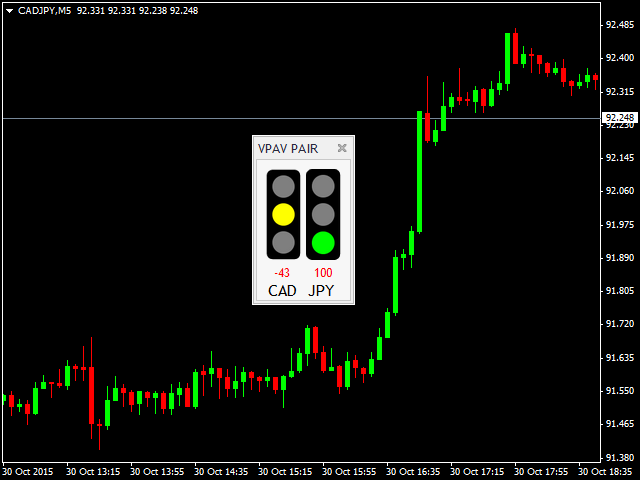
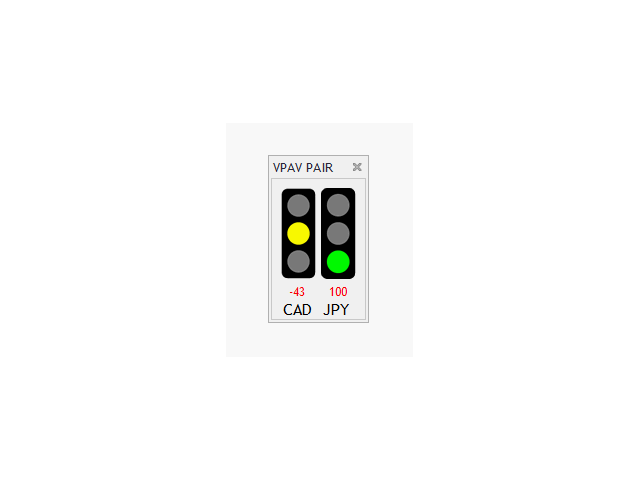
  3. Verdure Price Action Volatility indicators use a traffic light system to present volatility values
  4. Indicators can be used on ALL timeframes
  5. Alert, Email or Mobile Push Notifications are generated for every trade opportunity across 28 pairs from a single chart (Verdure PA Volatility Matrix only). Alert, Email or Mobile Push Notifications can be configured from the input tab.


How to use in trading

When the the traffic light turns green, it means buy the currency and when it turns red, it means sell the currency. All you therefore have to do is to match 'green light' with 'red light'.

For a particluar currency e.g EURUSD, when the volatility of the base currency (EUR) is equal to the value set in 'bullishVolatilityThreshold' parameter and the volatility of the quote currency (USD) is equal to the value set in 'bearishVolatilityThreshold' parameter, place a buy order for EURUSD. The default value of 'bullishVolatilityThreshold' parameter is 100 and that of 'bearishVolatilityThreshold' parameter is -100.

At these values, it means that EUR is being bought across all 7 EUR currency pairs (i.e. EURUSD, EURGBP, EURJPY, EURCHF, EURCAD, EURAUD, EURNZD) and USD is being sold across all 7 USD currency pairs (i.e. USDCHF, GBPUSD, USDJPY, NZDUSD, AUDUSD, EURUSD, USDCAD).

You can configure alerts, email and mobile push notification for these events.


Instruction

  1. Make sure the MARKET WATCH is visible (From View Menu, select 'Market Watch' or use keyboard shortcut Ctrl+M)
  2. Make sure all FOREX symbols are present in MARKET WATCH (Right click any symbol in Market Watch, point to 'Sets' and Click 'forexall')
  3. Open the chart you want to place the indicator on (Right click the symbol on Market Watch and click 'Chart Window')
  4. Make sure the chart view is on the most recent bar (Click 'Chart Shift' on Charts Toolbar)
  5. Drag the indicator from the Navigator unto the EURUSD chart and edit input parameters to suit you


Input Parameters

  • calculation - performs calculation on every 'Tick' or after 'LastBar' closes and new bar forms
  • bearishVolatilityThreshold - the indicator notifies when bearish threshold configured here breaches
  • bullishVolatilityThreshold - the indicator notifies when bullish threshold configured here breaches
  • notifyfor - sends notification for 'individual' currency or the 'pair'
  • sendEmail - send email notification
  • pushNotification - send push notification to mobile device
  • alert - send alert on terminal

리뷰 2
163007 Hailey
524
163007 Hailey 2015.12.01 19:20 
 

I'll give this 5 stars. I compared it to some other inds and this was pretty responsive to changes in direction.

추천 제품
TradePilot
Hossein Khalil Alishir
TradePilot Expert Advisor (EA) for MetaTrader 4 TradePilot is a professional and user-friendly Expert Advisor (EA) for MetaTrader 4 (MT4) . It simplifies automated trading , risk management , and trade execution using a smart trading panel . Perfect for beginners and experienced traders looking for a reliable trade manager EA with automated lot size calculation . Key Advantages User-Friendly Trading Panel: Customizable panel with buttons and hotkeys. Smart Risk Management: Supports percen
Fibonacci System
Maksim Neimerik
The system applies Fibo levels. Apart from basic Fibo levels (23.6; 38.2; 50.0; 61.8; 100.0;), the EA features custom levels (34.0; 36.0; 64.0; 66.0;). You can decide the levels trading is to be performed from. Sample trade: when the market is bullish and the price rolls back to the levels (as we remember, we select the levels on our own), the EA opens buy orders. The opposite is true for sell orders. The EA can work in three modes. Each of the modes is a separate Fibo levels construction method
Raw Tick Recorder EA for MetaTrader 4 For full setup instructions and demo version that works on chart (not just Strategy Tester), visit:   Full User Guide –  Raw Tick Recorde r Public channel:   CLICK HERE Raw Tick Recorder EA   is a non-trading Expert Advisor that records every incoming market tick with high-precision timestamps. It saves bid/ask data to disk in multiple formats for further analysis, model training, or broker verification. Ideal for traders, analysts, quants, and developers w
RS No Loss
Sergei Reshetnikov
The auxiliary adviser is designed to transfer profitable positions without loss. The adviser does not trade itself, it opens two oppositely directed positions in the tester to demonstrate the work. Settings: Start no loss (>size) -  after how many points does it start without a loss. Size no loss (<start) -  size without loss. (size without loss must be less than start)
Vizzion
Joel Protusada
Vizzion is a fully automated scalping Expert Advisor that can be run successfully using GBPJPY currency pair at H1 timeframe. Very Important This Expert Advisor can not run with any EAs in the same account. As part of the money management plan, it calculates and monitors the Margin Level % and assumes that all open trades are created by it. If you want an Expert Advisor that trades in a daily basis, this EA is not for you because using this requires a patience to wait for a few days or weeks on
ZIWOX TRADE LIST Description: Feeling weary with your small screen? and you need to close your trade list tab to have a larger perspective of chart? Require better management of your trade list? such as win rate, risk/reward ratio? Its a simple tools, but usefull. consolidate your trade list, active positions, opened positions and pending orders onto a distinct chart embellished with refined visuals. It contains with a lots of usefull information. Feautures: List your trades and positions sort
Triangular EA Limited MT4
Kyra Nickaline Watson-gordon
1 (2)
Note: MT4 Backtest cannot test EAs that trades with several symbols simultaneously. For backtest use MT5 versions download here . Note : Limited version can trade with the volume less than 0.05 lots. Important : This is Arbitrage EA and may not work on all accounts. It is recommended to follow the testing process described on product screenshots. If you are not familiar with arbitrage trading, It is recommended to use our other trading robots . Strategy : EA will place trades based on Tria
Jet Punch
Didit Haryadi Saputra
Jet Punch is another best expert advisor for MT4,  can help you make money while you sleep by automatically entering and exiting trades. It trades by opening trades every day and closing them at the right time to ensure you always earn a profit. The software is very simple and can be used by both beginner and experienced traders.  Jet Punch was tested and has successfully passed the stress test with slippage and commission approximate to the real market condition. Recommendations: Currency pair:
This is a fully automatic trading robot for the EURCHF currency pair.  But this robot can be configured to trade for other currency pairs. TURBO SCALPER PRO using a trend following strategy based on MACD, Parabolic SAR and Moving Average indicator. The robot works in full automatic mode, on the M1 timeframe. The trader does not need to set it up for trading. Open EURCHF and attach TURBO SCALPER PRO only to EURCHF M1 using the default settings. Advantages of the TURBO SCALPER PRO :  We show you
Details of each condition Type 1. Set no use Hedging Martingale, to open the order by yourself only through the push button. TP and SL follow setting. Set Setting_Hedging =false;     Use_HLine =false;      Set Setting_TrailingStop =false; if not use. Type 2. Semi Auto Recovery Zone You have to open the order by yourself only through the push button. If in the wrong direction and Set true on Hedging Martingale, EA will fix the order with the zone system by use Hedging Martingale Set Se
Smart Funded Hft
Barbaros Bulent Kortarla
4.7 (67)
스마트 펀드 HFT EA로 거래 잠재력을 해제하세요! VPS 없음 / 설정 파일 없음 / 플러그 앤 플레이 즐기기 / 아래 쉬운 설정 비디오 확인 한정된 시간 동안 프로모션 가격 제 거래의 비밀을 공유하게 되어 매우 기쁩니다 – 스마트 펀드 EA. 수백 가지 도전을 완벽한 성공률로 정복했으며, 이제 여러분의 거래 게임을 한 단계 업그레이드할 차례입니다! 이 EA는 HFT 사용을 허용하는 프롭 회사의 HFT 도전을 통과하기 위해 설계되었습니다. HFT 사용이 허용되지 않는 도전/펀드 계정/실제 계정에서는 사용하지 마세요. 스마트 펀드 HFT EA가 돋보이는 이유: 도전 마스터리: 거의 모든 HFT 도전에서 수백 번의 도전을 성공적으로 완료하여 100%의 성공률을 확보했습니다. 단순한 도구가 아니라 검증된 파워하우스입니다. 최고의 간편함: 복잡한 설정이나 VPS 설정에 빠져들 필요 없습니다. 로드하고, 로트 크기를 조정한 다음 실행 버튼을 누르기만 하면 됩니다 - 최고의 간편함입니다.
The Super scalper universal is a fully automated scalping Expert Advisor, which uses five indicators. Each open position is protected by a hidden stop order managed by an advanced modification algorithm. When searching for the suitable signals, the EA uses the integrated indicator in conjunction with the trend and time filters, as well as the volatility filter. It use dynamic position closure, which considers the location where the order had been opened and the subsequent price action. Profit is
Auto Fibo Pro m
DMITRII GRIDASOV
"Auto FIBO Pro" Crypto_Forex 지표 - 거래에 유용한 보조 도구입니다! - 지표는 자동으로 Fibo 수준과 로컬 추세선(빨간색)을 계산하여 차트에 배치합니다. - Fibonacci 수준은 가격이 반전될 수 있는 주요 영역을 나타냅니다. - 가장 중요한 수준은 23.6%, 38.2%, 50%, 61.8%입니다. - 역전 스캘핑이나 존 그리드 거래에 사용할 수 있습니다. - Auto FIBO Pro 지표를 사용하여 현재 시스템을 개선할 수 있는 기회도 많습니다. - Info Spread Swap Display가 있습니다. 현재 Spread와 Swap이 부착된 외환 쌍을 표시합니다. - 디스플레이에는 계정 잔액, 자본 및 마진도 표시됩니다. - 차트의 어느 모서리에서나 Info Spread Swap Display를 찾을 수 있습니다. 0 - 왼쪽 상단 모서리, 1 - 오른쪽 상단, 2 - 왼쪽 하단, 3 - 오른쪽 하단. 여기를 클릭하여 고품질 트레이딩 로봇과
VR Black Box
Vladimir Pastushak
3.67 (3)
VR Black Box는 경험 많은 트레이더 겸 프로그래머가 개발한 현대적인 자동 매매 전문가 어드바이저입니다. 검증된 추세 추종 전략을 기반으로 한 강력한 거래 도구입니다. 이 로봇은 오랜 기간에 걸친 개발과 개선 과정을 거쳤으며, 꾸준히 업데이트되고 변화하는 시장 환경에 적응해 왔습니다. 실제 거래 계좌에서 여러 해 동안 운용되면서 초보자와 숙련된 트레이더 모두에게 신뢰할 수 있는 조력자로 입증되었습니다. 세트 파일, 제품의 데모 버전, 지침 및 보너스를 사용할 수 있습니다. [블로그] 버전: [MetaTrader 5] 주요 전략 로봇은 여러 가지 거래 모드를 구현합니다: 매수와 매도 포지션을 번갈아 여는 방식 (Buy and Sell alternately). 동시에 매수와 매도 거래를 수행 (Buy and Sell at the same time). 무작위 방향 선택 (Randomly Buy or Sell, “오рел или решка” 전략과 유사). 매수 전용 (Buy on
Mobile LotSize Trade on the go with confidence Have you ever spotted the perfect trade opportunity on your phone, only to enter with the wrong lot size and end up risking more than you intended? With Mobile LotSize , that’s no longer a problem. Leave this EA running on your trading platform, and it will automatically monitor your pending orders set at 0.01 lots. If you’ve placed a stop loss or take profit from your phone, Mobile LotSize will calculate and adjust the trade size to match your ris
| Fully-automated Smart Money Concept (ICT) inspired trading solution with multi-strategy capabilities | Built by a grid trader >> for grid traders.  This is MT4 version, click  here  for  Blue CARA MT5  (settings and logics are same in both versions)     Real monitoring signal  -->  Cara Gold Intro Blue CARA EA   ('CARA') - short for  C omprehensive  A lgorithmic R esponsive A dvisor is a next-gen  multi-currency    multi-timeframe  EA base on the widely known (and perhapse most popular) Inn
Project Oro
Giacomo Donati
Follow us on Instagram: https://www.instagram.com/project_oro_ea Project Oro is a trading algorithm project that I began approximately six years ago. After countless painful and excruciating hours of coding, it is finally ready to be released to the public. The Expert Advisor (EA) is built on a proprietary and unique technique that analyzes the behavior and movement of candlesticks and the price action within the gold market. It searches for short windows of opportunity to strike and exits tr
The Infinity Expert Advisor is a scalper. When the resistance and support levels are broken, trades are opened in the direction of the price movement. Open positions are managed by several algorithms based on the current market situation (fixed stop loss and take profit, trailing stop, holding positions in case of trend indication, etc.). Requirements for the broker The EA is sensitive to spread, slippages and execution quality. It is strongly recommended not to use the EA for currencies with s
The “ SG Opposit Grid ” EA works with Virtual TakeProfit(or real) - at the trader's choice. The EA looks for signals to enter the market along the trend on D1 and H1 . If the signals coincide, the EA on the working period ( М1 - М30 depends on the trader's choice) looks for a confirming pattern and opens a position in the direction of the trend. If, after opening a position, the price moves in a profitable direction, the position is closed upon reaching the virtual TProfit with a profit. If the
Fever ESM
Evgenii Morozov
Trading Advisor for margin currency pairs and metals. Conservative trading of 100,000 units per 0.01 lot. The standard trade is 10,000 units per 0.01 lot. Aggressive trading with high risks of 1000 units per 0.01 lot. You can always pick up your starting lot.  The EA is fully automated, you only have to put up the initial lot depending on your initial deposit. The recommended timeframe is H1. 1. Test on any steam, iron and fuel oil 2. Try starting with convenient depots 3. When going into a dra
Bar Boss
Iurii Tokman
5 (1)
Bar Boss   Expert   Advisor는 FletBoxPush 지표를 사용하여 시장을 분석하고 거래 신호를 결정합니다. 표시기는 Expert Advisor에 내장되어 있으며 차트에 추가로 설치할 필요가 없습니다. 거래는 플랫의 경계로 정의된 레벨의 브레이크아웃에서 발생합니다. 손실 제한이 사용됩니다. 어드바이저 설정에 대한 설명 TimeFrames - 차트 기간, 표시기 설정 color - 플랫으로 정의된 가격 영역의 색상, 표시기에 대한 설정 직사각형 - 평면으로 정의된 가격 영역 표시, 지표 설정 랏 - 거래 시작 볼륨 MagicNumber - 마법의 주문 수 Count_LOSS - 수익이 0이 될 때까지의 연속 손실 거래 수(0으로 종료) FlatPips - 플랫을 결정하기 위한 포인트 제한, 지표 설정 FlatBars - 평면을 결정하기 위한 막대 수의 제한, 표시기 설정 MinBarsClosedOutside - 종가가 특정 고정 수준 위/아래로 고정된 막대의 수
차트에 직접   메모를 작성하고   트레이딩 시   관찰 내용을 활용 심볼 간   리마인더   동기화  옵션을 통해   현재   시장 상태에   관한   중요한   정보를  기억할 수 있습니다 따라서 ,   이   도구는   트레이딩   중   이전에   확인한   중요한   정보를   놓치는   상황을   방지합니다 . 다기능 유틸리티 : 66+ 기능, 이 도구 포함  |   질문이 있으면 연락주세요   |   MT5 버전 설정: 메모 동기화   방법 : 동일한 심볼 간 동기화; 각 차트에 고유한 메모; 모든 곳에 동일한 메모 ; 선택적으로 ,   메모를   생성한   타임프레임   과   연결     할   수   있습니다 ; 시각화  설정 : 텍스트 위치; 폰트: 색상, 스타일, 크기; 메모를   편집하려면   ,   오른쪽   하단   코너에   있는   [ e]  버튼을   클릭하세요 :   입력   필드가   표시됩니다 . 프로그램 파일은 " Indicators " 디렉
Gyroscopes
Nadiya Mirosh
Gyroscope        professional forex expert   (for EURUSD, GBPUSD, USDJPY, AUDUSD, USDCHF, EURGBP, EURJPY, NZDUSD, USDCAD, EURCHF, AUDJPY, CADJPY pairs)   alyzing the market using the Elliot Wave Index. Elliott wave theory is the interpretation of processes in financial markets through a system of visual models (waves) on price charts. The author of the theory, Ralph Elliott, identified eight variants of alternating waves (of which five are in the trend and three are against the trend). The mov
Macd Pro I
Steve Zoeger
MACD Pro I EA https://youtu.be/2wCzTFIGNp4 =============== This Robot is fully automated and has been created for everyone. The Robot works also on cent accounts. The Ea is based on the MACD Indicator and 3 more and has been kept simple. ========================================= Maybe better to go for small profit, set it on higher time frames then you can use it for more pairs at the same time. =========================================== => works on all Time Frames but i would recommend the
This panel is a part of the SupDem-Pro trading system and is used to search for the best opportunities for any available instruments. Which can be selected manually in the Market Watch (open it with CTRL + M). Using this trading panel in combination with ShvedSupDem-Pro_Zone allows to analyze multiple currency pairs with a single click. The panel allows to load any instruments from the Market Watch, from 6 major currency pairs up to all instruments (480). The indicator parameters Button Width -
Hello traders! I present to you Argo Gold Edition - an expert built for gold trading, which is tailored to the specifics of gold movements on international markets. The basis of its logic is that it follows profitable patterns drawn from past periods. Mathematical algorithms are based on the correlation between the values of the indicators used and the corresponding movement of the price of gold. The expert is built on the basis of the ARGO series. It specializes in GOLD / XAUUSD trading. 2 or 3
Risk Commander
Adisorn Soodkanueng
Product Name: Risk Commander: Trade Assistant & Strategy Simulator Risk Commander is more than just a trade panel—it is a complete Manual Trading Ecosystem . It serves two powerful purposes: Live Assistant: Helps you execute trades with speed, precision, and perfect risk management in real-time markets. Training Simulator: Fully compatible with the Strategy Tester (Visual Mode) , allowing you to practice manual trading on historical data without risking a cent. NEW! Built-in Simulator Mode S
This Expert Advisor trades based on trend lines, as well as on the basis of volume analysis. Volumes are calculated using minute bars, in order to determine if they were ascending or descending. The trend lines are drawn based on High and Lows in the trade history. There are also additional indicators. Buy or sell signals depend on all those factors. This allows the EA to enter the market with more accuracy and to perform more deals. Input parameters Lots - lot size (if 0, a lot is calculated b
Trade Assistant is a trading panel designed for manual trading. The panel allows you to calculate risk, manage positions using Limit orders, And other useful features. Key features of the panel It works with any trading instruments - currency pairs, CFDs, stocks, indices, futures, cryptocurrencies. Set Stop Loss and Take Profit as the distance in points. Setting and displaying the potential loss to profit ratio. The panel supports pending orders. Display on the chart the calculated position vol
MAX AUTO SCALPING EA는 MT4용 완전 자동 멀티페어 트레이딩 시스템입니다. "설정 후 잊어버리세요"라는 의미의 고품질 전문가 자문 프로그램으로, 모든 트레이딩 작업을 자동으로 처리합니다! 7개 페어에 대한 7개의 Set_files를 사용할 수 있습니다! 테스트 및 거래를 위해 EA Set_files를 다운로드하세요. GBPCAD Set_file GBPCHF Set_file EURCHF Set_file USDCHF Set_file GBPAUD Set_file EURCAD Set_file EURAUD Set_file EA 주요 기능: - 지역 지지선/저항선 기반 스캘핑 트레이딩 방식 - 시스템은 안전하며 그리드 또는 마틴게일과 같은 위험한 방법을 사용하지 않습니다. 각 주문은 계정 보호를 위해 고정된 손절매(SL)를 갖습니다. - 이 EA는 매우 사용자 친화적이며 외환 전문가와 초보자 모두 사용할 수 있습니다. - 로봇이 모든 작업을 자동으로 처리합니다. MT4에
이 제품의 구매자들이 또한 구매함
Local Trade Copier EA MT4
Juvenille Emperor Limited
4.96 (108)
Local Trade Copier EA MT4 를 사용하여 매우 빠른 거래 복사 경험을 해보세요. 1분 안에 간편하게 설정할 수 있으며, 이 거래 복사기를 사용하면 Windows 컴퓨터 또는 Windows VPS에서 여러 개의 MetaTrader 터미널 간에 거래를 0.5초 미만의 초고속 복사 속도로 복사할 수 있습니다. 초보자든 전문가든 Local Trade Copier EA MT4 는 다양한 옵션을 제공하여 사용자의 특정 요구에 맞게 맞춤 설정할 수 있습니다. 이는 수익 잠재력을 높이려는 모든 사람을 위한 최고의 솔루션입니다. 지금 사용해보시고 이것이 왜 시장에서 가장 빠르고 쉬운 무역용 복사기인지 알아보세요! 팁: 여기 에서 데모 계정에서 Local Trade Copier EA MT4 데모 버전을 다운로드하여 사용해 볼 수 있습니다. 다운로드한 무료 데모 파일을 MT4 >> File >> Open Data Folder >> MQL4 >> Experts 폴더에 붙여넣고 터미널
Trade Manager EA에 오신 것을 환영합니다. 이 도구는 거래를 보다 직관적이고 정확하며 효율적으로 만들기 위해 설계된 궁극적인 리스크 관리 도구 입니다. 단순한 주문 실행 도구가 아닌, 원활한 거래 계획, 포지션 관리 및 리스크 제어를 위한 종합 솔루션입니다. 초보자부터 고급 트레이더, 빠른 실행이 필요한 스캘퍼에 이르기까지 Trade Manager EA는 외환, 지수, 상품, 암호화폐 등 다양한 시장에서 유연성을 제공합니다. Trade Manager EA를 사용하면 복잡한 계산은 이제 과거의 일이 됩니다. 시장을 분석하고 진입, 손절 및 익절 수준을 차트의 수평선으로 표시한 후 리스크를 설정하면, Trade Manager가 이상적인 포지션 크기를 즉시 계산하고 SL 및 TP 값을 실시간으로 표시합니다. 모든 거래가 간편하게 관리됩니다. 주요 기능: 포지션 크기 계산기 : 정의된 리스크에 따라 거래 크기를 즉시 결정합니다. 간단한 거래 계획 : 진입, 손절, 익절을 위한
Trade Assistant MT4
Evgeniy Kravchenko
4.42 (193)
거래당 위험 계산, 라인을 사용한 손쉬운 신규 주문, 부분 청산 기능을 통한 주문 관리, 7가지 유형의 트레일링 스탑 및 기타 유용한 기능을 제공합니다. 추가 자료 및 지침 설치 지침 - 애플리케이션 지침 - 데모 계정용 애플리케이션 평가판 라인 기능       - 차트에 개시선, 손절매, 차익실현을 표시합니다. 이 기능을 사용하면 새로운 주문을 쉽게 하고 개봉 전에 추가 특성을 볼 수 있습니다. 위기 관리       -       위험 계산 기능은 설정된 위험과 손절매 주문의 크기를 고려하여 새 주문의 볼륨을 계산합니다. 이를 통해 손절매 크기를 설정하고 동시에 설정된 위험을 존중할 수 있습니다. 로트 계산 버튼 - 위험 계산을 활성화/비활성화합니다. 필요한 위험 값은 위험 필드에 0에서 100 사이의 백분율 또는 예금 통화로 설정됩니다. 설정 탭에서 위험 계산 옵션을 선택합니다. $ 통화, % 잔액, % 지분, % 자유 마진, % 사용자 정의, % AB 이전 일, % AB
Copy Cat More Trade Copier MT4 (복사 고양이 MT4) 는 단순한 로컬 트레이드 카피어가 아니라, 오늘날의 거래 환경을 위해 설계된 완전한 리스크 관리 및 실행 프레임워크입니다. Prop Firm 챌린지부터 개인 계좌 관리까지, 강력한 실행력, 자본 보호, 유연한 설정, 고급 거래 처리 기능을 통해 모든 상황에 적응합니다. 이 카피어는 Master(송신자) 와 Slave(수신자) 모드 모두에서 작동하며, 실시간으로 시장가/지정가 주문, 거래 수정, 부분 청산, Close By 작업을 동기화합니다. 데모 및 실계좌 모두 호환되며, 거래용 비밀번호 또는 투자자 비밀번호로도 사용할 수 있습니다. Persistent Trade Memory 기술을 통해 EA, 터미널, VPS가 재시작되더라도 거래가 복원됩니다. 여러 Master와 Slave를 동시에 관리할 수 있으며, 브로커 간 차이는 접두사/접미사 자동 감지 또는 심볼 매핑으로 처리됩니다. 매뉴얼/설정: Copy C
The product will copy all telegram signal to MT4   ( which you are member  ) , also it can work as remote copier.  Easy to set up, copy order instant, can work with almost signal formats, image signal, s upport to translate other language to English Work with all type of channel or group, even channel have "Restrict Saving Content", work with  multi channel, multi MT5 Work as remote copier: with signal have ticket number, it will copy exactly via ticket number. Support to backtest signal. How to
Trade copier MT4
Alfiya Fazylova
4.58 (33)
Trade Copier는 거래 계정 간의 거래를 복사하고 동기화하도록 설계된 전문 유틸리티입니다. 복사는 공급자의 계정/단말기에서 동일한 컴퓨터 또는 vps에 설치된 수신자의 계정/단말기로 발생합니다. 구매하기 전에 데모 계정에서 데모 버전을 테스트할 수 있습니다. 데모 버전 여기 . 전체 지침 여기 . 주요 기능 및 이점: 복사기는 "МТ4> МТ4", "МТ4> МТ5", "МТ5> МТ4" 복사를 지원합니다. 복사기는 데모 계정 > 실 계정, 실 계정 > 데모 계정, 데모 계정 > 데모 계정 및 실제 계정 > 실 계정 복사를 지원합니다. 복사기는 읽기 전용 암호가 적용된 투자자 계정에서 복사를 지원합니다. 하나의 공급자 터미널은 여러 수신 터미널로 트랜잭션을 보낼 수 있고 하나의 수신 터미널은 여러 공급자 터미널에서 트랜잭션을 수신할 수 있습니다. 복사기는 귀하 또는 귀하의 고문이 거래하는 동일한 터미널에서 작동할 수 있습니다. 높은 복사 속도(0.5초 미만). 복사기에는 간편
Crystal Trade Manager PRO – MT4 고급 리스크 및 트레이드 관리 시스템 무료 버전: https://www.mql5.com/en/market/product/150632 개요 Crystal Trade Manager PRO(CTM)는 MetaTrader 4를 위한 전문급 거래 실행 및 리스크 관리 유틸리티입니다. 엄격한 실행, 견고한 자본 보호, 그리고 똑똑한 자동화를 필요로 하는 트레이더를 위해 설계되었습니다. 본 시스템은 계좌 리스크를 관리하고, 자본(EQ)을 보호하며, 일일 제한을 적용하고, SL/TP를 자동으로 설정하며, 전문급 기능을 갖춘 초고속 원클릭 트레이딩 패널을 제공합니다. Prop Firm 챌린지, 데이트레이딩, 스캘핑, 포트폴리오 매니저에게 최적화되어 있습니다. MT5 버전도 제공됩니다. 주요 기능 1. 고급 리스크 및 드로우다운 보호 기능 하루 드로우다운을 1%~70% 범위에서 설정 가능 설정한 한도를 초과할 경우 모든 포지션 즉시 종료 조건
Exp COPYLOT CLIENT for MT4
Vladislav Andruschenko
4.65 (66)
MetaTrader 4용 트레이드 복사기.       모든 계정의 외환 거래, 포지션, 주문을 복사합니다. 그것은 최고의 무역 복사기 중 하나입니다       MT4 - MT4, MT5 - MT4       위해       카피롯 MT4       버전(또는       MT4 -  MT5   MT5 - MT5       위해       카피롯 MT5       버전). MT5 버전 전체 설명   +DEMO +PDF 구입 방법 설치하는 방법     로그 파일을 얻는 방법     테스트 및 최적화 방법     Expforex의 모든 제품 복사기   버전         MetaTrader 5   터미널 (   МТ5 - МТ5, МТ4 - МТ5   ) -   Copylot Client MT5 고유한 복사 알고리즘은 마스터 계정에서 고객 계정으로 모든 거래를 정확하게 복사합니다. 이 제품은 또한 높은 작동 속도에서 높은 오류 처리로 유명합니다. 강력한 기능 세트. 프로그램은 여러 터
TradePanel MT4
Alfiya Fazylova
4.85 (92)
Trade Panel은 다기능 거래 보조원입니다. 이 애플리케이션에는 수동 거래를 위한 50개 이상의 거래 기능이 포함되어 있으며 대부분의 거래 작업을 자동화할 수 있습니다. 데모 계정에서만 작동하는 앱의 체험판 애플리케이션 사용 안내 거래. 한 번의 클릭으로 거래 작업을 수행할 수 있습니다: 자동 위험 계산을 통해 지정가 주문 및 포지션을 엽니다. 한 번의 클릭으로 여러 주문과 포지션을 열 수 있습니다. 주문 그리드를 엽니다. 그룹별 대기 주문 및 포지션을 마감합니다. 포지션 반전(매수 청산 후 매도 개시 또는 매도 청산 후 매수 개시). 포지션 고정(매수 포지션과 매도 포지션의 양을 동일하게 하는 추가 포지션 개설). 한 번의 클릭으로 모든 포지션을 부분 청산합니다. 모든 포지션의 이익실현과 손절매를 동일한 가격 수준으로 설정합니다. 모든 포지션에 대한 손절매를 해당 포지션의 손익 분기점 수준으로 설정합니다. 주문 및 포지션 개시 시 다음 기능을 적용할 수 있습니다: 계산된 거래
Trade Dashboard MT4
Fatemeh Ameri
4.96 (53)
Tired of complex order placement and manual calculations? Trade Dashboard is your solution. With its user-friendly interface, placing orders becomes effortless, by a single click, you can open trades, set stop loss and take profit levels, manage trade lot size, and calculate risk to reward ratios, allowing you to only focus on your strategy. Say goodbye to manual calculations and streamline your trading experience with Trade Dashboard. Download  Demo Version  right now. You can find  Details of
Take a Break
Eric Emmrich
5 (31)
One tool to protect all your EAs — news filter, equity protection, time filter and more — free demo available Take a Break has evolved from a basic news filter into a comprehensive account protection solution. It pauses your other Expert Advisors during news events or based on custom filters. When trading resumes, it automatically restores your entire chart setup , including all EA settings. Typical use cases: One news filter for all your EAs. Pause trading during news or high volatility — and c
Risk/Reward Tool은 MetaTrader 4에서 거래를 계획, 시각화 및 실행하는 방식을 혁신하도록 설계된 전문가급 Expert Advisor입니다. 정밀한 리스크 관리를 중시하는 재량 트레이더이든, 거래 설정을 시각적으로 테스트해야 하는 전략 개발자이든, 이 도구는 우아하고 직관적인 인터페이스에서 필요한 모든 것을 제공합니다. 기본적인 포지션 계산기와 달리, Risk/Reward Tool은 시각적 거래 계획을 즉각적인 실행 기능, 실시간 손익 모니터링 및 포괄적인 거래 관리 기능과 결합합니다. 이 도구는 MT4 전략 테스터와 완전히 호환되어 실제 자본을 위험에 빠뜨리지 않고 거래 전략을 연습하고 접근 방식을 개선할 수 있습니다. 도구의 전체 매뉴얼은 여기에서 확인할 수 있습니다: https://www.mql5.com/en/blogs/post/766244 MT5 version:  https://www.mql5.com/en/market/product/158601 주요 기능
MT4 to Telegram Signal Provider 는 사용하기 쉽고 완전히 사용자 정의가 가능한 도구로, 텔레그램으로 신호를 보내어 계정을 신호 제공자로 변환할 수 있습니다. 메시지 형식은 완전히 사용자 정의가 가능합니다! 그러나 간단한 사용을 위해 미리 정의된 템플릿을 선택하고 메시지의 특정 부분을 활성화하거나 비활성화할 수도 있습니다. [ 데모 ]  [ 매뉴얼 ] [ MT5 버전 ] [ 디스코드 버전 ] [ 텔레그램 채널 ]  New: [ Telegram To MT5 ] 설정 단계별 사용자 가이드 가 제공됩니다. 텔레그램 API에 대한 지식이 필요 없으며, 개발자가 필요한 모든 것을 제공합니다. 주요 기능 구독자에게 보낸 주문 세부 정보를 사용자 정의할 수 있는 기능 예를 들어 브론즈, 실버, 골드와 같은 계층 구독 모델을 만들 수 있습니다. 골드 구독은 모든 신호 등을 받게 됩니다. ID, 심볼 또는 코멘트별 주문 필터링 주문이 실행된 차트의 스크린샷을 포함 보낸
Copy Master mt4
Evgenii Aksenov
5 (5)
이 유틸리티를 사용하면 마스터 설정이있는 한 터미널에서 슬레이브 설정이있는 다른 터미널로 모든 트랜잭션을 복사 할 수 있습니다 동시에 복사 할 쌍을 선택하고 여러 매개 변수에 따라 복사 된 순서의 크기를 설정할 수 있습니다. 드로우 다운 손실 한도를 설정하거나 수익성있는 거래 만 복사하십시오 Mt4 또는 mt5 에서 다른 브로커의 mt4 또는 MT5 로 거래를 복사 할 수 있습니다 이제 mt4 에서 일하는 전문가의 신호를 MT5 터미널 또는 뒤로 복사하는 것이 어렵지 않을 것입니다 복사 마스터를 사용하여 다른 신호,전문가 고문,수동 거래에서 거래를 복사하십시오.  를 사용하여 설정을 변경할 수 있습니다 많은 크기,무역 방향으로만 복사 수익을 거래하고 설정 값을 저장하는 금고  복사 마스터는 하나의 계정에 서로 다른 가입 신호의 여러 전략을 결합 할 수 있습니다 익을 MT4,당신은 필요합 복사본을 마스터 MT5 버전:  https://www.mql5.com/ko/mar
Telegram Signal pro
Sara Sabaghi
4.86 (7)
What is it? Think about it, you can send all the orders/positions info to your telegram channel or group to create your community or VIP signals on telegram. Position info means this EA forward all of your new positions open details (Open price, Open time, Position Type, position Symbol and volume), positions changes ( SL or TP modifying or pending price changes) and position close (Close price, profit or loss, position duration time) and also EA Send NEWS alert (Economic calendar event) on you
Auto Grid trades
Makarii Gubaydullin
Auto Grid:  기존 거래를 기반으로 한 자동 그리드 주문 생성. 복잡한 트레이딩 전략 자동화   새 포지션을 감지하고 최적화된 주문 배열을 자동으로 생성하는 정교한 그리드 시스템. 다기능 유틸리티 : 66+ 기능, Auto Grid 도구 포함  |   문의사항은 연락주세요   |   MT5 버전 A. 지능형 거래 감지 및 모니터링: 특정 심볼 또는 포괄적인 포트폴리오 스캐닝 정확한 분류를 통한 고급 주문 유형 감지 전략적 모니터링 시작: 즉시, 지연 또는 조건 기반 알고리즘 전략 호환성을 위한 매직넘버 통합 B. 정교한 그리드 구성: 전략적 주문 배치:   다양한 포지셔닝 방법론 지능형 방향 로직:   동일, 반대 또는 시장 기반 주문 생성 정밀 주문 수량:   사용자 정의 가능한 그리드 밀도 및 구조 고급 오프셋 시스템:   고정 간격 또는 동적 백분율 진행 포괄적 수준 관리:   크기 또는 가격 일관성을 갖는 SL/TP 상속 정교한 로트 사이징:   고정, 점진적 증가
Rocket FX Trading Manager PRO Note: Once you download the manager, message me for the background files The Ultimate All-in-One Trade Management Solution for MetaTrader 4 Version:   4.5 |   Platform:   MetaTrader 4 |   Category:   Utility / Trade Manager   Overview Rocket Fx Trading Manager v4.5 is a comprehensive, all-in-one trade management system designed to transform your trading experience. This powerful utility combines   intelligent position sizing ,   multi-target order placement
This EA is fully automated , it is built based on  the method of catching the pop-up Alert event and forwarding them to Telegram Channel/Group. Parameters of the EA: -------- <EA Settings> -------- Magic Number:   The identifying (magic) number of the currently selected order. Bot name:   Name of the Expert Advisor. Allow forward Alert: Enable/ Disable Forward Alert. Do not send messages after the current time (seconds) . Number of rows to read from list (>= 4...| affect processing speed). --
Trend Line Optimizer
Evgenii Aksenov
4.11 (19)
이 추세선 프로 표시기에 대한 자동 매개 변수 최적화 프로그램입니다 쉽고 빠르게 당신은 당신의 마음에 드는 추세선 프로 표시기에 대한 최적의 매개 변수를 선택합니다. 최적화에는 몇 초 밖에 걸리지 않습니다. 최적화할 수 있는 최고의 매개변수에 대한 각 쌍고기간:진폭,TP1-TP3,stoploss 에뿐만 아니라,값은 시간을 필터 및 카테고에 필터가 역사를 선택 섹션(일) 다른 시간대를 최적화하려면 다른 범위의 히스토리가 필요합니다: M5-M15 계산 범위 매개 변수 설정(일)=60(3 개월) M30-H1 계산 범위 매개 변수 설정(일)=120(6 개월) H4 매개 변수 계산 범위 설정(일)=240(1 년) D1-W1 매개 변수 계산 범위 설정(일)=720(3 년) Mn1 매개 변수 계산 범위 설정(일)=1200(5 년) 최적화 후 매개 변수는 폴더의 기성품 세트 파일에 자동으로 저장됩니다.MQL4>Files>trendlineoptimizedsettings 최적화 유틸리티 사용
RSI Divergence Scanner is a multi-timeframe and multi-symbol dashboard and alert that checks all timeframes and symbols to find divergences between price chart and RSI indicator. This divergence scanner is integrated with support and resistance zones so you can check the RSI divergences in the most important areas of the chart to find trend reversals in the price chart. Download demo version   (works on M 1,M5,M30,W1 timeframes) Full description of scanner parameters ->   click here . How to get
DrawDown Limiter MT4
Haidar Lionel Haj Ali
5 (8)
Drawdown Limiter EA You are in the right place if you were searching for Drawdown control, Drawdown limiter, Balance protection, Equity Protection or Daily Drawdown Limit related to Prop Firm, FTMO, or Funded account trading, or if you want to protect your trading account. Have you suffered from controlling your drawdown when trading funded accounts? This EA is meant for you. Prop firms usually set a rule called “Trader Daily Drawdown”, and if it is not respected, you are disqualified.  I am an
Copier4Fee Advanced
Vladimir Tkach
4.75 (16)
The utility copies trades from the signal provider accounts (master accounts, one or multiple providers) to unlimited number of receiver accounts (slave accounts).  Attention! Y ou need to use identifiers (Provider number) of the same length if you use several master copiers. For example. 1, 2, 3 or 11, 13, 22. The copying can be set in the opposite direction. The comments with all the recently performed actions are displayed on the screen to monitor the utility actions in slave mode. To avoid p
AW Grids Maker
AW Trading Software Limited
4.33 (3)
"AW_Grids_Maker"는 보류 중인 주문으로부터 그리드를 구축하는 데 사용됩니다. 이 유틸리티는 범용적이며, 유연한 설정과 직관적인 패널 인터페이스를 제공합니다. 이 프로그램은 필요한 단계를 거쳐 STOP 및 LIMIT 주문으로부터 네트워크를 구축하며, 포지션 볼륨 배수를 사용합니다. MT5 버전 -> 여기 / 문제 해결 -> 여기 장점: 모든 유형의 보류 주문을 사용합니다. 간단하고 유연한 구성. 잘 디자인되고 다기능적인 유틸리티 패널입니다. 잘 고안된 정보 모듈 작업의 특징: 피라미딩, 클래식 평균 또는 마팅게일에 적합합니다. 그리드 개설, 주문 추적 및 마감을 자동화합니다. 이는 거래 시스템의 필수적인 부분이 될 수도 있고 독립적인 전략이 될 수도 있습니다. 조정 가능한 거리와 거래량을 통해 모든 유형의 주문 네트워크를 구축하면 계수가 증가합니다. 패널에 대한 자세한 설명: 트레이더는 "Open_Buy" 버튼을 사용하여 보류 중인 매수 지정가 주문과 매수 정지 주문을
Comprehensive on chart trade panel with the unique ability to be controllable from mobile as well. Plus has a library of downloadable configuration, e.g. exit rules, extra panel buttons, pending order setup and more. Please see our product video. Works with all symbols not just currency pairs. Features On chart panel plus controllable from free app for Windows, iPhone and Android Built-in script engine with library of downloadable configuration, e.g. add 'Close All Trades in Profit' button, exit
News Filter EA: Advanced Algo Trading Assistant News Filter EA is an advanced algo trading assistant designed to enhance your trading experience. By using the   News Filter EA , you can integrate a Forex economic news filter into your existing expert advisor, even if you do not have access to its source code. In addition to the news filter, you can also specify   trading days   and   hours   for your expert. The News Filter EA also includes   risk management   and   equity protection   features
Exp4 Duplicator
Vladislav Andruschenko
4.5 (22)
Expert Advisor   는   귀하의 계정 MetaTrader 4   에서 사전 설정된 횟수만큼 거래 및 포지션을 반복하거나 신호를 보냅니다. 수동으로 또는 다른 Expert Advisor에 의해 열린 모든 거래를 복사합니다. 신호를 복사하고 신호에서 로트를 늘립니다   ! 다른 EA의 수를 늘립니다. 다음 기능이 지원됩니다: 복사된 거래에 대한 사용자 지정 로트, 손절매 복사, 이익 실현, 후행 정지 사용. MT5 버전 전체 설명 +DEMO +PDF 구입 방법 설치하는 방법     로그 파일을 얻는 방법     테스트 및 최적화 방법     Expforex의 모든 제품 연결 MetaTrader용 무역 복사기는 여기에서 사용할 수 있습니다:   COPYLOT 주목 참고: 터미널 간 거래를 위한 복사기가 아닙니다. 전략 테스터에서 Expert Advisor를 테스트하고 비주얼 모드에서 EAPADPRO 도구 모음과 거래할 수 있습니다! 1개의 통화 쌍에 EA를 설치하는 것
Custom Alerts: 여러 시장을 동시에 모니터링하고 중요한 기회를 놓치지 마세요 개요 Custom Alerts 는 여러 종목에 걸쳐 잠재적 트레이딩 기회를 한눈에 파악하고자 하는 트레이더를 위한 동적인 솔루션입니다. FX Power, FX Volume, FX Dynamic, FX Levels, IX Power와 같은 Stein Investments의 주요 도구들과 통합되어, 여러 차트를 오가거나 기회를 놓치는 일 없이 중요한 시장 변화를 자동으로 알림으로 제공합니다. 이제 브로커가 제공하는 모든 자산군을 지원하며, 기호를 입력할 필요 없이 자산 유형만 선택하면 설정이 완료됩니다. 1. Custom Alerts가 트레이더에게 매우 유용한 이유 올인원 시장 모니터링 • Custom Alerts 는 외환, 금속, 암호화폐, 지수, 주식(브로커가 지원하는 경우)까지 다양한 자산군의 신호를 수집하고 통합합니다. • 여러 차트를 전환할 필요 없이 하나의 창에서 명확한 알림을 받아보
특별 할인 – 40% 할인 고급 거래 관리자 – 더 빠르고, 더 스마트하고, 더 안전한 수동 거래를 위한 최고의 올인원 솔루션 차트엔드 거래 관리자 AI로 수동 거래를 혁신하세요. 즉각적인 주문 실행, 시각적인 거래 계획, 강력한 위험 관리 기능을 하나의 직관적인 도구에 통합한 전문가급 차트 패널입니다. 차트를 벗어나지 않고도 그 어느 때보다 빠르게 주문을 실행하고, 위험을 관리하고, 수익을 보호할 수 있습니다. 정확성과 효율성을 높이고자 하는 모든 트레이더에게 적합합니다. MT4 전략 테스터에서 위험 부담 없이 테스트해 보세요 데모 버전을 다운로드하여 모의 거래 기능을 사용해 보세요. 실제 거래에 들어가기 전에 안전한 시뮬레이션 환경에서 주문 실행 연습, 위험 관리 규칙 테스트, 전략 개선을 할 수 있습니다. 자세한 사용자 설명서 및 단계별 가이드는 다음 링크를 참조하세요. https://www.mql5.com/en/blogs/post/764217 주요 장점: 빠른 거래
VirtualTradePad mt4 Extra
Vladislav Andruschenko
4.86 (59)
한 번의 클릭으로 거래할 수 있는 거래 패널.   위치 및 주문 작업!   차트 또는 키보드에서 거래. 거래 패널을 사용하면 차트에서 클릭 한 번으로 거래하고 표준 MetaTrader 컨트롤보다 30배 빠르게 거래 작업을 수행할 수 있습니다. 거래자의 삶을 더 쉽게 만들고 거래자가 훨씬 빠르고 편리하게 거래 활동을 수행할 수 있도록 도와주는 매개변수 및 기능의 자동 계산. 차트의 무역 거래에 대한 그래픽 팁 및 전체 정보. MT5 버전 전체 설명   +DEMO +PDF 구입 방법 설치하는 방법     로그 파일을 얻는 방법     테스트 및 최적화 방법     Expforex의 모든 제품 열기 및 닫기, 반전 및 잠금, 부분 닫기/오토로트. 가상/실제 손절매/이익 실현/후행 정지/손익분기점, 주문 그리드 .... MetaТrader 4   의 주요 요청 거래 제어판   : 구매, 판매, 구매 중지, 구매 제한, 판매 중지, 판매 제한, 닫기, 삭제, 수정, 후행 중지, 손절매,
복사기->편리하고 빠른 인터페이스 상호작용으로 사용자가 바로 사용 가능       ->>>> Windows 컴퓨터 또는 VPS Windows에서 사용하는 것이 좋습니다. 특징: 다양하고 개인화된 복사 거래 설정: 1. 다양한 신호 소스에 대해 다양한 로트 모드를 설정할 수 있습니다. 2. 다양한 신호 소스를 포워드 및 리버스 복사 거래에 대해 설정할 수 있습니다. 3. 신호는 주석으로 설정할 수 있습니다. 4. 계약 로트에 따라 로트를 교정할지 여부 다양하고 개인화된 복사 주문 설정 2: 1. 다양한 품종에 대해 다양한 로트 모드를 설정할 수 있습니다. 2. 정방향 및 역방향 복사 주문에 대해 다양한 품종을 설정할 수 있습니다. 3. 주석으로 신호를 설정할 수 있습니다. 4. 계약 로트에 따라 로트를 교정할지 여부 댓글 필터링, MAGIC 필터링, 시그널 로트 필터링, 로컬 제품 필터링 근무시간 설정 역동기화 SLAVE 닫힘 주문 바인딩 기능: 모든 주문은 설정된 신호 소스 주문
제작자의 제품 더 보기
Overview This is the DELUXE version in the Pivot Point Plotter Series. It is a robust indicator that dynamically calculates and plots any of the 4 major pivot points on your chart irrespective of intra day timeframe on which the indicator is placed. This indicator is capable of plotting STANDARD, CAMARILLA, FIBONNACI or WOODIE daily pivot points. Whichever you use in your trading, this indicator is your one-stop shop. Kindly note that it is a DAILY Pivot Point Plotter for DAY TRADERS who trade o
Verdure OCO EA
Olawale Adenagbe
5 (1)
Overview A One-Cancels-the-Other Order (OCO) is a pair of orders stipulating that if one order is executed, then the other order is automatically cancelled. Verdure OCO EA brings this functionality to MT4. This EA is a robust implementation of the popular One-Cancels-the-Other Order (OCO) but with added benefits, features and options. It is an EA that helps with trade management and especially useful for traders who use stop and reverse trading systems, traders who look for opportunities around
Verdure Lot Calculator
Olawale Adenagbe
5 (1)
Overview Money management is an all-important aspect of trading that many traders often overlook. It is very possible that even with a winning strategy, bad money management can often result in huge loses. Verdure Lot Calculator aims to help traders minimize risk and exposure in the Forex market. Verdure Forex Calculators implements Lot (Trade or Contract Size) Calculator as an indicator on MT4 platform. Lot Calculator (trade or contract size) A lot refers to a bundle of units in trade. In Fore
Overview Money management is an all-important aspect of trading that many traders often overlook. It is very possible that even with a winning strategy, bad money management can often result in huge loses. Verdure Forex Calculators aims to help traders minimize risk and exposure in the Forex market. Verdure Forex Calculators implements 4 calculators in one single indicator. It is the first of it's kind on MT4 platform. Calculators implemented are: Lot (Trade or Contract Size) Calculator. Margin
This is a purely Price Action indicator that tracks the open and close prices of all 28 major Forex currency pairs and calculates a volatility value based on every tick in real time. It only tracks raw price data and not data from another indicator and it does not use any complicated formula or algorithm in calculating volatility. This version shows volatility for all 28 major currency pairs Benefits Accurate and real time update of volatility Volatility across all 28 major Forex currency pairs
Overview This is the WOODIE version in the Verdure Pivot Trail Series. Verdure Woodie Pivot Trail plots WOODIE pivot levels for every bar on the chart. Pivot levels are great at determining turning points in the market and when period pivot levels are compared to daily pivot level, these turns can be accurately predicted and timed. Features Dynamically calculates and draws Pivot levels for every bar on the chart (Central Pivot Point, R1, R2, R3, S1, S2 and S3) Pivot level can be used to trail p
필터:
Neil Groom
120
Neil Groom 2016.02.05 16:47 
 

사용자가 평가에 대한 코멘트를 남기지 않았습니다

163007 Hailey
524
163007 Hailey 2015.12.01 19:20 
 

I'll give this 5 stars. I compared it to some other inds and this was pretty responsive to changes in direction.

리뷰 답변