Mobile Calculator

이 EA를 사용하면 거래량을 다시 계산할 필요가 없습니다. 그리고 이것은 또한 당신이 할 수 있다는 것을 의미합니다

  • 분석에 더 집중하세요

  • 트레이딩 사고방식에 더 집중하세요

  • 더 나은 결정을 내리다

  • 더욱 안정적이고 지속적인 수익을 얻으세요

또한 사용자가 각 거래를 보다 쉽고 규칙적으로 실행할 수 있도록 자동 이익 가격 계산 및 일일 손실 관리 시스템이라는 두 가지 기능도 추가했습니다.

사용 가능한 통화:

  • 통화쌍

  • 암호화폐

  • 금속

  • 색인

  • 재고

사용하는 방법:

  • MT5를 열고 "알고리즘 트레이딩"을 클릭하세요.

  • 차트를 열고 EA를 차트로 드래그하세요.


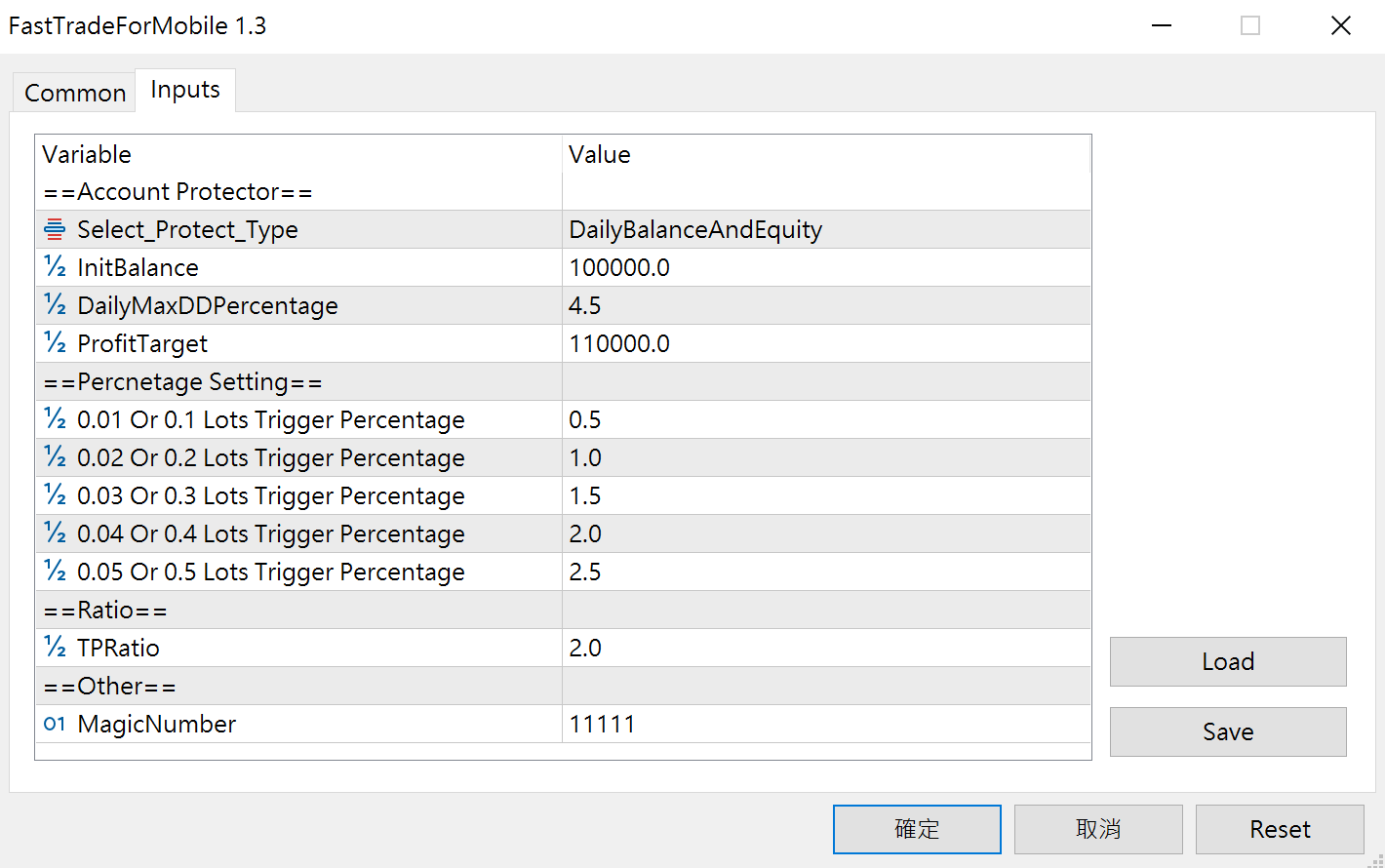
창 분야 소개:

  • 선택_보호_유형:

두 가지 옵션이 제공됩니다:

  1. DailyBalanceAndEquity

  2. 초기화BalanceAndEquity

여기서는 두 가지 보호 방법에 대해 자세히 소개하지 않습니다. 더 자세히 알고 싶다면 FTMO 및 TFT의 일일 손실액 규칙을 확인하세요.

InitBalanceAndEquity는 FTMO용이고 DailyBalanceAndEquity는 TFT용입니다.

  • 초기화균형:

Select_Protect_Type이 InitBalanceAndEquity를 선택하면 계정은 일일 손실이 InitBalanceAndEquity*DailyMaxDDPercentage에 도달했는지 확인합니다.

Select_Protect_Type이 DailyBalanceAndEquity를 선택하는 경우 이를 무시합니다. EA는 자동으로 일일 순 가치를 감지합니다. (참고! 해당 날짜에 거래가 이루어지지 않았을 때 EA를 시작하는 것이 좋습니다.)

  • 일일MaxDD퍼센트:

귀하의 계정 자산 또는 잔액이 이 하락폭에 도달하면 EA는 모든 거래와 주문을 종료합니다.

당일 인출액이 자금의 5%를 초과하지 않도록 하려면 4.5%를 설정하여 계좌 자금이 5% 이내에서 마감되도록 할 수 있습니다.

  • 이익목표:

계정이 지정한 금액에 도달하면 EA는 모든 거래와 주문을 종료합니다.

  • 0.0x 또는 0.x 로트 트리거 백분율:

총 5개의 필드(0.01~0.05)가 있습니다. EA는 다양한 시장의 최소 거래량(일부는 0.01, 일부는 0.1, 일부는 1일 수 있음)을 자동으로 감지하고 이를 사용하여 원하는 거래량으로 변환합니다.

EURUSD의 최소 거래량이 0.01이라고 가정하면 0.01 또는 0.1 로트 트리거 백분율 필드에서 원하는 손실 비율을 설정하고 지정가 주문 또는 중지 주문을 사용하여 주문할 수 있습니다. 주문을 하고 손절매를 하면 EA는 자동으로 주문을 0.5% 손실에 필요한 거래량으로 변환합니다.

  • TPR비율:

예를 들어 이 필드가 2이면 위험 대 보상 비율이 1:2라는 의미입니다. EA는 이 비율을 기준으로 이익 가격을 계산합니다.



추천 제품
You set the limits. TEVSYS applies them across your account. Your risk rules are clear in your head. The hard part is executing them when the market speeds up, pressure rises, and the temptation for “one more” shows up. TEVSYS narrows the gap between what you decide and what happens in the terminal. No signals. No profit promises. Documented close precision. Account-level protection. Evidence you can cross-check in MetaTrader 5. What TEVSYS is TEVSYS is an operational governance system within Me
Grid Trading EA is a semi-automated one-click trading EA for both Normal Trading and Grid/Martingale Trading . Normal Trading Simply click Buy or Sell directly from the chart. The EA will automatically manage trades by: Setting Stop Loss and Take Profit Managing Trailing Stop Grid / Martingale Trading (For Hedging Account Type Only) When Grid Trading mode is enabled, the EA will automatically open additional grid orders at specified distances while increasing the lot size based on your settings.
TrendSync AutoSL Guardian
Juliano Guzlinki Pacheco
TrendSync AutoSL Guardian  Trade and manage manual positions at the speed of a keystroke — every order protected the instant it opens. TrendSync AutoSL Guardian turns manual trading on MetaTrader 5 into a fast, disciplined workflow. Open, protect, scale and close positions straight from the chart or the keyboard — no order dialogs, no hunting for tickets. It is a trade-management and execution tool, not a signal EA : you make the decisions, it makes them instant and safe. Perfect for discretion
XBOOT BOLETA PRO Professional Manual Trading Panel for MetaTrader 5 XBOOT Boleta Pro is a complete trading panel designed for traders who execute manual trades and want greater speed, organization, and control during every trading session. More than a standard Buy and Sell panel, XBOOT Boleta Pro combines powerful trading tools into a single interface, helping traders analyze the market, manage risk, execute orders, and monitor trading performance without leaving the chart. Its purpose is to sim
Pattern Recognition EA
Claudiu-georgian Zavera
Pattern Recognition EA - From Learn to Earn. The market repeats itself. This EA finds every past repeat of the current candle sequence - and lets history vote the direction. ONE SHAPE. EVERY REPEAT IN HISTORY VOTES. The last N candles on your signal timeframe form a shape. The EA scans the history you choose - a fixed number of bars or everything your broker provides - for the SAME shape, and checks what happened next, every single time. Only when enough repeats exist AND a clear majority of t
QFT Scalp Gold is a XAUUSD scalping Robot designed for the M1 timeframe.  The trading system is designed to identify high probability market action and  capitalize on such information.  The trouble with most scalping systems is the general lack of a credible response when the market makes very large moves against a huge number of open trades, often relying on very low reward to risk ratio.  QFT Scalp Gold solves this problem with a unique recovery system that uses the unfavorable market  mov
VirtualTradePad PRO SE MT5 — MetaTrader 5용 전문 트레이딩 컨트롤 센터 VirtualTradePad PRO SE 는 MetaTrader 5 용 프리미엄 차트 기반 트레이딩 패널이자 거래 관리 워크스페이스입니다. 더 빠른 주문 실행, 더 명확한 포지션 관리, 구조화된 거래 관리, 시각적인 레벨 계획, 그리고 차트에서 직접 작업하는 전문적인 워크플로를 원하는 트레이더를 위해 설계되었습니다. 이 제품은 단순한 BUY / SELL 패널이 아닙니다. PRO SE는 수동 트레이딩, 예약 주문, 포지션 관리, 부분 청산, 바스켓 손익 관리, 평균가 레벨, ATM 규칙, 신호 모니터링, 실시간 시장 정보, 전략 테스터 (Strategy Tester) 워크플로, VPS 중심 운용을 하나의 연결된 인터페이스로 통합합니다. MT4 버전 | 전체 설명 및 스크린샷 | 구입 방법 | 설치 방법 | 로그 파일을 얻는 방법 | 테스트 및 최적화 방법 | Expforex의 모든
Guardian Account Protector — the seatbelt for your trading account Your robots have no brakes. Guardian is the brakes. Guardian does not open trades. It has no grid, no martingale, and no entry logic of any kind. It does one job with complete discipline: it watches your ENTIRE account and enforces the risk limits you set, so that no robot, no strategy, and no bad day can destroy your balance. Think of it like a seatbelt for the driver. A seatbelt does not steer the car and does not make the d
Chart Pro Classic Dark v1.00 Chart Pro Classic Dark is a professional MT5 chart styling and customization tool designed to give your charts a clean, modern, and professional dark appearance. Key Features Dark Black Background — Applies a clean black background to the chart. ️ Candlestick Chart — Automatically configures the chart to use candlesticks. Bullish Candles — Green/Lime bullish candles. Bearish Candles — White bearish candles. Grid Removal — Hides the chart grid for a clean
FREE
SmartZone Sentinel
Allan Njuguna Kimani
SmartZone Sentinel — Multi-Symbol Smart Money Concepts EA Trade Smart Money Concepts across multiple symbols at once — with confluence-gated entries, automatic risk management, and real-time Telegram alerts. SmartZone Sentinel scans as many symbols as you choose, in parallel, looking for institutional-style setups: break of structure, liquidity sweeps, fair value gaps, and order block mitigation. It only acts when multiple signals line up — not on a single indicator firing — and once a trade is
Risk Trade Management Panel
Yim Chung Eric Liong Wee Kwong
Risk Panel is an on-chart position sizing, order execution and trade management utility for MetaTrader 5. It is built for discretionary traders who choose their own entries but want to calculate volume, prepare orders and manage positions directly from the chart. The panel does not provide trading signals and does not choose when to trade. How it works Enter the amount you want to risk, in money or as a percentage of your balance or equity. Position the Stop Loss and Take Profit lines on the cha
CosmiCLab FIBO
Kirils Subins
CosmiCLab SMC FIBO CosmiCLab SMC FIBO is a professional trading indicator designed for traders who use Smart Money Concepts (SMC), market structure analysis and Fibonacci retracement levels. The indicator automatically detects market swings and builds Fibonacci levels based on the latest impulse movement. It also identifies market structure changes such as BOS (Break of Structure) and CHOCH (Change of Character), helping traders understand the current market direction. CosmiCLab SMC FIBO also pr
Introducing our Trailing Stop Tool, a powerful solution designed to enhance your trading strategy by trailing your trades based on a selected number of candles. This tool provides an advanced feature that allows you to dynamically adjust your stop loss level as the market moves in your favor, aiming to lock in profits while minimizing potential losses. With the Trailing Stop Tool, you have the flexibility to choose the number of candles you want the tool to trail. Whether you prefer a conservat
MT5 To Telegram Signal EA
Olaoluwa Oluwaseun Bamitale
MT5 Trade To Telegram MT5 Trade To Telegram is a professional trade signal bridge for MetaTrader 5. It monitors trades, positions, and pending orders placed on your MT5 account and sends clean, structured signal updates to your Telegram bot, group, channel, or private chat. It is designed for traders, signal providers, educators, account managers, and trading communities who need fast trade communication with flexible TP/SL handling, inverse signal mode, live target monitoring, and a modern on-
Click Sent Order
Supanat Wiboonpanit
This program is a GUI for issuing orders that can be done more quickly. Faster TP SL setting This program is not an automated trading platform. Trading is risky, please manage your risk. We do not accept any responsibility. It should be tried with Demo before using it with Real. Normally, the setting sets the risk to 1:1 to shift manually or to enter the risk to x:1, where x can be entered and everything can move freely. Thank you to all customers who have purchased our products. We would like t
Hermes is a control panel that allows you to easily and effectively open market positions and place pending orders. In addition, thanks to its send and receive functions, Hermes can connect two or more terminals, copying the operations of one to the other or to the others. The send and receive functions for orders and market positions are independent of each other, i.e. it is possible to send positions to be copied to one terminal and orders to another, or to copy positions from one terminal and
️ Trade Manager oneclick  ( Reverse Trade,  Partial Close,  Breakeven, Close All Running Trade )   control – Smart Manual Trade Control for MT5 Trade Manager oneclick control is a powerful yet lightweight trade management utility built for manual traders who want precise control over their open positions — directly from the MT5 chart. This EA does not open or close trades automatically based on any strategy. It simply provides one-click management tools to handle your running trades efficient
FREE
King ElChart Telegram Bridge
Mohammed Maher Al-sayed Mohammed Ahmed Saleh
King ElChart Telegram Bridge    A professional bridge between MetaTrader and Telegram.   It can send and receive trading signals instantly and manage trades automatically.     FEATURES   • Two modes: Sender and Receiver   • Works on any symbol or timeframe   • Fast and lightweight   • Easy setup and real-time status display   NOTE   After purchase, please contact me via MQL5 private messages   to receive the bridge package and assistance with setup.  
EAs Manager
Abdeljalil El Kedmiri
5 (2)
Are you running multiple EAs on the same MT5 account and losing sleep over stacked risk? EAs Manager Pro is the central risk-control layer for your entire MT5 account. Attach it to one chart, and it automatically detects every EA you're running by  Magic Number — no source code changes, no per-EA setup. It then monitors every  position, automated or manual, and enforces the risk rules you set across your whole account, not just one strategy at a time. Built for traders running scalpers, breakout
Noize Absorption Index
Ekaterina Saltykova
Noize Absorption Index - is the manual trading system that measures the difference of pressure between bears forces and bulls forces. Green line - is a noize free index that showing curent situation. Zero value of index shows totally choppy/flat market.Values above zero level shows how powerfull bullish wave is and values below zero measures bearish forces.Up arrow appears on bearish market when it's ready to reverse, dn arrow appears on weak bullish market, as a result of reverse expectation.
AlgoRadar
Stephen J Martret
5 (4)
AlgoRadar is an on-chart analytics dashboard for MT5 that aggregates Expert Advisor performance across multiple accounts, brokers, and platforms, including both MT4 and MT5 data, into a single live view on your MT5 chart. All analysis runs from the chart interface, with no external applications or manual report processing required. EA Analysis and Ranking For traders running multiple Expert Advisors, AlgoRadar provides a consolidated view of each EA's performance across accounts. Active EAs a
Premium Risk is an intelligent risk-management and trade-execution tool designed especially for scalpers. It automatically calculates your risk-reward ratio (R:R) and capital-based risk amount , helping you determine accurate lot size and position volume. With the POS module , you can automatically monitor and manage your trades. The magnet feature detects current market price instantly, allowing fast and precise order execution. In short, Premium Risk is a professional, risk-focused trading ass
Truvana Trend Campaign Manager EA (TCM) Advanced Basket Management & Profit Locking Tool for Trend Traders Short Description Turn strong trends into managed campaigns. Truvana TCM is a professional trade management EA designed for traders who already know how to identify trends and execute entries. The EA automatically manages basket expansion, validates risk before adding positions, and locks profits using a broker-side Basket Stop Price (BSP). No martingale. No grid recovery. No signal genera
Manyal trading system, CovEchoTrend Robot, focuses on reliability and flexibility. By employing statistical analysis methods to study the relationships between the base indicator and market patterns, the system enables a deeper understanding of market processes. Intelligent pattern analysis: The application of statistical data processing helps identify key trend reversal points more accurately, signaling significant market shifts. Informed decision-making is based on the intersection of indicato
DCA Buddy
Karim Abdelwahab
DCA Buddy: Advanced Price Visualiser Take control of your multi-position trading with DCA Buddy , an advanced indicator for MetaTrader 5. It provides a clear and accurate visualisation of the average break-even price for all your open trades on the current chart symbol. This powerful tool goes beyond simple averages, correctly handling both one-sided and complex hedged scenarios, and features a sophisticated alert system to notify you precisely when your net position achieves its goals. Core Fun
Prop-Firm Guardian. 실시간 드로우다운 보호 ️ 규칙을 위반하기 전에 계좌를 멈춥니다 Prop-Firm Guardian 은 매 틱마다 자기자본을 감시하고, 일일 또는 총 드로우다운 한도에 도달하는 즉시 모든 포지션을 강제 청산하는 방어형 전문가 고문 입니다. 이후 새로운 거래는 다음 브로커 자정까지 자동으로 차단되므로, FTMO, MyForexFunds, FundedNext, The5ers 또는 다른 모든 프롭 펌 챌린지가 메인 전략이 잘못 작동해도 계속 살아남습니다. Guardian 한 개로 모든 심볼과 모든 Magic Number에 걸쳐 전체 계좌가 보호됩니다. ️ 데모, 실제, 펀딩 계좌에서 작동합니다. 외부 종속성 없음, DLL 없음. Guardian 은 OnTick() 내부와 1초 타이머를 통해 잔액과 자기자본을 실시간으로 모니터링합니다. 설정된 드로우다운 임계값을 초과하는 순간, 모든 시장 포지션을 청산하고 미체결 주문을 삭제(선택 사항)하며, 터

Luck or Edge
Leandro Alberto Carrasco Matos
Your account shows a 78% win rate and a positive average. Does that mean your strategy works, or did you get lucky? Most history tools answer a different question. They show balance, equity, profit by symbol. Useful, but none of them tell you whether the number you are looking at is a real edge or noise. Luck or Edge reads your closed trades and answers that one question. WHAT IT SHOWS Verdict. A single line at the top: Real edge, Could be luck, Systematic loss, or Sample too small. Most of the
Trade Shot 99
Ricardo Copio Bejenaru Martins
Trade shot is a management tool. Automatically closes pending orders at X profit or Y loss. You define the $ you want to earn or lose per trade, the advantage in relation to take or stop loss is that here you define the money to be gained or lost and not based on points. Ideal for Scalp day trade strategies Your trades will easily be better managed based on what you want to win or lose, orders are closed automatically without worrying about managing money.
Equity Master Stop v2 MT5
Frank William Jr Colbert
Trading tool combining a sophisticated equity stop-loss, dynamic take-profit management (Breakeven & Trailing), and symbol-group-based closing logic. It is a complete risk management and trade supervision tool. Features: All features of `Equity Master Stop v1` (floating profit/loss limits, exit protection, skip hours). Take-Profit Override: Can force a TP on any order to lock in a `MAX_FLOATING_PROFIT`. Step Breakeven: Locks in increasing amounts of profit as a trade moves favorably (e.g., aft
Caicai L&S Yield Histogram Important Notice: This indicator is an integral tool of the automated EA Caicai Long and Short Pair Trading . This indicator visually displays the percentage deviation (Yield %) of a pair's current spread relative to its own historical mean. It is an excellent tool for quickly visualizing the gross financial potential of a market distortion in Long & Short operations. Main Features: Percentage Visualization: Understand the size of the distortion in palpable percentage
이 제품의 구매자들이 또한 구매함
Farmed Hedge Yield Farming | All Markets (Manual - Hybrid - Semi/Automated EA) VERIFIED TRADING RESULTS - Farmed Hedge Yield Axi Copy:  https://www.mql5.com/en/signals/2356376 - Farmed Hedge Yield Exn Copy:   https://www.mql5.com/en/signals/2356404 - Farmed Hedge Yield V Copy:  https://www.mql5.com/en/signals/2357156 IMPORTANT NOTICE: FarmedHedge is a MANUAL-FOCUSED TRADING UTILITY ,not a fully automated EA. Results shown on this Signal include manual trades and overall strategic management.
================================================================================ POC BREAKOUT - V20.72. Full Professional Grade Toolkit ================================================================================ POC Breakout is a full MetaTrader 5 trading dashboard for discretionary traders who want breakout signals, Point of Control (POC) context, volume profiles, order flow, market structure, news, alerts, and advanced trade planning in one professional workspace. Attached directly to you
Premium Trade Manager - 코치가 내장된 트레이딩 패널 Premium Trade Manager 는 차트 안에 트레이딩 코치를 심어놓은 도구입니다. 주문을 확정하기 전에, AI 트레이딩 코치 Max가 설정된 거래를 직접 읽고 명확한 판단을 내려줍니다. 스톱이 규율 있는 접근 방식에 맞는지, 리스크 크기가 합리적인지, 고영향 뉴스 이벤트가 몇 분 후에 있는지, 프롭 펌 한도에 근접했는지. 그 아래에는 완전한 실행 엔진이 있습니다. 원클릭 리스크 기반 진입, 차트에서 드래그로 세우고 거래가 진행되는 동안에도 계속 움직일 수 있는 플랜, 최대 4단계 분할 익절, 7가지 트레일링 방식, 실시간 프롭 펌 컴플라이언스, 뉴스 가드, 그리고 자체 비용을 평가하는 스프레드까지. 결정은 당신이 내립니다. Max가 두 번째 시선으로 확인합니다. 패널이 그 이후의 모든 것을 처리합니다. 구매 전에 직접 체험해 보세요. 브라우저에서 라이브 패널을 직접 클릭해볼 수 있습니다. 구매 전에 실제
Welcome to ENTRY IN THE ZONE WITH SMC MULTI TIMEFRAME Entry In The Zone and SMC Multi Timeframe is a real-time market analysis tool based on Smart Money Concepts (SMC), designed to analyze market structure, price direction, and key trading zones. It supports both Single-Timeframe Analysis and Multi-Timeframe Analysis, providing a clearer view of the overall market structure across multiple timeframes, with real-time BUY / SELL signals that do not repaint. It is designed to help filter trading op
EA Overfitter
Stephen J Martret
5 (1)
That backtest looks great. But will it still be making money tomorrow, next week, next month? EA Overfitter re-runs your EA on 100 price histories it has never seen. One score tells you if the edge is real. A backtest tells you what an EA did on one price history — the one that happened to occur. What you cannot tell from it is how much of that result was the strategy and how much was the particular path. EA Overfitter answers that. It builds up to 100 synthetic price histories your EA has n
The product will copy all telegram signal to MT5 ( which you are member) , also it can work as remote copier.  Easy to set up, copy order instant, can work with almost signal formats, image signal,  s upport to translate other language to English Work with all type of channel or group, even channel have "Restrict Saving Content", work with  multi channel, multi MT5 Work as remote copier: with signal have ticket number, it will copy exactly via ticket number. Support to backtest signal. How to s
FUTURES ORDERFLOW FOOTPRINT CHART Professional OrderFlow EA for MetaTrader 5 Version 1.01| Professional tool for real traders | Institutional-Grade Visualization STRATEGY TESTER USERS - PLEASE SELECT EVERY REAL TICK WHEN TESTING AND YOU HAVE DOWNLOADED HISTORICAL DATA. IF YOU SEE A WAITING SCREEN AND IT IS NOT DOWNLOADING, IT MEANS YOU HAVE LOW HISTORICAL DATA. TRY 1 MIN AND 5 MIN FIRST ON 1 DAY DATA. ONE DAY DATA SHOULD BE THE NEWEST AND MOST CURRENT DATE. PLEASE WAIT UNTIL THE MARKET HAS ROL
Footprint Chart Pro — Professional OrderFlow EA for MetaTrader 5 Version 6.34 | Professional tool for real traders | Institutional-Grade Visualization DEMO USERS - PLEASE SELECT EVERY TICK / REAL TICK WHEN TESTING AND YOU HAVE DOWNLOADED HISTORICAL DATA. IF YOU SEE A WAITING SCREEN AND IT IS NOT DOWNLOADING, IT MEANS YOU HAVE LOW HISTORICAL DATA. TRY 1 MIN AND 5 MIN FIRST ON 1 DAY DATA. ONE DAY DATA SHOULD BE THE NEWEST AND MOST CURRENT DATE. PLEASE WAIT UNTIL THE MARKET HAS ROLLED OVER PERIOD.
파워 캔들 전략 스캐너 - 자체 최적화 다중 종목 설정 찾기 도구 파워 캔들 전략 스캐너는 마켓 워치에 등록된 모든 종목에 대해 파워 캔들 지표와 동일한 자체 최적화 엔진을 동시에 실행합니다. 하나의 패널에서 현재 통계적으로 거래 가능한 종목, 각 종목별 최적의 전략, 최적의 손절매/익절 조합을 알려주며, 새로운 신호가 발생하면 즉시 알림을 전송합니다. 이 도구는 Stein Investments 에코시스템의 일부입니다. 18개 이상의 도구와 함께 당신의 1대1 AI 트레이딩 멘토 Max.  항상 대기 중, 모든 인디케이터를 깊이 있게 이해, 무언가를 차근차근 생각해보고 싶은 순간에 도움을 줍니다.  https://stein.investments 에서 만나보세요 완벽한 시장 모니터링. 종목당 3,000건 이상의 자동 최적화. 2가지 알림 유형. 한 번의 클릭으로 차트를 전환하고 바로 거래하세요. 이 도구가 필요한 이유 대부분의 다중 종목 스캐너는 가격 변동만 보여줍니다. 티커별
This Expert Advisor waits a position to be opened, no matter if you open manually or with the EA buttons or eventually via mobile: it creates a Grid in Anti Martingale with pending stop orders in the same direction of the first position. You can specify the number of orders, the size and the distance between the orders. You can also adjust the Monetary Target of the Grid, the monetary Stop Loss, the Intermediate Target (when reached the EA insert an order with opposite direction of the total pos
Copy your MT5 trades to Interactive Brokers You keep using MT5. Every order you open or close is sent to your IB account. In real time. No coding. No changes to your strategy or EA. Try it first Rent 1 month: $30. Test on a live or paper account. What it does Real-time copying: same direction, reverse, or one side only. Map any MT5 symbol to any IB symbol. Set a lot ratio for each. Forex, Futures, Stocks, CFDs, Metals and Crypto. Position sync: both accounts checked, any difference fixed. Optio
Ultimate Extractor
Clifton Creath
5 (8)
Ultimate Extractor - Professional Trading Analytics for MT5 *****this is the local HTML version of Ultimate Extractor. !!!!!it is not compatible with Cloud!!!! For the online version please reach out to me directly****** Ultimate EA manager also now available when you use cloud pro and above for free!! Ultimate Extractor transforms your MetaTrader 5 trading history into actionable insights with comprehensive analytics, interactive charts, and real-time performance tracking. What It Does Automa
AI Agent Supervisor is NOT an Expert Advisor. AI Agent Supervisor   is a   multi-agent AI risk & portfolio supervisor   that watches every EA on your account and intervenes in real time.  WANT AN AI PORTFOLIO MANAGER WATCHING YOUR FLEET 24/7?   Run your fleet on the same brokers I do:   IC MARKETS , IC TRADING   .  Unlike the centralized stock market, Forex has no single, unified price feed.  Every broker sources liquidity from different providers, creating unique data streams. The Supervisor r
YuClusters
Yury Kulikov
4.93 (43)
Attention: You can view the program operation in the free version  YuClusters DEMO .  YuClusters is a professional market analysis system. The trader has unique opportunities to analyze the flow of orders, trade volumes, price movements using various charts, profiles, indicators, and graphical objects. YuClusters operates on data based on Time&Sales or ticks information, depending on what is available in the quotes of a financial instrument. YuClusters allows you to build graphs by combining da
Quant AI Agents
Ho Tuan Thang
5 (1)
Quant AI Agents are independent trading Expert Advisors. Instead of trading using a fixed strategy like other conventional EAs, Quant AI Agents   is a   multi-agent AI trading framework   that turns natural-language strategy prompts into live.  WANT THE SAME RESULTS AS MY LIVE SIGNAL?   Use the exact same brokers I do:   IC MARKETS , IC TRADING   .  Unlike the centralized stock market, Forex has no single, unified price feed.  Every broker sources liquidity from different providers, creating un
EA Auditor
Stephen J Martret
5 (5)
EA Auditor is an independent analysis tool for traders evaluating Expert Advisors and trading signals on MetaTrader 5. It audits backtest reports, reviews posted developer signals, and cross-verifies the two against each other to help traders assess strategies before committing capital. The MQL5 market offers a wide range of Expert Advisors from many developers, with varying approaches, quality, and transparency. EA Auditor provides a consistent, data-driven framework for reviewing them, answer
Global Investing FX Terminal
Santiago Nicolas Pla Casuriaga
5 (1)
Global Investing FX Terminal 은 MetaTrader 5용 올인원 FX 대시보드입니다 — 중앙은행 정책금리, CFTC COT 포지션, 캐리 순위, 경제 서프라이즈, 옵션 스큐, 소매 심리, 상관관계까지 총 열세 개의 분석 패널을 깜빡임 없는 단일 캔버스에 렌더링하며, 단일 EA에서 10초마다 갱신됩니다. 외부 소프트웨어가 필요 없습니다. 전문적인 FX 분석은 일반적으로 별도의 플랫폼에 분산된 데이터에 동시에 접근해야 합니다: 금리 파생상품, 정부 데이터 포털, 브로커 스왑 명세, 옵션 데스크. 이 EA는 이 모든 것을 거래 결정이 실행되는 거래 터미널 내 단일 화면에 통합합니다. 대시보드에서 보이는 것 시장 개요 FX 페어 테이블 — 28개 G10 통화쌍 전체에, 브로커의 Market Watch에 NOK/SEK 크로스가 있을 경우 이를 더한 최대 36개 통화쌍의 실시간 매수/매도 가격. 각 행은 스프레드, 일간·주간 변화, 핍 단위의 절대 범위, ADR% — 1
Telegram To MT5 Receiver
Levi Dane Benjamin
4.53 (15)
가입한 모든 채널에서 (개인 및 제한된 채널 포함) 시그널을 바로 MT5로 복사합니다.   이 도구는 사용자를 고려하여 설계되었으며 거래를 관리하고 모니터하는 데 필요한 많은 기능을 제공합니다. 이 제품은 사용하기 쉽고 시각적으로 매력적인 그래픽 인터페이스로 제공됩니다. 설정을 사용자 정의하고 제품을 몇 분 안에 사용할 수 있습니다! 사용자 가이드 + 데모  | MT4 버전 | 디스코드 버전 데모를 시도하려면 사용자 가이드로 이동하십시오. Telegram To MT5 수신기는 전략 테스터에서 작동하지 않습니다! Telegram To MT5 특징 여러 채널에서 동시에 신호를 복사합니다. 개인 및 제한된 채널에서 신호를 복사합니다. Bot 토큰이나 채팅 ID가 필요하지 않습니다.   (원하는 경우에는 사용할 수 있습니다) 위험 % 또는 고정된 로트로 거래합니다. 특정 심볼을 제외합니다. 모든 신호를 복사할지 또는 복사할 신호를 사용자 정의할지 선택할 수 있습니다. 모든 신호를 인
Prop Firm Os
Gayathiri Gopalakrishnan
5 (1)
PROP FIRM OS Structured Trading Assistant for MetaTrader 5 PROP FIRM OS is a structured trading assistant designed for MetaTrader 5 users who prefer rule-based market analysis and organized trading workflows. The Expert Advisor combines market analysis tools, scanner functions, dashboard monitoring, alerts, risk-control settings, and trade management features inside one system. PROP FIRM OS is designed to help traders follow selected rules, filters, and monitoring conditions during trading activ
Trading Chaos Expert
Gennadiy Stanilevych
5 (11)
This software has no equals in the world and represents a universal trade "console" covering trading signals, automated market entry, setting of Stop Loss and Take Profit, as well as Trailing Profit for multiple trades at the same time in a single open window. Intuitive control of the Expert Advisor in "three clicks" ensures a comprehensive use of all its functions on different computers, including tablets PCs. Interacting with additional signal indicators that mark the chart to give a real mark
EasyInsight AIO MT5
Alain Verleyen
4.92 (12)
EASY Insight AIO – 스마트하고 손쉬운 트레이딩을 위한 올인원 솔루션 개요 외환, 금, 암호화폐, 지수, 심지어 주식까지 — 전 시장을 몇 초 만에, 수동 차트 확인이나 복잡한 설치, 인디케이터 설정 없이 스캔할 수 있다고 상상해 보세요. EASY Insight AIO 는 AI 기반 트레이딩을 위한 궁극의 플러그 앤 플레이(Plug & Play) 데이터 내보내기 도구입니다. 단 하나의 깔끔한 CSV 파일로 전체 시장 스냅샷을 제공하며, ChatGPT, Claude, Gemini, Perplexity 등 다양한 AI 플랫폼에서 즉시 분석할 수 있습니다. 창 전환, 복잡함, 차트 오버레이는 더 이상 필요 없습니다. 자동으로 내보내지는 순수하고 구조화된 데이터 인사이트만으로, 반복적인 차트 감시 대신 데이터 기반의 스마트한 의사결정에 집중할 수 있습니다. 왜 EASY Insight AIO인가요? 진정한 올인원 • 별도의 설정, 인디케이터 설치, 차트 오버레이가 필요 없습
TradePad
Ruslan Khasanov
5 (1)
TradePad는 수동 및 알고리즘 트레이딩을 위한 도구입니다. 여러 거래 상품에 대한 빠른 거래 작업과 포지션 제어를 위한 간단한 솔루션을 제공합니다. 주의, 이 애플리케이션은 전략 테스터에서 작동하지 않습니다! 데모 계정을 위한 애플리케이션의 평가판과 모든 도구에 대한 설명 애플리케이션 인터페이스는 고해상도 모니터에 맞게 조정되었으며 간단하고 직관적입니다. 편안한 작업을 위해 트레이더에게 다음과 같은 도구 세트가 제공됩니다. 거래 작업 관리, 메인 차트 기간 간 전환, TradePad 상품 간 전환을 위한 핫키 관리자; 포지션을 개설하거나 보류 주문을 설정할 때 하락 위험을 평가하고 잠재적 이익을 계산하기 위한 거래 수준 표시 도구; 여러 거래 심볼을 시각적으로 모니터링하고 알고리즘 트레이딩을 위한 거래 신호를 수신하기 위한 MultiCharts 도구. 편의를 위해 거래 쌍 세트를 구성하여 여러 시간대의 가격을 모니터링하고 다중 통화 거래를 수행할 수 있습니다. 확장된 HTML
Bots Builder Pro MT5
Andrey Barinov
4.17 (6)
This is exactly what the name says. Visual strategy builder . One of a kind. Turn your trading strategies and ideas into Expert Advisors without writing single line of code. Generate mql source code files with a few clicks and get your fully functional Expert Advisors, which are ready for live execution, strategy tester and cloud optimization. There are very few options for those who have no programming skills and can not create their trading solutions in the MQL language. Now, with Bots Builde
The real‑time view of what is happening inside the market. Footprint Secrets brings detailed analysis directly into MetaTrader 5. It shows where volume is trading, how buyers and sellers are interacting, and how liquidity shifts as the market evolves. Designed for traders who want a precise, real‑time understanding of market behavior. Check out the free preview version here:  https://www.mql5.com/en/market/product/172398 Benefits for the Trader See the real activity behind price . Footprint ch
HINN Lazy Trader
ALGOFLOW OÜ
5 (1)
The core idea: using the user interface, you configure the parameters the chart must meet before entering a position (or positions), choose which entry models to use, and set the rules for when trading and planning should end. Lazy Trader  handles the rest: it  takes over all the routine chart watching and execution! full description  :: 3 key videos [1] ->  [2]   ->  [3] What can it do? - Understands Larry Williams market structure - Understands swing market structure by Michael Huddleston
Custom Alerts AIO: 다중 시장을 동시에 모니터링 – 설정 없이 즉시 사용 가능 개요 Custom Alerts AIO 는 복잡한 설정 없이 즉시 사용할 수 있는 통합 시장 모니터링 도구입니다. FX Power, FX Volume, FX Dynamic, FX Levels, IX Power 등 필요한 모든 지표가 내장되어 있어 별도의 설치나 구성 없이 알림 기능을 바로 사용할 수 있습니다. 차트 그래픽 없이 작동하며, Forex, 금속, 지수, 암호화폐 등 주요 자산군을 모두 지원합니다. 주식(Symbols)은 별도로 입력하여 추가할 수 있으나, MetaTrader에서는 일반적으로 제한적으로만 사용됩니다. 1. 왜 Custom Alerts AIO를 선택해야 하나요? 추가 라이선스가 필요 없습니다 • 모든 Stein Investments 지표가 내장되어 있어 별도 구매가 필요 없습니다. • 즉시 알림 기능을 시작할 수 있어 빠르고 간편합니다. 모든 시장을 하나의 도구로
Features   With MT5 to Interactive Brokers(IB) Trader, you can: 1. Load chart data from IB to MT5, and Analyze with all standard or customer Indicators. 2. Place Orders to IB Account Directly in MT5. 3. Make your Own EAs upon IB Securities by only making minus changes of the trading function. Usage 1) Installation Copy the "Mt5ToIBTraderEn.ex4" and sample files to [MT5 Data Folder]->MQL5->Experts.  2)  MT5 Settings Add the IP Address to the MT5 Allowed URLs in 'Tools->Options->Expert Adviso
Check EA performance  https://www.mql5.com/en/signals/2376164?source=Site +Profile+Seller Spot vs Future Arbitrage EA for MT5 Spot vs Future Arbitrage EA is an automated Expert Advisor designed for MetaTrader 5 that operates using price differences between Gold spot and Gold futures instruments. The strategy opens positions on both instruments simultaneously to take advantage of temporary differences between spot and futures prices. Requirements The trading account must provide both Gold spot
The product will copy all  Discord  signal   to MT5   ( which you are member  ) , also it can work as remote copier.  Easy to set up. Work with almost signal formats, support to translate other language to English Work with multi channel, multi MT5. Work with Image signal. Copy order instant, auto detect symbol. Work as remote copier: with signal have ticket number, it will copy exactly via ticket number. How to setup and guide: Let read all details about setup and download Discord To MetaTrader
Trade Copier Pro MT5
Vu Trung Kien
3.67 (3)
Trade Copier Pro MT5 is a tool to copy trade remotely to multiple MT4, MT5 and cTradfer accounts at different computers/locations over internet. This is an ideal solution for you if you are a signal provider and want to copy your trades to other receivers globally on your own rules. One provider can copy trades to multiple receivers and one receiver can get trade from multiple providers as well. The provider can even set the subscription expiry for each receiver, so that receiver will not be abl
필터:
리뷰 없음
리뷰 답변