 MetaTrader 5
 エキスパート
 インディケータ
 ライブラリ
ライブラリ
 ユーティリティ
 ウィジェット
 ルール
ルール
YouTubeにあるマーケットチュートリアルビデオをご覧ください
ロボットや指標を購入する
仮想ホスティングで
EAを実行
EAを実行
ロボットや指標を購入前にテストする
マーケットで収入を得る
販売のためにプロダクトをプレゼンテーションする方法
MetaTrader 5版新取引ユーティリティ - 70
 以下はMetaTrader5での取引を簡素化する取引プログラムです。ユーティリティにカーソルを合わせると、その説明と目的が表示されます。
Close Partial: You can close half of your opened positions (Close Partial). If, for example, you set a predefined number of 100 points, the system will immediately close half of your position when it reaches that profit level. Risk-Free: All your positions in various symbols. For example, when your profit reaches 120 points, the system will automatically adjust your stop loss to secure your profits and minimize risk. Trail Stop: All your positions in various symbols. For example, when your prof

Introducing our Trailing Stop Tool, a powerful solution designed to enhance your trading strategy by trailing your trades based on a selected number of candles. This tool provides an advanced feature that allows you to dynamically adjust your stop loss level as the market moves in your favor, aiming to lock in profits while minimizing potential losses. With the Trailing Stop Tool, you have the flexibility to choose the number of candles you want the tool to trail. Whether you prefer a conservat

Advanced harmonic filter is a reliable and smart utility that uses an author's algorithm to process continuous data and present them in the form of harmonic oscillations. The utility can identify regularities and patterns in the input data, which are then used to generate output data that is most similar to the input data. This makes it a powerful tool to use with other indicators to predict future trends and identify Elliott waves on selected intervals. The utility is most effective when us
FREE

Advanced harmonic filter is a reliable and smart utility that uses an author's algorithm to process continuous data and present them in the form of harmonic oscillations. The utility can identify regularities and patterns in the input data, which are then used to generate output data that is most similar to the input data. This makes it a powerful tool to use with other indicators to predict future trends and identify Elliott waves on selected intervals. The utility is most effective when us

Phoenix MT5 Telegram Notifier is a trading utility that integrates with both MetaTrader5 and Telegram. The utility publishes all your trades as signals in your channels or groups. This allows you to track in real time what is happening with your account via Telegram.
Notifications for :
Opened order Closed order Modified order
Parameters :
Telegram Bot Token - create a bot on Telegram and get a token Telegram Chat Id - input your Telegram group/channel Id Notify for opened order - notifies wh

Phoenix MT5 Discord Notifier is a trading utility that integrates with both MetaTrader5 and Discord. The utility publishes all your trades as signals in your channels or groups. This allows you to track in real time what is happening with your account via Discord .
Notifications for :
Opened order Closed order Modified order
Parameters :
Discord Webhook - Discord webhook which will be used for receiving the info
Discord Bot name - Bot name in Discord server/channel Notify for opened order - no
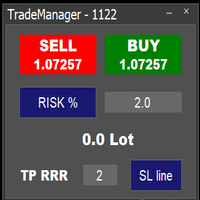
Easy to use trade manager/lotsize calculator. You can chose if you want to risk exact percentage of your account or exact amount of money. You can chose your risk to reward based on stoploss. Then you click on SL line and you can move where exactly you want to have stoploss. When you click on buy or sell, manager will calculate lotsize for you and opens trade. :) :)

TradeSnapは、BUY/SELLオーダーが約定した際に自動的に画面キャプチャを行い保存します。 チャートにセットするだけで、余計な作業をすることなく、自動で保存されます。
また、チャートに記載された線や矢印なども、そのまま画像に保存されます。 保存できる画像サイズは、10000x10000ピクセルですので、値動き経緯がわかる横長の画像で保存することもできます。
"s"キーで現在のチャートを保存します。
パラメタ設定 --Event Parameter--
Magic number (0=ALL): キャプチャ対象のマジックナンバーを指定します。
Entry: エントリー時にキャプチャします。
Exit: クローズ時にキャプチャします。
--Capture Info--
Image width, Image height: 出力する画像のサイズを指定します。
--Message Info--
Text color, Text size, Text pos, Display seconds: メッセージの表示内容を設定します。
画像の保存先:データフォルダ/MQL5/File
FREE

Introducing KML Grid: Maximize Your Trading Potential with the Grid Strategy
KML Grid is the ultimate tool to take your trading to the next level with the Grid strategy. Designed for ambitious traders, KML Grid provides you with an innovative way to capitalize on market fluctuations and maximize your profit potential.
Empower Your Trading with the Grid Strategy: The Grid strategy is known for its ability to harness market conditions within a range. KML Grid intelligently utilizes this strateg

TradeInfo is a utility indicator which displays the most important information of the current account and position.
Displayed information: Information about the current account (Balance, Equity, Free Margin). Current spread, current drawdown (DD), planned profit, expected losses, etc. Number of open position(s), volume (LOT), profit. Today’s and yesterday’s range. Remaining time to the next candle. Last day profit information. MagicNumber filter. Comment filter.
Indicator parameters: ShowPro
FREE

Telegram Bot EA This Expert Advisor (EA) is a powerful tool that allows traders to receive Telegram notifications, manage Drawdown alerts, set up charts, and much more, all directly from the MetaTrader 5 platform.
The Expert Advisor (EA) tool, integrated with Telegram, offers extensive customizable options to enhance your trading activities. The product allows you to display the signal name in the messages for easy tracking. It further provides the feature of sending the MQL5 link, either with

*Display all text information you need on your charts.*
This will help you on displaying text on the chart, to note everything , for example: strategy.
* BUY SIGNAL
- rule 1 - rule 2 - rule 3 - etc * SELL SIGNAL
- rule 1 - rule 2 - rule 3 - etc
This will remind you to follow the discipline and trading strategy set by you.
The Discipline to Follow Rules is the Mark of a Top Trader
Safety first, then profit will come.
FREE

Use Day Trading Tracker to keep a record of your earnings across accounts. This indicator will show a dashboard in the Meta Trader chart to show for the profit or loss money in your account. It’s easy to see just how much money you’re making matched betting with the Forex Trading Profit Tracker. Key features: Track your profit over time Check out your stats. Track expected profits against actual profits. Export account history to Excel. MT4 version: https://www.mql5.com/en/market/product/39113
FREE

This script allows you to visualize the risk of your account based on the open orders you have. * Low risk is between 0 and 10% of handicap * Medium risk is between 11% and 30% of handicap * High risk is more than 31% of handicap
The script displays the spread of the current pair, the total of open positions, showing the lotage for both directions (buy, sell) as well as the number of buy and sell operations.
FREE

FX28 Trader Dashboardをご紹介します - あなたの究極のトレードマネージャー FX28 Trader Dashboardは、あなたの外国為替(Forex)取引を新たな高みに押し上げるために設計された包括的で直感的なトレードマネージャーです。経験豊富なトレーダーでも、まだ金融の旅を始めたばかりの方でも、この強力なツールは取引活動を効率化し、意思決定プロセスを向上させるために開発されました。 主な特徴: ユーザーフレンドリーなインターフェース: FX28 Trader Dashboardは、あらゆるレベルのトレーダーに適したユーザーフレンドリーなインターフェースを備えています。さまざまな機能やツールを簡単にナビゲートし、わずか数クリックでトレードを完全にコントロールできます。 リアルタイムマーケットデータ: リアルタイムのマーケットデータフィードで先を見越してください。通貨ペア、トレンド、マーケットの変動に関する最新の情報を提供し、情報を元に自信を持ってトレードを実行できます。 高度なトレードアナリティクス: FX28 Trader Dashboardでは、高度なアナ

Position Calculator calculates how many lots to trade based on: Entry and stop-loss levels Risk tolerance Account size (balance, equity, or even your savings account) Account currency Currency exchange rates - The main tab of the panel provides the primary control over the EA's functions and serves to output the most important calculation results: the position size, risk, reward, and risk-to-reward ratio. - The risk tab can help you assess current and potential risk and reward profile. Using a s
FREE

The E.A listens for keyboard events and performs specific actions based on the keys that are pressed. When the "C" key is pressed, the script iterates through all open positions and closes them. When the "D" key is pressed, the script iterates through all pending orders and deletes them. This E.A could be useful for traders who want to quickly close all open positions or delete all pending orders with a single keystroke. and specially in times of strong news. if you are SCALPER facing many Prof

Exaado Capital care If you've been searching for ways to manage Drawdown control, Drawdown Control, Balance protection, or Daily Drawdown Limit related to trading with Prop Firms, FTMO, My Forex Fund, or Funded accounts, then you've come to the right place. Additionally, if you're looking to safeguard your trading account, we can help. Do you struggle with managing your drawdown while trading funded accounts? Our EA is designed specifically for those in your position. Many prop firms have a "Tra
FREE

product video: https://vimeo.com/824742776?share=copy Trade Assistant, Trade Manager, Trade Panel for MetaTrader 5 with the following functions:
- Display the remaining candle time and the current time of day
- Open long and short positions without SL and TP at the current market price
- Display of the current ask, bid and spread
- Open long and short positions with predefined lot size, SL and TP at the current market price
- Quick selection of the lot size (freely selectable lot sizes)
-
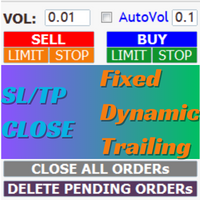
AIP – TradeManagement The main functions of Ea TradeManagement 1. GUI o Interact with running EAs o GUI for placing orders o Closing orders by Ticket o Closing orders by MagicNumber o Closing all orders o Delete Pending orders 2. General management: o Management based on Symbol, manually orders , orders from the EA, and orders from other EAs o User-friendly trade interface with the ability to drag and drop SL,TP,Entry o Support backtest
3. Stoploss man

Breaking TrendLine This Forex Expert Advisor is a semi-automated trading system that utilizes trend lines and support/resistance levels to execute buy and sell orders in the foreign exchange market. The system automatically places stop-loss and take-profit orders based on predefined parameters set by the user. The Expert Advisor operates on an algorithmic approach to trading, allowing for precise and timely execution of trades without the need for human intervention. This system provides traders

[ MT4 Version ] [ Discord Version ] [ Pro: Telegram + Discord ] Post your trades to Telegram automatically — and keep every signal UPDATED: this is the only sender that EDITS the original message when you modify SL/TP or close the trade. Your followers always see the real state of every trade, and your channel stays clean and professional. Built for signal providers, VIP channel owners and traders who share their trading. WHY THIS ONE ️ EDITS THE ORIGINAL SIGNAL

Instead of sticking to the Charts,let's use OneKey.
Welcome to our new product - OneKey ! This is a great product written in MQL5, a streamlined version of the ALL IN ONE Keylevel product with the only feature removed being Algo trading. Other features of the product are kept intact and not affected. OneKey integrates many notable functions, including trend determination and Kelevel drawing, detecting Engulfing candle signals, Pinbar, Sideway breakout patterns, BOS, CHOCH, along with profession
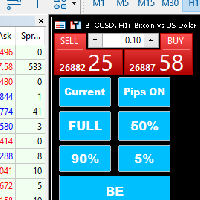
Introducing our MT5 Expert Advisor (EA) with advanced functionality to optimize your trading strategy: Current/All Button: Choose between closing trades on the current chart or all running trades across multiple charts. Enjoy flexibility in managing your positions with a single click. Pips Display Toggle: Easily view or hide your running pips and total pips. Stay informed about your trade progress with real-time updates. Full Close Button: Close all active trades swiftly and efficiently. Streaml

Hide Scale - 画面スペースを増やしたいトレーダーのためのツール 使用方法 時間スケールを非表示にするには「T」を、価格スケールを非表示にするには「P」を押します。 これらのキーをカスタマイズするには、対応するボタンをクリックしてキーボード上の新しいキーを入力します。 両方のスケールを同時に非表示にするには、同じキーを両方のオプションに割り当てることができます。 スケールを再表示するには、再び対応するキーを押すだけです。 このツールを作成した理由 当社のインジケーター Sweet VWAP を使用するトレーダーが、より多くのスペースを持つためにこのHide Scaleツールを作成しました。 このツールを使用することで、画面スペースの制限に直面するすべてのトレーダーが快適かつ生産的な作業環境を提供することを目的としています。 このツールは、ローソク足の形成や価格の動きを観察する必要があるprice actionトレーダーにとって特に役立ちます。 当社のツールを使用すると、スケールを非表示にするためにキーを押すだけで済みます。 これにより、トレーダーは市場分析に集中できます。 キ
FREE

MQL5ユーティリティボタンの紹介 - 楽な取引管理のための究極のソリューション!ワンクリックで、すべてのオープンポジションを即座に閉じることができ、取引体験をこれまで以上にスムーズかつ効率的にします。
この革新的なツールは、シンプルさを念頭に置いて設計されており、あらゆるレベルのトレーダーにとって使いやすいことを保証します。あなたがベテランの専門家であろうと初心者であろうと、MQL5ユーティリティボタンは比類のない容易さであなたの取引を管理するための手間のかからない方法を提供します。 このボタンは、すべてのオープンポジションを閉じるプロセスを簡素化するだけでなく、貴重な時間を節約します。各ポジションを1つずつ手動で閉じる必要はもうありません-MQL5ユーティリティボタンは、ほんの数秒ですべてを行います。 では、なぜ待つのですか?今すぐMQL5ユーティリティボタンをダウンロードして、取引を次のレベルに引き上げましょう。シンプルで効率的、そしてすぐに使用できる-貿易管理プロセスを合理化しようとしているトレーダーに最適なツールです。
FREE

Because of the variety of strategies that traders and investors have developed over time, quantified, statistics-based strategies over time stand out. Statistical strategies are not based on technical analysis or similar patterns, as some might expect, but on the approach of using recurring patterns in the market, caused, for example, by liquidity effects, on the basis of a period-based entry and exit.
The Quantifier Expert Advisor therefore offers the possibility to implement exactly these sa
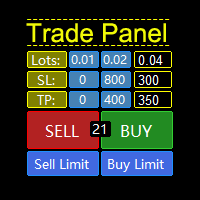
MQL5 Trading Panel SL TP — это мощный инструмент, призванный помочь трейдерам эффективно управлять своими позициями на платформе MetaTrader 5. Эта торговая панель предоставляет простой в использовании интерфейс для установки уровней Stop Loss (SL) и Take Profit (TP) для открытых позиций. MQL5 Trading Panel SL TP обладает широкими возможностями настройки и может быть адаптирована к конкретным потребностям отдельных трейдеров. Панель можно изменять в размере, перемещать и настраивать с помощью ра

--- StudentK Strategy EA --- 1. Various strategies available 2. Private channel for discussion 3. Keep going improvements for opportunities
4. Adapt StudentK's Indicators for advanced usage
5. ** Price must be increased from time to time (old 1-year members will get discount) **
--- Context --- StudentK is not indicated as a master or K Sir for knowledgeable person who claims for winning all the time. (But lots of traders should know the fact that it is rarely truth, especially in fluctuated p

Индикатора группирует исторические и актуальные данные по наименованиям инструментов. Индикатор работает с любыми инструментами. Сортировка по наименованию инструмента и прибыли, убытку. Движение средств (ввод / вывод), прибыльность за последние две недели. Информация сведена в таблицы с возможностью настройки формата таблиц. В одном окне информация по всем инструментам с которыми вы когда - либо работ работали.
チャートの任意の場所でマルチシンボルをダブルクリックして、価格アラートを設定し、ターミナルアラートまたはプッシュ通知から通知を受け取ります
1. EA ユーティリティをチャートに追加する
2. <- 左または -> 右矢印キーでチャートをブラウズ
3. チャートの任意の場所をダブルクリックすると、線が追加されます。この線をドラッグして希望の価格を設定すると、アラートが設定されます! 価格がラインに到達すると、ユーティリティの設定に従って端末またはプッシュ通知で通知されます。 ターミナルを再起動しても、このアラートは機能し続けます。
4. マルチシンボルを閲覧し続け、アラートで通知したい多くのチャートに線を追加し続けます.
5. 最初からやり直したい場合は、D を押して、設定したすべてのアラートを削除します。
6. 水平線を削除すると、アラートが無効になります。


[ MT4 Version ] [ Telegram Version ] [ Pro: Telegram + Discord ] Post your trades to Discord automatically via webhook — no bot setup, no permissions: paste ONE URL and you are live in 60 seconds . And keep every signal UPDATED: the original message is edited when you modify SL/TP or close the trade. Built for signal providers, trading communities and prop-firm teams living on Discord. WHY THIS ONE WEBHOOK-BASED — no bot to create, no tokens, no permissions. Disc

The application works as a service. It sends the report to the e-mail address you enter in your Meta Trade program.
Prepares H1 analysis reports every hour.
Prepares and sends D1 analysis reports after 00:00 at night.
Meta Trader analyzes all symbols loaded from the watch screen.
Below is a report for H1. I have added 2-3 symbols in the market watch as an example.
You have an assistant who does these analyzes for you every hour and sends you an e-mail. All the analysis is now done for yo

El EA Boton pone botones de Buy y Sell en la pantalla Ideal para usuarios que habren muchas ordenes y diferentes pares
9 botones buy desde 0.01 al 0.09 y 9 botones sell de 0.01 al 0.09 9 botones buy desde 0.1 al 0.9 y 9 botones sell de 0.1 al 0.9 Boton Close buy y sell Boton Close buy positivos y Boton Sell positivos Boton Close buy negativos y Boton Sell negativos un boton close all y botones buy de 1, 5 y 10 y botones de sell 1,5, 10

This utility is a stop loss assistant simply make a trade as you desire, ether a buy or a sell. Manually set your own stop loss as you desire the higher the timeline the lower the stop loss.
When the Algorithm Trading or Auto Trading is enabled the stop loss will follow the market price. Stop/disable the Algorithm Trading or Auto Trading.
This is a simple stop loss tailing utility use at own risk or pleasure.

It Will Close Your All Trade in Half of second no matter you open 100 plus trade open it will close all trade half of second .
it good work for 1 -5 min scalping this Ea have many function see the pic i uploaded there .
ea that have function close all trade , close all lossing trade , close all profit trade . also have lot system where you can put your expected lot and buy sell button and it can close 100 trade in 1 second

Trade Manager は、リスクを自動的に計算しながら、取引を迅速に開始および終了するのに役立ちます。 過剰取引、復讐取引、感情的な取引を防止する機能が含まれています。 取引は自動的に管理され、アカウントのパフォーマンス指標はグラフで視覚化できます。 これらの機能により、このパネルはすべてのマニュアル トレーダーにとって理想的なものとなり、MetaTrader 5 プラットフォームの強化に役立ちます。多言語サポート。 MT4バージョン | ユーザーガイド + デモ Trade Manager はストラテジー テスターでは機能しません。 デモについてはユーザーガイドをご覧ください。 危機管理 % または $ に基づくリスクの自動調整 固定ロットサイズを使用するか、ボリュームとピップに基づいた自動ロットサイズ計算を使用するオプション RR、Pips、または価格を使用した損益分岐点ストップロス設定トレーリングストップロス設定 目標に達したときにすべての取引を自動的に終了するための 1 日あたりの最大損失 (%)。 過度のドローダウンからアカウントを保護し、オーバートレードを防ぎます

Tick Database — export of tick database from MT5 terminal to MT4. The utility provides access to the tick database in real time. This is necessary to generate synthetic charts in the MT4 terminal, which initially does not provide for loading a tick database. For example, you can organize permanent access to the tick database for the Seconds Chart utility. If the opening time of the current candle in the terminals is different, then you need to specify the time offset in hours. Example We open M1
FREE

1. What is this Many of the EA's on the market have cheats inside to optimize its money curve, which results in the buyer wasting money and effort and buying a junk EA . This tool is an effective tool for detecting whether an EA is cheating by allowing the data to be panned to the left for 28 years. 2. How to use a. Load it and it will generate a new symbol, usually it will be named with a suffix. For example, EURUSD --> EURUSD_28year. b. If your want to test one EA, you should open The time fr

TrendFollowing is an multi-currency scanner that just indicates where to buy/sell: Abilities: Opens up the chart automatically with and arrow indicating where to take action. Send the signal to a telegram channel, see @fx_signal_com channel to get the idea. Configuration: No need to configure "Market Watch". Open a chart and attach the scanner to it. Trading Rules: Use only buystop/sellstop orders above/below arrow on the chart. Delete the pending order if price retraces below/above the moving
FREE

TrendFollowing is an multi-currency scanner that just indicates where to buy/sell: Abilities: Opens up the chart automatically with and arrow indicating where to take action. Send the signal to a telegram channel, see @fx_signal_com channel to get the idea. Configuration: Configure "Market Watch" with all the symbol you like to trade. Open a chart and attach the scanner to it. Trading Rules: Use only buystop/sellstop orders above/below arrow on the chart Delete the pending order if price retrac
Este script permite abrir operaciones de forma rápida con un loteo automático basado en el "equity".
También permite habilitar/deshabilitar la colocación de SL y TP al hacer clic en un botón. Si se habilita el SL o el TP, también se tiene la posibilidad de establecer el riesgo que se desea tomar en pips.
* Se recomienda ocultar los botones de compra y venta originales.
FREE

Local_Timeは、チャート下部に指定の時差または、自動計算された時差でオリジナルの時間目盛りを追加します。
時間目盛りには、「DD.MM hh:mm」「DD MMM hh:mm」「MM-DD hh:mm」「MM/DD hh:mm」「DD hh:mm」「hh:mm」などなど対数のフォーマットに対応しています。
時差計算の必要性がない方でも、標準の時間目盛を消して、この時間目盛でサーバー時間の表示形式を変えるだけで、チャートの見やすさがアップするでしょう。
また、この日時バーよりも下にサブウインドウが作られてしまった場合は、赤いバーが表示されクリックすると最下部に移動する機能も付いています。
表示イメージは、スクリーンショットをご覧ください。
how to use
https://www.mql5.com/en/blogs/post/752455
FREE

チャート下に表示されるテキストボックスから、Slackに投稿するツールです。 w/Imgのボタンからは、チャート画像も送ることができます。
チャートに線やマーク、コメントなどを書いても、その画像が投稿されます。
使い方は簡単。 メッセージを入力し、SENDボタンでメッセージの投稿、w/IMGボタンでメッセージ+画像の投稿を行うことができます。 どんな使い方ができるか、人それぞれですが、Slackでコミュニケーションをされている方であれば、チャート画像を一発送信できるので便利だと思います。
*Slack API"のTOKENをパラメタに設定しますので、取得する必要があります。
ストラテジーテスターでも動作を確認できます。
FREE
Trading assistant that offers advanced management of your trades with optimization features. It automatically calculates the risk per trade, makes it easy to set up new orders, and offers advanced management tools such as automatic trade closing in 5 different ways. It also has other useful features that will improve your control and decision making. And best of all, you can use it in the strategy tester to perfect your tactics before trading live!
Our trading assistant is a trading tool that

Here is a powerful trading tool that will allow you to trade manually or automatically in any market, but is especially useful in markets with high volatility and liquidity.
This system has two EAs (Expert Advisors): one for Buy and one for Sell, which work independently. The operation is based on the hedging strategy and the increase in lots based on the Fibonacci sequence, which will allow you to always add the two previous lots: 1, 2, 3, 5, 8, 13...
You decide how you want to trade: you ca

PropAngel EA is a manager EA to help you to pass proprietary firm challenges and evaluations and to keep your funded accounts. PropAngel EA makes sure you do not breach daily drawdown limit which gives you change to continue trading the account and recover from the drawdown. PropAngel EA makes sure that at the moment you have reached your challenge, evaluation or scaling target all trading will be immediately stopped. This is done to prevent account falling away from the target. PropAngel EA giv
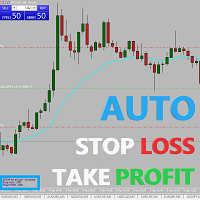
Easy and simple Automatic Stop Loss and Take Profit manager.
For all pairs, indexes etc. Works with all instruments.
All types of orders. All charts.
Users inputs:
- take profit in pp
- stop loss in pp
- font name,size and color
- corner for place settings info
Save & Load settings option.
Fast, simple and reliable trade assistant.
A "MUST HAVE" for all traders.
Check out other tools provided by our team!

Easy and simple tool which close all trades in defined point of time. It can also close all open trades when opened positions reach defined target profit or stop loss.
For all pairs, indexes etc. Works with all instruments.
All types of orders. All charts.
Users inputs:
- close time (hour,min,sec)
- take profit (in users currency)
- stop loss (in users currency)
Save & Load settings option.
Fast, simple and reliable.
Check out other tools provided by our team!
FREE

This indicator shows both GMT time and your broker's time on the chart.
Simply attach the indicator to a chart, and you will see the GMT time and your broker's time displayed in the top left corner, as shown in the screenshot. By using this indicator, you can always stay informed about your broker's time, which is especially useful during daylight saving changes.
You won't have to worry about whether your broker follows the US or EU schedule, as the indicator automatically adjusts to reflect any
FREE

私たちの多くは、VPSを使用して24時間365日取引EAを実行していますが、これらの端末が稼働しているかどうかを監視するにはどうしたらよいでしょうか。
もし、クラッシュしたり、アップデートのためにシャットダウンしたらどうする?そのような場合、どのように通知されるのでしょうか?
そこで、ハートビート・モニタリングの出番です。
24時間365日、すべての端末とVPSを監視することができるのです。
では、そのために必要なものは何でしょうか?
1.プロフェッショナルな監視サービスである Cronitorの 無料ユーザー アカウント 。
2.VPS上のチャート上で動作する本ツール。 MT5や接続の問題が発生した場合、メールにて通知されます(より多くの通知方法があります)。
私たちはこの技術的ソリューションを、重要なバックエンドインフラの監視に使用しているので、信頼性と有用性は実証済みです。
私のパートナーのブログ:Daniel Steinで 完全なチュートリアルをお読み ください。
もしご希望であれば、 Nodepingサービス (有料)をご利用ください。
詳細とスクリーンショッ
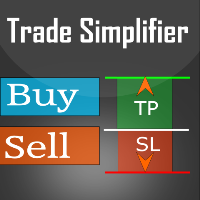
Trade simplifier is a trade panel that simplifies trade opening. It is simple and easy to understand, with key features to ease trading. Features include:
Order type selection Fixed lot entry from the chart user interface Easy Take profit entry field on the chart user interface Visual take profit selection and adjustment via the line that appears when you click the Take Profit button Easy Stop loss entry field in points on the chart user interface Visual Stop Loss selection and adjustment via
FREE

Copy trades with ease using the MetaTrader5 trade copier - the quickest and easiest way to copy transactions between different MetaTrader 5 accounts! This innovative tool allows you to locally copy trades in any direction and quantity, giving you full control over your investments.
Attention!
You need to download the Trade Copier Slave mq5 file as well to run this EA. Download it from here https://www.mql5.com/en/market/product/96541
Designed to work on both Windows PC and Windows VPS, this
FREE
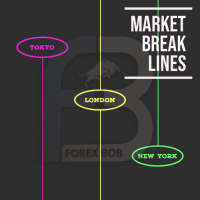
Market Break Lines is an utility tool to create a partition line at market openings/closings of Tokyo/London/NewYork sessions. This will help you to compare the market movements, volatility variations between the different markets.
Inputs: Inputs are simple to feed the time of Tokyo/London/NewYork sessions as per your broker server time Change Color and width of partition lines You can enable or disable any line (Hide/Show).
Please don't forget to support by giving handsome reviews/rating MT
FREE

Copy trades with ease using the MetaTrader5 trade copier - the quickest and easiest way to copy transactions between different MetaTrader 5 accounts! This innovative tool allows you to locally copy trades in any direction and quantity, giving you full control over your investments. Designed to work on both Windows PC and Windows VPS, this program is versatile and adaptable to your trading preferences. Whether you prefer to work from your desktop or a virtual private server, the MetaTrader5 trade
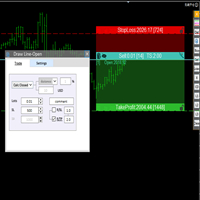
交易者的最佳伙伴! 基本使用设置 基本: 支持语言的选择切换(目前支持中文和英文) 自动识别语言 划线交易
支持英文中文自动选择,自动识别.
1.划线交易 ( 支持拖拉,支持多个订单线 ) 2.手数管理: 两种手数计算模式 ①资金的风险比例,例如设置风险百分比为1的时候,1万美金可交易1手. 计算手数 = 资金(净值或者余额或者剩余保证金) * RISK /10000 ②按亏损金额计算,本设置需要配合止损设置, 计算手数 = ( 当订单被初始下单设置的止损所止损的时候所亏损金额 计算得到的手数,小于最低手数会等于最小手数) ; 3.盈亏比等设置,
设置部分 1. 自动吸附最近高低点 2.高低点偏移 3.自动选择订单习惯 4.SL TP设置方式 5.语言设置

IMPORTANT: Blocks&Levels Alerts MT5 indicador.
Gives you the ability to easy draw Blocks and Levels (support and resistance) using key shortcuts and Alerts when price touch them. Please use it and give me feedback!! It really helps! Thank you very much! DESCRIPTION:
Blocks&Levels Indicator, has useful key shortcuts for draw Levels, Blocks Zones, change chart Time Frames, Select or Deselect all drew objects. SETUP: Just install the Indicator on the Chart
Open and navigate Indicator properties

Bot to attach to any different chart than the one using to get the orders and send them to telegram Inputs: Telegram Bot Token, Telegram Chat ID Sends Open Price, Order Type, Lots, Take Profit and Stop Loss instantly after the trade is executed. Easy to SetUp and to use My other Bot for XAUUSD and USDCHF: https://www.mql5.com/en/market/product/94001 Just remember to go to Tolls->Options->ExpertAdvisors->Allow Web Request for listed URL: https://api.telegram.org/

このツールは、ポジションにストップを配置します
Metatrade Strategy Tester ですばやくテストします。 ロング ポジションの場合、ストップは最後の底になります。 または、ショート ポジションの場合、ストップは最後のトップになります。
さらに、このツールはオープン ポジションのトレーリングを管理します。 常に最後に形成された高値または最後に形成された底にストップを置きます
上値と下値を作成するには、このリンクからダウンロードできる無料のインジケーター「サポートとレジスタンス ライン」を使用します: メタトレード 5 の無料の上下インジケーターをダウンロード
このツールは、挿入された資産のすべてのオープン ポジションのストップを移動します。

"Terminator Trades " EA robot, built on the powerful MQ5 code, is designed to simplify the process of closing your positions and pending orders. You can adjust if you want close all the trades or by specific symbols. With just a single click on a button, you can efficiently manage your current positions, ensuring that you never miss an opportunity to terminate a trade. Close Trades , Delete Pending Orders with Terminator Trades.
FREE

All in one Multipurpose Telegram Trade Management , Manage and Copy Trades on the go From Telegram Pro Version MT4: www.mql5.com/en/market/product/85691
Execute Trades on mobile with fast execution When away from desktop MT5, or scalping the market with mobile device, or needed to copy trades from telegram groups while away, or doing some other activities, Telegram EA Manager is an effective tool to perform any trade operation with swift execution. In other words, Our Telegram Trade Manag

All in one Multipurpose Telegram Trade Management , Manage and Copy Trades on the go From Telegram Pro Version MT5: www.mql5.com/en/market/product/95742 Pro Version MT4: www.mql5.com/en/market/product/85691
Execute Trades on mobile with fast execution When away from desktop MT5, or scalping the market with mobile device, or needed to copy trades from telegram groups while away, or doing some other activities, Telegram EA Manager is an effective tool to perform any trade operation with swift
FREE
Chart Chimes のご紹介 - 取引を音の交響曲にする MT4/MT5 インジケーター! 一日中チャートを見つめるのにうんざりしていませんか? 取引中に気分を高揚させるために、ちょっとした気晴らしが必要ですか? まあ、Chart Chimes があなたをカバーしてくれます!
チャート チャイムを使用すると、そのボタンを押すたびに楽しい音が聞こえ、あなたの顔が笑顔になり、足元がスキップされます。 勝利を収めたトランペットや穏やかなハープの音を背景に取引をすることを想像してみてください - それはあなた自身の個人的なオーケストラがあなたを応援しているようなものです!
しかし、Chart Chimes は楽しい気晴らしだけではありません。取引中に集中して関与し続けるのに役立つ強力なツールです。 サウンドをカスタマイズする機能により、取引スタイルや好みに合った独自のサウンド環境を作成できます。 あなたのストップロスに固執するためのちょっとしたリマインダーが必要ですか? 審判の笛を模した音を設定してみませんか。 または、花火の音で取引の成功を祝いたいと思うかもしれません - 可能性
FREE

Blind Broker System の唯一の目的は、取引計画を隠し、ブローカーに見えないようにすることです。 あなたが本当に彼を「ブラインド」にしたいのであれば、彼があなたのストップロスレベル、テイクプロフィットレベル、ボリュームについて事前に何も知らないことを確認してください - ただこのトレーディングロボットを使用してください.
氏に感謝します。 このプロジェクトの開始とアイデアについては、Henryk Kardas 氏に感謝します。 MQL が提供する無料のデモでは、この EA の機能をテストできないことに注意してください。 実際のテストについては、実際のデモ バージョンをダウンロードしてください。
デモ版へのリンク https://www.mql5.com/en/market/product/94192
Blind Broker System は、注文管理の代替システムです。 ある意味、Meta Trader Terminal 内のシステムと同じです。
違いは、ブローカーのサーバーに書き込まれるのではなく、Blind Broker System を通じて

ขอบคุณ แรงบันดาลใจ จากโค้ชแพม ที่ทำให้เริ่มทำ Close all ตัวนี้ และขอขอบคุณทุกคนที่ให้ความรู็มาโดยตลอด ไม่ว่าจะทางตรงทางอ้อม ขอบคุณทุกคนที่ให้ความรู้เพื่อนร่วมเทรด ทั้งนี้เพื่อให้นักเทรดทุกคนได้มีเครื่องมือในการควบคุมการปิดการซื้อขาย จึงขอพัฒนาโปรแกรม close all version 5 ได้ใช้ทุกคน Close all and update profit Version 1.00 (MT5) Full version Give you free
For MT4 Click https://www.mql5.com/en/market/product/79252
Fix TPSL calculate
Program function
Tab 1 Close order function and show br
FREE

Introducing the "Auto Timed Close Operations", a useful utility for MetaTrader 5 traders! This utility has been developed to help traders of all levels automatically close their open positions at the exact moment they desire. With the "Auto Timed Close Operations", you gain the required control over your trades and can avoid unwanted surprises at the end of the day or at any other predefined time. We know how important it is to protect your profits and limit your losses, and that's exactly what
This EA will set breakeven or breakeven-plus for your trades, whether you have manually or automatically set stop loss or not. If your broker charges commissions per trade, you need to set breakeven plus, not just breakeven, in order to cover up those charges and properly let your trades run at zero risk. Inputs:
In the inputs section , set BEPoffsetPips to 0, to use it as a "breakeven" EA. Or set BEPoffsetPips to any amount of pips you want, to use it as a "breakeven-plus" EA. "OnProf

Customize your charts with this simple utility. Choose in the 24 pre-built color sets, or use your own colors, save them to re-use them later. You can also add a text label on your chart.
--- Chart Colors-- Color Set : 24 prebuilt color sets (select "Custom" to use colors below) Background color Foreground color Grid color Chart Up color Chart Down color Candle Bull color Candle Bear color Line color Volumes color --- Label--- Text Label : Type the text you want to appear on the chart Label P
FREE

OR One-Click - Exiting EA on OsMA and RSI
This utility will not create a new position for you nor will it find a new opportunity. It will help you exit a trade. It allows you to use the "One-Click" feature on your cellphone MT5 APP to place a trade; then the utility will modify and manage the position until it is closed. This utility will work on the following 16 symbols. USDJPY, EURJPY, AUDJPY, CADJPY, GBPJPY, EURUSD, EURGBP, EURCAD, EURAUD, AUDCHF, AUDCAD, USDCAD, USDCHF, AUDUSD, GBPUSD, N
FREE
MetaTraderプラットフォームのためのアプリのストアであるMetaTraderアプリストアで自動売買ロボットを購入する方法をご覧ください。
MQL5.community支払いシステムでは、PayPalや銀行カードおよび人気の支払いシステムを通してトランザクションをすることができます。ご満足いただけるように購入前に自動売買ロボットをテストすることを強くお勧めします。

取引の機会を逃しています。
- 無料取引アプリ
- 8千を超えるシグナルをコピー
- 金融ニュースで金融マーケットを探索