 MetaTrader 5
 Experts
 지표
지표
 라이브러리
라이브러리
 유틸리티
유틸리티
 위젯
위젯
 규칙
규칙
MetaTrader 5용 무료 트레이딩 유틸리티 - 4
 다음은 MetaTrader 5의 거래를 단순화하는 거래 프로그램입니다. 유틸리티의 설명과 목적을 읽으려면 유틸리티 위에 마우스를 놓으십시오.
EquityGuard is a silent account-protection utility. It watches your equity in real time and closes every position, deletes pending orders, and (optionally) shuts the EA down the moment a configurable loss, drawdown, or profit threshold is hit.
Built for prop-firm traders (FTMO, MFF, FundedNext, The5ers), multi-EA portfolios, and anyone tired of watching a green day turn red.
Key features - Daily loss limit — % from start-of-day balance - Daily profit target — lock in the day when reached - Ma
FREE

Chart Link allows you to control multiple charts from one chart or multiple charts from multiple charts. Features 1. Synchronised Scrolling : Scrolling the master chart also scrolls all linked sub charts to the same position. Sub charts inherit offset and auto-scroll settings from the master chart. 2. Synchronised Timeframe : Switching the master chart timeframe also switches all linked sub charts. 3. Synchronised Symbol : Switching the master chart symbol also switches all
FREE

Native Depth Viewer renders the order book of the current symbol directly on the chart: ask ladder, bid ladder, spread, and bid/ask volume imbalance. MarketBookAdd, OnBookEvent and MarketBookGet, the functions this indicator is built on, have no equivalent in MQL4. This reading is native to MetaTrader 5 only.
WHAT IT SHOWS
When your broker does publish a real book for the symbol: Ask ladder (sell side), worst price first, reading top-down like a real DOM Bid ladder (buy side), best price firs
FREE

BreakEven Trailing은 이미 보유 중인 포지션의 손절(스톱로스)을 관리하는 MetaTrader 5용 유틸리티입니다. 손절을 본전 가격으로 옮기고 가격을 따라 이동시키므로, 차트를 계속 지켜보지 않아도 평가이익을 지킬 수 있습니다.
이 EA는 신규 진입을 하지 않으며 시장가로 청산하지도 않습니다. 기존 포지션의 손절만 변경합니다. 청산은 EA가 설정한 손절에 가격이 도달했을 때 이루어집니다.
주요 기능
- 포지션의 평가이익이 지정한 pips에 도달하면 손절을 진입 가격 또는 진입 가격에서 지정한 만큼 이익 방향으로 이동한 위치로 옮깁니다. - 평가이익이 지정한 pips에 도달하면 현재 가격에서 일정 거리를 유지하며 손절을 따라 이동시킵니다. - 본전 이동과 트레일링은 각각 켜고 끌 수 있으며 함께 사용할 수도 있습니다. - 매수(BUY)와 매도(SELL) 포지션 모두 지원합니다. - 기존 손절을 더 불리한 위치로 되돌리지 않습니다. 손절은 이익을 더 많이 지키는 방
FREE

Simple panel with Stop loss (Loss), Stop gain (Gain) , Trailing stop (TS) and Breakeven (BE-P).
Lot is the number of contracts to be traded.
Gain is the number, in points, that the stop gain will be positioned. If you don't want to put stop gain, just put 0 (zero) in place and when you open the order it won't have this stop.
Loss is the number, in points, that the stop loss will be placed. If you don't want to put stop loss, just put 0 (zero) in place and when you open the order it won't ha
FREE

제품이 마음에 드셨다면 댓글과 평가를 남겨주시는 것을 잊지 마세요!
Advanced PolyLines는 MetaTrader 5 차트에서 직접 폴리라인을 생성하고 편집할 수 있는 도구입니다. 여러 개의 선분을 하나의 구조로 연결할 수 있어 차트 분석에 사용하는 라인의 생성과 관리를 편리하게 할 수 있습니다. 여러 선분으로 구성된 구조를 쉽게 관리할 수 있도록 설계되었습니다. 연결된 포인트를 함께 이동할 수 있어 각 라인을 개별적으로 편집하지 않고도 전체 구조를 조정할 수 있습니다. 주요 기능 도구 인터페이스 차트에 통합된 인터페이스를 통해 그리기 모드를 활성화하고, 컨트롤을 숨기거나 생성된 폴리라인을 삭제할 수 있습니다. Magnetic Snap 마우스 커서가 캔들의 OHLC 가격 수준에 가까워지면 포인트를 해당 가격에 자동으로 정렬할 수 있습니다. 이를 통해 시가, 고가, 저가 및 종가에 라인을 배치할 수 있습니다. Joint Dragging 여러 선분이 공유하는 포인트를 차트에서
FREE

Trade Copier Pro Trade Copier Pro는 Meta Trader 5 용 거래 복사 도구로, 여러 MT5 계정 간의 거래를 실시간으로 복사하도록 설계되었습니다. 이 제품을 통해 트레이더는 서로 다른 브로커의 여러 계정을 연결하고, 마스터 계정과 슬레이브 계정을 설정하며, 거래가 계정 간에 어떻게 동기화되는지 관리할 수 있습니다. 계정 동기화, 전략 복제 및 다양한 거래 환경에서의 거래 관리에 적합하도록 설계되었습니다. Trade Copier Pro는 Meta Trader 5 내부에서 직접 실행되며 외부 서비스가 필요하지 않습니다. 기능 다중 계정 연결 여러 MT5 계정을 동시에 연결하고 하나의 인터페이스에서 관리할 수 있습니다. 지원되는 계정 유형: • 개인 계정
• Prop Firm 계정
• 브로커 분산용 계정
• 전략 테스트용 계정 브로커 호환성 다음과 같은 다양한 브로커 간 계정 복사를 지원합니다: • HFM
• RoboForex
• IC Markets
• E
FREE

Synthetic Chart Generator — MetaTrader 5용 인디케이터 Synthetic Chart Generator는 브로커 서버에서 실시간으로 수신되는 가격 데이터를 사용하여 1분 미만의 타임프레임에서 캔들 차트를 생성하는 인디케이터입니다. 이 인디케이터의 기능 MetaTrader 5는 기본적으로 1분 미만의 타임프레임을 지원하지 않습니다. 이 인디케이터는 수신된 가격 데이터를 사용자가 설정할 수 있는 간격(예: 10초, 15초 또는 30초)으로 그룹화하여 해당 타임프레임을 대체적으로 구성합니다. 설정된 각 간격마다 인디케이터는 시가, 고가, 저가, 종가를 기록하여 완전한 캔들을 형성합니다. 결과는 터미널 내에서 사용자 정의 심볼로 게시되며, 사용자가 다른 인디케이터를 적용하거나 기준 레벨을 그리거나 Expert Advisor를 실행할 수 있는 완전히 기능하는 차트가 생성됩니다. 주요 특징 초 단위로 사용자가 설정할 수 있는 타임프레임. MetaTrader 5 내에
FREE

Trade Manager OS is a risk-based order panel for MetaTrader 5. You decide where the entry, stop loss and take profit go. It works out the lot size so that a stop-out costs the amount you chose, in money or as a percentage of your account, and shows every number before you click. Then it keeps working after the order: breakeven, trailing stop, scale out and a daily loss guard run on the positions it sent, so you do not have to watch every tick. HOW IT WORKS Choose how much to risk: a fixed amount
FREE

MetaTrader 5 용 무료 일괄 청산 도구입니다. 그리드나 헤지, 또는 하나의 아이디어를 향한 여러 건의 거래를 굴리고 있다면 중요한 것은 한 건 한 건이 아니라 묶음 전체입니다. 이것을 차트에 붙이고 합계 목표를 정해 두면, 보유 중인 거래의 합계가 그 목표에 닿는 순간 전부 한꺼번에 청산합니다. 새로 진입하지 않고 신호도 내지 않습니다. 무엇을 하는가 목표에 닿으면 묶음 전체를 청산합니다. 보유 중인 거래의 합산 결과가 목표에 도달하면 한 번의 처리로 전부 함께 청산합니다. 손실 한도도 선택할 수 있습니다. 합계 손실을 정해 두면 합산 결과가 거기까지 내려갔을 때 묶음을 청산합니다. 묶음 단위의 단순한 손절입니다. 청산을 끝까지 해냅니다. 목표에 닿으면 묶음 전체를 정리하고, 모든 거래가 닫힐 때까지 물러서지 않습니다. 그래서 브로커의 일시적인 거부 때문에 한 건만 남아 버리는 일이 없습니다. 목표는 편한 단위로 계좌 통화 기준의 고정 금액. 잔고 대비
FREE

Coming soon: short GIFs showing how to use every part of this manager. I am working on them - please bear with me, they are on the list right after "put the kettle on".
Trade manually, manage automatically. Break even, trailing stops, partial closes and an equity guard - all from one clean panel. Free - no DLL, no internet, no subscription.
A ton of work has gone into this to make it the best I can make it, and it is free - not a trial, not a lite version - and it always will be. I am still d
FREE

TradeCopier allows you to locally copy transactions between different MetaTrader 5 accounts on the same computer or vps with very little input from the user. Find out more: Her e Features One Chart Setup you only need one chart to trade all available symbols Multiple currency pairs support Very easy to use - minimal input from the user is required Has a very high refresh rate - it can refresh every 1 millisecond and in doing so reduce the lag between the transmitter account and receiver accoun
FREE

Manzano Risk Reward Box The PRO version, including direct trade execution and automatic R-based trailing management, is available. For information about the PRO version, please contact us via MQL5 private message. Manzano Risk Reward Box is a visual trade planning and risk management tool for MetaTrader 5, designed to help traders prepare their positions directly on the chart before execution. It allows users to create visual BUY and SELL scenarios, define the percentage of the account they want
FREE

The "Close All Order Tools" tool is designed to solve common problems faced by Forex traders when managing profitable orders—especially in highly volatile market conditions or when dealing with multiple open trades simultaneously. Problems This Tool Solves: Unable to close orders in time : “Just when it was rising nicely, the price suddenly dropped—I couldn’t close it in time, and the profit vanished.” Closing orders one-by-one is time-consuming : “With multiple orders open, closing each one ind
FREE

네, 알겠습니다. 제품 설명 전문을 한국어 트레이딩 환경에서 사용하는 전문 용어로 다듬어 번역해 드립니다. MTForge Chart Trader — 전문가용 차트 기반 거래 집행 및 관리 패널 MetaTrader 5 전용으로 개발된 가장 완벽한 차트 기반 주문 집행 시스템 MT5 Chart Trader 는 세련되고 직관적인 차트 위 패널을 통해 기관급 주문 집행, 브라켓 관리, 리스크 컨트롤 기능을 MetaTrader 5에 제공합니다. 진입, 관리, 보호, 청산에 필요한 모든 기능을 차트를 벗어나지 않고 사용할 수 있습니다. 외부 브릿지, DLL 의존성, 타사 플랫폼이 전혀 필요 없으며, MT5 터미널 내부에서 직접 실행되는 순수 MQL5로 제작되었습니다. 1분 차트에서 NQ(나스닥) 선물을 스캘핑하든, 15분 차트에서 외환 데이트레이딩을 하든, 일봉 차트에서 골드 스윙 트레이딩을 하든 — MT5 Chart Trader는 전문 트레이더가 요구하는 실행 도구를 제공하며, 분석을 방해
FREE
如果产品有任何问题或者您需要在此产品上添加功能,请联系我 Contact/message me if you encounter any issue using the product or need extra feature to add on the base version.
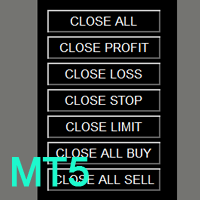
You can get the free Close Button MT4 version at LINK . Close Button provides you an intuitive, effective, and handy way to close your orders and/or positions based on their type and their profit status. The tool provides seven close options: Close All: close all pending orders and positions. Close Profit: close all positions which are in profit. Close L
FREE

Alpha TradeCommander Pro with Auto Risk Lot Calculator MT5
Modern Dark GUI Panel with Auto Risk % Calculation, 1-Click Execution & Auto Break-Even
### Overview Alpha TradeCommander Pro MT5 is an indispensable On-Chart Trading Assistant designed for professional day traders, prop firm challenge candidates, and high-frequency scalpers.
In fast-paced markets, taking 15 seconds to calculate your position size can cost you dozens of pips. Alpha TradeCommander Pro automates professional mathematic
FREE

VM Auto SLTP Basic - Intelligent Trade Management for Scalpers Enhance your scalping strategy to a higher level. VM Auto SLTP Basic automatically manages Stop Loss and Take Profit for orders that are opened manually or by other Expert Advisors. This tool does not open trades on its own, allowing you to maintain full control while enjoying precise risk management. Full documentation available in the product blog: [User Guide] For additional trade management features, see VM Auto SLTP Pro. It su
FREE

Generates custom tick-based charts. Runs as a service. Key Features: Custom Tick Bars: Define the exact number of ticks per candle. Auto-Setup: Automatically creates the custom symbol in Market Watch and loads history. Session Control: Automatically closes the current bar at the end of the trading day. Real-Time: Updates seamlessly with live market data. Parameters: Source Symbol: Base asset (e.g., EURUSD). Required. Symbol suffix: Suffix for the new symbol (default: _TICK ). Ticks per bar: Tick
FREE

SomaNews는 Soma 브레이크아웃 EA가 사용하는 주요 미국 뉴스(NFP, 연준 금리 결정, CPI) 전에 MetaTrader 5 모바일 앱으로 푸시 알림을 보내는 무료 MT5 유틸리티입니다. 임의의 차트에 SomaNews를 부착하세요. MT5 내장 경제 캘린더에서 이벤트를 로드하며(언어 독립 매칭), 캘린더를 사용할 수 없으면 내장 일정으로 대체합니다. 알림은 캘린더 로드 시도가 완료된 후에만 전송됩니다. 기능 공식 MetaTrader 5 앱 푸시 알림 (MetaQuotes ID 필요) 시간·분 단위 사전 알림 설정 NFP, 연준 금리, CPI 개별 활성/비활성 다음 이벤트 및 카운트다운 차트 패널 스마트 캘린더 검색 — 활성화된 각 유형의 다음 이벤트를 찾으면 중지 (최대 90일) 이벤트 경과 후 자동 새로고침 모든 MT5 터미널 언어 지원 설정 MT5 모바일 앱 설치 후 도구 → 옵션 → 알림에서 MetaQuotes ID 연결. SomaNews를 차트에 부착하고 원하는 뉴
FREE

OHLC Magnet adds the missing magnet points for Horizontal Lines and Price Labels. If you liked this utility, please rate, comment, and check out my other programs.
Instructions:
Simply drag one of the aforementioned objects to the desired Open, High, Low, or Close, within the Pixel Proximity, and OHLC Magnet will automatically attach the object to the exact price point you chose. Parameters:
Proximity (Pixels): The proximity, in pixels, to how close your mouse cursor must be to the Open/High/Low
FREE

Plan your trade visually, size it by risk, and place it with one click. Position Forge turns a simple drag-and-drop box on your chart into a fully-sized market, limit, or stop order — no manual lot calculations required.
Position Forge is a visual trade-planning tool for MetaTrader 5. Instead of calculating lot sizes and typing in stop-loss and take-profit levels by hand, you draw your trade directly on the chart and let the EA handle the math. Click LONG or SHORT on the floating toolbar to dr
FREE

이것은 마우스로 차트 위에 직접 주문을 그릴 수 있는 간단한 패널입니다. 레벨을 수동으로 계산하거나 숫자를 입력할 필요가 없습니다. 세 가지 색상 블록을 잡아서 움직이기만 하면 됩니다. 녹색 블록 — 이익 실현 지점 (Take Profit) 회색 블록 — 진입 지점 (진입점) 빨간색 블록 — 손실 제한 지점 (Stop Loss) 프로그램이 자동으로 가격을 입력하고 올바른 예약 주문을 설정합니다. 기능: 마우스 컨트롤
블록을 움직이면 프로그램이 즉시 목표까지의 핍(pips) 수와 손익 금액을 보여줍니다. 모든 것이 시각적입니다. 스마트 계산 (RR 버튼)
RR 버튼을 누르면 프로그램이 리스크 대비 보상 비율이 2 대 1(또는 설정한 비율)이 되도록 레벨을 자동으로 조정합니다. 예: $100의 리스크를 감수하면 목표는 $200가 됩니다. 레벨 고정 (Lock TP / Lock SL 버튼)
실수로 움직이지 않도록 레벨을 고정하고 싶으신가요? Lock TP를 누르면 녹색 블
FREE

AR Trade Practice Coach MT5 is a chart-based practice utility for MetaTrader 5. It is designed for traders who want to train their manual trading decisions on historical price movement without sending real orders to the broker.
The tool creates a live-style practice environment directly on the MT5 chart. You can replay market movement, place virtual BUY or SELL trades, manage SL and TP levels, close trades manually, and review your practice results through an on-chart trade history panel.
Thi
FREE
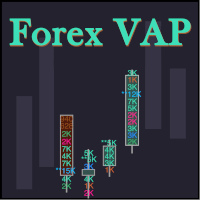
What do you see inside a candle? How to interpret the fight between bulls and bears? The candlestick chart brings a lot of information, but the volume is lacking in the candlestick body. This is where the Forex Volume At Price Expert Advisor comes in. This advisor searches for a set of recent trades, calculates the buy and sell attack volumes and prints on the candles, the volume value in each price range. You can also define up to ten colors to filter volumes and make it easier to
FREE

Range Volume Profile with Risk Management Panel Professional Trading Utility for MetaTrader 5
The Range Volume Profile with Risk Management Panel is an advanced trading utility designed for traders who manually execute trades while maintaining strict money management.
Unlike a traditional Expert Advisor that automatically opens trades, this utility helps traders identify important volume areas, calculate accurate lot sizes based on account risk, and place pending orders directly from the char
FREE

Hey Trader!
Boring with the Meta chart? Do you want to move it as you do in Profit?
Your problems are over! Now available Chart Panoramic or ChartPan for closer friends, a utility that allows you to move the chart to better visualize the most relevant points for your trade.
Recommend you to add a keyboard shortcut for quick access (Ctrl + Q - for example), because you will need to run ChartPan after symbol changing to "release" the chart again.
To add a hotkey: after downloading
FREE

This plugin is designed to enhance trading efficiency and risk management in scalping strategies. Key features include:
-One-Click Trade Execution: With a single click, the plugin opens two trades simultaneously, each with its own Take Profit (TP1 and TP2) targets. -Automatic Stop Loss Adjustment: The plugin automatically adjusts the Stop Loss (SL) to Break Even (BE) once the price reaches halfway towards TP1, securing partial profits. -Account Protection Features: It includes built-in protecti
FREE

This application is now replaced by Ofir Notify Light Edition (Free) or Ofir Notify (paid).
Thank all for your positive feedbacks.
Telegram Alerts is a tool which send alerts on trades to Telegram Alert on any event concerning a position : Opening, Closing, modification (SL, TP) Alert on Equity change Display Risk, Reward and progress of profit/lost for each position Send signals from your indicators or experts Multi-lingual If you are facing any issue using this utility, please contact me to
FREE

AI Chart Assistant MT5
AI Chart Assistant MT5 is a professional manual chart intelligence exporter for MetaTrader 5, designed for traders who want to use ChatGPT with real, structured and deeply prepared MT5 market context.
Most traders use ChatGPT for trading analysis by typing simple questions like:
“Analyze this chart” “Should I buy or sell?” “Find support and resistance”
The problem is that ChatGPT cannot properly analyze a chart without complete market context.
AI Chart Assistant MT5
FREE

Title: Smart Position Manager PRO - Advanced Risk & Position Manager Description: Smart Position Manager PRO is an all-in-one visual trade management and risk calculation tool designed for serious traders who prioritize iron discipline and strict risk management. Whether you are executing precise SMC or ICT setups on personal capital or managing large funded accounts on strict prop firms, this tool ensures you focus on counting percentages rather than emotional money swings. With a highly int
FREE

ขอบคุณ แรงบันดาลใจ จากโค้ชแพม ที่ทำให้เริ่มทำ Close all ตัวนี้ และขอขอบคุณทุกคนที่ให้ความรู็มาโดยตลอด ไม่ว่าจะทางตรงทางอ้อม ขอบคุณทุกคนที่ให้ความรู้เพื่อนร่วมเทรด ทั้งนี้เพื่อให้นักเทรดทุกคนได้มีเครื่องมือในการควบคุมการปิดการซื้อขาย จึงขอพัฒนาโปรแกรม close all version 5 ได้ใช้ทุกคน Close all and update profit Version 1.00 (MT5) Full version Give you free
For MT4 Click https://www.mql5.com/en/market/product/79252
Fix TPSL calculate
Program function
Tab 1 Close order function and show br
FREE

AI Auto BreakEven Partial Close Manager is a universal trade-management utility that automatically protects and scales out of profitable positions - on any symbol, opened by any Expert Advisor or manually by you. Attach it once and it silently manages every open position on the account (or just the current symbol, your choice) according to rules you define, freeing you from having to babysit trades. KEY FEATURES
- Automatic break-even: once a position reaches your trigger profit (in points), its
FREE

100% 무료 — 정식 버전, 제한 없음, 등록 불필요.
무엇을 막아주는가
- 에쿼티 트레일링 스톱 — 에쿼티가 고점 대비 설정 % 하락 시 전체 청산, 이익 확보.
- 최대 손실폭 — 에쿼티가 최고 잔고 대비 설정 % 아래로 내려가면 전체 청산.
- 일일 손실 한도 — 한도 도달 시 당일 거래 중단(선택적 청산).
- 증거금 비상 — 증거금 수준이 하한 아래로 내려가면 강제청산 전에 전체 청산.
- 이익 목표 — 당일 이익이 설정 %에 도달하면 전체 청산해 이익 확정.
- 연속 손실 — 연속 손실 후 당일 일시 정지.
- 주말 청산 — 금요일 지정 시각부터 청산하고 비워둠.
- 뉴스 정지 — 경제 캘린더 이벤트 전후 정지(선택적 청산).
작동 방식
하드 스톱(에쿼티 트레일링, 최대 손실폭, 증거금)은 범위 내 모든 포지션을 한 번 청산하고 RESET을 누를 때까지 정지 상태를 유지합니다. 일일 스톱은 다음 거래일에 자동 해제됩니다. 정지 중에는 다시 나타나는 포지션을 청산해
FREE
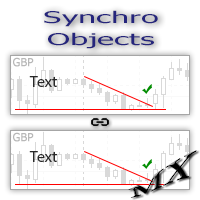
The SynchroObjects utility is designed to facilitate and speed up the work with graphic constructions on different charts of one symbol. The SynchroObjects utility clones the created objects to all charts on which the utility is running and which have the same symbol. And also synchronously changes their properties. The utility is easy to use and requires no configuration. Tip: If you view the history frequently - we also recommend you to also install the free Smart AutoScroll utility. It automa
FREE

차트에서 직접 시장가 주문을 빠르게 실행하고 포지션을 관리할 수 있는, 간단하고 명확하며 사용하기 쉬운 트레이딩 패널입니다.
패널은 직관적인 인터페이스를 갖추고 있어 대부분의 기능을 한눈에 이해할 수 있습니다. 주요 기능 BUY 및 SELL 버튼 — 선택한 랏 크기로 시장가 주문을 즉시 실행합니다. 유연한 랏 관리 — 랏 크기는 수동으로 입력하거나 Quick Lots 버튼으로 설정할 수 있습니다. 스텝은 각 심볼의 요구 사항에 자동으로 맞춰집니다. CLOSE BUY 및 CLOSE SELL — 현재 심볼에서 해당 방향의 모든 포지션을 한 번의 클릭으로 청산합니다. PLAN 모드 — 차트에서 드래그 가능한 SL 및 TP 라인이 있는 시각적 손익 계산기입니다. 시각 정보 — 각 오픈 포지션의 P&L과 드래그 가능한 SL/TP 레벨을 차트에 직접 표시합니다. 주목할 만한 두 개의 버튼 대부분의 버튼은 직관적이지만, 가운데 두 버튼의 기능은 아이콘만으로는 바로 알아보기 어렵습니다 (첫 번째
FREE

MT-Radar — 휴대폰으로 MetaTrader 터미널을 무료로 모니터링
매번 RDP로 VPS에 접속하지 않고도 EA가 작동 중인지, 터미널이 연결되어 있는지 알고 싶으신가요?
MT-Radar는 모든 MT4/MT5 터미널의 상태를 하나의 안전한 웹 패널에 보여줍니다. 휴대폰, 태블릿 또는 어떤 컴퓨터에서든 열어 몇 초 만에 모든 것이 정상적으로 작동하는지 확인하세요.
MT-Radar가 보여주는 정보: 계정 및 터미널 — 계정 정보와 터미널의 일반 정보 로그 — 터미널 로그와 엑스퍼트 로그를 실시간으로 확인 마켓 워치 — 마켓 워치에 있는 심볼의 시세 차트 및 EA — 차트를 열고 해당 차트에서 실행 중인 EA의 상태 확인 모든 터미널을 하나의 패널에서 — 여러 컴퓨터와 VPS의 MT4 및 MT5 개인정보 보호 및 보안
종단 간 암호화 — 로컬 MTAgent-Radar와 웹 패널 사이의 전체 경로에서 데이터가 암호화됩니다. 중계 서버는 암호화된 트래픽만 전달하며 내용을 읽을
FREE

Maximize your profits and protect your capital on any symbol, any broker, any digits. Demonstration video: https://youtube.com/shorts/enSPf2qCsVU?si=1LBVjmVzgFJE751C The Universal Trailing Stop and Breakeven EA is a powerful, beginner-friendly tool that automates trailing stop management across all your open trades. Whether you are scalping XAUUSD, swinging BTCUSD, or day trading EURUSD, this expert advisor ensures you are always locking in gains while minimizing risk.
What's New in 2.0? Perce
FREE

The TradingView-style hide-drawings button MT5 never had
"From the maker of Risk Sentinel — risk-first position sizing that keeps your risk fixed as you drag the stop: https://www.mql5.com/en/market/product/185711 "
Hide/Show Drawing is a one-tap chart-cleanup utility for MT5. Hide all your drawings — or just trendlines, Fibs, shapes, or text — to read raw price action, then restore everything exactly as it was, per-timeframe settings and all. Nothing is deleted; every object stays in memory a
FREE
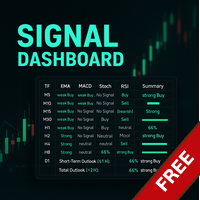
Link to the full version: https://www.mql5.com/de/market/product/138246?source=Site +Profile+Seller#description Feature enhancements or comments are always welcome! Description: This powerful script provides traders with a comprehensive real-time signal overview across multiple timeframes using some of the most reliable technical indicators. It is designed as a clear, compact table on the chart and displays actionable insights for selected timeframes - helping traders make informed decisions ba
FREE

Move TP & SL (MT5) 는 한 번의 클릭으로 활성 포지션과 대기 주문의 Take Profit(TP) 및 Stop Loss(SL)를 빠르게 이동할 수 있는 트레이딩 유틸리티 스크립트입니다. 이 스크립트는 다음 두 가지 작동 모드를 지원합니다. Pips 모드 (Pips Mode): 주문의 진입 가격을 기준으로 고정된 핍(pips) 거리만큼 TP와 SL을 설정합니다. 가격 모드 (Price Mode): 지정한 가격 레벨에 TP와 SL을 직접 설정합니다. 모든 주문, 활성 포지션만, 또는 대기 주문만 등 수정할 주문 대상을 선택할 수 있습니다. 실행 후에는 수정된 주문 수, 선택된 모드, 적용된 TP 및/또는 SL 값을 한 줄로 명확하게 표시하는 알림이 나타납니다. 입력 값이 잘못되었거나 수정할 주문이 없는 경우에는 “No action taken” 메시지가 표시됩니다. 사용 방법 관리하려는 심볼의 차트를 엽니다. 해당 심볼에 활성 포지션 및/또는 대기 주문이 있는지 확인합니다.
FREE

HotkeyTrader — Expert Advisor for MetaTrader 5 HotkeyTrader is a free Expert Advisor that allows opening and closing trades using keyboard shortcuts, without interacting with the terminal menus. Available functions Key B: opens a buy order at the current price. Key S: opens a sell order at the current price. Key C: closes all open positions. Features No cost. No usage restrictions. Compatible with all instruments available in MetaTrader 5.
FREE
Another request from my brotherhood was putting the name of the Symbol being seen - a little bigger - on the Chart, just to get sure that they are seeing the correct one... Mistakes pay a high price on the market... It is a very effective, and almost resource-null-consuming indicator that displays the current Symbol Name and Timeframe in almost any position of your Chart, with any color, and any Font Size... And also you can change the divisor character that is presented between the Symbol Name
FREE

Tandem은 MetaTrader용 로컬 거래 복사 도구입니다. 같은 컴퓨터나 VPS에서 돌아가는 터미널끼리 거래를 복사하며, MT4에서 MT4로, MT4에서 MT5로, MT5에서 MT5로, 그리고 MT5에서 MT4로도 복사할 수 있습니다. 플랫폼마다 버전이 하나씩 있고, 두 버전은 서로 함께 동작합니다. 마스터와 슬레이브를 하나의 Expert Advisor에 담았습니다. 각 터미널의 차트에 적용한 뒤, 거래하는 계좌에서는 MASTER를 누르고 따라갈 계좌는 SLAVE로 두면 됩니다. 채널 번호만 같으면 슬레이브는 보통 1초도 걸리지 않아 마스터의 거래를 받아옵니다. 데이터는 터미널 공용 폴더의 작은 파일 하나로 주고받기 때문에 DLL도, 서버도, Windows 설정도 필요 없습니다. 각 터미널에서 알고리즘 거래를 허용해야 하고, 모든 터미널은 같은 Windows 사용자로 실행되어야 합니다. 복사되는 것은 시장가 포지션과 대기 주문, 그 손절과 익절, 나중에 바꾼 손절 및 대기 주문
FREE

100% 무료 — 정식 버전, 제한 없음, 등록 불필요.
기능
- 차트 종목에 원클릭 BUY/SELL, 핍 단위 SL/TP 자동 설정.
- 리스크 기반 랏: 리스크 %를 입력하면 손절 거리와 틱 가치로 랏을 계산 — 매 거래가 잔고의 동일 비율을 리스크로 함. 고정 랏으로 전환 가능.
- 안전한 랏: 브로커의 최소/최대/스텝/한도에 자동 클램프하고 사용자 상한으로 제한. 매 주문 전 증거금 확인 — "잔고 부족"이나 수량 초과 거부 없음.
- 청산 제어: CLOSE ALL, CLOSE PROFIT, CLOSE LOSS, PARTIAL 50%.
- BREAK-EVEN: 조건을 충족하는 모든 포지션의 스톱을 본전으로 이동.
- TRAIL 토글: 핍 기반 트레일링 스톱 켜기/끄기.
- 실시간 요약: 잔고, 에쿼티, 보유 포지션, 평가손익, 다음 주문에 사용할 정확한 랏.
범위
기본적으로 패널은 자신의 거래만(자체 매직으로) 관리하여 다른 EA 및 수동 주문과 안전하게 공존합니다.
FREE

Auto SLTP Pro can help you setSL & TP automatically for positions & pending orders * 2 modes: - Points - USD * Symbol Filter: Select All or a specific symbol * For pending orders: Select true to set SLTP for pending orders Note: Only valid for positions (pending orders) without SL&TP! Join my channel here for more useful management tools: * Remote Tools via Telegram: Super Assistant, Master Close, Master Control, Master Notify * Free Tools: Tele Notify, Price Alert, Quick Close
FREE

100% 무료 — 정식 버전, 제한 없음, 등록 불필요.
기능
- 다가오는 이벤트를 중요도별 색상의 수직선으로 차트에 표시.
- 다음 이벤트까지 통화·중요도와 함께 카운트다운.
- 일시정지 플래그: 전역 변수 FXEA_NEWS_PAUSE — EA가 읽어(한 줄 GlobalVariableGet) 진입을 건너뛰며, 구간이 지나면 0으로 복귀.
- 구간 동안 선택적 포지션 청산(전체 계좌 또는 현재 종목, 매직 필터).
- 구간 시작 전 푸시/이메일/웹훅으로 사전 알림.
설정
감시 통화, 최소 중요도(높음만 / 보통 이상 / 전체), 이벤트 전후 몇 분을 일시정지 구간으로 할지 선택합니다. 도구는 캘린더를 지속 스캔하며 플래그·마커·패널을 동기화합니다.
참고: MT5 경제 캘린더는 전략 테스터에서 사용할 수 없으므로 이 도구는 실거래/포워드용입니다.
=== 이 아이디어를 자동매매 시스템으로 쓰고 싶다면 (FXEA365) ===
이 도구는 거래 주변의 리스크를 관리하며 스스로 주문
FREE

Crystal Cross Sync Advanced MT5 Chart Synchronization & Backtesting Engine Crystal Cross Sync is a high-performance MetaTrader 5 utility designed to transform the way traders analyze, replay, and synchronize market data. Built specifically for serious MT5 traders, this tool delivers ultra-fast chart synchronization, automatic time alignment, precision zoom control, and structured backtesting assistance — all in one optimized engine. This is not an indicator.
This is a professional chart control
FREE

Trade Manager with Risk-Based Position Control This Expert Advisor is a manual trade management tool designed to assist traders in planning, managing, and controlling open positions on MetaTrader 5 charts. The product does not generate trading signals and does not make independent trading decisions . All entries are initiated manually by the user or by other Expert Advisors. This tool focuses exclusively on position sizing, trade management, and execution assistance . Key Features Manual positi
FREE

Hello, Every one
A script to close all market positions and/or pending orders.
-----------------------------------------------------------------------------------
This is Close All market positions and/or pending orders button
You can close all orders in 1 second by one click
For advanced version: Advanced: https://www.mql5.com/en/market/product/77763
https://www.mql5.com/en/market/product/89311 Key:
1 Close all button: The script will close All orders market + pending
FREE

Support Resistance Alert for MT5 Support Resistance Alert는 차트에 지지선과 저항선을 자동으로 표시하고, Bid 가격이 해당 수준에 닿거나 통과하면 팝업 알림을 제공하는 보조 EA입니다. 분석과 모니터링 전용 도구이며, 거래를 개시하거나 청산하거나 수정하지 않습니다. 주요 기능 가격 수준 검증: 더 최근의 마감된 캔들에서 이미 도달하거나 돌파한 후보 수준을 제외합니다. 접촉 및 통과 알림: 가격이 해당 수준에서 종목 기준 2포인트 이내로 접근하거나 연속 틱 사이에서 해당 수준을 통과하면 감지합니다. 지지선과 저항선 알림은 각각 켜거나 끌 수 있습니다. 반복 알림 방지: 알림 대기 상태인 각 수준에 대해 한 번만 알림을 보냅니다. 표시 설정 변경: 선 색상과 두께, 라벨 글꼴 크기 및 위치를 조정할 수 있습니다. 자동 업데이트: 새 캔들이 시작될 때 수준을 다시 계산하고, 매 틱마다 가격을 확인합니다. 사용 방법 원하는 종목과 시간대의 차트
FREE

About CrashBoom Stones is an expert advisor utility that gives you a signal to catch CrashBoom drops or spikes. It shows you a Red Sell arrow on Crash to sell, and a blue arrow on Boom to buy. It also gives you an alert when an arrow is shown. Note:
The utility does not show signals for the historical data in live mode, use the strategy tester to test this utility. The arrows shown are independent to the trends pane. The trends pane is more accurate when H1 and M30 agree.
Recommendations
W
FREE

PEN Trade Manager is a professional trading, position management, and risk control tool designed for MetaTrader 5.
Its main purpose is simple: help traders plan a trade visually, calculate risk accurately, execute orders quickly, and manage open positions from one clean interface.
At the center of PEN Trade Manager is the PEN system — a visual trading tool that allows you to place and adjust your Entry, Stop Loss, and Take Profit directly on the chart. Instead of calculating levels manually, s
FREE

Trade Panel Description Version: 1.00 This Trade Panel is a manual, on-chart trading interface designed to provide fast and precise control over trade execution and position management directly from the chart. It enables one-click trading and real-time adjustment of risk parameters without using the standard MetaTrader order window. Trade Execution BUY Button
Instantly opens a Buy position on the current symbol using the selected lot size.
Stop Loss and optional Take Profit are applied accordi
FREE

This simple visual expert advisor allows you to trade easily from the chart. It handles risk management for you and can perform several useful tasks with your existing trades, saving time and making risk-management for each individual trade easier. [ Installation Guide | Update Guide | Troubleshooting | FAQ | All Products | Get Help ] Trade easily from the chart Trade with precise risk management, hassle free Trade pending order with drag and drop price selection Set SL and TP levels with d
FREE

Free. One click to switch the chart to another symbol. TrueRisk Symbol Changer puts your symbols on the chart as buttons, each with today's % change in green or red. Click one and the chart switches to it, keeping your timeframe, your template and your other indicators. One row of timeframe buttons (M1 to MN) does the same for the timeframe. No more right-click, Symbols, find, drag. MT4 version (free) | TrueRisk Account Dashboard (free) | TrueRisk Trade Panel (free) | All TrueRisk tools Symbols
FREE

특정 거래 세션만 표시하는 사용자 정의 심볼을 생성하는 MT5 유틸리티로, 야간 데이터(Globex)와 거래 시간 외 가격 움직임을 필터링합니다. Regular Trading Hours (RTH) 또는 사용자 정의 시간대를 기반으로 차트를 구축할 수 있습니다. 기능: 서비스로 실행: 한 번 설정하면 잊어버려도 됩니다. 서비스는 MT5와 함께 자동으로 시작되어 백그라운드에서 실행됩니다. 소스 차트를 열어두거나 지표를 첨부할 필요가 없습니다.
진정한 데이터 필터링: 저거래량 야간 데이터를 제거하여 갭, 거래량 노드, 세션 고점/저점을 더 명확하게 볼 수 있습니다. 자동화된 워크플로우: M1 히스토리를 자동으로 다운로드하고, 사용자 정의 심볼을 생성하며, 실시간으로 라이브 틱을 라우팅합니다. 스마트 시간 라우팅: 표준 장중 세션(예: 09:30–16:00) 및 자정을 넘어가는 세션(예: London/Asia 중복 또는 암호화폐 세션)을 완벽하게 지원합니다. 성능 최적화:
FREE
The RFOC Candle Timer 2x was created for the trader to locate himself in time, having access to the pending time for the formation of a new candle. Additionally, it is possible to include in the chart a second timer that shows the pending time for the formation of a new candle in a time period different from the current one. The user will have the option to select up to 4 different positions for the timer display ("No candle", lower left corner, lower right corner or upper right corner). In ad
FREE

ABJ EA DASHBOARD turns your account history into a clean, full-window dashboard on your chart. You can see which Expert Advisors or strategies make money and which lose, without opening the History tab or using spreadsheets. The tool is display-only. It never opens, closes or modifies a trade. Main features Fills the whole chart window. The layout, fonts and buttons scale automatically when you resize or maximize the chart. The A-, Auto and A+ buttons let you adjust the size by hand. Automatic g
FREE

워터마크 MT4 버전: https://www.mql5.com/en/market/product/120783 MT5 버전: https://www.mql5.com/en/market/product/120784
로고 MT4 버전: https://www.mql5.com/en/market/product/121289 MT5 버전: https://www.mql5.com/en/market/product/121290
"워터마크" 스크립트는 차트 배경에 중요한 정보를 직접 표시하여 거래 차트를 더욱 돋보이게 하도록 설계되었습니다. 이 스크립트는 현재 거래 쌍, 시간대, 다양한 시간 지표와 같은 주요 정보를 명확하고 눈에 띄지 않게 추적할 수 있는 방법을 제공합니다.
기능:
거래 쌍 표시:
스크립트는 차트에 표시된 현재 거래 쌍(예: EUR/USD, BTC/USD)을 자동으로 감지하여 표시합니다. 이를 통해 트레이더는 분석 중인 자산을 항상 파악할 수 있어 잘못된 통화쌍을 기반으로 결정을 내릴
FREE

DoIt EA Monitor - Multi EA Performance Dashboard for MT5 Your account can be profitable while one EA quietly drags down the portfolio. MetaTrader history shows the combined result, but it does not clearly show which strategy deserves more capital and which one needs attention. DoIt EA Monitor runs on one chart and separates live and historical performance by magic number, EA and symbol. It is completely read-only. It never opens, closes or modifies a trade. KNOW WHICH EA IS EARNING ITS PLACE Aut
FREE

Trading Assistant 69 는 트레이딩 관리를 자동화하여 시장 분석과 수동 진입에만 온전히 집중할 수 있도록 설계된 강력한 유틸리티 전문가 자문(EA)입니다. 이 도구는 M1 또는 M5 차트와 같은 짧은 타임프레임에서 빠른 속도로 전략을 실행하는 트레이더에게 매우 유용합니다. 정밀도와 속도가 중요한 스마트 머니 컨셉(SMC)이나 ICT 방법론을 사용하는 트레이더에게 손절매(Stop Loss) 및 이익 실현(Take Profit) 레벨을 수동으로 계산하고 설정하는 것은 귀중한 몇 초를 낭비하게 만들 수 있습니다. 이 어시스턴트는 트레이드를 오픈하는 순간 사전 정의된 위험 매개변수를 즉시 적용하여 이러한 문제를 해결하며, 감정적인 간섭을 제거하고 포지션을 자동으로 안전하게 보호합니다. 주요 특징 및 장점 자동 손절매 및 이익 실현 (Auto SL/TP): EA는 수동 진입 시 사전 정의된 SL 및 TP 포인트를 즉시 첨부합니다. 이를 통해 포지션을 수동으로 수정하거나 가격 레
FREE

Trading Practice Simulator turns the MT5 Strategy Tester into a hands-on practice desk. Place market and pending orders, toggle SL/TP, adjust lot size, and watch live stats: open positions, floating P/L, win rate, profit factor, max drawdown, best and worst trade, all while price replays real historical data. Perfect for weekend practice or rehearsing a setup before risking capital. Works in the Strategy Tester's Visual mode and on live/demo charts. Simulation only; not investment advice.
Pract
FREE

Free TrendLine EA opens trades whenever the price on the chart interacts with or crosses your trend line. You simply draw the trend line manually then let the EA do the trading automatically according to the rules you give it. The settings available in the EA are explained below: Lots : The lot size for trading. RiskPercentage : Set a value other than zero to activate lot sizing by use of percentage of margin. TrendLineName: The name of the line to track. You can either * rename the trend li
FREE

Blodsalgo Analytics — 당신의 트레이딩을 해독하다. MetaTrader 5를 위한 무료 실시간 분석. Blodsalgo Analytics는 MetaTrader 5 터미널을 웹의 전문 분석 대시보드와 연결해 주는 무료 보조 유틸리티 입니다. 모든 체결, 모든 지표, 모든 미결제 포지션이 자동으로 동기화되어 각 계좌와 각 EA의 실제 성과를 확인할 수 있습니다. 모든 브로커를 한곳에서, 어떤 기기에서든 볼 수 있습니다. 설치 방법, 대시보드 주소, 모든 링크는 이 제품의 설치 및 링크 안내 댓글 에 정리되어 있습니다. MQL5 Market 지침상 제품 설명에는 외부 링크를 넣을 수 없어 관련 내용을 한곳에 모아 두었습니다. 이것은 매매용 EA가 아닙니다. 어떤 주문도 진입, 수정, 청산하지 않습니다. EA 옆에서 조용히 동작하는 읽기 전용 데이터 커넥터이며 매매에 전혀 개입하지 않습니다. BLODSALGO EA 보유자 전용입니다. 무료. 구독 없음. 숨은 비용 없음. 새
FREE
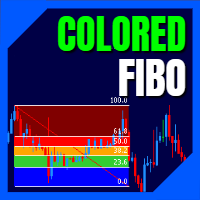
LT Colored Fibo is a simple indicator that paints the price zones between Fibonacci Retracement levels. Its configuration is extremely simple. It is possible to change the colors of each level of the retracement, choose between background or front of the chart and also work only with the current asset or all open. If you found a bug or have any suggestion for improvement, please contact me. Enjoy!
This is a free indicator, but it took hours to develop. If you want to pay me a coffee, I apprecia
FREE

MT5용 Stats Dashboard & Journal Pro - 트레이딩 분석 도구 MetaTrader 5를 위한 실시간 성과 분석 및 전문 저널링 Stats Dashboard Pro는 상세한 성과 인사이트, 데이터 기반 분석, 그리고 트레이딩 규율을 마스터하기 위한 전문 저널링 시스템이 필요한 MetaTrader 5 트레이더를 위해 설계된 종합 분석 도구입니다. 주요 기능 멀티 뷰 분석 인터페이스 6개의 인터랙티브 탭: 저널 설정(신규), 트랜잭션, 차트, 캘린더, 시간대별 성과, 아레나 통계. 실시간 업데이트: 청산된 포지션 자동 새로고침 및 실시간(LIVE) 및 대기(PENDING) 주문 추적. 전문 저널링 시스템: 모든 트레이드에 노트 추가, 전략(셋업) 추적 및 실수 기록. TradingView 통합: TradingView 스크린샷을 트레이드에 연결하세요. 대시보드가 MT5 내부에서 직접 다운로드하여 표시합니다. 사용자 정의 필터: 고급 심볼 필터링, 다중 선택 매직 넘
FREE

Chart Risk Desk Free는 차트 위 깔끔한 패널을 제공하는 가벼운 MetaTrader 5 유틸리티 EA입니다. 진입 신호를 내지 않으며 그리드·마틴게일도 쓰지 않습니다. 매수·매도 시점은 여러분이 정하고, 패널은 수량·스톱·빠른 포지션 관리를 돕습니다. 빈 데모가 아니라 실제로 쓸 수 있는 무료판입니다. 필요하면 나중에 Pro로 업그레이드하세요. 기능 - 고정 로트 또는 잔고/자산 위험%와 SL 거리로 로트 계산 - 포인트 또는 핍 거리 모드(3/5자리·지수에 유용) - 시장가 BUY/SELL(기본 SL/TP) - 대기: Buy Limit, Sell Limit, Buy Stop, Sell Stop - 원클릭 본절·부분 청산 - 매직·심볼 필터로 전체/수익/손실 청산 - 매직 필터 OFF 시 수동·모바일 주문도 관리 - 정보 줄: 스프레드, 심볼 손익, 관리 포지션 수 - 단축키: B 매수, S 매도, C 전체 청산, E 본절, P 부분 - 다크/라이트 패널 대상 - 버튼
FREE

HotkeyTrader Pro — MetaTrader 5용 Expert Advisor HotkeyTrader Pro는 키보드 단축키를 통해 트레이더의 거래 관리를 지원하도록 설계된 Expert Advisor입니다. 이 EA에는 다음 기능이 포함되어 있습니다: 거래가 트레이더에게 유리한 방향으로 진행됨에 따라 스톱 레벨을 자동으로 조정하는 다이나믹 트레일링 스톱. 설정 가능한 리스크 매개변수를 기반으로 한 자동 랏 계산으로, 트레이더가 포지션 진입 전에 리스크 노출을 정의할 수 있습니다. 오픈 포지션 중 수동 개입의 필요성을 줄이는 거래 관리 도구. 이 EA는 운영 도구입니다. 결과는 전적으로 트레이더의 전략과 시장 상황에 따라 달라집니다...................
FREE
RENKO Reversal by StockGamblers Actually working RENKO in MT5. Uses "custom symbols" for drawing. You can apply any indicators with complete peace of mind. The movement of the last price is displayed in real during the formation of the "brick". Put the script in the MQL5/Experts folder. More precisely: C:\Users\user\AppData\Roaming\MetaQuotes\Terminal\terminal_number\MQL5\Experts Settings: ValuePerBar - height of the "brick" in points revCandle - multiplier for the height of the turning "brick".
FREE
MetaTrader 마켓은 MetaTrader 플랫폼용 애플리케이션을 구입할 수 있는 편리하고 안전한 환경을 제공합니다. Strategy Tester의 테스트를 위해 터미널에서 Expert Advisor 및 인디케이터의 무료 데모 버전을 다운로드하십시오.
MQL5.community 결제 시스템을 이용해 성능을 모니터링하고 원하는 제품에 대해 결제할 수 있도록 다양한 모드로 애플리케이션을 테스트할 수 있습니다.
