 MetaTrader 5
 Experts
 지표
 스크립트
 라이브러리
 보관함
거래 로봇을 무료로 다운로드 하는 법을 시청해보세요
당사를 Facebook에서 찾아주십시오!
당사 팬 페이지에 가입하십시오
스크립트가 마음에 드시나요? MetaTrader 5 터미널에서 시도해보십시오

Safe Pyramiding - add to winning trades only when they are risk free - MetaTrader 5용 라이브러리
Lukas Szyry

Gold Trading Specialist | XAUUSD Expert Advisors
MetaTrader 5용 금(XAUUSD) 규칙 기반 Expert Advisor를 개발합니다. 장기적인 계좌 성장을 위한 견고한 시스템에 집중합니다: 마틴게일 없음, 그리드 없음, 손실 시 물타기 없음.
모든 업데이트는 출시 전에 2010년부터 현재까지 XAUUSD 실제 틱 데이터로 아웃오브샘플 기간을 포함하여 테스트됩니다. 기존 사용자에게 업데이트는 항상 무료입니다.
- 조회수:
- 71
- 게시됨:
-
 이 코드를 기반으로 한 로봇이나 지표가 필요하신가요? 프리랜스로 주문하세요
프리랜스로 이동

Pyramiding can make a good trend trade much better, but done wrong it turns one winner into a big loser. This small include only allows an add when it is safe:
- every open position in that direction already has the stop on break-even or better
- the newest position is at least x R in profit (R = stop distance of the first trade)
- the max number of adds is not reached
- the stop of the add respects the stops level and there is enough free margin
The add gets the same stop distance as the first trade and a smaller lot (for example 0.5x). So at any time the open risk is never more than the risk of one add.
Functions
pyr.Setup(magic, 2, 1.0, 0.5) - max 2 adds, add every +1R, add lot = half of the first lot
LS_Pyramid::Remember(ticket, open, sl) - call after every entry, stores the stop distance (survives a terminal restart)
pyr.CanAdd(POSITION_TYPE_BUY, lot, sl) - true if an add is allowed, gives you lot and stop
pyr.Verbose(true) - prints in the journal why there is no add
Usage
#include <LS_Pyramid.mqh>
LS_Pyramid pyr;
pyr.Setup(12345, 2, 1.0, 0.5);
// after EVERY entry (first trade and adds):
LS_Pyramid::Remember(positionTicket, openPrice, sl);
// later, e.g. on a new bar and only if your signal still confirms:
double lot, sl;
if(pyr.CanAdd(POSITION_TYPE_BUY, lot, sl))
   trade.Buy(lot, _Symbol, 0, sl);
The file only decides, it doesnt open trades. Your EA opens the order, so your own filters (signal still valid, spread, session, news) stay in control. Hedging accounts only, on netting it always returns false.
To get the stops to break-even the package uses LS_StopManager.mqh (my break-even and trailing stop library: https://www.mql5.com/en/code/79902), but your own code works too.
Demo EA
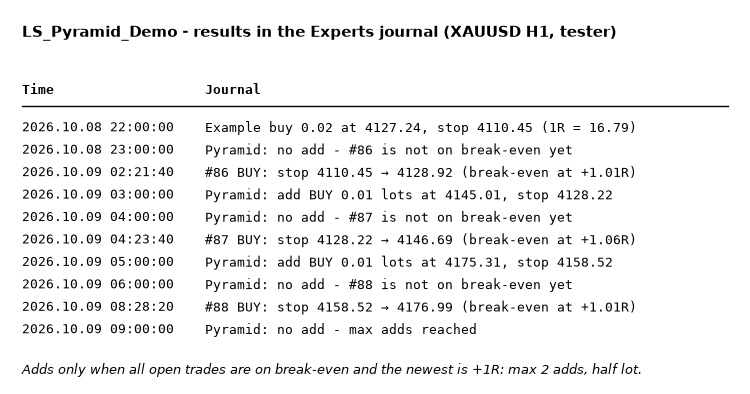
The demo EA doesnt open trades on a real or demo account, it only prints when an add to your positions would be allowed. In the strategy tester it opens an example buy, moves the stop to break-even and really adds, so you can watch it in the journal (picture above: XAUUSD H1, October 2026).
The lot size calculator that fits to it: https://www.mql5.com/en/code/79855
 Risk Lot Line: lot size from a draggable stop loss
Drag a stop-loss line and read the lot size for your risk. The loss per lot comes from OrderCalcProfit, so the size is right on metals, indices and cross pairs. Shows the real risk after rounding, the margin and an R-multiple take profit. Places no orders.
 Import Ticks CSV - a tick file into a custom symbol for real-tick tests
A script that reads a tick CSV into a custom symbol and builds its M1 bars, so the Strategy Tester can run "Every tick based on real ticks" over a period the broker's server does not keep. It finds the columns by name and moves UTC times to server time.
 EzoO Candle Timer - time left on the candle, live spread and today's range
Shows the time left on the current candle, the live spread and today's range next to the price or in a chart corner. Works on every timeframe.
EzoO Prev Levels - previous day high/low/open/close, previous week high/low and today's open
Previous day high/low/open/close, previous week high/low and today's open, drawn as a segment for each of the last N days with price labels.