 MetaTrader 5
 Experts
 지표
 스크립트
 라이브러리
 보관함
거래 로봇을 무료로 다운로드 하는 법을 시청해보세요
당사를 Telegram에서 찾아주십시오!
당사 팬 페이지에 가입하십시오
당사 팬 페이지에 가입하십시오
스크립트가 마음에 드시나요? MetaTrader 5 터미널에서 시도해보십시오

- 조회수:
- 77
- 게시됨:
-
 이 코드를 기반으로 한 로봇이나 지표가 필요하신가요? 프리랜스로 주문하세요
프리랜스로 이동

JONY ISLAM EMA Cluster Signals with Entry SL TP MTF Panel
Overview:
This indicator is designed to help traders catch trend continuations and reversals using an EMA cluster cloud. By analyzing the alignment of four Exponential Moving Averages (Fast, Mid, Slow, and Trend), it filters out market noise and provides precise Buy and Sell signals.
Upon generating a signal, the indicator automatically calculates and draws the Entry price, Stop Loss, and three Take Profit levels (TP1, TP2, TP3) based on the Average True Range (ATR). It also includes a convenient multi-timeframe dashboard to check the overall market bias at a glance.
How It Works:
-
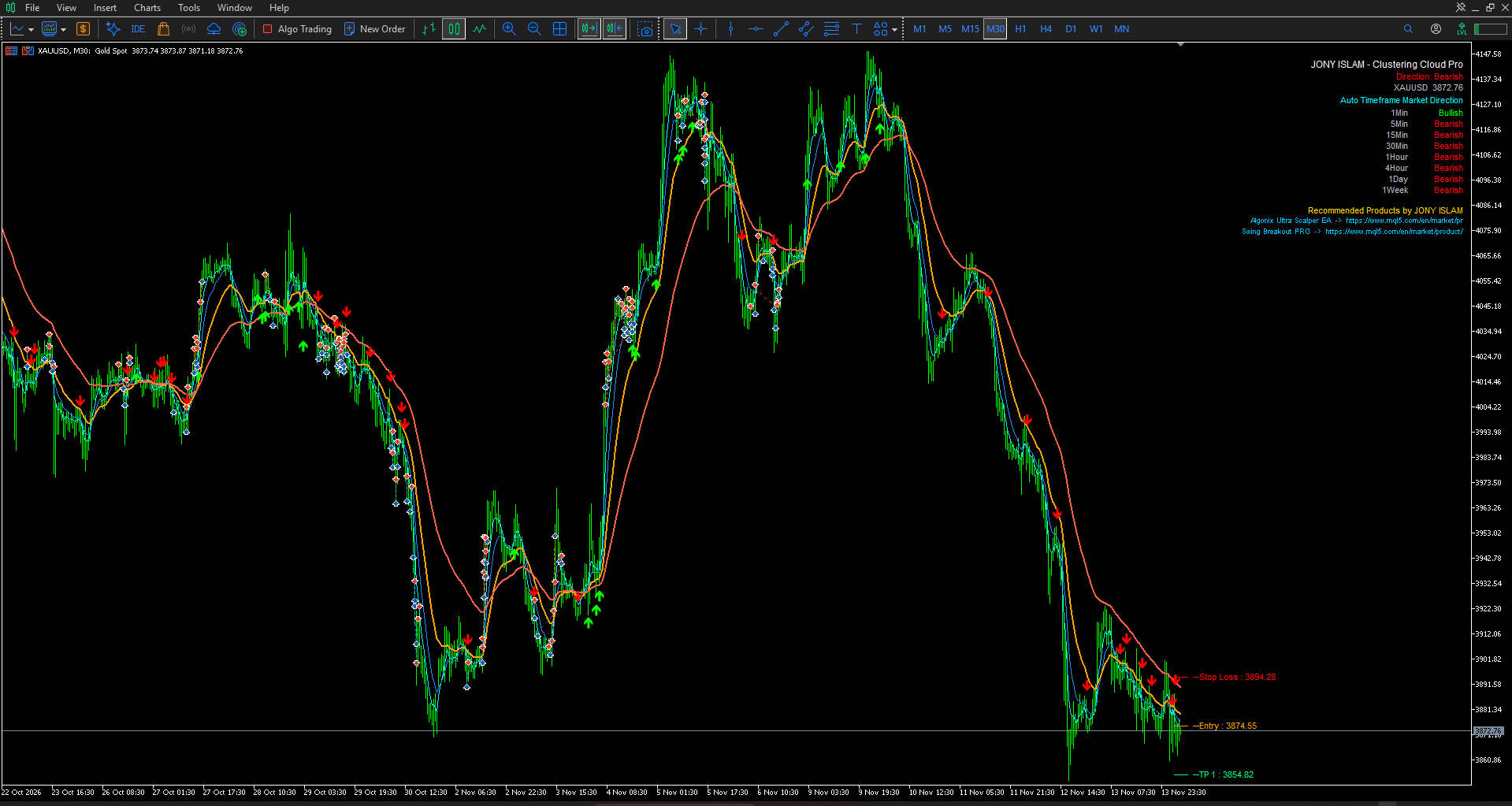
The Cloud: The indicator plots 4 EMAs (5, 10, 21, 55 by default). A bullish trend is confirmed when the EMAs are perfectly aligned upwards (Fast > Mid > Slow > Trend).
-
Signals: A BUY arrow is generated when the price closes above the Mid EMA during a bullish alignment, provided the price is not over-extended (filtered by ATR). SELL signals work in the exact opposite way.
-
Risk Management: Once a signal appears, the indicator calculates the risk using ATR and plots visual horizontal lines for Stop Loss and multiple Take Profit targets.
-
MTF Panel: A top-right panel displays the trend direction across 8 timeframes (M1 to W1) to help traders align their trades with higher timeframe momentum.
Input Parameters:
-
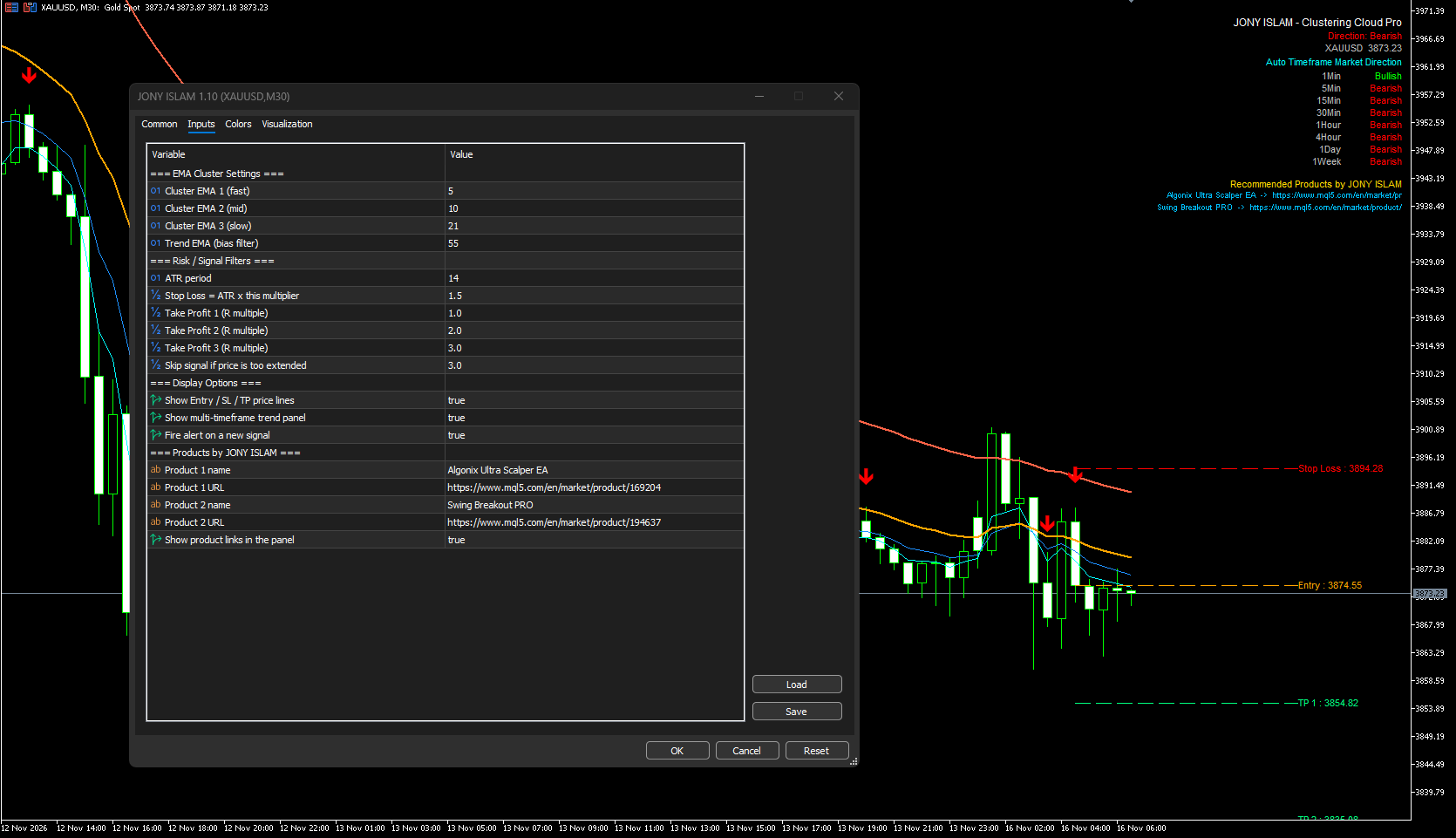
EMA Cluster Settings: Adjust the periods for Fast (5), Mid (10), Slow (21), and Trend (55) EMAs.
-
ATR Period: Period for the ATR used to calculate Stop Loss and Targets (Default: 14).
-
SL_ATR_Mult: Multiplier for the Stop Loss distance (Default: 1.5).
-
TP1/TP2/TP3_RR: Risk-to-Reward ratios for the Take Profit levels (Default: 1.0, 2.0, 3.0).
-
MaxExtensionATR: Prevents signals if the price is too far from the Slow EMA (Default: 3.0).
-
ShowLevels / ShowPanel: Toggle the Entry/SL/TP lines and the MTF dashboard on or off.
-
AlertsOn: Enable or disable pop-up alerts for new signals.
Usage Recommendations:
-
Attach the indicator to any chart and timeframe.
-
Wait for the BUY/SELL arrow to appear on a closed candle.
-
Use the recommended Entry, SL, and TP levels provided by the indicator lines.
-
Check the MTF panel to ensure the signal aligns with the higher timeframe trend (e.g., taking a BUY signal on M15 when H1 and H4 are bullish).
Author:
JONY ISLAM
Recommended Products by the Author:
-
Algonix Ultra Scalper EA: https://www.mql5.com/en/market/product/169204
-
Swing Breakout PRO: https://www.mql5.com/en/market/product/194637
 Trend Filtered Donchian Breakout Channel
Plots a Donchian channel and a long-period SMA and marks only those closed-bar channel breakouts that are on the same side of the SMA.
RSI Pullback Zones Above Rising SMA
Plots a long-period SMA and marks bars where the RSI has pulled back to a set level while the price is still above the rising SMA.
 EA Safety Check - scan EA source for DLLs, data leaks and martingale
Static safety scan of EA/indicator source: DLL imports, programs started, account data sent online, hidden text, martingale, SL = 0.
Previous Day High/Low with First Touch Marker
Draws the previous day's high and low over each day and marks the first touch of each level, with an optional alert.