 MetaTrader 5
 Experts
 지표
 스크립트
 라이브러리
 보관함
거래 로봇을 무료로 다운로드 하는 법을 시청해보세요
당사를 Facebook에서 찾아주십시오!
당사 팬 페이지에 가입하십시오
당사 팬 페이지에 가입하십시오
스크립트가 마음에 드시나요? MetaTrader 5 터미널에서 시도해보십시오

Economic Calendar Event Lines by Impact - MetaTrader 5용 지표
Kenichiro Sakamoto

저는 Kenichiro Sakamoto이며, MetaTrader 5용 투명하고 규칙 기반의 EA(Expert Advisor)를 만드는 스튜디오 FXEA365의 개발자입니다.
- 조회수:
- 120
- 평가:
- 게시됨:
-
 이 코드를 기반으로 한 로봇이나 지표가 필요하신가요? 프리랜스로 주문하세요
프리랜스로 이동


The indicator marks economic releases on the chart. It reads the built-in MetaTrader 5 economic calendar and draws a dotted vertical line at the time of every event of the selected currencies, from InpDaysBack days before the current server time to InpDaysForward days after it. Each line has a tooltip with the currency and the name of the event.
Only events whose impact is at least InpImportance are drawn. High-impact events use the high-impact colour, medium-impact events the medium colour and low-impact events the low colour. InpCurrencies is a comma-separated list of currency codes such as USD,EUR,JPY. When it is empty, the events of all currencies are shown.
The lines are rebuilt on every new bar and every five minutes by a timer, so newly scheduled events appear without reloading the indicator. The lines are drawn in the background and cannot be selected, so they do not get in the way of other objects. All lines are removed when the indicator is deleted from the chart.
The calendar is provided by the terminal and needs a connection to the trade server. It is not available in the strategy tester, so in the tester the indicator loads without drawing anything.
Input parameters
- InpDaysBack - number of past days to show (default 2).
- InpDaysForward - number of days ahead to show (default 3).
- InpImportance - minimum impact to show: 1 low, 2 medium, 3 high (default 2).
- InpCurrencies - comma-separated currency codes to include; empty shows all currencies (default USD,EUR,JPY).
- InpHighColor - colour of high-impact events (default Tomato).
- InpMidColor - colour of medium-impact events (default Goldenrod).
- InpLowColor - colour of low-impact events (default Gray).
The indicator only draws objects and has no buffers. It does not place or manage trades.
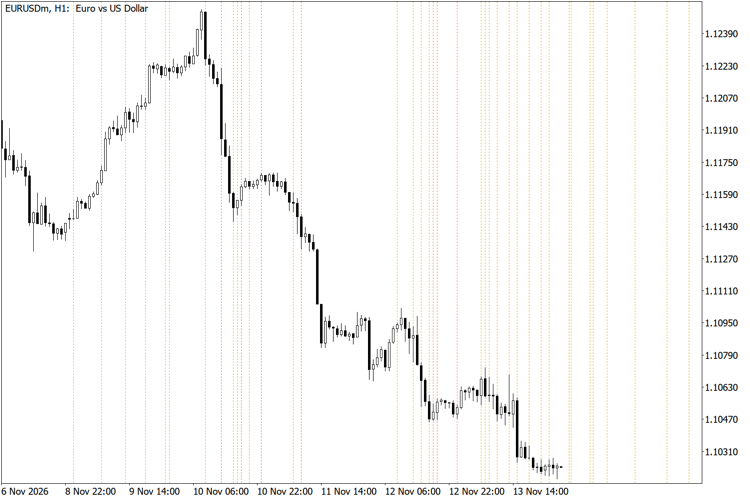
Economic calendar event lines on EURUSD H1 (InpDaysBack = 7)
Six-Timeframe EMA Trend Direction Panel
Compares a fast and a slow EMA on M5, M15, M30, H1, H4 and D1 and shows UP, DOWN or FLAT for each timeframe in one panel on the chart.
ATR Stop Distance and Risk-Based Lot Size Panel
Panel that shows the ATR of the last closed bar, a stop-loss distance derived from it, the money at risk for a chosen percentage of the balance and the lot size that matches that risk.
 Risk Order Script: Drop at Stop Loss for Auto Lot Size and R:R Take Profit
Drop the script on the chart at your stop loss price and it opens a market order with the lot size calculated from your risk percentage and take profit placed at your reward:risk ratio.
Spread Statistics by Hour
Historical spread statistics by hour for many symbols at once (median, 75th percentile, mean), exported to CSV. Does not trade.