 MetaTrader 5
 Experts
 지표
 스크립트
 라이브러리
 보관함
거래 로봇을 무료로 다운로드 하는 법을 시청해보세요
당사를 Twitter에서 찾아주십시오!
당사 팬 페이지에 가입하십시오
당사 팬 페이지에 가입하십시오
스크립트가 마음에 드시나요? MetaTrader 5 터미널에서 시도해보십시오

ATR Stop Distance and Risk-Based Lot Size Panel - MetaTrader 5용 지표
Kenichiro Sakamoto

저는 Kenichiro Sakamoto이며, MetaTrader 5용 투명하고 규칙 기반의 EA(Expert Advisor)를 만드는 스튜디오 FXEA365의 개발자입니다.
- 조회수:
- 114
- 평가:
- 게시됨:
-
 이 코드를 기반으로 한 로봇이나 지표가 필요하신가요? 프리랜스로 주문하세요
프리랜스로 이동


The indicator shows a small position-size calculator on the chart. It reads the ATR of the last closed bar and shows it in price units and in pips. The suggested stop-loss distance is the ATR multiplied by InpAtrSlMult. The risk amount is InpRiskPercent percent of the account balance in the deposit currency.
The suggested lot is the risk amount divided by the loss of one lot at the suggested stop distance. The loss per lot is calculated from the tick size and the tick value of the symbol, so the result also works for metals, indices and crosses whose quote currency differs from the account currency. The lot is rounded down to the volume step and kept between the minimum and maximum volume of the symbol.
A pip is ten points on 3- and 5-digit quotes and one point on other quotes. Because the lot is never rounded below the minimum volume, the actual risk can be larger than the requested percentage on small accounts. The values are refreshed on every tick and every five seconds by a timer.
The panel size and the offsets are scaled by the screen DPI, and the panel can be placed in any of the four chart corners. The values are informational only. All objects and the ATR handle are released when the indicator is deleted from the chart.
Input parameters
- InpAtrPeriod - ATR period (default 14).
- InpRiskPercent - risk per trade as a percentage of the account balance (default 1.0).
- InpAtrSlMult - suggested stop-loss distance as a multiple of the ATR (default 1.5).
- InpCorner - chart corner the panel is anchored to (default upper right).
- InpX - horizontal offset from the corner in pixels at 96 dpi (default 20).
- InpY - vertical offset from the corner in pixels at 96 dpi (default 30).
- InpFontSize - font size of all labels (default 10).
- InpTextColor - colour of the labels (default WhiteSmoke).
- InpValueColor - colour of the values (default Gold).
- InpBgColor - panel background colour (default Black).
The indicator only draws objects and has no buffers. It does not place or manage trades.
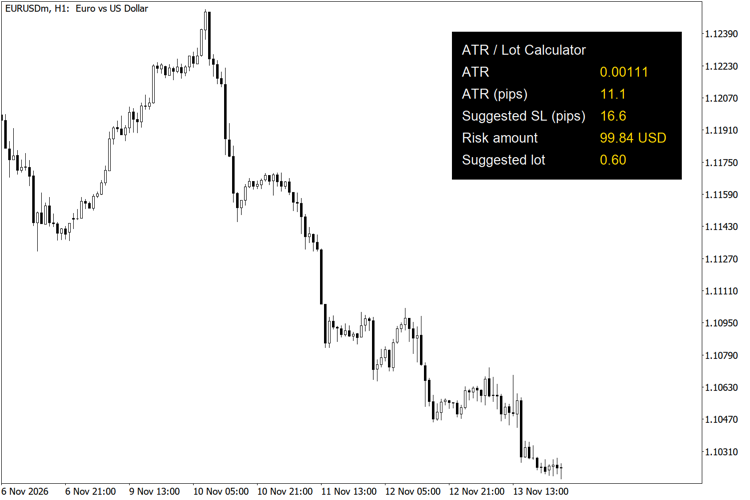
ATR stop distance and lot size panel on EURUSD H1
Account Information Panel with Daily P/L and Equity Drawdown
Shows balance, equity, margin, margin level, floating P/L, today's closed P/L and the drawdown from the equity peak in a small panel on the chart.
 Close All Positions with Symbol, Magic, Direction and Profit Filters
A script that closes open positions in one click, with filters for chart symbol, magic number, buy/sell direction and profit/loss state. Works on netting and hedging accounts.
Six-Timeframe EMA Trend Direction Panel
Compares a fast and a slow EMA on M5, M15, M30, H1, H4 and D1 and shows UP, DOWN or FLAT for each timeframe in one panel on the chart.
Economic Calendar Event Lines by Impact
Draws a dotted vertical line at the release time of each economic calendar event of the selected currencies, coloured by impact, from the built-in MetaTrader 5 calendar.