 MetaTrader 5
 Experts
 지표
 스크립트
 라이브러리
 보관함
거래 로봇을 무료로 다운로드 하는 법을 시청해보세요
당사를 Twitter에서 찾아주십시오!
당사 팬 페이지에 가입하십시오
당사 팬 페이지에 가입하십시오
스크립트가 마음에 드시나요? MetaTrader 5 터미널에서 시도해보십시오

- 조회수:
- 112
- 게시됨:
-
 이 코드를 기반으로 한 로봇이나 지표가 필요하신가요? 프리랜스로 주문하세요
프리랜스로 이동


AlgoFX Session Liquidity Sweeps draws the liquidity levels most intraday traders watch and marks the candle that sweeps one of them: price trades through the level, then closes back on the other side.
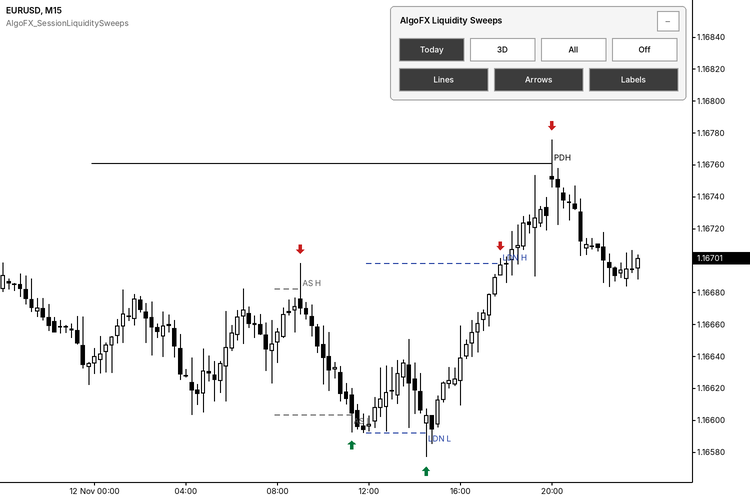
Levels
- PDH / PDL: previous trading day high and low.
- AS H / AS L: Asian session high and low (default 00:00 to 08:00 server time).
- LDN H / LDN L: London session high and low (default 08:00 to 12:00 server time).
All ranges are built from chart OHLC and broker server dates. Sessions use [start,end) membership by bar open time and support midnight crossing. A level becomes active only after its session has closed. A partial first loaded day or session is skipped.
Sweep rule
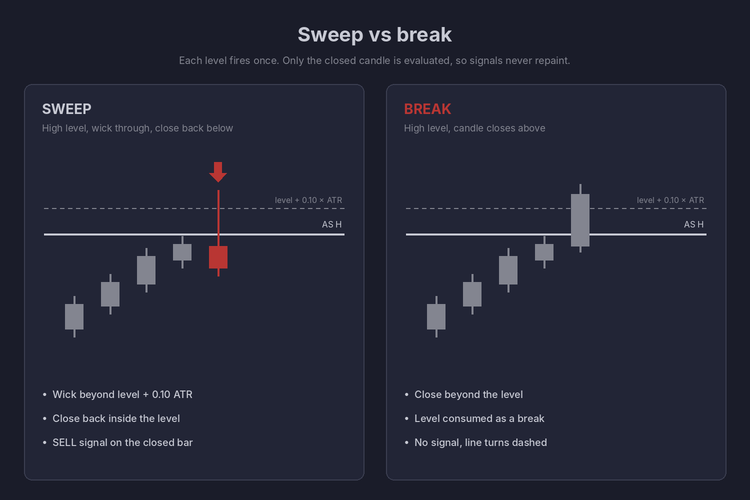
- Sell sweep: a closed candle's high exceeds level + InpMinPenetrationATR x ATR and the candle closes below the level.
- Buy sweep: the symmetric rule for low levels.
- A close beyond the level consumes it as a break (no signal, line turns dashed).
- Each level produces one event only. The forming candle is never evaluated, so arrows do not repaint.
Display panel
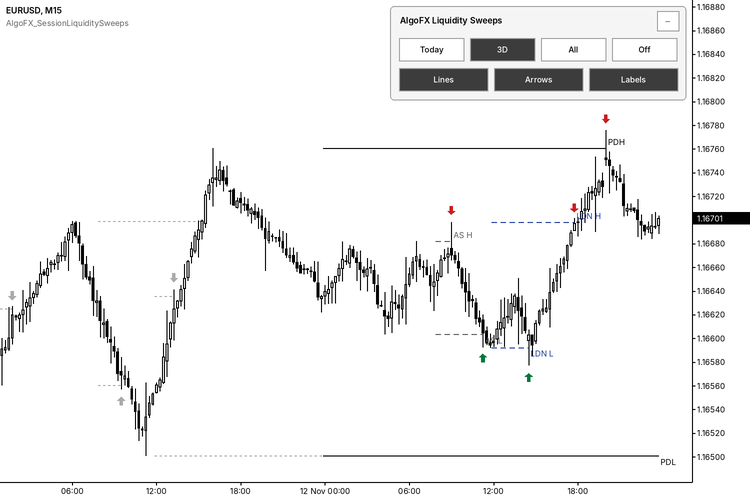
The on-chart panel switches between Today (default), ND (today plus N earlier days, shown as 3D by default), All and Off, and toggles Lines, Arrows and Labels. Earlier days are drawn muted and dotted. Panel state is saved per chart and survives timeframe changes and terminal restarts. Display changes never affect calculations or alerts.
Use in an Expert Advisor
Read buffer 2 (BuySignal) and buffer 3 (SellSignal) at shift 1 with CopyBuffer on an iCustom handle. The value is the swept level price, or EMPTY_VALUE when there is no signal. Buffers 0/1 are display only and should not be used for decisions.
Main inputs
- InpDisplayMode, InpLastNDays, InpPastStyle: initial view and how earlier days are drawn.
- InpShowPrevDay, InpShowAsia, InpShowLondon: enable each level group.
- InpAsiaStart/End, InpLondonStart/End: session times in HH:MM server time.
- InpMinPenetrationATR (0.10), InpATRPeriod (14): sweep filter.
- InpMaxLevelAgeBars: 0 keeps a level for its activation day and the next trading day; a positive value limits it to N bars.
- InpHideConsumedLevels, InpShowPanel, InpPanelCorner: hide swept/broken levels, show the panel and choose its chart corner.
- InpApplyChartTheme: applies the AlgoFX chart colors and restores your original colors on removal.
- Visuals and Panel palette groups: level and arrow colors, widths, styles, arrow codes and panel colors are all adjustable.
- InpAlertPopup, InpAlertSound, InpAlertPush: alerts on the latest closed candle only, once per swept level.
Notes
- Timeframes M1 to H1 show all levels. Higher intraday periods show previous day levels only. D1 and above are disabled.
- Use one instance per chart.
- No DLLs, no web requests, no file I/O.
 Round-Number / Psychological Level Magnet
Auto-scaled round-number grid for any symbol — big figures and half levels drawn to the right spacing whether you're on EURUSD, USDJPY, XAUUSD or an index, plus a live "distance to nearest magnet" readout.
Spread and Daily ATR Risk Meter HUD
Compact zero-buffer MetaTrader 5 on-chart HUD displaying live Spread in points and pips, Daily ATR(14) range consumption percentage, broker Stops/Freeze levels, and 1R lot size.
 Risk Lot Calculator
Chart panel that calculates position size from risk % and stop-loss in points, with tick value, margin and money at risk. Does not place orders.
ICT Session Boxes - four GMT windows, automatic broker offset, high and low lines
Session windows are quoted in GMT; the chart runs on the broker's clock. This indicator takes each window in GMT, applies your broker's offset, and draws the box over that window's bars. It adds the high and low lines to every enabled window unless you switch them off, prints the session name and range only on that session's newest box when there is room, and never trades.