 MetaTrader 5
 Experts
 지표
 스크립트
 라이브러리
 보관함
거래 로봇을 무료로 다운로드 하는 법을 시청해보세요
당사를 Twitter에서 찾아주십시오!
당사 팬 페이지에 가입하십시오
당사 팬 페이지에 가입하십시오
스크립트가 마음에 드시나요? MetaTrader 5 터미널에서 시도해보십시오

- 조회수:
- 92
- 게시됨:
-
 이 코드를 기반으로 한 로봇이나 지표가 필요하신가요? 프리랜스로 주문하세요
프리랜스로 이동


Round-Number / Psychological Level Magnet
The idea behind it
Price doesn't need a reason to react at 1.1000, 150.00, or 1950.00 — round numbers pull orders toward them anyway, because that's where a lot of other traders' stops, take-profits, and resting limit orders already sit. The trouble with marking these by hand is that "round" means something different on every symbol: a EURUSD big figure is a 0.0100 move, a USDJPY big figure is 1.00, and on XAUUSD it's closer to 10.00. Round-Number Magnet reads the current price's own order of magnitude and picks a sensible spacing automatically, then keeps a small grid of big-figure and half-figure lines centered on wherever price currently is.
Instead of asking you to recalculate spacing every time you switch symbols, the auto-step logic takes the price's magnitude and lands on the "00"-style level traders actually talk about for that instrument. You can still override it with a manual step if your own convention differs.
How to interpret it
- Dashed lines are big-figure levels — the "00" round numbers at the auto-detected (or manual) spacing.
- Dotted lines, when enabled, sit exactly halfway between two big figures — the "50" levels traders treat as minor magnets.
- The grid is centered on price and redraws only when price drifts far enough from the current center to need it — it doesn't rebuild on every tick, so it won't flicker or eat CPU on a fast feed.
- The on-chart readout shows the single nearest magnet price and your current distance to it in points — the fastest way to see "how close is price to a level that might matter" without eyeballing the grid.
- The readout text turns from silver to orange once price is inside your configured approach distance — a quiet visual nudge before any alert fires.
- With alerts on, a close approach to any magnet fires once and logs to the Experts tab; it won't fire again for that approach until price pulls back out past the re-arm distance.
External variables (inputs)
| Input | Default | Purpose |
|---|---|---|
| InpManualStep | 0.0 | Manual level spacing in price units. Leave at 0 to auto-detect the spacing from the current price's magnitude. |
| InpLevelsEachSide | 6 | Number of big-figure levels drawn above and below the current price. |
| InpShowHalfLevels | true | Also draw the half-level line sitting between each pair of big figures. |
| InpRecenterThreshold | 0.70 | Fraction (0-1) of the half-band width price must drift before the grid recenters and redraws. |
| InpAlertOnApproach | false | Enable a one-shot alert when price comes within InpApproachPoints of any magnet. |
| InpApproachPoints | 50 | Distance, in points, that counts as "near" a magnet level. |
| InpRearmPoints | 100 | Distance, in points, price must move back out before the same approach can alert again. |
| InpCorner | CORNER_LEFT_UPPER | Chart corner the readout panel is anchored to. |
| InpCornerX | 20 | Panel X offset, in pixels, from the chosen corner. |
| InpCornerY | 20 | Panel Y offset, in pixels, from the chosen corner. |
| InpBigColor | Silver | Color of the big-figure (dashed) lines. |
| InpHalfColor | DimGray | Color of the half-level (dotted) lines. |
Recommended use
- Works on any symbol the broker exposes — FX, metals, indices, crypto CFDs — since the spacing is derived from the price itself, not hardcoded per instrument.
- Most useful on H1 and above, where round-number reactions are a real, recurring pattern rather than noise; on M1/M5 the "magnet" effect is weaker relative to normal tick-to-tick movement.
- Pure visualization — it places no orders and holds no position, so it carries none of its own margin or stop-out risk and behaves the same on any account type.
- A very wide InpLevelsEachSide on a fast-moving symbol means more frequent recenters; if you notice the grid rebuilding too often, lower InpRecenterThreshold's sensitivity by raising it closer to 1, or reduce the level count.
- Distance is measured in points (not pips), so on a 5-digit FX symbol 50 points is 5 pips — adjust InpApproachPoints accordingly per symbol's digit convention.
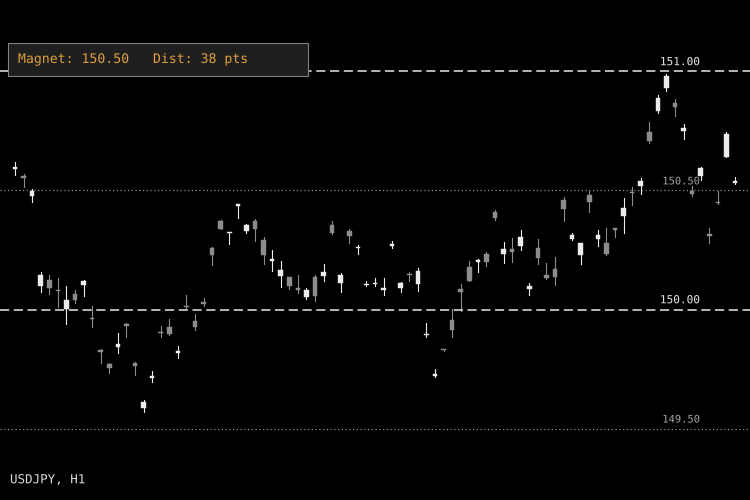
Fig. 1. Round-Number Magnet grid and nearest-magnet readout on a USDJPY chart (shown in black & white per Code Base image guidelines; line colors are configurable on a live chart).
 Spread and Daily ATR Risk Meter HUD
Compact zero-buffer MetaTrader 5 on-chart HUD displaying live Spread in points and pips, Daily ATR(14) range consumption percentage, broker Stops/Freeze levels, and 1R lot size.
 Risk Drift Audit: the Real Risk of Every Past Trade
Shows the risk every past trade really took (the loss at its stop loss as a % of the balance at entry) and how far a fixed lot drifted from the tested risk. Read-only.
AlgoFX Session Liquidity Sweeps
Marks previous day, Asian and London session highs and lows from chart bars and flags closed-bar, ATR-filtered liquidity sweeps. Non-repainting, with EA-readable buy/sell buffers and an on-chart display panel.
 Risk Lot Calculator
Chart panel that calculates position size from risk % and stop-loss in points, with tick value, margin and money at risk. Does not place orders.