 MetaTrader 5
 Experts
 지표
지표
 스크립트
스크립트
 라이브러리
라이브러리
 보관함
보관함
당사 팬 페이지에 가입하십시오

ICT Model Tracker - Sweep, MSS and FVG Setups with Honest Statistics - MetaTrader 5용 지표

How I work:
• A written specification first, so every rule is unambiguous.
• Clean, commented source code.
- 조회수:
- 135
- 평가:
- 게시됨:
-
 이 코드를 기반으로 한 로봇이나 지표가 필요하신가요? 프리랜스로 주문하세요
프리랜스로 이동
이 코드를 기반으로 한 로봇이나 지표가 필요하신가요? 프리랜스로 주문하세요
프리랜스로 이동


ICT Model Tracker is an indicator: it detects and measures the ICT model, and it never trades. It finds the classic ICT sequence on any chart: a liquidity sweep inside a killzone, a market structure shift with displacement (or an inverted FVG), and the retrace entry with stop loss and take profit. It follows every setup to its outcome and reports, in a statistics panel, what the model would have done. Closed bars only: nothing repaints. One file, no DLL.
Why this page shows a losing result
On US100.cash M5, from January 2025 to August 2026, the default model lost 0.05R per trade on average (690 setups, 425 trades, profit factor 0.91). None of the five configurations tested was profitable.
The result is here on purpose. The indicator exists to measure the model, and a measuring tool is only worth trusting if it also reports bad news. Winning screenshots are easy to pick; this page shows the whole record.
The number describes the model, not a fault in the code: on a four-month test, an independent implementation reproduced every event. Other symbols, timeframes or settings may give a different answer, and the panel lets you check yours before you risk money. Nothing on this page is a recommendation to trade.
What you see on the chart
- Killzone boxes (London, NY AM, NY PM) in New York time, with daylight-saving changes handled for any broker.
- Liquidity levels: previous day high and low, Asian range, London range and, optionally, swing highs and lows.
- For every setup: the sweep that started it (✕, labelled with the level), the MSS line and the FVG, or for an iFVG the original gap until the candle that inverts it. Then the position: a green buy or red sell arrow and entry line, a shaded target zone and a shaded risk zone, and the final result (+R, −1R, EXP, MISS).
- A statistics panel: setups, trades, win rate, average R, profit factor, longest losing streak and drawdown in R, broken down by killzone, direction and model.
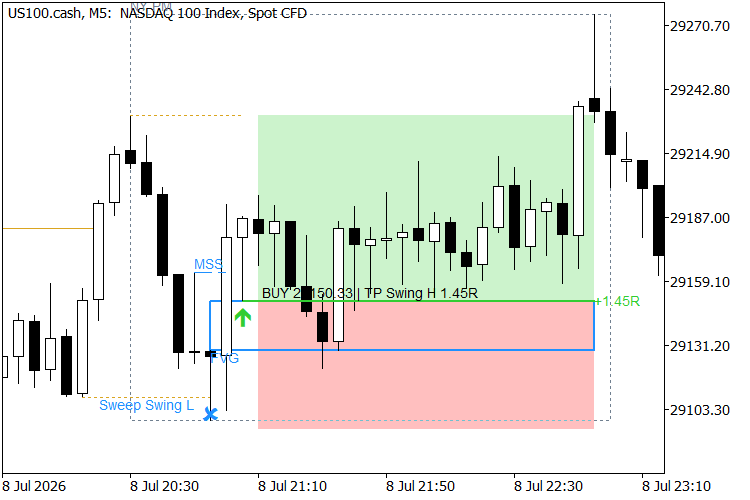
One setup from sweep to result: the sweep, the MSS line, the FVG, the entry and the shaded target and risk zones. US100.cash M5.
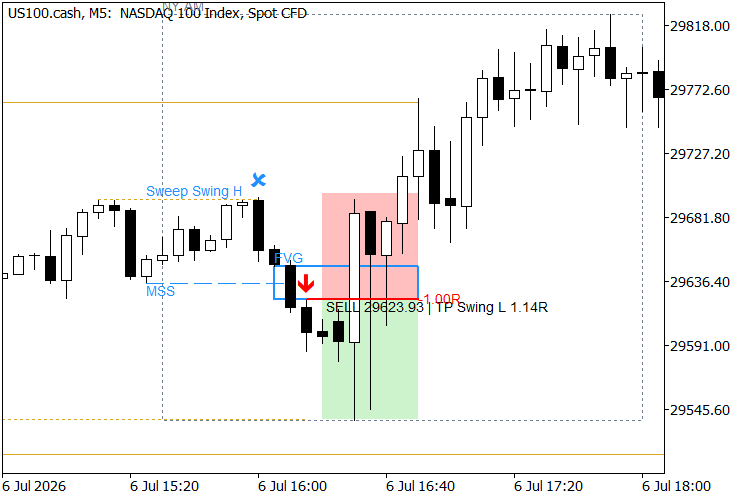
A losing trade, drawn exactly like a winning one: a sell that hit its stop loss. Every setup is followed to its result, good or bad.
Quick start
- Attach it to an intraday chart. It was built and verified on M5; it runs on any timeframe, but killzones only make sense from M1 to M15.
- Check the server time: the default (New York + 7) fits most GMT+2/+3 brokers, and "Server time" below shows how to confirm yours.
- Read the panel: it reports what the model did over "Days processed" (120 by default). Raise "Days drawn" to see older setups on the chart.
How a setup is defined
The rules below are one precise, written-down reading of the ICT model (Inner Circle Trader, the method taught by Michael J. Huddleston). Every threshold is an input.
- Sweep: inside a killzone, a candle trades through a live liquidity level.
- Confirmation within 12 bars. Model A: a close beyond the last 3-candle swing before the sweep extreme (MSS), with a displacement candle (body of at least 1 ATR) leaving an FVG. Model B: a displacement candle closes through an opposite FVG formed into the sweep (iFVG).
- Entry: limit order at the near edge of the zone (or its 50%); SL beyond the sweep extreme plus 0.1 ATR; TP at the nearest opposite liquidity at least 1R away, otherwise 2R.
- Lifecycle: the order must fill within 12 bars or it expires; it is cancelled if the target is reached first; open trades close at 16:00 New York. Long and short setups are tracked separately, so a buy and a sell can be live at the same time: the indicator measures setups, it does not manage an account. An EA built on its buffers decides how to handle that case.
Every threshold is ATR-based, so the defaults work on indices, gold and forex.
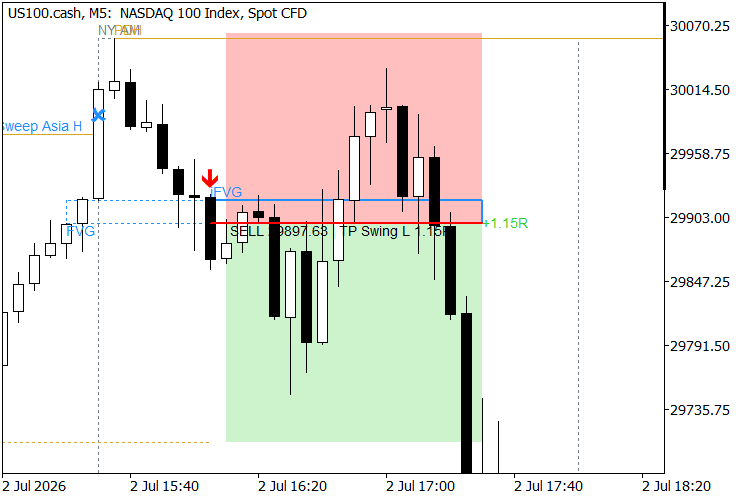
Model B. The original FVG (dotted) lasts until the candle that inverts it; from there the same zone continues as the iFVG.
How the statistics are computed
- Bar-based simulation with spread: the median spread of the loaded bars, or your own value.
- Worst case on ambiguous bars: a bar that touches SL and TP counts as a loss, and a fill bar never counts as a win.
- The panel shows what the model did on past bars; it does not predict what it will do.
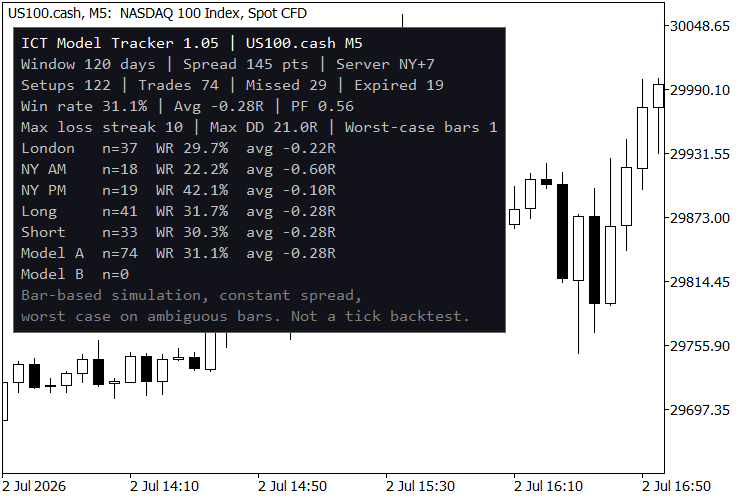
The statistics panel with the default settings, US100.cash M5.
Verified behaviour
- No repaint: buffers logged bar by bar in the Strategy Tester are identical to the values computed on history, and results do not depend on where the loaded window starts.
- Independent replay: a separate implementation of the specification reproduced all 1,927 events and statistics of four months of US100 M5; seven configurations matched exactly.
- Visual review: ten setups covering both models, both directions and every outcome were checked candle by candle against the independent replay.
- Time zones: the server-to-New-York conversion matches the IANA time zone database in three server modes, across both daylight-saving changes.
- Other markets: runs without errors on EURUSD, USDJPY, XAUUSD and US100 across M1, M5, M15, H4 and D1.
- Speed: the full calculation of 120 days takes about 30 ms on M5 (23,339 bars) and about 160 ms on M1 (116,701 bars) in the Strategy Tester.
Inputs
| Group | Main inputs |
|---|---|
| Model | A (MSS + FVG), B (iFVG) or both; MSS swing strength; displacement body and FVG size in ATR |
| Entry, SL and TP | Proximal or 50% entry; bars to fill; SL buffer; liquidity or fixed-R target; time exit |
| Liquidity | Previous day, Asian range, London range, swings |
| Killzones | Three windows in New York time |
| Server time | New York + 7 (most GMT+2/+3 brokers), GMT+X with European DST, or fixed GMT+X |
| HTF bias | Off, HTF market structure (H1 to D1) or New York midnight open |
| Statistics | Days processed, simulation spread, CSV export |
| Alerts | Sweep, setup, fill, result; popup, sound, push, email |
| Drawing | Days drawn, layers (including sweeps that gave no setup), panel corner, colours, zone shading |
For EA developers
Buffers 0 to 9 hold one value per event, on the bar where the event is confirmed, and never change afterwards. Read shift 1 on every new bar.
| Buffer | Value |
|---|---|
| 0 | Signal: +1 long, −1 short |
| 1, 2, 3 | Entry, SL and TP of that signal |
| 4 / 5 | Long / short order: 1 filled, 0 cancelled |
| 6 / 7 | Long / short result in R |
| 8 / 9 | Swept level that opened a short / long setup |
In iCustom, every input group of this indicator counts as one string parameter: pass the group name in its position.
Server time
The default (New York + 7) fits brokers whose server runs at GMT+2/+3 on the US daylight-saving schedule. To check yours, find the US100 or US500 cash open (09:30 New York): it should print at 16:30 server time all year. If it moves to 15:30 for a few weeks in March and November, choose European DST.
Limitations
- One symbol per chart; there is no multi-symbol dashboard.
- Bar-based simulation: no ticks, constant spread, no commissions.
- With the automatic spread, the median depends on the loaded window; set a fixed spread to compare different window lengths.
Risk Lot Panel
On-chart panel that turns a risk setting into a lot size and shows what the broker's volume step and minimum lot do to that risk. Display only - it never places, modifies or closes an order.
 BacktestOverfitting: probability of backtest overfitting (PBO) of an optimization
Probability of Backtest Overfitting (PBO) of an MT5 optimization by combinatorially symmetric cross-validation. Every pass sends its daily results as a frame, and the PBO is computed when the optimization ends.
Extreme Price Filter
An indicator to reveal the the time candles breached an extreme price boundary
 Trade Environment Check: account mode, symbol trading rules and open positions in one report
Script that reports what an EA has to cope with here: hedging or netting, trade permissions, filling modes, stop and freeze levels, volume rules, swaps and the positions already open on the symbol. Saves a report file you can attach to a Freelance order.