 MetaTrader 5
 Experts
 지표
지표
 스크립트
스크립트
 라이브러리
라이브러리
 보관함
보관함
당사 팬 페이지에 가입하십시오

AttachExpert: attach an EA with inputs to a chart from code - MetaTrader 5용 라이브러리

제가 제공하는 작업:
고객의 전략, TradingView 스크립트 또는 문서화된 규칙을 깔끔한 MT5 Expert Advisor로 구현
기존 EA 수정 및 문제 해결: % 기준 리스크 포지션 사이징, 트레일링 스톱, 세션 및 시간 필터, 스프레드 필터, 멀티 심볼 포트폴리오, 드로다운 보호 기능
- 조회수:
- 114
- 게시됨:
-
 이 코드를 기반으로 한 로봇이나 지표가 필요하신가요? 프리랜스로 주문하세요
프리랜스로 이동
이 코드를 기반으로 한 로봇이나 지표가 필요하신가요? 프리랜스로 주문하세요
프리랜스로 이동

AttachExpert.mqh attaches an Expert Advisor to a chart from MQL5 code, with the inputs you choose and with "Allow Algo Trading" on or off. MQL5 has no function for this; the library writes a template with an <expert> block and applies it with ChartApplyTemplate().
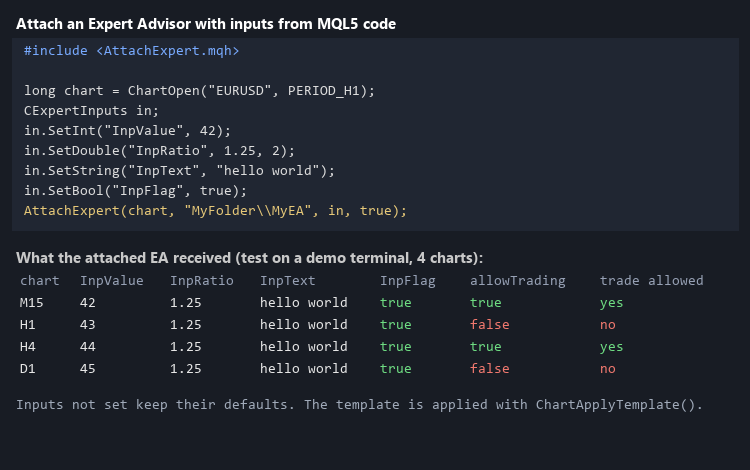
Usage
#include <AttachExpert.mqh>

long chart = ChartOpen("EURUSD", PERIOD_H1);
CExpertInputs in;
in.SetInt("InpValue", 42);
in.SetDouble("InpRatio", 1.25, 2);
in.SetString("InpText", "hello world");
in.SetBool("InpFlag", true);
AttachExpert(chart, "MyFolder\\MyEA", in, true); // MQL5\Experts\MyFolder\MyEA.ex5 - Inputs that you do not set keep their default values.
- The template is applied asynchronously. By default AttachExpert() waits up to 10 seconds until the EA runs on the chart (CHART_EXPERT_NAME); pass waitMs = 0 to return at once, for example from an Expert Advisor.
- Do not apply it to the chart of the calling Expert Advisor: the template would replace the caller.
- Whether the attached EA can trade also depends on the AutoTrading button of the terminal.
Example
The script AttachExpertExample.mq5 opens a chart and attaches the Moving Average example EA (Experts\Examples\Moving Average) with chosen inputs. Put AttachExpert.mqh in MQL5\Include and the script in MQL5\Scripts.
Checked
A test EA attached on M15, H1, H4 and D1 charts reported the inputs it received (int, double, string with a space, bool) and whether it was allowed to trade; all matched (picture 1).
 News Lines Utility – Economic Calendar Lines and Event Panel
Short description (for the "Short description" field) Shows economic news events directly on your chart as colour-coded vertical lines with tooltips, plus a draggable event panel with upcoming and recent releases. Works on every symbol and timeframe, with filters for impact level and instrument groups (Gold & Silver, Forex Majors, Indices, Oil & Gas).
 Margin Call Radar
Read-only panel that shows the distance to margin call and stop out in money, percent of equity and points, plus adverse price and equity shock scenarios. Hedge-aware, does not trade.
FxCraft Example EA – MA Cross
Educational Expert Advisor: moving average crossover with clean, commented MQL5 code – margin, volume, stop level and spread checks, order retries. Demo accounts and Strategy Tester only.
FxCraft Example EA – Bollinger Bands mean reversion
Educational Expert Advisor: Bollinger Bands return to the mean with an optional RSI filter and trading hours. Clean, commented MQL5 code with margin, volume and stop level checks. Demo and Strategy Tester only.