 MetaTrader 5
 Experts
 지표
지표
 스크립트
스크립트
 라이브러리
라이브러리
 보관함
보관함
당사 팬 페이지에 가입하십시오

Session TWAP: time weighted average price from the cash open, with deviation bands - MetaTrader 5용 지표
- 게시자:
-
Timon-pascal Krueger
 Systematic index trader and MT5 developer from Germany.
I trade my own capital and funded accounts, including a live FTMO account, with time anchored breakout strategies on DAX, FTSE, Dow and Nasdaq. - 조회수:
- 142
- 평가:
- 게시됨:
-
 이 코드를 기반으로 한 로봇이나 지표가 필요하신가요? 프리랜스로 주문하세요
프리랜스로 이동
이 코드를 기반으로 한 로봇이나 지표가 필요하신가요? 프리랜스로 주문하세요
프리랜스로 이동


A VWAP on a CFD chart is weighted by tick volume, and tick volume is a counter of price updates, not of traded contracts. A burst of quotes in a fast minute pulls the line towards that minute, a quiet hour hardly moves it. The time weighted average price avoids that question entirely: every second of the session has the same weight. This indicator draws it from the cash open of the session you select and resets it at the next open.
Time weighting has one trap on bar data. A minute in which no tick arrived has no bar, so a plain average of the bars skips it, although the price stood somewhere during that minute. Here each bar is held for its own duration, and a gap to the next bar of the same session is filled with the last close for exactly as many seconds as are missing. The forming bar counts only for the seconds it has run so far.
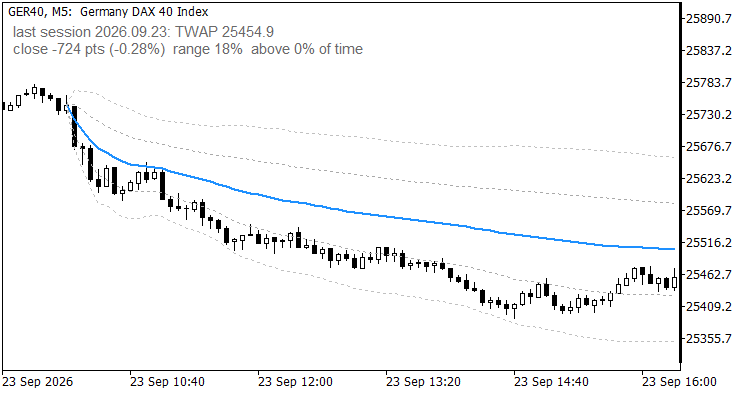
GER40 M5: TWAP from the Frankfurt cash open with the 1 and 2 sigma bands
What you see on the chart
- The TWAP line from the first candle at or after the open until the end of that server day. Candles before the open stay empty, so the night session never leaks into the average.
- Two pairs of dotted bands at 1 and 2 time weighted standard deviations of price around the TWAP. Either pair can be switched off by setting its width to zero.
- An info label with the TWAP value, the session, the distance of the last close in points and percent, where that close sits inside the session range (0 % at the low, 100 % at the high) and the share of session time the close spent above the TWAP.
- Before today's open the label shows the last completed session with its date, so the value you take into the open is on screen instead of a blank.
The session anchor works like in my Session Candle Counter. The open is converted from exchange local time to UTC to broker server time. Frankfurt and London switch daylight saving on the last Sunday of March and October, New York on the second Sunday of March and the first Sunday of November, Tokyo never switches. The broker offset is read from the terminal. By default the symbol name selects the session, and a manual mode takes a plain server time for everything else.
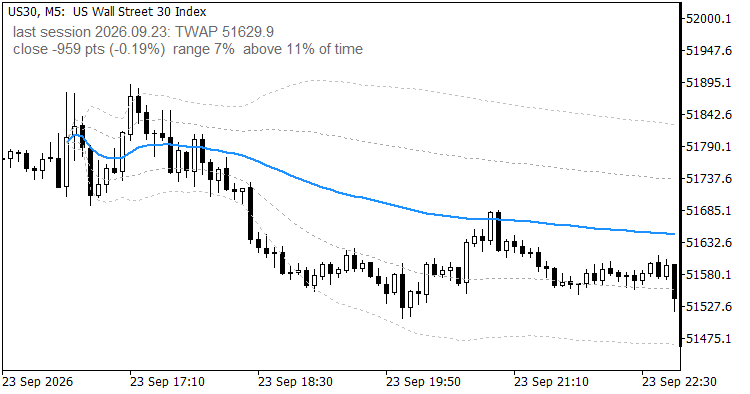
US30 M5 anchored at the New York open; the label shows the last completed session before the next open
Input parameters
| Parameter | Default | Meaning |
| InpSession | Auto | Session anchor: Auto, Frankfurt 09:00, London 08:00, New York 09:30, Tokyo 09:00 or Manual |
| InpManualOpen | 09:00 | Open time in server time, format HH:MM, used by the Manual session |
| InpPrice | Typical | Price held for each bar: Typical (H+L+C)/3, Close, Median (H+L)/2, Weighted (H+L+2C)/4 |
| InpBand1 | 1.0 | Inner band in standard deviations, 0 switches it off |
| InpBand2 | 2.0 | Outer band in standard deviations, 0 switches it off |
| InpShowInfo | true | Show the info label |
| InpInfoCorner | left upper | Corner for the info label |
| InpInfoX | 10 | Info label X offset in pixels |
| InpInfoY | 20 | Info label Y offset in pixels |
| InpInfoColor | DimGray | Colour of the info label |
| InpInfoSize | 9 | Font size of the info label |
Symbol and timeframe
The indicator is built for index CFDs and other symbols with a cash open: GER40, UK100, US30, NAS100, US500, JP225. Timeframes from M1 to H1 are supported. Above H1 a bar covers too much of the session, the buffers stay empty and the label asks for a smaller timeframe. M1 gives the finest time weighting, M5 is a good compromise. On Forex use the manual mode with a time that means something to you.
How it was checked
The buffer was compared with an independent recomputation from the bars, including the gap fill, for complete sessions on GER40, US30 and UK100 on M5 and M1, and for night sessions from 02:00 server time on GER40, UK100, USDZAR, XPTUSD and EURNOK on M1, where minutes without a tick occur. The largest difference in all cases was zero, and every bar before the open was empty.
Limitations
- A session runs from its open to the end of the server day. There is no session close input, so the evening hours of a CFD count into the same average.
- The value depends slightly on the timeframe, because each bar is represented by one price. On the GER40 session of 23 September 2026 the final TWAP was 25454.85 on M5 and 25454.77 on M1.
- Exchange holidays are not known to the indicator. On a day the exchange is closed but the CFD trades, the average starts anyway at the usual minute.
- In the strategy tester the terminal reports the simulated server time as GMT, so the anchors are treated as UTC. The average stays consistent, only the clock behind it shifts.
- Session detection reads the symbol name. Symbols it does not know fall back to Frankfurt, which the info label marks with "auto".
- The indicator is display only. It writes no files and sends no orders.
Quick start
- Attach it to an index chart on M1 or M5 and leave every input at its default. The line starts at the first candle of the current session.
- Check the session in the info label. If the symbol is unknown to the name detection, pick the session yourself in InpSession.
- Read the label before the open for the last session's TWAP, and during the session for where price stands against it.
The code is a free companion of my prop firm utilities in the Market (PropGuardian, PropMirror, PropSizer, PropCorrelation). It runs on its own and needs nothing else.
 PropSpread: time-weighted spread monitor with ATR context, alert and CSV log
Panel that samples the spread once per second and shows it in points and in the symbol's natural unit (pips on FX, index points on index CFDs), with rolling min/avg/median/max, a session statistic since server midnight, the spread as percent of ATR, a hold-time alert and an optional CSV log. It never sends an order.
Asian Range Sweep Indicator with a Built-In Win Rate Scorecard
Marks the Asian session range, signals when London or New York sweeps one side of it and reverses, and keeps a scorecard of how every past signal ended in R, spread included. Non-repainting, with buffers ready for an Expert Advisor.
EMA Cross Demo EA with ATR Stops
A small demo Expert Advisor: EMA fast/slow cross entries (evaluated on closed bars only, no repainting), ATR-based stop-loss and take-profit, spread filter, and position handling that works on both hedging and netting accounts. Includes a Python reference implementation for parity testing. This is a deliverable example, not a trading recommendation - the attached equity curve is from synthetic data and shows the method, not an edge.
ATR Trailing Stop (Pine Script Port)
MQL5 port of a Pine Script ATR trailing-stop indicator: nLoss = ATR-multiple, the stop ratchets under price in an uptrend and over price in a downtrend, and flips (with a buy/sell arrow) when price closes through it. Includes a Python reference port and a parity test that checks both agree with a literal, bar-by-bar transcription of the Pine semantics (na/nz/series history).