 MetaTrader 5
 Experts
 지표
지표
 스크립트
스크립트
 라이브러리
라이브러리
 보관함
보관함
당사 팬 페이지에 가입하십시오

Session Daylight Gradient — Ambient Forex Session Overlay - MetaTrader 5용 지표

- 조회수:
- 3995
- 평가:
- 게시됨:
- 업데이트됨:
-
 이 코드를 기반으로 한 로봇이나 지표가 필요하신가요? 프리랜스로 주문하세요
프리랜스로 이동
이 코드를 기반으로 한 로봇이나 지표가 필요하신가요? 프리랜스로 주문하세요
프리랜스로 이동

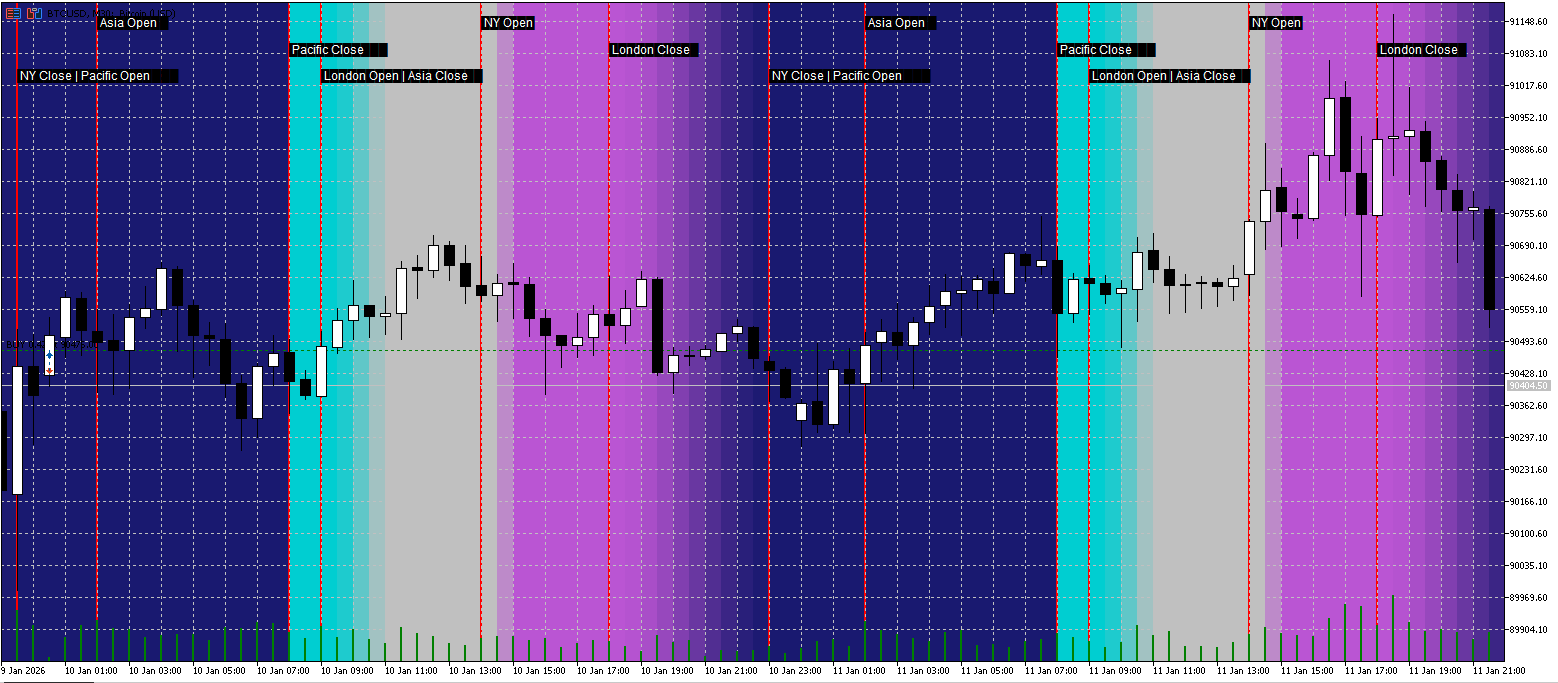
Overview
Session Daylight Gradient is an ambient session awareness indicator for MetaTrader 5.
Instead of drawing heavy session boxes, it uses a soft background gradient that visually communicates the current market regime—quiet hours, rising activity, peak volatility, and fade-out—at a glance.
This helps traders stay aligned with typical session behavior without cluttering the chart.
What You See on the Chart
-
Session Daylight Background:
A colored gradient that changes smoothly through the trading day:-
Pacific (quiet / reset)
-
Asia (range / consolidation)
-
London (activity increase)
-
London/NY overlap (peak volatility)
-
NY fade-out into Pacific
-
-
Session Event Markers (optional):
Vertical separator lines and compact labels for key events such as:-
Asia Open / Asia Close
-
London Open / London Session
-
NY Open (overlap start)
-
London Close
-
NY Close / Pacific Open
-
-
Sunrays (optional):
Add highlighted time windows for scheduled events (e.g., economic news).
You can enter multiple times in a simple list, and each is drawn as a “sunray” band around the timestamp.
Why It’s Useful
Most session indicators show boxes that dominate the chart. This indicator focuses on low-noise, high-information visuals:
-
You instantly sense whether you are in a calmer session or a high-volatility window.
-
The background is subtle (opacity adjustable), so price action remains the priority.
-
Event markers give structure without forcing you to read a timetable every day.
Timezone Handling (Important)
Markets trade globally, but brokers and PCs can use different time references.
This indicator provides three modes:
-
UTC — Recommended for consistent global session definitions.
-
Broker/Server Time — Uses your broker’s server time (chart time).
-
PC Local Time — Uses your computer’s local time.
Additionally, you can apply a Manual DST Shift (hours) to correct cases where daylight saving time causes session alignment to appear off by one hour.
Main Inputs
General Settings
-
EnableGradient — Enable/disable the background gradient.
-
EnableSunrays — Enable/disable news highlight bands.
-
SessionTimeMode — Choose UTC / Broker-Server / PC Local.
-
ManualDSTShiftHours — Manually shift session reference by hours (+1 / -1 / 0).
Session Times (HH:MM)
Customize session windows using simple strings:
-
AsiaStart / AsiaEnd
-
LondonOpenStart / LondonOpenEnd
-
OverlapStart / OverlapEnd
-
NYCloseStart / NYCloseEnd
-
PacificStart / PacificEnd (wraps midnight by design)
Colors & Intensity
-
PacificColor , AsiaColor , LondonColor , NYColor
-
MaxOpacity — Controls how subtle the background is (0–255).
-
SmoothingStrength — Smooth transition strength.
Visual Separators
-
ShowSessionLines
-
SessionLineColor , SessionLineStyle , SessionLineWidth
Sunrays
-
SunrayTimes — Example: 14:30; 16:00 or 2026-01-11 14:30; 16:00
-
SunrayWidthMinutes , SunrayOpacity , SunrayColor
Performance Notes
The indicator draws chart objects (rectangles/lines/text) only for the visible range plus a buffer.
If you use very low timeframes with a large visible history, consider reducing visible bars or disabling some visual features for maximum responsiveness.
Typical Workflow
-
Attach the indicator to any chart.
-
Set SessionTimeMode to UTC (recommended).
-
If sessions appear shifted, adjust ManualDSTShiftHours .
-
Enable ShowSessionLines for clearer structure.
-
Add SunrayTimes if you want news/event highlights.
 CPlotManager (Auto Buffer and Plot Manager)
Automates MQL5 buffer and plot index management. Eliminates manual counting, simplifies Z-order layering, and handles complex plot types (Candles, Color Lines) with a single line of code.
 The Playground Series v1 to V4 - A combination of trading concepts
The Playground EA series was created for experimentation with Fair Value Gaps (FVGs) and liquidity concepts
ASZ - Adaptive Structure ZigZag
A robust Market Structure analyzer that adapts to volatility. ASZ uses a Hybrid ATR engine to filter noise and detect reliable Swing points. Non-repainting on confirmed bars.
Adaptive VWAP Institutional
Adaptive VWAP Institutional: Multi-Asset Auto-Detection & DST-Accurate Session Resets (Forex 5PM NY Standard).