Winner Pyramid Builder
- ユーティリティ
- バージョン: 1.0
- アクティベーション: 5

PYRAMIDING WITHOUT THE EXTRA RISK: ADD TO YOUR WINNERS, NEVER TO YOUR LOSERS, AND KEEP THE WHOLE STACK INSIDE THE RISK OF YOUR FIRST TRADE.
Before: a EURUSD buy with a 30 pip stop runs 60 pips your way. You want more size, but every manual add-on adds new risk, and one reversal can turn a great trade into a loss. After: Winner Pyramid Builder opens a smaller add-on at +1R and +2R and moves every position of the stack to one shared stop, so the combined stack can never lose more money than the first trade risked alone. If the move keeps going, you hold far more size; if it reverses, you lose at most the original risk, and usually less.
Built for trend and breakout traders who like pyramiding but hate doing the maths by hand. One promise: every add-on is paid for by profit already made. Mechanism: a position-pyramiding utility (a pyramid position builder / scaling-in tool) for MetaTrader 5 that measures the run in R multiples, points or ATR, adds a smaller lot each step and recalculates one protective stop for the whole stack.
Works with: manual trades and other Expert Advisors or trade copiers on the same terminal (symbol scope and magic filter decide which trades it builds on; its own add-ons carry their own magic number), hedging and netting accounts, every symbol (forex, gold, indices, crypto), and prop-firm style rules that cap the risk per trade.
Try it free first: run Winner Pyramid Builder in the Strategy Tester with visual mode on. There it opens small demo base trades with a stop, so you can watch the add-ons appear on winners and the shared stop line move up the chart.
Who this is NOT for: traders looking for a grid, martingale or averaging-down tool (this never adds to a losing trade and add-ons are never bigger than the previous entry), and anyone who trades without a stop loss: a position without a stop is shown on the panel but never pyramided.
In short
- Adds only in profit: the next add-on is due after the price ran 1 R (default), a set number of points, or an ATR multiple beyond the last entry of the stack.
- Smaller each time: add-on lots = previous entry x lot factor (0.5 by default), at most 3 add-ons, optional lot cap per stack.
- One shared stop: after every add-on all positions of the stack move to the stop at which the whole stack loses no more than the original risk (or a lower percentage you choose). Stops are only ever tightened.
- Money first: margin checked (x 1.5) before every add-on, broker volume limits, stop and freeze levels respected; an add-on is skipped when its shared stop would not fit.
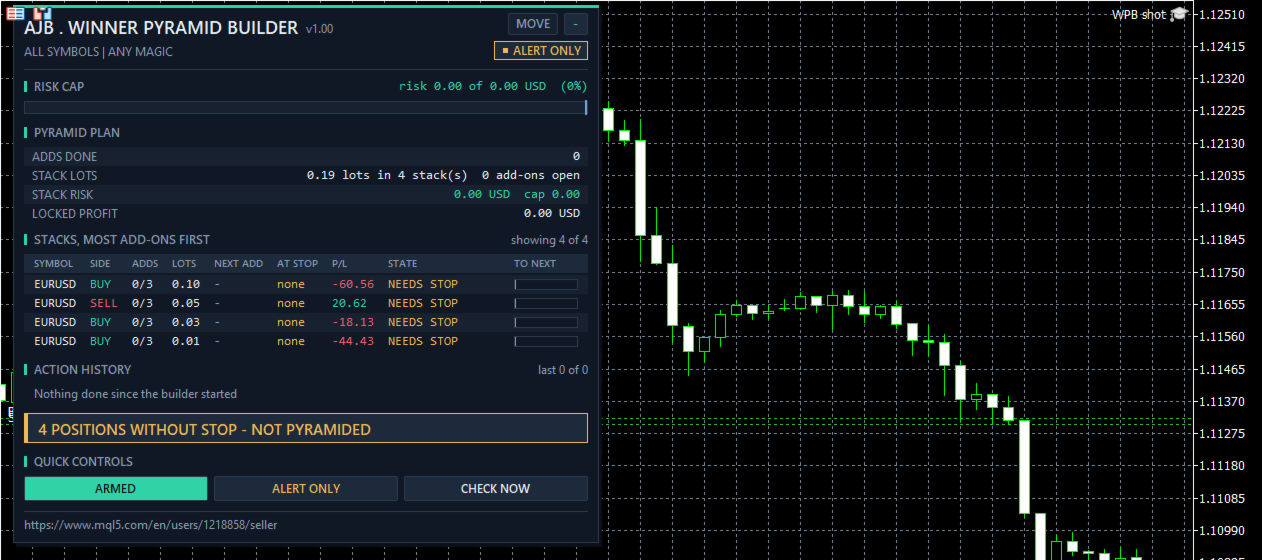
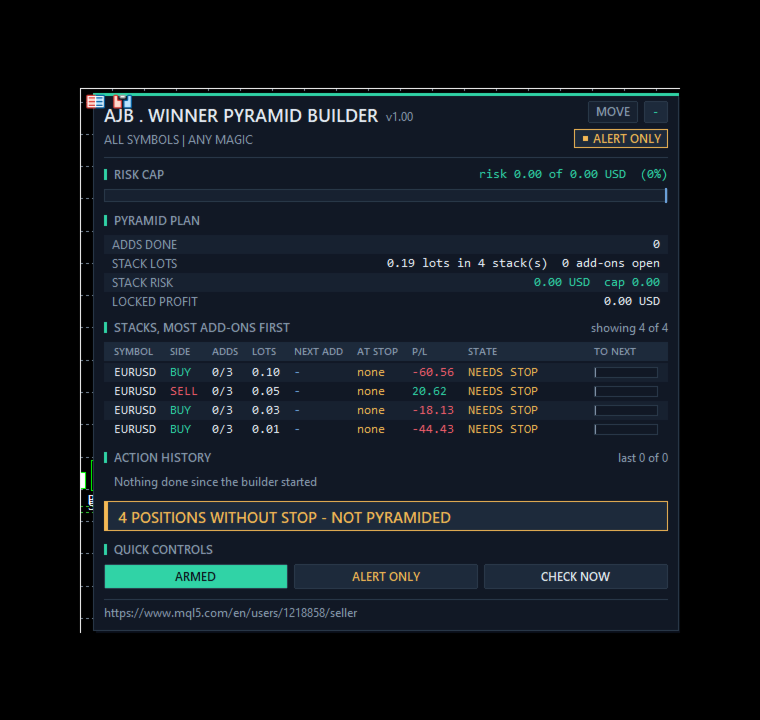
- Panel with real trading data: adds done, stack lots, stack risk in money against the cap, locked profit, a RISK CAP bar and a TO NEXT bar per stack.
- Alert-only mode shows every add-on and stop it would send and sends nothing.
- Not a grid, no martingale, no averaging, no DLLs, no web requests.
- Tester numbers (June 2026, EURUSD H1, defaults): 34 demo base trades, 32 add-ons, 52 shared stop moves, 0 failed sends, 0 journal errors, 0 stacks above the risk cap.
START HERE
Attach it to one chart, for example EURUSD H1. One copy watches every symbol of the account unless you limit it. Open your trade as usual, with a stop loss. Keep the defaults (+1 R per entry, half size each add-on, 3 add-ons, risk cap 100 percent). Turn on Algo Trading and watch the stack table: WAIT, ADDING, SHARING STOP, PROTECTED, FULL. To watch first, switch to ALERT ONLY with the panel button.
How the shared stop is worked out
When the builder first sees your trade it records its original risk: the money lost if the stop is hit (for example 0.20 lots, 30 pips = 60 USD). Before every add-on it calculates, with your broker's own profit maths, the single stop price at which base trade plus all add-ons together lose no more than those 60 USD. If that stop would sit too close to the market for the broker, the add-on is not sent. After the add-on fills, every other position of the stack is moved to the same stop. A stop you or another EA already tightened further is never pulled back.
The life of one stack
Base. Your trade opens with a stop. The panel shows its original risk and the distance TO NEXT add-on.
Add. The price runs 1 R beyond the entry: a half-size add-on opens with the shared stop, comment WPB+ticket and its own magic number.
Share. All positions of the stack move to the shared stop; STACK RISK drops back under the cap, often to locked profit.
Repeat. The next add-on is measured from the last entry, up to the maximum count. When the stack is FULL, only the stop sharing continues.
Safety patterns inside
Before any send it checks that Algo Trading is allowed, that the symbol is tradable in that direction, that its session is open and that the last quote is no older than 5 minutes. A refused send is retried with a growing pause up to 2 minutes, with one alert after a set number of failures. Right before each send the base position is selected again and its symbol and magic are checked again. Per-stack memory (original risk, add-on count, last entry) is kept in GlobalVariables whose keys contain the chart symbol, the magic filter and both magic numbers, so two copies never share a key and a terminal restart continues the same stack.
Inputs, every one explained
ADD-ON TRIGGER
InpTrigger = R multiple. How the distance between entries is measured: R multiple of the original stop distance, fixed points, or ATR multiple.
InpTrigR = 1.0. Distance in R (1.0 = one original stop distance).
InpTrigPoints = 300. Distance in points (also the fallback when R cannot be measured).
InpTrigATR = 1.0, InpATRTF = H1, InpATRPeriod = 14. Distance in ATR.
InpMinSpacing = 100. Never two entries of a stack closer than this many points.
ADD-ON SIZE
InpMode = 1. 0 alert only, 1 open add-ons and move the shared stop.
InpLotFactor = 0.5. Add-on lots = previous entry lots x factor (0 to 1, never bigger).
InpMaxAdds = 3. Most add-ons per stack.
InpMaxStackLots = 0. Most lots in one stack, 0 = no cap.
InpAddMagic = 712270. Magic number of the add-ons.
SHARED STOP
InpRiskCapPct = 100. The stack may risk this percentage of the original risk; 50 halves it, 0 means the stack must be at break-even or better after an add-on.
InpMoveBaseStop = true. Move every position of the stack to the shared stop.
EXECUTION
InpSlippage = 30. Maximum slippage of an add-on in points. InpFailAlertAt = 3. One alert after this many failed attempts.
FILTER - WHICH POSITIONS ARE PYRAMIDED
InpSymbolScope = all symbols or the chart symbol only. InpMagicFilter = any magic, only manual trades (magic 0), or only the magic number InpMagic.
ALERTS
InpAlertPopup = true. InpAlertPush = false (push to the MetaTrader app on your phone).
PANEL
ShowPanel = true. ShowLines = true: shared stop line, next add-on line and entry markers for chart-symbol stacks. PanelX = 12, PanelY = 15, PanelFontSize = 9, MaxTableRows = 6, MaxHistoryRows = 4. The MOVE button drags the panel; on a short chart it drops its least important rows first.
STRATEGY TESTER DEMO
InpTesterDemo = true. Strategy Tester only: Monday to Friday 08 to 16 one demo base trade per 4-hour slot with a stop 1.5 ATR away, at most 2 open, margin checked x 1.5, closed after 4 days, stopped after a 20 percent balance loss. This code never runs on a live or demo chart.
The panel
RISK CAP: a bar with the money all stacks risk now against the money their first trades risked. PYRAMID PLAN: adds done, stack lots, stack risk, locked profit, trigger, add-on size, mode, stop moves, positions without a stop, last action, Algo Trading, failed sends, totals and orphan add-ons. STACKS, MOST ADD-ONS FIRST: symbol, side, adds done of max, lots, points to the next add-on, money at the shared stop, profit, state and a TO NEXT bar. ACTION HISTORY lists every add-on and stop move with server time. QUICK CONTROLS: ARMED or PAUSED, the mode button and CHECK NOW. The right side of the chart stays clear.
Common questions
Does it open trades by itself? Only add-ons to a trade you (or your EA) already opened, and only in profit. It never opens a first trade on a live account.
Does it work with my other EA? Yes. Use the magic filter to choose which trades it builds on; its add-ons carry their own magic number so your EA does not mistake them for its own.
What happens after a restart? The original risk, add-on count and last entry of each stack are kept in GlobalVariables, so it continues where it stopped.
Can the stack lose more than my first trade? Not by design: an add-on is only sent when the shared stop that keeps the stack within the cap can be placed. Gaps and slippage at the stop can still cost more, as with any stop.
What it cannot do
It does not choose entries and it cannot make a losing trade a winner. In a choppy market an add-on can be stopped out at the shared stop; the cost is then capped by the original risk, not removed. It only works while it runs: keep the terminal on, for example on a VPS.
What was and was not tested
Tested in the Strategy Tester on a hedging account, 1 to 30 June 2026, 1-minute OHLC, H1, deposit 10000, leverage 100, three runs, with no journal error, no failed send and no stack above its risk cap at the end. EURUSD defaults: 34 demo base trades, 32 add-ons, 52 shared stop moves. XAUUSD with an ATR trigger, lot factor 0.6 and 4 add-ons: 36 base trades, 53 add-ons, 101 stop moves. EURUSD alert only: 32 base trades, 19 add-on alerts, nothing sent. On a demo chart the panel ran in alert-only mode beside 4 EURUSD positions without stops and correctly refused to pyramid them.
Not tested at the time of writing: real add-ons on a live or demo broker, a netting account, retries after a broker refusal, chart symbol scope, magic filters, pop-up and push alerts and a terminal restart. These paths exist in the code and are described by design. Please try them on a demo account with your own broker first.
Try it in the Strategy Tester
Choose Winner Pyramid Builder, EURUSD or XAUUSD, H1, any recent month, visual mode, and press Start. Watch the add-on markers appear on winning trades and the dashed shared stop climb behind them.
If the builder turned a good trade into a great one, or you think it should handle a case differently, an honest review on the product page helps other traders decide and tells me what to improve next.