NatTrade Volume EA
- エキスパート
- バージョン: 1.0
- アクティベーション: 5

Title: NATTRADE Volume EA – Volume-Spike Strategy with 6-Target Scale-Out and a Full On-Chart Control Panel
Overview
NATTRADE Volume EA trades one idea: a closed candle backed by unusually high volume. On every new bar it compares the last closed candle’s tick volume with the average of the previous bars and looks for two setups: Volume Continuation (strong volume in the direction of the trend) and Volume Breakout (strong volume closing outside the recent range, off by default). An optional RSI override fades extreme moves (RSI 80 / 20 by default).
Every trade has a stop-loss behind the signal candle. There is no grid, no martingale and no averaging down, and only one position is open at a time.
Trade management
- 6 targets at 0.5R / 1R / 1.5R / 2R / 2.5R / 3R (step and count are inputs).
- 15% of the position is closed at each of targets 1–5, and the last 25% runs to the final take-profit.
- The stop moves to breakeven at target 1, then to the previous target after each further target.
- Time-stop after N bars, applied only while price is on the loss side of the entry.
- Optional trend-runner for the last leg.
Capital protection
Risk-% lot sizing, margin check, max-lot cap, daily and weekly equity kill-switch (state survives restarts), relative spread filter, daily trade limit, optional session filter, retry logic with duplicate-order protection.
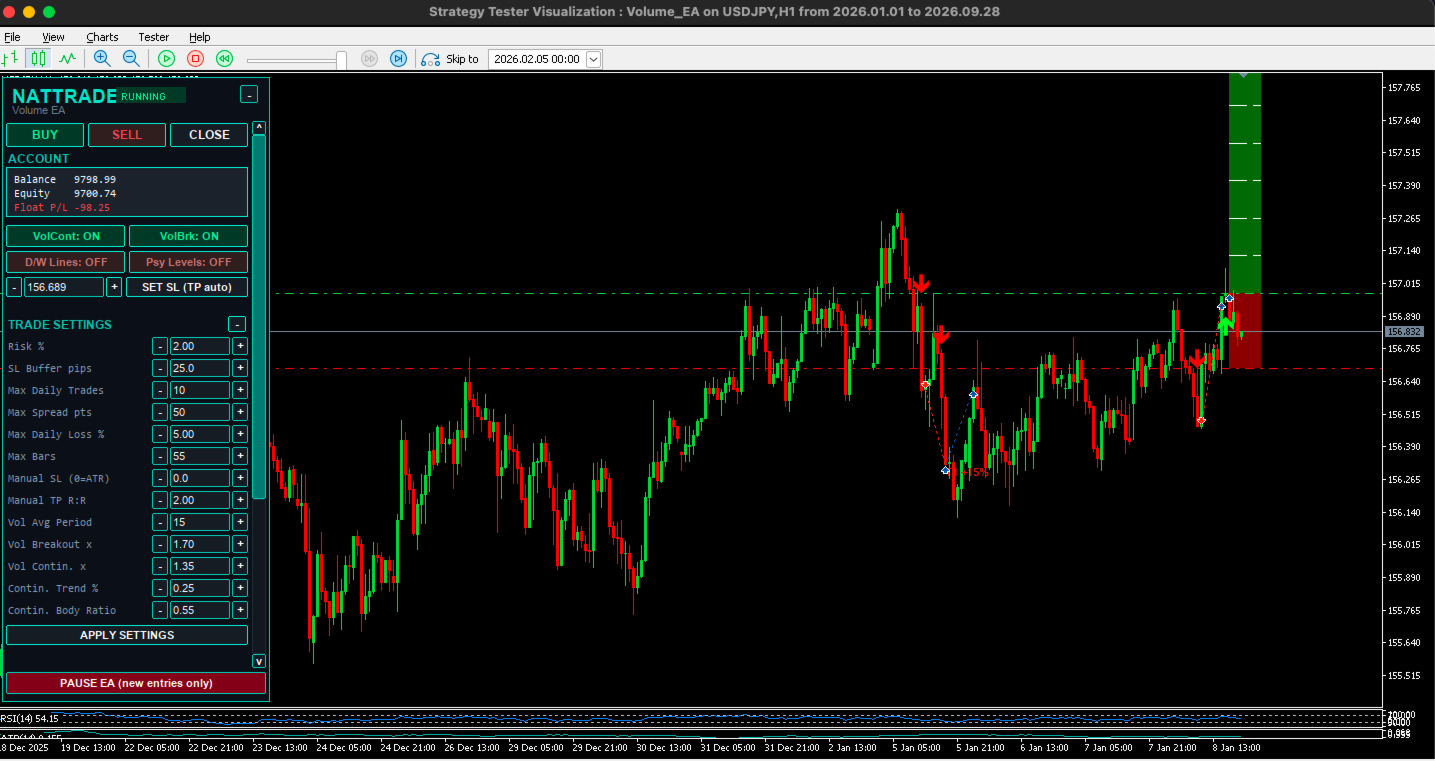
The on-chart NATTRADE panel
The panel is drawn directly on the chart. It is scrollable and fits itself to the chart height. A header with a collapse button stays fixed at the top, and the PAUSE button stays fixed at the bottom.
Header
- EA name and a status badge: RUNNING, PAUSED or HALTED (loss limit reached).
- [-] / [+] button that folds the whole panel down to the header.
Manual trading row
- BUY / SELL / CLOSE buttons.
- A BUY or SELL click shows a confirmation window with lot size, entry, SL, TP and R:R before sending.
- The stop distance comes from a fixed pip value or from ATR × a multiplier. The TP follows a live-editable Manual TP R:R.
- CLOSE closes every position of the EA on the chart symbol.
Account block
- Balance, equity and floating P/L, with floating P/L colored green or red.
Strategy switches
- ON/OFF buttons for the Volume Continuation and Volume Breakout setups, applied instantly.
Chart helpers
- D/W Lines: vertical lines at every daily open, with a thicker line at the weekly open.
- Psy Levels: horizontal psychological levels every 50 pips, with the round levels emphasized.
Stop-loss editor (one line)
- [-] [SL box] [+] [SET SL (TP auto)]
- The box always mirrors the broker SL of the open position. The −/+ buttons nudge it by one pip.
- SET SL checks that the stop is on the correct side of price and respects the broker’s minimum distance.
- It recalculates the TP to keep the original R:R, unless the new SL already locks profit.
- A status line under the editor shows the result of every action.
Trade settings (collapsible, live-editable)
Thirteen rows with [-] [value box] [+]. You can click the buttons or type a value and press APPLY SETTINGS:
- Risk %, SL buffer (pips), max daily trades, max spread, max daily loss %, max bars in trade.
- Manual SL (0 = ATR) and Manual TP R:R.
- Volume average period, breakout multiplier, continuation multiplier, trend %, body ratio.
- A Staged Targets ON/OFF switch.
All values are validated against safe ranges and saved per symbol, so they survive an EA restart or a terminal restart.
Core status
- Two cards, one per setup, each showing its volume multiplier and the number of open positions.
Execution
- Symbol, timeframe and live spread.
Protection
- Daily and weekly loss-limit status (ACTIVE/OFF).
- Session-filter status.
- Kill-switch state, or trades taken today versus the daily limit.
- The last signal with its time, colored green for buy and red for sell.
PAUSE EA
- Blocks new entries only. Open trades keep being managed normally.
Chart drawings
- Red/green risk-reward zones for each open trade.
- White dashed lines at every target.
- Signal arrows and target labels.
Requirements
MT5 account (hedging or netting) with automated trading allowed, low spread (raw/ECN recommended), minimum lot 0.01, and a balance of roughly $2,000 or more at 2% risk. The EA is designed for H1. Pip size is detected automatically for forex (including JPY pairs), gold, silver and crypto.
Risk warning
Trading involves substantial risk. Tested or past results do not guarantee future performance. Test on a demo account first.