FX Session Timer
- インディケータ
- バージョン: 1.0
- アクティベーション: 5

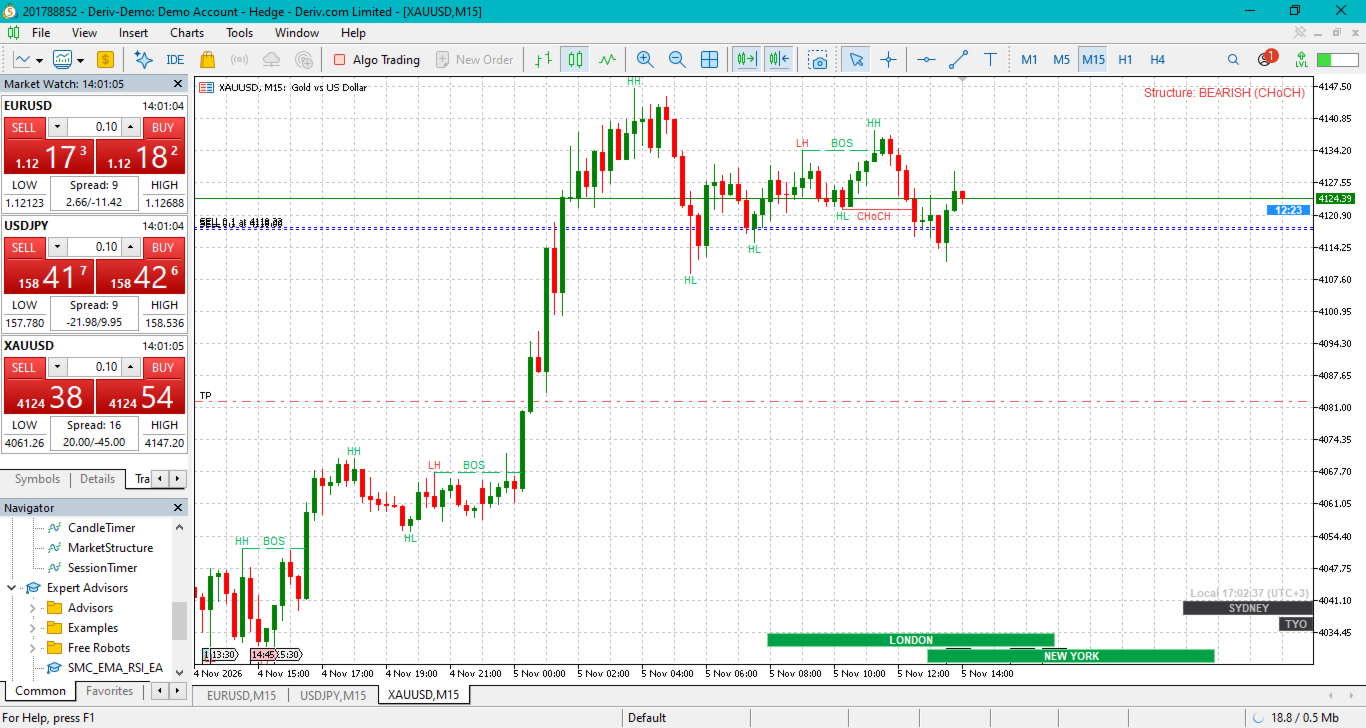
What it draws along the bottom of the chart
- Ruler: a strip of tick marks with timestamps in your computer’s local time. The label spacing adjusts as you zoom, and a date label like Nov 05 appears at local midnight.
- Session boxes: one row each for Sydney, Tokyo, London and New York, stretched across the time axis. A box is green while that session is open and grey otherwise, with the session name inside. The text shortens to LDN and so on if the box is narrow, and hides if it’s too narrow for that.
- Real time: the green/grey state and the small local clock update every second.
Timezone
- Your local time comes from your computer’s clock, and the indicator works out your UTC offset from it. The clock text shows the offset it detected, for example Local 14:32:05 (UTC+3) , so you can check it matches.
- Session hours are set in each city’s own local time, and the daylight saving shifts are applied automatically. The defaults are 8:00–17:00 for Sydney, London and New York, and 9:00–18:00 for Tokyo. You can change the hours, or turn off the auto-adjust, in the inputs.
- At the moment (early November) London is on winter time and New York is on EST. Sydney is on summer time (AEDT).
Things to know
- Session boxes are hidden when more than 10 days are visible, because they stop being readable. You can change this with Hide session boxes when more than this many days are visible. The ruler stays visible either way. The indicator works best on M1 to H4.
- Sessions on Saturday and Sunday are hidden by default.
- The session boxes are placed using your broker’s current server offset. On a chart that spans a broker clock change, bars from before the change can sit up to an hour off.
- You can turn on Show local open-close hours inside the box if you want times like LONDON 11:00-20:00 instead of just the name