Grid Linear Weighted Moving Average EA
- エキスパート
- バージョン: 3.15
- アクティベーション: 5

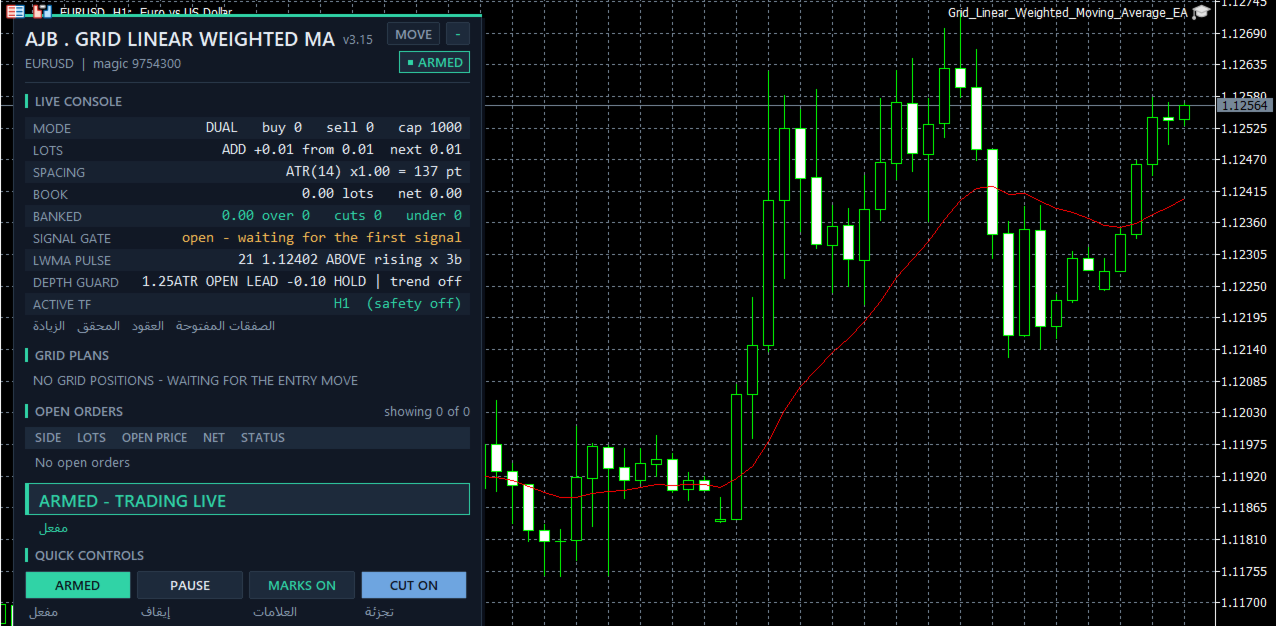
See it work before you decide: load Grid Linear Weighted Moving Average EA into the MetaTrader 5 Strategy Tester, pick visual mode, and watch the grid stay completely idle until a closed candle crosses the weighted average with fresh momentum behind it.
THE NEWEST CANDLES DECIDE. OLD HISTORY DOES NOT.
A plain moving average treats a bar from three weeks ago exactly like the bar that closed a minute ago. The Linear Weighted Moving Average does not: the latest bar carries the largest weight and every older bar counts a little less, so the line bends as soon as the market really changes its mind. Grid Linear Weighted Moving Average EA uses that line to decide when a new move has begun, and then hands control to a full grid management engine that keeps shrinking the oldest exposure, one group closure and one partial slice at a time.
At a glance
• A BUY cycle can begin only when a bar closes above the LWMA after the bar before it closed at or below it; a SELL cycle needs the mirror cross below. Closed bars only, so nothing repaints.
• New in this product: the Weight Lead Guard. The LWMA must stand ahead of a plain SMA of the same length, in the direction of the trade, by a minimum number of ATR. That is direct proof that the most recent bars, not old history, are pushing price your way.
• The Cross Depth Guard is kept as well: a cross that only scratches the line is ignored as noise, and a cross that lands miles past it on one violent candle is ignored as a spike.
• A slope rule keeps every entry in step with the line: a BUY only while the LWMA rises, a SELL only while it falls.
• The LWMA is drawn on the live chart in the main window, and arrows mark every candle where a cycle was armed.
• Profits are banked by groups of the oldest and newest orders, and a heavy old order is retired in partial slices instead of waiting for a full return.
• No stop loss and no forced close-all. When a limit is reached, new levels are refused while the existing book keeps being managed.
• Hedging and netting accounts are both supported, and every limit is a visible input.
FIRST STEPS
Start on EURUSD H1 or XAUUSD D1 with the default 0.01 lot and the additive ladder. For the first session switch RunMode to Scan only: the panel then shows every plan the EA would make without sending a single order, and one button turns it to Armed when you are ready. Run the Strategy Tester on your own broker's data first, because spreads, swaps and commissions are different everywhere. On a smaller balance keep the starting lot and let the tester show you how deep the book can grow on your symbol.
Why a linear weighted average
Every average looks backwards, and every one of them is late in some way. The LWMA multiplies each closing price by its position, so with a period of 21 the newest close counts 21 times, the one before it 20 times, and the oldest just once. The result follows the present far more closely than a simple average of the same length, yet it remains a smooth line that ignores single ticks. For a grid, an early and honest start matters: a late first level means much of the move is already spent before the ladder begins.
The improvement in this release
The Weight Lead Guard is this EA's own addition. Because the LWMA leans on recent bars and the SMA gives every bar the same vote, the gap between the two lines tells you who is driving the market. When the LWMA is above the SMA, the latest bars are stronger than the average of the period; when it is below, they are weaker. On every cross the EA measures that gap, divides it by the ATR so one setting fits currencies, gold and indices, and signs it by the trade direction. A BUY needs the LWMA above the SMA by at least your minimum, a SELL needs it below by the same amount. A cross that happens while recent bars are still pulling the other way is skipped. Set the minimum to 0 to switch the guard off. The panel shows the live lead next to the depth reading, with OPEN or HOLD for each guard. Margin-level timeframe safety is included and is off by default.
One cycle, step by step
1. The read. On every closed bar the EA reads the built-in MetaTrader 5 Moving Average in linear weighted mode. The forming candle is never used, so history shows exactly what the EA saw.
2. The cross. A BUY is considered when the bar closes above the LWMA after the previous bar closed at or below it; a SELL is the mirror below.
3. The slope rule. By default the LWMA must be rising for a BUY and falling for a SELL.
4. The Cross Depth Guard. The close must sit between your minimum and maximum distance from the line, measured in ATR.
5. The Weight Lead Guard. The LWMA must lead the SMA of the same period in the trade direction by your minimum ATR fraction.
6. The optional trend filter. A slow EMA can confirm the side: trade only with it, only against it as a fade, or leave it off.
7. The rhythm. A quiet gap of bars between accepted signals keeps a choppy session from starting one cycle after another, and a signal stays valid for a few bars if a level cannot be placed at once.
8. The ladder. Levels are spaced by fixed points or by ATR, with a floor, a ceiling and an option to freeze the distance for the whole cycle. BUY and SELL grids can run side by side or in one direction only.
9. The harvest. The closer searches for groups of the oldest and newest orders and closes a group as soon as its combined result, after swap and commission, beats your target. When the oldest order is still too heavy, only a slice of it is closed, paid for with profit already on the table.
10. The safety checks. A reopen guard blocks any closure that would reopen the same level straight away. Every leg is checked against the deal history, failed legs go into a retry queue, and a plan is dropped if the book changes between the scan and the send.
11. The optional hedge cycle. Off by default. When switched on it holds a balanced pair on a symbol you choose and retires it in equal slices, paid for by a small surcharge on closures the grid is already making.
The panel
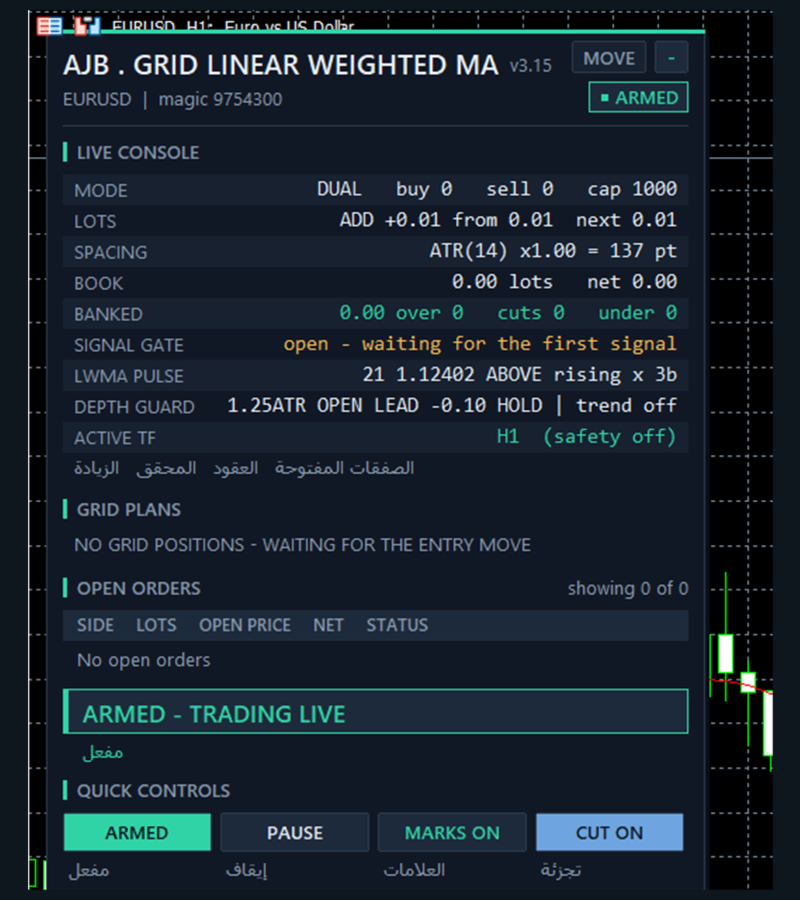
The panel sits on the left of the chart and leaves the right side and the price scale free. It shows the symbol and magic number, a status pill (ARMED, SCAN ONLY or PAUSED), grid mode, lot step, spacing, banked profit, the book in lots with its net result, the closing plan for each side with its own close button, and the order list. The LWMA PULSE row shows the period and live value of the line, whether price is above or below it, whether it is rising or falling and how many bars ago the last cross happened. The DEPTH GUARD row shows the live distance in ATR with its state, the live weight lead with its state, and the trend filter. Buttons switch Armed / Scan only, Pause / Resume, chart marks and slicing. The Hedge Vault card is docked directly under the main panel and follows it when you drag or minimise. The panel scales with the screen and draws nothing in a non-visual backtest, so optimisation stays fast.
Protection you control
No stop loss and no forced close-all. A reached limit stops new levels; it never dumps the book at a bad moment.
Before each order the money check asks one plain question: is there enough free margin, with a safety buffer, for this order?
Limits on levels per grid, orders per side and lot per order keep the ladder bounded, and the lot ladder stops growing at the level limit.
On netting accounts the margin of the merged position is capped as a percentage of equity.
Optional margin-level timeframe safety moves the signal and the spacing to a higher timeframe when the margin level falls to your chosen levels, and moves back only after margin recovers past a cushion. Off by default.
Every copy isolates itself by symbol and magic numbers, so several charts never touch each other's orders or saved state.
Scan only mode shows every decision without sending any order.
Who it suits, and who it does not
It suits traders who want one visible line on the chart as the reason for every new cycle, who like many small closures more than one distant target, and who are ready to size the lot for their own account. It does not suit anyone who needs a stop loss on every order, a promised monthly figure, or a set-and-forget robot running large lots on a tiny balance.
Quick answers
Does it repaint? No. Signals come from closed bars only.
What is the difference from an EMA? An EMA also favours recent bars, but its weights fade slowly and never fully forget the past; the LWMA uses a fixed window with a straight-line weighting, so a bar that leaves the window stops counting at all.
Can I make the line faster or slower? Yes. A shorter period reacts sooner and gives more crosses; a longer one gives fewer, calmer crosses.
Can I use it on gold or indices? Yes. It runs on any symbol and timeframe; ATR spacing and both ATR based guards adapt to the symbol.
Can I run it on several charts? Yes. Give each copy its own magic numbers and they stay fully separate.
Can I make it trade more or less often? Yes. Lower SignalBarsDelay or the guard minimums for more cycles; raise them, use a longer period, or switch on the trend filter for fewer.
Every setting explained
Grid - how levels are opened
TradeMode - dual grid by default (BUY and SELL side by side), or one direction only.
GridSpacePoints - fixed distance between levels in points when ATR spacing is off (25).
GridSpaceMultiplier - 1.0 keeps levels evenly spaced; a higher value spreads deeper levels further apart.
MaxGridLevels - the most levels one grid may hold (1000).
UpDirectionIsBuy - decides which side an upward move belongs to.
EAMagicNumber - the ID written on this EA's grid orders (9754300).
GridOrderComment - the comment on each grid order (GLWMA).
OneOrderPerBar - no more than one new level per bar.
Lot ladder
InitialLotSize - volume of the first level (0.01).
LotSizingMode - additive by default, or multiply.
LotMultiplier - in multiply mode, each level is the previous lot times this value (1.25).
LotAddStep - in additive mode, the volume added at each level (0.01; 0 means the starting lot).
MaxOrderVolume - the largest lot any single order may use (1.0).
UseAutoLot - scales the starting lot with the balance (off).
AutoLotBaseBalance - the balance that matches the starting lot (1000).
AutoLotAllowDecrease - lets auto lot go below the starting lot (off).
ATR spacing
GridSpacingMode - ATR by default, or fixed points.
ATRTimeframe - the timeframe volatility is measured on (current chart).
ATRPeriod - ATR length (14).
ATRSpacingFactor - spacing equals ATR times this value (1.0).
ATRBarShift - 1 uses the last closed bar.
ATRMinSpacingPts - the smallest allowed spacing in points (50; 0 means none).
ATRMaxSpacingPts - the largest allowed spacing in points (5000; 0 means none).
ATRFreezeOnStart - keeps one spacing for the whole cycle (off).
Profit target
DesiredProfitPerClosure - the base target in account currency (2.0).
ProfitMultiplier - scales the final target between 1.00 and 2.00.
ProfitTargetMode - scaled by default, so a bigger and deeper book must earn a bigger result.
ProfitVolumePower - how strongly closing volume lifts the target (1.0; 0 turns it off).
ProfitDepthBonus - extra target for each additional open level (0.10).
ProfitMaxMultiple - the cap on the scaled target as a multiple of the base (50).
ProfitMaxReachFraction - keeps the target within a fraction of one grid step so it stays reachable (0.50).
Fragment scanner
UseMultiLegScan - tests combinations of several orders before the simple pair (on).
MaxOldestLegs - the most oldest orders allowed in one closure (3).
MaxNewestLegs - the most newest orders allowed in one closure (6).
ScanPriority - how qualifying groups are ranked; most orders first by default.
NeverBankLessThanPair - a group must also beat the plain pair target (on).
RequireCloseVolumeExceedsTarget - the newest volume must outweigh the oldest volume (on).
MinCloseVolumeRatio - minimum ratio of closing volume to target volume (1.5).
Target slicing - partial closes
EnableTargetSlicing - closes a slice of the oldest order when the whole lot cannot be paid off yet (on).
FragProfitWeightPower - how profit is weighted per closing lot (1.5).
FragMinSlicePercent - the smallest slice as a percent of the target order (20).
FragAllowMultiCloser - lets several newest orders pool their profit to pay for one slice (on).
FragPreferFullClosure - a full closure wins over a slice whenever both qualify (on).
Reopen guard
ReopenGuard - blocks closures that would immediately reopen a level (step based).
ReopenGuardCushion - the safe distance as a fraction of one grid step (0.90).
Account protection
MinMarginLevelPercent - no new levels below this margin level percent (0 = off).
MaxAccountRiskPercent - no new levels above this floating loss as a percent of balance (0 = off).
NetMaxMarginPercent - on netting accounts, the largest margin of the net position as a percent of equity (5.0).
MaxTotalOrders - absolute cap on grid orders per side (1000).
Execution and verification
RunMode - Armed or Scan only; Scan only is the gentle first step.
CloseSequence - the order in which legs are sent; oldest first by default.
MaxSlippagePoints - maximum slippage (30 points).
MaxSpreadPoints - trading pauses above this spread (7500 points).
MinSecondsBetweenClosures - minimum pause between two closures on the same side (5 seconds).
CloseAttemptsPerLeg - send attempts before a leg moves to the retry queue (3).
VerifyTimeoutSeconds - how long a stuck leg keeps being checked (90 seconds).
DeferWhenMarketClosed - waits for the session instead of halting when the market is closed (on).
MarketClosedRetrySeconds - retry interval while the broker refuses orders (30 seconds).
AutoResumeAfterSeconds - clears a halt by itself after this many seconds (300; 0 waits for the panel button).
NoPartialRetryMinutes - tries partial closes again this many minutes after a broker refusal (15; 0 never).
AbortIfBookChanged - drops a plan if a leg changed between the scan and the send (on).
UseFullCommission - counts commission for both sides of a trade (on).
CommissionPerLot - fallback commission when history has none (0 reads it from history).
CloseOrderComment - the comment on closing deals.
Hedge cycle
EnableHedgeCycle - off by default.
HedgeSymbols - comma-separated list of hedge symbols; repeating one gives it more turns (XAGUSD).
HedgeSymbolRotation - how the next cycle's symbol is picked (per cycle).
HedgeMaxSymbolsInTester - limits rotation in the Strategy Tester only (2; 0 means no limit).
HedgeCycleLots - lots on each side of the balanced pair (0.01).
HedgeSliceLots - lots retired from each side per slice (0.01).
HedgeFragmentBonus - extra amount added on top of the slice cost (100).
HedgeBonusIsPercent - the bonus is a percent of the slice cost; false makes it a fixed amount (on).
HedgeMaxSurcharge - money cap on what one closure may be surcharged (0 = no cap).
HedgeMaxSurchargePercent - the most the hedge may raise any closure target, in percent (50).
HedgeMagicNumber - the hedge legs' ID; it must differ from the grid's (9754301).
HedgeReopenOnFinish - opens a fresh cycle when one finishes (on).
HedgeStartRequiresTrade - waits for the grid to open something before the first cycle (on).
HedgeIntegritySeconds - how often both legs are checked to be equal (5 seconds).
HedgeAutoRepair - repairs a lone leg automatically (on).
HedgeNakedAction - what to do with a lone leg; re-hedge by default.
HedgeMaxSpreadPoints - no hedge orders above this spread (0 = off).
HedgeSlippagePoints - maximum slippage on hedge orders (30 points).
HedgeAttemptsPerLeg - send attempts per hedge leg (3).
HedgeVerifyTimeout - how long a stuck hedge leg keeps being checked (90 seconds).
HedgeCommissionPerLot - fallback hedge commission (0 reads it from history).
HedgeOrderComment - the comment on hedge deals.
Weekly cash day
WeeklyCashDay - no new hedge cycle and no slice during your withdrawal window (off).
CashDayOfWeek - 0 Sunday, 1 Monday and so on (1).
CashCutoffHour - server hour after which no new slice is fired (21).
Panel and chart
ShowPanel - shows or hides the panel.
PanelX and PanelY - panel offsets from the chart edges (12 and 15).
PanelFontSize - base font size (9).
ShowArabic - adds an Arabic line under the English on the panel (on).
ShowChartMarks - draws plans and levels on the chart (on).
MaxTableRows - order rows shown per grid (13).
PanelCorner - the chart corner the panel is anchored to.
Entry trigger
EntryTriggerMode - the LWMA strategy arms the first level by default.
SignalBarShift - 1 means the last closed bar.
SignalBarsDelay - bars that must pass between accepted signals (30; 0 accepts every signal).
SignalValidBars - a signal stays usable for this many bars (3).
SignalAllowBuy and SignalAllowSell - turn each direction on or off separately.
SignalReverse - inverts the direction (off).
Linear Weighted Moving Average - the signal
InpLWMAPeriod - the LWMA length (21).
InpLWMAPrice - the price the LWMA is built on (close).
InpLWMASlopeAgree - a BUY only while the LWMA is rising and a SELL only while it is falling (on).
InpLWMALeadMinATR - Weight Lead Guard: how far the LWMA must stand ahead of the SMA of the same period in the trade direction, in ATR (0.05; 0 = off).
InpLWMADepthMinATR - Cross Depth Guard: the smallest distance between the close and the LWMA on the cross bar, in ATR (0.10; 0 = off).
InpLWMADepthMaxATR - Cross Depth Guard: the largest accepted distance in ATR, so over-stretched spike crosses are skipped (2.00; 0 = off).
InpLWMAGuardATR - the ATR length both guards use to measure distance (14).
InpLWMATrendFilter - 0 off, 1 trade with the EMA side, 2 trade against it as a fade.
InpLWMATrendMAPeriod - the trend EMA length (200).
InpShowSignalArrows - arrows on the candles where a cycle was armed (on).
InpShowLWMAOnChart - draws the LWMA line in the main chart window of the live chart (on; no extra sub-window, so the panel keeps the full chart height).
Debug
DebugMode - detailed journal logging (off).
Margin timeframe safety
UseMarginTFSafety - off by default.
Level1MarginPct and Level1TF - at or below 6000 percent margin level, work on M15.
Level2MarginPct and Level2TF - at or below 5000 percent, work on H1.
MarginTFHysteresisPct - how far margin must recover above a level before stepping back (500).
Honest expectations
A grid manages a position; it cannot see the future. Grid Linear Weighted Moving Average EA is careful about when a cycle begins and works steadily to keep each cycle short and each old order shrinking, but a market can cross the line with fresh momentum and still reverse hard, keeping the book open for a long time. Choose a lot your account can carry through that, test on your own broker first, and let the Strategy Tester show you how it behaves before you trade it live. It runs on any symbol and timeframe and needs no DLLs and no extra files.
If it earns a place on your charts, a short and honest review of how it behaved on your account, good or bad, helps other traders make their choice.