Gold Specter
- エキスパート
-
Sif-eddine Tabet
 Allow me to introduce myself. my name is sif i'm from algeria founder of V12 Team start trading since 2015 up to date. My team and I specialize in trading for both forex and binary options also for creating powerfull tools and ea's '' life is too short to stay all day trying to find a good trade
 - バージョン: 1.0
- アクティベーション: 10
Gold Specter combines nine trading engines with built-in AI filtering and configurable trade protection. Choose a prepared strategy profile or select the engines individually, then set your position size, trading conditions and account limits.
The dashboard brings account figures, engine activity and trading status into one view. It also shows when new entries are paused, helping you understand the EA’s current state without searching through the journal.
Gold Specter manages individual positions without a recovery grid or loss-based martingale. Several engines can hold trades at the same time on a hedging account, so total exposure remains an important part of your configuration.
Built-in AI filtering
The AI reviews potential trades produced by the strategy engines. You can choose how it participates in trade approval through three operating modes.
| AI mode | Function |
|---|---|
| Conservative | Applies AI entry approval and ongoing review of pending setups. |
| More Trades | Applies AI approval to new setups without the additional pending-setup review. |
| AI Off | Runs the strategy engines without AI approval. |
AI filtering runs within the EA. A separate AI subscription or external API key is not required.
The approval mode is separate from position sizing and profit protection. You retain control over those settings, and an approved setup can still result in a losing trade.
Strategy presets
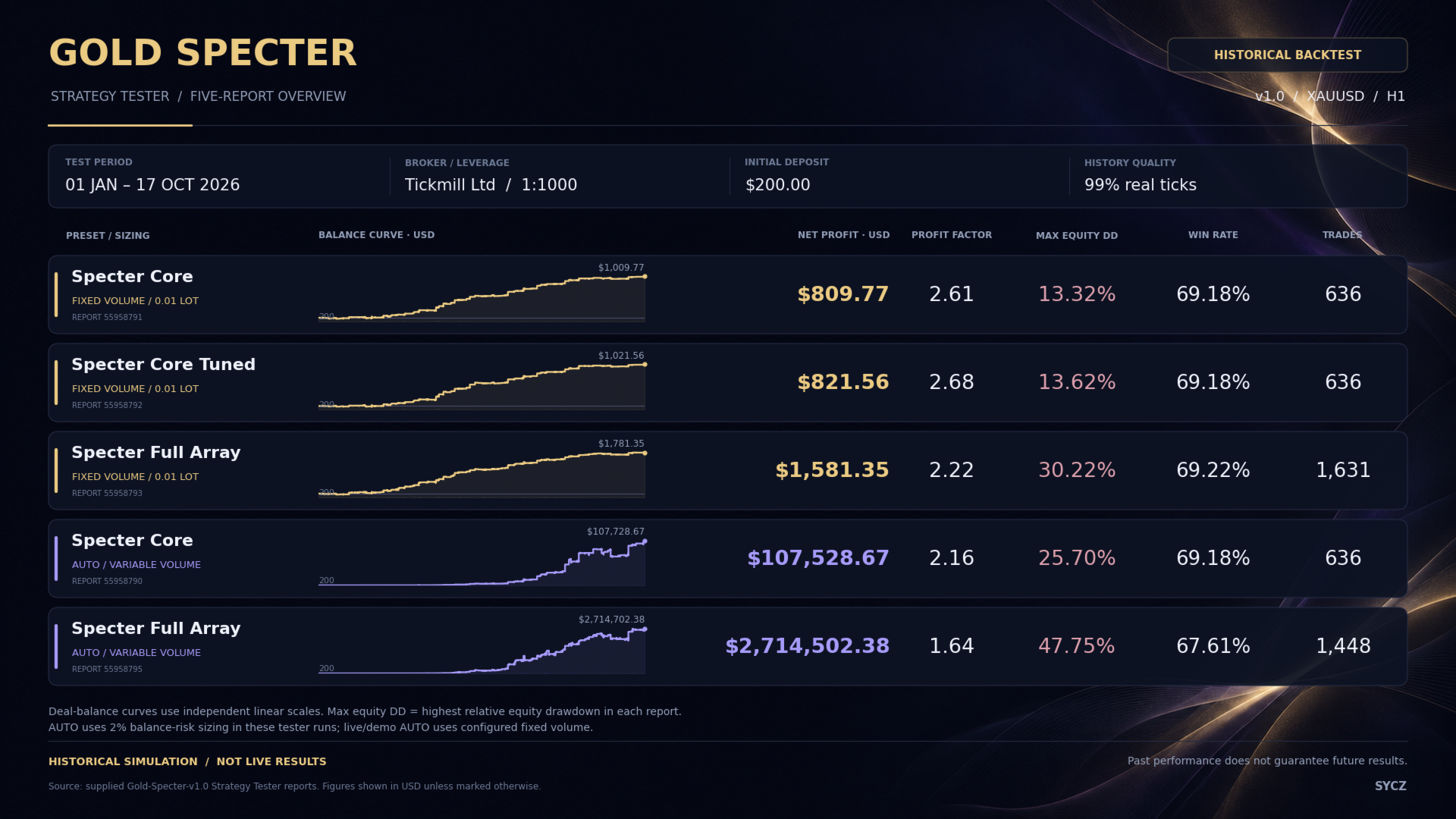
The preset selector provides four prepared configurations and a Custom option.
| Preset | Engine selection | Profit-lock configuration |
|---|---|---|
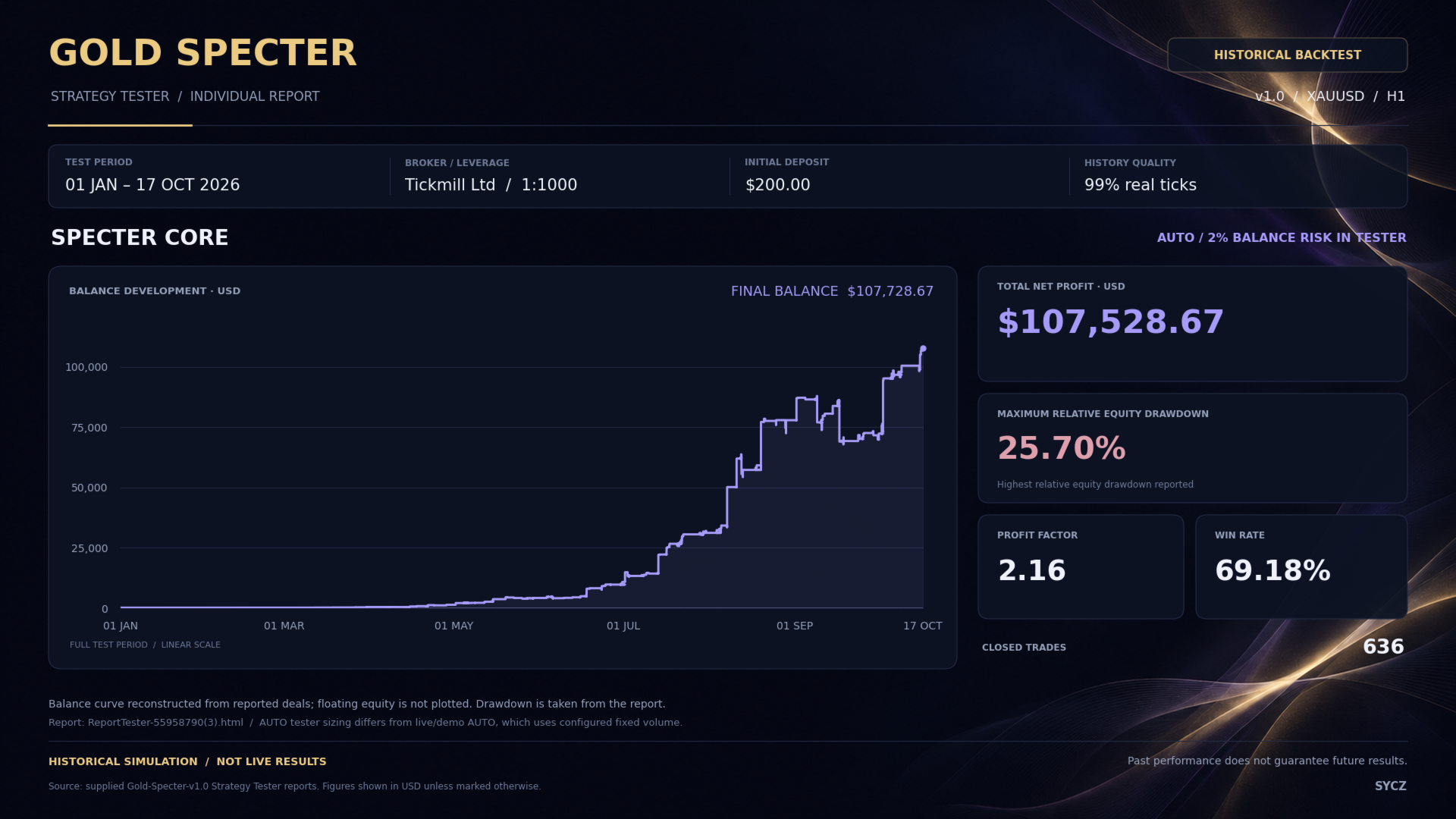
| Specter Core | Five core engines | Shared Specter Lock settings |
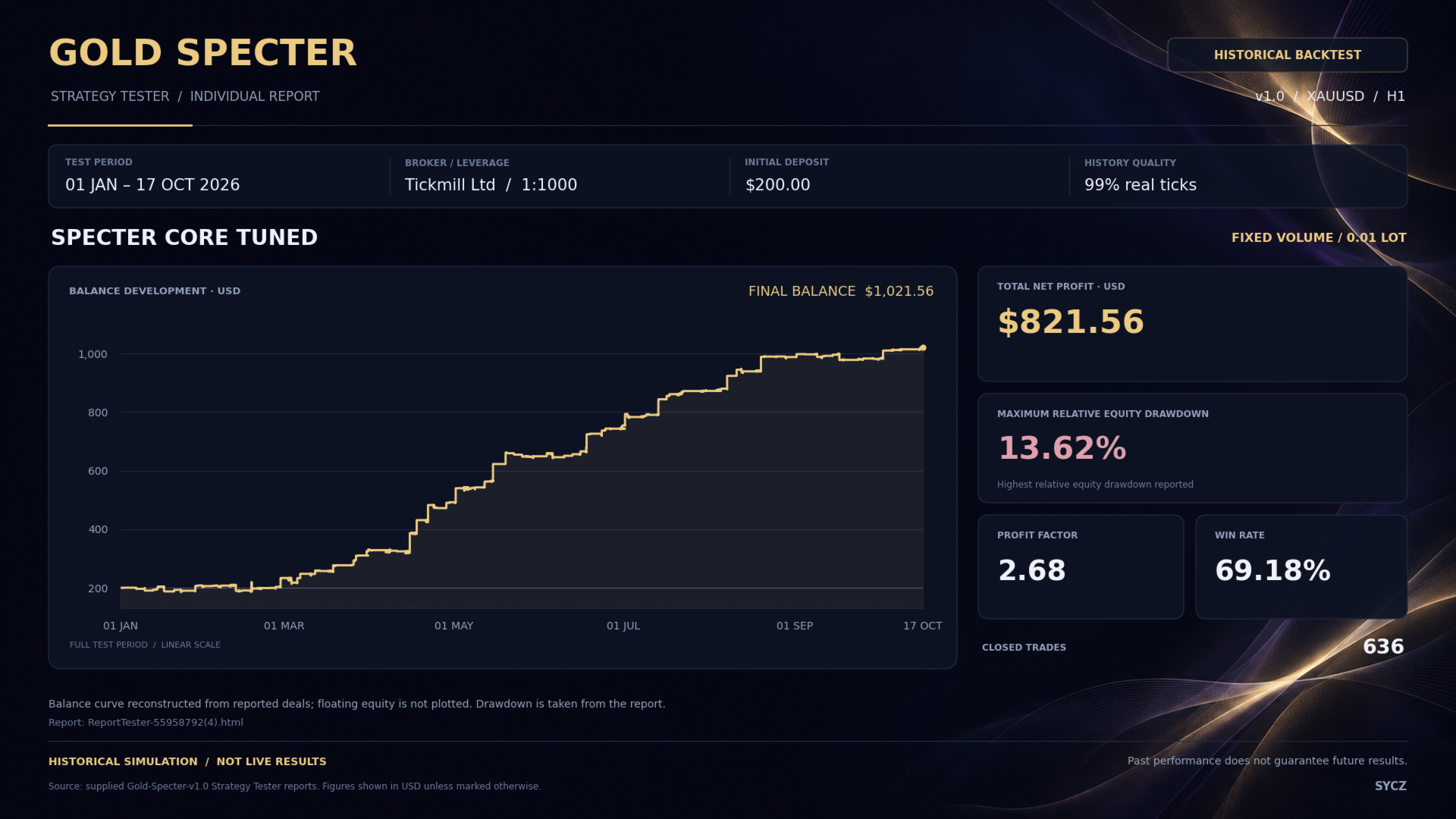
| Specter Core Tuned | Five core engines | Individual engine profiles |
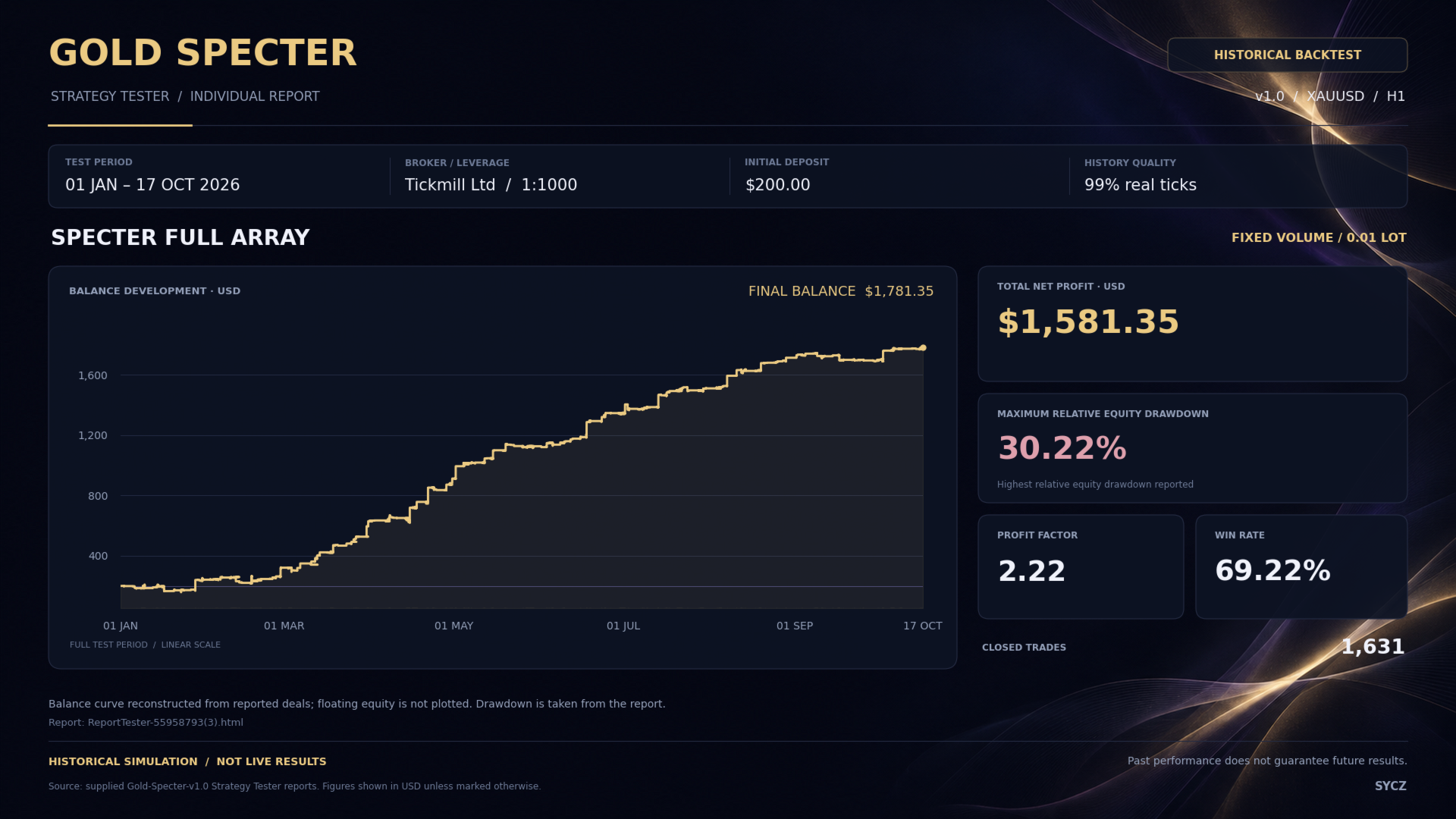
| Specter Full Array | All nine engines | Shared Specter Lock settings |
| Specter Full Tuned | All nine engines | Individual engine profiles |
| Custom | Your selected engines | Configurable, with optional engine-tuned exits |
The core group contains Wraith, Revenant, Phantom, Shade and Veil. Full Array adds Drift, Watcher, Bulwark and Tempest.
Individual engine switches apply in Custom mode. Prepared presets determine the active engine selection and their associated configuration, so select the preset before adjusting the remaining inputs.
Position sizing and risk
Position sizing can be configured independently of the strategy preset.
| Sizing mode | Purpose |
|---|---|
| Fixed Volume | Uses your requested lot size, subject to broker volume rules. |
| Preset Percentage Risk | Calculates volume using a preset balance-risk percentage and the planned protective stop. |
| Custom Percentage Risk | Uses your chosen balance-risk percentage. |
| Growth | Uses percentage-risk sizing with a minimum volume condition. |
| AUTO | Uses percentage-risk sizing in the tester and configured fixed volume on live and demo accounts. |
Additional inputs provide a maximum volume cap for risk-based calculations and an optional AI volume boost for supported manual percentage-risk modes.
The AI boost can increase exposure for qualifying setups. Growth’s minimum volume condition can also make effective risk higher on a smaller account. Consider these options alongside the number of active engines and any existing positions.
For a direct comparison between historical tests and account trading, choose the same explicit sizing mode in both environments.
Trade protection and exit settings
Gold Specter provides separate controls for initial protection, profit objectives and ongoing position management.
| Setting group | What you control |
|---|---|
| Initial Stop Loss | The global protective-stop distance, where applicable to the selected exit configuration. |
| Take Profit | A separate Revenant target and a target setting for the other engines. |
| Specter Lock | Activation, profile selection and the applicable profit-lock percentage. |
| Custom Breakeven | Activation and the protective offset after activation. |
| Custom Trailing | Activation, distance and minimum improvement between updates. |
| Protection Restoration | Recovery of saved virtual protection after a terminal restart. |
Specter Lock offers Classic and Gradual profiles, with Shield versions that add spread-spike confirmation. Tuned presets use individual engine profiles.
Custom breakeven and trailing apply when their option is enabled and Specter Lock is switched off. Protection management can close a position before its original Take Profit is reached.
Protection methods
| Method | Operation |
|---|---|
| Broker | Uses broker-side stop updates for normal trailing protection. Specter Lock remains a separate setting. |
| Combined | Uses broker-side stops together with virtual protection. |
| Virtual Only | Retains a broker safety stop and manages ongoing profit protection virtually. |
Virtual protection requires the EA, terminal and trading connection to remain operational. Saved protection state can be restored after a restart, but it cannot execute a close while the terminal is offline.
Trading conditions
Session, news and spread controls let you define when new exposure is permitted.
| Control | Available settings |
|---|---|
| Entry Session | Opening and closing times, with optional cancellation of pending orders outside the session. |
| Weekend Guard | Automatic broker-session scheduling or a custom Friday cutoff and Monday restart. |
| Major-Event Guards | Separate NFP, CPI and FOMC permissions, with adjustable pause periods before and after releases. |
| General News Guard | Event-importance filters, pause periods and pending-order handling. |
| Calendar Availability | An option to pause new entries when calendar data becomes unavailable. |
| Spread Guard | A configurable spread ceiling with optional pending-order cleanup. |
Session and weekend times use broker server time. The optional spread guard operates alongside the engine’s existing entry-spread restrictions.
A built-in major-event backup schedule is available for the dates included in the installed version.
Account protection and exposure limits
Account-level settings provide additional control over new entries and the actions taken when configured limits are reached.
| Feature | Purpose |
|---|---|
| Daily Loss Guard | Monitors a daily equity-loss ceiling, with configurable position closing and pending-order cancellation. |
| Challenge Protection | Provides profit-objective, daily-loss and overall-drawdown controls. |
| Drawdown References | Supports fixed and moving reference methods for the challenge configuration. |
| Safety Buffer | Allows challenge loss thresholds to be set inside the main limits. |
| Exposure Limits | Provides applicable same-direction and combined position/pending-order limits. |
| Saved Profiles | Retains supported account-protection state between sessions. |
Challenge settings include the daily reset time and the actions to take when a target or limit is reached. Match these settings to the account provider’s actual rules.
These controls monitor account conditions and request the configured actions. They cannot guarantee that a limit will be respected during price gaps or execution delays.
Optional account-growth scaling
Fixed-volume scaling can increase lot size in steps as the selected account reference grows.
| Scaling input | Function |
|---|---|
| Reference Balance | Establishes the starting point for growth measurement. |
| Growth Step | Sets the account growth required before an increase. |
| Volume Step | Sets the additional lots for each completed step. |
| Maximum Volume | Caps the scaled volume. |
| Balance or Equity | Selects the account value used for growth measurement. |
| Retain and Restore State | Controls retention of the highest growth level and restoration after restart. |
This feature applies to Fixed Volume mode and AUTO on live or demo accounts. It is optional and should be included when reviewing the account’s overall exposure.
Dashboard and execution review
The dashboard uses a dark theme with gold and violet accents. Account information and engine status remain visible alongside the current entry state.
| Dashboard area | Information or controls |
|---|---|
| Account Overview | Balance, equity, floating results and current drawdown. |
| Engine Activity | The status of the selected trading engines. |
| Trading Status | Entry pauses caused by sessions, news, account limits or manual control. |
| Manual Controls | Entry pausing, pending-order cancellation and position closing. |
| Execution Review | Recorded fill-quality measurements and configurable rating thresholds. |
| Display Options | Dashboard scale, startup-card visibility, candle colors and chart-grid visibility. |
The execution view helps you review the fills received on your account. It reports measurements; it does not alter broker execution.
Setup and compatibility
| Setting | What to know |
|---|---|
| Hedging Accounts | Allow separate strategy positions and overlapping engine activity. |
| Netting Accounts | Use one pending order or one position per symbol. Existing activity on that symbol can block a new entry. |
| Gold-Symbol Restriction | Optionally restricts new entries to recognized gold symbols. Gold remains the intended market. |
| Magic Number | Identifies the EA’s trades. Use a distinct base for each separately managed chart. |
| Previous and Legacy Magic | Supports management of recognized positions from supported earlier numbering schemes. |
| Order Comments | Allows custom text, an engine code or blank comments under the corresponding challenge option. |
| Fast Backtest | Reduces tester overhead while retaining the dashboard in visual testing. |
| Diagnostics and Review Logs | Provides information for troubleshooting and reviewing activity. Review logging does not train the AI. |
Before live use, confirm the selected preset, sizing method and protection settings, then check the broker’s symbol specifications and execution conditions. Test the configuration before committing live capital.
Risk notice
Trading involves the possibility of substantial loss. AI filtering, Stop Loss orders and account guards do not guarantee profits or a maximum realized loss. Execution prices can differ from requested levels, and historical results do not guarantee future performance.