Beta Entry Navigator Premium Indicator
- インディケータ
- バージョン: 1.0
- アクティベーション: 20

BETA ENTRY NAVIGATOR PREMIUM
Multi-Symbol Trading Scanner | Triple-Confluence Signals | Market Structure | Fair Value Gaps
Beta Entry Navigator Premium – Advanced Market Scanner and Trade Setup Analyzer for MetaTrader 5
A multi-symbol trading analysis indicator that identifies potential BUY and SELL opportunities using momentum confirmation, adaptive RSI analysis, market structure, and Fair Value Gap (FVG) entry analysis. It scans Market Watch symbols on M5 and M15 timeframes, ranks qualifying setups, and displays the four highest-ranked candidates on an interactive dashboard.
Its central advantage is combining Triple-Confluence signal generation with an additional market-structure-based entry confirmation engine.
2. WHAT THIS INDICATOR DOES
Addresses three common challenges:
· Too many charts to monitor – Automatically scans Market Watch symbols across two short-term timeframes.
· Conflicting trading signals – Combines three complementary analytical conditions.
· Unclear entry locations – Provides CHoCH, BOS, FVG analysis, and potential entry areas.
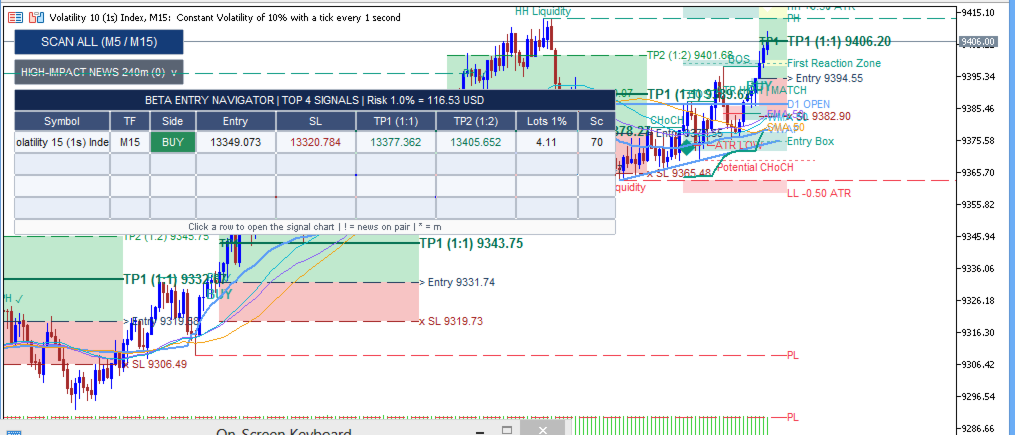
It identifies candidate setups, calculates proposed Entry, Stop Loss, and Take Profit levels, and organizes results into a ranked dashboard. Selecting a candidate opens its dedicated chart with analytical levels displayed.
This is an analysis and signal-scanning indicator, not an automated trading robot. Trade execution and final decisions remain your responsibility.
3. HOW THE TECHNOLOGY WORKS
A. Triple-Confluence Signal Engine
1. Cardwell RSI and Moving Average Confirmation
Calculates RSI and evaluates faster/slower RSI-based moving average relationships. Bullish crossover = potential BUY; bearish crossover = potential SELL. Supports Kalman filtering, RMA smoothing, and linear-regression-based smoothing.
2. Adaptive RSI and Supertrend Confirmation
Calculates adaptive RSI compared with a smoothed signal derived from that oscillator and an ATR-based Supertrend. Bullish/bearish crossovers provide directional confirmation.
3. Market Structure Break Confirmation
Bullish confirmation when price closes above a relevant swing high (subject to directional RSI condition); bearish when price closes below a relevant swing low.
How conditions work together: A BUY requires all three bullish conditions within the configured confirmation window; a SELL requires the equivalent bearish conditions. New signals generate only when combined conditions become valid.
B. Entry Terminal Market Structure Engine
Identifies structural changes, tracks subsequent breaks, analyzes FVGs, and evaluates entry opportunities:
· Identifying relevant swing points
· Detecting bullish/bearish Change of Character
· Monitoring subsequent Break of Structure events
· Tracking FVGs and potential breaker zones
· Evaluating structural and FVG-based entry sequences
· Comparing market direction and entry stage with the Triple-Confluence signal
4. CORE FEATURES
· Multi-Symbol Market Watch Scanner – Scans M5 and M15 across Market Watch symbols.
· Triple-Confluence Signal Generation – RSI-based MA crossovers, adaptive RSI/Supertrend, and price-structure breaks.
· Advanced Market Structure Analysis – CHoCH and BOS event identification.
· Fair Value Gap Analysis – Bullish/bearish FVGs with breaker-zone development.
· Entry Terminal Confirmation – Three modes: OFF, DIRECTION, ENTRY.
· Automatic Entry/SL/TP Calculations – ATR-based risk distance and configurable reward multiples; dashboard shows Entry, SL, TP1, TP2.
· Four-Position Signal Dashboard – Symbol, timeframe, direction, entry, SL, TP1, TP2, lot size, and internal signal score.
· High-Impact Economic News Awareness – Optional exclusion of candidates affected by upcoming high-impact events (disabled by default).
· Dedicated Signal Charts – Click a dashboard row to open the symbol/timeframe with analytical drawings.
· Configurable Analytical Components – Settings for confirmation, smoothing, structure detection, FVG analysis, drawings, news handling, and risk calculations.
5. BUY AND SELL SIGNALS
BUY Signals require: RSI-based MA bullish crossover; adaptive RSI crossing above its signal under bullish filter; price closing above a relevant swing high with required RSI condition — all within the confirmation window.
SELL Signals require the equivalent bearish conditions.
Important: A Triple-Confluence signal does not automatically qualify for the dashboard. The scanner may reject signals that are too old, already invalidated, or failing selected Entry Terminal requirements. Signal generation and final scanner qualification are separate stages.
6. TRADE SETUP INTERPRETATION
Provides: directional signal, market structure context, FVG areas, entry level, Stop Loss, Take Profit levels, and signal score.
The score is an internal ranking value derived from the relationship between the Triple-Confluence signal, Entry Terminal direction/stage, and signal age. It is not a probability of success or a statistically validated prediction of profitability.
For a more selective workflow, prioritize candidates with matching directional confirmation and a more advanced Entry Terminal stage, then inspect the chart before considering execution.
7. CONFIRMATION AND FILTERS
Entry Terminal Confirmation Modes:
· OFF – No additional confirmation required.
· DIRECTION – Entry Terminal direction must agree with the signal (default).
· ENTRY – Directional agreement plus full-entry stage required.
Higher-Timeframe Filter – Optional; compares directional conditions on selected HTF (default H4, disabled by default).
ADX Filter – Optional; requires ADX above configurable minimum (default threshold 20, disabled by default). Used as a trend-strength condition, not a direction signal.
Signal Age Filter – Default maximum age is six closed bars.
Invalid Signal Filter – Excludes signals where historical data shows SL or TP1 was reached. A historical validity check, not a guarantee of current suitability.
Economic Calendar Filter – Optional exclusion of candidates associated with currencies affected by detected upcoming high-impact events.
8. CHART VISUALIZATION
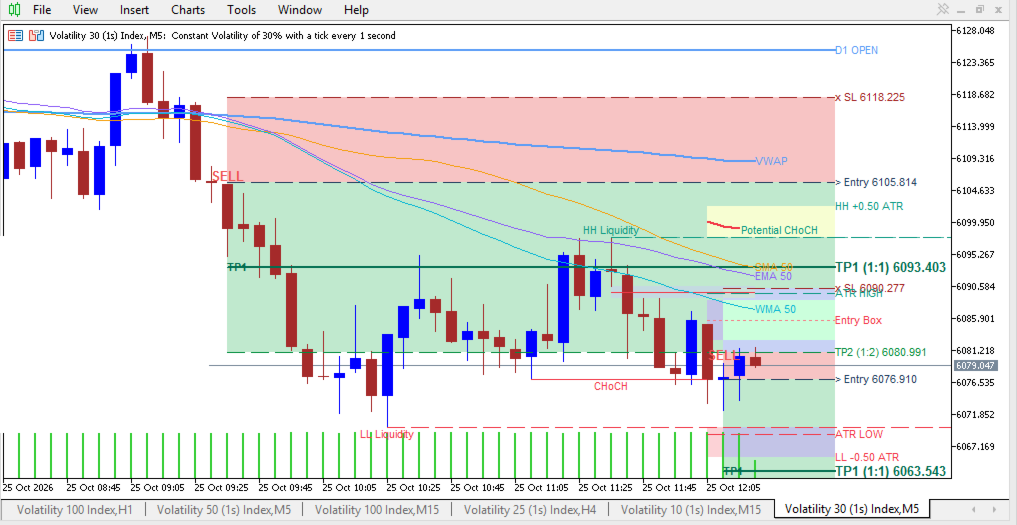
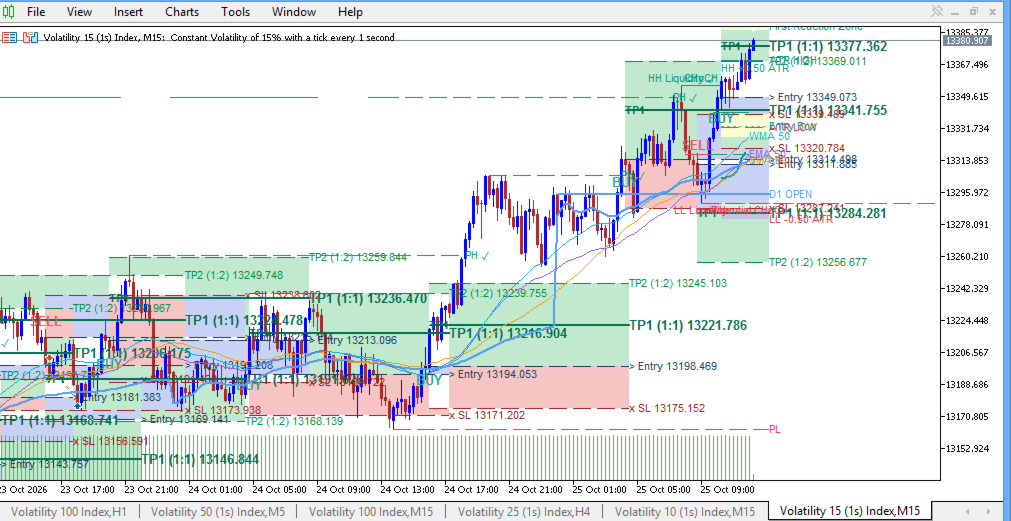
· Entry and Risk-Reward Visualization – Entry, SL, TP1, TP2 levels with colored reward/risk regions and labels.
· Market Structure Labels – CHoCH and BOS annotations.
· Fair Value Gap Zones – Shaded rectangles with optional midpoint lines and breaker visualization.
· Rejected Blocks – Highlighted qualifying areas with midpoints.
· ATR Boundaries – Volatility-adjusted upper/lower boundaries around structural events.
· Liquidity References – High/low reference levels (price-based analytical references, not measurements of actual resting orders).
· Trend Lines and Fibonacci Zones – Optional pivot relationships, retracement zones, projected areas, and potential entry boxes.
· Higher-Timeframe Opening Price – Default D1 opening price.
· Configurable Chart Appearance – Drawing visibility, text size, colors; optional white background, no grid, blue bullish/brown bearish candles.
9. SUPPORTED TIMEFRAMES AND MARKETS
Scanning Timeframes: M5 and M15 (both scanned for each Market Watch symbol).
Symbol Coverage: Works with symbols accessible through MetaTrader 5, subject to sufficient historical data. Not restricted to a single named currency pair; actual coverage depends on broker, Market Watch symbols, symbol specifications, and terminal data.
Chart Analysis: The indicator draws analytical output on the attached chart. The M5/M15 restriction applies to the scanner's candidate search, not every chart-drawing calculation.
10. USER SETTINGS
Scanner Settings
· History Bars per Symbol/Timeframe: Default 1200
· Maximum Signal Age: Default 6 closed bars
· Entry Terminal Mode: Default DIRECTION
· Skip Invalid Signals: Default enabled
· Risk Percentage: Default 1%
News Settings
· News Window: Default 240 minutes ahead
· Exclude News-Affected Signals: Default disabled
RSI and Moving Average Settings – RSI period, fast/slow smoothing periods, smoothing method, adaptive RSI parameters, Supertrend settings.
Structure and Trade Setup Settings – Swing detection, ATR calculation, ATR-based SL distance, SL buffer, confirmation window, reward multiples (TP1 default 1:1, TP2 default 1:2).
Higher-Timeframe and ADX Filters – Optional HTF filter with assignable timeframe; optional ADX filter with configurable length and threshold.
Entry Terminal Settings – Pivot sensitivity, candle-body confirmation, BOS display, continuation levels, rejected-block detection, minimum rejection-wick requirements, FVG detection/mitigation rules, ATR boundaries, liquidity references, HTF opening levels, trend-line drawings, Fibonacci analysis and entry zones.
Display Settings – Chart styling, historical bars drawn, text size, and visibility of individual components.
11. INSTALLATION AND ACTIVATION
1. Download the .mq5 source file.
2. Open MetaTrader 5 → File → Open Data Folder → MQL5 → Indicators.
3. Copy the indicator file into that folder.
4. Open MetaEditor, locate the indicator in Navigator, compile, and confirm no errors.
5. Return to MetaTrader 5 and refresh Navigator if necessary.
6. Attach Beta Entry Navigator Premium to a chart.
7. Ensure desired symbols are in Market Watch with sufficient historical data.
8. Click SCAN ALL (M5 / M15) to begin.
9. The dashboard displays up to four qualifying candidates when available.
10. Click a populated row to open the dedicated analysis chart.
If no candidates appear, check price history, symbol availability, and confirmation settings before assuming malfunction.
12. PRACTICAL TRADING PROCEDURE
1. Prepare the watchlist – Add instruments to Market Watch with sufficient M5/M15 history.
2. Attach the indicator – Review configuration; start with defaults.
3. Run the scanner – Click SCAN ALL (M5 / M15).
4. Review the dashboard – Compare symbol, timeframe, direction, entry, SL, TPs, lot size, and score. A higher score is not a guarantee of better performance.
5. Inspect the selected chart – Examine structure, FVG zones, entry reference, SL, and targets.
6. Evaluate market conditions – Consider spread, volatility, session, news, and support/resistance.
7. Determine position size – Verify potential loss at intended SL is acceptable; do not use displayed minimum lot automatically if it exceeds intended risk.
8. Make an independent decision – Execute manually if the setup meets your plan; skip if unclear or risk is excessive.
9. Manage the trade – Follow predefined risk rules; avoid moving SL farther away to prevent a loss.
10. Review results – Record setup, conditions, entry, exit, and outcome to assess configuration suitability over time.
13. RISK MANAGEMENT
Includes a risk-based lot-size calculator and automatic trade-level calculations, but does not execute trades or manage positions.
Risk-Based Lot Calculation: Default risk is 1% of account balance. Position size is estimated using entry-to-SL distance and symbol tick-value/tick-size information. This is an estimate, not a guaranteed maximum loss — actual results can differ due to spread, slippage, gaps, commissions, execution prices, and broker contract specifications. If the calculated lot is below the broker minimum, it is raised to the minimum and marked with an asterisk; actual risk may then exceed the selected percentage.
Stop Loss and Take Profit: SL uses ATR-based risk distance and swing-structure references. TP1/TP2 use configured reward multiples (default 1R and 2R). These provide a consistent framework but do not guarantee targets will be reached.
Recommended Practices:
· Risk only what you can afford to lose.
· Use lower risk percentages for highly volatile instruments.
· Verify SL and position size before execution.
· Account for spread, commissions, slippage, and gaps.
· Avoid multiple highly correlated positions without considering combined exposure.
· Do not treat every candidate as a mandatory trade.
· Test configurations on historical data and demo accounts before live use.
14. LIMITATIONS AND TRANSPARENCY
· No guaranteed profitability – Valid signals can result in losing trades.
· Historical data requirements – Symbols with insufficient history may be skipped.
· Market Watch dependency – Scans only Market Watch symbols, not every broker instrument.
· News-data dependency – Calendar results depend on MT5 calendar availability; the exclusion filter does not guarantee protection from news volatility.
· No automated execution – Does not open, modify, or close positions.
· No actual liquidity measurement – Liquidity references derive from price structure; they do not measure actual pending institutional orders or capital at a price level.
· Signal freshness – Candidates can become less relevant as the market moves; filters do not eliminate execution risk.
· Calculation and display behavior – The Triple-Confluence engine evaluates historical bars; the market-structure engine derives drawings and entry stages from price data and structural conditions. These are distinct analytical processes.
· No formal non-repainting guarantee – The source code does not guarantee non-repainting behavior across every calculation, refresh, and live condition. Validate signal timing through forward testing.
· Broker differences – Specifications, history, spreads, and execution conditions affect practical results.
· Configuration sensitivity – Changing smoothing methods, confirmation windows, structural settings, or filters can materially change the number and timing of detected opportunities. Defaults are starting points, not universally optimal.
15. WHO SHOULD USE THIS INDICATOR?
May be suitable for:
· Scalpers – Analyzing M5/M15 opportunities across multiple instruments.
· Intraday traders – Identifying candidates before detailed chart examination.
· Price-action traders – Interested in CHoCH, BOS, swing structures, and continuation.
· Momentum traders – Using RSI-based calculations and MA relationships.
· Fair Value Gap traders – Incorporating price imbalances and retest areas.
· Multi-symbol traders – Wanting a consolidated view of opportunities.
· Discretionary traders – Preferring analytical assistance while retaining execution control.
May be less suitable for traders seeking a fully automated Expert Advisor, guaranteed entry accuracy, or an indicator that independently measures actual institutional order flow.
16. WHY THIS INDICATOR DESERVES ATTENTION
Beta Entry Navigator Premium integrates three-part directional confirmation with a separate market-structure and FVG-based entry-analysis engine. It scans Market Watch instruments on M5 and M15 and ranks qualifying candidates instead of requiring manual chart-by-chart searching.
The interactive dashboard presents direction, entry, SL, targets, estimated position size, and internal score. Selecting a candidate opens a dedicated chart with structural references and visual trade analysis. Configurable confirmation modes, plus optional higher-timeframe, ADX, signal-age, invalidation, and news filters, provide control over the scanning process.
Analytical output is made easier to interpret through structural labels, FVG zones, ATR boundaries, liquidity references, trend lines, Fibonacci areas, and risk-reward drawings.
Built for traders who want a more organized way to discover, compare, and investigate opportunities without surrendering decision control.
17. RISK DISCLAIMER
Beta Entry Navigator Premium is a technical analysis tool intended to support trading decisions. It does not guarantee profitable results, eliminate market risk, or ensure signals reach proposed targets.
Trading forex, CFDs, and other leveraged instruments involves substantial risk of loss. Past performance and historical signals do not guarantee future results.
Always conduct your own analysis, apply appropriate risk management, and thoroughly test the indicator before using it on a live account.