Gold Nexus EA
- エキスパート
- バージョン: 1.0
- アクティベーション: 10

GOLD NEXUS
Automated Gold Trading. Structured Execution. Clear Control.
GOLD NEXUS is an Expert Advisor developed for automated gold trading on MetaTrader 5. It brings market evaluation, order execution and position management into a unified trading environment, with an on-chart dashboard that keeps the system's activity visible.
Built for traders who value a structured process, GOLD NEXUS applies predefined trading conditions and configurable management controls throughout the trade lifecycle.
PURPOSE-BUILT FOR GOLD
Designed for XAUUSD, GOLD NEXUS combines proprietary analysis with automated execution. Its internal decision rules remain part of the trading engine, while users retain control over the available operating and risk settings.
ACTIVE POSITION MANAGEMENT
Trade management continues after an order is filled. Configurable protective settings and PROFIT SHIELD provide tools for managing open positions as market conditions evolve. Profit protection is subject to execution conditions and does not guarantee a closing price or retained profit.
RISK SETTINGS UNDER YOUR CONTROL
Choose fixed-volume or percentage-risk sizing and review the available exposure and account-protection controls. Optional spread, trading-session, economic-event and weekend filters allow users to configure when the system may initiate new trades. Protection features must be enabled and configured for the intended account.
NEXUS COMMAND DASHBOARD
Monitor operating status, account information, module activity and open positions directly from the chart. Integrated controls provide access to trading and management functions without switching between separate tools.
WHAT GOLD NEXUS OFFERS
• Automated market evaluation, order placement and position management.
• A dedicated gold-trading configuration.
• Adjustable position sizing and protective controls.
• Configurable trading filters and operating settings.
• An integrated dashboard with manual controls.
• Historical-test examples for independent evaluation.
GETTING STARTED
Attach GOLD NEXUS to your broker's gold symbol on an M15 chart. Use a hedging account for the full multi-position functionality. Review the input guide, select suitable sizing and protection settings, and test the configuration with your broker's data before enabling automated trading. Keep the terminal running with a stable connection; a VPS is recommended for continuous operation.
ABOUT THE TEST SCREENSHOTS
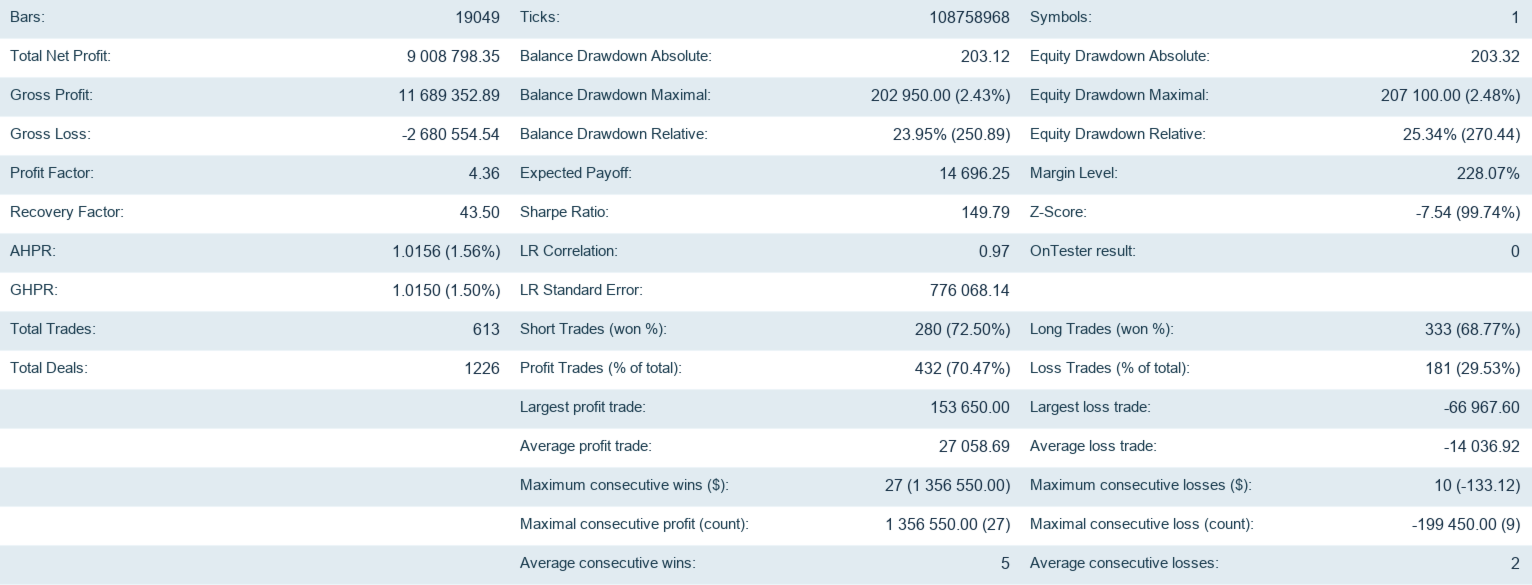
The accompanying reports show historical simulations. The variable-volume report covers a different period and uses different position sizing from the annual fixed-volume examples. Evaluate each configuration separately. They include the original report statistics and balance graphics. These examples illustrate the tested configurations and are not live-account results. The dashboard screenshot is an interface preview with automated trading disabled.
OPERATING CONSIDERATIONS
Broker specifications, spread, commissions, swaps, latency and price gaps can affect trading results. Virtual profit protection requires the Expert Advisor and terminal to remain active. Economic-event controls depend on calendar availability and correct broker-time settings; the bundled backup schedule has limited calendar coverage and requires review for future use.
Trading involves risk, including the loss of capital. Historical simulations do not guarantee future performance. Evaluate the demo and use settings appropriate for your account.
SUPPORT
For setup questions and product assistance, contact the author through MQL5 messaging or the product comments.