H4 Range Setups Hybrid EA by SaintEmma Fx Systems
Early-session range breaks often fail, and this EA is built to trade that failure. It scans your whole Market Watch list for false breakouts of the first H4 range of the New York day. It shows the freshest setups on a dashboard and can place one trade a day for you with sizing, stealth stops and trailing already built in.
WHAT THIS EA DOES
Watching many pairs for the same pattern is slow and easy to get wrong. The EA marks the opening New York H4 range on every symbol in Market Watch. It waits for price to close outside the range and then back inside, and signals the failed break. You can leave it as a scanner or let it execute the signals under your risk rules.
HOW THE TECHNOLOGY WORKS
The range high and low come from the first four hours of the New York day (00:00 to 04:00 NY by default). They are built from M5 data, with New York daylight saving handled automatically.
Once the range is complete, closed M5 candles are evaluated in order.
A candle closing above the range high arms a SELL. The first later candle that closes back inside the range triggers it at that candle's close.
A candle closing below the range low arms a BUY, which triggers the same way.
Wicks never arm or trigger anything. Only closes count.
A scan runs after every M5 close, whatever timeframe the EA is attached to.
CORE FEATURES
Multi-symbol scanning of the Market Watch list, on demand with the Scan button and automatically after each M5 close.
Optional automatic execution, with a default of one trade per New York day taken from the scan. The limit is adjustable.
Three lot-sizing modes: a fixed amount risked per trade ($10 by default), a percentage of balance, or a fixed lot with a 0.001 minimum.
Stealth SL and TP managed by the EA, with a broker-side physical SL and TP as backup.
A trailing routine, a spread filter and a high-impact news notice.
A dashboard of the top four signals and a trade log of the EA's last five trades.
BUY AND SELL SIGNALS
A signal exists only after an M5 candle has closed. SELL: a close above the range high, then a later close back inside the range. BUY: a close below the range low, then a later close back inside. The entry reference is the close of the returning candle. The EA executes a signal only within a short window after that close (120 seconds by default), so it does not trade old setups when attached mid-day.
TRADE SETUP INTERPRETATION
Clicking a dashboard row opens that pair on M15. The chart shows the shaded range with its high and low extended to the end of the day, a green box from entry to target and a red box from entry to stop. A dashed line marks 1:1. Treat every setup as a candidate, not a certainty.
CONFIRMATION AND FILTERS
Trend filter (toggleable): BUY only when the 50 EMA is above the 200 EMA on H1, SELL only when it is below. Timeframe and lengths are adjustable.
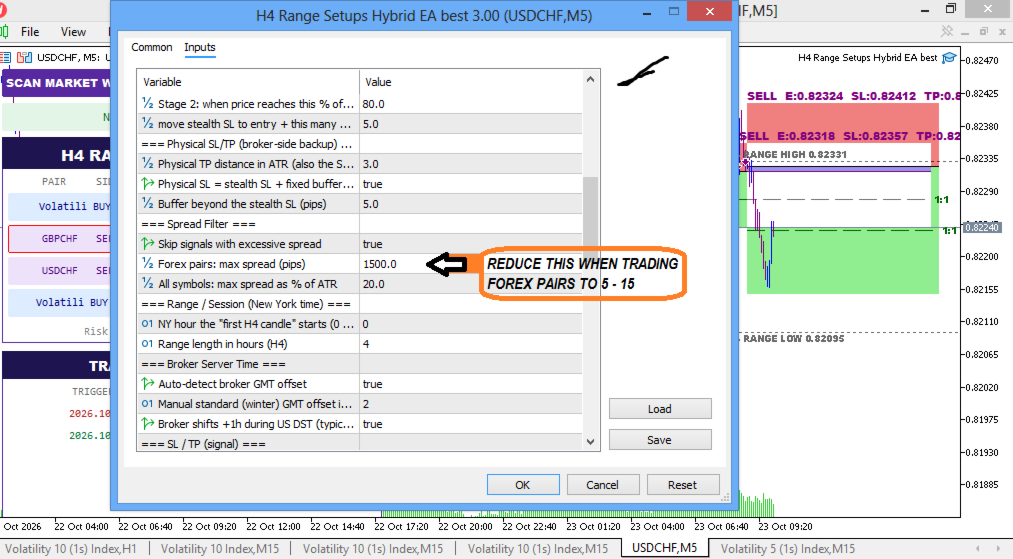
Spread filter (toggleable): forex pairs are skipped above 2.5 pips of spread, and any symbol is skipped when spread exceeds 20% of ATR. Both limits are adjustable, and the dashboard flags wide spreads.
Trade sequencing (toggleable): the scanner considers a new signal only after the previous one has reached its stop or target.
News notice (toggleable): a banner shows the nearest high-impact event within 240 minutes and flags affected pairs. It is informational and does not block trades.
CHART VISUALIZATION
The scan button and news bar sit at the top left, with the signal dashboard below showing pair, side, entry, NY time, lot size and spread. Below that is the trade log, which shows the trigger date and time in New York time and the profit or loss of each of the EA's last five trades from the last five trading days. The trade log reads only trades carrying the EA's magic number. An optional chart style applies a white background, no grid, blue bull candles, purple bear candles and period separators below H4.
SUPPORTED TIMEFRAMES AND MARKETS
You can attach it to any chart timeframe. All analysis and execution use M5 data, so M5 history must be available for each symbol. It scans any symbol in your Market Watch, and the spread filter treats forex pairs separately. The news notice uses the terminal's economic calendar, which is not available in the Strategy Tester.
USER SETTINGS
Auto-trade on or off, magic number, trades per day, slippage and signal freshness window.
Lot mode, risk amount, risk percentage and fixed lot.
Stealth reward-to-risk, trail stages and physical SL and TP settings.
Spread limits and the trend, news and alert options.
The range start hour and length, broker time settings, ATR buffer, stop cap and scan interval.
INSTALLATION AND ACTIVATION
Install from the Market, or copy the file to MQL5/Experts.
Show the symbols you want scanned in Market Watch.
Enable Algo Trading in the terminal and allow it in the EA's properties.
Attach the EA to any chart and press SCAN.
For alerts, enable them in Tools > Options. Push alerts also need your MetaQuotes ID.
PRACTICAL TRADING PROCEDURE
Start on a demo account and confirm the broker-time detection matches your server.
Choose a lot mode and risk amount that fit your account rules.
Leave the one-trade-per-day default until you have watched several sessions.
Review each dashboard signal on M15 and check spread and news flags.
Read the Experts log, which records every executed, skipped and rejected trade and why.
RISK MANAGEMENT
Stops: the stealth SL sits at the extreme of the last six M5 candles of the move plus a 0.2 ATR buffer. It is capped at 2 ATR from entry. If the structural level exceeds the cap, the EA uses the closest swing inside the cap, otherwise 2 ATR. The stealth TP is 1:1 by default.
Trail: at 60% of the distance to target, the stealth SL moves halfway between entry and SL. At 80%, it moves to entry plus 5 pips.
Physical SL/TP: the physical SL sits 5 pips beyond the stealth SL by default, and the physical TP is 3 ATR away. They protect the position if the EA or terminal stops running.
Sizing safeguards: before each order the EA checks the lot against the broker's own loss calculation and against free margin. It skips an over-risk trade and shrinks a lot that is not affordable.
Not enforced: daily loss limits or drawdown rules. Keep your own, especially on prop firm accounts.
LIMITATIONS AND TRANSPARENCY
Stealth SL and TP exist only inside the EA. They work only while the terminal is running and connected, so a VPS is recommended.
The ATR used for the stop reads the M15 candle containing the signal, so levels can shift slightly until that candle completes.
The signal list is rebuilt from price history on each scan.
Commission and slippage are not included in risk sizing.
False breakouts can fail, and strongly trending days can produce losing setups.
Broker time settings must match your server.
Backtesting is limited, because the EA scans the live Market Watch list.
WHO SHOULD USE THIS EA?
Intraday traders who trade range and liquidity-failure setups, traders who want one disciplined entry per day across many pairs, and prop firm candidates who want fixed-dollar or percentage risk with a log of what the EA did.
WHY THIS EA DESERVES ATTENTION
It turns one clear rule into a complete workflow: scan, filter, size, execute, manage and log. The stop is capped, the lot is cross-checked with the broker's own calculation, and stealth levels are backed by a physical safety net. Every trade it takes is documented in a dedicated log by magic number.
RISK DISCLAIMER
Trading leveraged products carries a high risk of loss. This tool provides automated analysis and execution and does not guarantee profits or any particular result. Past behavior does not indicate future results. Test on a demo account first and use proper risk management.