All In One Trade Manager MT4
- ユーティリティ
- バージョン: 1.0
- アクティベーション: 10

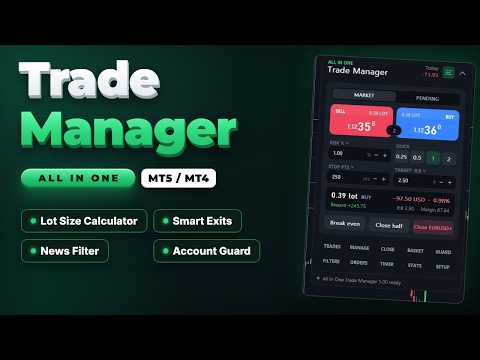
All In One Trade Manager is a trade manager and one-click trading panel for manual traders on MetaTrader 4. It works as a trading assistant, risk manager and position size calculator in one dashboard. It brings together everything below in one panel:
- order entry with risk sizing
- automatic trade management
- advanced order types
- account protection
- statistics
Its entry checks run in the background and tell you, before you click BUY or SELL, when something speaks against the trade.
Also available for MetaTrader 5: https://www.mql5.com/en/market/product/169959
WHO IT IS FOR
- Manual traders who scalp, day trade or swing trade forex, gold (XAUUSD), indices or crypto.
- Traders who want consistent risk management: every lot is calculated from the risk you set, and stop loss and take profit are placed with each order.
- Prop firm challenge and funded traders who need a daily loss limit, a max drawdown limit and an equity guard. Always check your firm's own rules too.
ENTRY CHECKS
The panel stays clean while every rule passes. When a rule needs your attention, one line appears at the top of the panel with the exact reason, for example "USD Non-Farm Payrolls in 4 min":
- Amber: a warning, for example news coming up.
- Red: the rule blocks new entries.
You can still send a blocked BUY or SELL by holding the button for one second, so you stay in control.
The available rules:
- News filter. Uses the free ForexFactory weekly calendar. Add https://nfs.faireconomy.media under Tools > Options > Expert Advisors > Allow WebRequest (see the notes below). The calendar is loaded at most once an hour.
- Only events for the chart's currencies count (for example USD and EUR on EURUSD, USD on gold).
- Choose high impact only, or high and medium impact.
- Set the minutes before and after each event.
- Choose whether news warns you or blocks new entries.
- Optional action a set time before the event: close trades, move stops to break even, delete pending orders, or close and delete.
- Upcoming events list with countdown, and event markers on the chart.
- Spread limit.
- Trading hours: two time windows, which may cross midnight, plus a choice of trading days.
- Volatility band: minimum and maximum ATR.
- Exposure limits: lots per currency and trades per symbol.
- Account guard (equity protection): daily loss limit, weekly loss limit, max drawdown, daily profit target, trades per day, open positions, loss streak and cooldown after a loss.
ORDER PANEL
- Buy and sell buttons with live prices and the spread between them.
- Market or pending orders. For pending orders, the limit or stop type is chosen automatically from where you place the entry.
- Lot size calculator: size by risk % of balance, equity or free margin, by risk in money, or by fixed lots. Quick buttons for common sizes.
- Commission per lot is counted in the risk.
- Stop loss in points or as a multiple of ATR. Take profit in points or as a risk:reward ratio.
- Live preview of lot size, risk in money and percent, reward, R:R and required margin, before you send.
- Volume is rounded to the broker's lot step. If the minimum lot would exceed your risk, the panel tells you.
- Broker error codes are shown as plain sentences, for example "Stop or target too close to price".
ADVANCED ORDERS
- Scale-in layers. Split one trade into 2 to 10 entries that step toward the stop. All layers share one stop and one target, and your risk is divided between them. A preview shows each layer's price, lot and risk before you send.
- Straddle (OCO). Places a buy stop above and a sell stop below the price, both sized by your risk. When one fills, the other is deleted.
- Trailing pending orders. Pending orders follow the price at a set distance.
- Virtual pending orders. The order waits on your computer and is sent when the price reaches it.
CHART RISK:REWARD TOOL
- Entry, stop and target lines with labels showing points, money, percent and R.
- Partial take-profit and partial stop levels are marked on the chart.
- Drag the stop and the lot size updates to keep your risk constant.
- Drag the entry to switch to a pending order.
- Drag any pill sideways to move the whole tool anywhere on the chart.
- Click the dots on the entry pill to switch between BUY and SELL.
- Every open position gets a small label with its profit and its R multiple.
TRADE MANAGEMENT
- Break even (breakeven stop): trigger in points or R, with a lock offset in points. Two extra profit-lock steps.
- Trailing stop, six methods: fixed distance, ATR, candle high/low, moving average, Parabolic SAR and fractals. Each starts after a profit you choose and moves in steps.
- Partial take profit: up to four levels, each closing a percentage of the starting volume. Optional move to break even after the first level.
- Partial stop loss: two levels that cut part of a losing position before the full stop.
- Automatic stop and target for trades opened manually, from the mobile app or by other EAs.
- Scope: this symbol or all symbols; trades opened by the panel only, or all trades.
CLOSE TOOLS
- Close all, profitable, losing, buys or sells. Delete pending orders.
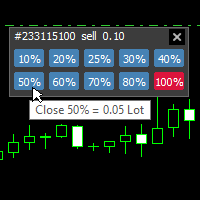
- Partial close 25%, 50% or 75%.
- Reverse a position, or lock it with an opposite hedge position (hedging accounts).
- Bulk buttons are confirmed by holding them, so a single misclick does nothing.
BASKET
- Manage a group of trades as one: this symbol or all; buys, sells or both.
- Basket target and stop, in money or percent of balance.
- Trailing that locks a share of the peak profit.
- Break-even line of the whole basket drawn on the chart.
STEALTH
- Hidden (virtual) stop loss and take profit: kept on your computer instead of at the broker, with an optional wider emergency stop at the broker.
- Stop on candle close: the stop only fires when a bar closes beyond it.
- Convert the stops of open trades to virtual stops and back with one button.
TIMER AND ALERTS
- Server clock, a candle countdown, and a 24-hour session ribbon for Sydney, Tokyo, London and New York.
- Close trades after a set number of minutes.
- Close everything at a daily time, or before the weekend on Friday.
- Delete pending orders after a set time.
- Price alerts: a line on the chart that notifies you when the price reaches it. Drag the line to move the alert.
STATS
- Results for today, this week, this month or all time: net profit, win rate, profit factor, average win and loss, expectancy, and average R.
- 30-day result curve.
- Open risk if all stops are hit.
- Exposure per currency.
- Results by symbol.
- Export of the trade journal to CSV.
- Optional chart screenshot when a trade opens and closes.
NOTIFICATIONS
Sound, MT4 push, e-mail and Telegram (with your own bot) for:
- guard actions
- basket exits
- news actions
- price alerts
COMFORT
- Three presets save all your settings and load them with one click.
- Dark and light themes. All colours can be changed in the inputs, and the panel scales from 50% to 250%.
- Keyboard shortcuts (hotkeys): Shift+B buy, Shift+S sell, Shift+C close symbol, Shift+E break even, Shift+L chart tool, Shift+P pending, Shift+H hide.
- Settings are saved per symbol and per account, and survive restarts.
- When the panel runs on several charts, one chart runs the automatic rules so they never act twice.
- The panel scrolls on small screens: drag its scroll bar.
ACCOUNTS AND INSTRUMENTS
- Works on every MetaTrader 4 account.
- Forex, metals, indices and crypto. Lot sizing uses the broker's own profit calculation, so no instrument needs special settings.
IMPORTANT NOTES
- Rules that act locally need MetaTrader 4 to be running and connected: virtual stops and orders, partial exits, trailing, timer exits, basket, guard, news actions and alerts. A stop set at the broker keeps protecting your trade when the terminal is closed. Virtual stops do not.
- When a limit is hit, the account guard blocks new entries from the panel and can close all open trades. With "Hard lock" on, it also closes trades opened elsewhere while trading is locked. It cannot stop another terminal or the mobile app from opening trades in the first place, and it does not replace the rules of your prop firm.
- News filter: add https://nfs.faireconomy.media under Tools > Options > Expert Advisors > Allow WebRequest. Without it the news filter shows how to allow it, and every other feature works as usual.
- Telegram: add https://api.telegram.org under Tools > Options > Expert Advisors > Allow WebRequest, and enter your bot token and chat id in the inputs.
- The news calendar is not available in the Strategy Tester. In the tester the news filter shows "Calendar is not available".
- The product does not open trades on its own and does not give trading signals.
TESTING THE FREE DEMO
Run the demo in the Strategy Tester with visual mode on to use the panel by hand. Without visual mode, the tester runs a short automatic demonstration that opens sample trades so you can see break even, partial closes and trailing at work.
The MetaTrader 4 tester sends no mouse or keyboard events to an EA. The panel still answers clicks there:
- A click takes effect on the next price tick. Slow the test down with the speed slider and click once, then wait for the panel to react: two clicks between two ticks cancel each other.
- Buttons that you hold on a live chart (bulk close, or BUY and SELL while a rule blocks entries) ask for a second click instead.
- Click the upper or lower half of the scroll bar on the right edge of the panel to scroll.
- Click the BUY or SELL pill on the chart tool to switch sides. Dragging the chart tool works on a live chart only.
- The tester shows its own tooltip with the object name over the panel. A live chart does not.
INPUTS
Trading
- Magic number for trades opened by the panel: 2604190
- Order comment: AIO Trade Manager
- Maximum slippage (points): 30
- Default risk per trade (% of balance): 1.0
- Manage manual and other EA trades by default: false
Behaviour
- Keyboard shortcuts (Shift + key): true
- Hold to confirm bulk close buttons: true
- Sounds: true
- Push notifications: false
- Telegram bot token / chat id: empty (off)
- Reset saved panel settings on start: false
Appearance
- Theme: Dark
- Panel scale (%): 100
- Corner radius (px): 16
- 11 colours for the dark theme (slate theme by default)
Everything else is set inside the panel and saved automatically.