Dashboard Super MA RSI CCI

3.33

如果产品有任何问题或者您需要在此产品上添加功能,请联系我

Contact/message me if you encounter any issue using the product or need extra feature to add on the base version.


There is Demo version of this panel Dashboard Super MA RSI CCI Demo in my product list, pls try it out to get familiar with all functionalities free.

Dashboard Super MA RSI CCI is an intuitive, and handy graphic tool to help you to:

  • Have 28 pairs under control with one dashboard
  • Monitor price movement, identify possible trend based on MA, RSI, and CCI indicators
  • Provide trading signals based on the indicators selected


Features

  • Customizable trading session: total 3 sessions can be set for autotrade
  • Option for autotrade
  • Selection of pairs (symbols) to trade: you can choose which pair(s) to trade
  • Customizable dashboard position
  • Very easy to adjust the indicator parameters
  • Very easy and handy to use


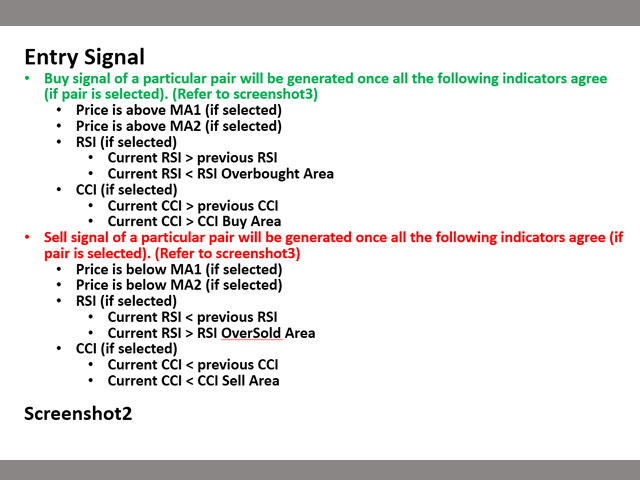
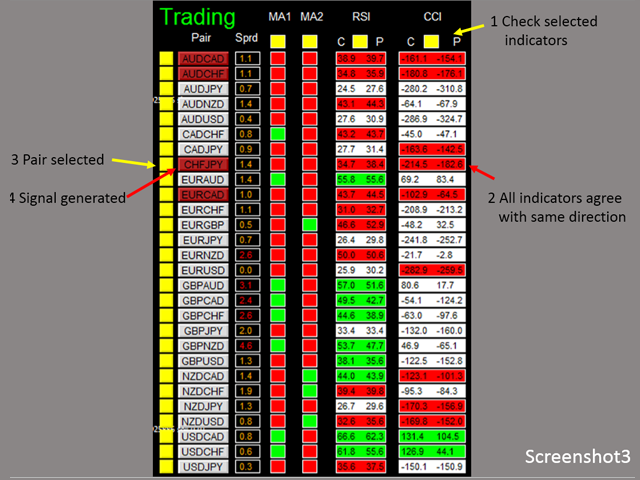
Entry Signal

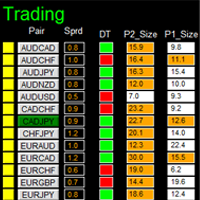
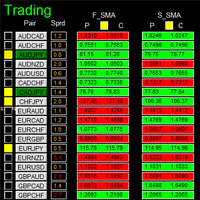
Refer to screenshot2


Input Parameters

  • Use AutoTrade:
    • Yes: buy/sell orders will be sent once signal is generated
    • No: no order will be sent even signal is generated
  • Send Alert upon Signal (Refer to note3)
  • Send Notification upon Signal (Refer to note3)
  • Single pair TP in pips: the take profit in pips for single pair.
  • Single pair SL in pips: the stop loss in pips for single pair
  • MA:
    • Use MA1/MA2
    • MA Timeframe of MA1/MA2
    • MA Period of MA1/MA2
    • MA Method of MA1/MA2
    • MA Applied Price of MA1/MA2
  • RSI:
    • Use RSI
    • RSI Timeframe
    • RSI Period
    • RSI Applied Price
    • RSI Overbought Area
    • RSI Oversold Area
  • CCI
    • Use CCI
    • CCI Timeframe
    • CCI Period
    • CCI Applied Price
    • CCI Buy Area
    • CCI Sell Area
  • Magic Number
  • Lot Size:
  • Basket TP in $:(see explanation in Note1)
  • Basket SL in $
  • Max Spread:once spread exceeds max spread, no order will be sent.
  • Trading Session, if time is out of session, no order will be sent
    • Close all trades after session(s)
      • Yes: all active (open) position(s) will be closed when session closed
      • No: no active (open) position(s) will be closed when session closed
    • Note that: starting and ending time is your computer/local time, not server time
    • Use Session1
      • Session1 Start Time
      • Session1 End Time
      • Session1comment: comment of each order
    • Use Session2
      • Session2 Start Time
      • Session2 End Time
      • Session2comment
    • Use Session3
      • Session3 Start Time
      • Session3 End Time
      • Session3comment
    • Non-stop session is active if Use Session 1, 2, and 3 are all selected as false.
  • TimeFrame of new chart
  • Suffix: suffix string of your symbol. i.e.: your symbol is ‘EURUSDx’ instead of ‘EURUSD’, input ‘x’ in suffix cell, leave prefix cell blank
  • Prefix: prefix string of your symbol


Dashboard Objects:

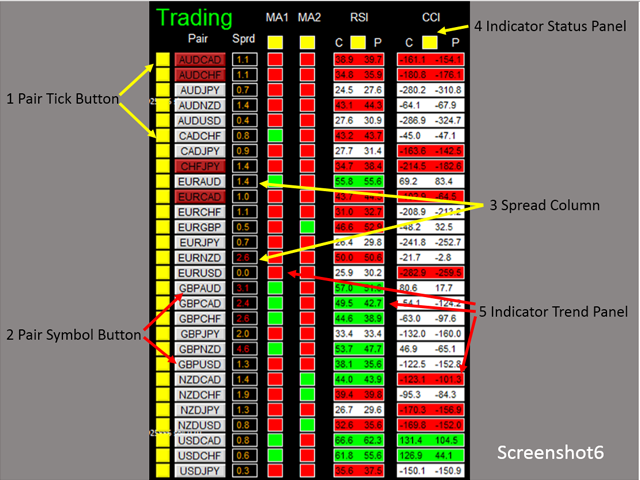
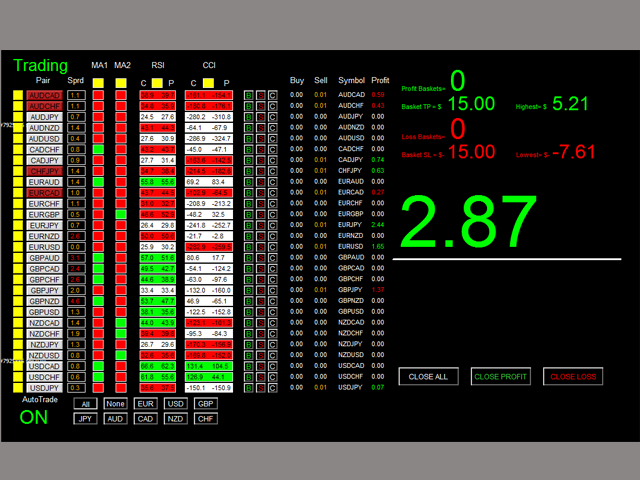
For object 1-5, please refer to screenshot6.

Object 6-12: screenshot7.

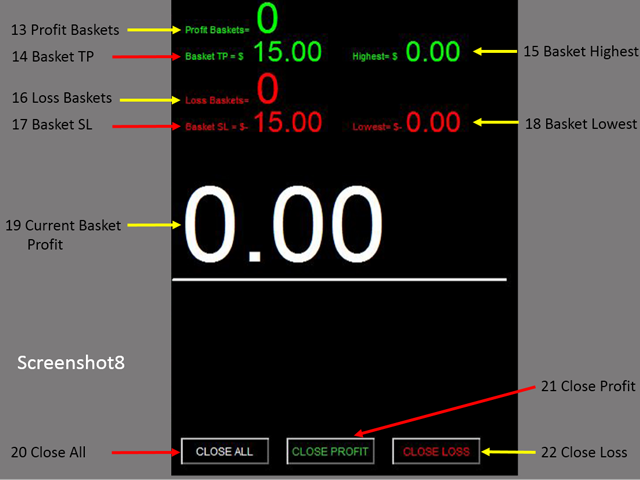
Object 13-22: screenshot8.

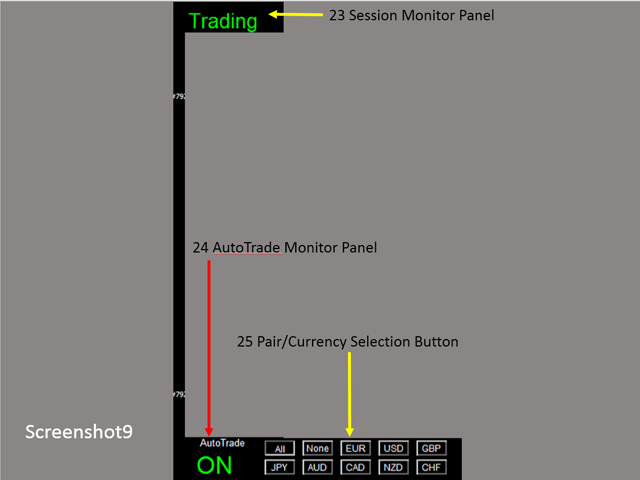
Object 23-25: screenshot9.

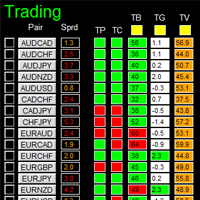
  1. Pair Tick Button: Click once to active the corresponding pair for trading. Click once more to de-active.
  2. Pair Symbol Button:
    • Click on button to open a corresponding new window chart
  3. Spread column: show current spread of each pair.
  4. Indicator Status Panel: indicates which indicator is selected to generate signal
  5. Indicator Trend Panel
  6. Buy Button: (refer to note2)
  7. Sell Button
  8. Close Button: close all positions of corresponding pair
  9. Buy Volume Column
  10. Sell Volume Column
  11. Symbol:
  12. Profit Column
  13. Profit Baskets: calculate the number of baskets hitting TP
  14. Basket TP: Basket take profit
  15. Basket Highest: the maximum profit that current basket ever reach
  16. Loss Baskets: calculate the number of baskets hitting SL
  17. Basket SL: Basket stop loss
  18. Basket Lowest: the maximum loss that current basket ever reach
  19. Current Basket Profit: Current basket profit
  20. Close All: close all positions
  21. Close Profit: close all positions in profit
  22. Close Loss: close all positions in loss
  23. Session Monitor Panel:
  24. AutoTrade Monitor Panel
  25. Pair/Currency Selection Button:
    • All: select all 28 pairs
    • None: clear all selected pairs
    • EUR: select all EUR pairs, like EURUSD, EURJPY…
    • Same rules applies to USD, GBP, JPY... buttons


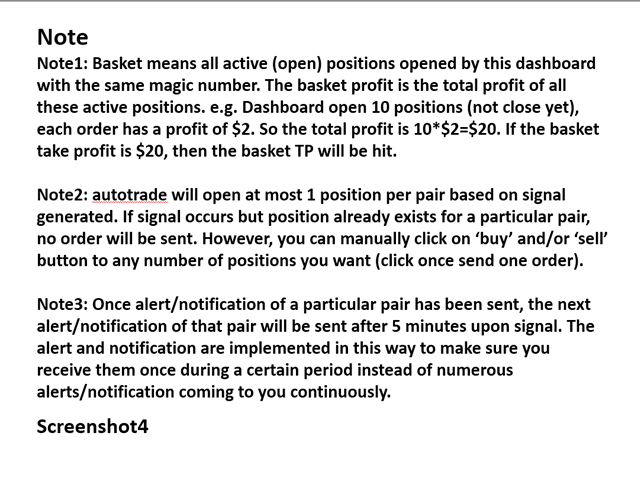
Note

Refer to screenshot4

レビュー 3
Marcos Barahona Parra
448
Marcos Barahona Parra 2020.05.02 03:26 
 

Hello Mr. Wang Yu, yesterday I rented your Ea.Dashboard Super MA RSI CCI. I have read reviews of other products, and I have a good expectation of your product. If it works correctly I hope to buy it.

I also have a question for you that you cannot understand in the indications.

What do the letters (C and P) mean about RSI and CCI?

Also request if it is possible to add the possibility of buying by currency packages according to the strength of the currencies, that is, all the pairs of EUR, all the pairs of the USD, etc. Thank you for your answer.

Michael Kirchmann
250
Michael Kirchmann 2017.07.21 13:44 
 

Erst gemietet und werde jetzt kaufen. Gutes Fundament, aber man sollte selber viele Einstellungen vornehmen! RSI, CCI, MA1 und MA2 Faktoren und SL, TP sowie Orderzeiten u.a. selber verändert, dann klappt es sehr gut mit den Gewinnen. 99 Prozent sind dann möglich! Bei 0,01 Lot Size mache ich 10 - 15 Euro täglich Gewinn. Ohne vor dem Rechner zu sitzen, das Programm sorgt für Taschengeld, wenn ich auf Arbeit bin!

おすすめのプロダクト
如果产品有任何问题或者您需要在此产品上添加功能,请联系我 Contact/message me if you encounter any issue using the product or need extra feature to add on the base version. There is Demo version of this panel Dashboard Super Three MA Demo in my product list, please try it out to get familiar with all functionalities free, LINK . This system basically utilizes PA and three adjustable Moving Average as the main indicator set to generate trading signal. With the feature that all MA_timeframe, MA_period, MA_applied_price are ad
MARKET MAKER EXPERT is an customizable advanced, fully automated Grid Trading Expert Advisor developed to trade on MULTIPAIR MODE ( EURUSD,USDJPY,USDCHF,USDCAD,EURCHF ), by spreading out risks. Expanding Grid is its speciality. It focuses on opening a large number of orders. The currency pairs have been chosen carefully to run this system. Once it analyze the market, it does a hedge order immediately, (so margin levels are not affected on the initial trade) Starts grid when the price move aga
US30 Break Scalp
Vitor Manuel Goncalves Pinto
This Expert Advisor trades based on a specific range breakout within a specific hour using scalp techniques. It does not use dangerous techniques like martingale. It only opens a maximum of 3 trades per day (default settings). The default settings are optimized for IcMarkets, FTMO and MFF (set file in the comments) although it can be used with other brokers, you just need to confirm the hours input. Despite this Expert Advisor presents good results in backtesting and for this month (January 2023
加载黄金M1图表.资金不低于10000,建议使用美分账户。 黄金网格,使用马丁,套期保值,不错过每一笔行情。 免责声明:EA不能保证客户盈利,市场有风险,计算机及网络也存在间接风险,任何因素导致的一切可能的风险及损失均由客户自己承担。 EA不使用任何指标。智能交易系统根据行情打开交易,然后可以建立订单网络或使用止损。 是一款智能交易顾问,能够以微薄的利润部分平仓大量市场头寸。小部分平仓可让您快速及有效地减少亏损的部位。主要的交易策略是建立一个部位网络,并在给定利润的框架内以小部分平仓。顾问分析市场部位并将其手分成几部分。因这种方法,价格的小幅波动会导致部分部位的计算平仓。 可以在此处找到对实际工作以及我的其他发展的监控: https://www.mql5.com/zh/signals/2147803?source=Site +Profile+Seller 您可以在这里找到所有设置!
MT4 バージョン: https://www.mql5.com/ja/market/product/99489 MT5 バージョン: https://www.mql5.com/ja/market/product/99490 Hedging Locking (MT4) — ダイナミックロックヘッジ EA (マルチシンボル) Hedging Locking は、買い注文と売り注文を同​​時にオープン(ロック/ヘッジ)し、価格が動的な距離だけ離れた時点で追加のヘッジレイヤーを構築するように設計された、マルチシンボルヘッジのエキスパートアドバイザーです。この EA は、「直接」側と「反対/回復」側に別々のロット乗数を使用するロックアプローチを使用してフローティングエクスポージャーを管理し、その後、通貨ペアまたはバスケットごとに金額/パーセント目標を使用して取引を終了します。 仕組み(戦略概要) 初期ロック(ヘッジエントリー) シンボルに取引がない場合、EAは以下の条件でポジションを開きます。 1 × 買い(Ask) 1 × 売り(Bid) ダイナミックステップ(レイヤー) EAは最も遠い
Monkey EA is fully automatic Expert Advisor for trading on GBPUSD . It based on Exponential Moving Average and Bollinger Bands. Monkey EA has been tested from year 2003 to March 2021 . You can download the demo and test it yourself. My test used the real tick data with 99,90% accuracy. I made Monte Carlo test with 200 simulations used too. Monkey EA offers hight profit factor  and small drawndown . All trades are covers by TakeProfit  and StopLoss ! Doesn't use Martingale or other dangerous star
NebularMan
Viktor Shpakovskiy
1ロットで平均化して新しい注文を追加する機能を備えた手動取引用のEA。 ロットボリューム、注文間のステップを変更し、オープンポジションの数とロットの合計ボリュームを制限することで、リスクを管理できます。 トレーリング ストップ、バーチャル ストップ ロス、バーチャル テイク プロフィットがあり、チャート上を自由に移動できます。 組み込みの取引シミュレーターを使用して、ストラテジー テスターで EA がどのように機能するかを確認できます。 利点 最初のロットは、トレーダーまたは他のアドバイザーによって開かれます。 EA は平均 1 ロットでオープン ポジションに新しい注文を追加します。 増加ロットは固定されており、オープン ポジションのサイズに依存しません。 リスク管理(ロット量、注文数、注文間のステップによる); 預金通貨で利益を得る; 仮想ストップロスと仮想テイクプロフィット; ポイントによるトレーリングストップ; トレーリングストップを開始するための小さな利益; チャートの「ホットボタン」で注文を素早く開閉できます。 小数点以下4桁と5桁の引用符を持つアカウントで機能します; 5
Make grid trading safe again | Built by a grid trader >> for grid traders.    Walkthrough Video  <== Get Grid Rescue up and running in 5 minutes  This is MT4 version, click  here  for  BlueSwift GridRescue MT5  (settings and logics are same in both versions) BlueSwift Grid Rescue MT4  is a risk management utility  EA  (used together with other grid trading experts) that can help you trade aggressive grid systems with manageable drawdown, therefore reduce substanstially margin call risk as we
This system is very simple.. It uses a martingale grid hedging style strategy by increasing lot sizes and grid levels. The open order step and volume can be both fixed and dynamic. The EA is easily customizable. The EA does not use a stop loss and all positions close when the chart move back from trend and arrive last grid level. Recommended :   pairs : Side way pairs is very good for this system.                                 Time frame : not important.                                Deposit
This EA is a breakthrough EA. When the monitoring market changes rapidly, fluctuates rapidly in one direction, and exceeds the set threshold, the EA will quickly place an order and quickly adopt a mobile stop loss strategy to complete capital preservation and profitability. Advantages of this EA: 1. The transaction is very fast to the closing of the position, and it is never procrastinated. 2. After the transaction, the accuracy rate is very high. 3. Place an order with compound interest, and th
### FX Kings Elite Scalper v13.0 - Enhanced AI-Powered Trading System **Unlock Elite-Level Trading with AI Intelligence – Designed for Every Trader, Every Market, Every Account!** Are you ready to elevate your trading game with a cutting-edge Expert Advisor (EA) that combines razor-sharp scalping strategies, advanced machine learning, and robust risk management? Introducing **FX Kings Elite Scalper v13.0**, the ultimate AI-enhanced trading system built for maximum profitability, adaptability,
By :ForextraderEanow   Green Mower 10.0                                                                                                                                                                                                                                                                                                        This EA is Famous Grid Strategy that open grid of trades with the same size (not martingale)  and make PROFIT even when the Forex price moves in the WRONG Direction
Dark Trader
Volodymyr Hrybachov
EAは急激な価格変動に対応しており、オープンポジションのロックとピラミッドを使用できます。仮想ストップが使用され(利益を得る、トレーリングストップ)、注文ロックと残高の%でのストップロスが損失を制限するために使用されます。同時に数十の注文を開くことができ、アドバイザーはロックから抜け出し、総利益に基づいてすべてのポジションを閉じるために無料の資金を必要とします。これは取引する商品の数を選択するときに考慮に入れる必要があります。 Expert Advisorは、設定された時間枠に依存しません。計算には価格と時間のみが使用されます(ただし、テストと最適化にはM1を使用することをお勧めします)。実際の口座で作業するには、スプレッドが最小でボラティリティが高い通貨ペアが推奨されます:EURUSD、GBPUSD、AUDUSD、USDCAD、USDCHF、USDJPY、NZDUSD。 Expert Advisorは通貨ペアでの取引用に開発されており、金属、契約、株式などではテストされていません。実際の口座にインストールする前に、少なくとも過去3か月間は実際のティックでExpertAdvis
(MT5):  https://www.mql5.com/en/market/product/135268?source=Site+Market+My+Products+Page#description Live account: https://www.mql5.com/en/signals/2307663?source=Site+Profile Gold Breakout Sniper( Strategy 259 158 ) EA is a fully automated trading system designed for XAUUSD on the H1 timeframe, focusing on volatility breakout opportunities confirmed by trend filters. This EA combines multiple ATR levels to accurately gauge market volatility conditions and filters trades using MACD to ensure e
VR Smart Grid
Vladimir Pastushak
4.29 (168)
VR Smart Gridは、MetaTrader 4とMetaTrader 5向けに開発された完全機能の取引アドバイザーで、古典的なグリッド取引戦略に基づいて構築されています。ロボットは独立してポジションを開き、管理し、部分的に決済し、市場の変化に適応する効率的な注文グリッドを作成します。15年間の開発を経て、このアドバイザーは数千の変異とテストを経ています。これは実際のアカウントとデモアカウントでの体系的な改善の結果です。 セットファイル、製品のデモ版、説明書、特典が入手可能 [ブログ] のバージョン [MetaTrader 5] インテリジェントなポジション平均化 VR Smart Gridの主な特徴の1つは、複数の平均化モードです。スマート平均化と部分平均化が含まれています。ロボットは現在の市場状況を分析し、ポジションを最適な部分に分割し、平均決済価格を計算します。これにより、現在の市場価格にできるだけ近くなります。このアプローチにより、注文グリッドを柔軟に管理し、チャートを常に監視する必要なく、ドローダウンからのポジションをより効果的に回復できます。 8つのポジション管理方
MARTINGALE & HEDGING https://www.mql5.com/en/users/earobotkk/seller#products MARTINGALE & HEDGING is a fully automated EA that uses martingale and hedging strategy. This expert is designed to make quick profit as fast as possible. INPUTS Trade Comment: user comment Magic No: unique EA Number Time Frame: default is H1   Lot: lot size. Take Profit: value in pips. Max Spread: EA will not open new order if spread is more than maximum spread allowed. Multiplier: lot multiplier. Pip Step: distance in
Exp Swing
Vladislav Andruschenko
4.5 (58)
これは、Swinger(Pendulum、Cheburashka)と呼ばれる有名な戦略のモデルを使用しています。 戦略は、2つの反対の保留中の注文を出すことにあります。価格が特定の方向に移動すると、一方の保留中の注文がトリガーされ、もう一方の注文のロットサイズが増加します。 EAは3種類のオープン保留中の注文を提供します(TypeofTrade) 配置後の自動オープン(インスタントオープンAutoTrade) 手動開封後の開封と管理(手動開封ManualTrade) 高/低レベルで開く(過去のバーTFTradeの高低) OCO(One-Cancels-the-Other)注文は、2つの注文で構成される条件付き注文の一種です。2つ目の注文が約定すると、1つ目の注文は自動的にキャンセルされます。 スイング-完全な説明 MT5 version 購入する方法 インストールする方法     ログファイルの取得方法     テストと最適化の方法     Expforex のすべての製品 使い方? 開始時に、エキスパートアドバイザーは2つの注文を出します-現在の価格から StopOrderDe
FREE
FlySystemEA Pro
Nikolaos Pantzos
3.23 (13)
This Expert Advisor is a pure scalping system. The expert place and manage pending orders. Runs perfect on pairs with tight spread and low commission broker (commission plus spread equal or less than 1.0 pip). Choose a broker with zero stop level and fast execution to use expert. Pairs and Time Frame Pair: eurusd Time frame: M1 Default settings are good for eurusd. Information Please test expert on demo account first, before uses it on real account. Have on your mind, all scalpers are sensiti
FREE
エキスパートアドバイザーの有利なポートフォリオへの素晴らしい追加。この戦略は、構築されたレベルを一定期間突破するためのアルゴリズムに基づいています。 EAには固定のStopLossがあり、最小のドローダウンを維持できます。 Tick Data Suiteを使用してすべてのティックでテストされ、可能な限り最も近い実際の取引条件で、ビデオをご覧ください。 最初の10人の購入者の価格$ 75(コメントにレポートを投稿してください) 推奨事項:スプレッドが低く、優れたECNブローカー。 推奨通貨ペアEURUSD。 GBPUSDやUSDJPYなどの他の通貨ペアを使用できます。 コメント内の設定ファイル。 すべての質問については、プライベートメッセージに連絡してください! 喜んでお手伝いさせていただきます!
The Arrow Scalper
Fawwaz Abdulmantaser Salim Albaker
1 (2)
Dear Friend..  I share with you this simple Expert Adviser .. it is full automatic  this Expert Adviser following the trend of the pair you install on or any stocks or indices , it is works like that: - when the trend on H4 chart show a start of up trend the expert will wait till the 15M & 1H charts show an up trend the EA will open a buy order directly , and do the same for down trend and open a sell order the buy or sell  order lot size and take profit and stop loss will measured manually  by
FREE
Expert Advisor: Breakout_Recovery_V2    Version: 2.3    Symbol: XAUUSD    Timeframe: M15 (recommended)    Strategy Type: Breakout + Smart Recovery (Bi-directional Martingale)    Platform: MetaTrader 4 (MT4) Description: Breakout_Recovery_V2 is a smart trading system that detects real breakout opportunities and uses a controlled recovery mechanism (martingale) when the market moves against the initial entry. Features: *Real breakout entry logic using a custom supply/demand
SFire Gold EA
Jacques Scholtz Fourie
This EA is a grid-based trading system. It incorporates several advanced features to manage trades dynamically and adapt to market conditions. Here's a summary of its functionality: I am happy to provide my settings file. Recomendation would be to run on a 20 000 cent account. Key Features: 1. Grid Trading Strategy:    - The EA uses a grid-based approach to open buy and sell trades at predefined price intervals.    - It dynamically adjusts the grid levels based on market conditions and risk se
Details of each condition Type 1. Set no use Hedging Martingale, to open the order by yourself only through the push button. TP and SL follow setting. Set Setting_Hedging =false;     Use_Signal =false;  Type 2. Semi Auto Recovery Zone You have to open the order by yourself only through the push button. If in the wrong direction and Set true on Hedging Martingale, EA will fix the order with the zone system by use Hedging Martingale Set Setting_Hedging =true;     Use_Signal =false;  Type 3. Use
Trend Magnete
Evgenii Kuznetsov
3.75 (4)
The Expert Advisor tries to enter the market at the beginning of a trend. If the price moves in the unfavorable direction, the EA hedges the deal by placing an opposite order with a larger volume. The EA will change direction in the course of the trend until it is captured. The minimum distance for changing direction is specified by the Min Turn Step parameter, the actual distance can be longer and depends on the current volatility, it is controlled by the Mult Factor Next Orders parameter. The
News Hedging Pro  is a unique robot that allows you to trade during the most critical news announcement periods by your predefined strategy. You can preset the strategy to trade, and then it will trade that news automatically when the news comes. News release gives opportunity to have pips since the price usually has big move at that time. Now with this tool, trading news become easier, more flexible and more exciting than ever. No waiting, no confusing anymore. Product Links Fully  Description
1. Intro: Like the cold weather and freezing of winter, Crazz Winter EA’s open trades can be held for one day or TP within minutes. Aiming to have a high consistency and profitable amount, Crazz Winter EA is designed to trade with only two kinds of currency which are EURUSD and AUDUSD and there will only one trade open for each currency at the same time. With the combination of Moving Average and Relative Strength Index, it may detect and identify the current and following market trade. The EA h
Trends Hunter Expert Advisor is designed for medium-term trading. It is not a martingale and it does not depend on an account type (ECN, STP etc.) or spread level. This is a fully automated EA that features a custom algorithm for recognizing the price action and origination of a trend. If the EA identifies the beginning of a trend, one trade is opened. If a trend continues, the EA adds to the position. The number of addings is adjusted by the settings. Options Lots - fixed lot size; EMA1/EMA2 p
Level Pro
Elena Sokolova
5 (1)
This system has been developed over the last 6 years, a huge amount of work and tests has been done. The Expert Advisor trades on most currency pairs on the m15 timeframe. To choose the most suitable currency pairs for yourself, conduct a test. eurusd currency pair is not supported. Please take a look at my other products:       https://www.mql5.com/en/users/algo_trade/seller#products The Expert Advisor is a night scalper, it trades on a quiet night market. For each currency pair, its own
"The FXPivot Clicker EA is a game-changing automated trading robot designed to simplify and enhance your Forex trading experience. Powered by advanced algorithms and cutting-edge technology, this EA takes care of all the hard work for you, executing trades with precision and efficiency. With the FXPivot Clicker EA, you can enjoy the freedom of automated trading across all currency pairs. Whether it's major, minor, or exotic pairs, the EA is equipped to analyze the market and identify profitable
LogicalTraderEA is a Hedging expert advisor which uses a grid recovery strategy. Trading Strategy LogicalTraderEA trades on all types of pairs. It works most efficiently on an account with a high margin, which plays a huge role in any strategy. The user has to be able to consider withdrawal as a part of the strategy. This EA works on all time frames without losing its efficiency, but it works most efficiently in the H1 time frame. I have already set the most optimal default parameters in accorda
このプロダクトを購入した人は以下も購入しています
EASY Insight AIO – スマートで手間いらずな取引のオールインワンソリューション 概要 数秒で市場全体——FX、ゴールド、暗号資産、指数、さらには株式まで——を、手作業のチャート確認や複雑なセットアップ・インジケーター導入なしにスキャンできたらどうでしょうか? EASY Insight AIO はAIトレードのための究極のプラグ&プレイ型エクスポートツールです。市場全体のスナップショットを、クリーンなCSVファイルで一括出力。ChatGPT、Claude、Gemini、Perplexityなど、さまざまなAIプラットフォームで即座に解析できます。 ウィンドウの切り替えやグラフのごちゃごちゃしたオーバーレイはもう不要。自動エクスポートされる純粋で構造化されたインサイトだけで、無駄なチャート監視に悩まされず、スマートなデータ主導の判断に集中できます。 なぜEASY Insight AIOなのか? 本当のオールインワン • セットアップ不要、インジケーターのインストール不要、チャートへのオーバーレイ不要。インストールして起動し、エクスポートするだけです。 マルチアセット対
The product will copy all telegram signal to MT4   ( which you are member  ) , also it can work as remote copier.  Easy to set up, copy order instant, can work with almost signal formats, image signal, s upport to translate other language to English Work with all type of channel or group, even channel have "Restrict Saving Content", work with  multi channel, multi MT5 Work as remote copier: with signal have ticket number, it will copy exactly via ticket number. Support to backtest signal. How to
THIS EA IS A SEMI-AUTO EA, IT NEEDS USER INPUT. Manual & Test Version Please TEST this product before   BUYING  and watch my video about it. Contact me for user support or bug reports, or if you want the MT5 version! MT5 Version I do not guarantee any profits or financial success using this EA. With this Expert Advisor, you can: Implement your own   Zone Recovery   strategy to capitalize on trending markets. Create   Grid   trading strategies, to profit from ranging markets. Place orders easil
Time saving and fast execution Whether you’re traveling or sleeping, always know that Telegram To Mt4 performs the trades for you. In other words, Our   Telegram MT4 Signal Trader  will analyze the trading signals you receive on your selected Telegram channels and execute them to your Telegram to MT4 account. Reduce The Risk Telegram To Mt4   defines the whole experience of copying signals from   Telegram signal copier to mt4 platforms. Users not only can follow all instructions from the signa


Unlimited Trade Copier Pro is a tool to copy trade remotely to multiple MT4, MT5 and cTrader accounts at different computers/locations over internet. This is an ideal solution for you if you are a signal provider and want to copy your trades to other receivers globally on your own rules. One provider can copy trades to multiple receivers and one receiver can get trade from multiple providers as well. The provider can even set the subscription expiry for each receiver, so that receiver will not b
Strategy Builder offers an incredible amount of functionality. It combines a trade panel with configurable automation (covert indicators into an EA), real-time statistics (profit & draw down) plus automatic optimization of SL, TP/exit, trading hours, indicator inputs. Multiple indicators can be combined into an single alert/trade signal and can include custom indicators, even if just have ex4 file or purchased from Market. The system is easily configured via a CONFIG button and associated pop-up
Ultimate Extractor - Professional Trading Analytics for MT4 Ultimate Extractor transforms your MetaTrader 4 trading history into actionable insights with comprehensive analytics, interactive charts, and real-time performance tracking. Ability to combine multiple accounts and MT4 and MT5 into a single dashboard. What It Does Automatically analyzes your MT4 trading history across all Expert Advisors and generates detailed HTML reports with interactive visualizations. Tracks live performance metric
あなたがメンバーである任意のチャンネル(プライベートおよび制限されたチャンネルを含む)からのシグナルを、直接あなたのMT4にコピーします。 このツールは、ユーザーを念頭に置いて設計されており、取引を管理および監視するために必要な多くの機能を提供しています。 この製品は、使いやすく視覚的に魅力的なグラフィカルインターフェースで提供されています。設定をカスタマイズして、数分で製品を使用開始できます! ユーザーガイド + デモ  | MT5版 | Discord版 デモを試したい場合は、ユーザーガイドを参照してください。 Telegram To MT5レシーバーは、ストラテジーテスターでは機能しません! Telegram To MT4の特長 一度に複数のチャンネルからシグナルをコピー プライベートおよび制限されたチャンネルからシグナルをコピー BotトークンやチャットIDは不要です(必要な場合は引き続き使用できます) リスク%または固定ロットを使用して取引 特定のシンボルを除外 すべてのシグナルをコピーするか、コピーするシグナルをカスタマイズするかを選択 すべてのシグナルを認識するため
The product will copy all  Discord  signal   to MT4   ( which you are member  ) , also it can work as remote copier.  Easy to set up. Work with almost signal formats, support to translate other language to English Work with multi channel, multi MT4. Work with Image signal. Copy order instant, auto detect symbol. Work as remote copier: with signal have ticket number, it will copy exactly via ticket number. How to setup and guide: Let read all details about setup and download Discord To MetaTrader
Remote Trade Copier   is an advanced tool designed for efficiently copying trades between accounts in both   local   and   remote   modes. It allows for lightning-fast order replication from a master account to a slave account. In local mode, trades are copied instantly, while in remote mode, the copying process takes a second.  In new version, in remote mode , the copy operation can be performed with a delay of milliseconds or zero . After purchase, ask how to activate it MT4 Version (Only Loc
平均化ヘルパー - この種の取引ヘルパー ツールは、次の 2 つのテクニックを使用して、以前は利益がなかったポジションを平均化するのに役立ちます。 標準平均 トレンドに応じてポジションを開くヘッジ このユーティリティは、買いと売りの両方の異なる方向の複数のオープンポジションを一度に整理する機能を備えています 。例えば、売りポジションを1つ、買いポジションを1つオープンしたが、どちらも利益が出ていない場合、あるいは1つは利益が出ているものの利益が十分でない場合、この2つのポジションを平均化してプラスで取引を終了したい場合などです。これは、私の平均化支援ユーティリティが役立ちます。 平均化ヘルパー ユーティリティ - 次のポジションのサイズ、注文価格、ポジションを平均化する方向、指定した利益確定サイズでプラスでポジションをクローズする方向を自動的に計算できます。 このユーティリティでは、「買い」と「売り」ボタンを使ってポジションを開くこともできます。希望する利益確定額と開始ロットを指定するだけです。ユーティリティ自体は、最初に指定した利益確定額でポジションをクローズするか、ポジションを平均
With this Expert Advisor, you can seamlessly integrate various channel, arrow, and reversal indicators. It offers the flexibility to use all popular channel trading strategies, while also providing powerful tools to customize your trading conditions and risk management system.   The Expert Advisor opens orders when the price crosses the channel boundaries. Multiple crossing conditions are available for customization: Price touches boundary on re-entry into the channel Price touches boundary on
Custom Alerts AIO:マルチマーケット監視を一括で実現 — 設定不要ですぐに使えるインテリジェントツール 概要 Custom Alerts AIO は、追加のインジケーター設定が不要で、インストール後すぐに利用できる高機能マーケットスキャナーです。FX Power、FX Volume、FX Dynamic、FX Levels、IX Power を内部にすべて統合し、主要なすべての資産クラス(為替、金属、指数、暗号資産)を一括監視できます。MetaTrader の仕様により、株式は個別のシンボルとして追加可能ですが、一般的には利用頻度は低めです。 1. なぜ Custom Alerts AIO を選ぶべきか 追加ライセンス不要 • 必要なすべての Stein Investments インジケーターが内蔵されており、すぐに使用可能です。 • チャートに表示されるグラフィックは省略されており、アラート生成に特化した構成です。 市場を広範囲にカバー • 為替、金属、暗号資産、株価指数に対応(株式は手動追加可能)。 • シンボル名を入力する必要はなく、プロパティで資産クラス
Wouldn't it be great if AI had a second look at your trading data — graphics, indicators, and beyond? Introducing AI Trading Station , a revolutionary utility seamlessly integrated with the MetaTrader platform. Powered by the advanced intelligence of OpenAI's ChatGPT, this complete solution covers every step of your trading journey, from data gathering to trade execution. The Complete Trading Process. Reinvented Data Gathering & Visualization: Collect and display vital market data on intuitive
Trade Copier Pro is a tool to copy trade remotely to MT4, MT5 and cTrader accounts at different computers/locations over internet. This is an ideal solution for you if you are a signal provider and want to copy your trades to other receivers globally on your own rules. One provider can copy trades to multiple receivers and one receiver can get trade from multiple providers as well. The provider can even set the subscription expiry for each receiver, so that receiver will not be able to receive t
A ready-made multitimeframe trading system based on automatic plotting and tracking of Fibonacci levels for buying and selling any symbol. Advantages Determines the trend direction based on a complex of 14 indicators ( Cx ), extremums of ZigZag ( Z ), RSI ( R ), Impulse ( I ) Displaying the values of 14 indicators comprising the trend direction ( Cx ) Plotting horizontal levels, support and resistance lines, channels View the plotting option of Fibonacci levels on any timeframe, with the abilit
LIMITED OFFER - JUST FOR 2 DAYS | 50% BLACK FRIDAY DISCOUNT $640 -> $320 Your Smart Trading Assistant for the Forex Market Introducing a powerful MetaTrader tool designed to revolutionize the way you trade. This intelligent assistant goes beyond traditional indicators to provide a comprehensive, AI-driven market analysis — so you can trade with clarity and confidence. What It Does This advanced tool continuously monitors and analyzes a wide range of market data to deliver high-quality trading
Crystal Trade Manager PRO – MT4向け 高度リスク管理・トレードコントロールシステム 無料版: https://www.mql5.com/en/market/product/150632 概要 Crystal Trade Manager PRO(CTM)は、MetaTrader 4 のために設計された、プロフェッショナル向けのリスク管理および取引管理ユーティリティです。 厳密な執行、強力な資金保護、高度な自動化を必要とするトレーダーのために構築されています。 本システムは、リスク管理、エクイティ保護、日次制限、SL/TP の自動設定を行い、プロレベルの高速ワンクリック取引パネルを提供します。 Prop Firm チャレンジ、デイトレード、スキャルピング、資金運用者に最適です。 MT5版も利用可能です。 主な特徴 1. 高度なリスク・ドローダウン保護 日次ドローダウン上限を 1%〜70% の範囲で設定可能。 上限超過時、 全てのポジションを即時クローズ 。 オプションで 全ての保留注文(Pending Orders)を自動削除 。 日次ロックアウトモード:翌日
This is an Expert Adviser use for manual trading as a background EA or combine with external EA to open orders. Loss Recovery Trading is one of your options to handle the lose positions instead of using stop loss by setting a zone recovery area and target to exit the turn rounds sequence. How It Work? If the market goes against your first positions direction at the specific of losing points, the EA will open an opposite direction position with calculated larger lot size and also keep the first
The advantage of using this EA This EA directly updates takeprofit and stop losses that are still empty in a manual order Parameters Multiplier: Multiplier value of the previous transaction Distance: Distance hedging from the previous order Takeprofit: take profit taken from the last price + the value of this column We recommend that you do not add more than one manual transaction in the same pair martingale hedging | manual hedging | hedging manual | hedging lot | best robot | best ea
This means now you can trade on multiple MetaTrader 4 accounts simultaneously, mirror the trades of any trading bot to your friends and family accounts (even if it is locked to your MT4 account number), create investment portfolios of many MT4 accounts, remove risk of unregulated Forex brokers, turn losing trading strategy into a winner and become an independent account manager immediately without the need to sign any contracts or opening expensive PAMM accounts with the broker. Reverse Trading
The FFx Hidden Manager panel will help you to manage easily your orders directly on the chart. Below all features described: TP, SL and TrailingStop are hidden Each order has its own lines on chart Drag & Drop any line to change the TP/SL as per your need Option to move automatically the SL line at breakeven when TP #1 is reached Option to choose the TP/SL type (by pips or price) Option to choose the TrailingStop type (by pips, MA, Fractals, PSAR or ATR) Define which order(s) you want to manage
FFx Risk Calculator panel will help you to calculate very easily your trades size, SL or the risk directly on the chart. All features are described below: Option to select which parameter to calculate: Risk, Stop Loss or Lot Size The panel will show if the lot size is allowed according to the current account free margin Button to maximize/minimize the panel Drag and Drop the panel anywhere on the chart How to use it? Select the parameter you want to be calculated. It will be based on the 2 other
News Trader Pro is a unique robot that allows you to trade the news by your predefined strategy. It loads every piece of news from several popular Forex websites. You can choose any news and preset the strategy to trade it, and then News Trader Pro will trade that news by selected strategy automatically when the news comes. News release gives opportunity to have pips since the price usually has big move at that time. Now, with this tool, trading news becomes easier, more flexible and more exciti
The FFx Watcher PRO is a dashboard displaying on a single chart the current direction of up to 15 standard indicators and up to 9 timeframes. It has 2 different modes: 1. Watcher mode: Multi Indicators User is able to select up to 15 indicators to be displayed User is able to select up to 9 timeframes to be displayed 2. Watcher mode: Multi Pairs User is able to select any number of pairs/symbols User is able to select up to 9 timeframes to be displayed This mode uses one of the standard indicat
Copies transactions between MT4 terminals. Possibilities: quick copy start minimum processor load direct and reverse (reverse) copying. copying Take Profit and Stop Loss levels copying deferred and their changes copy transactions one to many copy trades many to one local copy only Attention: The product is designed for copying trades only within a single computer or VPS with access to the desktop. The product will not work on the built-in Virtual Hosting of the terminal. We will help you set up
The product combines a manual trade panel with the ability to perform actions automatically in a highly configurable way. Actions include capturing indicator values and then based on those values raising alerts, open/close or partially close trades, scale-in, setting up pending orders, adjusting stop loss, take profit and more. On-chart controls can be configured, such as tick boxes and buttons, so can be fully interactive. The EA also handles money management, news events, hidden stop loss, tak
Binary Options Copier Remote is an EA that allows to copy binary options trades between MT4 accounts at different computers. This is an ideal solution for signal provider, who want to share his trade with the others globally on his own rules. Provider can give free bonus license to 10 receivers. That means those 10 receivers can copy from provider by using Binary Options Receiver Free (no cost). From 11th one, receiver have to buy Binary Options Receiver Pro (paid version) in order to copy from
The Price Action Dashboard is an innovative tool to help the trader to control a large number of financial instruments. This tool is designed to automatically suggest signals and price conditions. The Dashboard analyzes all major Time Frame suggesting price action conditions with graphic elements. The Dashboard can suggest you the strength of the trend identifying directional movement, it is an indispensable tool for those who want to open position themselves using market trends identifiers. The
エリオット波動カウンターは、エリオット波動を迅速かつユーザーフレンドリーに手動でマークアップするためのパネルです。マークの色とレベルを選択できます。最後のマークアップとツールによって作成されたマークアップ全体を削除する機能もあります。マークアップはワンクリックで作成されます。 5 回クリック - 5 つの波があります。エリオット波動カウンターは、エリオット波動の初心者にもプロのアナリストにも最適なツールです。 エリオット波動カウンターのインストールと入力ガイド 取得したい場合     EA 追加 URL (  http://autofxhub.com   ) MT5 端末に関する 通知 (スクリーンショットを参照)。 MT4 バージョン https://www.mql5.com/en/market/product/14016 MT5 バージョン https://www.mql5.com/en/market/product/15081 一般的な入力: 波の種類ボタン: このボタンを使用すると、ユーザーはチャートで強調表示する波のパターンの種類を選択できます。使用可能なオプションには、イン
作者のその他のプロダクト
如果产品有任何问题或者您需要在此产品上添加功能,请联系我 Contact/message me if you encounter any issue using the product or need extra feature to add on the base version. Close Button provides you an intuitive, effective, and handy way to close your orders based on their type. The utility provides seven close options: Close All: close all orders, including trading and pending ones. Close Profit: close all orders which are in profit. Close Loss: close all orders which are in loss. Close Stop: close all stop orders. Close L
FREE
如果产品有任何问题或者您需要在此产品上添加功能,请联系我 Contact/message me if you encounter any issue using the product or need extra feature to add on the base version. You can get the free Close Button MT4 version at LINK . Close Button provides you an intuitive, effective, and handy way to close your orders and/or positions based on their type and their profit status. The tool provides seven close options: Close All: close all pending orders and positions. Close Profit: close all positions which are in profit. Close L
FREE
如果产品有任何问题或者您需要在此产品上添加功能,请联系我 Contact/message me if you encounter any issue using the product or need extra feature to add on the base version. There is Demo version of this panel Dashboard Babon Scalping System MT5 Demo in my product list, please try it out to get familiar with all functionalities for free. Free version: LINK MT4 version: LINK This system basically utilizes TDI, Heiken Ashi Trend, Price Trend on H1 time-frame and TMA on H1&H4 time-frame to generate the trend (big picture). Then
如果产品有任何问题或者您需要在此产品上添加功能,请联系我 Contact/message me if you encounter any issue using the product or need extra feature to add on the base version. PA Touching Alert is a tool to free you from watching price to touch certain critical price levels all day alone. With this tool, you can set two price levels: upper price and lower price, which should be greater than/less than the current price respectively. Then once price touches the upper price or lower price, alert and/or notification would be sent
FREE
如果产品有任何问题或者您需要在此产品上添加功能,请联系我 Contact/message me if you encounter any issue using the product or need extra feature to add on the base version. Floating Highest Lowest MT5 provides you an intuitive and user-friendly method to monitor the floating highest (profit) and lowest (loss) that all your trades together ever arrive. For example, I opened 3 orders, which arrived at $4.71 floating profit when trade following trend. Later when the trend is against me, these 3 orders arrive $30 in loss, and a
FREE
如果产品有任何问题或者您需要在此产品上添加功能,请联系我 Contact/message me if you encounter any issue using the product or need extra feature to add on the base version. PA Touching Alert is a tool to free you from watching price to touch certain critical price level all day alone. With this tool, you can set two price levels: upper price and lower price, which should be greater than/ less than the current price respectively. Then once price touches the upper price or lower price, alert and/or notification would be sent
FREE
如果产品有任何问题或者您需要在此产品上添加功能,请联系我 Contact/message me if you encounter any issue using the product or need extra feature to add on the base version. Session TakeProfit StopLoss is basically helping to set the take profit and stop loss in dollar for the total open orders (session). Once the total profit is greater than session_tp or less than session_sl, the EA will help to close all open orders acting similarly to a take profit/stop loss for a single order. Inputs session_tp: session take profit ses
FREE
如果产品有任何问题或者您需要在此产品上添加功能,请联系我 Contact/message me if you encounter any issue using the product or need extra feature to add on the base version. Indicator Floating Highest Lowest provides you an intuitive, and user-friendly method to monitor the floating highest (profit) and lowest (loss) that all your trades together ever arrive. For example, I opened 3 orders, which arrived at $4.71 floating profit when trade following trend. Later when the trend is against me, these 3 orders arrive $30 in loss
FREE
如果产品有任何问题或者您需要在此产品上添加功能,请联系我 Contact/message me if you encounter any issue using the product or need extra feature to add on the base version. Session TakeProfit StopLoss is basically helping to set the take profit and stop loss in dollar for the total open orders (session). Once the total profit is greater than session_tp or less than session_sl, the EA will help to close all open orders acting similarly to a take profit/stop loss for a single order. Inputs session_tp: session take profit ses
FREE
By applying this expert onto any char window, you are able to force download the historical data upon all time-frame (PERIOD_M1, PERIOD_M5, PERIOD_M15, PERIOD_M30, PERIOD_H1, PERIOD_H4, PERIOD_D1, PERIOD_W1, PERIOD_MN1) of 28 major pairs. The 28 major pairs are the combination of the 8 major currencies. 8 major currencies "USD", "EUR", "GBP", "JPY", "AUD", "NZD", "CAD", "CHF" 28 pairs "AUDCAD","AUDCHF","AUDJPY","AUDNZD","AUDUSD","CADCHF","CADJPY" "CHFJPY","EURAUD","EURCAD","EURCHF","EURGBP","E
FREE
如果产品有任何问题或者您需要在此产品上添加功能,请联系我 Contact/message me if you encounter any issue using the product or need extra feature to add on the base version. Dashboard Super Candle is an intuitive, and handy graphic tool to help you to: Have 28 pairs under control with one dashboard. Monitor candle direction, identify possible price movement and trend. Provide trading signals based on the candle direction selected by you. Automatically manage order once signal are generated. Have the ability to select which p
如果产品有任何问题或者您需要在此产品上添加功能,请联系我 Contact/message me if you encounter any issue using the product or need extra feature to add on the base version. Critical Support and Resistance is an intuitive, and handy graphic tool to help you to monitor and manage critical support and resistance price point easily with one glance to know status of all important S&R. Price is likely to pullback or breakout at important support and/or resistance. This indicator is designed to help you monitor these critical supp
如果产品有任何问题或者您需要在此产品上添加功能,请联系我 Contact/message me if you encounter any issue using the product or need extra feature to add on the base version. Dashboard Super Currency Strength is an intuitive, and handy graphic tool to help you to: Have 28 pairs under control with one dashboard. Monitor price movement, identify possible trend based on currency strength gap of two currency on 3 timeframe. Provide trading signals based on the CSM (currency Strength Meter) selected. Manage order automatically onc
如果产品有任何问题或者您需要在此产品上添加功能,请联系我 Contact/message me if you encounter any issue using the product or need extra feature to add on the base version. To access the free demo version, please re-direct to this LINK . To access the single pair version, please re-direct to this LINK . Price is likely to pullback or breakout at important support and/or resistance. This dashboard is designed to help you monitor these critical support and resistance area. Once price moves close to these important support and
如果产品有任何问题或者您需要在此产品上添加功能,请联系我 Contact/message me if you encounter any issue using the product or need extra feature to add on the base version. Please re-direct to LINK for free demo version. There are two critical components in a profitable trading system, one is entry (place an order), and another one is exit (close an order). You can exit by time: closing order after London Close for example. You can also exit by position: closing an order when price reaches a certain support/resistance level
如果产品有任何问题或者您需要在此产品上添加功能,请联系我 Contact/message me if you encounter any issue using the product or need extra feature to add on the base version. There are two critical components in a profitable trading system. One is entry (placing an order) and another one is exit (closing an order). You can exit by time: closing order after London Close, for example. You can also exit by position: closing an order when price reaches a certain support/resistance level. Easy RR Monitor Panel is an intuitive, and
Contact/message me if you encounter any issue using the product or need extra feature to add on the base version. There is a demo version of this panel Dashboard Trading Made Simple Demo in my product list, please try it out to get familiar with all functionalities free, LINK . This system basically utilizes TDI as the main indicator to generate trading signal mainly on H1 and H4 timeframes. The signal will be further filtered and trimmed. Stochastic; Heiken Ashi candle direction and candle siz
如果产品有任何问题或者您需要在此产品上添加功能,请联系我 Contact/message me if you encounter any issue using the product or need extra feature to add on the base version. There is a Demo version of this panel Dashboard Currency Strength Meter AdvancedDemo in my product list, please try it out to get familiar with all functionalities free, LINK . The Dashboard Currency Strength Meter Advanced gives you a quick visual guide to which currencies are strong, and which ones are weak over the customized 4 time-frames and period.
如果产品有任何问题或者您需要在此产品上添加功能,请联系我 Contact/message me if you encounter any issue using the product or need extra feature to add on the base version. There is Demo version of this panel Dashboard Super Three MA Demo in my product list, please try it out to get familiar with all functionalities free, LINK . This system basically utilizes PA and three adjustable Moving Average as the main indicator set to generate trading signal. With the feature that all MA_timeframe, MA_period, MA_applied_price are ad
如果产品有任何问题或者您需要在此产品上添加功能,请联系我 Contact/message me if you encounter any issue using the product or need extra feature to add on the base version. There is Demo version of this panel Dashboard Timeframe 15 Demo in my product list, please try it out to get familiar with all functionalities free, LINK . This system basically utilizes TDI as the core indicator to generate trading signal mainly on time-frame M15. The signal will be further filtered and trimmed by 1) 200 EMA and Price; 2) 10 EMA and Hei
如果产品有任何问题或者您需要在此产品上添加功能,请联系我 Contact/message me if you encounter any issue using the product or need extra feature to add on the base version. There is Demo version of this panel Dashboard Genesis Matrix Trading Demo in my product list, please try it out to get familiar with all functionalities free, LINK . This system basically utilizes Genesis Indi Set (TVI, CCI, GannHilo, and T3) as the core indicators to generate trading signal mainly on time-frame M15. The signal will be further filtered a
如果产品有任何问题或者您需要在此产品上添加功能,请联系我 Contact/message me if you encounter any issue using the product or need extra feature to add on the base version. There is Demo version of this panel Dashboard Symphonie Trader System Demo in my product list, please try it out to get familiar with all functionalities free, LINK . This system basically utilizes Symphonie Indicator Set (Extreme, Emotion, Trend, and Sentiment) as the core indicators to generate trading signal mainly on time-frame M15. The signal will b
如果产品有任何问题或者您需要在此产品上添加功能,请联系我 Contact/message me if you encounter any issue using the product or need extra feature to add on the base version. There is Demo version of this panel Dashboard Extreme TMA System Demo in my product list, please try it out to get familiar with all functionalities free, LINK . This system basically utilizes 4 TMA (Triangular Moving Average) slope indicators on 4 time-frame and TMA Band as the core indicators to generate trading signal mainly on time-frame M15. The sig
如果产品有任何问题或者您需要在此产品上添加功能,请联系我 Contact/message me if you encounter any issue using the product or need extra feature to add on the base version. DIBS = Daily Inside Bar Setup This system basically utilizes the popular candle pattern Inside Bar to generate trading signal mainly on time-frame H1. To facilitate you to understand and trade this system quickly and effectively, the collection of PDF manuals and tips are provided in my latest comment of this product. For who cannot access Google Drive,
如果产品有任何问题或者您需要在此产品上添加功能,请联系我 Contact/message me if you encounter any issue using the product or need extra feature to add on the base version. This system basically utilizes two simple moving averages (10 SMA and 197 SMA) over 2 hours before Tokyo Open to generate trading signal mainly on timeframe H1. The signal will be further filtered by 1) M15 and M5 Fractals; 2) Stochastic To facilitate you to understand and trade this system quickly and effectively, the collection of PDF manuals and tips
如果产品有任何问题或者您需要在此产品上添加功能,请联系我 Contact/message me if you encounter any issue using the product or need extra feature to add on the base version. There is Demo version of this panel Dashboard Babon Scalping System Demo in my product list, please try it out to get familiar with all functionalities for free, LINK . This system basically utilizes TDI, Heiken Ashi Trend, Price Trend on H1 time-frame and TMA on H1&H4 time-frame to generate the trend (big picture). Then the system will zoom in to genera
This indicator helps to visualize the Bollinger Band status of 28 pairs. With the feature of color panel, alert, and notification features, user can catch the potential Bollinger Bounce opportunities from 28 main pairs on one Dashboard quickly. Dashboard Bollinger Band is an intuitive and handy graphic tool to help you to monitor all 28 pairs and provide trading signals based on the Bollinger Bounce Rules (Overbought/Oversold and Bollinger Band Cross). COLOR LEGEND: clrOrange: price is above the
This indicator helps to visualize the Stochastic status of 28 pairs. With the feature of color panel, alert, and notification features, user can catch the potential buy and sell opportunities when the 28 main pairs cross the oversold/overbought area on one Dashboard quickly. Dashboard Stochastic is an intuitive and handy graphic tool to help you to monitor all 28 pairs and provide trading signals based on the Stochastic Classic Rules (Overbought/Oversold and Stochastic Cross). COLOR LEGEND: cl
This indicator helps to visualize the RSI status of 28 pairs. With the feature of color panel, alert, and notification features, user can catch the potential buy and sell opportunities when the 28 main pairs cross the oversold/overbought area on one Dashboard quickly. Dashboard RSI is an intuitive and handy graphic tool to help you to monitor all 28 pairs and provide trading signals based on the RSI Rules (Overbought/Oversold and Stochastic Cross). COLOR LEGEND: clrOrange: RSI signal is above th
This indicator helps to visualize the MACD status of 28 pairs. With the feature of color panel, alert, and notification features, user can catch the potential buy and sell opportunities when the 28 main pairs’ fast EMA cross the slow EMA on one Dashboard quickly. Dashboard MACD is an intuitive and handy graphic tool to help you to monitor all 28 pairs and provide trading signals based on the MACD Rules (Fast EMA Cross Slow). COLOR LEGEND: clrRed: MACD fast EMA down cross MACD slow EAM and MACD f
フィルタ:
Frank Paetsch
7496
Frank Paetsch 2021.11.24 23:07 
 

Hello , something strange bugs inside. highly not recoment

Marcos Barahona Parra
448
Marcos Barahona Parra 2020.05.02 03:26 
 

Hello Mr. Wang Yu, yesterday I rented your Ea.Dashboard Super MA RSI CCI. I have read reviews of other products, and I have a good expectation of your product. If it works correctly I hope to buy it.

I also have a question for you that you cannot understand in the indications.

What do the letters (C and P) mean about RSI and CCI?

Also request if it is possible to add the possibility of buying by currency packages according to the strength of the currencies, that is, all the pairs of EUR, all the pairs of the USD, etc. Thank you for your answer.

Michael Kirchmann
250
Michael Kirchmann 2017.07.21 13:44 
 

Erst gemietet und werde jetzt kaufen. Gutes Fundament, aber man sollte selber viele Einstellungen vornehmen! RSI, CCI, MA1 und MA2 Faktoren und SL, TP sowie Orderzeiten u.a. selber verändert, dann klappt es sehr gut mit den Gewinnen. 99 Prozent sind dann möglich! Bei 0,01 Lot Size mache ich 10 - 15 Euro täglich Gewinn. Ohne vor dem Rechner zu sitzen, das Programm sorgt für Taschengeld, wenn ich auf Arbeit bin!

レビューに返信