Trade Desk for MT4

Trade Desk は MetaTrader 向けのトレードパネルとトレードマネージャーです。チャート上でエントリーを決め、ロット計算機で数量を出し、同じパネルから保有ポジションを管理します。損切り、複数の利確、建値、トレーリングストップに対応します。

チャート上のツールの多くは注文を出すところまでです。約定のあとはポジションマネージャーが必要です。Trade Desk はその両方を同じチャートに置きます。レベルをドラッグしてリスク報酬比をその場で確認し、パネルから送信します。その後、別の注文ウィンドウを開かずに、開いている取引を選んで調整できます。ブローカーへの変更は 「更新」を押すまでプレビューのままなので、ラインをドラッグしてもポジションは誤って変わりません。

主な機能

  • チャート上のトレードパネル: Buy と Sell のクイックエントリー、ロット、金額リスク、口座に対する割合リスクを、レベル表と保有ポジション一覧の横に配置します。
  • チャート上のトレードアシスタント: エントリー、損切り、利確のラインをドラッグします。動かしている間、パネルは価格、pips、金額、 リスク報酬比 を表示します。
  • ロット計算機: 固定ロット、ドル建てのリスク、または口座の割合。数量はストップまでの距離に従います。
  • 複数の利確: 1 つの取引に複数の目標価格を置けます。それぞれ距離と リスク報酬比 を持ちます。
  • 目標到達後にストップを移動: ストップをそのままにする、建値へ移す、またはそのレベル到達後に直前の利確へ移す、から選べます。
  • 建値とトレーリング: 指定した距離を進んだあと自動で 建値 にし、管理中の取引で トレーリングストップ を動かします。
  • 成行と予約注文の管理: 建玉一覧 の行を選び、ストップや目標を変えて 「更新」で確定します。同じパネルから成行ポジションを決済し、予約注文を削除できます。
  • 確認ステップ付きの送信: パネルまたはチャートのホットキーから送ります。ブローカーへ出す前に確認を求められます。
おすすめのプロダクト
Signal Provider Utility Pro (Telegram & Discord) The Professional Solution for Signal Providers. Automated Broadcasting | Smart GUI Panel | Performance Reports Stop managing your signals manually.   Signal Provider Utility Pro   is the realiable bridge between your MetaTrader 4 terminal and your community on Telegram and Discord. Designed for high-performance signal services, this tool gives you instant control over your broadcasts without ever needing to open the settings window. From   real-ti
All In One Trade Manager is a trade manager and one-click trading panel for manual traders on MetaTrader 4. It works as a trading assistant, risk manager and position size calculator in one dashboard. It brings together everything below in one panel: order entry with risk sizing automatic trade management advanced order types account protection statistics Its entry checks run in the background and tell you, before you click BUY or SELL, when something speaks against the trade. Also available
Grid Trading Manager EA
Ibrahim Mohamed Ibrahim Mohamed Elsahafy
Professional grid management EA with 3-tab GUI, progressive placement, 5 take profit levels (TP1-TP5), basket breakeven protection, and advanced trailing stop. Automatically manages manual trades with intelligent limit order distribution. --- ### KEY FEATURES **3-Tab Interactive GUI** - STATUS: Real-time monitoring, profit tracking, trailing targets - SETTINGS: Runtime configuration without EA restart - TAKE PROFIT: Configure 5 sequential TP levels **Progressive Order Placement** - Wave-
FREE
This tool monitors your current Expert Advisors and manages stop losses and take profits. You can customize which EAs and/or which currencies to monitor. It is primarily meant for EAs that you feel manage stop losses and/or take profits poorly. If you want this tool to be able to monitor manual trades, please use '0' (zero) as the magic number. Supports hidden stoploss and take profit Supports ATR-calculated dynamic stoploss Supports Breakeven for individual trades Supports Trailing stop Lower r
RJS Trade Copier: High-Speed Hybrid Sync Pro RJS Trade Copier   is a professional-grade, ultra-low latency synchronization tool designed for traders managing multiple MetaTrader 4 accounts. Whether you are scaling a   $400k Prop Firm account   (FTMO, Topstep, etc.) or managing private investor capital, RJS provides a seamless, "set-and-forget" mirroring experience. Built with proprietary   Zero-Path Technology , RJS bypasses the common freezing, lag, and complex setup issues found in tradition
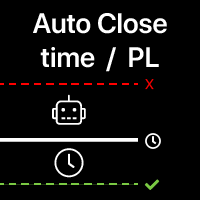
自動決済:時間指定、または利益/損失トリガー このユーティリティを使用すると、特定の条件で取引を自動的に決済できます。 多機能ユーティリティ : 66+ 機能、このツールを含む  |   質問がある場合は連絡してください   |   MT5版 自動決済を有効にするには、次のパラメータを設定する必要があります(パネル上): 1. シンボル   機能が適用される: 特定の   [Symbol]   / または   [ALL]   すべてのシンボル。 2.   条件、   決済タイミング: [if total] / [if single] / [at time]:   このパラメータに応じて、  利益/損失達成時 に決済するか、  指定時間 に決済するかのオプションが表示されます。 [close at Profit / Loss] オプションの設定: 1. [if total] / [if single]:   P/L計算方法:すべての  選択された取引を  まとめて、  または各取引を  個別に計算; 2. [Floating] / [Potential]:  浮動P/L  (未決済取引
AT24 Prop Firm Guard for MetaTrader 4 watches the whole account against the rules of a challenge or funded account and closes orders before a limit is broken. It opens no trades. What it does Daily loss: shows how much of your daily limit is used, with a bar and the amount left. The limit can be a percent of the initial balance or of the balance at the start of the day. You choose the server hour when the day starts. Maximum loss: the same for the total limit, counted from the initial balance
「一目均衡表」の専門的な使い方は、一目均衡表を正しく解釈してグラフを分析することです! はトレーダーが価格グラフ上の指定された点間の比率を素早く簡 単に測定できるようにするグラフィックプログラムです。この時間と価格の指標は、MT4 プラットフォームの一目の戦略に従って図表を分析するための基本的なツールです。この ツールを使用すると、 非常に短期間での価格波だけでなく、時間波の洞察に満ちた完全な 分析も可能になります。分析の実行に費やされる労力は、エクセルを使用して実行される 同様の測定および計算と比較して、何度も最小限に抑えられます。指標は、一目均衡表戦 略を使用するトレーダーの知識と経験、およびそれらの期待を考慮して設計されています。 提示されたツールは私たちの仕事の結果です。 指標のモジュール構造により、論理的な順序で分析を実行できます。このプロセスは過去 の波に関するデータを収集することから始まり、それが将来の市場の動きを計算するため の基礎となります。 計算で考慮されるデータは、予測の正確さにとって非常に重要です。 この操作は最小限に抑えられ、即座に測定値が得られます。 この測

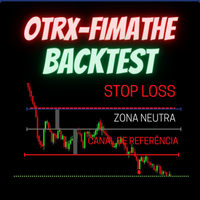
OTRX Fimathe Backtest is a tool for the Trader or Enthusiast who uses the Fimathe technique created by Trader Marcelo Ferreira to carry out his training and validate if he can obtain profitability. In this tool you will be able to: 1. Define whether you are looking for a buy or sell entry. (Trend). 2. Define by clicking twice on the horizontal lines where your Reference Zone and your Neutral Zone will be. 3. Monitor the entry, subcycle and exit of the trade. 4. Trading Summary, Daily, Week
FREE
EchoTrade Telegram Signal Backtester VALIDATE TELEGRAM SIGNALS IN MINUTES - STOP GUESSING, START BACKTESTING Stop blowing accounts on "VIP" signals that don't deliver. The EchoTrade Telegram Signal Backtester is the professional solution to audit, verify, and optimize any Telegram signal provider's performance on historical data. Most signal providers show you their wins but hide their losses. This tool reveals the naked truth. By combining a powerful Data Manager (included) with an advanced MT4
「一目均衡表」の専門的な使い方は、一目均衡表を正しく解釈してグラフを分析することです! はトレーダーが価格グラフ上の指定された点間の比率を素早く簡 単に測定できるようにするグラフィックプログラムです。この時間と価格の指標は、MT4 プラットフォームの一目の戦略に従って図表を分析するための基本的なツールです。この ツールを使用すると、 非常に短期間での価格波だけでなく、時間波の洞察に満ちた完全な 分析も可能になります。分析の実行に費やされる労力は、エクセルを使用して実行される 同様の測定および計算と比較して、何度も最小限に抑えられます。指標は、一目均衡表戦 略を使用するトレーダーの知識と経験、およびそれらの期待を考慮して設計されています。 提示されたツールは私たちの仕事の結果です。 指標のモジュール構造により、論理的な順序で分析を実行できます。このプロセスは過去 の波に関するデータを収集することから始まり、それが将来の市場の動きを計算するため の基礎となります。 計算で考慮されるデータは、予測の正確さにとって非常に重要です。 この操作は最小限に抑えられ、即座に測定値が得られます。 この測
FREE
Grid Trading EA is a semi-automated one-click trading EA for both Normal Trading and Grid/Martingale Trading . Normal Trading Simply click Buy or Sell directly from the chart. The EA will automatically manage trades by: Setting Stop Loss and Take Profit Managing Trailing Stop Grid / Martingale Trading When Grid Trading mode is enabled, the EA will automatically open additional grid orders at specified distances while increasing the lot size based on your settings. Inputs & Settings Lots — Initia
This tool will perform Trailing stop loss and Break even management for orders. Helps you limit or reduce the time spend watching orders on the screen, especially when you need to go to sleep. Just add this EA to 1 chart, you can manage all pairs. You can filter orders by comment, magic number, symbol, and order ticket number. When Breakeven it can add shift/offset pips (to cover the commission...). You can try in strategy tester before purchase. The EA will add Buy and Sell alternately, so yo
This panel closes trading positions at multiple symbols. The panel displays the situation for all open symbols on the account: Balans - account balance Equity - account equity Margin - used margin Freemargin - free margin Summ Position - the summary position on the account, in lots Position buy - the summary buy position, in lots Position sell - the summary sell position, in lots Summ Profit - the total profit (loss) at all positions Profit buy - the total profit of buy positions Profit sell - t
BreakEven ProSync EA – Trade Management & Risk Control Tool Overview BreakEven ProSync EA is an expert advisor for   MetaTrader 4  that helps traders manage open positions efficiently by   automating stop-loss adjustments   and ensuring position synchronization. This tool is designed for traders who want to standardize their stop-loss and take-profit levels across multiple trades while integrating a break-even function. The EA works by calculating the  average price   of all open positions and
Advanced Trade Manager (40% OFF) は、手動取引のための NextGen Trade Manager AI のチャート上パネルです。即時の注文執行、ビジュアルな取引計画、自動リスク管理を1つのツールに統合しています。 このパネルは標準の MT4 取引ダイアログを置き換えます。注文の執行、ストップの設定、ポジションの決済をチャート上で直接行い、リスクに基づいてロットを算出し、Break-Even、トレーリング、部分決済はパネルが処理します。スキャルピングやデイトレードに適しており、あらゆる銘柄で使用できます。 MT4 ストラテジーテスターで試す デモ版をダウンロードして ペーパートレード機能を利用できます 。デモ版は MT4 ストラテジーテスターでの手動取引をサポートしているため、実際の運用前にシミュレーション環境で約定とリスクルールを練習できます。 ドキュメント 完全なユーザーマニュアルとステップバイステップのガイド: https://www.mql5.com/en/blogs/post/764217 主な特長: スピーディな取引: 注文の執行、ストップの

Black Friday: 39% off until November 30, 2026 (30 USD instead of 49 USD). One EA, two modes: no separate master product, no DLL and no internet connection needed. Chakana Trade Copier copies trades between MetaTrader terminals running on the same computer or VPS. Attach it as Master on the account you trade and as Slave on every account that should follow. How to use it in 3 steps Attach it as Master on the account you trade. Attach it as Slave on each follower account, with the same channel nam
One panel to enter, manage, protect and measure every trade of your account. Chakana Trade Command replaces the four or five tools most traders keep on their charts: a lot calculator, a trade panel, a trade manager, a drawdown guard and a journal. It works on any symbol, manages trades opened from the phone or by other EAs, and keeps its state after a terminal restart. How to use it in 3 steps Attach it to one chart. It sees every symbol of the account. TRADE tab: choose the risk (% of balance,
EasyTradePad
Sergey Batudayev
5 (5)
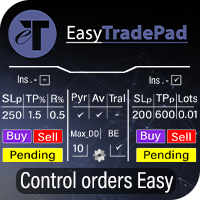
EasyTradePad – MetaTrader 4用取引パネル EasyTradePadは 、手動および半自動取引のためのツールです。パネルでは、注文とポジションを迅速に管理できるほか、リスク管理の計算もワンクリックで行えます。 パネルの機能: 事前に定義されたリスク(%または預金通貨)で取引を開始および終了します SLとTPをポイント、パーセンテージ、または金額で設定します リスクと報酬の比率を自動計算 損切りを損益分岐点に移動する 部分的なポジションのクローズ トレーリングストップ(ポイントまたはローソク足の影による) ポジションの平均化とピラミッディング アクティブな取引のパラメータを変更する [   デモ ] [   説明 ] 追加機能: ピラミッド化 価格がテイクプロフィットに近づくにつれて、段階的に取引を追加します。新規取引ごとのリスクを軽減できます。追加する取引数は簡単に設定できます。 平均化 チャート上のカスタムレベルで追加注文を出すことができます。ポジションは平均エントリー価格で決済されます。 損益分岐点移転 価格が指定された利益幅に達した後、ストップロ
Spread Costs refers to the amount of the loss caused by the spread, and Swap Benefits refers to the amount of the income gained by overnight positions. Spread Costs is an important indicator for short-term traders, especially for scalping traders, and Swap Benefits is an important indicator for long-term traders. Since the spreads and swaps on the MetaTrader 4 platform are all expressed in points, we need to convert it into the amount expressed in the account currency. This tool can display the
This EA gives traders a clean, full-window view of how large a position each Market Watch symbol can support at different percentages of account balance used as margin. It helps you quickly compare sizing options across symbols and risk levels without ever placing or modifying orders. The goal is simple position-size awareness so you can decide exposure before you trade. Benefits Shows lot size potential across Market Watch symbols at up to three different % of balance margin levels side-by-sid
FREE
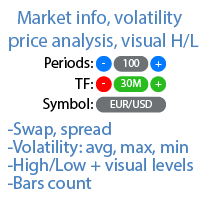
市場情報と詳細な統計:ボラティリティと価格バーの分析。 私の  # 1 Trade Assistant : 66+ の機能、このツールを含む  |   ご質問はこちら  まで 情報を取得するために任意の通貨ペア/取引商品を指定してください: 市場情報: 現在のスプレッド; ロングポジション(買い)のスワップ; ショートポジション(売り)のスワップ; 価格変動を分析するための時間枠と期間数を選択してください: 平均ボラティリティ; 最大ボラティリティ; 最小ボラティリティ; 最高価格; 最安価格; 上昇バー数(終値 > 始値); 下降バー数(終値 < 始値); 中立バー数(始値 = 終値); インターフェースの利点: パネルを   折りたたむ ことができ、チャート上のスペースを解放します: ((^)   ボタン ); パネルを  移動  してチャート上の任意の場所に配置できます: (< MOVE >   ボタン ); ダークまたはライトのインターフェーステーマ : (" Dark "   スイッチ ); TP / RR 計算 の有効化/無効化: (" TP "   スイッチ ); 高
Introduction Managing a trade by hand often means an order ticket, a lot calculator, a stop-loss to edit and a set of personal rules to keep in mind. Trade Manager Pro puts these tasks in one panel on your chart. It is a manual trade manager, not an automated strategy. You decide when to enter. The panel handles order entry, position sizing, stop management and the risk limits you set for yourself. Two design choices set it apart. First, it has a Real mode and a Virtual mode. Virtual mode is
Multi Take Profit Manager Automatically close portions of your open trades at up to three profit targets. This utility is designed for manual traders who frequently open multiple positions and want to scale out of trades automatically as profit targets are reached. Instead of manually closing positions one by one, the utility can partially close your total open position at predefined Take Profit levels, helping you lock in profits while allowing the remaining positions to continue running. Key F
Expert Advisor for MT4 Useful utility MUST have for all traders.  With 1 click button, you're able to close all your open positions. Its come with a warning pop up notification when you click to close all your trades, to avoid an accident press the button. Just press 'Yes' to confirm or 'No' to cancel it. The expert will close all your open positions no matter what pairs you currently open or directions. Just attach the expert on 1 of your chart, and you're good to go.
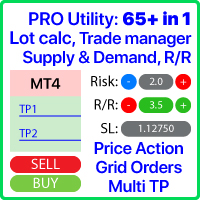
多機能取引ツール:ロット計算機、グリッド注文、R/R比率、トレードマネージャー、需給ゾーン、プライスアクションなど デモ版   |   ユーザーマニュアル トレードアシスタント はストラテジーテスターでは動作しません:この ユーティリティ をテストするには デモ版をこちら からダウンロードしてください。 ご質問 /改善のアイデア/バグ発見 の場合は 私に連絡 してください MT5版が必要な場合は、 こちら から入手できます 取引 プロセス を簡素化、高速化、自動化します。この ダッシュボード で標準ターミナルの機能を拡張します。 取引パネル はあらゆる取引銘柄で動作します:FX、株式、指数、暗号通貨など。 1. 新規取引の開始 :ロット/リスク/RR計算:手動取引のリスク管理 ロット計算機(リスクサイズに基づく取引量計算) リスク計算機(ロットサイズに基づくリスク額) リスクリワード比率 グリッド注文: + 動的間隔オプション、分割ロットオプション 注文アクショントリガー、+ 買いストップリミット/売りストップリミット:Mt4でも可能 仮想SL、仮想TP(非表示SL、非表示TP:ブロ
Telegram Sender — MetaTrader to Telegram Trade Alerts Telegram Sender   is a powerful MetaTrader utility that instantly sends trading alerts from your MT4/MT5 platform directly to Telegram. Stay connected to the market anywhere, anytime, without constantly watching your charts. Designed for traders who value speed, automation, and convenience, Telegram Sender delivers real-time notifications for signals, order activity, and market events straight to your phone or Telegram group. Key Features In
The Simple Lot Size Calculator can help you with risk management. Just type risk percentage, stop loss points and click calculate to get required lot size. The Simple Lot Size Calculator calculates a current chart's instrument. It's lightweight. Just load it to your chart then The Simple Lot Size Calculator will apper in the left upper corner of your chart.
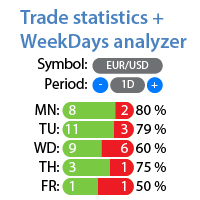
選択期間における詳細な取引統計 私の #1 トレードアシスタント をチェックしてください:66以上の機能、このツールを含む | 質問がある場合はお問い合わせください このユーティリティには2つの独立したツールが含まれます: 取引統計 曜日分析ツール 統計表示モード: 選択した 通貨ペア/取引商品 すべての取引 の統計 (" ALL ") 統計を取得したい期間を選択できます: 1日 1週間 1ヶ月 2 ヶ月 3 ヶ月 6 ヶ月 1年 2年 全取引履歴 1. 取引統計: 総利益 総損失 総損益 取引数 買いの利益取引率 売りの利益取引率 総利益取引率 平均保有時間 利益取引の平均保有時間 損失 取引の平均 保有時間 2. 曜日分析ツール:  最適な市場参入日を見つける 曜日ごとの統計が表示されます:利益/損失数、各日の勝率。 赤と緑のセクターにより、取引に最適な日と取引を控えた方が良い日を視覚的に確認できます。 インターフェースの利点: パネルを 折りたたむ ことができ、チャート上のスペースを解放します:([^] ボタン ); パネルを 移動  してチャート上の任意の場所に配置できます:(
Risk and Lot Size Calculator は、「損切りになったら失う金額」が決めた額になるロット数を計算する MT4 用インジケーターです。チャート上の3本の線(エントリー・損切り・利確)をドラッグすると、ロット数、リスク額、利確時の利益、リスクリワード、必要証拠金をパネルに表示します。プロップ口座(資金提供型口座)の損失の余裕も、必要なら表示できます。 裁量で取引する方が、注文の前に損切り幅からロット数を決めるための道具です。計算と表示だけの道具で、注文・変更・決済は一切しません。表示は計算の目安であり、実際の約定・損益・証拠金はご利用の業者の条件で決まります。 機能 ・エントリー(点線)、損切り、利確の3本の水平線。線にマウスを乗せてドラッグします。損切りがエントリーより下なら買い、上なら売りとして計算します。エントリーの線を現在値に追従させることもできます(「現在値に追従」ボタン) ・パネル:ロット数(大きく)と売買の方向、リスク額(基準に対する%)と目標額、損切り幅(FX は pips、それ以外は価格差とポイント)とスプレッド込みの幅、利確幅、リスクリワード
このプロダクトを購入した人は以下も購入しています
The product will copy all telegram signal to MT4   ( which you are member  ) , also it can work as remote copier.  Easy to set up, copy order instant, can work with almost signal formats, image signal, s upport to translate other language to English Work with all type of channel or group, even channel have "Restrict Saving Content", work with  multi channel, multi MT5 Work as remote copier: with signal have ticket number, it will copy exactly via ticket number. Support to backtest signal. How to
Trade Indicator Assistant is a powerful MT4 utility designed to turn indicators into automated trading systems. Its main feature is the ability to automatically detect an indicator’s   BUY and SELL signal buffers , without requiring you to know the buffer numbers, search through indicator settings, or modify the indicator source code. Bonus Indicator: After purchasing Trade Indicator Assistant, contact me to receive Trade Signal Pro completely free as a bonus indicator. [Download Demo Version]
The Price Action Dashboard is an innovative tool to help the trader to control a large number of financial instruments. This tool is designed to automatically suggest signals and price conditions. The Dashboard analyzes all major Time Frame suggesting price action conditions with graphic elements. The Dashboard can suggest you the strength of the trend identifying directional movement, it is an indispensable tool for those who want to open position themselves using market trends identifiers. The
Riskless Pyramid
Snapdragon Systems Ltd
5 (1)
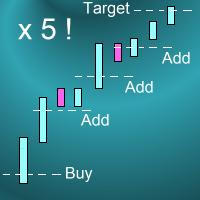
Introduction This powerful MT4 trade mangement EA offers a way potentially to aggressively multiply trade profits in a riskfree manner. Once a trade has been entered with a defined stoploss and take profit target then the EA will add three pyramid add-on trades in order to increase the overall level of profit. The user sets the total combined profit target to be gained if everything works out. This can be specified either as a multiple of the original trade profit or as a total dollar amount. Fo
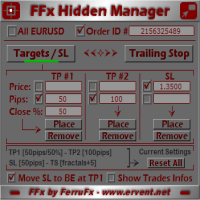
The FFx Hidden Manager panel will help you to manage easily your orders directly on the chart. Below all features described: TP, SL and TrailingStop are hidden Each order has its own lines on chart Drag & Drop any line to change the TP/SL as per your need Option to move automatically the SL line at breakeven when TP #1 is reached Option to choose the TP/SL type (by pips or price) Option to choose the TrailingStop type (by pips, MA, Fractals, PSAR or ATR) Define which order(s) you want to manage
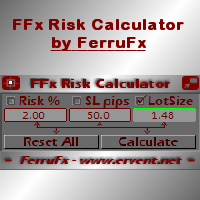
FFx Risk Calculator panel will help you to calculate very easily your trades size, SL or the risk directly on the chart. All features are described below: Option to select which parameter to calculate: Risk, Stop Loss or Lot Size The panel will show if the lot size is allowed according to the current account free margin Button to maximize/minimize the panel Drag and Drop the panel anywhere on the chart How to use it? Select the parameter you want to be calculated. It will be based on the 2 other
Trade Copier Pro is a tool to copy trade remotely to MT4, MT5 and cTrader accounts at different computers/locations over internet. This is an ideal solution for you if you are a signal provider and want to copy your trades to other receivers globally on your own rules. One provider can copy trades to multiple receivers and one receiver can get trade from multiple providers as well. The provider can even set the subscription expiry for each receiver, so that receiver will not be able to receive t
News Trader Pro is a unique robot that allows you to trade the news by your predefined strategy. It loads every piece of news from several popular Forex websites. You can choose any news and preset the strategy to trade it, and then News Trader Pro will trade that news by selected strategy automatically when the news comes. News release gives opportunity to have pips since the price usually has big move at that time. Now, with this tool, trading news becomes easier, more flexible and more exciti
The FFx Watcher PRO is a dashboard displaying on a single chart the current direction of up to 15 standard indicators and up to 9 timeframes. It has 2 different modes: 1. Watcher mode: Multi Indicators User is able to select up to 15 indicators to be displayed User is able to select up to 9 timeframes to be displayed 2. Watcher mode: Multi Pairs User is able to select any number of pairs/symbols User is able to select up to 9 timeframes to be displayed This mode uses one of the standard indicat
This is a must have tool for a serious trader. It saves your precious time spent for opening/closing trades, creating pending trades and modifying your TP/SL in bulk according to either pips or price. If you need to quickly open several pending orders (Buy Stop, Sell Stop) at a certain distance from each other, this script will do all the routine for you! The first time you use this handy tool, you will realize it has already paid for itself. Instructions: Drag and drop this script onto a chart.
The product combines a manual trade panel with the ability to perform actions automatically in a highly configurable way. Actions include capturing indicator values and then based on those values raising alerts, open/close or partially close trades, scale-in, setting up pending orders, adjusting stop loss, take profit and more. On-chart controls can be configured, such as tick boxes and buttons, so can be fully interactive. The EA also handles money management, news events, hidden stop loss, tak
Binary Options Copier Remote is an EA that allows to copy binary options trades between MT4 accounts at different computers. This is an ideal solution for signal provider, who want to share his trade with the others globally on his own rules. Provider can give free bonus license to 10 receivers. That means those 10 receivers can copy from provider by using Binary Options Receiver Free (no cost). From 11th one, receiver have to buy Binary Options Receiver Pro (paid version) in order to copy from
This panel is very simple to use and it is a very ally to manage your positions and orders. Also you can modify your risk, writing in fields directly on Panel. One click on buttons and the operation on market is done! Operations possible: BUY/SELL Break Even Split (close 50% all orders) Close All positions Hedging (opens reverse positions to cover) Close only BUY positions Close only SELL positions Close All pending orders Reverse all positions Please watch the video to verify the very simple u
Slow Pips OCO Trade Panel is an advanced trading panel for placing pending orders. Traders can use this panel to place two pending orders at once. One pending order would be of buy entry type and the other one would be of sell entry type. Both orders will have Stop Loss and Take Profit parameters. Since two pending orders are placed at the same time, the pending order for which the price hits first gets converted into a market order and the other pending order gets deleted (one order cancels the
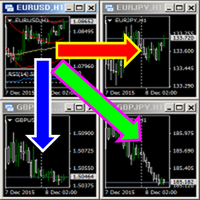
This indicator changes the timeframe and chart profile for multiple charts. If you dispatched many charts (10~20 or more) in single MetaTrader terminal, it is very boring and difficult work to manage the timeframe and chart profile individually. If the indicators you use in a chart are numerous and the setting values are different from the default one, you might give up adding all the indicators to all charts. The changing of timeframes on multiple charts has the same problem, too. Whenever you
エリオット波動カウンターは、エリオット波動を迅速かつユーザーフレンドリーに手動でマークアップするためのパネルです。マークの色とレベルを選択できます。最後のマークアップとツールによって作成されたマークアップ全体を削除する機能もあります。マークアップはワンクリックで作成されます。 5 回クリック - 5 つの波があります。エリオット波動カウンターは、エリオット波動の初心者にもプロのアナリストにも最適なツールです。 エリオット波動カウンターのインストールと入力ガイド 取得したい場合     EA 追加 URL (  http://autofxhub.com   ) MT5 端末に関する 通知 (スクリーンショットを参照)。 MT4 バージョン https://www.mql5.com/en/market/product/14016 MT5 バージョン https://www.mql5.com/en/market/product/15081 一般的な入力: 波の種類ボタン: このボタンを使用すると、ユーザーはチャートで強調表示する波のパターンの種類を選択できます。使用可能なオプションには、イン
If you wish to draw Support and Resistance lines, view: daily market opening, classical pivot levels, Fibonacci pivot levels, trend lines, Fibonacci levels, the remaining time to candle closing, and current spread. If you seek to place your orders with the exact lot that meets your desired stop loss risk. If you wish to do all this and more with just one click, then this is the perfect tool to use. This tool will allow you to feel more relaxed when deciding to open orders, as well as predicting
ワンクリック分析ツールは、     キーボード ショートカット ベースのオブジェクトの作成     MetaTraderのコピーツール。クリックするだけで MetaTrader の分析ツールを簡単に使用できます。私たちのツールを使用すると、サポートとレジスタンスのレベル、フィボナッチ レベル、形状、チャネル、トレンド ライン、およびチャート上の他のすべてのオブジェクトをすばやく描画できます。ボタンをクリックしてマウスを動かすだけで、ワンクリック分析ツールが残りの作業を行います。これにより時間が節約され、チャート分析がより効率的になり、分析に基づいて情報に基づいた取引決定を下すことに集中できるようになります。 ワンクリック分析ツールには、オブジェクトの作成に加えて、     あるチャートから別のチャートにオブジェクトを簡単にコピーできる オブジェクトコピー機 ( チャート 同期)   。これは、複数のチャートを開いていて、それらの間でオブジェクトを複製する必要がある場合に特に役立ちます。 ワンクリック分析ツールを使用すると、     すべてのシンボルに 1 つのチャートを使用する   メ
Partial Close Expertは 、多くの機能を1つの自動化システムに統合したツールです。このEAは、リスク管理と潜在的な利益の最大化のための複数のオプションを提供することで、トレーダーがポジションをより効果的に管理するのに役立ちます。 パーシャルクローズエキスパートを使用すると、トレーダーは   部分的な閉鎖   利益を確定するためのレベル、     トレーリングストップ   利益を守り損失を制限するレベル、     とんとん   価格が反対方向に動いた場合でも取引が損益ゼロになることを保証するレベル、およびその他のいくつかの機能。 このオールインワンのエキスパートアドバイザーを使用することで、トレーダーは取引を常に監視する必要がなく、時間と労力を節約できます。EAは市場の状況に基づいて事前に設定された指示を実行するため、トレーダーはより柔軟に取引をコントロールできます。 部分クローズエキスパートを添付し、     キーボードの「p」を押して 設定を変更すれば準備完了です。 部分クローズエキスパート   インストールと入力ガイド EA に関する通知を受け取りたい場合は、U
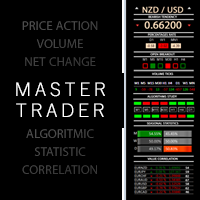
Master Trend Dashboard is a new generation indicator, compact, light and efficient. Each element of this Dashboard is designed to return specific signals as: Price Action, Breakout, Net Change (performance of the instrument), algorithmic studies, correlations and statistical calculations. This tool will change your way of trading allowing you to receive important information. See the Graphic Signals to understand every single signal below: Graphic Signals Symbol name and arrow color Green = Cur
Trade Copier Agent は、複数の MetaTrader(4/5) アカウント/端末間で取引をコピーするように設計されています。 このツールを使用すると、プロバイダー (ソース) または受信者 (宛先) として機能できます。すべての取引アクションは、遅延なくプロバイダーからレシーバーにコピーされます。 このツールを使用すると、0.5 秒未満の超高速のコピー速度で、同じコンピューター上の複数の MetaTrader ターミナル間で取引をコピーできます。 Trade Copier Agent インストール & 入力ガイド コピーを開始する前、または注文がないうちに、プロバイダー アカウントで設定を適用してください。 注文中の変更は、受取人のアカウントに影響します。 例: プロバイダー アカウントが買い注文を適用し、その後、受信者アカウントのすべての買い注文を無効にすると、決済されます。 EA追加URL(   http://autofxhub.com   )MT4端末(スクリーンショット参照) に関する通知を受け取りたい場合 。 MT5 バージョン https://www
Unlimited Trade Copier Pro is a tool to copy trade remotely to multiple MT4, MT5 and cTrader accounts at different computers/locations over internet. This is an ideal solution for you if you are a signal provider and want to copy your trades to other receivers globally on your own rules. One provider can copy trades to multiple receivers and one receiver can get trade from multiple providers as well. The provider can even set the subscription expiry for each receiver, so that receiver will not b
Unlimited Binary Options Copier Remote is a powerful tool to copy binary options trades remotely between multiple accounts at different locations over internet. This is an ideal solution for signal provider, who want to share his binary options trades with the others globally on his own rules. One provider can copy trades to unlimited receivers and one receiver can get trade from unlimited providers as well. The provider can set the subscription expiry for each receiver, so that receiver will no
This is an Expert Adviser use for manual trading as a background EA or combine with external EA to open orders. Loss Recovery Trading is one of your options to handle the lose positions instead of using stop loss by setting a zone recovery area and target to exit the turn rounds sequence. How It Work? If the market goes against your first positions direction at the specific of losing points, the EA will open an opposite direction position with calculated larger lot size and also keep the first
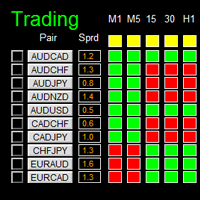
如果产品有任何问题或者您需要在此产品上添加功能,请联系我 Contact/message me if you encounter any issue using the product or need extra feature to add on the base version. Dashboard Super Candle is an intuitive, and handy graphic tool to help you to: Have 28 pairs under control with one dashboard. Monitor candle direction, identify possible price movement and trend. Provide trading signals based on the candle direction selected by you. Automatically manage order once signal are generated. Have the ability to select which p
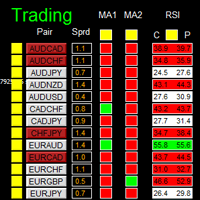
如果产品有任何问题或者您需要在此产品上添加功能,请联系我 Contact/message me if you encounter any issue using the product or need extra feature to add on the base version. There is Demo version of this panel Dashboard Super MA RSI CCI Demo in my product list, pls try it out to get familiar with all functionalities free . Dashboard Super MA RSI CCI is an intuitive, and handy graphic tool to help you to: Have 28 pairs under control with one dashboard Monitor price movement, identify possible trend based on MA, RSI, and CCI i
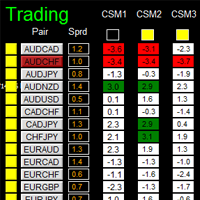
如果产品有任何问题或者您需要在此产品上添加功能,请联系我 Contact/message me if you encounter any issue using the product or need extra feature to add on the base version. Dashboard Super Currency Strength is an intuitive, and handy graphic tool to help you to: Have 28 pairs under control with one dashboard. Monitor price movement, identify possible trend based on currency strength gap of two currency on 3 timeframe. Provide trading signals based on the CSM (currency Strength Meter) selected. Manage order automatically onc
Dax Scalping Bracket is a new generation Expert Advisor Panel. This a very professional tool for SCALPING. The usability makes this tool an excellent ally for FAST operations of SCALPING on Index instruments and Forex market. The main feature of this EA is the ability to open multiple operations with a single click. Each position is autonomous and you can set different take profit and stop loss for each position. Special functionalities: STOP MOVE to manage your stop chasing the price BREAK EVEN
Great for scalper/intraday weapon for your ease daily trading. Scalper weapon will suit's you for any trading condition, whether it's intraday / scalper this tool is important for you which providing the missing function on the native MT4 platform. You have to check Allow Auto Trading by pressing Ctrl+O, going to Expert Advisors tab, and checking " Allow automated trading" . also to ensure the " auto trading " is green. Input Parameters _MINIMIZED_AT_START: to chose whether the panel is minimiz
A new way of managing your trades – efficiently, automatically and with no emotions. Control various markets and manage many different trades at one moment. Grasp your competitive advantage and ultimately find out what profitable trading looks like! Trademanager is a piece of software developed for MT4 platforms. This tool enables you to completely set up all parameters for many different trades on many different markets – at one time and with no emotions as psychological obstacles. Must-need to
作者のその他のプロダクト
Trade Builder MT5
Mostafa Saad Saeed Shawara
4.43 (7)
製品名 Trade Builder - チャート上のインタラクティブ・ビジュアル・トレードマネージャー&リスクアシスタント 簡単な説明 Trade Builder を使用して取引を簡素化しましょう。これは、非常にインタラクティブなトレードアシスタント ( Trade Assistant ) およびトレードマネージャー ( Trade Manager ) です。チャート上で直接エントリー、ストップロス、およびテイクプロフィットを設定すると、ロット数とリスクリワード比 ( risk reward ratio ) がリアルタイムで自動計算されます。 概要 効果的なトレード管理 ( Trade Management ) は、長期的な取引の成功に不可欠です。 Trade Builder は、MetaTraderチャート上にドラッグ可能なビジュアルダッシュボードを提供することで、手動のリスク計算を不要にします。ラインを調整するだけで、ツールが瞬時にリスク計算を処理し、ワンクリック取引またはホットキーでの実行が可能になります。 主な機能: インタラクティブ・ビジュアル・トレーディング: チャート上の
FREE
Trade Builder MT4
Mostafa Saad Saeed Shawara
5 (2)
製品名 Trade Builder - チャート上のインタラクティブ・ビジュアル・トレードマネージャー&リスクアシスタント 簡単な説明 Trade Builder を使用して取引を簡素化しましょう。これは、非常にインタラクティブなトレードアシスタント ( Trade Assistant ) およびトレードマネージャー ( Trade Manager ) です。チャート上で直接エントリー、ストップロス、およびテイクプロフィットを設定すると、ロット数とリスクリワード比 ( risk reward ratio ) がリアルタイムで自動計算されます。 概要 効果的なトレード管理 ( Trade Management ) は、長期的な取引の成功に不可欠です。 Trade Builder は、MetaTraderチャート上にドラッグ可能なビジュアルダッシュボードを提供することで、手動のリスク計算を不要にします。ラインを調整するだけで、ツールが瞬時にリスク計算を処理し、ワンクリック取引またはホットキーでの実行が可能になります。 主な機能: インタラクティブ・ビジュアル・トレーディング: チャート上の
FREE
MQLTeam Fractals
Mostafa Saad Saeed Shawara
MQLTeam Fractals は、MetaTrader 5 のチャートに揺れの高値と安値を矢印で示します。上向きフラクタルは、左右の足より高い高値です。下向きフラクタルは、左右の足より低い安値です。Williams のいつもの設定は、点の前が2本、後が2本です。両方の本数は変えられます。 矢印は価格チャートに描かれ、別のインジケーター窓は開きません。上位時間足の高値と安値は、チャートの足の上に段差として描けます。 設定はチャート上のパネルで変え、操作は TradingView に近いものです。シグナルの前後の本数、時間足、色、太さ、矢印の形はすぐ更新されます。インジケーターを外さずに設定を比べられます。今は不要なコピーは隠せます。設定は、再び表示するまで残ります。 主な機能 チャート上のフラクタル: Fractal Up は揺れの高値、 Fractal Down は揺れの安値です。同じ名前がデータウィンドウに出ます。 前と後(Left と Right): Left はより古い足の本数、Right はより新しい足の本数です。初期値は 2 と 2 で、いつもの Williams フラク
FREE
MQLTeam SuperTrend
Mostafa Saad Saeed Shawara
MQLTeam SuperTrend は MetaTrader 5 向けの SuperTrend インジケーターです。価格チャートにトレンドを描きます。上昇中は価格の下に線、下降中は価格の上に線、トレンドが反転した足に矢印を置きます。 価格からの距離は ATR で決まります。期間と倍率がその距離を決めます。トレンドが続いている間、線は価格とともにだけ動きます。終値が線の反対側で確定すると、トレンドが反転します。計算には足の高値、安値、終値を使い、別のインジケーター窓は開きません。 設定はチャート上のパネルで変え、操作は TradingView に近いものです。期間、倍率、時間足、色を変えると線が更新されます。チャートを離れず、インジケーターを外さずに設定を比べられます。今は不要なコピーは隠せます。設定は、再び表示するまで残ります。 主な機能 チャート上の SuperTrend: UpTrend と DownTrend の 2 本の線です。有効な側だけを描きます。上昇線と下降線は別の色です。 反転の矢印: UpSignal はトレンドが上に転じた足を示します。 DownSignal は下
FREE
ZigZag Colored
Mostafa Saad Saeed Shawara
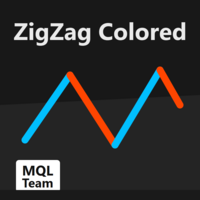
製品名 ZigZag Colored (MT4) See also >>  Smart ZigZag  Pro  ,   Smart ZigZag (free) 短い説明 MT4向け二色ZigZag。単一ライン色の制限を解決し、各バーの値と方向をEAが読み取れるバッファを提供します。 概要 既存のZigZagを上昇/下降の二本線として色分け表示し、構造把握を容易に。バー毎の値がEA/他インジで利用可能。 主な機能 二色レッグ;EAバッファ ZigZag Up 、 ZigZag Down 、 ZigZag Per Bar ;ネイティブ挙動;軽量描画;全銘柄/全時間足。 入力 ZigZag の基本入力: Depth, Deviation, Backstep;加えて上昇/下降レッグの色設定。 バッファ 標準のZigZagバッファと追加のバー毎バッファを含みます: ZigZag Up ; ZigZag Down ; ZigZag Per Bar 。 用途 構造/スイングの迅速な把握;EAへのバー毎値/方向供給;直近高安に沿ったリスク管理。 互換性 MT4のみ;すべての銘柄と時間足に対応。
FREE
Smart ATR MT4
Mostafa Saad Saeed Shawara
製品名 Smart ATR (MT4) – SmartView シリーズ 短い説明 MetaTrader プラットフォームで独特なユーザー体験を提供する ATR インジケーター。以前は利用できなかった高度な機能を提供し、ダブルクリックで設定を開く、削除せずにインジケーターを非表示/表示する、インジケーターウィンドウをチャート全体のサイズで表示するなどの機能を備えています。SmartView Indicators シリーズの残りの部分とシームレスに連携するように設計されています。 概要 SmartView シリーズは、革新的な機能を通じて MetaTrader プラットフォーム上のインジケーターに独特で特徴的なユーザー体験を提供し、インジケーター管理をより速く、より簡単にします。各インジケーターには、チャート上のスマートコントロールパネルが装備されており、基本情報を表示し、すべての重要な機能への迅速なアクセスを提供します。 以前は利用できなかった独自の機能 SmartView シリーズは、インジケーターでの作業をより簡単で迅速にする高度な機能を提供します: ダブルクリックで設定を開く:
FREE
MQLTeam Close Area
Mostafa Saad Saeed Shawara
MQLTeam Close Area はローソク足チャートの終値線の下に柔らかい面積塗りを描きます。 area chart / mountain chart のような見た目で、ローソク自体は置き換えません。終値の流れを見やすくする視覚レイヤーであり、売買シグナルツールではありません。 MQLTeam をフォロー: MQL5 チャンネル — 製品メモと更新。 一度追加すれば、表示中の終値に沿い、価格ウィンドウ下方へ滑らかにフェードします。既定色は中立的なスチールブルーです。任意で各足の方向ごとに色分けもできます。 主な機能 終値エリア塗り: 終値の稜線下のソフトな影。 Fade mode: From_chart_top (既定)または From_close 。 Strength: 0–100。 Bull / bear colors: 足ごとの任意着色。 Area ボタン: ON時は塗り色、OFF時は同系の落ち着いた色。角と座標を設定可能。 チャート移動: 移動中は非表示、停止後に再描画。 プラットフォーム: MetaTrader 5。 入力(Inputs タブと同じ名称) Color 、
FREE
Smart ZigZag MT4
Mostafa Saad Saeed Shawara
製品名 Smart ZigZag (MT4) – SmartView シリーズ 短い説明 MetaTrader プラットフォームで独特なユーザー体験を提供する ZigZag インジケーター。以前は利用できなかった高度な機能を提供し、ダブルクリックで設定を開く、削除せずにインジケーターを非表示/表示する、インジケーターウィンドウをチャート全体のサイズで表示するなどの機能を備えています。SmartView Indicators シリーズの残りの部分とシームレスに連携するように設計されています。 概要 SmartView シリーズは、革新的な機能を通じて MetaTrader プラットフォーム上のインジケーターに独特で特徴的なユーザー体験を提供し、インジケーター管理をより速く、より簡単にします。各インジケーターには、チャート上のスマートコントロールパネルが装備されており、基本情報を表示し、すべての重要な機能への迅速なアクセスを提供します。 以前は利用できなかった独自の機能 SmartView シリーズは、インジケーターでの作業をより簡単で迅速にする高度な機能を提供します: ダブルクリックで設
FREE
MQLTeam Auto Select は、マウスを重ねるとチャートオブジェクトを選択します。ダブルクリックなしで移動、プロパティ、Delete での削除ができます。 こちらも利用可能: MetaTrader 5 用 MQLTeam Auto Select Auto Select は小さなチャート用ツールです。シグナルは描かず、注文もしません。一度付けてボタンを緑のままにし、通常どおり線や図形を扱います。 使い方 ボタン: 印は右下から始まります。緑がオン、落ち着いた色がオフ。印は同じで色だけ変わります。邪魔ならドラッグできます。 移動: 対象に重ねてドラッグ。 プロパティ: 重ねて右クリック。 削除: 重ねて Delete。 対応オブジェクト 水平・垂直線、トレンドライン、2点アンカーのフィボナッチ、ガン線系、矩形、矢印、テキスト、一般的な画面ラベル。選択は最初の2つの時間/価格アンカーに基づきます。 現バージョンの制限 3点以上が必要なオブジェクト(チャネル、三角形、ピッチフォークなど)はこの版では選択しません。後で追加できます。それまでは MetaTrader の通常操作を使って
FREE
製品名 Smart Accumulation (MT4) – SmartView シリーズ 短い説明 MetaTrader プラットフォームで独特なユーザー体験を提供する Accumulation インジケーター。以前は利用できなかった高度な機能を提供し、ダブルクリックで設定を開く、削除せずにインジケーターを非表示/表示する、インジケーターウィンドウをチャート全体のサイズで表示するなどの機能を備えています。SmartView Indicators シリーズの残りの部分とシームレスに連携するように設計されています。 概要 SmartView シリーズは、革新的な機能を通じて MetaTrader プラットフォーム上のインジケーターに独特で特徴的なユーザー体験を提供し、インジケーター管理をより速く、より簡単にします。各インジケーターには、チャート上のスマートコントロールパネルが装備されており、基本情報を表示し、すべての重要な機能への迅速なアクセスを提供します。 以前は利用できなかった独自の機能 SmartView シリーズは、インジケーターでの作業をより簡単で迅速にする高度な機能を提供しま
FREE
Smart MACD MT4
Mostafa Saad Saeed Shawara
製品名 Smart MACD (MT4) – SmartView シリーズ 短い説明 MetaTrader プラットフォームで独特なユーザー体験を提供する MACD インジケーター。以前は利用できなかった高度な機能を提供し、ダブルクリックで設定を開く、削除せずにインジケーターを非表示/表示する、インジケーターウィンドウをチャート全体のサイズで表示するなどの機能を備えています。SmartView Indicators シリーズの残りの部分とシームレスに連携するように設計されています。 概要 SmartView シリーズは、革新的な機能を通じて MetaTrader プラットフォーム上のインジケーターに独特で特徴的なユーザー体験を提供し、インジケーター管理をより速く、より簡単にします。各インジケーターには、チャート上のスマートコントロールパネルが装備されており、基本情報を表示し、すべての重要な機能への迅速なアクセスを提供します。 以前は利用できなかった独自の機能 SmartView シリーズは、インジケーターでの作業をより簡単で迅速にする高度な機能を提供します: ダブルクリックで設定を開く
FREE
MQLTeam Auto Select
Mostafa Saad Saeed Shawara
MQLTeam Auto Select は、マウスを重ねるとチャートオブジェクトを選択します。ダブルクリックなしで移動、プロパティ、Delete での削除ができます。 こちらも利用可能: MetaTrader 4 用 MQLTeam Auto Select Auto Select は小さなチャート用ツールです。シグナルは描かず、注文もしません。一度付けてボタンを緑のままにし、通常どおり線や図形を扱います。 使い方 ボタン: 印は右下から始まります。緑がオン、落ち着いた色がオフ。印は同じで色だけ変わります。邪魔ならドラッグできます。 移動: 対象に重ねてドラッグ。 プロパティ: 重ねて右クリック。 削除: 重ねて Delete。 対応オブジェクト 水平・垂直線、トレンドライン、2点アンカーのフィボナッチ、ガン線系、矩形、矢印、テキスト、一般的な画面ラベル。選択は最初の2つの時間/価格アンカーに基づきます。 現バージョンの制限 3点以上が必要なオブジェクト(チャネル、三角形、ピッチフォークなど)はこの版では選択しません。後で追加できます。それまでは MetaTrader の通常操作を使って
FREE
Smart ADX MT4
Mostafa Saad Saeed Shawara
製品名 Smart ADX (MT4) – SmartView シリーズ 短い説明 MetaTrader プラットフォームで独特なユーザー体験を提供する ADX インジケーター。以前は利用できなかった高度な機能を提供し、ダブルクリックで設定を開く、削除せずにインジケーターを非表示/表示する、インジケーターウィンドウをチャート全体のサイズで表示するなどの機能を備えています。SmartView Indicators シリーズの残りの部分とシームレスに連携するように設計されています。 概要 SmartView シリーズは、革新的な機能を通じて MetaTrader プラットフォーム上のインジケーターに独特で特徴的なユーザー体験を提供し、インジケーター管理をより速く、より簡単にします。各インジケーターには、チャート上のスマートコントロールパネルが装備されており、基本情報を表示し、すべての重要な機能への迅速なアクセスを提供します。 以前は利用できなかった独自の機能 SmartView シリーズは、インジケーターでの作業をより簡単で迅速にする高度な機能を提供します: ダブルクリックで設定を開く:
FREE
Smart Ichimoku MT4
Mostafa Saad Saeed Shawara
製品名 Smart Ichimoku (MT4) – SmartView シリーズ 短い説明 MetaTrader プラットフォームで独特なユーザー体験を提供する Ichimoku インジケーター。以前は利用できなかった高度な機能を提供し、ダブルクリックで設定を開く、削除せずにインジケーターを非表示/表示する、インジケーターウィンドウをチャート全体のサイズで表示するなどの機能を備えています。SmartView Indicators シリーズの残りの部分とシームレスに連携するように設計されています。 概要 SmartView シリーズは、革新的な機能を通じて MetaTrader プラットフォーム上のインジケーターに独特で特徴的なユーザー体験を提供し、インジケーター管理をより速く、より簡単にします。各インジケーターには、チャート上のスマートコントロールパネルが装備されており、基本情報を表示し、すべての重要な機能への迅速なアクセスを提供します。 以前は利用できなかった独自の機能 SmartView シリーズは、インジケーターでの作業をより簡単で迅速にする高度な機能を提供します: ダブルクリ
FREE
Smart Awesome MT4
Mostafa Saad Saeed Shawara
製品名 Smart Awesome (MT4) – SmartView シリーズ 短い説明 MetaTrader プラットフォームで独特なユーザー体験を提供する Awesome インジケーター。以前は利用できなかった高度な機能を提供し、ダブルクリックで設定を開く、削除せずにインジケーターを非表示/表示する、インジケーターウィンドウをチャート全体のサイズで表示するなどの機能を備えています。SmartView Indicators シリーズの残りの部分とシームレスに連携するように設計されています。 概要 SmartView シリーズは、革新的な機能を通じて MetaTrader プラットフォーム上のインジケーターに独特で特徴的なユーザー体験を提供し、インジケーター管理をより速く、より簡単にします。各インジケーターには、チャート上のスマートコントロールパネルが装備されており、基本情報を表示し、すべての重要な機能への迅速なアクセスを提供します。 以前は利用できなかった独自の機能 SmartView シリーズは、インジケーターでの作業をより簡単で迅速にする高度な機能を提供します: ダブルクリック
FREE
製品名 Smart Parabolic SAR (MT4) – SmartView シリーズ 短い説明 MetaTrader プラットフォームで独特なユーザー体験を提供する Parabolic SAR インジケーター。以前は利用できなかった高度な機能を提供し、ダブルクリックで設定を開く、削除せずにインジケーターを非表示/表示する、インジケーターウィンドウをチャート全体のサイズで表示するなどの機能を備えています。SmartView Indicators シリーズの残りの部分とシームレスに連携するように設計されています。 概要 SmartView シリーズは、革新的な機能を通じて MetaTrader プラットフォーム上のインジケーターに独特で特徴的なユーザー体験を提供し、インジケーター管理をより速く、より簡単にします。各インジケーターには、チャート上のスマートコントロールパネルが装備されており、基本情報を表示し、すべての重要な機能への迅速なアクセスを提供します。 以前は利用できなかった独自の機能 SmartView シリーズは、インジケーターでの作業をより簡単で迅速にする高度な機能を提供
FREE
製品名 Smart Heiken Ashi (MT4) – SmartView シリーズ 短い説明 MetaTrader プラットフォームで独特なユーザー体験を提供する Heiken Ashi インジケーター。以前は利用できなかった高度な機能を提供し、ダブルクリックで設定を開く、削除せずにインジケーターを非表示/表示する、インジケーターウィンドウをチャート全体のサイズで表示するなどの機能を備えています。SmartView Indicators シリーズの残りの部分とシームレスに連携するように設計されています。 概要 SmartView シリーズは、革新的な機能を通じて MetaTrader プラットフォーム上のインジケーターに独特で特徴的なユーザー体験を提供し、インジケーター管理をより速く、より簡単にします。各インジケーターには、チャート上のスマートコントロールパネルが装備されており、基本情報を表示し、すべての重要な機能への迅速なアクセスを提供します。 以前は利用できなかった独自の機能 SmartView シリーズは、インジケーターでの作業をより簡単で迅速にする高度な機能を提供します:
FREE
製品名 Smart Moving Averages (MT4) – SmartView シリーズ 短い説明 MetaTrader プラットフォームで独特なユーザー体験を提供する Moving Averages インジケーター。以前は利用できなかった高度な機能を提供し、ダブルクリックで設定を開く、削除せずにインジケーターを非表示/表示する、インジケーターウィンドウをチャート全体のサイズで表示するなどの機能を備えています。SmartView Indicators シリーズの残りの部分とシームレスに連携するように設計されています。 概要 SmartView シリーズは、革新的な機能を通じて MetaTrader プラットフォーム上のインジケーターに独特で特徴的なユーザー体験を提供し、インジケーター管理をより速く、より簡単にします。各インジケーターには、チャート上のスマートコントロールパネルが装備されており、基本情報を表示し、すべての重要な機能への迅速なアクセスを提供します。 以前は利用できなかった独自の機能 SmartView シリーズは、インジケーターでの作業をより簡単で迅速にする高度な機
FREE
製品名 Smart Accelerator (MT4) – SmartView シリーズ 短い説明 MetaTrader プラットフォームで独特なユーザー体験を提供する Accelerator インジケーター。以前は利用できなかった高度な機能を提供し、ダブルクリックで設定を開く、削除せずにインジケーターを非表示/表示する、インジケーターウィンドウをチャート全体のサイズで表示するなどの機能を備えています。SmartView Indicators シリーズの残りの部分とシームレスに連携するように設計されています。 概要 SmartView シリーズは、革新的な機能を通じて MetaTrader プラットフォーム上のインジケーターに独特で特徴的なユーザー体験を提供し、インジケーター管理をより速く、より簡単にします。各インジケーターには、チャート上のスマートコントロールパネルが装備されており、基本情報を表示し、すべての重要な機能への迅速なアクセスを提供します。 以前は利用できなかった独自の機能 SmartView シリーズは、インジケーターでの作業をより簡単で迅速にする高度な機能を提供します:
FREE
製品名 Smart Bollinger Bands (MT4) – SmartView シリーズ 短い説明 MetaTrader プラットフォームで独特なユーザー体験を提供する Bollinger Bands インジケーター。以前は利用できなかった高度な機能を提供し、ダブルクリックで設定を開く、削除せずにインジケーターを非表示/表示する、インジケーターウィンドウをチャート全体のサイズで表示するなどの機能を備えています。SmartView Indicators シリーズの残りの部分とシームレスに連携するように設計されています。 概要 SmartView シリーズは、革新的な機能を通じて MetaTrader プラットフォーム上のインジケーターに独特で特徴的なユーザー体験を提供し、インジケーター管理をより速く、より簡単にします。各インジケーターには、チャート上のスマートコントロールパネルが装備されており、基本情報を表示し、すべての重要な機能への迅速なアクセスを提供します。 以前は利用できなかった独自の機能 SmartView シリーズは、インジケーターでの作業をより簡単で迅速にする高度な機
FREE
Smart Alligator MT4
Mostafa Saad Saeed Shawara
製品名 Smart Alligator (MT4) – SmartView シリーズ 短い説明 MetaTrader プラットフォームで独特なユーザー体験を提供する Alligator インジケーター。以前は利用できなかった高度な機能を提供し、ダブルクリックで設定を開く、削除せずにインジケーターを非表示/表示する、インジケーターウィンドウをチャート全体のサイズで表示するなどの機能を備えています。SmartView Indicators シリーズの残りの部分とシームレスに連携するように設計されています。 概要 SmartView シリーズは、革新的な機能を通じて MetaTrader プラットフォーム上のインジケーターに独特で特徴的なユーザー体験を提供し、インジケーター管理をより速く、より簡単にします。各インジケーターには、チャート上のスマートコントロールパネルが装備されており、基本情報を表示し、すべての重要な機能への迅速なアクセスを提供します。 以前は利用できなかった独自の機能 SmartView シリーズは、インジケーターでの作業をより簡単で迅速にする高度な機能を提供します: ダブル
FREE
Smart Fractals MT4
Mostafa Saad Saeed Shawara
製品名 Smart Fractals (MT4) – SmartView シリーズ 短い説明 MetaTrader プラットフォームで独特なユーザー体験を提供する Fractals インジケーター。以前は利用できなかった高度な機能を提供し、ダブルクリックで設定を開く、削除せずにインジケーターを非表示/表示する、インジケーターウィンドウをチャート全体のサイズで表示するなどの機能を備えています。SmartView Indicators シリーズの残りの部分とシームレスに連携するように設計されています。 概要 SmartView シリーズは、革新的な機能を通じて MetaTrader プラットフォーム上のインジケーターに独特で特徴的なユーザー体験を提供し、インジケーター管理をより速く、より簡単にします。各インジケーターには、チャート上のスマートコントロールパネルが装備されており、基本情報を表示し、すべての重要な機能への迅速なアクセスを提供します。 以前は利用できなかった独自の機能 SmartView シリーズは、インジケーターでの作業をより簡単で迅速にする高度な機能を提供します: ダブルクリ
FREE
Smart Bulls MT4
Mostafa Saad Saeed Shawara
製品名 Smart Bulls (MT4) – SmartView シリーズ 短い説明 MetaTrader プラットフォームで独特なユーザー体験を提供する Bulls インジケーター。以前は利用できなかった高度な機能を提供し、ダブルクリックで設定を開く、削除せずにインジケーターを非表示/表示する、インジケーターウィンドウをチャート全体のサイズで表示するなどの機能を備えています。SmartView Indicators シリーズの残りの部分とシームレスに連携するように設計されています。 概要 SmartView シリーズは、革新的な機能を通じて MetaTrader プラットフォーム上のインジケーターに独特で特徴的なユーザー体験を提供し、インジケーター管理をより速く、より簡単にします。各インジケーターには、チャート上のスマートコントロールパネルが装備されており、基本情報を表示し、すべての重要な機能への迅速なアクセスを提供します。 以前は利用できなかった独自の機能 SmartView シリーズは、インジケーターでの作業をより簡単で迅速にする高度な機能を提供します: ダブルクリックで設定を
FREE
製品名 Smart Stochastic (MT4) – SmartView シリーズ 短い説明 MetaTrader プラットフォームで独特なユーザー体験を提供する Stochastic インジケーター。以前は利用できなかった高度な機能を提供し、ダブルクリックで設定を開く、削除せずにインジケーターを非表示/表示する、インジケーターウィンドウをチャート全体のサイズで表示するなどの機能を備えています。SmartView Indicators シリーズの残りの部分とシームレスに連携するように設計されています。 概要 SmartView シリーズは、革新的な機能を通じて MetaTrader プラットフォーム上のインジケーターに独特で特徴的なユーザー体験を提供し、インジケーター管理をより速く、より簡単にします。各インジケーターには、チャート上のスマートコントロールパネルが装備されており、基本情報を表示し、すべての重要な機能への迅速なアクセスを提供します。 以前は利用できなかった独自の機能 SmartView シリーズは、インジケーターでの作業をより簡単で迅速にする高度な機能を提供します: ダ
FREE
Smart OsMA MT4
Mostafa Saad Saeed Shawara
製品名 Smart OsMA (MT4) – SmartView シリーズ 短い説明 MetaTrader プラットフォームで独特なユーザー体験を提供する OsMA インジケーター。以前は利用できなかった高度な機能を提供し、ダブルクリックで設定を開く、削除せずにインジケーターを非表示/表示する、インジケーターウィンドウをチャート全体のサイズで表示するなどの機能を備えています。SmartView Indicators シリーズの残りの部分とシームレスに連携するように設計されています。 概要 SmartView シリーズは、革新的な機能を通じて MetaTrader プラットフォーム上のインジケーターに独特で特徴的なユーザー体験を提供し、インジケーター管理をより速く、より簡単にします。各インジケーターには、チャート上のスマートコントロールパネルが装備されており、基本情報を表示し、すべての重要な機能への迅速なアクセスを提供します。 以前は利用できなかった独自の機能 SmartView シリーズは、インジケーターでの作業をより簡単で迅速にする高度な機能を提供します: ダブルクリックで設定を開く
FREE
Smart RSI MT4
Mostafa Saad Saeed Shawara
製品名 Smart RSI (MT4) – SmartView シリーズ 短い説明 MetaTrader プラットフォームで独特なユーザー体験を提供する RSI インジケーター。以前は利用できなかった高度な機能を提供し、ダブルクリックで設定を開く、削除せずにインジケーターを非表示/表示する、インジケーターウィンドウをチャート全体のサイズで表示するなどの機能を備えています。SmartView Indicators シリーズの残りの部分とシームレスに連携するように設計されています。 概要 SmartView シリーズは、革新的な機能を通じて MetaTrader プラットフォーム上のインジケーターに独特で特徴的なユーザー体験を提供し、インジケーター管理をより速く、より簡単にします。各インジケーターには、チャート上のスマートコントロールパネルが装備されており、基本情報を表示し、すべての重要な機能への迅速なアクセスを提供します。 以前は利用できなかった独自の機能 SmartView シリーズは、インジケーターでの作業をより簡単で迅速にする高度な機能を提供します: ダブルクリックで設定を開く:
FREE
製品名 Smart Williams' %R (MT4) – SmartView シリーズ 短い説明 MetaTrader プラットフォームで独特なユーザー体験を提供する Williams' %R インジケーター。以前は利用できなかった高度な機能を提供し、ダブルクリックで設定を開く、削除せずにインジケーターを非表示/表示する、インジケーターウィンドウをチャート全体のサイズで表示するなどの機能を備えています。SmartView Indicators シリーズの残りの部分とシームレスに連携するように設計されています。 概要 SmartView シリーズは、革新的な機能を通じて MetaTrader プラットフォーム上のインジケーターに独特で特徴的なユーザー体験を提供し、インジケーター管理をより速く、より簡単にします。各インジケーターには、チャート上のスマートコントロールパネルが装備されており、基本情報を表示し、すべての重要な機能への迅速なアクセスを提供します。 以前は利用できなかった独自の機能 SmartView シリーズは、インジケーターでの作業をより簡単で迅速にする高度な機能を提供しま
FREE
Smart Bears MT4
Mostafa Saad Saeed Shawara
製品名 Smart Bears (MT4) – SmartView シリーズ 短い説明 MetaTrader プラットフォームで独特なユーザー体験を提供する Bears インジケーター。以前は利用できなかった高度な機能を提供し、ダブルクリックで設定を開く、削除せずにインジケーターを非表示/表示する、インジケーターウィンドウをチャート全体のサイズで表示するなどの機能を備えています。SmartView Indicators シリーズの残りの部分とシームレスに連携するように設計されています。 概要 SmartView シリーズは、革新的な機能を通じて MetaTrader プラットフォーム上のインジケーターに独特で特徴的なユーザー体験を提供し、インジケーター管理をより速く、より簡単にします。各インジケーターには、チャート上のスマートコントロールパネルが装備されており、基本情報を表示し、すべての重要な機能への迅速なアクセスを提供します。 以前は利用できなかった独自の機能 SmartView シリーズは、インジケーターでの作業をより簡単で迅速にする高度な機能を提供します: ダブルクリックで設定を
FREE
Smart CCI MT4
Mostafa Saad Saeed Shawara
製品名 Smart CCI (MT4) – SmartView シリーズ 短い説明 MetaTrader プラットフォームで独特なユーザー体験を提供する CCI インジケーター。以前は利用できなかった高度な機能を提供し、ダブルクリックで設定を開く、削除せずにインジケーターを非表示/表示する、インジケーターウィンドウをチャート全体のサイズで表示するなどの機能を備えています。SmartView Indicators シリーズの残りの部分とシームレスに連携するように設計されています。 概要 SmartView シリーズは、革新的な機能を通じて MetaTrader プラットフォーム上のインジケーターに独特で特徴的なユーザー体験を提供し、インジケーター管理をより速く、より簡単にします。各インジケーターには、チャート上のスマートコントロールパネルが装備されており、基本情報を表示し、すべての重要な機能への迅速なアクセスを提供します。 以前は利用できなかった独自の機能 SmartView シリーズは、インジケーターでの作業をより簡単で迅速にする高度な機能を提供します: ダブルクリックで設定を開く:
FREE
Smart Momentum MT4
Mostafa Saad Saeed Shawara
製品名 Smart Momentum (MT4) – SmartView シリーズ 短い説明 MetaTrader プラットフォームで独特なユーザー体験を提供する Momentum インジケーター。以前は利用できなかった高度な機能を提供し、ダブルクリックで設定を開く、削除せずにインジケーターを非表示/表示する、インジケーターウィンドウをチャート全体のサイズで表示するなどの機能を備えています。SmartView Indicators シリーズの残りの部分とシームレスに連携するように設計されています。 概要 SmartView シリーズは、革新的な機能を通じて MetaTrader プラットフォーム上のインジケーターに独特で特徴的なユーザー体験を提供し、インジケーター管理をより速く、より簡単にします。各インジケーターには、チャート上のスマートコントロールパネルが装備されており、基本情報を表示し、すべての重要な機能への迅速なアクセスを提供します。 以前は利用できなかった独自の機能 SmartView シリーズは、インジケーターでの作業をより簡単で迅速にする高度な機能を提供します: ダブルクリ
FREE
フィルタ:
レビューなし
レビューに返信