M51H EMA Panel
- インディケータ
-
Pedro Dos Santos
 Some say he thought "Star Wars" was a documentary... and "Credit Crunch" is a new type of breakfast cereal.
All we know he's called Peterlisbon.
I check the markets at the end of the day and move my pieces in the global market board while I listening a nice soundtrack. - バージョン: 1.0
M51H Dashboard: see the trend on two timeframes at a glance
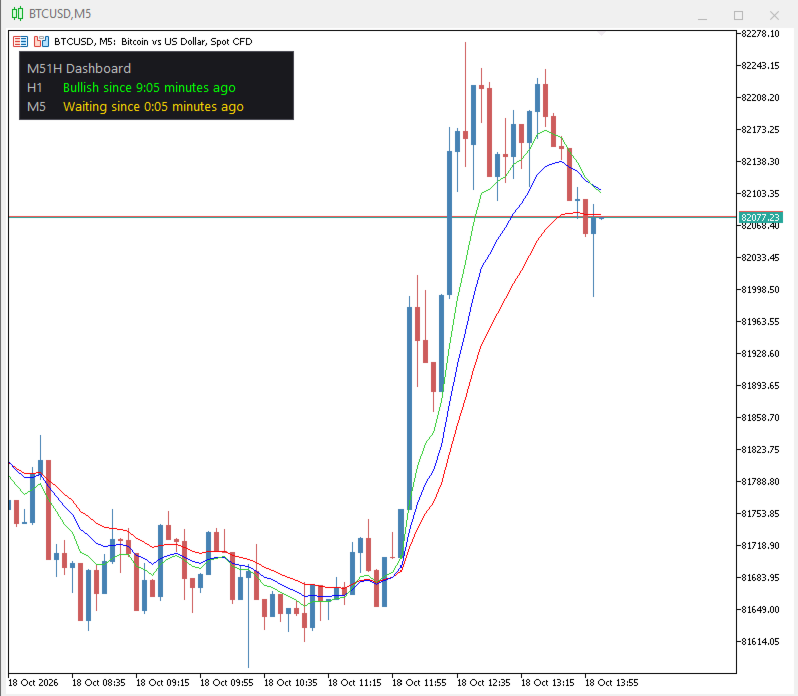
M51H Dashboard is a small panel in the corner of your chart. It shows whether the higher timeframe and your trading timeframe agree on direction, and how long each trend has been running. You don’t need to switch charts or add several indicators.
What it shows
| Row | What it checks | Possible states |
|---|---|---|
| H1 (anchor chart) | EMA 8 vs EMA 21 | Bullish, Bearish, Neutral |
| M5 (trading chart) | EMA 8, 13 and 21 lined up in order | Bullish, Bearish, Waiting |
Each row also shows how long the current state has lasted, for example “Bullish since 1:25”.
- Green means bullish, red means bearish, and gold means neutral or waiting.
- The M5 row is bullish only when EMA 8 is above 13, and 13 is above 21. It is bearish when the order is reversed. Anything else shows “Waiting”.
Main features
- Two timeframes in one panel. The higher-timeframe trend and the trading-timeframe alignment sit together on one chart.
- Live “time in trend” timers. You can tell a fresh move from an old one. The timers update every second and can show seconds if you want.
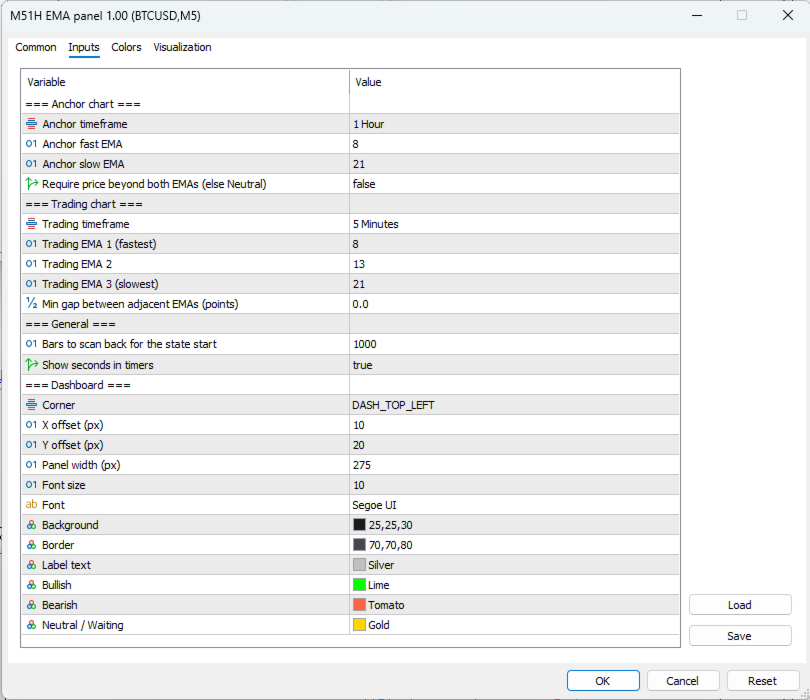
- Cleaner alignment signal. Set a minimum gap between the EMAs so tangled, flat EMAs show “Waiting” instead of a false trend.
- Optional price confirmation on the anchor chart. If enabled, the H1 row only turns bullish or bearish when price is also beyond both EMAs. Otherwise it shows Neutral.
- Fully adjustable. You can change the timeframes, all EMA periods, the scan depth (default 1,000 bars), the corner (all four are supported), offsets, panel width, font, font size and every color.
- Works on any symbol and any chart timeframe. The panel reads its own timeframes, so the chart you attach it to doesn’t matter.
Advantages
- Light and clean. It draws no lines and adds no clutter to your price chart.
- Quick decisions. You can see in a second whether the higher timeframe supports a trade on the lower one.
- Easy to read. Colors and plain words replace guesswork.
- Stays in place. The panel repositions itself when you resize the chart.
- Tidy. It removes all its objects when you take it off the chart.
- Suits several styles. The defaults are H1 and M5, but any timeframe pair works for scalping, day trading or swing trading.
This indicator is ideally for a strategy like the one in the YouTube channel: ForexSignals TV, video: SIMPLE and PROFITABLE Forex Scalping Strategy!
Note: this is a trend-analysis tool, not a trading signal or an automated system. It does not guarantee profits. Always use your own risk management.