KT Support Resistance EA MT4
- エキスパート
- バージョン: 1.0
- アクティベーション: 10

KT Support Resistance EA trades bounces only from the support and resistance levels where price has reversed its direction many times in the past. Every level carries a Reversal Chance: out of all the times price reached that level, the share of times it reversed instead of breaking through. The EA trades a bounce only when the Reversal Chance is high. Each trade opens with a stop loss beyond the zone and a take profit at the next opposing level.
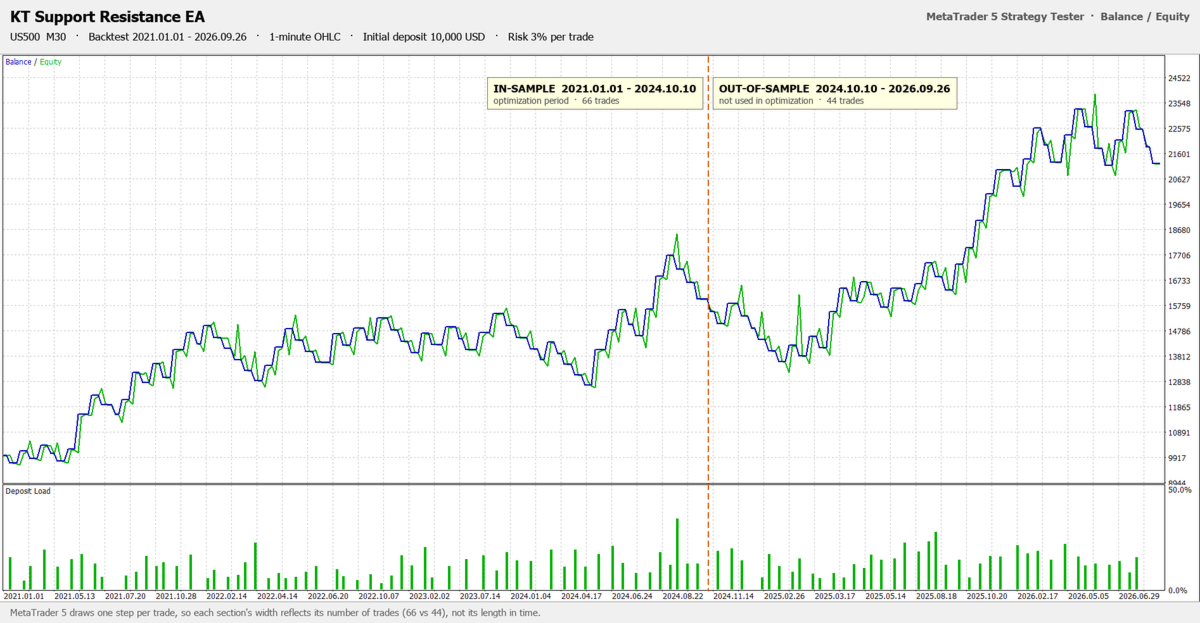
Five tested settings built in
Choose JP225 M30, JP225 H1, US500 M30, US30 M30 or DE40 H1 in the Settings input, attach the EA to that chart, set your risk, and it trades the settings that were tested on those markets. Choose Custom to set every filter yourself. The backtest results of the tested settings are in the screenshots.
How it trades a bounce
The EA finds levels on the monthly, weekly, daily and chart timeframes: swing highs and lows, pivots, the previous day, week and month prices, order block midpoints and Smart Zones. These are the same levels as KT Auto Support Resistance Levels Indicator, and the indicator is not needed.
When a candle dips into a support zone and closes back above it, the EA buys at that close (and the mirror for resistance). Only closed candles count, so a wick that is still forming never opens a trade. The stop loss goes beyond the zone and beyond the wick, and the target is the next opposing level, as long as the reward is large enough for the risk.
Why traders choose it
- Only proven levels: a level that price broke through too often is left alone, however good it looks on the chart.
- A full plan from the first second: stop loss and take profit are set on every trade, and the stop loss moves to break even once the trade is far enough in profit.
- The same risk on every trade: the lot size comes from the stop loss distance and your Risk Percent per Trade, or a fixed lot if you prefer it.
- A daily loss limit that follows your risk: after a set number of losses in a day, the chart stops trading until the next day. Trades per day and open trades are limited too.
- No grid, no martingale and no averaging: one trade per level per day, and if a stop loss is ever removed, the EA puts it back or closes the trade.
- Careful with your account: a new trade never takes the margin level below 150%, and a lot above the broker's maximum is split into parts and managed as one trade.
- Always informed: the panel shows the nearest support and resistance with their Reversal Chance, the EA's state and a PAUSE button, with pop-up, push and email alerts on every open and close.
Recommendations
JP225, US500, US30 and DE40 with the matching settings (your broker may call them NI225, SPX500, DJ30 or GER40), on hedging or netting accounts. Set Max bars in chart to 100000 or more so the EA sees enough history for the monthly and weekly levels. Each tested setting has its own Magic Number, so two of them can run on the same account. A VPS keeps the EA running around the clock.
Input parameters
- Settings: JP225 M30, JP225 H1, US500 M30, US30 M30, DE40 H1 or Custom.
- Levels and level engine: which level types to use, the pivot type, and the swing, order block and Smart Zone settings of the indicator.
- Level filters: Minimum Reversal Chance, Minimum Number of Touches, and whether fresh levels are traded.
- Entry modes: bounces, break and retest, and a minimum rejection wick.
- Stop loss and take profit: stop loss mode and distance beyond the zone, take profit mode (next opposing level, level ladder or fixed points), minimum reward to risk and target level filters.
- Risk: lot mode, Risk Percent per Trade, trades per day, open trades, daily loss limit and trades per level per day.
- Trade management: break even, break even lock, level ladder percent and an ATR trailing stop.
- Filters: trading hours, maximum spread, Friday close, higher timeframe trend filter and maximum slippage.
- Panel and alerts: panel, levels on the chart, pop-up, push and email alerts, Magic Number and trade comment.
Trade the levels where price turns
Pick a tested setting, attach KT Support Resistance EA to its chart, and let it trade the support and resistance levels where price has reversed its direction many times before, with a stop loss and a target on every trade.