ORB Ultimate Pro MT5
- インディケータ
-
Jordan Steven R Machell
 QuantFlow Labs develops chart indicators for structured intraday market analysis. Our work focuses on liquidity sweeps, session ranges, market structure and clear, configurable chart visuals.
 - バージョン: 1.0
- アクティベーション: 5
ORB Ultimate Pro MT5
Give your opening-range trading a clear structure. ORB Ultimate Pro by QuantFlow Labs maps your chosen session, follows eligible breakouts and retests, and keeps entry, stop and target references together on your MetaTrader 5 chart.
Choose your confirmation style, apply optional context filters and follow the setup's progress from range building to its recorded outcome. Designed for intraday analysis on M1 to M15 charts.
Two ways to follow the breakout
- Immediate breakout: a qualifying breakout creates an entry reference on the completed signal candle.
- Breakout and retest: wait for a later candle to revisit the range boundary and close back outside it. The entry reference is that confirming candle's close, not an assumed limit-order fill.
Select candle-close or wick breakout detection. Add a tick buffer, control the confirmation window and set a maximum number of entries per session. Strict-burn mode can invalidate a direction after a failed qualifying attempt, helping you define which opportunities remain eligible.
Your opening range
The default session is 09:30–09:45 New York local time, with US daylight saving applied. Configure a second opening-range window if required; it is disabled by default. New York, London, Tokyo, UTC and broker-time session modes are available. The optional expiry stops waiting for a fresh breakout after your chosen time window.
Optional context filters
Start with the core breakout logic and add filters individually. Available controls cover candle momentum, local EMA direction, completed higher-timeframe trend, volume, broker-day VWAP, ATR range size, RSI exhaustion and proximity to the previous broker day's high or low. Filters are disabled by default and are not presented as a guarantee of improved results.
Entry, stop and target references
- Four stop methods: opposite range boundary, confirming candle, ATR distance or recent lookback extreme.
- Reward-to-risk or ATR-based target calculation.
- Optional breakeven reference after price reaches your chosen percentage of the target distance.
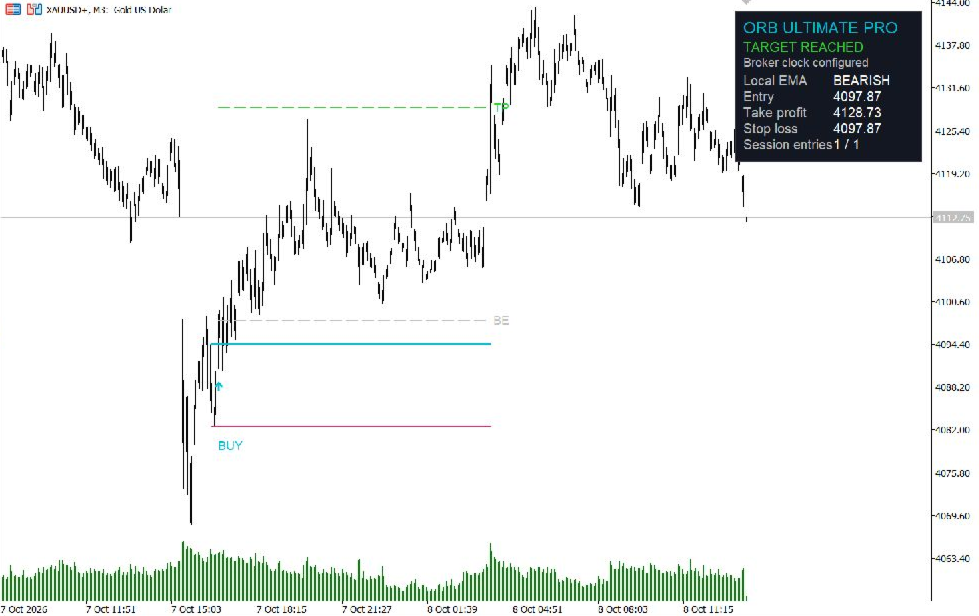
- Buy/sell markers, opening-range levels and stop/target drawings.
- Dashboard showing setup status, local EMA direction, reference prices and session entry count.
Reference outcomes are calculated from chart candles. They are not broker fills, executed trades or a performance report. If both stop and target are touched on the same candle, the stop takes precedence. Breakeven is processed before that outcome check. Trading costs and order execution are not simulated.
Appearance and alerts
Choose dashboard placement, range colours, line visibility and the amount of session history displayed. Your chart background and candle colours remain controlled by MT5 chart Properties. Enable terminal popups and optional mobile push or email alerts. Push and email require the relevant MetaTrader configuration and a connected, running terminal. Historical loading does not send a backlog of alerts.
Getting started
- Install from MQL5 Market in MetaTrader 5 desktop using the MQL5 account that purchased or rented the indicator.
- Open an M1–M15 chart with sufficient broker history and attach ORB Ultimate Pro MT5.
- Verify your broker's winter/summer UTC offsets and daylight-saving rule before confirming the broker-clock setting.
- Choose your session and entry mode. Begin with the default logic settings, then change one optional filter at a time.
- Use the Market demo in the MT5 Strategy Tester to inspect historical behaviour before purchasing. Indicator demos do not run on ordinary live charts.
Platform and support
The MT5 edition is a separate purchase from the TradingView edition. Prices, volume data, daily boundaries and available history differ between feeds, so identical signals across platforms are not promised. The higher-timeframe trend filter uses completed higher-timeframe candles; VWAP resets at the broker's day boundary.
For support, use this product's Comments section or message QuantFlow Labs on MQL5. Include the version, broker/server, symbol, timeframe, relevant date/time and settings. Remove account details from screenshots.
ORB Ultimate Pro MT5 is an analysis indicator. It does not place, manage or close orders. The screenshots illustrate the interface and an individual historical example; they do not establish a win rate or guarantee future trading results.